<!DOCTYPE html>
    <html lang="vi" xmlns="http://www.w3.org/1999/xhtml" prefix="og: http://ogp.me/ns#">
    <head>
<title>Cách quản lý mức độ ưu tiên của tiến trình I&#x002F;O trong Linux</title>
<meta name="description" content="Cách quản lý mức độ ưu tiên của tiến trình I&#x002F;O trong Linux - Savefile - Tin Tức -...">
<meta name="author" content=".: Nguoicodonvn2008.info - Cõi lòng người cô đơn :.">
<meta name="copyright" content=".: Nguoicodonvn2008.info - Cõi lòng người cô đơn :. [admin@nguoicodonvn2008.info]">
<meta name="robots" content="index, archive, follow, noodp">
<meta name="googlebot" content="index,archive,follow,noodp">
<meta name="msnbot" content="all,index,follow">
<meta name="generator" content="NukeViet v4.5">
<meta http-equiv="Content-Type" content="text/html; charset=utf-8">
<meta property="og:title" content="Cách quản lý mức độ ưu tiên của tiến trình I&#x002F;O trong Linux">
<meta property="og:type" content="website">
<meta property="og:description" content="Savefile - Tin Tức - https&#x3A;&#x002F;&#x002F;www.nguoicodonvn2008.info&#x002F;vi&#x002F;news&#x002F;savefile&#x002F;kien-thuc-may-tinh&#x002F;cach-quan-ly-muc-do-uu-tien-cua-tien-trinh-i-o-trong-linux-932.html">
<meta property="og:site_name" content=".&#x3A; Nguoicodonvn2008.info - Cõi lòng người cô đơn &#x3A;.">
<meta property="og:url" content="https://www.nguoicodonvn2008.info/vi/news/savefile/kien-thuc-may-tinh/cach-quan-ly-muc-do-uu-tien-cua-tien-trinh-i-o-trong-linux-932.html">
<link rel="shortcut icon" href="https://nguoicodonvn2008.info/favicon.ico">
<link rel="canonical" href="https://www.nguoicodonvn2008.info/vi/news/savefile/kien-thuc-may-tinh/cach-quan-ly-muc-do-uu-tien-cua-tien-trinh-i-o-trong-linux-932.html">
<link rel="alternate" href="https://nguoicodonvn2008.info/vi/news/rss/" title="Tin Tức" type="application/rss+xml">
<link rel="alternate" href="https://nguoicodonvn2008.info/vi/news/rss/karaoke-dual/" title="Tin Tức - Karaoke Dual" type="application/rss+xml">
<link rel="alternate" href="https://nguoicodonvn2008.info/vi/news/rss/nhac-tre/" title="Tin Tức - Nhạc trẻ" type="application/rss+xml">
<link rel="alternate" href="https://nguoicodonvn2008.info/vi/news/rss/tru-tinh/" title="Tin Tức - Trữ tình" type="application/rss+xml">
<link rel="alternate" href="https://nguoicodonvn2008.info/vi/news/rss/nuoc-ngoai/" title="Tin Tức - Nước ngoài" type="application/rss+xml">
<link rel="alternate" href="https://nguoicodonvn2008.info/vi/news/rss/remix/" title="Tin Tức - Remix" type="application/rss+xml">
<link rel="alternate" href="https://nguoicodonvn2008.info/vi/news/rss/tam-su-tinh-yeu/" title="Tin Tức - Tâm sự tình yêu" type="application/rss+xml">
<link rel="alternate" href="https://nguoicodonvn2008.info/vi/news/rss/tho-suu-tam/" title="Tin Tức - Thơ sưu tầm" type="application/rss+xml">
<link rel="alternate" href="https://nguoicodonvn2008.info/vi/news/rss/cuoc-song/" title="Tin Tức - Cuộc sống" type="application/rss+xml">
<link rel="alternate" href="https://nguoicodonvn2008.info/vi/news/rss/phan-mem/" title="Tin Tức - Phần mềm" type="application/rss+xml">
<link rel="alternate" href="https://nguoicodonvn2008.info/vi/news/rss/kien-thuc-may-tinh/" title="Tin Tức - Kiến thức máy tính" type="application/rss+xml">
<link rel="alternate" href="https://nguoicodonvn2008.info/vi/news/rss/hoc-tap/" title="Tin Tức - Học tập" type="application/rss+xml">
<link rel="alternate" href="https://nguoicodonvn2008.info/vi/news/rss/tai-lieu/" title="Tin Tức - Tài liệu" type="application/rss+xml">
<link rel="alternate" href="https://nguoicodonvn2008.info/vi/news/rss/de-thi/" title="Tin Tức - Đề thi" type="application/rss+xml">
<link rel="preload" as="style" href="https://nguoicodonvn2008.info/assets/css/font-awesome.min.css" type="text/css">
<link rel="preload" as="style" href="https://nguoicodonvn2008.info/themes/default/css/bootstrap.non-responsive.css" type="text/css">
<link rel="preload" as="style" href="https://nguoicodonvn2008.info/themes/default/css/style.css" type="text/css">
<link rel="preload" as="style" href="https://nguoicodonvn2008.info/themes/default/css/style.non-responsive.css" type="text/css">
<link rel="preload" as="style" href="https://nguoicodonvn2008.info/themes/default/css/news.css" type="text/css">
<link rel="preload" as="style" href="https://nguoicodonvn2008.info/themes/default/css/custom.css" type="text/css">
<link rel="preload" as="script" href="https://nguoicodonvn2008.info/assets/js/jquery/jquery.min.js" type="text/javascript">
<link rel="preload" as="script" href="https://nguoicodonvn2008.info/assets/js/language/vi.js" type="text/javascript">
<link rel="preload" as="script" href="https://nguoicodonvn2008.info/assets/js/DOMPurify/purify3.js" type="text/javascript">
<link rel="preload" as="script" href="https://nguoicodonvn2008.info/assets/js/global.js" type="text/javascript">
<link rel="preload" as="script" href="https://nguoicodonvn2008.info/assets/js/site.js" type="text/javascript">
<link rel="preload" as="script" href="https://nguoicodonvn2008.info/themes/default/js/news.js" type="text/javascript">
<link rel="preload" as="script" href="https://nguoicodonvn2008.info/themes/default/js/main.js" type="text/javascript">
<link rel="preload" as="script" href="https://nguoicodonvn2008.info/themes/default/js/custom.js" type="text/javascript">
<link rel="preload" as="script" href="https://nguoicodonvn2008.info/themes/default/js/bootstrap.min.js" type="text/javascript">
<link rel="stylesheet" href="https://nguoicodonvn2008.info/assets/css/font-awesome.min.css">
<link rel="stylesheet" href="https://nguoicodonvn2008.info/themes/default/css/bootstrap.non-responsive.css">
<link rel="stylesheet" href="https://nguoicodonvn2008.info/themes/default/css/style.css">
<link rel="stylesheet" href="https://nguoicodonvn2008.info/themes/default/css/style.non-responsive.css">
<link rel="StyleSheet" href="https://nguoicodonvn2008.info/themes/default/css/news.css">
<link rel="stylesheet" href="https://nguoicodonvn2008.info/themes/default/css/custom.css">
<style type="text/css">
	body{background: #fff;}
</style>
    </head>
    <body>
<div id="print">
	<div id="hd_print">
		<h2 class="pull-left">.&#x3A; Nguoicodonvn2008.info - Cõi lòng người cô đơn &#x3A;.</h2>
		<p class="pull-right"><a title=".&#x3A; Nguoicodonvn2008.info - Cõi lòng người cô đơn &#x3A;." href="https://nguoicodonvn2008.info/">https://nguoicodonvn2008.info</a></p>
	</div>
	<div class="clear"></div>
	<hr />
	<div id="content">
		<h1>Cách quản lý mức độ ưu tiên của tiến trình I&#x002F;O trong Linux</h1>
		<ul class="list-inline">
			<li>Thứ ba - 10/09/2019 11:21</li>
			<li class="hidden-print txtrequired"><em class="fa fa-print">&nbsp;</em><a title="In ra" href="javascript:;" onclick="window.print()">In ra</a></li>
			<li class="hidden-print txtrequired"><em class="fa fa-power-off">&nbsp;</em><a title="Đóng cửa sổ này" href="javascript:;" onclick="window.close()">Đóng cửa sổ này</a></li>
		</ul>
		<div class="clear"></div>
		<div id="hometext">
		</div>
				<div class="imghome">
			<img alt="Cách quản lý mức độ ưu tiên của tiến trình I&#x002F;O trong Linux" src="https://st.quantrimang.com/photos/image/2019/09/10/quan-ly-muc-do-uu-tien-cua-tien-trinh-i-o-trong-linux-3.jpg" width="460" class="img-thumbnail" />
		</div>
		<div class="clear"></div>
		<div id="bodytext" class="clearfix">
			<p>Bạn đã từng sao chép hoặc di chuyển hàng chục hoặc hàng trăm gigabyte dữ liệu chưa? Nếu đã thực hiện việc này, bạn chắc chắn nhận thấy rằng hệ thống trở nên ít đáp ứng hơn trong thời gian đó. Trên&nbsp;Linux, bạn có thể tránh điều này với sự trợ giúp của lệnh ionice.</p>

<h2>&nbsp;</h2>

<h2 id="mcetoc_1dkd5nkvj0">Mức ưu tiên I/O là gì?</h2>

<p><strong>I/O</strong>&nbsp;là viết tắt của&nbsp;<strong>Input/Output</strong>&nbsp;(đầu vào/đầu ra). Có nhiều loại thiết bị I/O, nhưng trong trường hợp này, đó là các thiết bị lưu trữ.</p>

<p>Mỗi tiến trình muốn đọc hoặc ghi dữ liệu vào một thiết bị như vậy được chỉ định một scheduling class và số ưu tiên (hay giá trị “nice”). Điều này áp dụng trên Linux đối với các hệ thống file như ext4. Các hệ thống file khác, chẳng hạn như ZFS, có thể thực hiện các phương pháp hơi khác nhau để lên lịch cho các hoạt động đọc/ghi trên ổ đĩa. Ngoài ra, trình lập lịch CFQ nên được kích hoạt để làm việc này. Bạn có thể kiểm tra với:</p>

<pre id="pre0">
<code>cat /sys/block/*/queue/scheduler</code></pre>

<p>Một tiến trình với giá trị “nice” cao có mức độ ưu tiên thấp hơn.</p>

<h2 id="mcetoc_1dkd5nkvk1">Mức ưu tiên I/O hoạt động như thế nào?</h2>

<p>Một thiết bị lưu trữ rõ ràng có số lượng hoạt động I/O giới hạn mà nó có thể thực hiện mỗi giây (IOPS). Vì vậy, khi hai tiến trình muốn đọc/ghi cùng một lúc, mỗi tiến trình sẽ nhận được một phần IOPS. Nếu chúng có cùng mức độ ưu tiên, mỗi tiến trình sẽ nhận được khoảng 50% IOPS.</p>

<p><img alt="Mức ưu tiên I/O" data-i="0" data-src="https://st.quantrimang.com/photos/image/2019/09/10/quan-ly-muc-do-uu-tien-cua-tien-trinh-i-o-trong-linux-1.jpg" data-was-processed="true" height="150" src="https://st.quantrimang.com/photos/image/2019/09/10/quan-ly-muc-do-uu-tien-cua-tien-trinh-i-o-trong-linux-1.jpg" width="650" /></p>

<p>Nhưng IOPS có vẻ trừu tượng và phức tạp. Để đơn giản, bạn chỉ cần nghĩ về kết quả cuối cùng: Tốc độ đọc/ghi. Giả sử ổ đĩa có thể ghi với tốc độ tối đa 100MB/s. Tiến trình A bắt đầu một thao tác ghi. Nó ghi vào ổ đĩa với tốc độ 100MB/s. Tiến trình B xuất hiện và muốn ghi vào cùng một ổ đĩa. Nó sẽ ghi với tốc độ khoảng 50MB/s, đồng thời đưa tốc độ ghi của tiến trình A về cùng giá trị, 50MB/s. Bây giờ, nếu bạn gán cho tiến trình B một giá trị nice I/O cao hơn, nó sẽ ghi với tốc độ 20MB/s và để cho tiến trình A ghi với tốc độ 80MB/s. Khi tiến trình A hoàn thành, tiến trình B sẽ bắt đầu ghi với tốc độ 100MB/s.</p>

<p>Ví dụ này rất hữu ích để hiểu điều gì đó có thể gây nhầm lẫn cho một số người. Nếu một tiến trình có mức độ ưu tiên rất thấp (giá trị nice cao), thì không có nghĩa là tiến trình đó sẽ ghi chậm mọi lúc. Nếu đó là tiến trình duy nhất sử dụng ổ đĩa, nó sẽ đọc/ghi với tốc độ tối đa. Nhưng khi các tiến trình khác cần ổ đĩa, nó sẽ tạm thời thoát ra và cho phép những tiến trình đó sử dụng nhiều băng thông ổ đĩa hơn. Đối với một hoạt động sao chép/ghi có thể mất hàng giờ để hoàn thành, việc gán cho nó một mức ưu tiên thấp là ý tưởng hay, nếu bạn muốn sử dụng máy tính của mình trong thời gian đó.</p>
&nbsp;

<h2 id="mcetoc_1dkd5nkvk2">Cách sử dụng lệnh ionice</h2>

<p>Cú pháp chung của lệnh là:</p>

<pre id="pre1">
<code>ionice -c scheduling_class -n priority_nice_value command</code></pre>

<h3 id="mcetoc_1dkd5nkvk3">Các scheduling class ionice</h3>

<p><strong>Idle (class 3)</strong>: Các tiến trình trong class (lớp) này chỉ đọc/ghi khi không có chương trình nào khác cần truy cập ổ đĩa. Điều này có nghĩa là quá trình đọc/ghi chỉ ở tốc độ tối đa khi nó không bị cạnh tranh. Khi một chương trình khác cần ổ đĩa, tiến trình trong class Idle sẽ chỉ đọc/ghi với bất kỳ tài nguyên nào còn lại. Từ 100MB/s, nó có thể tạm thời ghi với tốc độ 5MB/s, sau đó quay lại 100MB/s khi chương trình khác hoàn thành việc truy cập vào ổ đĩa. Đây là class hoàn hảo cho các công việc dài hạn mà bạn không muốn làm chậm hệ thống của mình. Không có mức ưu tiên nào cần phải chỉ định cho class này.</p>

<p>Lệnh ví dụ:</p>

<pre id="pre2">
<code>ionice -c 3 cp /home/user/largefile /Backups</code></pre>

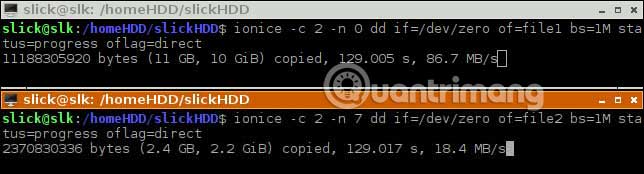
<p><strong>Best-effort (class 2)</strong>: Có mức ưu tiên/giá trị nice trong khoảng từ&nbsp;<strong>0</strong>&nbsp;đến&nbsp;<strong>7</strong>. Hãy nhớ rằng, số thấp hơn có nghĩa là mức độ ưu tiên cao hơn. Hãy sử dụng class này khi bạn muốn tinh chỉnh thời gian truy cập ổ đĩa cho hai hoặc nhiều tiến trình.</p>

<p>Ví dụ, bạn muốn quá trình sao lưu của mình hoàn thành nhanh hơn và gán cho nó giá trị nice là 0. Đồng thời, bạn cũng đang chuyển 6 bộ phim sang ổ đĩa khác nhưng không vội, vậy hãy chỉ định giá trị nice cho tiến trình này là 7.</p>

<p>Lệnh ví dụ:</p>

<pre id="pre3">
<code>ionice -c 2 -n 0 backup_command</code></pre>

<p><img alt="Best-effort (class 2)" data-i="1" data-src="https://st.quantrimang.com/photos/image/2019/09/10/quan-ly-muc-do-uu-tien-cua-tien-trinh-i-o-trong-linux-4.jpg" data-was-processed="true" height="174" src="https://st.quantrimang.com/photos/image/2019/09/10/quan-ly-muc-do-uu-tien-cua-tien-trinh-i-o-trong-linux-4.jpg" width="644" /></p>

<p><strong>Realtime (class 1)</strong>: Chỉ nên sử dụng nếu việc tiến trình nên được ghi càng sớm càng tốt và không bị gián đoạn bởi bất kỳ chương trình nào khác rất quan trọng. Hầu hết người dùng sẽ không bao giờ cần điều này và nên tránh sử dụng, trừ trường hợp đặc biệt. Class này cũng hỗ trợ các giá trị nice trong khoảng từ&nbsp;<strong>0</strong>&nbsp;đến&nbsp;<strong>7</strong>. Chỉ root mới có thể sử dụng class này. Điều đó có nghĩa là bạn sẽ phải thêm tiền tố&nbsp;<strong>sudo</strong>&nbsp;vào lệnh.</p>

<p>Lưu ý rằng một tiến trình trong class Realtime có mức độ ưu tiên 0 có thể ngăn cản các tiến trình tài nguyên khác. Về mặt thực tế, điều đó có nghĩa là chương trình khác có thể phải chờ vài phút hoặc thậm chí hàng giờ để hoàn thành việc ghi/đọc một vài megabyte dữ liệu. Hãy sử dụng class này cẩn thận, chỉ khi bạn chắc chắn mình cần đến nó. Nếu một tiến trình quan trọng trong class 2 hoặc 3 cần truy cập ổ đĩa, hệ thống của bạn có thể đóng băng cho đến khi tiến trình trong class Realtime được ghi xong.</p>

<p>Lệnh ví dụ:</p>

<pre id="pre4">
<code>sudo ionice -c 1 -n 7 bash</code></pre>

<h3 id="mcetoc_1dkd5nkvk4">Những ví dụ ionice hữu ích</h3>

<p>Trong ví dụ cuối cùng, thay vì chạy lệnh sao chép/di chuyển, shell đã được khởi chạy (Bash). Bây giờ, mỗi lệnh tiếp theo bạn nhập vào shell đó sẽ kế thừa scheduling class I/O và mức độ ưu tiên. Bạn cũng có thể làm điều này trên một giao diện đồ họa.</p>

<pre id="pre5">
<code>ionice -c 3 pcmanfm</code></pre>

<p>Lệnh cuối cùng sẽ khởi chạy một file explorer trên môi trường desktop LXDE. Thay thế&nbsp;<strong>“pcmanfm”</strong>&nbsp;bằng tên của file explorer trong desktop cụ thể của bạn. Bây giờ, tất cả các hoạt động ổ đĩa bắt đầu ở đó sẽ được thực hiện với scheduling class I/O Idle.</p>

<p>Trong các tình huống khác, thao tác sao chép/di chuyển có thể đã hoạt động. Trong trường hợp này, bạn có thể sử dụng ionice theo một cách khác.</p>

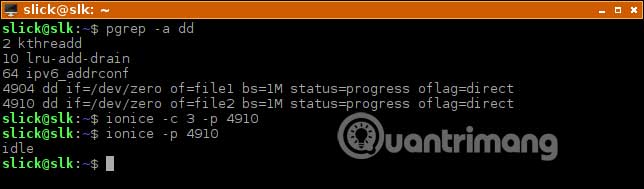
<pre id="pre6">
<code>ionice -c 3 -p 4910</code></pre>

<p>Điều này thay đổi class ưu tiên của chương trình đang chạy với ID tiến trình&nbsp;<strong>4910.</strong>&nbsp;Bạn có thể tìm thấy PID (Process ID - ID tiến trình) với trình quản lý tác vụ của mình hoặc bằng một lệnh chẳng hạn như&nbsp;<strong>pgrep.</strong></p>

<p><strong><img alt="Những ví dụ ionice hữu ích" data-i="2" data-src="https://st.quantrimang.com/photos/image/2019/09/10/quan-ly-muc-do-uu-tien-cua-tien-trinh-i-o-trong-linux-3.jpg" data-was-processed="true" height="189" src="https://st.quantrimang.com/photos/image/2019/09/10/quan-ly-muc-do-uu-tien-cua-tien-trinh-i-o-trong-linux-3.jpg" width="644" /></strong></p>

<p>Lệnh ionice có thể hữu ích trên các desktop mà bạn không muốn bị lag trong khi sao chép/di chuyển các file lớn. Nhưng hãy nhớ rằng ionice cũng có thể hữu ích hơn nữa trên các máy chủ. Bạn chắc chắn không muốn một trang web mà mình host làm khách truy cập gặp phải hiện tượng lag, trong khi thực hiện sao lưu toàn bộ, đúng không?</p>

<p>Chúc bạn thực hiện thành công!</p>
		</div>
				<div id="author">
						<p>
				<strong>Nguồn tin:</strong>
				Quantrimang.com
			</p>
		</div>
	</div>
	<div id="footer" class="clearfix">
		<div id="url">
			<strong>URL của bản tin này: </strong><a href="https://www.nguoicodonvn2008.info/vi/news/savefile/kien-thuc-may-tinh/cach-quan-ly-muc-do-uu-tien-cua-tien-trinh-i-o-trong-linux-932.html" title="Cách quản lý mức độ ưu tiên của tiến trình I&#x002F;O trong Linux">https://www.nguoicodonvn2008.info/vi/news/savefile/kien-thuc-may-tinh/cach-quan-ly-muc-do-uu-tien-cua-tien-trinh-i-o-trong-linux-932.html</a>

		</div>
		<div class="clear"></div>
		<div class="copyright">
			&copy; .&#x3A; Nguoicodonvn2008.info - Cõi lòng người cô đơn &#x3A;.
		</div>
		<div id="contact">
			<a href="mailto:admin@nguoicodonvn2008.info">admin@nguoicodonvn2008.info</a>
		</div>
	</div>
</div>
        <div id="timeoutsess" class="chromeframe">
            Bạn đã không sử dụng Site, <a onclick="timeoutsesscancel();" href="https://nguoicodonvn2008.info/#">Bấm vào đây để duy trì trạng thái đăng nhập</a>. Thời gian chờ: <span id="secField"> 60 </span> giây
        </div>
        <div id="openidResult" class="nv-alert" style="display:none"></div>
        <div id="openidBt" data-result="" data-redirect=""></div>
		</script>
		<div class="car-top">
  <span><img src="https://nguoicodonvn2008.info/themes/default/images/car.png" alt=""></span>
</div>
<div id="run_cronjobs" style="visibility:hidden;display:none;"><img alt="cron" src="/index.php?second=cronjobs&amp;p=z0oNCrG4" width="1" height="1" /></div>
<script src="https://nguoicodonvn2008.info/assets/js/jquery/jquery.min.js"></script>
<script>var nv_base_siteurl="/",nv_lang_data="vi",nv_lang_interface="vi",nv_name_variable="nv",nv_fc_variable="op",nv_lang_variable="language",nv_module_name="news",nv_func_name="savefile",nv_is_user=0, nv_my_ofs=-4,nv_my_abbr="EDT",nv_cookie_prefix="nv4c_e856T",nv_check_pass_mstime=1738000,nv_area_admin=0,nv_safemode=0,theme_responsive=0,nv_recaptcha_ver=2,nv_recaptcha_sitekey="",nv_recaptcha_type="image",XSSsanitize=1;</script>
<script src="https://nguoicodonvn2008.info/assets/js/language/vi.js"></script>
<script src="https://nguoicodonvn2008.info/assets/js/DOMPurify/purify3.js"></script>
<script src="https://nguoicodonvn2008.info/assets/js/global.js"></script>
<script src="https://nguoicodonvn2008.info/assets/js/site.js"></script>
<script src="https://nguoicodonvn2008.info/themes/default/js/news.js"></script>
<script src="https://nguoicodonvn2008.info/themes/default/js/main.js"></script>
<script src="https://nguoicodonvn2008.info/themes/default/js/custom.js"></script>
<script type="application/ld+json">
        {
            "@context": "https://schema.org",
            "@type": "Organization",
            "url": "https://nguoicodonvn2008.info",
            "logo": "https://nguoicodonvn2008.info/uploads/angel.gif"
        }
        </script>
<script src="https://nguoicodonvn2008.info/themes/default/js/bootstrap.min.js"></script>
<script type="text/javascript">
var $scrolltop = $('.car-top');
$scrolltop.on('click', function () {
    $('html,body').animate({
        scrollTop: 0
    }, 800);
    $(this).addClass("car-run");
    setTimeout(function(){ $scrolltop.removeClass('car-run');}, 1000);
    return false;
});
$(window).on('scroll', function ()
{ 
    if($(window).scrollTop() >= 200)
    {
        $scrolltop.addClass("show");
        $scrolltop.addClass("car-down");
    }
    else
    {
       $scrolltop.removeClass("show");
       setTimeout(function(){ $scrolltop.removeClass('car-down');}, 300);
    }
});
</script>
</body>
</html>