<!DOCTYPE html>
    <html lang="vi" xmlns="http://www.w3.org/1999/xhtml" prefix="og: http://ogp.me/ns#">
    <head>
<title>Cách phóng to thu nhỏ văn bản Word</title>
<meta name="description" content="Cách phóng to thu nhỏ văn bản Word - Savefile - Tin Tức -...">
<meta name="author" content=".: Nguoicodonvn2008.info - Cõi lòng người cô đơn :.">
<meta name="copyright" content=".: Nguoicodonvn2008.info - Cõi lòng người cô đơn :. [admin@nguoicodonvn2008.info]">
<meta name="robots" content="index, archive, follow, noodp">
<meta name="googlebot" content="index,archive,follow,noodp">
<meta name="msnbot" content="all,index,follow">
<meta name="generator" content="NukeViet v4.5">
<meta http-equiv="Content-Type" content="text/html; charset=utf-8">
<meta property="og:title" content="Cách phóng to thu nhỏ văn bản Word">
<meta property="og:type" content="website">
<meta property="og:description" content="Savefile - Tin Tức - https&#x3A;&#x002F;&#x002F;www.nguoicodonvn2008.info&#x002F;vi&#x002F;news&#x002F;savefile&#x002F;kien-thuc-may-tinh&#x002F;cach-phong-to-thu-nho-van-ban-word-8636.html">
<meta property="og:site_name" content=".&#x3A; Nguoicodonvn2008.info - Cõi lòng người cô đơn &#x3A;.">
<meta property="og:url" content="https://www.nguoicodonvn2008.info/vi/news/savefile/kien-thuc-may-tinh/cach-phong-to-thu-nho-van-ban-word-8636.html">
<link rel="shortcut icon" href="https://nguoicodonvn2008.info/favicon.ico">
<link rel="canonical" href="https://www.nguoicodonvn2008.info/vi/news/savefile/kien-thuc-may-tinh/cach-phong-to-thu-nho-van-ban-word-8636.html">
<link rel="alternate" href="https://nguoicodonvn2008.info/vi/news/rss/" title="Tin Tức" type="application/rss+xml">
<link rel="alternate" href="https://nguoicodonvn2008.info/vi/news/rss/karaoke-dual/" title="Tin Tức - Karaoke Dual" type="application/rss+xml">
<link rel="alternate" href="https://nguoicodonvn2008.info/vi/news/rss/nhac-tre/" title="Tin Tức - Nhạc trẻ" type="application/rss+xml">
<link rel="alternate" href="https://nguoicodonvn2008.info/vi/news/rss/tru-tinh/" title="Tin Tức - Trữ tình" type="application/rss+xml">
<link rel="alternate" href="https://nguoicodonvn2008.info/vi/news/rss/nuoc-ngoai/" title="Tin Tức - Nước ngoài" type="application/rss+xml">
<link rel="alternate" href="https://nguoicodonvn2008.info/vi/news/rss/remix/" title="Tin Tức - Remix" type="application/rss+xml">
<link rel="alternate" href="https://nguoicodonvn2008.info/vi/news/rss/tam-su-tinh-yeu/" title="Tin Tức - Tâm sự tình yêu" type="application/rss+xml">
<link rel="alternate" href="https://nguoicodonvn2008.info/vi/news/rss/tho-suu-tam/" title="Tin Tức - Thơ sưu tầm" type="application/rss+xml">
<link rel="alternate" href="https://nguoicodonvn2008.info/vi/news/rss/cuoc-song/" title="Tin Tức - Cuộc sống" type="application/rss+xml">
<link rel="alternate" href="https://nguoicodonvn2008.info/vi/news/rss/phan-mem/" title="Tin Tức - Phần mềm" type="application/rss+xml">
<link rel="alternate" href="https://nguoicodonvn2008.info/vi/news/rss/kien-thuc-may-tinh/" title="Tin Tức - Kiến thức máy tính" type="application/rss+xml">
<link rel="alternate" href="https://nguoicodonvn2008.info/vi/news/rss/hoc-tap/" title="Tin Tức - Học tập" type="application/rss+xml">
<link rel="alternate" href="https://nguoicodonvn2008.info/vi/news/rss/tai-lieu/" title="Tin Tức - Tài liệu" type="application/rss+xml">
<link rel="alternate" href="https://nguoicodonvn2008.info/vi/news/rss/de-thi/" title="Tin Tức - Đề thi" type="application/rss+xml">
<link rel="preload" as="style" href="https://nguoicodonvn2008.info/assets/css/font-awesome.min.css" type="text/css">
<link rel="preload" as="style" href="https://nguoicodonvn2008.info/themes/default/css/bootstrap.non-responsive.css" type="text/css">
<link rel="preload" as="style" href="https://nguoicodonvn2008.info/themes/default/css/style.css" type="text/css">
<link rel="preload" as="style" href="https://nguoicodonvn2008.info/themes/default/css/style.non-responsive.css" type="text/css">
<link rel="preload" as="style" href="https://nguoicodonvn2008.info/themes/default/css/news.css" type="text/css">
<link rel="preload" as="style" href="https://nguoicodonvn2008.info/themes/default/css/custom.css" type="text/css">
<link rel="preload" as="script" href="https://nguoicodonvn2008.info/assets/js/jquery/jquery.min.js" type="text/javascript">
<link rel="preload" as="script" href="https://nguoicodonvn2008.info/assets/js/language/vi.js" type="text/javascript">
<link rel="preload" as="script" href="https://nguoicodonvn2008.info/assets/js/DOMPurify/purify3.js" type="text/javascript">
<link rel="preload" as="script" href="https://nguoicodonvn2008.info/assets/js/global.js" type="text/javascript">
<link rel="preload" as="script" href="https://nguoicodonvn2008.info/assets/js/site.js" type="text/javascript">
<link rel="preload" as="script" href="https://nguoicodonvn2008.info/themes/default/js/news.js" type="text/javascript">
<link rel="preload" as="script" href="https://nguoicodonvn2008.info/themes/default/js/main.js" type="text/javascript">
<link rel="preload" as="script" href="https://nguoicodonvn2008.info/themes/default/js/custom.js" type="text/javascript">
<link rel="preload" as="script" href="https://nguoicodonvn2008.info/themes/default/js/bootstrap.min.js" type="text/javascript">
<link rel="stylesheet" href="https://nguoicodonvn2008.info/assets/css/font-awesome.min.css">
<link rel="stylesheet" href="https://nguoicodonvn2008.info/themes/default/css/bootstrap.non-responsive.css">
<link rel="stylesheet" href="https://nguoicodonvn2008.info/themes/default/css/style.css">
<link rel="stylesheet" href="https://nguoicodonvn2008.info/themes/default/css/style.non-responsive.css">
<link rel="StyleSheet" href="https://nguoicodonvn2008.info/themes/default/css/news.css">
<link rel="stylesheet" href="https://nguoicodonvn2008.info/themes/default/css/custom.css">
<style type="text/css">
	body{background: #fff;}
</style>
    </head>
    <body>
<div id="print">
	<div id="hd_print">
		<h2 class="pull-left">.&#x3A; Nguoicodonvn2008.info - Cõi lòng người cô đơn &#x3A;.</h2>
		<p class="pull-right"><a title=".&#x3A; Nguoicodonvn2008.info - Cõi lòng người cô đơn &#x3A;." href="https://nguoicodonvn2008.info/">https://nguoicodonvn2008.info</a></p>
	</div>
	<div class="clear"></div>
	<hr />
	<div id="content">
		<h1>Cách phóng to thu nhỏ văn bản Word</h1>
		<ul class="list-inline">
			<li>Thứ năm - 11/07/2024 00:12</li>
			<li class="hidden-print txtrequired"><em class="fa fa-print">&nbsp;</em><a title="In ra" href="javascript:;" onclick="window.print()">In ra</a></li>
			<li class="hidden-print txtrequired"><em class="fa fa-power-off">&nbsp;</em><a title="Đóng cửa sổ này" href="javascript:;" onclick="window.close()">Đóng cửa sổ này</a></li>
		</ul>
		<div class="clear"></div>
		<div id="hometext">
		</div>
				<div class="imghome">
			<img alt="Cách phóng to thu nhỏ văn bản Word" src="https://st.quantrimang.com/photos/image/2019/12/25/Word-pho-to-thu-nho-4.jpg" width="460" class="img-thumbnail" />
		</div>
		<div class="clear"></div>
		<div id="bodytext" class="clearfix">
			<h1>Khi làm việc với tài liệu Word thì những thao tác cơ bản là điều mà bất cứ ai cũng cần biết và nắm rõ, để có thể soạn thảo tài liệu Word được thuần thục hơn. Trong quá trình làm việc với tài liệu Word có nhiều trang, thì thao tác phóng to hay thu nhỏ văn bản giúp chúng ta dễ dàng theo dõi nhiều nội dung hơn, thay vì chỉ được ít trang Word.</h1>

<p>Với những tài liệu có 2, 3 trang thì bạn có thể lựa chọn cách&nbsp;thu gọn văn bản Word&nbsp;để dễ quan sát. Nếu tài liệu có nhiều trang thì bạn nên chọn thao tác phóng to thu nhỏ. Bài viết dưới đây sẽ hướng dẫn bạn đọc cách phóng to thu nhỏ tài liệu Word.</p>

<h2>Cách 1: Phóng to thu nhỏ Word bằng Thanh thu phóng</h2>

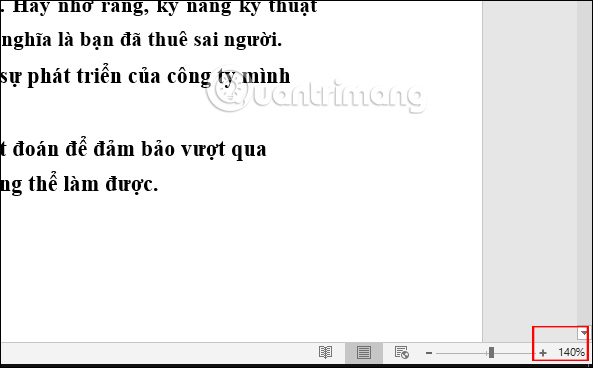
<p>Thanh thu phóng nằm ngay dưới giao diện Word ở phía dưới bên phải để người dùng sử dụng và truy cập nhanh khi cần. Nếu&nbsp;<strong>kéo về bên phải nghĩa là bạn tăng % độ thu phóng</strong>. Lúc này giao diện trang sẽ tăng kích thước để chúng ta nhìn rõ hơn.</p>

<p><img alt="Tăng % phóng trang " data-i="0" data-src="https://st.quantrimang.com/photos/image/2019/12/25/Word-pho-to-thu-nho-1.jpg" data-was-processed="true" height="368" src="https://st.quantrimang.com/photos/image/2019/12/25/Word-pho-to-thu-nho-1.jpg" width="593" /></p>
&nbsp;

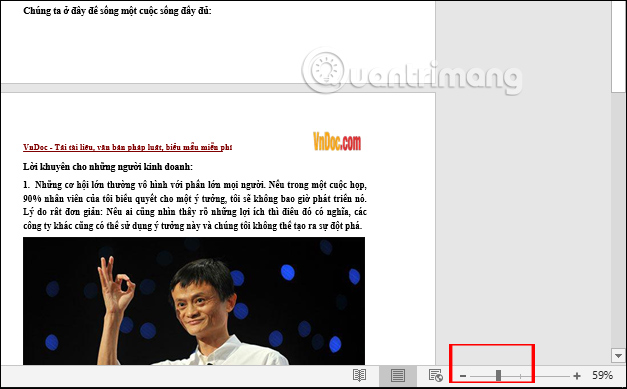
<p>Nếu&nbsp;<strong>giảm % phóng trang Word</strong>&nbsp;thì lúc đó chúng ta sẽ theo dõi được nhiều trang tài liệu trên 1 màn hình.</p>

<p>&nbsp;</p>
<img alt="Giảm % phóng trang " data-adbro-processed="true" data-i="1" data-src="https://st.quantrimang.com/photos/image/2019/12/25/Word-pho-to-thu-nho-2.jpg" data-was-processed="true" height="372" src="https://st.quantrimang.com/photos/image/2019/12/25/Word-pho-to-thu-nho-2.jpg" width="600" />
<h2>Cách 2: Phóng to thu nhỏ Word bằng công cụ Zoom</h2>

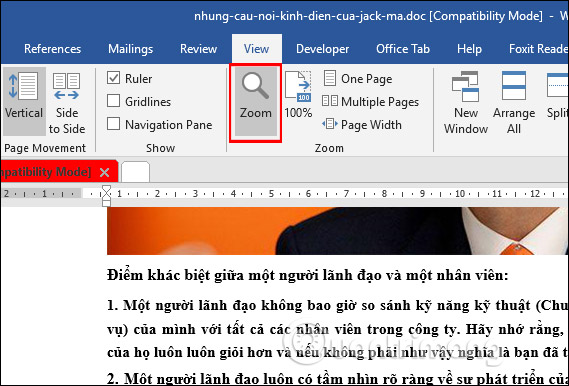
<p>Công cụ Zoom này có thêm nhiều tùy chọn để phóng to hay thu nhỏ giao diện tài liệu Word hơn. Tại giao diện Word chúng ta nhấn vào<strong>&nbsp;tab View</strong>&nbsp;rồi nhấn vào&nbsp;<strong>công cụ Zoom</strong>&nbsp;như hình dưới đây.</p>

<p><img alt="Công cụ Zoom " data-i="2" data-src="https://st.quantrimang.com/photos/image/2019/12/25/Word-pho-to-thu-nho-3.jpg" data-was-processed="true" height="386" src="https://st.quantrimang.com/photos/image/2019/12/25/Word-pho-to-thu-nho-3.jpg" width="569" /></p>

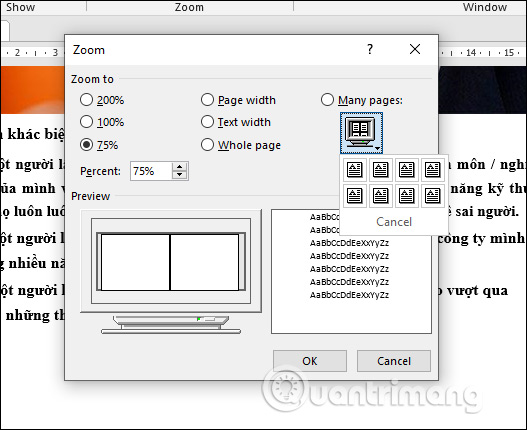
<p>Lúc này hiển thị giao diện hộp thoại Zoom như hình dưới đây. Tại đây người dùng sẽ thấy các&nbsp;<strong>tùy chọn để phóng to hay thu nhỏ trang tài liệu Word</strong>&nbsp;theo tỷ lệ % cho sẵn, hoặc bạn điền tỷ lệ % cụ thể vào ô Percent. Bên cạnh đó người dùng cũng có nhiều tùy chọn hiển thị phụ thuộc vào kích thước màn hình của thiết bị như toàn màn hình hay nửa màn hình, hay chọn xem nhiều trang. Cuối cùng nhấn OK để áp dụng.</p>

<p><img alt="Tùy chỉnh zom trang " data-i="3" data-src="https://st.quantrimang.com/photos/image/2019/12/25/Word-pho-to-thu-nho-4.jpg" data-was-processed="true" height="430" src="https://st.quantrimang.com/photos/image/2019/12/25/Word-pho-to-thu-nho-4.jpg" width="527" /></p>

<p>Ngoài ra chúng ta cũng có thể nhấn vào phím&nbsp;<strong>Ctrl&nbsp;</strong>và sử dụng<strong>&nbsp;con lăn chuột</strong>&nbsp;ở giữa để phóng to hoặc thu nhỏ giao diện màn hình. Thao tác này thì áp dụng được với giao diện trình duyệt chứ không chỉ áp dụng mỗi duyệt tài liệu Word.</p>

<p>Trong trường hợp chúng ta sử dụng màn hình cảm ứng thì chỉ cần sử dụng 2 ngón tay để phóng to thu nhỏ giao diện trên màn hình cảm ứng là được.</p>

<p>Thao tác phóng to thu nhỏ trên Word rất đơn giản và bạn có thể thực hiện theo nhiều cách khác nhau. Tùy theo sự thuận tiện của người dùng mà chúng ta lựa chọn thao tác thực hiện cho phù hợp.</p>

<p>Hy vọng bài viết này hữu ích với bạn!</p>
		</div>
				<div id="author">
						<p>
				<strong>Nguồn tin:</strong>
				Quantrimang.com:
			</p>
		</div>
	</div>
	<div id="footer" class="clearfix">
		<div id="url">
			<strong>URL của bản tin này: </strong><a href="https://www.nguoicodonvn2008.info/vi/news/savefile/kien-thuc-may-tinh/cach-phong-to-thu-nho-van-ban-word-8636.html" title="Cách phóng to thu nhỏ văn bản Word">https://www.nguoicodonvn2008.info/vi/news/savefile/kien-thuc-may-tinh/cach-phong-to-thu-nho-van-ban-word-8636.html</a>

		</div>
		<div class="clear"></div>
		<div class="copyright">
			&copy; .&#x3A; Nguoicodonvn2008.info - Cõi lòng người cô đơn &#x3A;.
		</div>
		<div id="contact">
			<a href="mailto:admin@nguoicodonvn2008.info">admin@nguoicodonvn2008.info</a>
		</div>
	</div>
</div>
        <div id="timeoutsess" class="chromeframe">
            Bạn đã không sử dụng Site, <a onclick="timeoutsesscancel();" href="https://nguoicodonvn2008.info/#">Bấm vào đây để duy trì trạng thái đăng nhập</a>. Thời gian chờ: <span id="secField"> 60 </span> giây
        </div>
        <div id="openidResult" class="nv-alert" style="display:none"></div>
        <div id="openidBt" data-result="" data-redirect=""></div>
		</script>
		<div class="car-top">
  <span><img src="https://nguoicodonvn2008.info/themes/default/images/car.png" alt=""></span>
</div>
<script src="https://nguoicodonvn2008.info/assets/js/jquery/jquery.min.js"></script>
<script>var nv_base_siteurl="/",nv_lang_data="vi",nv_lang_interface="vi",nv_name_variable="nv",nv_fc_variable="op",nv_lang_variable="language",nv_module_name="news",nv_func_name="savefile",nv_is_user=0, nv_my_ofs=-4,nv_my_abbr="EDT",nv_cookie_prefix="nv4c_e856T",nv_check_pass_mstime=1738000,nv_area_admin=0,nv_safemode=0,theme_responsive=0,nv_recaptcha_ver=2,nv_recaptcha_sitekey="",nv_recaptcha_type="image",XSSsanitize=1;</script>
<script src="https://nguoicodonvn2008.info/assets/js/language/vi.js"></script>
<script src="https://nguoicodonvn2008.info/assets/js/DOMPurify/purify3.js"></script>
<script src="https://nguoicodonvn2008.info/assets/js/global.js"></script>
<script src="https://nguoicodonvn2008.info/assets/js/site.js"></script>
<script src="https://nguoicodonvn2008.info/themes/default/js/news.js"></script>
<script src="https://nguoicodonvn2008.info/themes/default/js/main.js"></script>
<script src="https://nguoicodonvn2008.info/themes/default/js/custom.js"></script>
<script type="application/ld+json">
        {
            "@context": "https://schema.org",
            "@type": "Organization",
            "url": "https://nguoicodonvn2008.info",
            "logo": "https://nguoicodonvn2008.info/uploads/angel.gif"
        }
        </script>
<script src="https://nguoicodonvn2008.info/themes/default/js/bootstrap.min.js"></script>
<script type="text/javascript">
var $scrolltop = $('.car-top');
$scrolltop.on('click', function () {
    $('html,body').animate({
        scrollTop: 0
    }, 800);
    $(this).addClass("car-run");
    setTimeout(function(){ $scrolltop.removeClass('car-run');}, 1000);
    return false;
});
$(window).on('scroll', function ()
{ 
    if($(window).scrollTop() >= 200)
    {
        $scrolltop.addClass("show");
        $scrolltop.addClass("car-down");
    }
    else
    {
       $scrolltop.removeClass("show");
       setTimeout(function(){ $scrolltop.removeClass('car-down');}, 300);
    }
});
</script>
</body>
</html>