<!DOCTYPE html>
    <html lang="vi" xmlns="http://www.w3.org/1999/xhtml" prefix="og: http://ogp.me/ns#">
    <head>
<title>Cách phát DVD trên Windows 10</title>
<meta name="description" content="Cách phát DVD trên Windows 10 - Savefile - Tin Tức - https&#x3A;&#x002F;&#x002F;www.nguoicodonvn2008.info&#x002F;vi&#x002F;news&#x002F;savefile&#x002F;kien-thuc-may-tinh&#x002F;cach-phat-dvd-tren-windows-10-431.html">
<meta name="author" content=".: Nguoicodonvn2008.info - Cõi lòng người cô đơn :.">
<meta name="copyright" content=".: Nguoicodonvn2008.info - Cõi lòng người cô đơn :. [admin@nguoicodonvn2008.info]">
<meta name="robots" content="index, archive, follow, noodp">
<meta name="googlebot" content="index,archive,follow,noodp">
<meta name="msnbot" content="all,index,follow">
<meta name="generator" content="NukeViet v4.5">
<meta http-equiv="Content-Type" content="text/html; charset=utf-8">
<meta property="og:title" content="Cách phát DVD trên Windows 10">
<meta property="og:type" content="website">
<meta property="og:description" content="Savefile - Tin Tức - https&#x3A;&#x002F;&#x002F;www.nguoicodonvn2008.info&#x002F;vi&#x002F;news&#x002F;savefile&#x002F;kien-thuc-may-tinh&#x002F;cach-phat-dvd-tren-windows-10-431.html">
<meta property="og:site_name" content=".&#x3A; Nguoicodonvn2008.info - Cõi lòng người cô đơn &#x3A;.">
<meta property="og:url" content="https://www.nguoicodonvn2008.info/vi/news/savefile/kien-thuc-may-tinh/cach-phat-dvd-tren-windows-10-431.html">
<link rel="shortcut icon" href="https://nguoicodonvn2008.info/favicon.ico">
<link rel="canonical" href="https://www.nguoicodonvn2008.info/vi/news/savefile/kien-thuc-may-tinh/cach-phat-dvd-tren-windows-10-431.html">
<link rel="alternate" href="https://nguoicodonvn2008.info/vi/news/rss/" title="Tin Tức" type="application/rss+xml">
<link rel="alternate" href="https://nguoicodonvn2008.info/vi/news/rss/karaoke-dual/" title="Tin Tức - Karaoke Dual" type="application/rss+xml">
<link rel="alternate" href="https://nguoicodonvn2008.info/vi/news/rss/nhac-tre/" title="Tin Tức - Nhạc trẻ" type="application/rss+xml">
<link rel="alternate" href="https://nguoicodonvn2008.info/vi/news/rss/tru-tinh/" title="Tin Tức - Trữ tình" type="application/rss+xml">
<link rel="alternate" href="https://nguoicodonvn2008.info/vi/news/rss/nuoc-ngoai/" title="Tin Tức - Nước ngoài" type="application/rss+xml">
<link rel="alternate" href="https://nguoicodonvn2008.info/vi/news/rss/remix/" title="Tin Tức - Remix" type="application/rss+xml">
<link rel="alternate" href="https://nguoicodonvn2008.info/vi/news/rss/tam-su-tinh-yeu/" title="Tin Tức - Tâm sự tình yêu" type="application/rss+xml">
<link rel="alternate" href="https://nguoicodonvn2008.info/vi/news/rss/tho-suu-tam/" title="Tin Tức - Thơ sưu tầm" type="application/rss+xml">
<link rel="alternate" href="https://nguoicodonvn2008.info/vi/news/rss/cuoc-song/" title="Tin Tức - Cuộc sống" type="application/rss+xml">
<link rel="alternate" href="https://nguoicodonvn2008.info/vi/news/rss/phan-mem/" title="Tin Tức - Phần mềm" type="application/rss+xml">
<link rel="alternate" href="https://nguoicodonvn2008.info/vi/news/rss/kien-thuc-may-tinh/" title="Tin Tức - Kiến thức máy tính" type="application/rss+xml">
<link rel="alternate" href="https://nguoicodonvn2008.info/vi/news/rss/hoc-tap/" title="Tin Tức - Học tập" type="application/rss+xml">
<link rel="alternate" href="https://nguoicodonvn2008.info/vi/news/rss/tai-lieu/" title="Tin Tức - Tài liệu" type="application/rss+xml">
<link rel="alternate" href="https://nguoicodonvn2008.info/vi/news/rss/de-thi/" title="Tin Tức - Đề thi" type="application/rss+xml">
<link rel="preload" as="style" href="https://nguoicodonvn2008.info/assets/css/font-awesome.min.css" type="text/css">
<link rel="preload" as="style" href="https://nguoicodonvn2008.info/themes/default/css/bootstrap.non-responsive.css" type="text/css">
<link rel="preload" as="style" href="https://nguoicodonvn2008.info/themes/default/css/style.css" type="text/css">
<link rel="preload" as="style" href="https://nguoicodonvn2008.info/themes/default/css/style.non-responsive.css" type="text/css">
<link rel="preload" as="style" href="https://nguoicodonvn2008.info/themes/default/css/news.css" type="text/css">
<link rel="preload" as="style" href="https://nguoicodonvn2008.info/themes/default/css/custom.css" type="text/css">
<link rel="preload" as="script" href="https://nguoicodonvn2008.info/assets/js/jquery/jquery.min.js" type="text/javascript">
<link rel="preload" as="script" href="https://nguoicodonvn2008.info/assets/js/language/vi.js" type="text/javascript">
<link rel="preload" as="script" href="https://nguoicodonvn2008.info/assets/js/DOMPurify/purify3.js" type="text/javascript">
<link rel="preload" as="script" href="https://nguoicodonvn2008.info/assets/js/global.js" type="text/javascript">
<link rel="preload" as="script" href="https://nguoicodonvn2008.info/assets/js/site.js" type="text/javascript">
<link rel="preload" as="script" href="https://nguoicodonvn2008.info/themes/default/js/news.js" type="text/javascript">
<link rel="preload" as="script" href="https://nguoicodonvn2008.info/themes/default/js/main.js" type="text/javascript">
<link rel="preload" as="script" href="https://nguoicodonvn2008.info/themes/default/js/custom.js" type="text/javascript">
<link rel="preload" as="script" href="https://nguoicodonvn2008.info/themes/default/js/bootstrap.min.js" type="text/javascript">
<link rel="stylesheet" href="https://nguoicodonvn2008.info/assets/css/font-awesome.min.css">
<link rel="stylesheet" href="https://nguoicodonvn2008.info/themes/default/css/bootstrap.non-responsive.css">
<link rel="stylesheet" href="https://nguoicodonvn2008.info/themes/default/css/style.css">
<link rel="stylesheet" href="https://nguoicodonvn2008.info/themes/default/css/style.non-responsive.css">
<link rel="StyleSheet" href="https://nguoicodonvn2008.info/themes/default/css/news.css">
<link rel="stylesheet" href="https://nguoicodonvn2008.info/themes/default/css/custom.css">
<style type="text/css">
	body{background: #fff;}
</style>
    </head>
    <body>
<div id="print">
	<div id="hd_print">
		<h2 class="pull-left">.&#x3A; Nguoicodonvn2008.info - Cõi lòng người cô đơn &#x3A;.</h2>
		<p class="pull-right"><a title=".&#x3A; Nguoicodonvn2008.info - Cõi lòng người cô đơn &#x3A;." href="https://nguoicodonvn2008.info/">https://nguoicodonvn2008.info</a></p>
	</div>
	<div class="clear"></div>
	<hr />
	<div id="content">
		<h1>Cách phát DVD trên Windows 10</h1>
		<ul class="list-inline">
			<li>Thứ năm - 11/07/2019 01:49</li>
			<li class="hidden-print txtrequired"><em class="fa fa-print">&nbsp;</em><a title="In ra" href="javascript:;" onclick="window.print()">In ra</a></li>
			<li class="hidden-print txtrequired"><em class="fa fa-power-off">&nbsp;</em><a title="Đóng cửa sổ này" href="javascript:;" onclick="window.close()">Đóng cửa sổ này</a></li>
		</ul>
		<div class="clear"></div>
		<div id="hometext">
		</div>
				<div class="imghome">
			<img alt="Cách phát DVD trên Windows 10" src="https://st.quantrimang.com/photos/image/2019/07/10/phat-dvd-tren-windows-1.png" width="460" class="img-thumbnail" />
		</div>
		<div class="clear"></div>
		<div id="bodytext" class="clearfix">
			<p style="text-align: justify;">Windows 10 không có khả năng tích hợp trực tiếp để chạy các đĩa DVD. Điều này dẫn đến nhiều máy tính hiện nay cũng không có ổ đĩa. Tuy nhiên nếu có máy tính có ổ đĩa DVD hoặc ổ đĩa DVD ngoài, bạn sẽ bối rối không biết làm thế nào để phát DVD trên Windows 10.</p>

<p style="text-align: justify;">Có một số giải pháp giúp bạn chạy đĩa DVD trên Windows 10 hãy cùng theo dõi trong bài viết sau đây nhé.<br  />
<br  />
Cách chạy đĩa DVD trên Windows 10 với phần mềm cài đặt trước</p>

<p style="text-align: justify;">Nếu mua máy tính có đầu DVD tích hợp, nó có thể đi kèm với phần mềm phát DVD riêng. Vì Windows 8.1 và Windows 10 không hỗ trợ phát DVD, do đó các nhà sản xuất máy tính sẽ thêm phần mềm hỗ trợ trước khi đóng gói sản phẩm.</p>

<p style="text-align: justify;">Trước tiên bạn cần tìm phần mềm phát DVD tích hợp.&nbsp;Nếu có sách hướng dẫn sử dụng máy tính, bạn có thể tìm hướng dẫn phát DVD trong đó hoặc tìm kiếm trên trang web của nhà sản xuất để xem phần mềm phát DVD/phương tiện họ đã cài đặt.</p>

<p style="text-align: justify;">Một cách khác để tìm phần mềm đó là mở thanh tìm kiếm Windows và gõ&nbsp;<strong>movies</strong>&nbsp;hoặc&nbsp;<strong>DVD</strong>. Hoặc nếu may mắn khi đưa DVD vào ổ đĩa của máy tính, phần mềm sẽ tự khởi động.</p>

<p style="text-align: justify;">Một khi đã xác định được phần mềm được cài đặt sẵn bạn có thể dễ dàng phát DVD.</p>

<div style="text-align: justify;">&nbsp;</div>

<h2 style="text-align: justify;">Cách phát DVD trong Windows 10 với phần mềm miễn phí</h2>

<p style="text-align: justify;">Nếu đang sử dụng ổ đĩa DVD ngoài hoặc không thể tìm thấy bất kỳ phần mềm nào đã được cài đặt sẵn để phát DVD trên máy tính bạn có thể sử dụng phần mềm miễn phí.&nbsp;VLC Media Player&nbsp;là một trong những&nbsp;phần mềm phát video miễn phí&nbsp;tốt nhất và nó cũng hỗ trợ phát DVD. Bạn cũng có thể thử phần mềm đi kèm với ổ đĩa DVD ngoài nếu có.&nbsp;</p>

<p style="text-align: justify;"><img alt="Phần mềm VLC" data-i="0" data-src="https://st.quantrimang.com/photos/image/2019/07/10/phat-dvd-tren-windows-1.png" data-was-processed="true" height="359" src="https://st.quantrimang.com/photos/image/2019/07/10/phat-dvd-tren-windows-1.png" width="640" /></p>

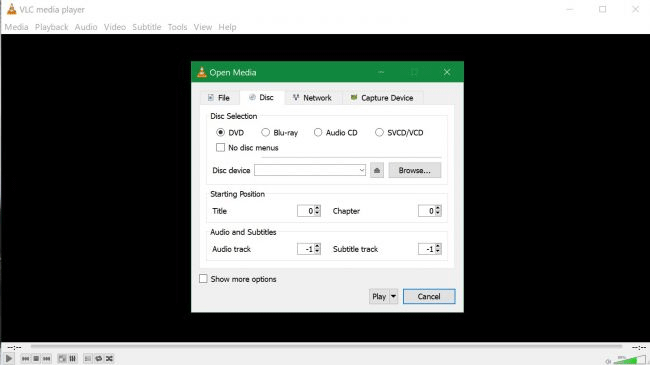
<p style="text-align: justify;">Để phát DVD trước tiên khởi chạy VLC, sau đó chèn DVD vào máy tính, nó có thể chạy tự động. Tuy nhiên trong trường hợp không phát tự động, thực hiện theo các bước sau:</p>

<p style="text-align: justify;"><img alt="Click vào Play" data-i="1" data-src="https://st.quantrimang.com/photos/image/2019/07/10/phat-dvd-tren-windows-2.png" data-was-processed="true" height="359" src="https://st.quantrimang.com/photos/image/2019/07/10/phat-dvd-tren-windows-2.png" width="640" /></p>

<p style="text-align: justify;"><strong>Bước 1</strong>. Chọn&nbsp;<strong>Media &gt; Open Disc</strong>&nbsp;hoặc nhấn&nbsp;<code>Ctrl</code>&nbsp;+&nbsp;<code>D</code>.</p>

<p style="text-align: justify;"><strong>Bước 2</strong>. Trong cửa sổ bật lên, trong phần&nbsp;<strong>Disc Selection</strong>, chọn&nbsp;<strong>DVD</strong>&nbsp;và nhấn&nbsp;<strong>Play</strong>&nbsp;ở cuối.</p>

<p style="text-align: justify;">Nếu VLC không xác định được DVD, bạn cần chỉ ra vị trí ổ đĩa bằng cách nhấn&nbsp;<strong>browse</strong>&nbsp;trong phần&nbsp;<strong>Disc Selection</strong>&nbsp;của menu hiện ra và chọn ổ DVD từ tùy chọn ổ ở bên trái cửa sổ File Explorer.</p>

<p style="text-align: justify;">Chúc các bạn thực hiện thành công!&nbsp;</p>
		</div>
				<div id="author">
						<p>
				<strong>Nguồn tin:</strong>
				Quantrimang.com
			</p>
		</div>
	</div>
	<div id="footer" class="clearfix">
		<div id="url">
			<strong>URL của bản tin này: </strong><a href="https://www.nguoicodonvn2008.info/vi/news/savefile/kien-thuc-may-tinh/cach-phat-dvd-tren-windows-10-431.html" title="Cách phát DVD trên Windows 10">https://www.nguoicodonvn2008.info/vi/news/savefile/kien-thuc-may-tinh/cach-phat-dvd-tren-windows-10-431.html</a>

		</div>
		<div class="clear"></div>
		<div class="copyright">
			&copy; .&#x3A; Nguoicodonvn2008.info - Cõi lòng người cô đơn &#x3A;.
		</div>
		<div id="contact">
			<a href="mailto:admin@nguoicodonvn2008.info">admin@nguoicodonvn2008.info</a>
		</div>
	</div>
</div>
        <div id="timeoutsess" class="chromeframe">
            Bạn đã không sử dụng Site, <a onclick="timeoutsesscancel();" href="https://nguoicodonvn2008.info/#">Bấm vào đây để duy trì trạng thái đăng nhập</a>. Thời gian chờ: <span id="secField"> 60 </span> giây
        </div>
        <div id="openidResult" class="nv-alert" style="display:none"></div>
        <div id="openidBt" data-result="" data-redirect=""></div>
		</script>
		<div class="car-top">
  <span><img src="https://nguoicodonvn2008.info/themes/default/images/car.png" alt=""></span>
</div>
<script src="https://nguoicodonvn2008.info/assets/js/jquery/jquery.min.js"></script>
<script>var nv_base_siteurl="/",nv_lang_data="vi",nv_lang_interface="vi",nv_name_variable="nv",nv_fc_variable="op",nv_lang_variable="language",nv_module_name="news",nv_func_name="savefile",nv_is_user=0, nv_my_ofs=-4,nv_my_abbr="EDT",nv_cookie_prefix="nv4c_e856T",nv_check_pass_mstime=1738000,nv_area_admin=0,nv_safemode=0,theme_responsive=0,nv_recaptcha_ver=2,nv_recaptcha_sitekey="",nv_recaptcha_type="image",XSSsanitize=1;</script>
<script src="https://nguoicodonvn2008.info/assets/js/language/vi.js"></script>
<script src="https://nguoicodonvn2008.info/assets/js/DOMPurify/purify3.js"></script>
<script src="https://nguoicodonvn2008.info/assets/js/global.js"></script>
<script src="https://nguoicodonvn2008.info/assets/js/site.js"></script>
<script src="https://nguoicodonvn2008.info/themes/default/js/news.js"></script>
<script src="https://nguoicodonvn2008.info/themes/default/js/main.js"></script>
<script src="https://nguoicodonvn2008.info/themes/default/js/custom.js"></script>
<script type="application/ld+json">
        {
            "@context": "https://schema.org",
            "@type": "Organization",
            "url": "https://nguoicodonvn2008.info",
            "logo": "https://nguoicodonvn2008.info/uploads/angel.gif"
        }
        </script>
<script src="https://nguoicodonvn2008.info/themes/default/js/bootstrap.min.js"></script>
<script type="text/javascript">
var $scrolltop = $('.car-top');
$scrolltop.on('click', function () {
    $('html,body').animate({
        scrollTop: 0
    }, 800);
    $(this).addClass("car-run");
    setTimeout(function(){ $scrolltop.removeClass('car-run');}, 1000);
    return false;
});
$(window).on('scroll', function ()
{ 
    if($(window).scrollTop() >= 200)
    {
        $scrolltop.addClass("show");
        $scrolltop.addClass("car-down");
    }
    else
    {
       $scrolltop.removeClass("show");
       setTimeout(function(){ $scrolltop.removeClass('car-down');}, 300);
    }
});
</script>
</body>
</html>