<!DOCTYPE html>
    <html lang="vi" xmlns="http://www.w3.org/1999/xhtml" prefix="og: http://ogp.me/ns#">
    <head>
<title>Cách phân quyền cho người dùng trong MS SQL Server</title>
<meta name="description" content="Cách phân quyền cho người dùng trong MS SQL Server - Savefile - Tin Tức -...">
<meta name="author" content=".: Nguoicodonvn2008.info - Cõi lòng người cô đơn :.">
<meta name="copyright" content=".: Nguoicodonvn2008.info - Cõi lòng người cô đơn :. [admin@nguoicodonvn2008.info]">
<meta name="robots" content="index, archive, follow, noodp">
<meta name="googlebot" content="index,archive,follow,noodp">
<meta name="msnbot" content="all,index,follow">
<meta name="generator" content="NukeViet v4.5">
<meta http-equiv="Content-Type" content="text/html; charset=utf-8">
<meta property="og:title" content="Cách phân quyền cho người dùng trong MS SQL Server">
<meta property="og:type" content="website">
<meta property="og:description" content="Savefile - Tin Tức - https&#x3A;&#x002F;&#x002F;www.nguoicodonvn2008.info&#x002F;vi&#x002F;news&#x002F;savefile&#x002F;kien-thuc-may-tinh&#x002F;cach-phan-quyen-cho-nguoi-dung-trong-ms-sql-server-11418.html">
<meta property="og:site_name" content=".&#x3A; Nguoicodonvn2008.info - Cõi lòng người cô đơn &#x3A;.">
<meta property="og:url" content="https://www.nguoicodonvn2008.info/vi/news/savefile/kien-thuc-may-tinh/cach-phan-quyen-cho-nguoi-dung-trong-ms-sql-server-11418.html">
<link rel="shortcut icon" href="https://nguoicodonvn2008.info/favicon.ico">
<link rel="canonical" href="https://www.nguoicodonvn2008.info/vi/news/savefile/kien-thuc-may-tinh/cach-phan-quyen-cho-nguoi-dung-trong-ms-sql-server-11418.html">
<link rel="alternate" href="https://nguoicodonvn2008.info/vi/news/rss/" title="Tin Tức" type="application/rss+xml">
<link rel="alternate" href="https://nguoicodonvn2008.info/vi/news/rss/karaoke-dual/" title="Tin Tức - Karaoke Dual" type="application/rss+xml">
<link rel="alternate" href="https://nguoicodonvn2008.info/vi/news/rss/nhac-tre/" title="Tin Tức - Nhạc trẻ" type="application/rss+xml">
<link rel="alternate" href="https://nguoicodonvn2008.info/vi/news/rss/tru-tinh/" title="Tin Tức - Trữ tình" type="application/rss+xml">
<link rel="alternate" href="https://nguoicodonvn2008.info/vi/news/rss/nuoc-ngoai/" title="Tin Tức - Nước ngoài" type="application/rss+xml">
<link rel="alternate" href="https://nguoicodonvn2008.info/vi/news/rss/remix/" title="Tin Tức - Remix" type="application/rss+xml">
<link rel="alternate" href="https://nguoicodonvn2008.info/vi/news/rss/tam-su-tinh-yeu/" title="Tin Tức - Tâm sự tình yêu" type="application/rss+xml">
<link rel="alternate" href="https://nguoicodonvn2008.info/vi/news/rss/tho-suu-tam/" title="Tin Tức - Thơ sưu tầm" type="application/rss+xml">
<link rel="alternate" href="https://nguoicodonvn2008.info/vi/news/rss/cuoc-song/" title="Tin Tức - Cuộc sống" type="application/rss+xml">
<link rel="alternate" href="https://nguoicodonvn2008.info/vi/news/rss/phan-mem/" title="Tin Tức - Phần mềm" type="application/rss+xml">
<link rel="alternate" href="https://nguoicodonvn2008.info/vi/news/rss/kien-thuc-may-tinh/" title="Tin Tức - Kiến thức máy tính" type="application/rss+xml">
<link rel="alternate" href="https://nguoicodonvn2008.info/vi/news/rss/hoc-tap/" title="Tin Tức - Học tập" type="application/rss+xml">
<link rel="alternate" href="https://nguoicodonvn2008.info/vi/news/rss/tai-lieu/" title="Tin Tức - Tài liệu" type="application/rss+xml">
<link rel="alternate" href="https://nguoicodonvn2008.info/vi/news/rss/de-thi/" title="Tin Tức - Đề thi" type="application/rss+xml">
<link rel="preload" as="style" href="https://nguoicodonvn2008.info/assets/css/font-awesome.min.css" type="text/css">
<link rel="preload" as="style" href="https://nguoicodonvn2008.info/themes/default/css/bootstrap.non-responsive.css" type="text/css">
<link rel="preload" as="style" href="https://nguoicodonvn2008.info/themes/default/css/style.css" type="text/css">
<link rel="preload" as="style" href="https://nguoicodonvn2008.info/themes/default/css/style.non-responsive.css" type="text/css">
<link rel="preload" as="style" href="https://nguoicodonvn2008.info/themes/default/css/news.css" type="text/css">
<link rel="preload" as="style" href="https://nguoicodonvn2008.info/themes/default/css/custom.css" type="text/css">
<link rel="preload" as="script" href="https://nguoicodonvn2008.info/assets/js/jquery/jquery.min.js" type="text/javascript">
<link rel="preload" as="script" href="https://nguoicodonvn2008.info/assets/js/language/vi.js" type="text/javascript">
<link rel="preload" as="script" href="https://nguoicodonvn2008.info/assets/js/DOMPurify/purify3.js" type="text/javascript">
<link rel="preload" as="script" href="https://nguoicodonvn2008.info/assets/js/global.js" type="text/javascript">
<link rel="preload" as="script" href="https://nguoicodonvn2008.info/assets/js/site.js" type="text/javascript">
<link rel="preload" as="script" href="https://nguoicodonvn2008.info/themes/default/js/news.js" type="text/javascript">
<link rel="preload" as="script" href="https://nguoicodonvn2008.info/themes/default/js/main.js" type="text/javascript">
<link rel="preload" as="script" href="https://nguoicodonvn2008.info/themes/default/js/custom.js" type="text/javascript">
<link rel="preload" as="script" href="https://nguoicodonvn2008.info/themes/default/js/bootstrap.min.js" type="text/javascript">
<link rel="stylesheet" href="https://nguoicodonvn2008.info/assets/css/font-awesome.min.css">
<link rel="stylesheet" href="https://nguoicodonvn2008.info/themes/default/css/bootstrap.non-responsive.css">
<link rel="stylesheet" href="https://nguoicodonvn2008.info/themes/default/css/style.css">
<link rel="stylesheet" href="https://nguoicodonvn2008.info/themes/default/css/style.non-responsive.css">
<link rel="StyleSheet" href="https://nguoicodonvn2008.info/themes/default/css/news.css">
<link rel="stylesheet" href="https://nguoicodonvn2008.info/themes/default/css/custom.css">
<style type="text/css">
	body{background: #fff;}
</style>
    </head>
    <body>
<div id="print">
	<div id="hd_print">
		<h2 class="pull-left">.&#x3A; Nguoicodonvn2008.info - Cõi lòng người cô đơn &#x3A;.</h2>
		<p class="pull-right"><a title=".&#x3A; Nguoicodonvn2008.info - Cõi lòng người cô đơn &#x3A;." href="https://nguoicodonvn2008.info/">https://nguoicodonvn2008.info</a></p>
	</div>
	<div class="clear"></div>
	<hr />
	<div id="content">
		<h1>Cách phân quyền cho người dùng trong MS SQL Server</h1>
		<ul class="list-inline">
			<li>Thứ ba - 21/10/2025 00:38</li>
			<li class="hidden-print txtrequired"><em class="fa fa-print">&nbsp;</em><a title="In ra" href="javascript:;" onclick="window.print()">In ra</a></li>
			<li class="hidden-print txtrequired"><em class="fa fa-power-off">&nbsp;</em><a title="Đóng cửa sổ này" href="javascript:;" onclick="window.close()">Đóng cửa sổ này</a></li>
		</ul>
		<div class="clear"></div>
		<div id="hometext">
		</div>
				<div class="imghome">
			<img alt="Cách phân quyền cho người dùng trong MS SQL Server" src="https://st.quantrimang.com/photos/image/2018/02/02/ms-sql-server-permissions.jpg" width="460" class="img-thumbnail" />
		</div>
		<div class="clear"></div>
		<div id="bodytext" class="clearfix">
			<p style="text-align: justify;"><strong>Cấp quyền cho user trong SQL Server&nbsp;</strong>là tác vụ cơ bản mà lập trình viên cần biết. Nếu muốn biết<strong>&nbsp;các quyền dành cho user trên csdl gồm có</strong>&nbsp;gì, bài viết sẽ cho bạn câu trả lời.</p>

<div style="text-align: justify;">&nbsp;</div>

<p style="text-align: justify;">Quản lý thông tin đăng nhập, người dùng và quyền trong SQL Server là một khía cạnh quan trọng của bảo mật và quản trị cơ sở dữ liệu. Quy trình này đảm bảo rằng chỉ những cá nhân được ủy quyền mới có quyền truy cập vào cơ sở dữ liệu và có thể thực hiện các hoạt động cần thiết.</p>

<p style="text-align: justify;">Ở bài viết này, chúng ta sẽ tìm hiểu cách tạo và quản lý thông tin đăng nhập, liên kết người dùng với các thông tin đăng nhập này và cấp quyền phù hợp là điều cần thiết để duy trì môi trường SQL Server an toàn.</p>

<p style="text-align: justify;"><strong>Các khái niệm chính cần ghi nhớ:</strong></p>

<ul>
	<li style="text-align: justify;">Việc quản lý thông tin đăng nhập, người dùng và quyền trong SQL Server tạo ra liên kết ngay lập tức giữa bảo mật và quản trị cơ sở dữ liệu.</li>
	<li style="text-align: justify;">Dưới đây là những điều cần biết về cách phân quyền người dùng trong MS SQL Server.</li>
</ul>

<p style="text-align: justify;">Khi nhắc tới bảo vệ dữ liệu nhạy cảm và giữ cho môi trường database an toàn, quản lý quyền &amp; đặc quyền đăng nhập database sẽ là trọng tâm. Ví dụ, bạn muốn một người nào đó, có thể chỉnh sửa và thao tác dữ liệu cá nhân, còn người khác chỉ có thể xem dữ liệu. Ở trường hợp này, quản trị database sẽ cần tạo người dùng hoặc vai trò mới với quyền cụ thể được phân tại server, database hay cấp schema đó. Để triển khai nhiệm vụ này, họ có thể dùng các lệnh T-SQL được cung cấp bởi SQL Server hay công cụ bên thứ ba.</p>

<p style="text-align: justify;">Thực tế, tạo đăng nhập mới trong SQL Server không khó. Đầu tiên, bạn cần tạo một đăng nhập mới dựa trên xác thực Windows, SQL Server, chứng chỉ hoặc một key bất đối xứng.</p>

<p style="text-align: justify;">Để thêm đăng nhập mới, dùng lệnh CREATE LOGIN. Nó tạo một đăng nhập được kết nối tới phiên bản SQL Server. Đăng nhập này sau đó sẽ được map tới tài khoản người dùng cụ thể. Cú pháp của nó như sau:</p>

<p style="text-align: justify;"><strong>Xác thực Windows</strong></p>

<pre id="pre0" style="text-align: justify;">
CREATE LOGIN login_name
FROM WINDOWS
&#91; WITH DEFAULT_DATABASE = database_name
| DEFAULT_LANGUAGE = language_name &#93;;</pre>

<p style="text-align: justify;"><strong>Xác thực SQL Server</strong></p>

<pre id="pre1" style="text-align: justify;">
CREATE LOGIN login_name
WITH PASSWORD = { &#039;password&#039; | hashed_password HASHED } &#91; MUST_CHANGE &#93;
&#91; , SID = sid_value
| DEFAULT_DATABASE = database_name
| DEFAULT_LANGUAGE = language_name
| CHECK_EXPIRATION = { ON | OFF }
| CHECK_POLICY = { ON | OFF }
| CREDENTIAL = credential_name &#93;;</pre>

<p style="text-align: justify;"><strong>Chứng chỉ</strong></p>

<pre id="pre2" style="text-align: justify;">
CREATE LOGIN login_name
FROM CERTIFICATE certificate_name;</pre>

<p style="text-align: justify;"><strong>Key bất đối xứng</strong></p>

<pre id="pre3" style="text-align: justify;">
CREATE LOGIN login_name
FROM ASYMMETRIC KEY asym_key_name;</pre>

<p style="text-align: justify;"><strong>Giới hạn và những hạn chế bạn cần biết trước khi&nbsp; phân quyền</strong></p>

<p style="text-align: justify;">Phân quyền hay vai trò, không phải đăng nhập hay người dùng cá nhân. Khi thay người được phân quyền, nghĩa là loại bỏ một cá nhân khỏi vai trò đó và thay vào đó bằng người mới. Bạn có thể kết hợp phân nhiều quyền cho một vai trò. Nếu một số người trong công ty hay tổ chức của bạn cần được phân quyền giống nhau, hãy lần lượt thêm họ vào vai trò đó.</p>

<p style="text-align: justify;">Cấu hình các bảo mật tương tự (bảng, trình xem và quy trình) để được sở hữu bởi một schema, sau đó cấp quyền cho schema đó. Ví dụ: lược đồ bảng lương có thể sở hữu một số bảng, cửa sổ xem và thủ tục được lưu trữ. Bằng cách cấp quyền truy cập vào lược đồ, tất cả các quyền cần thiết để thực hiện chức năng tính lương có thể được cấp cùng một lúc.</p>

<p style="text-align: justify;">Nếu những hạn chế trên không phải vấn đề với bạn thì bạn có thể ngay lập tức áp dụng các cách phân quyền cho người dùng MS SQL Server như sau:</p>

<p style="text-align: justify;">Bạn có thể phân quyền trong SQL Server và thu hồi chúng trên các đối tượng database khác nhau. Quyền người dùng luôn ở cấp database.</p>

<p style="text-align: justify;">Bạn có thể cấp bất kỳ hoặc một kết hợp kiểu quyền sau:</p>

<ul>
	<li style="text-align: justify;"><strong>Select:</strong>&nbsp;Cấp cho người dùng khả năng triển khai hoạt động chọn trên bảng.</li>
	<li style="text-align: justify;"><strong>Insert</strong>: Cho phép người dùng triển khai các hoạt động chèn dữ liệu trên bảng.</li>
	<li style="text-align: justify;"><strong>Update</strong>: Cấp cho người dùng khả năng thực hiện các hoạt động cập nhật bảng.</li>
	<li style="text-align: justify;"><strong>Delete</strong>: Cấp cho người dùng khả năng thực hiện hoạt động xóa trên bảng.</li>
	<li style="text-align: justify;"><strong>Alter</strong>: Cấp cho người dùng khả năng thay đổi định nghĩa bảng.</li>
	<li style="text-align: justify;"><strong>References</strong>: Quyền tham khảo cần thiết cho việc tạo giới hạn khóa ngoại trên bảng. Nó cũng cần để tạo một hàm hoặc lệnh View WITH SCHEMABINDING tham chiếu tới đối tượng đó.</li>
	<li style="text-align: justify;"><strong>Control</strong>: Cấp quyền SELECT, INSERT, UPDATE, DELETE và REFERENCES cho người dùng trên bảng.</li>
</ul>

<p style="text-align: justify;">Tương tự, bạn có thể thu hồi bất kỳ quyền đã phân.</p>

<p style="text-align: justify;">Bạn có thể cấp hoặc thu hồi quyền bằng SSMS hoặc chạy tập lệnh T-SQL. Dưới đây là hướng dẫn chi tiết.</p>

<h2 id="mcetoc_1c7d8pgpi0" style="text-align: justify;"><strong>Cách 1: Dùng T-SQL</strong></h2>

<p style="text-align: justify;"><strong>Cú pháp:</strong></p>

<pre id="pre4" style="text-align: justify;">
Use &lt;database name&gt;Grant &lt;permission name&gt; on &lt;object name&gt; to &lt;username\principle&gt;</pre>

<p style="text-align: justify;"><strong>Ví dụ:</strong></p>

<p style="text-align: justify;">Để phân quyền chọn cho người dùng có tên TestUser trên đối tượng là TestTable trên CSDL có tên TestDB, bạn chạy truy vấn dưới đây.</p>

<pre id="pre5" style="text-align: justify;">
USE TestDBGOGrant select on TestTable to TestUser</pre>

<h2 id="mcetoc_1c7d8q4ig1" style="text-align: justify;"><strong>Cách 2: Dùng SQL Server Management Studio SSMS</strong></h2>

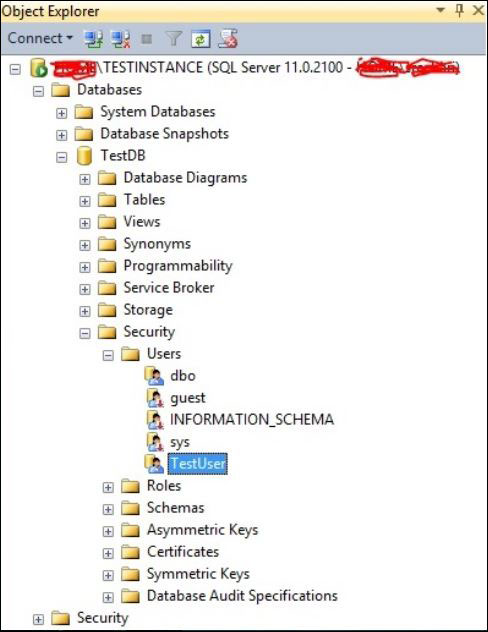
<p style="text-align: justify;"><strong>Bước 1</strong>: Kết nối tới CSDL, mở rộng thư mục như trong hình dưới đây.</p>

<p style="text-align: justify;"><img alt="Mở thư mục Security &gt; Users và tìm tên người dùng muốn phân quyền" data-adbro-processed="true" data-i="0" data-src="https://st.quantrimang.com/photos/image/2018/02/02/ms-sql-server-user.jpg" data-was-processed="true" height="632" src="https://st.quantrimang.com/photos/image/2018/02/02/ms-sql-server-user.jpg" width="488" /><br />
<em>Mở thư mục Security &gt; Users và tìm tên người dùng muốn phân quyền</em></p>

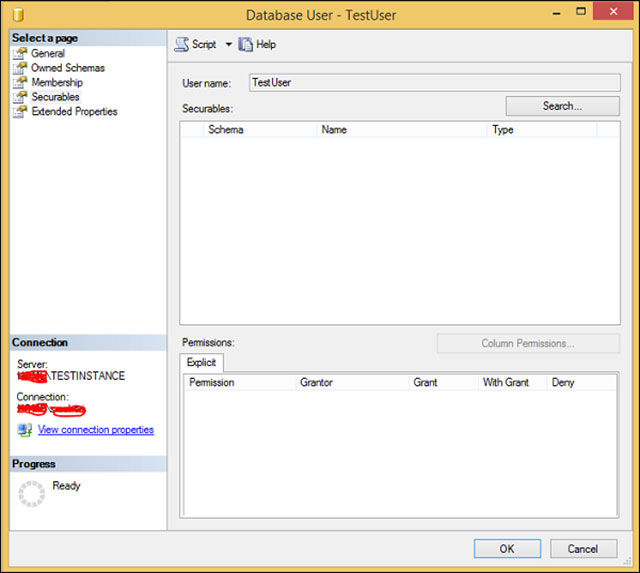
<p style="text-align: justify;"><strong>Bước 2</strong>: Click chuột phải vào&nbsp;<em>TestUser</em>&nbsp;và chọn&nbsp;<em>Properties.</em>&nbsp;Màn hình dưới đây sẽ hiện ra.</p>

<p style="text-align: justify;"><img alt="Màn hình quản lý người dùng TestUser " data-i="1" data-src="https://st.quantrimang.com/photos/image/2018/02/02/ms-sql-server-database-user.jpg" data-was-processed="true" height="573" src="https://st.quantrimang.com/photos/image/2018/02/02/ms-sql-server-database-user.jpg" width="640" /><br />
<em>Màn hình quản lý người dùng TestUser</em></p>

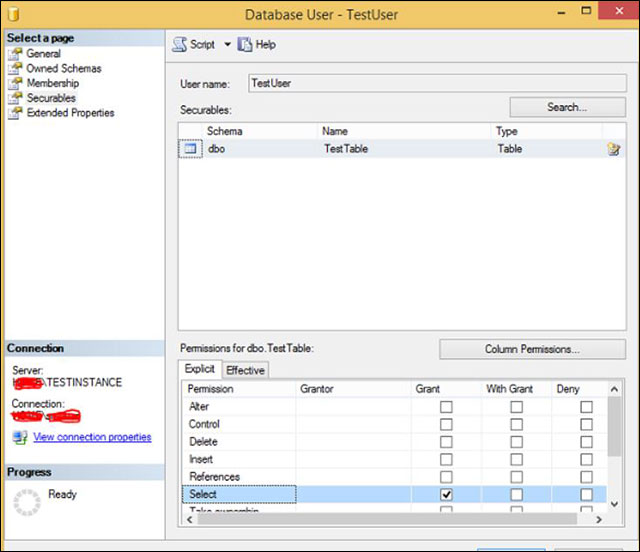
<p style="text-align: justify;"><strong>Bước 3</strong>: Dùng&nbsp;<strong>Search</strong>&nbsp;để tìm kiếm sau đó chọn đối tượng muốn phân quyền, ở đây là bảng&nbsp;<em>TestTable.</em></p>

<p style="text-align: justify;"><strong>Bước 4</strong>: Click chọn bảng&nbsp;<em>TestTable,</em>&nbsp;sau đó chọn hộp checkbox&nbsp;<strong>Grant</strong>&nbsp;cho các thao tác trong danh sách bên dưới như trong hình dưới đây. Ở ví dụ này là trao quyền chọn bảng&nbsp;<strong>(Select).</strong></p>

<p style="text-align: justify;"><img alt="Tick chọn hộp phân quyền " data-i="2" data-src="https://st.quantrimang.com/photos/image/2018/02/02/ms-sql-server-permissions.jpg" data-was-processed="true" height="552" src="https://st.quantrimang.com/photos/image/2018/02/02/ms-sql-server-permissions.jpg" width="640" /><br />
<em>Tick chọn hộp phân quyền</em></p>

<p style="text-align: justify;"><strong>Bước 5</strong>: Click&nbsp;<strong>OK</strong>&nbsp;để hoàn tất việc phân quyền.</p>

<div style="text-align: justify;">&nbsp;</div>
		</div>
				<div id="author">
						<p>
				<strong>Nguồn tin:</strong>
				Quantrimang.com:
			</p>
		</div>
	</div>
	<div id="footer" class="clearfix">
		<div id="url">
			<strong>URL của bản tin này: </strong><a href="https://www.nguoicodonvn2008.info/vi/news/savefile/kien-thuc-may-tinh/cach-phan-quyen-cho-nguoi-dung-trong-ms-sql-server-11418.html" title="Cách phân quyền cho người dùng trong MS SQL Server">https://www.nguoicodonvn2008.info/vi/news/savefile/kien-thuc-may-tinh/cach-phan-quyen-cho-nguoi-dung-trong-ms-sql-server-11418.html</a>

		</div>
		<div class="clear"></div>
		<div class="copyright">
			&copy; .&#x3A; Nguoicodonvn2008.info - Cõi lòng người cô đơn &#x3A;.
		</div>
		<div id="contact">
			<a href="mailto:admin@nguoicodonvn2008.info">admin@nguoicodonvn2008.info</a>
		</div>
	</div>
</div>
        <div id="timeoutsess" class="chromeframe">
            Bạn đã không sử dụng Site, <a onclick="timeoutsesscancel();" href="https://nguoicodonvn2008.info/#">Bấm vào đây để duy trì trạng thái đăng nhập</a>. Thời gian chờ: <span id="secField"> 60 </span> giây
        </div>
        <div id="openidResult" class="nv-alert" style="display:none"></div>
        <div id="openidBt" data-result="" data-redirect=""></div>
		</script>
		<div class="car-top">
  <span><img src="https://nguoicodonvn2008.info/themes/default/images/car.png" alt=""></span>
</div>
<script src="https://nguoicodonvn2008.info/assets/js/jquery/jquery.min.js"></script>
<script>var nv_base_siteurl="/",nv_lang_data="vi",nv_lang_interface="vi",nv_name_variable="nv",nv_fc_variable="op",nv_lang_variable="language",nv_module_name="news",nv_func_name="savefile",nv_is_user=0, nv_my_ofs=-4,nv_my_abbr="EDT",nv_cookie_prefix="nv4c_e856T",nv_check_pass_mstime=1738000,nv_area_admin=0,nv_safemode=0,theme_responsive=0,nv_recaptcha_ver=2,nv_recaptcha_sitekey="",nv_recaptcha_type="image",XSSsanitize=1;</script>
<script src="https://nguoicodonvn2008.info/assets/js/language/vi.js"></script>
<script src="https://nguoicodonvn2008.info/assets/js/DOMPurify/purify3.js"></script>
<script src="https://nguoicodonvn2008.info/assets/js/global.js"></script>
<script src="https://nguoicodonvn2008.info/assets/js/site.js"></script>
<script src="https://nguoicodonvn2008.info/themes/default/js/news.js"></script>
<script src="https://nguoicodonvn2008.info/themes/default/js/main.js"></script>
<script src="https://nguoicodonvn2008.info/themes/default/js/custom.js"></script>
<script type="application/ld+json">
        {
            "@context": "https://schema.org",
            "@type": "Organization",
            "url": "https://nguoicodonvn2008.info",
            "logo": "https://nguoicodonvn2008.info/uploads/angel.gif"
        }
        </script>
<script src="https://nguoicodonvn2008.info/themes/default/js/bootstrap.min.js"></script>
<script type="text/javascript">
var $scrolltop = $('.car-top');
$scrolltop.on('click', function () {
    $('html,body').animate({
        scrollTop: 0
    }, 800);
    $(this).addClass("car-run");
    setTimeout(function(){ $scrolltop.removeClass('car-run');}, 1000);
    return false;
});
$(window).on('scroll', function ()
{ 
    if($(window).scrollTop() >= 200)
    {
        $scrolltop.addClass("show");
        $scrolltop.addClass("car-down");
    }
    else
    {
       $scrolltop.removeClass("show");
       setTimeout(function(){ $scrolltop.removeClass('car-down');}, 300);
    }
});
</script>
</body>
</html>