<!DOCTYPE html>
    <html lang="vi" xmlns="http://www.w3.org/1999/xhtml" prefix="og: http://ogp.me/ns#">
    <head>
<title>Cách nhận bản cập nhật Windows 11 24H2 vừa chính thức ra mắt</title>
<meta name="description" content="Cách nhận bản cập nhật Windows 11 24H2 vừa chính thức ra mắt - Savefile - Tin Tức -...">
<meta name="author" content=".: Nguoicodonvn2008.info - Cõi lòng người cô đơn :.">
<meta name="copyright" content=".: Nguoicodonvn2008.info - Cõi lòng người cô đơn :. [admin@nguoicodonvn2008.info]">
<meta name="robots" content="index, archive, follow, noodp">
<meta name="googlebot" content="index,archive,follow,noodp">
<meta name="msnbot" content="all,index,follow">
<meta name="generator" content="NukeViet v4.5">
<meta http-equiv="Content-Type" content="text/html; charset=utf-8">
<meta property="og:title" content="Cách nhận bản cập nhật Windows 11 24H2 vừa chính thức ra mắt">
<meta property="og:type" content="website">
<meta property="og:description" content="Savefile - Tin Tức - https&#x3A;&#x002F;&#x002F;www.nguoicodonvn2008.info&#x002F;vi&#x002F;news&#x002F;savefile&#x002F;kien-thuc-may-tinh&#x002F;cach-nhan-ban-cap-nhat-windows-11-24h2-vua-chinh-thuc-ra-mat-9137.html">
<meta property="og:site_name" content=".&#x3A; Nguoicodonvn2008.info - Cõi lòng người cô đơn &#x3A;.">
<meta property="og:url" content="https://www.nguoicodonvn2008.info/vi/news/savefile/kien-thuc-may-tinh/cach-nhan-ban-cap-nhat-windows-11-24h2-vua-chinh-thuc-ra-mat-9137.html">
<link rel="shortcut icon" href="https://nguoicodonvn2008.info/favicon.ico">
<link rel="canonical" href="https://www.nguoicodonvn2008.info/vi/news/savefile/kien-thuc-may-tinh/cach-nhan-ban-cap-nhat-windows-11-24h2-vua-chinh-thuc-ra-mat-9137.html">
<link rel="alternate" href="https://nguoicodonvn2008.info/vi/news/rss/" title="Tin Tức" type="application/rss+xml">
<link rel="alternate" href="https://nguoicodonvn2008.info/vi/news/rss/karaoke-dual/" title="Tin Tức - Karaoke Dual" type="application/rss+xml">
<link rel="alternate" href="https://nguoicodonvn2008.info/vi/news/rss/nhac-tre/" title="Tin Tức - Nhạc trẻ" type="application/rss+xml">
<link rel="alternate" href="https://nguoicodonvn2008.info/vi/news/rss/tru-tinh/" title="Tin Tức - Trữ tình" type="application/rss+xml">
<link rel="alternate" href="https://nguoicodonvn2008.info/vi/news/rss/nuoc-ngoai/" title="Tin Tức - Nước ngoài" type="application/rss+xml">
<link rel="alternate" href="https://nguoicodonvn2008.info/vi/news/rss/remix/" title="Tin Tức - Remix" type="application/rss+xml">
<link rel="alternate" href="https://nguoicodonvn2008.info/vi/news/rss/tam-su-tinh-yeu/" title="Tin Tức - Tâm sự tình yêu" type="application/rss+xml">
<link rel="alternate" href="https://nguoicodonvn2008.info/vi/news/rss/tho-suu-tam/" title="Tin Tức - Thơ sưu tầm" type="application/rss+xml">
<link rel="alternate" href="https://nguoicodonvn2008.info/vi/news/rss/cuoc-song/" title="Tin Tức - Cuộc sống" type="application/rss+xml">
<link rel="alternate" href="https://nguoicodonvn2008.info/vi/news/rss/phan-mem/" title="Tin Tức - Phần mềm" type="application/rss+xml">
<link rel="alternate" href="https://nguoicodonvn2008.info/vi/news/rss/kien-thuc-may-tinh/" title="Tin Tức - Kiến thức máy tính" type="application/rss+xml">
<link rel="alternate" href="https://nguoicodonvn2008.info/vi/news/rss/hoc-tap/" title="Tin Tức - Học tập" type="application/rss+xml">
<link rel="alternate" href="https://nguoicodonvn2008.info/vi/news/rss/tai-lieu/" title="Tin Tức - Tài liệu" type="application/rss+xml">
<link rel="alternate" href="https://nguoicodonvn2008.info/vi/news/rss/de-thi/" title="Tin Tức - Đề thi" type="application/rss+xml">
<link rel="preload" as="style" href="https://nguoicodonvn2008.info/assets/css/font-awesome.min.css" type="text/css">
<link rel="preload" as="style" href="https://nguoicodonvn2008.info/themes/default/css/bootstrap.non-responsive.css" type="text/css">
<link rel="preload" as="style" href="https://nguoicodonvn2008.info/themes/default/css/style.css" type="text/css">
<link rel="preload" as="style" href="https://nguoicodonvn2008.info/themes/default/css/style.non-responsive.css" type="text/css">
<link rel="preload" as="style" href="https://nguoicodonvn2008.info/themes/default/css/news.css" type="text/css">
<link rel="preload" as="style" href="https://nguoicodonvn2008.info/themes/default/css/custom.css" type="text/css">
<link rel="preload" as="script" href="https://nguoicodonvn2008.info/assets/js/jquery/jquery.min.js" type="text/javascript">
<link rel="preload" as="script" href="https://nguoicodonvn2008.info/assets/js/language/vi.js" type="text/javascript">
<link rel="preload" as="script" href="https://nguoicodonvn2008.info/assets/js/DOMPurify/purify3.js" type="text/javascript">
<link rel="preload" as="script" href="https://nguoicodonvn2008.info/assets/js/global.js" type="text/javascript">
<link rel="preload" as="script" href="https://nguoicodonvn2008.info/assets/js/site.js" type="text/javascript">
<link rel="preload" as="script" href="https://nguoicodonvn2008.info/themes/default/js/news.js" type="text/javascript">
<link rel="preload" as="script" href="https://nguoicodonvn2008.info/themes/default/js/main.js" type="text/javascript">
<link rel="preload" as="script" href="https://nguoicodonvn2008.info/themes/default/js/custom.js" type="text/javascript">
<link rel="preload" as="script" href="https://nguoicodonvn2008.info/themes/default/js/bootstrap.min.js" type="text/javascript">
<link rel="stylesheet" href="https://nguoicodonvn2008.info/assets/css/font-awesome.min.css">
<link rel="stylesheet" href="https://nguoicodonvn2008.info/themes/default/css/bootstrap.non-responsive.css">
<link rel="stylesheet" href="https://nguoicodonvn2008.info/themes/default/css/style.css">
<link rel="stylesheet" href="https://nguoicodonvn2008.info/themes/default/css/style.non-responsive.css">
<link rel="StyleSheet" href="https://nguoicodonvn2008.info/themes/default/css/news.css">
<link rel="stylesheet" href="https://nguoicodonvn2008.info/themes/default/css/custom.css">
<style type="text/css">
	body{background: #fff;}
</style>
    </head>
    <body>
<div id="print">
	<div id="hd_print">
		<h2 class="pull-left">.&#x3A; Nguoicodonvn2008.info - Cõi lòng người cô đơn &#x3A;.</h2>
		<p class="pull-right"><a title=".&#x3A; Nguoicodonvn2008.info - Cõi lòng người cô đơn &#x3A;." href="https://nguoicodonvn2008.info/">https://nguoicodonvn2008.info</a></p>
	</div>
	<div class="clear"></div>
	<hr />
	<div id="content">
		<h1>Cách nhận bản cập nhật Windows 11 24H2 vừa chính thức ra mắt</h1>
		<ul class="list-inline">
			<li>Thứ hai - 07/10/2024 02:50</li>
			<li class="hidden-print txtrequired"><em class="fa fa-print">&nbsp;</em><a title="In ra" href="javascript:;" onclick="window.print()">In ra</a></li>
			<li class="hidden-print txtrequired"><em class="fa fa-power-off">&nbsp;</em><a title="Đóng cửa sổ này" href="javascript:;" onclick="window.close()">Đóng cửa sổ này</a></li>
		</ul>
		<div class="clear"></div>
		<div id="hometext">
		</div>
				<div class="imghome">
			<img alt="Cách nhận bản cập nhật Windows 11 24H2 vừa chính thức ra mắt" src="https://st.quantrimang.com/photos/image/2024/10/06/windows-11-24h22.jpg" width="460" class="img-thumbnail" />
		</div>
		<div class="clear"></div>
		<div id="bodytext" class="clearfix">
			<p style="text-align: justify;">Bản cập nhật tính năng lớn năm nay cho Windows 11 - 24H2 - hiện đã chính thức ra mắt. Bản cập nhật này chứa khá nhiều tính năng và cải tiến mới, nhưng thật đáng buồn là chúng không khả dụng ngay cho tất cả người dùng đủ điều kiện. Microsoft đang triển khai bản cập nhật dần dần, điều đó có nghĩa là nhiều nhiều người sẽ phải chờ đợi trong vài tuần hoặc thậm chí vài tháng nữa để nhận được Windows 11 phiên bản 24H2. Nếu máy tính của bạn đáp ứng được điều kiện hỗ trợ và bạn muốn trải nghiệm Windows 11 24H2 ngay bây giờ, đây là cách thực hiện.</p>

<p style="text-align: justify;">Nhưng trước tiên, cần lưu ý rằng hệ thống của bạn có thể không &quot;nhìn thấy&quot; Windows 11 phiên bản 24H2 do sự cố chặn. Kiểm tra danh sách các lỗi đã biết trước khi thử tải xuống và cài đặt Windows 11 24H2. Áp dụng giải pháp thay thế có thể gỡ bỏ lệnh chặn hoặc bạn sẽ phải đợi trước khi Microsoft sửa lỗi ngăn bạn cập nhật.</p>

<h2 style="text-align: justify;">Tùy chọn 1 — Download Windows 11 24H2 từ Windows Update</h2>

<p style="text-align: justify;">1. Để sử dụng phương pháp này, bạn cần có bản cập nhật non-security May 2024 cho Windows 11.</p>

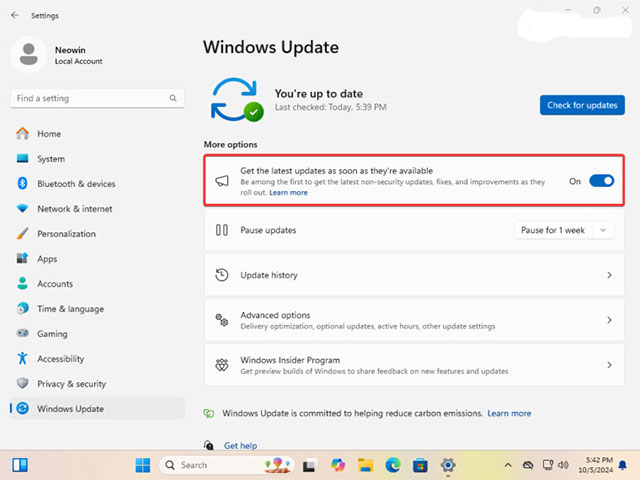
<p style="text-align: justify;">2. Mở&nbsp;<strong>Settings&nbsp;</strong>và đi tới&nbsp;<strong>Windows Update</strong>.</p>

<figure>
<div style="text-align: justify;"><img alt="" data-i="0" data-src="https://st.quantrimang.com/photos/image/2024/10/06/windows-11-24h21.jpg" data-was-processed="true" height="480" src="https://st.quantrimang.com/photos/image/2024/10/06/windows-11-24h21.jpg" width="640" /></div>
</figure>

<p style="text-align: justify;">3. Bật tùy chọn &quot;<strong>Get the latest updates as soon as they&#039;re available</strong>&quot; và xác nhận hành động.</p>

<p style="text-align: justify;">4. Nhấp vào &quot;<strong>Check for updates</strong>&quot;. Windows sẽ tra cứu các bản cập nhật khả dụng và nếu hệ thống của bạn đủ điều kiện, hệ thống sẽ đề xuất tải xuống Windows 11 24H2.</p>

<p style="text-align: justify;">5. Nhấp vào tải xuống và đợi quá trình hoàn tất.</p>

<p style="text-align: justify;"><strong>Lưu ý:&nbsp;</strong>Windows 11 phiên bản 24H2 là bản cập nhật hệ thống đầy đủ, do đó việc cài đặt bản cập nhật này có thể mất nhiều thời gian hơn so với cài đặt bản cập nhật tích lũy thông thường.</p>

<h2 style="text-align: justify;">Tùy chọn 2 — tải xuống Windows 11 24H2 bằng Installation Assistant</h2>

<p style="text-align: justify;">1. Truy cập website download Windows 11 chính thức bằng liên kết&nbsp;này.<br />
<strong><span style="color:rgb(192, 57, 43);">https://www.microsoft.com/en-us/software-download/windows11</span></strong></p>

<p style="text-align: justify;">2. Tìm phần &quot;<strong>Windows 11 Installation Assistant</strong>&quot;.</p>

<p style="text-align: justify;">3. Nhấp vào &quot;<strong>Download Now</strong>&quot;.</p>

<p style="text-align: justify;">4. Truy cập trang web&nbsp;này&nbsp;để tải xuống ứng dụng PC Health Check của Microsoft. Trợ lý cài đặt sẽ không cho phép bạn cập nhật mà không kiểm tra xem hệ thống của mình có đủ điều kiện hay không, ngay cả khi bạn đã sử dụng Windows 11.</p>

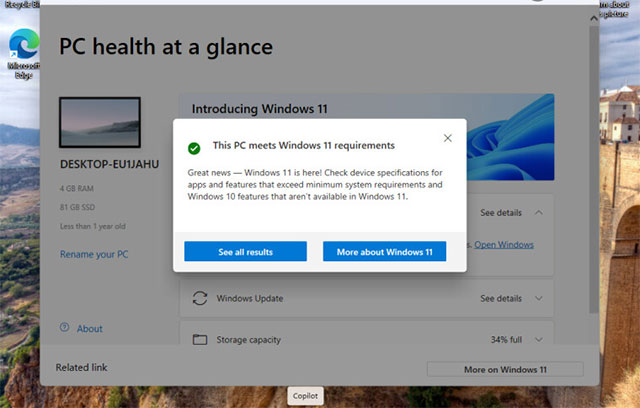
<p style="text-align: justify;">5. Cài đặt ứng dụng PC Health Check và chạy nó. Nhấp vào kiểm tra và đảm bảo rằng hệ thống của bạn tương thích với Windows 11.</p>

<div style="text-align: justify;"><img alt="" data-adbro-processed="true" data-i="1" data-src="https://st.quantrimang.com/photos/image/2024/10/06/windows-11-24h22.jpg" data-was-processed="true" height="408" src="https://st.quantrimang.com/photos/image/2024/10/06/windows-11-24h22.jpg" width="640" /></div>

<p style="text-align: justify;">6. Đóng ứng dụng PC Health Check và khởi chạy file&nbsp;<strong>.exe&nbsp;</strong>đã tải xuống.</p>

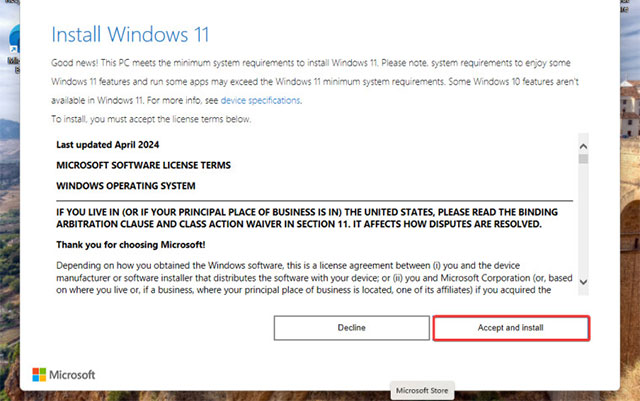
<p style="text-align: justify;">7. Nhấp vào &quot;<strong>Accept and Install</strong>&quot;.</p>

<p style="text-align: justify;"><img alt="" data-i="2" data-src="https://st.quantrimang.com/photos/image/2024/10/06/windows-11-24h23.jpg" data-was-processed="true" height="401" src="https://st.quantrimang.com/photos/image/2024/10/06/windows-11-24h23.jpg" width="640" /></p>

<div style="text-align: justify;">&nbsp;</div>

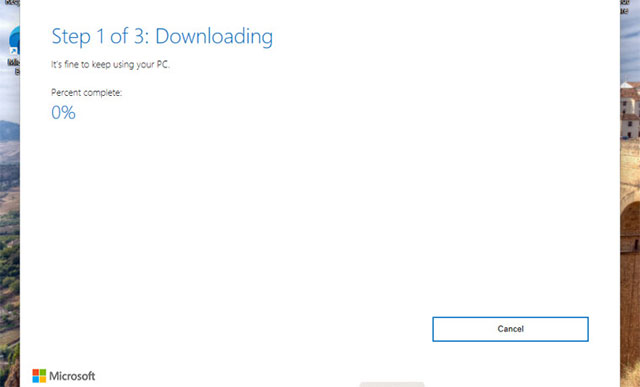
<p style="text-align: justify;">8. Đợi quá trình hoàn tất. Ứng dụng sẽ nhắc bạn khởi động lại sau khi quá trình chuẩn bị kết thúc.</p>

<p style="text-align: justify;"><img alt="" data-i="3" data-src="https://st.quantrimang.com/photos/image/2024/10/06/windows-11-24h24.jpg" data-was-processed="true" height="387" src="https://st.quantrimang.com/photos/image/2024/10/06/windows-11-24h24.jpg" width="640" /></p>

<h2 style="text-align: justify;">Tùy chọn 3 — cập nhật lên Windows 11 24H2 bằng các image chính thức</h2>

<p style="text-align: justify;">Nếu máy tính của bạn không thể cập nhật lên Windows 11 24H2 bằng các phương pháp nêu trên, việc bắt buộc cập nhật bằng ISO thông qua bản cập nhật tại chỗ sẽ là giải pháp, mặc dù đây có thể không phải là lựa chọn tốt nhất. Microsoft có thể có lệnh giữ tương thích hoặc sự cố đã biết ngăn hệ thống của bạn cập nhật. Trong trường hợp như vậy, việc bắt buộc cài đặt Windows 11 24H2 có thể dẫn đến trải nghiệm người dùng kém, sự cố nghiêm trọng, mất ổn định hoặc ứng dụng bị hỏng. Hãy suy nghĩ kỹ trước khi tiến hành.</p>

<p style="text-align: justify;">1. Truy cập trang web tải xuống Windows 11 chính thức bằng liên kết&nbsp;này.</p>

<p style="text-align: justify;">2. Cuộn xuống phần &quot;<strong>Download Windows 11 Disk Image</strong>&quot;.</p>

<p style="text-align: justify;">3. Chọn &quot;<strong>Windows 11</strong>&quot; từ menu thả xuống và nhấp vào &quot;<strong>Download now</strong>&quot;.</p>

<p style="text-align: justify;">4. Chọn ngôn ngữ bạn cần.</p>

<p style="text-align: justify;">5. Nhấp vào &quot;<strong>64-bit Download</strong>&quot; và đợi trình duyệt tải xuống tệp ISO.</p>

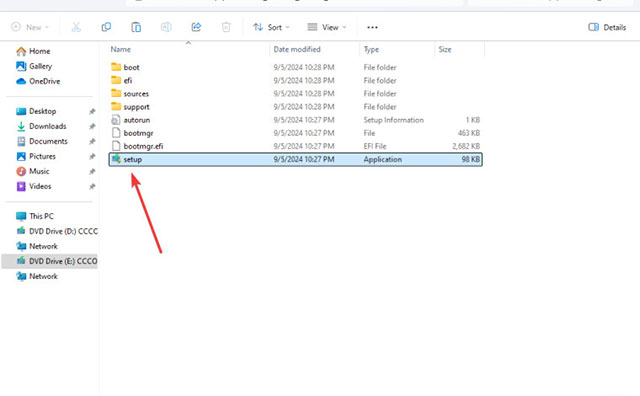
<p style="text-align: justify;">6. Nhấp đúp vào hình ảnh đã tải xuống và khởi chạy tệp&nbsp;<strong>setup.exe</strong>.</p>

<p style="text-align: justify;"><img alt="" data-i="4" data-src="https://st.quantrimang.com/photos/image/2024/10/06/windows-11-24h25.jpg" data-was-processed="true" height="396" src="https://st.quantrimang.com/photos/image/2024/10/06/windows-11-24h25.jpg" width="640" /></p>

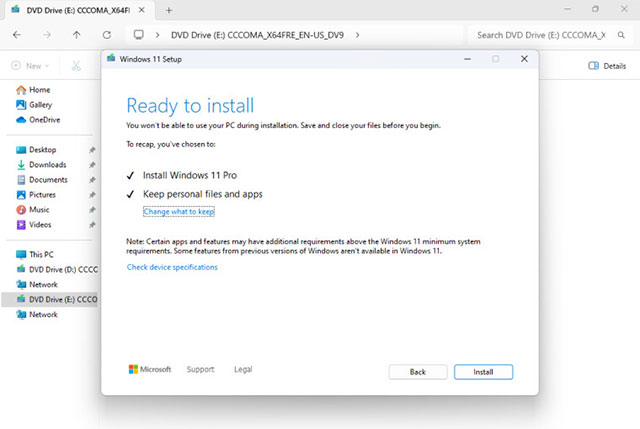
<p style="text-align: justify;">7. Đợi ứng dụng chuẩn bị hệ thống, sau đó nhấp vào &quot;<strong>Settings</strong>&quot; trên màn hình &quot;<strong>Ready to install</strong>&quot;.</p>

<p style="text-align: justify;"><img alt="" data-i="5" data-src="https://st.quantrimang.com/photos/image/2024/10/06/windows-11-24h26.jpg" data-was-processed="true" height="429" src="https://st.quantrimang.com/photos/image/2024/10/06/windows-11-24h26.jpg" width="640" /></p>

<p style="text-align: justify;">Đó là những cách bạn có thể tải xuống Windows 11 phiên bản 24H2 mà không cần chờ Microsoft chấp thuận.</p>
		</div>
				<div id="author">
						<p>
				<strong>Nguồn tin:</strong>
				Quantrimang.com:
			</p>
		</div>
	</div>
	<div id="footer" class="clearfix">
		<div id="url">
			<strong>URL của bản tin này: </strong><a href="https://www.nguoicodonvn2008.info/vi/news/savefile/kien-thuc-may-tinh/cach-nhan-ban-cap-nhat-windows-11-24h2-vua-chinh-thuc-ra-mat-9137.html" title="Cách nhận bản cập nhật Windows 11 24H2 vừa chính thức ra mắt">https://www.nguoicodonvn2008.info/vi/news/savefile/kien-thuc-may-tinh/cach-nhan-ban-cap-nhat-windows-11-24h2-vua-chinh-thuc-ra-mat-9137.html</a>

		</div>
		<div class="clear"></div>
		<div class="copyright">
			&copy; .&#x3A; Nguoicodonvn2008.info - Cõi lòng người cô đơn &#x3A;.
		</div>
		<div id="contact">
			<a href="mailto:admin@nguoicodonvn2008.info">admin@nguoicodonvn2008.info</a>
		</div>
	</div>
</div>
        <div id="timeoutsess" class="chromeframe">
            Bạn đã không sử dụng Site, <a onclick="timeoutsesscancel();" href="https://nguoicodonvn2008.info/#">Bấm vào đây để duy trì trạng thái đăng nhập</a>. Thời gian chờ: <span id="secField"> 60 </span> giây
        </div>
        <div id="openidResult" class="nv-alert" style="display:none"></div>
        <div id="openidBt" data-result="" data-redirect=""></div>
		</script>
		<div class="car-top">
  <span><img src="https://nguoicodonvn2008.info/themes/default/images/car.png" alt=""></span>
</div>
<script src="https://nguoicodonvn2008.info/assets/js/jquery/jquery.min.js"></script>
<script>var nv_base_siteurl="/",nv_lang_data="vi",nv_lang_interface="vi",nv_name_variable="nv",nv_fc_variable="op",nv_lang_variable="language",nv_module_name="news",nv_func_name="savefile",nv_is_user=0, nv_my_ofs=-4,nv_my_abbr="EDT",nv_cookie_prefix="nv4c_e856T",nv_check_pass_mstime=1738000,nv_area_admin=0,nv_safemode=0,theme_responsive=0,nv_recaptcha_ver=2,nv_recaptcha_sitekey="",nv_recaptcha_type="image",XSSsanitize=1;</script>
<script src="https://nguoicodonvn2008.info/assets/js/language/vi.js"></script>
<script src="https://nguoicodonvn2008.info/assets/js/DOMPurify/purify3.js"></script>
<script src="https://nguoicodonvn2008.info/assets/js/global.js"></script>
<script src="https://nguoicodonvn2008.info/assets/js/site.js"></script>
<script src="https://nguoicodonvn2008.info/themes/default/js/news.js"></script>
<script src="https://nguoicodonvn2008.info/themes/default/js/main.js"></script>
<script src="https://nguoicodonvn2008.info/themes/default/js/custom.js"></script>
<script type="application/ld+json">
        {
            "@context": "https://schema.org",
            "@type": "Organization",
            "url": "https://nguoicodonvn2008.info",
            "logo": "https://nguoicodonvn2008.info/uploads/angel.gif"
        }
        </script>
<script src="https://nguoicodonvn2008.info/themes/default/js/bootstrap.min.js"></script>
<script type="text/javascript">
var $scrolltop = $('.car-top');
$scrolltop.on('click', function () {
    $('html,body').animate({
        scrollTop: 0
    }, 800);
    $(this).addClass("car-run");
    setTimeout(function(){ $scrolltop.removeClass('car-run');}, 1000);
    return false;
});
$(window).on('scroll', function ()
{ 
    if($(window).scrollTop() >= 200)
    {
        $scrolltop.addClass("show");
        $scrolltop.addClass("car-down");
    }
    else
    {
       $scrolltop.removeClass("show");
       setTimeout(function(){ $scrolltop.removeClass('car-down');}, 300);
    }
});
</script>
</body>
</html>