<!DOCTYPE html>
    <html lang="vi" xmlns="http://www.w3.org/1999/xhtml" prefix="og: http://ogp.me/ns#">
    <head>
<title>Cách mở tệp cục bộ Windows bằng trình duyệt web</title>
<meta name="description" content="Cách mở tệp cục bộ Windows bằng trình duyệt web - Savefile - Tin Tức -...">
<meta name="author" content=".: Nguoicodonvn2008.info - Cõi lòng người cô đơn :.">
<meta name="copyright" content=".: Nguoicodonvn2008.info - Cõi lòng người cô đơn :. [admin@nguoicodonvn2008.info]">
<meta name="robots" content="index, archive, follow, noodp">
<meta name="googlebot" content="index,archive,follow,noodp">
<meta name="msnbot" content="all,index,follow">
<meta name="generator" content="NukeViet v4.5">
<meta http-equiv="Content-Type" content="text/html; charset=utf-8">
<meta property="og:title" content="Cách mở tệp cục bộ Windows bằng trình duyệt web">
<meta property="og:type" content="website">
<meta property="og:description" content="Savefile - Tin Tức - https&#x3A;&#x002F;&#x002F;www.nguoicodonvn2008.info&#x002F;vi&#x002F;news&#x002F;savefile&#x002F;kien-thuc-may-tinh&#x002F;cach-mo-tep-cuc-bo-windows-bang-trinh-duyet-web-3789.html">
<meta property="og:site_name" content=".&#x3A; Nguoicodonvn2008.info - Cõi lòng người cô đơn &#x3A;.">
<meta property="og:url" content="https://www.nguoicodonvn2008.info/vi/news/savefile/kien-thuc-may-tinh/cach-mo-tep-cuc-bo-windows-bang-trinh-duyet-web-3789.html">
<link rel="shortcut icon" href="https://nguoicodonvn2008.info/favicon.ico">
<link rel="canonical" href="https://www.nguoicodonvn2008.info/vi/news/savefile/kien-thuc-may-tinh/cach-mo-tep-cuc-bo-windows-bang-trinh-duyet-web-3789.html">
<link rel="alternate" href="https://nguoicodonvn2008.info/vi/news/rss/" title="Tin Tức" type="application/rss+xml">
<link rel="alternate" href="https://nguoicodonvn2008.info/vi/news/rss/karaoke-dual/" title="Tin Tức - Karaoke Dual" type="application/rss+xml">
<link rel="alternate" href="https://nguoicodonvn2008.info/vi/news/rss/nhac-tre/" title="Tin Tức - Nhạc trẻ" type="application/rss+xml">
<link rel="alternate" href="https://nguoicodonvn2008.info/vi/news/rss/tru-tinh/" title="Tin Tức - Trữ tình" type="application/rss+xml">
<link rel="alternate" href="https://nguoicodonvn2008.info/vi/news/rss/nuoc-ngoai/" title="Tin Tức - Nước ngoài" type="application/rss+xml">
<link rel="alternate" href="https://nguoicodonvn2008.info/vi/news/rss/remix/" title="Tin Tức - Remix" type="application/rss+xml">
<link rel="alternate" href="https://nguoicodonvn2008.info/vi/news/rss/tam-su-tinh-yeu/" title="Tin Tức - Tâm sự tình yêu" type="application/rss+xml">
<link rel="alternate" href="https://nguoicodonvn2008.info/vi/news/rss/tho-suu-tam/" title="Tin Tức - Thơ sưu tầm" type="application/rss+xml">
<link rel="alternate" href="https://nguoicodonvn2008.info/vi/news/rss/cuoc-song/" title="Tin Tức - Cuộc sống" type="application/rss+xml">
<link rel="alternate" href="https://nguoicodonvn2008.info/vi/news/rss/phan-mem/" title="Tin Tức - Phần mềm" type="application/rss+xml">
<link rel="alternate" href="https://nguoicodonvn2008.info/vi/news/rss/kien-thuc-may-tinh/" title="Tin Tức - Kiến thức máy tính" type="application/rss+xml">
<link rel="alternate" href="https://nguoicodonvn2008.info/vi/news/rss/hoc-tap/" title="Tin Tức - Học tập" type="application/rss+xml">
<link rel="alternate" href="https://nguoicodonvn2008.info/vi/news/rss/tai-lieu/" title="Tin Tức - Tài liệu" type="application/rss+xml">
<link rel="alternate" href="https://nguoicodonvn2008.info/vi/news/rss/de-thi/" title="Tin Tức - Đề thi" type="application/rss+xml">
<link rel="preload" as="style" href="https://nguoicodonvn2008.info/assets/css/font-awesome.min.css" type="text/css">
<link rel="preload" as="style" href="https://nguoicodonvn2008.info/themes/default/css/bootstrap.non-responsive.css" type="text/css">
<link rel="preload" as="style" href="https://nguoicodonvn2008.info/themes/default/css/style.css" type="text/css">
<link rel="preload" as="style" href="https://nguoicodonvn2008.info/themes/default/css/style.non-responsive.css" type="text/css">
<link rel="preload" as="style" href="https://nguoicodonvn2008.info/themes/default/css/news.css" type="text/css">
<link rel="preload" as="style" href="https://nguoicodonvn2008.info/themes/default/css/custom.css" type="text/css">
<link rel="preload" as="script" href="https://nguoicodonvn2008.info/assets/js/jquery/jquery.min.js" type="text/javascript">
<link rel="preload" as="script" href="https://nguoicodonvn2008.info/assets/js/language/vi.js" type="text/javascript">
<link rel="preload" as="script" href="https://nguoicodonvn2008.info/assets/js/DOMPurify/purify3.js" type="text/javascript">
<link rel="preload" as="script" href="https://nguoicodonvn2008.info/assets/js/global.js" type="text/javascript">
<link rel="preload" as="script" href="https://nguoicodonvn2008.info/assets/js/site.js" type="text/javascript">
<link rel="preload" as="script" href="https://nguoicodonvn2008.info/themes/default/js/news.js" type="text/javascript">
<link rel="preload" as="script" href="https://nguoicodonvn2008.info/themes/default/js/main.js" type="text/javascript">
<link rel="preload" as="script" href="https://nguoicodonvn2008.info/themes/default/js/custom.js" type="text/javascript">
<link rel="preload" as="script" href="https://nguoicodonvn2008.info/themes/default/js/bootstrap.min.js" type="text/javascript">
<link rel="stylesheet" href="https://nguoicodonvn2008.info/assets/css/font-awesome.min.css">
<link rel="stylesheet" href="https://nguoicodonvn2008.info/themes/default/css/bootstrap.non-responsive.css">
<link rel="stylesheet" href="https://nguoicodonvn2008.info/themes/default/css/style.css">
<link rel="stylesheet" href="https://nguoicodonvn2008.info/themes/default/css/style.non-responsive.css">
<link rel="StyleSheet" href="https://nguoicodonvn2008.info/themes/default/css/news.css">
<link rel="stylesheet" href="https://nguoicodonvn2008.info/themes/default/css/custom.css">
<style type="text/css">
	body{background: #fff;}
</style>
    </head>
    <body>
<div id="print">
	<div id="hd_print">
		<h2 class="pull-left">.&#x3A; Nguoicodonvn2008.info - Cõi lòng người cô đơn &#x3A;.</h2>
		<p class="pull-right"><a title=".&#x3A; Nguoicodonvn2008.info - Cõi lòng người cô đơn &#x3A;." href="https://nguoicodonvn2008.info/">https://nguoicodonvn2008.info</a></p>
	</div>
	<div class="clear"></div>
	<hr />
	<div id="content">
		<h1>Cách mở tệp cục bộ Windows bằng trình duyệt web</h1>
		<ul class="list-inline">
			<li>Thứ bảy - 20/03/2021 00:53</li>
			<li class="hidden-print txtrequired"><em class="fa fa-print">&nbsp;</em><a title="In ra" href="javascript:;" onclick="window.print()">In ra</a></li>
			<li class="hidden-print txtrequired"><em class="fa fa-power-off">&nbsp;</em><a title="Đóng cửa sổ này" href="javascript:;" onclick="window.close()">Đóng cửa sổ này</a></li>
		</ul>
		<div class="clear"></div>
		<div id="hometext">
		</div>
				<div class="imghome">
			<img alt="Cách mở tệp cục bộ Windows bằng trình duyệt web" src="https://st.quantrimang.com/photos/image/2021/03/13/cach-mo-tep-cuc-bo-windows-bang-trinh-duyet-web1.jpg" width="460" class="img-thumbnail" />
		</div>
		<div class="clear"></div>
		<div id="bodytext" class="clearfix">
			<p style="text-align: justify;">Có lẽ đã không ít lần bạn phải làm việc liên tục qua lại giữa trình duyệt web và một vài tệp cục bộ khác trên máy tính. Việc phải chuyển đổi qua lại giữa cửa sổ trình duyệt và cửa sổ xem tệp cục bộ của hệ thống khiến bạn cảm thấy rối rắm và mất thời gian. Vậy tại sao bạn không biến chính trình duyệt web thành công cụ mở tệp cục bộ trên máy tính Windows 10 của mình?</p>

<p style="text-align: justify;">Tùy thuộc vào trình duyệt mà bạn sử dụng, việc mở các tệp cục bộ có thể được hỗ trợ nguyên bản hoặc yêu cầu bạn phải thực hiện một vài sửa đổi cài đặt trên máy tính Windows 10 của mình.</p>

<h2 style="text-align: justify;">Vấn đề bảo mật</h2>

<p style="text-align: justify;">Có một số vấn đề cần được giải quyết trước khi bạn bắt tay vào thiết lập để mở các tệp cục bộ trong trình duyệt web của mình.</p>

<p style="text-align: justify;">Có thể bạn không biết nhưng trình duyệt web sở hữu toàn quyền truy cập Internet nên bảo mật chính là một vấn đề quan trọng cần nhắc tới. Rất có thể bạn có thông tin quan trọng lưu trữ dưới dạng tệp cục bộ trên máy tính của mình và không muốn những dữ liệu này rơi vào tay kẻ xấu.</p>

<div style="text-align: justify;">&nbsp;</div>

<p style="text-align: justify;">Để tránh tình huống trên, bạn cần thực hiện một cuộc đánh giá nhỏ nhưng kỹ lưỡng. Máy tính phải được quét virus và trình duyệt được sử dụng phải là nguyên bản. Tất cả các tiện ích bổ sung và tiện ích mở rộng không cần thiết nên được gỡ bỏ, vì chúng có thể chứa phần mềm độc hại nguy hiểm, đánh cắp dữ liệu, hoặc thậm chí là ransomware.</p>

<p style="text-align: justify;">Bạn nên sử dụng phần mềm chống virus. Chúng không chỉ bảo vệ dữ liệu trên máy tính mà đôi khi còn hỗ trợ phân tích mạng lưu lượng để tìm bất kỳ phần mềm độc hại nào và gắn cờ nó. Sau khi được cài đặt, phần mềm sẽ thực hiện quét sâu máy tính để loại bỏ virus, phần mềm độc hại và ransomware tiềm ẩn. Chỉ cần lưu ý, phần mềm chống virus phải đủ tốt để có thể kiểm tra phân vùng khởi động của ổ cứng máy tính.</p>

<h2 style="text-align: justify;">Mở tệp cục bộ bằng trình duyệt web</h2>

<h3 style="text-align: justify;">Google Chrome</h3>

<p style="text-align: justify;">Bạn có thể sử dụng Google Chrome để truy cập các tệp cục bộ dễ dàng bằng cách nhấn tổ hợp phím Ctrl + O.</p>

<p style="text-align: justify;">Giao diện duyệt tệp quen thuộc sẽ mở ra, cho phép bạn điều hướng đến bất kỳ tệp hoặc thư mục nào cần mở.</p>

<div style="text-align: justify;">&nbsp;</div>

<p style="text-align: justify;">Chrome hỗ trợ mở hầu hết các loại tệp cơ bản mà mọi người thường xuyên sử dụng như pdf, mp3, một số tệp video và hầu hết các định dạng tệp tài liệu.</p>

<p style="text-align: justify;">Sở dĩ việc mở tệp cục bộ trên Chrome dễ dàng như vậy bởi đây là một tính năng gốc đã được Google tích hợp sẵn. Ngược lại, việc mở tệp cục bộ trên các trình duyệt không được hỗ trợ gốc sẽ phức tạp hơn đôi chút.</p>

<h3 style="text-align: justify;">Firefox</h3>

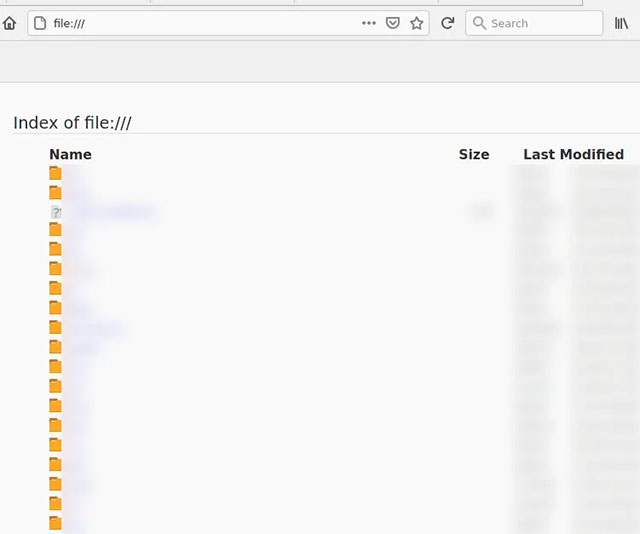
<p style="text-align: justify;">Đối với Firefox, bạn có thể mở một tệp cục bộ bằng cách mở một tab mới, sau đó nhấp vào tùy chọn “Open File”. Thao tác này sẽ mở trình khám phá tệp có thể được sử dụng để điều hướng các thư mục khác nhau và mở những định dạng tệp được Firefox hỗ trợ. Bạn cũng có thể rút ngắn quá trình này bằng cách nhập file:/// vào thanh địa chỉ và nhấn enter.</p>

<p style="text-align: justify;"><img alt="Trình khám phá tệp firefox" data-i="0" data-src="https://st.quantrimang.com/photos/image/2021/03/13/cach-mo-tep-cuc-bo-windows-bang-trinh-duyet-web1.jpg" data-was-processed="true" height="534" src="https://st.quantrimang.com/photos/image/2021/03/13/cach-mo-tep-cuc-bo-windows-bang-trinh-duyet-web1.jpg" width="640" /></p>

<h3 style="text-align: justify;">Edge</h3>

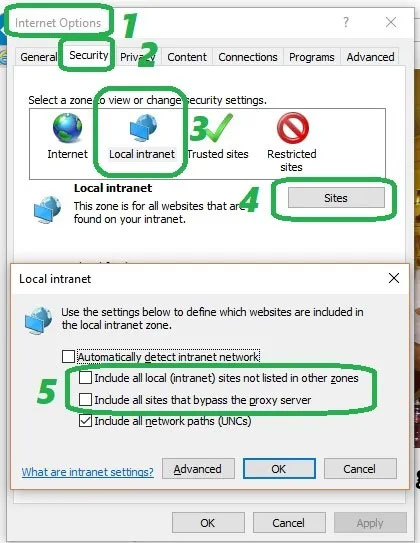
<p style="text-align: justify;">Tính năng mở trình khám phá tệp trong Edge hiện không được hỗ trợ. Một cách bạn có thể sử dụng để giải quyết vấn đề này là truy cập vào tùy chọn Internet, nhấp vào tab Security, chọn “local intranet” và nhấp vào “Sites”. Sau đó, bỏ tích các ô có nội dung “Include all local (intranet) sites not listed in other zones” cũng như “Include all sites that bypass the proxy server”.</p>

<p style="text-align: justify;"><img alt="Edge" data-i="1" data-src="https://st.quantrimang.com/photos/image/2021/03/13/cach-mo-tep-cuc-bo-windows-bang-trinh-duyet-web2.jpg" data-was-processed="true" height="543" src="https://st.quantrimang.com/photos/image/2021/03/13/cach-mo-tep-cuc-bo-windows-bang-trinh-duyet-web2.jpg" width="420" /></p>

<p style="text-align: justify;">Vấn đề với phương pháp này là nó có thể khiến máy tính của bạn dễ bị tấn công từ một tác nhân độc hại nằm ngay trong mạng cục bộ, chẳng hạn như mạng nội bộ của văn phòng, công ty. Đây cũng là một phương pháp “không bền” vì Edge thường xuyên tung ra các bản cập nhật khiến bạn phải thiết lập lại từ đầu.</p>

<p style="text-align: justify;">Nếu địa chỉ chính xác của tệp bạn muốn mở là không xác định, bạn cũng có thể chèn địa chỉ đầy đủ của tệp vào thanh tìm kiếm và nhấn enter để mở tệp đó trên Edge. Lưu ý rằng tệp phải thuộc một định dạng được Edge hỗ trợ, chẳng hạn như pdf hoặc các loại tệp nhạc phổ biến</p>
		</div>
				<div id="author">
						<p>
				<strong>Nguồn tin:</strong>
				Quantrimang.com
			</p>
		</div>
	</div>
	<div id="footer" class="clearfix">
		<div id="url">
			<strong>URL của bản tin này: </strong><a href="https://www.nguoicodonvn2008.info/vi/news/savefile/kien-thuc-may-tinh/cach-mo-tep-cuc-bo-windows-bang-trinh-duyet-web-3789.html" title="Cách mở tệp cục bộ Windows bằng trình duyệt web">https://www.nguoicodonvn2008.info/vi/news/savefile/kien-thuc-may-tinh/cach-mo-tep-cuc-bo-windows-bang-trinh-duyet-web-3789.html</a>

		</div>
		<div class="clear"></div>
		<div class="copyright">
			&copy; .&#x3A; Nguoicodonvn2008.info - Cõi lòng người cô đơn &#x3A;.
		</div>
		<div id="contact">
			<a href="mailto:admin@nguoicodonvn2008.info">admin@nguoicodonvn2008.info</a>
		</div>
	</div>
</div>
        <div id="timeoutsess" class="chromeframe">
            Bạn đã không sử dụng Site, <a onclick="timeoutsesscancel();" href="https://nguoicodonvn2008.info/#">Bấm vào đây để duy trì trạng thái đăng nhập</a>. Thời gian chờ: <span id="secField"> 60 </span> giây
        </div>
        <div id="openidResult" class="nv-alert" style="display:none"></div>
        <div id="openidBt" data-result="" data-redirect=""></div>
		</script>
		<div class="car-top">
  <span><img src="https://nguoicodonvn2008.info/themes/default/images/car.png" alt=""></span>
</div>
<script src="https://nguoicodonvn2008.info/assets/js/jquery/jquery.min.js"></script>
<script>var nv_base_siteurl="/",nv_lang_data="vi",nv_lang_interface="vi",nv_name_variable="nv",nv_fc_variable="op",nv_lang_variable="language",nv_module_name="news",nv_func_name="savefile",nv_is_user=0, nv_my_ofs=-4,nv_my_abbr="EDT",nv_cookie_prefix="nv4c_e856T",nv_check_pass_mstime=1738000,nv_area_admin=0,nv_safemode=0,theme_responsive=0,nv_recaptcha_ver=2,nv_recaptcha_sitekey="",nv_recaptcha_type="image",XSSsanitize=1;</script>
<script src="https://nguoicodonvn2008.info/assets/js/language/vi.js"></script>
<script src="https://nguoicodonvn2008.info/assets/js/DOMPurify/purify3.js"></script>
<script src="https://nguoicodonvn2008.info/assets/js/global.js"></script>
<script src="https://nguoicodonvn2008.info/assets/js/site.js"></script>
<script src="https://nguoicodonvn2008.info/themes/default/js/news.js"></script>
<script src="https://nguoicodonvn2008.info/themes/default/js/main.js"></script>
<script src="https://nguoicodonvn2008.info/themes/default/js/custom.js"></script>
<script type="application/ld+json">
        {
            "@context": "https://schema.org",
            "@type": "Organization",
            "url": "https://nguoicodonvn2008.info",
            "logo": "https://nguoicodonvn2008.info/uploads/angel.gif"
        }
        </script>
<script src="https://nguoicodonvn2008.info/themes/default/js/bootstrap.min.js"></script>
<script type="text/javascript">
var $scrolltop = $('.car-top');
$scrolltop.on('click', function () {
    $('html,body').animate({
        scrollTop: 0
    }, 800);
    $(this).addClass("car-run");
    setTimeout(function(){ $scrolltop.removeClass('car-run');}, 1000);
    return false;
});
$(window).on('scroll', function ()
{ 
    if($(window).scrollTop() >= 200)
    {
        $scrolltop.addClass("show");
        $scrolltop.addClass("car-down");
    }
    else
    {
       $scrolltop.removeClass("show");
       setTimeout(function(){ $scrolltop.removeClass('car-down');}, 300);
    }
});
</script>
</body>
</html>