<!DOCTYPE html>
    <html lang="vi" xmlns="http://www.w3.org/1999/xhtml" prefix="og: http://ogp.me/ns#">
    <head>
<title>Cách lưu dữ liệu vào file CSV trong ứng dụng C&#x23;</title>
<meta name="description" content="Cách lưu dữ liệu vào file CSV trong ứng dụng C&#x23; - Savefile - Tin Tức -...">
<meta name="author" content=".: Nguoicodonvn2008.info - Cõi lòng người cô đơn :.">
<meta name="copyright" content=".: Nguoicodonvn2008.info - Cõi lòng người cô đơn :. [admin@nguoicodonvn2008.info]">
<meta name="robots" content="index, archive, follow, noodp">
<meta name="googlebot" content="index,archive,follow,noodp">
<meta name="msnbot" content="all,index,follow">
<meta name="generator" content="NukeViet v4.5">
<meta http-equiv="Content-Type" content="text/html; charset=utf-8">
<meta property="og:title" content="Cách lưu dữ liệu vào file CSV trong ứng dụng C&#x23;">
<meta property="og:type" content="website">
<meta property="og:description" content="Savefile - Tin Tức - https&#x3A;&#x002F;&#x002F;www.nguoicodonvn2008.info&#x002F;vi&#x002F;news&#x002F;savefile&#x002F;kien-thuc-may-tinh&#x002F;cach-luu-du-lieu-vao-file-csv-trong-ung-dung-c-6224.html">
<meta property="og:site_name" content=".&#x3A; Nguoicodonvn2008.info - Cõi lòng người cô đơn &#x3A;.">
<meta property="og:url" content="https://www.nguoicodonvn2008.info/vi/news/savefile/kien-thuc-may-tinh/cach-luu-du-lieu-vao-file-csv-trong-ung-dung-c-6224.html">
<link rel="shortcut icon" href="https://nguoicodonvn2008.info/favicon.ico">
<link rel="canonical" href="https://www.nguoicodonvn2008.info/vi/news/savefile/kien-thuc-may-tinh/cach-luu-du-lieu-vao-file-csv-trong-ung-dung-c-6224.html">
<link rel="alternate" href="https://nguoicodonvn2008.info/vi/news/rss/" title="Tin Tức" type="application/rss+xml">
<link rel="alternate" href="https://nguoicodonvn2008.info/vi/news/rss/karaoke-dual/" title="Tin Tức - Karaoke Dual" type="application/rss+xml">
<link rel="alternate" href="https://nguoicodonvn2008.info/vi/news/rss/nhac-tre/" title="Tin Tức - Nhạc trẻ" type="application/rss+xml">
<link rel="alternate" href="https://nguoicodonvn2008.info/vi/news/rss/tru-tinh/" title="Tin Tức - Trữ tình" type="application/rss+xml">
<link rel="alternate" href="https://nguoicodonvn2008.info/vi/news/rss/nuoc-ngoai/" title="Tin Tức - Nước ngoài" type="application/rss+xml">
<link rel="alternate" href="https://nguoicodonvn2008.info/vi/news/rss/remix/" title="Tin Tức - Remix" type="application/rss+xml">
<link rel="alternate" href="https://nguoicodonvn2008.info/vi/news/rss/tam-su-tinh-yeu/" title="Tin Tức - Tâm sự tình yêu" type="application/rss+xml">
<link rel="alternate" href="https://nguoicodonvn2008.info/vi/news/rss/tho-suu-tam/" title="Tin Tức - Thơ sưu tầm" type="application/rss+xml">
<link rel="alternate" href="https://nguoicodonvn2008.info/vi/news/rss/cuoc-song/" title="Tin Tức - Cuộc sống" type="application/rss+xml">
<link rel="alternate" href="https://nguoicodonvn2008.info/vi/news/rss/phan-mem/" title="Tin Tức - Phần mềm" type="application/rss+xml">
<link rel="alternate" href="https://nguoicodonvn2008.info/vi/news/rss/kien-thuc-may-tinh/" title="Tin Tức - Kiến thức máy tính" type="application/rss+xml">
<link rel="alternate" href="https://nguoicodonvn2008.info/vi/news/rss/hoc-tap/" title="Tin Tức - Học tập" type="application/rss+xml">
<link rel="alternate" href="https://nguoicodonvn2008.info/vi/news/rss/tai-lieu/" title="Tin Tức - Tài liệu" type="application/rss+xml">
<link rel="alternate" href="https://nguoicodonvn2008.info/vi/news/rss/de-thi/" title="Tin Tức - Đề thi" type="application/rss+xml">
<link rel="preload" as="style" href="https://nguoicodonvn2008.info/assets/css/font-awesome.min.css" type="text/css">
<link rel="preload" as="style" href="https://nguoicodonvn2008.info/themes/default/css/bootstrap.non-responsive.css" type="text/css">
<link rel="preload" as="style" href="https://nguoicodonvn2008.info/themes/default/css/style.css" type="text/css">
<link rel="preload" as="style" href="https://nguoicodonvn2008.info/themes/default/css/style.non-responsive.css" type="text/css">
<link rel="preload" as="style" href="https://nguoicodonvn2008.info/themes/default/css/news.css" type="text/css">
<link rel="preload" as="style" href="https://nguoicodonvn2008.info/themes/default/css/custom.css" type="text/css">
<link rel="preload" as="script" href="https://nguoicodonvn2008.info/assets/js/jquery/jquery.min.js" type="text/javascript">
<link rel="preload" as="script" href="https://nguoicodonvn2008.info/assets/js/language/vi.js" type="text/javascript">
<link rel="preload" as="script" href="https://nguoicodonvn2008.info/assets/js/DOMPurify/purify3.js" type="text/javascript">
<link rel="preload" as="script" href="https://nguoicodonvn2008.info/assets/js/global.js" type="text/javascript">
<link rel="preload" as="script" href="https://nguoicodonvn2008.info/assets/js/site.js" type="text/javascript">
<link rel="preload" as="script" href="https://nguoicodonvn2008.info/themes/default/js/news.js" type="text/javascript">
<link rel="preload" as="script" href="https://nguoicodonvn2008.info/themes/default/js/main.js" type="text/javascript">
<link rel="preload" as="script" href="https://nguoicodonvn2008.info/themes/default/js/custom.js" type="text/javascript">
<link rel="preload" as="script" href="https://nguoicodonvn2008.info/themes/default/js/bootstrap.min.js" type="text/javascript">
<link rel="stylesheet" href="https://nguoicodonvn2008.info/assets/css/font-awesome.min.css">
<link rel="stylesheet" href="https://nguoicodonvn2008.info/themes/default/css/bootstrap.non-responsive.css">
<link rel="stylesheet" href="https://nguoicodonvn2008.info/themes/default/css/style.css">
<link rel="stylesheet" href="https://nguoicodonvn2008.info/themes/default/css/style.non-responsive.css">
<link rel="StyleSheet" href="https://nguoicodonvn2008.info/themes/default/css/news.css">
<link rel="stylesheet" href="https://nguoicodonvn2008.info/themes/default/css/custom.css">
<style type="text/css">
	body{background: #fff;}
</style>
    </head>
    <body>
<div id="print">
	<div id="hd_print">
		<h2 class="pull-left">.&#x3A; Nguoicodonvn2008.info - Cõi lòng người cô đơn &#x3A;.</h2>
		<p class="pull-right"><a title=".&#x3A; Nguoicodonvn2008.info - Cõi lòng người cô đơn &#x3A;." href="https://nguoicodonvn2008.info/">https://nguoicodonvn2008.info</a></p>
	</div>
	<div class="clear"></div>
	<hr />
	<div id="content">
		<h1>Cách lưu dữ liệu vào file CSV trong ứng dụng C&#x23;</h1>
		<ul class="list-inline">
			<li>Thứ năm - 20/10/2022 00:47</li>
			<li class="hidden-print txtrequired"><em class="fa fa-print">&nbsp;</em><a title="In ra" href="javascript:;" onclick="window.print()">In ra</a></li>
			<li class="hidden-print txtrequired"><em class="fa fa-power-off">&nbsp;</em><a title="Đóng cửa sổ này" href="javascript:;" onclick="window.close()">Đóng cửa sổ này</a></li>
		</ul>
		<div class="clear"></div>
		<div id="hometext">
		</div>
				<div class="imghome">
			<img alt="Cách lưu dữ liệu vào file CSV trong ứng dụng C&#x23;" src="https://st.quantrimang.com/photos/image/2022/10/19/luu-du-lieu-vao-file-csv-trong-ung-dung-c-2.jpg" width="460" class="img-thumbnail" />
		</div>
		<div class="clear"></div>
		<div id="bodytext" class="clearfix">
			<p style="text-align: justify;">Lưu dữ liệu vào một file có thể là một kỹ thuật rất mạnh khi nói đến phân tích hoặc báo cáo dữ liệu. Nếu bạn đang tạo ứng dụng C#, bạn có thể tạo&nbsp;file CSV&nbsp;để lưu dữ liệu của mình vào.</p>

<p style="text-align: justify;">File CSV là file văn bản mà bạn có thể lưu trữ các giá trị. Bạn có thể phân tách từng điểm dữ liệu bằng cách thêm dấu phẩy giữa các giá trị. Điều này cho phép bạn sắp xếp dữ liệu của mình theo hàng và cột. Sau đó, bạn có thể trực quan hóa các hàng và cột này khi bạn mở file trong&nbsp;Microsoft Excel.</p>

<h2 style="text-align: justify;">Làm cách nào để bạn lưu trữ dữ liệu trong file CSV?</h2>

<p style="text-align: justify;">File CSV là file văn bản nơi bạn có thể phân tách các điểm và giá trị dữ liệu bằng dấu phẩy.</p>

<p style="text-align: justify;">Khi lưu trữ dữ liệu trong file bằng chương trình, hãy thêm mỗi hàng dưới dạng một dòng riêng biệt. Để tạo cột, hãy định dạng dữ liệu bằng cách thêm dấu phẩy để phân tách từng giá trị hoặc điểm dữ liệu.</p>

<pre id="pre0">
<code>StringBuilder output = new StringBuilder();
output.AppendLine(string.Join(&quot;,&quot;, new String&#91;&#93; { &quot;1&quot;, &quot;2&quot;, &quot;3&quot; }));
// CSV File Output = 1,2,3</code></pre>

<h2 style="text-align: justify;">Cách tạo Console Application và Test Data</h2>

<p style="text-align: justify;">Tạo ứng dụng console C# bằng Visual Studio và thêm một số dữ liệu test vào chương trình.</p>

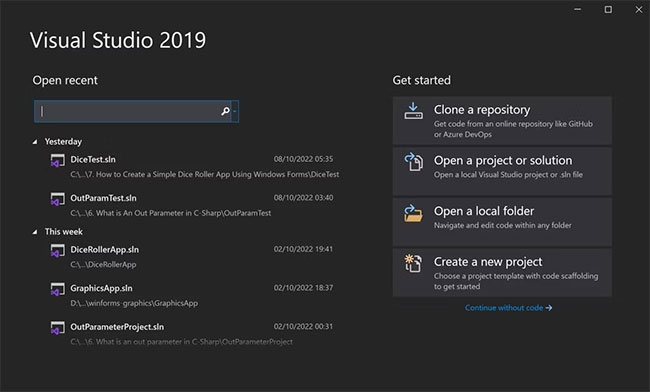
<p style="text-align: justify;">1. Mở Visual Studio và nhấp vào&nbsp;<strong>Create a new project</strong>.</p>

<figure>
<div style="text-align: justify;"><img alt="Tạo ứng dụng console mới" data-i="0" data-src="https://st.quantrimang.com/photos/image/2022/10/19/luu-du-lieu-vao-file-csv-trong-ung-dung-c-1.jpg" data-was-processed="true" height="392" src="https://st.quantrimang.com/photos/image/2022/10/19/luu-du-lieu-vao-file-csv-trong-ung-dung-c-1.jpg" width="650" /></div>

<figcaption>
<div style="text-align: justify;">Tạo ứng dụng console mới</div>
</figcaption>
</figure>

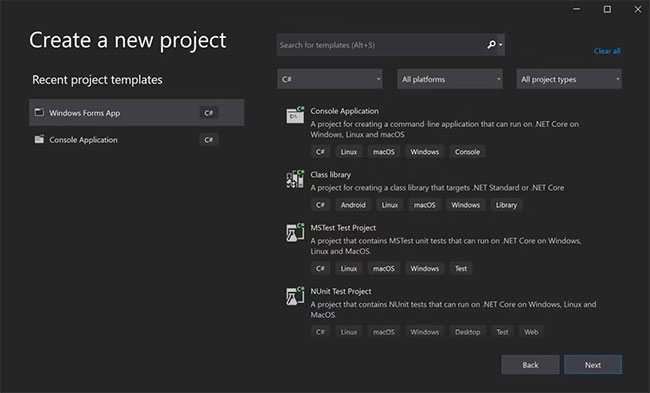
<p style="text-align: justify;">2. Nhấp vào&nbsp;<strong>Console Application</strong>&nbsp;rồi nhấn&nbsp;<strong>Next.</strong></p>

<figure>
<div style="text-align: justify;"><img alt="Chọn Console Application làm dự án mới" data-i="1" data-src="https://st.quantrimang.com/photos/image/2022/10/19/luu-du-lieu-vao-file-csv-trong-ung-dung-c-2.jpg" data-was-processed="true" height="393" src="https://st.quantrimang.com/photos/image/2022/10/19/luu-du-lieu-vao-file-csv-trong-ung-dung-c-2.jpg" width="650" /></div>

<figcaption>
<div style="text-align: justify;">Chọn Console Application làm dự án mới</div>
</figcaption>
</figure>

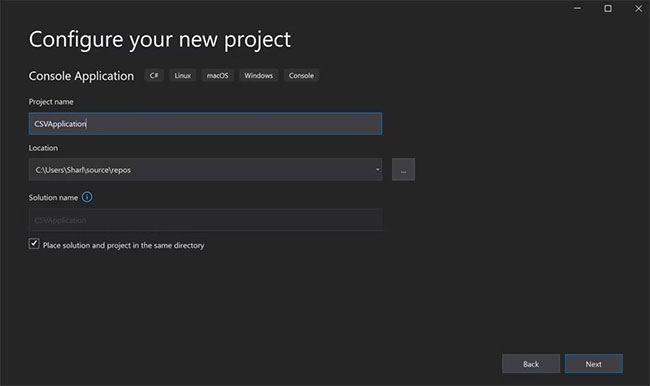
<p style="text-align: justify;">3. Đặt tên cho dự án và lưu trữ nó ở vị trí bạn chọn. Nhấp vào&nbsp;<strong>Next.</strong></p>

<figure>
<div style="text-align: justify;"><img alt="Đặt tên và chọn vị trí lưu" data-i="2" data-src="https://st.quantrimang.com/photos/image/2022/10/19/luu-du-lieu-vao-file-csv-trong-ung-dung-c-3.jpg" data-was-processed="true" height="386" src="https://st.quantrimang.com/photos/image/2022/10/19/luu-du-lieu-vao-file-csv-trong-ung-dung-c-3.jpg" width="650" /></div>

<figcaption>
<div style="text-align: justify;">Đặt tên và chọn vị trí lưu</div>
</figcaption>
</figure>

<p style="text-align: justify;">4. Để nguyên&nbsp;<strong>Target Framework</strong>&nbsp;mặc định và nhấp vào&nbsp;<strong>Create.</strong>&nbsp;Điều này khiến Visual Studio tạo ứng dụng console C# &quot;Hello World&quot; mặc định.</p>

<p style="text-align: justify;">5. Ở đầu chương trình, nhập&nbsp;<strong>System.IO</strong>&nbsp;và&nbsp;<strong>System.Text.</strong>&nbsp;Điều này sẽ cho phép bạn lưu trữ dữ liệu trong file CSV và cũng giúp định dạng chuỗi cho định dạng CSV.</p>

<pre id="pre1">
<code>using System.IO;
using System.Text;</code></pre>

<p style="text-align: justify;">6. Thêm một số dữ liệu test vào chương trình. Bên dưới class&nbsp;<strong>Main Program</strong>, tạo một class mới có tên là&nbsp;<strong>Student.</strong>&nbsp;Sử dụng class Student để lưu trữ thông tin về sinh viên, chẳng hạn như thẻ sinh viên, họ, tên và ngày sinh. Nếu chưa quen với cách hoạt động của các class, bạn có thể tìm hiểu thêm về&nbsp;<a href="https://quantrimang.com/hoc/lop-class-trong-c-155760" title="Lớp (Class) trong C#">Lớp (Class) trong C#</a>.</p>

<pre id="pre2">
<code>public class Student
{
    public int StudentId;
    public string FirstName;
    public string LastName;
    public string Dob;
    public Student(int StudentId, string FirstName, string LastName, string Dob)
    {
        this.StudentId = StudentId;
        this.FirstName = FirstName;
        this.LastName = LastName;
        this.Dob = Dob;
    }
}</code></pre>

<p style="text-align: justify;">7. Bên trong hàm&nbsp;<strong>Main()</strong>, hãy xóa code&nbsp;<em>&quot;Hello World&quot;</em>&nbsp;hiện có. Thay thế nó bằng một mảng students mới:</p>

<pre id="pre3">
<code>static void Main(string&#91;&#93; args)
{
    // Create an array with a list of students
    Student&#91;&#93; students =
    {
        new Student(1, &quot;John&quot;, &quot;Smith&quot;, &quot;03/04/1990&quot;),
        new Student(2, &quot;Adam&quot;, &quot;Van Houten&quot;, &quot;07/07/1991&quot;),
        new Student(3, &quot;Joey&quot;, &quot;Richardson&quot;, &quot;01/02/1992&quot;),
        new Student(4, &quot;Matt&quot;, &quot;Adams&quot;, &quot;05/05/1992&quot;),
        new Student(5, &quot;Jake&quot;, &quot;Smith&quot;, &quot;04/04/1994&quot;),
    }; 
}</code></pre>

<h2 style="text-align: justify;">Cách tạo file CSV mới và thêm các heading</h2>

<p style="text-align: justify;">Sử dụng đường dẫn của file để tạo file CSV mới và thêm các heading vào file.</p>

<p style="text-align: justify;">1. Bên trong hàm&nbsp;<strong>Main()</strong>, bên dưới danh sách sinh viên, hãy tạo một file CSV mới. Sử dụng đường dẫn file để xác định nơi bạn muốn lưu file. Nếu file không tồn tại, chương trình sẽ tự động tạo file CSV mới tại vị trí đó.</p>

<pre id="pre4">
<code>String file = @&quot;C:\Users\Sharl\Desktop\Output.csv&quot;;</code></pre>

<p style="text-align: justify;">2. Sử dụng&nbsp;<strong>StringBuilder</strong>&nbsp;để tạo một chuỗi có định dạng mới. Sử dụng biến separator để lưu trữ dấu phẩy sẽ phân tách từng giá trị cho mỗi cột.</p>

<pre id="pre5">
<code>String separator = &quot;,&quot;;
StringBuilder output = new StringBuilder();</code></pre>

<p style="text-align: justify;">3. Tạo các heading cho hàng trên cùng của file CSV. Thêm các heading cho StudentID của học sinh, họ, tên và ngày sinh.</p>

<pre id="pre6">
<code>String&#91;&#93; headings = { &quot;StudentID&quot;, &quot;First Name&quot;, &quot;Last Name&quot;, &quot;Date Of Birth&quot; };
output.AppendLine(string.Join(separator, headings));</code></pre>

<h2 style="text-align: justify;">Cách lưu trữ giá trị trong file CSV</h2>

<p style="text-align: justify;">Đối với mỗi sinh viên trong mảng students, hãy tạo một hàng mới để lưu trữ thông tin chi tiết của họ bên trong file CSV.</p>

<p style="text-align: justify;">1. Thêm một vòng lặp for cho mỗi sinh viên. Mỗi sinh viên sẽ hiển thị thông tin chi tiết của họ (bao gồm ID sinh viên, họ, tên và ngày sinh) trong mỗi hàng khác nhau của file CSV.</p>

<pre id="pre7">
<code>foreach (Student student in students)
{
}</code></pre>

<p style="text-align: justify;">2. Bên trong vòng lặp for, hãy tạo một danh sách các thuộc tính của sinh viên. Sử dụng&nbsp;<strong>StringBuilder</strong>&nbsp;để định dạng chuỗi và thêm dấu phẩy vào giữa mỗi giá trị.</p>

<pre id="pre8">
<code>String&#91;&#93; newLine = { student.StudentId.ToString(), student.FirstName, student.LastName, student.Dob };
output.AppendLine(string.Join(separator, newLine));</code></pre>

<p style="text-align: justify;">3. Ngoài ra, bạn có thể định dạng hàng bằng&nbsp;<strong>string.Format</strong>, thay vì&nbsp;<strong>StringBuilder.</strong></p>

<pre id="pre9">
<code>string newLine = string.Format(&quot;{0}, {1}, {2}, {3}&quot;, student.StudentId.ToString(), student.FirstName, student.LastName, student.Dob);
output.AppendLine(string.Join(separator, newLine));</code></pre>

<p style="text-align: justify;">4. Sau vòng lặp for, hãy ghi tất cả dữ liệu vào file. Thêm block try-catch để phát hiện bất kỳ sự cố tiềm ẩn nào có thể xảy ra khi ghi dữ liệu vào file. Điều này sẽ đảm bảo chương trình không bị treo nếu chương trình không thể lưu file thành công.</p>

<pre id="pre10">
<code>try
{
    File.AppendAllText(file, output.ToString());
}
catch(Exception ex)
{
    Console.WriteLine(&quot;Data could not be written to the CSV file.&quot;);
    return;
}</code></pre>

<p style="text-align: justify;">5. Thông báo cho người dùng rằng chương trình đã có thể tạo file thành công.</p>

<pre id="pre11">
<code>Console.WriteLine(&quot;The data has been successfully saved to the CSV file&quot;);</code></pre>

<h2 style="text-align: justify;">Cách xem dữ liệu trong file</h2>

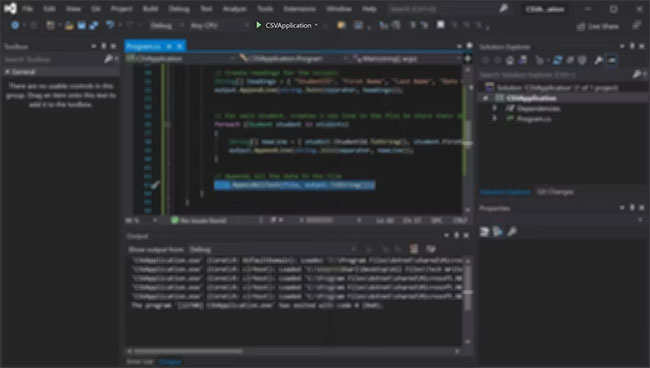
<p style="text-align: justify;">1. Chạy chương trình và điều hướng đến vị trí của file CSV đã tạo để mở nó.</p>

<figure>
<div style="text-align: justify;"><img alt="Nhấp vào nút phát màu xanh lá cây ở đầu cửa sổ Visual Studio" data-i="3" data-src="https://st.quantrimang.com/photos/image/2022/10/19/luu-du-lieu-vao-file-csv-trong-ung-dung-c-4.jpg" data-was-processed="true" height="368" src="https://st.quantrimang.com/photos/image/2022/10/19/luu-du-lieu-vao-file-csv-trong-ung-dung-c-4.jpg" width="650" /></div>

<figcaption>
<div style="text-align: justify;">Nhấp vào nút phát màu xanh lá cây ở đầu cửa sổ Visual Studio</div>
</figcaption>
</figure>

<p style="text-align: justify;">2. Chờ ứng dụng console biên dịch và hiển thị thông báo thành công.</p>

<figure>
<div style="text-align: justify;"><img alt="Thông báo thành công" data-i="4" data-src="https://st.quantrimang.com/photos/image/2022/10/19/luu-du-lieu-vao-file-csv-trong-ung-dung-c-5.jpg" data-was-processed="true" height="74" src="https://st.quantrimang.com/photos/image/2022/10/19/luu-du-lieu-vao-file-csv-trong-ung-dung-c-5.jpg" width="650" /></div>

<figcaption>
<div style="text-align: justify;">Thông báo thành công</div>
</figcaption>
</figure>

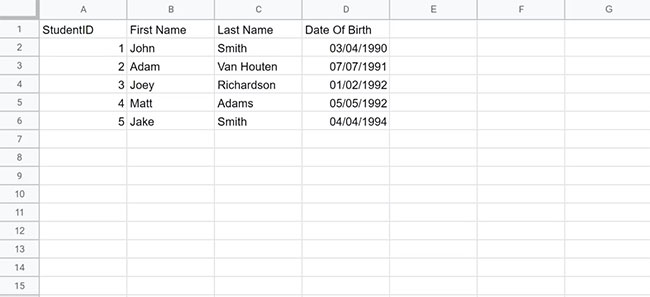
<p style="text-align: justify;">3.&nbsp;Điều hướng đến vị trí bạn đã lưu trữ file của mình và mở file&nbsp;<strong>Output.csv</strong>&nbsp;mới được tạo. Mở file bằng Microsoft Excel để xem dữ liệu dưới dạng hàng và cột.</p>

<figure>
<div style="text-align: justify;"><img alt="Dữ liệu CSV được mở trong file Excel" data-i="5" data-src="https://st.quantrimang.com/photos/image/2022/10/19/luu-du-lieu-vao-file-csv-trong-ung-dung-c-6.jpg" data-was-processed="true" height="297" src="https://st.quantrimang.com/photos/image/2022/10/19/luu-du-lieu-vao-file-csv-trong-ung-dung-c-6.jpg" width="650" /></div>

<figcaption>
<div style="text-align: justify;">Dữ liệu CSV được mở trong file Excel</div>
</figcaption>
</figure>

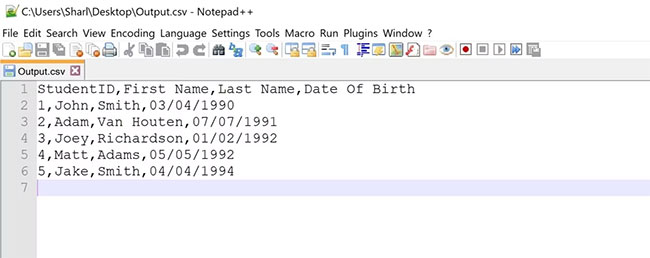
<p style="text-align: justify;">4. Mở file CSV bằng bất kỳ trình soạn thảo văn bản nào, chẳng hạn như Notepad++, để xem dữ liệu đã định dạng được phân tách bằng dấu phẩy.</p>

<figure>
<div style="text-align: justify;"><img alt="Kết quả CSV được mở trong Notepad" data-i="6" data-src="https://st.quantrimang.com/photos/image/2022/10/19/luu-du-lieu-vao-file-csv-trong-ung-dung-c-7.jpg" data-was-processed="true" height="258" src="https://st.quantrimang.com/photos/image/2022/10/19/luu-du-lieu-vao-file-csv-trong-ung-dung-c-7.jpg" width="650" /></div>

<figcaption>
<div style="text-align: justify;">Kết quả CSV được mở trong Notepad</div>
</figcaption>
</figure>

<p style="text-align: justify;">Bạn có thể lưu dữ liệu trong ứng dụng C# của mình bằng cách ghi dữ liệu đó vào file CSV. Tùy thuộc vào dữ liệu, bạn có thể thêm từng đối tượng hoặc tập dữ liệu dưới dạng một hàng riêng biệt. Sử dụng dấu phẩy để tách từng điểm dữ liệu hoặc giá trị thành các cột.</p>

<p style="text-align: justify;">Bạn có thể xem dữ liệu CSV thô trong trình soạn thảo văn bản để xem các điểm dữ liệu được định dạng của mình. Bạn cũng có thể xem file CSV của mình để thấy các hàng và cột một cách trực quan bằng Microsoft Excel.</p>
		</div>
				<div id="author">
						<p>
				<strong>Nguồn tin:</strong>
				Quantrimang.com
			</p>
		</div>
	</div>
	<div id="footer" class="clearfix">
		<div id="url">
			<strong>URL của bản tin này: </strong><a href="https://www.nguoicodonvn2008.info/vi/news/savefile/kien-thuc-may-tinh/cach-luu-du-lieu-vao-file-csv-trong-ung-dung-c-6224.html" title="Cách lưu dữ liệu vào file CSV trong ứng dụng C&#x23;">https://www.nguoicodonvn2008.info/vi/news/savefile/kien-thuc-may-tinh/cach-luu-du-lieu-vao-file-csv-trong-ung-dung-c-6224.html</a>

		</div>
		<div class="clear"></div>
		<div class="copyright">
			&copy; .&#x3A; Nguoicodonvn2008.info - Cõi lòng người cô đơn &#x3A;.
		</div>
		<div id="contact">
			<a href="mailto:admin@nguoicodonvn2008.info">admin@nguoicodonvn2008.info</a>
		</div>
	</div>
</div>
        <div id="timeoutsess" class="chromeframe">
            Bạn đã không sử dụng Site, <a onclick="timeoutsesscancel();" href="https://nguoicodonvn2008.info/#">Bấm vào đây để duy trì trạng thái đăng nhập</a>. Thời gian chờ: <span id="secField"> 60 </span> giây
        </div>
        <div id="openidResult" class="nv-alert" style="display:none"></div>
        <div id="openidBt" data-result="" data-redirect=""></div>
		</script>
		<div class="car-top">
  <span><img src="https://nguoicodonvn2008.info/themes/default/images/car.png" alt=""></span>
</div>
<div id="run_cronjobs" style="visibility:hidden;display:none;"><img alt="cron" src="/index.php?second=cronjobs&amp;p=t80T6Der" width="1" height="1" /></div>
<script src="https://nguoicodonvn2008.info/assets/js/jquery/jquery.min.js"></script>
<script>var nv_base_siteurl="/",nv_lang_data="vi",nv_lang_interface="vi",nv_name_variable="nv",nv_fc_variable="op",nv_lang_variable="language",nv_module_name="news",nv_func_name="savefile",nv_is_user=0, nv_my_ofs=-4,nv_my_abbr="EDT",nv_cookie_prefix="nv4c_e856T",nv_check_pass_mstime=1738000,nv_area_admin=0,nv_safemode=0,theme_responsive=0,nv_recaptcha_ver=2,nv_recaptcha_sitekey="",nv_recaptcha_type="image",XSSsanitize=1;</script>
<script src="https://nguoicodonvn2008.info/assets/js/language/vi.js"></script>
<script src="https://nguoicodonvn2008.info/assets/js/DOMPurify/purify3.js"></script>
<script src="https://nguoicodonvn2008.info/assets/js/global.js"></script>
<script src="https://nguoicodonvn2008.info/assets/js/site.js"></script>
<script src="https://nguoicodonvn2008.info/themes/default/js/news.js"></script>
<script src="https://nguoicodonvn2008.info/themes/default/js/main.js"></script>
<script src="https://nguoicodonvn2008.info/themes/default/js/custom.js"></script>
<script type="application/ld+json">
        {
            "@context": "https://schema.org",
            "@type": "Organization",
            "url": "https://nguoicodonvn2008.info",
            "logo": "https://nguoicodonvn2008.info/uploads/angel.gif"
        }
        </script>
<script src="https://nguoicodonvn2008.info/themes/default/js/bootstrap.min.js"></script>
<script type="text/javascript">
var $scrolltop = $('.car-top');
$scrolltop.on('click', function () {
    $('html,body').animate({
        scrollTop: 0
    }, 800);
    $(this).addClass("car-run");
    setTimeout(function(){ $scrolltop.removeClass('car-run');}, 1000);
    return false;
});
$(window).on('scroll', function ()
{ 
    if($(window).scrollTop() >= 200)
    {
        $scrolltop.addClass("show");
        $scrolltop.addClass("car-down");
    }
    else
    {
       $scrolltop.removeClass("show");
       setTimeout(function(){ $scrolltop.removeClass('car-down');}, 300);
    }
});
</script>
</body>
</html>