<!DOCTYPE html>
    <html lang="vi" xmlns="http://www.w3.org/1999/xhtml" prefix="og: http://ogp.me/ns#">
    <head>
<title>Cách lưu dữ liệu biểu mẫu React trong Mongo Database</title>
<meta name="description" content="Cách lưu dữ liệu biểu mẫu React trong Mongo Database - Savefile - Tin Tức -...">
<meta name="author" content=".: Nguoicodonvn2008.info - Cõi lòng người cô đơn :.">
<meta name="copyright" content=".: Nguoicodonvn2008.info - Cõi lòng người cô đơn :. [admin@nguoicodonvn2008.info]">
<meta name="robots" content="index, archive, follow, noodp">
<meta name="googlebot" content="index,archive,follow,noodp">
<meta name="msnbot" content="all,index,follow">
<meta name="generator" content="NukeViet v4.5">
<meta http-equiv="Content-Type" content="text/html; charset=utf-8">
<meta property="og:title" content="Cách lưu dữ liệu biểu mẫu React trong Mongo Database">
<meta property="og:type" content="website">
<meta property="og:description" content="Savefile - Tin Tức - https&#x3A;&#x002F;&#x002F;www.nguoicodonvn2008.info&#x002F;vi&#x002F;news&#x002F;savefile&#x002F;kien-thuc-may-tinh&#x002F;cach-luu-du-lieu-bieu-mau-react-trong-mongo-database-6754.html">
<meta property="og:site_name" content=".&#x3A; Nguoicodonvn2008.info - Cõi lòng người cô đơn &#x3A;.">
<meta property="og:url" content="https://www.nguoicodonvn2008.info/vi/news/savefile/kien-thuc-may-tinh/cach-luu-du-lieu-bieu-mau-react-trong-mongo-database-6754.html">
<link rel="shortcut icon" href="https://nguoicodonvn2008.info/favicon.ico">
<link rel="canonical" href="https://www.nguoicodonvn2008.info/vi/news/savefile/kien-thuc-may-tinh/cach-luu-du-lieu-bieu-mau-react-trong-mongo-database-6754.html">
<link rel="alternate" href="https://nguoicodonvn2008.info/vi/news/rss/" title="Tin Tức" type="application/rss+xml">
<link rel="alternate" href="https://nguoicodonvn2008.info/vi/news/rss/karaoke-dual/" title="Tin Tức - Karaoke Dual" type="application/rss+xml">
<link rel="alternate" href="https://nguoicodonvn2008.info/vi/news/rss/nhac-tre/" title="Tin Tức - Nhạc trẻ" type="application/rss+xml">
<link rel="alternate" href="https://nguoicodonvn2008.info/vi/news/rss/tru-tinh/" title="Tin Tức - Trữ tình" type="application/rss+xml">
<link rel="alternate" href="https://nguoicodonvn2008.info/vi/news/rss/nuoc-ngoai/" title="Tin Tức - Nước ngoài" type="application/rss+xml">
<link rel="alternate" href="https://nguoicodonvn2008.info/vi/news/rss/remix/" title="Tin Tức - Remix" type="application/rss+xml">
<link rel="alternate" href="https://nguoicodonvn2008.info/vi/news/rss/tam-su-tinh-yeu/" title="Tin Tức - Tâm sự tình yêu" type="application/rss+xml">
<link rel="alternate" href="https://nguoicodonvn2008.info/vi/news/rss/tho-suu-tam/" title="Tin Tức - Thơ sưu tầm" type="application/rss+xml">
<link rel="alternate" href="https://nguoicodonvn2008.info/vi/news/rss/cuoc-song/" title="Tin Tức - Cuộc sống" type="application/rss+xml">
<link rel="alternate" href="https://nguoicodonvn2008.info/vi/news/rss/phan-mem/" title="Tin Tức - Phần mềm" type="application/rss+xml">
<link rel="alternate" href="https://nguoicodonvn2008.info/vi/news/rss/kien-thuc-may-tinh/" title="Tin Tức - Kiến thức máy tính" type="application/rss+xml">
<link rel="alternate" href="https://nguoicodonvn2008.info/vi/news/rss/hoc-tap/" title="Tin Tức - Học tập" type="application/rss+xml">
<link rel="alternate" href="https://nguoicodonvn2008.info/vi/news/rss/tai-lieu/" title="Tin Tức - Tài liệu" type="application/rss+xml">
<link rel="alternate" href="https://nguoicodonvn2008.info/vi/news/rss/de-thi/" title="Tin Tức - Đề thi" type="application/rss+xml">
<link rel="preload" as="style" href="https://nguoicodonvn2008.info/assets/css/font-awesome.min.css" type="text/css">
<link rel="preload" as="style" href="https://nguoicodonvn2008.info/themes/default/css/bootstrap.non-responsive.css" type="text/css">
<link rel="preload" as="style" href="https://nguoicodonvn2008.info/themes/default/css/style.css" type="text/css">
<link rel="preload" as="style" href="https://nguoicodonvn2008.info/themes/default/css/style.non-responsive.css" type="text/css">
<link rel="preload" as="style" href="https://nguoicodonvn2008.info/themes/default/css/news.css" type="text/css">
<link rel="preload" as="style" href="https://nguoicodonvn2008.info/themes/default/css/custom.css" type="text/css">
<link rel="preload" as="script" href="https://nguoicodonvn2008.info/assets/js/jquery/jquery.min.js" type="text/javascript">
<link rel="preload" as="script" href="https://nguoicodonvn2008.info/assets/js/language/vi.js" type="text/javascript">
<link rel="preload" as="script" href="https://nguoicodonvn2008.info/assets/js/DOMPurify/purify3.js" type="text/javascript">
<link rel="preload" as="script" href="https://nguoicodonvn2008.info/assets/js/global.js" type="text/javascript">
<link rel="preload" as="script" href="https://nguoicodonvn2008.info/assets/js/site.js" type="text/javascript">
<link rel="preload" as="script" href="https://nguoicodonvn2008.info/themes/default/js/news.js" type="text/javascript">
<link rel="preload" as="script" href="https://nguoicodonvn2008.info/themes/default/js/main.js" type="text/javascript">
<link rel="preload" as="script" href="https://nguoicodonvn2008.info/themes/default/js/custom.js" type="text/javascript">
<link rel="preload" as="script" href="https://nguoicodonvn2008.info/themes/default/js/bootstrap.min.js" type="text/javascript">
<link rel="stylesheet" href="https://nguoicodonvn2008.info/assets/css/font-awesome.min.css">
<link rel="stylesheet" href="https://nguoicodonvn2008.info/themes/default/css/bootstrap.non-responsive.css">
<link rel="stylesheet" href="https://nguoicodonvn2008.info/themes/default/css/style.css">
<link rel="stylesheet" href="https://nguoicodonvn2008.info/themes/default/css/style.non-responsive.css">
<link rel="StyleSheet" href="https://nguoicodonvn2008.info/themes/default/css/news.css">
<link rel="stylesheet" href="https://nguoicodonvn2008.info/themes/default/css/custom.css">
<style type="text/css">
	body{background: #fff;}
</style>
    </head>
    <body>
<div id="print">
	<div id="hd_print">
		<h2 class="pull-left">.&#x3A; Nguoicodonvn2008.info - Cõi lòng người cô đơn &#x3A;.</h2>
		<p class="pull-right"><a title=".&#x3A; Nguoicodonvn2008.info - Cõi lòng người cô đơn &#x3A;." href="https://nguoicodonvn2008.info/">https://nguoicodonvn2008.info</a></p>
	</div>
	<div class="clear"></div>
	<hr />
	<div id="content">
		<h1>Cách lưu dữ liệu biểu mẫu React trong Mongo Database</h1>
		<ul class="list-inline">
			<li>Chủ nhật - 19/02/2023 23:44</li>
			<li class="hidden-print txtrequired"><em class="fa fa-print">&nbsp;</em><a title="In ra" href="javascript:;" onclick="window.print()">In ra</a></li>
			<li class="hidden-print txtrequired"><em class="fa fa-power-off">&nbsp;</em><a title="Đóng cửa sổ này" href="javascript:;" onclick="window.close()">Đóng cửa sổ này</a></li>
		</ul>
		<div class="clear"></div>
		<div id="hometext">
		</div>
				<div class="imghome">
			<img alt="Cách lưu dữ liệu biểu mẫu React trong Mongo Database" src="https://st.quantrimang.com/photos/image/2023/02/18/mongodb-bieu-mau-react4.jpg" width="460" class="img-thumbnail" />
		</div>
		<div class="clear"></div>
		<div id="bodytext" class="clearfix">
			<p style="text-align: justify;"><strong>Thử thêm MongoDB vào stack web&nbsp;</strong>của bạn để xem nó dễ dàng lưu trữ và truy vấn biểu mẫu dữ liệu như thế nào nhé!</p>

<p style="text-align: justify;"><img alt="MongoDB" data-i="0" data-src="https://st.quantrimang.com/photos/image/2023/02/18/MongoDB-React-Form-7.jpg" data-was-processed="true" height="340" src="https://st.quantrimang.com/photos/image/2023/02/18/MongoDB-React-Form-7.jpg" width="650" /></p>

<p style="text-align: justify;">Database quan hệ như MySQL về lý thuyết là sự lựa chọn cơ sở dữ liệu. Tuy nhiên, database NoSQL như MongoDB đã trở nên phổ biến nhờ cấu trúc linh hoạt trong lưu trữ dữ liệu và khả năng lưu cũng như trích xuất dữ liệu nhanh.</p>

<p style="text-align: justify;">Những database này cung cấp một ngôn ngữ truy vấn thay thế mà bạn có thể tích hợp liền mạch với web hiện đại và ứng dụng mobile. Dưới đây là cách lưu dữ liệu React trong một database MongoDB.</p>

<h2 style="text-align: justify;">NoSQL Database là gì?</h2>

<p style="text-align: justify;">NoSQL là viết tắt của Not only SQL, một database phi quan hệ. Đây là kiểu cơ sở dữ liệu không dựa vào mô hình truyền thống. Nó không có cấu trúc hàng cột xác định và có thể lưu dữ liệu ở định dạng khác nhau. Điều đó khiến nó trở nên linh hoạt và có thể mở rộng.</p>

<p style="text-align: justify;">Khác biệt chính giữa NoSQL và database quan hệ là thay vì có hàng và cột, database NoSQL lưu dữ liệu trong tài liệu có cấu trúc động.</p>

<p style="text-align: justify;"><img alt="Mối quan hệ trong cấu trúc dữ liệu" data-i="1" data-src="https://st.quantrimang.com/photos/image/2023/02/18/mongodb-bieu-mau-react1.jpg" data-was-processed="true" height="325" src="https://st.quantrimang.com/photos/image/2023/02/18/mongodb-bieu-mau-react1.jpg" width="650" /></p>

<h2 style="text-align: justify;">Thiết lập database MongoDB</h2>

<p style="text-align: justify;">MongoDB là database phổ biến nhất. Nó là một cơ sở dữ liệu mã nguồn mở, lưu dữ liệu ở dạng tài liệu (bảng) giống JSON trong bộ sưu tập.</p>

<p style="text-align: justify;">Đây là ví dụ về một cấu trúc tài liệu MongoDB đơn giản:</p>

<pre id="pre0">
<code>{
  FirstName: &#039;Andrew&#039;,
  Role: &#039;Backend Developer&#039;
}</code></pre>

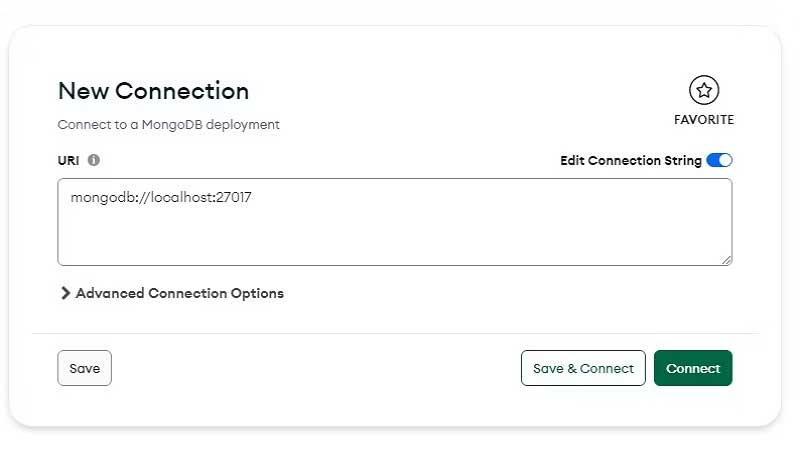
<p style="text-align: justify;">Để bắt đầu, trước tiên, bạn cần thiết lập một database MongoDB. Sau khi đã hoàn tất cấu hình MongoDB, mở app MongoDB Compass. Sau đó, click nút&nbsp;<strong>New Connection</strong>&nbsp;để tạo kết nối với server Mongo đang chạy nội bộ.</p>

<p style="text-align: justify;">Cung cấp URL kết nối và tên của nó, sau đó nhấn&nbsp;<strong>Save &amp; Connect</strong>.</p>

<p style="text-align: justify;"><img alt="Kết nối mới" data-i="2" data-src="https://st.quantrimang.com/photos/image/2023/02/18/mongodb-bieu-mau-react2.jpg" data-was-processed="true" height="371" src="https://st.quantrimang.com/photos/image/2023/02/18/mongodb-bieu-mau-react2.jpg" width="650" /></p>

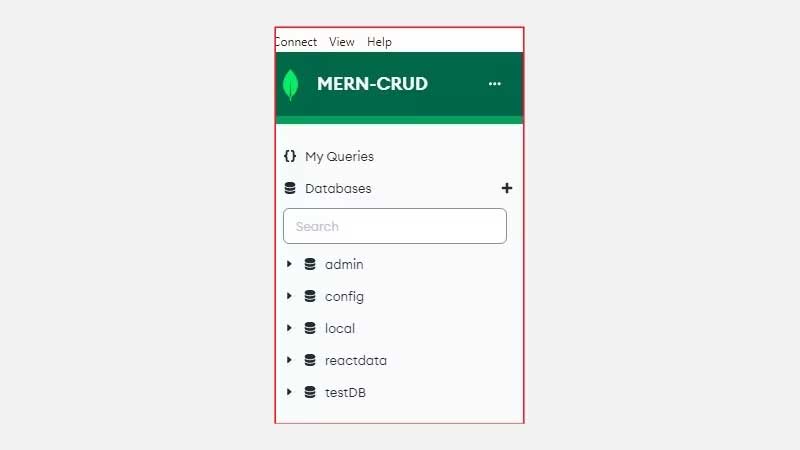
<p style="text-align: justify;">Cuối cùng, click nút&nbsp;<strong>Create Database</strong>, điền tên database và đặt tên cho bộ sưu tập.</p>

<p style="text-align: justify;"><img alt="Tìm kiếm cơ sở dữ liệu" data-i="3" data-src="https://st.quantrimang.com/photos/image/2023/02/18/mongodb-bieu-mau-react3.jpg" data-was-processed="true" height="366" src="https://st.quantrimang.com/photos/image/2023/02/18/mongodb-bieu-mau-react3.jpg" width="650" /></p>

<h2 style="text-align: justify;">Tạo client React</h2>

<p style="text-align: justify;">Để nhanh chóng khởi động một ứng dụng React, tạo thư mục dự án trên máy cục bộ, thay đổi thư mục và chạy các lệnh terminal dưới đây để tạo và khởi chạy server lập trình:</p>

<pre id="pre1">
<code>npx create-react-app my-app
cd my-app
npm start</code></pre>

<p style="text-align: justify;">Tiếp theo, cài đặt Axios. Gói này sẽ cho phép bạn gửi các truy vấn HTTP tới server Express.js backend để lưu dữ liệu trong database MongoDB.</p>

<pre id="pre2">
<code>npm install axios</code></pre>

<h3 style="text-align: justify;">Tạo một biểu mẫu thử nghiệm để thu thập dữ liệu người dùng</h3>

<p style="text-align: justify;">Mở file&nbsp;<strong>src/App.js</strong>, xóa code React soạn sẵn và thay thế nó bằng:</p>

<pre id="pre3">
<code>import &#039;./App.css&#039;;
import React, { useState } from &#039;react&#039;;
import Axios from &#039;axios&#039;;

function App() {
  const &#91;name, setName&#93; = useState(&quot;&quot;)
  const &#91;role, setRole&#93; = useState(&quot;&quot;)

  const handleSubmit = (e) =&gt; {
      e.preventDefault();

      Axios.post(&#039;http://localhost:4000/insert&#039;, {
          fullName: name,
          companyRole:role
      })
  }

  return (
    &lt;div className=&quot;App&quot;&gt;
      &lt;header className=&quot;App-header&quot;&gt; 
        &lt;div className=&quot;logIn-form&quot;&gt;
            &lt;form onSubmit={handleSubmit}&gt;
                &lt;p&gt;First Name&lt;/p&gt;

                &lt;input
                  className = &quot;Name&quot; 
                  type=&quot;text&quot;
                  placeholder=&quot;First name ...&quot;
                  onChange={(e) =&gt; {setName(e.target.value)}}
                /&gt;

                &lt;p&gt; Company Role&lt;/p&gt;

                &lt;input 
                  className = &quot;Role&quot;
                  type=&quot;text&quot;
                  placeholder = &quot;Role....&quot; 
                  onChange={(e) =&gt; {setRole(e.target.value)}}
                /&gt;

                &lt;button type=&quot;submit&quot;&gt;Submit&lt;/button&gt;
            &lt;/form&gt;
        &lt;/div&gt;
      &lt;/header&gt;
    &lt;/div&gt;
  );
}

export default App;</code></pre>

<p style="text-align: justify;">Giải thích chi tiết:</p>

<ul>
	<li style="text-align: justify;">Khai báo hai trạng thái, tên và một trạng thái vai trò để chứa dữ liệu người dùng đã thu thập từ các trường nhập bằng hook useState.</li>
	<li style="text-align: justify;">Phương thức onChange của từng trường nhập chạy một callback dùng các phương thức trạng thái để ghi và lưu dữ liệu người dùng nhập qua biểu mẫu này.</li>
	<li style="text-align: justify;">Để gửi dữ liệu tới server backend, hàm xử lý onSubmit dùng Axios.post để gửi dữ liệu được truyền từ các trạng thái dưới dạng một đối tượng tới endpoint API backend.</li>
</ul>

<p style="text-align: justify;">Để tạo kiểu biểu mẫu được hiển thị, thêm code sau vào file App.css.</p>

<pre id="pre4">
<code>* {
  padding: 0;
  margin: 0;
  box-sizing: border-box;
}

body {
  font-family: &#039;Poppins&#039;, sans-serif;
  background-color: #8EC1D6;
}

.logIn-form {
  margin: 100px auto;
  width: 200px;
  height: 250px;
  background-color: #fff;
  border-radius: 10px; 
}

.logIn-form p {
  text-align: center;
  font-size: 12px;
  font-weight: 600;
  color: #B8BFC6;
  padding: 10px 10px;
}

.logIn-form input {
  display: block;
  width: 80%;
  height: 40px;
  margin: 10px auto;
  border: 1px solid #ccc;
  border-radius: 5px;
  padding: 0 10px;
  font-size: 16px;
  color: black;
}

.logIn-form button {
  background-color: #8EC1D6;
  color: #fff;
  cursor: pointer;
  font-size: 15px;
  border-radius:7px;
  padding: 5px 10px;
  border: none;
}</code></pre>

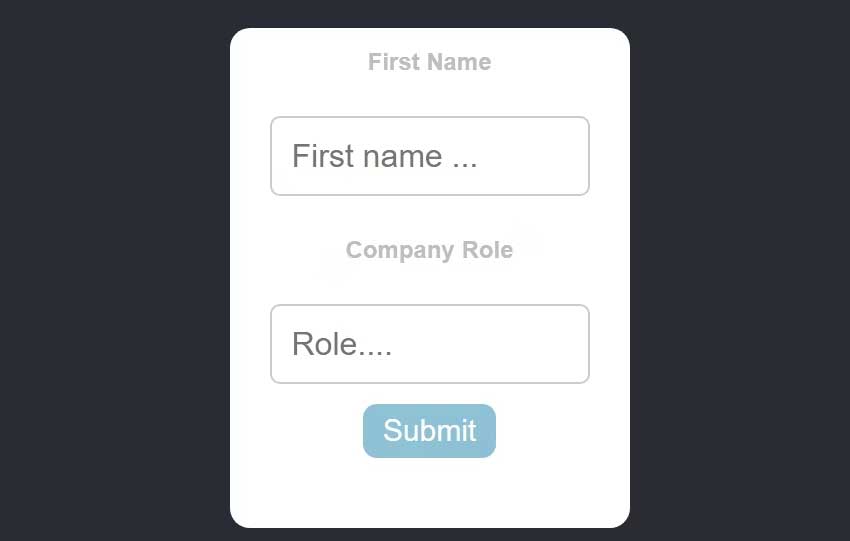
<p style="text-align: justify;">Giờ khởi động server phát triển để cập nhật các thay đổi và điều hướng tới http://localhost:3000 trên trình duyệt để xem kết quả.</p>

<p style="text-align: justify;"><img alt="Biểu mẫu React" data-i="4" data-src="https://st.quantrimang.com/photos/image/2023/02/18/mongodb-bieu-mau-react4.jpg" data-was-processed="true" height="414" src="https://st.quantrimang.com/photos/image/2023/02/18/mongodb-bieu-mau-react4.jpg" width="650" /></p>

<h2 style="text-align: justify;">Tạo backend Express.js</h2>

<p style="text-align: justify;">Một backend Express hoạt động giống như phần mềm trung gian giữa client React và cơ sở dữ liệu MongoDB. Từ server này, bạn có thể xác định sơ đồ dữ liệu và thiết lập kết nối giữa client và database.</p>

<p style="text-align: justify;">Tạo một server web và cài đặt hai gói này:</p>

<pre id="pre5">
<code>npm install mongoose cors</code></pre>

<p style="text-align: justify;">Mongoose là một thư viện tạo mẫu dữ liệu đối tượng (ODM) cho MongoDB và Note. Nó cung cấp phương thức dựa trên sơ đồ, để tạo mẫu dữ liệu ứng dụng và lưu nó trong database MongoDB.</p>

<p style="text-align: justify;">Gói CORS (Cross-Origin Resource Sharing - Chia sẻ tài nguyên chéo nguồn gốc) cung cấp một cơ chế cho server backend và một client frontend để giao tiếp và chuyển dữ liệu qua endpoint API.</p>

<h3 style="text-align: justify;">Tạo sơ đồ dữ liệu</h3>

<p style="text-align: justify;">Tạo một thư mục mới trong thư mục gốc của thư mục dự án server và đặt tên models cho nó. Trong thư mục này, tạo file mới: dataSchema.js.</p>

<p style="text-align: justify;">Trong trường hợp này, lược đồ đại diện cho cấu trúc logic của database. Nó xác định tài liệu (bản ghi) và các trường (thuộc tính) tạo nên bộ sưu tập trong database.</p>

<p style="text-align: justify;">Thêm code sau vào dataSchema.js:</p>

<pre id="pre6">
<code>const mongoose = require(&#039;mongoose&#039;);

const ReactFormDataSchema = new mongoose.Schema({
    name: {
        type: String,
        required: true
    },
    role: {
        type: String,
        required: true
    }
});

const User = mongoose.model(&#039;User&#039;, ReactFormDataSchema);
module.exports = User;</code></pre>

<p style="text-align: justify;">Code này tạo một sơ đồ Mongoose cho model User. Sơ đồ xác định cấu trúc dữ liệu cho dữ liệu người dùng, bao gồm tên và vai trò của người dùng. Sau đó, sơ đồ này được dùng để tạo một mô hình cho User. Điều này cho phép mô hình đó lưu dữ liệu trong một bộ sưu tập MongoDB theo cấu trúc đã được xác định ở Schema.</p>

<h3 style="text-align: justify;">Thiết lập Express Server</h3>

<p style="text-align: justify;">Tiếp theo, mở file index.js trong thư mục dự án server và thêm code này:</p>

<pre id="pre7">
<code>const express = require(&#039;express&#039;);
const mongoose = require(&#039;mongoose&#039;);
const cors = require(&#039;cors&#039;);
const app = express();
const User= require(&#039;./models/ReactDataSchema&#039;)

app.use(express.json());
app.use(cors());

mongoose.connect(&#039;mongodb://localhost:27017/reactdata&#039;, { useNewUrlParser: true });

app.post(&#039;/insert&#039;, async(req, res) =&gt; {
    const FirstName = req.body.firstName
    const CompanyRole = req.body.companyRole

    const formData = new User({
        name: FirstName,
        role: CompanyRole
    })

    try {
        await formData.save();
        res.send(&quot;inserted data..&quot;)
    } catch(err) {
        console.log(err)
    }
});

const port = process.env.PORT || 4000;

app.listen(port, () =&gt; {
    console.log(`Server started on port ${port}`);
});</code></pre>

<p style="text-align: justify;">Giải thích chi tiết:</p>

<ul>
	<li style="text-align: justify;">Khởi chạy Express, mongoose, và CORS trong server này.</li>
	<li style="text-align: justify;">Gói Mongoose thiết lập kết nối tới database MongoDB bằng phương thức connect lấy trong miền URL và một đối tượng. URL là một chuỗi kết nối được dùng để thiết lập một kết nối với cơ sở dữ liệu MongoDB. Đối tượng này chỉ định cấu hình. Ở đây, nó chứa một thiết lập để dùng biểu mẫu mới nhất của trình phân tích URL.</li>
	<li style="text-align: justify;">Server web chủ yếu phản hồi với các truy vấn đến từ các tuyến khác nhau với hàm xử lý phù hợp. Trong trường hợp này, server có route POST nhận dữ liệu từ client React, lưu lựa chọn dưới dạng biến và chuyển chúng tới mô hình dữ liệu đã nhập.</li>
	<li style="text-align: justify;">Server này sau đó dùng một khối thử &amp; chụp để chứa và lưu dữ liệu trong database MongoDB, đồng thời ghi lại mọi lỗi nếu có.</li>
</ul>

<p style="text-align: justify;">Cuối cùng khởi chạy server phát triển để cập nhật các thay đổi và chuyển tới ứng dụng client React trong trình duyệt của bạn. Nhập dữ liệu bất kỳ trên biểu mẫu và xem kết quả trên database MongoDB.</p>

<div style="text-align: justify;">&nbsp;</div>
		</div>
				<div id="author">
						<p>
				<strong>Nguồn tin:</strong>
				Quantrimang.com
			</p>
		</div>
	</div>
	<div id="footer" class="clearfix">
		<div id="url">
			<strong>URL của bản tin này: </strong><a href="https://www.nguoicodonvn2008.info/vi/news/savefile/kien-thuc-may-tinh/cach-luu-du-lieu-bieu-mau-react-trong-mongo-database-6754.html" title="Cách lưu dữ liệu biểu mẫu React trong Mongo Database">https://www.nguoicodonvn2008.info/vi/news/savefile/kien-thuc-may-tinh/cach-luu-du-lieu-bieu-mau-react-trong-mongo-database-6754.html</a>

		</div>
		<div class="clear"></div>
		<div class="copyright">
			&copy; .&#x3A; Nguoicodonvn2008.info - Cõi lòng người cô đơn &#x3A;.
		</div>
		<div id="contact">
			<a href="mailto:admin@nguoicodonvn2008.info">admin@nguoicodonvn2008.info</a>
		</div>
	</div>
</div>
        <div id="timeoutsess" class="chromeframe">
            Bạn đã không sử dụng Site, <a onclick="timeoutsesscancel();" href="https://nguoicodonvn2008.info/#">Bấm vào đây để duy trì trạng thái đăng nhập</a>. Thời gian chờ: <span id="secField"> 60 </span> giây
        </div>
        <div id="openidResult" class="nv-alert" style="display:none"></div>
        <div id="openidBt" data-result="" data-redirect=""></div>
		</script>
		<div class="car-top">
  <span><img src="https://nguoicodonvn2008.info/themes/default/images/car.png" alt=""></span>
</div>
<script src="https://nguoicodonvn2008.info/assets/js/jquery/jquery.min.js"></script>
<script>var nv_base_siteurl="/",nv_lang_data="vi",nv_lang_interface="vi",nv_name_variable="nv",nv_fc_variable="op",nv_lang_variable="language",nv_module_name="news",nv_func_name="savefile",nv_is_user=0, nv_my_ofs=-4,nv_my_abbr="EDT",nv_cookie_prefix="nv4c_e856T",nv_check_pass_mstime=1738000,nv_area_admin=0,nv_safemode=0,theme_responsive=0,nv_recaptcha_ver=2,nv_recaptcha_sitekey="",nv_recaptcha_type="image",XSSsanitize=1;</script>
<script src="https://nguoicodonvn2008.info/assets/js/language/vi.js"></script>
<script src="https://nguoicodonvn2008.info/assets/js/DOMPurify/purify3.js"></script>
<script src="https://nguoicodonvn2008.info/assets/js/global.js"></script>
<script src="https://nguoicodonvn2008.info/assets/js/site.js"></script>
<script src="https://nguoicodonvn2008.info/themes/default/js/news.js"></script>
<script src="https://nguoicodonvn2008.info/themes/default/js/main.js"></script>
<script src="https://nguoicodonvn2008.info/themes/default/js/custom.js"></script>
<script type="application/ld+json">
        {
            "@context": "https://schema.org",
            "@type": "Organization",
            "url": "https://nguoicodonvn2008.info",
            "logo": "https://nguoicodonvn2008.info/uploads/angel.gif"
        }
        </script>
<script src="https://nguoicodonvn2008.info/themes/default/js/bootstrap.min.js"></script>
<script type="text/javascript">
var $scrolltop = $('.car-top');
$scrolltop.on('click', function () {
    $('html,body').animate({
        scrollTop: 0
    }, 800);
    $(this).addClass("car-run");
    setTimeout(function(){ $scrolltop.removeClass('car-run');}, 1000);
    return false;
});
$(window).on('scroll', function ()
{ 
    if($(window).scrollTop() >= 200)
    {
        $scrolltop.addClass("show");
        $scrolltop.addClass("car-down");
    }
    else
    {
       $scrolltop.removeClass("show");
       setTimeout(function(){ $scrolltop.removeClass('car-down');}, 300);
    }
});
</script>
</body>
</html>