<!DOCTYPE html>
    <html lang="vi" xmlns="http://www.w3.org/1999/xhtml" prefix="og: http://ogp.me/ns#">
    <head>
<title>Cách lấy lại quyền truy cập ổ cứng, sửa lỗi không mở được ổ cứng</title>
<meta name="description" content="Cách lấy lại quyền truy cập ổ cứng, sửa lỗi không mở được ổ cứng - Savefile - Tin Tức -...">
<meta name="author" content=".: Nguoicodonvn2008.info - Cõi lòng người cô đơn :.">
<meta name="copyright" content=".: Nguoicodonvn2008.info - Cõi lòng người cô đơn :. [admin@nguoicodonvn2008.info]">
<meta name="robots" content="index, archive, follow, noodp">
<meta name="googlebot" content="index,archive,follow,noodp">
<meta name="msnbot" content="all,index,follow">
<meta name="generator" content="NukeViet v4.5">
<meta http-equiv="Content-Type" content="text/html; charset=utf-8">
<meta property="og:title" content="Cách lấy lại quyền truy cập ổ cứng, sửa lỗi không mở được ổ cứng">
<meta property="og:type" content="website">
<meta property="og:description" content="Savefile - Tin Tức - https&#x3A;&#x002F;&#x002F;www.nguoicodonvn2008.info&#x002F;vi&#x002F;news&#x002F;savefile&#x002F;kien-thuc-may-tinh&#x002F;cach-lay-lai-quyen-truy-cap-o-cung-sua-loi-khong-mo-duoc-o-cung-10254.html">
<meta property="og:site_name" content=".&#x3A; Nguoicodonvn2008.info - Cõi lòng người cô đơn &#x3A;.">
<meta property="og:url" content="https://www.nguoicodonvn2008.info/vi/news/savefile/kien-thuc-may-tinh/cach-lay-lai-quyen-truy-cap-o-cung-sua-loi-khong-mo-duoc-o-cung-10254.html">
<link rel="shortcut icon" href="https://nguoicodonvn2008.info/favicon.ico">
<link rel="canonical" href="https://www.nguoicodonvn2008.info/vi/news/savefile/kien-thuc-may-tinh/cach-lay-lai-quyen-truy-cap-o-cung-sua-loi-khong-mo-duoc-o-cung-10254.html">
<link rel="alternate" href="https://nguoicodonvn2008.info/vi/news/rss/" title="Tin Tức" type="application/rss+xml">
<link rel="alternate" href="https://nguoicodonvn2008.info/vi/news/rss/karaoke-dual/" title="Tin Tức - Karaoke Dual" type="application/rss+xml">
<link rel="alternate" href="https://nguoicodonvn2008.info/vi/news/rss/nhac-tre/" title="Tin Tức - Nhạc trẻ" type="application/rss+xml">
<link rel="alternate" href="https://nguoicodonvn2008.info/vi/news/rss/tru-tinh/" title="Tin Tức - Trữ tình" type="application/rss+xml">
<link rel="alternate" href="https://nguoicodonvn2008.info/vi/news/rss/nuoc-ngoai/" title="Tin Tức - Nước ngoài" type="application/rss+xml">
<link rel="alternate" href="https://nguoicodonvn2008.info/vi/news/rss/remix/" title="Tin Tức - Remix" type="application/rss+xml">
<link rel="alternate" href="https://nguoicodonvn2008.info/vi/news/rss/tam-su-tinh-yeu/" title="Tin Tức - Tâm sự tình yêu" type="application/rss+xml">
<link rel="alternate" href="https://nguoicodonvn2008.info/vi/news/rss/tho-suu-tam/" title="Tin Tức - Thơ sưu tầm" type="application/rss+xml">
<link rel="alternate" href="https://nguoicodonvn2008.info/vi/news/rss/cuoc-song/" title="Tin Tức - Cuộc sống" type="application/rss+xml">
<link rel="alternate" href="https://nguoicodonvn2008.info/vi/news/rss/phan-mem/" title="Tin Tức - Phần mềm" type="application/rss+xml">
<link rel="alternate" href="https://nguoicodonvn2008.info/vi/news/rss/kien-thuc-may-tinh/" title="Tin Tức - Kiến thức máy tính" type="application/rss+xml">
<link rel="alternate" href="https://nguoicodonvn2008.info/vi/news/rss/hoc-tap/" title="Tin Tức - Học tập" type="application/rss+xml">
<link rel="alternate" href="https://nguoicodonvn2008.info/vi/news/rss/tai-lieu/" title="Tin Tức - Tài liệu" type="application/rss+xml">
<link rel="alternate" href="https://nguoicodonvn2008.info/vi/news/rss/de-thi/" title="Tin Tức - Đề thi" type="application/rss+xml">
<link rel="preload" as="style" href="https://nguoicodonvn2008.info/assets/css/font-awesome.min.css" type="text/css">
<link rel="preload" as="style" href="https://nguoicodonvn2008.info/themes/default/css/bootstrap.non-responsive.css" type="text/css">
<link rel="preload" as="style" href="https://nguoicodonvn2008.info/themes/default/css/style.css" type="text/css">
<link rel="preload" as="style" href="https://nguoicodonvn2008.info/themes/default/css/style.non-responsive.css" type="text/css">
<link rel="preload" as="style" href="https://nguoicodonvn2008.info/themes/default/css/news.css" type="text/css">
<link rel="preload" as="style" href="https://nguoicodonvn2008.info/themes/default/css/custom.css" type="text/css">
<link rel="preload" as="script" href="https://nguoicodonvn2008.info/assets/js/jquery/jquery.min.js" type="text/javascript">
<link rel="preload" as="script" href="https://nguoicodonvn2008.info/assets/js/language/vi.js" type="text/javascript">
<link rel="preload" as="script" href="https://nguoicodonvn2008.info/assets/js/DOMPurify/purify3.js" type="text/javascript">
<link rel="preload" as="script" href="https://nguoicodonvn2008.info/assets/js/global.js" type="text/javascript">
<link rel="preload" as="script" href="https://nguoicodonvn2008.info/assets/js/site.js" type="text/javascript">
<link rel="preload" as="script" href="https://nguoicodonvn2008.info/themes/default/js/news.js" type="text/javascript">
<link rel="preload" as="script" href="https://nguoicodonvn2008.info/themes/default/js/main.js" type="text/javascript">
<link rel="preload" as="script" href="https://nguoicodonvn2008.info/themes/default/js/custom.js" type="text/javascript">
<link rel="preload" as="script" href="https://nguoicodonvn2008.info/themes/default/js/bootstrap.min.js" type="text/javascript">
<link rel="stylesheet" href="https://nguoicodonvn2008.info/assets/css/font-awesome.min.css">
<link rel="stylesheet" href="https://nguoicodonvn2008.info/themes/default/css/bootstrap.non-responsive.css">
<link rel="stylesheet" href="https://nguoicodonvn2008.info/themes/default/css/style.css">
<link rel="stylesheet" href="https://nguoicodonvn2008.info/themes/default/css/style.non-responsive.css">
<link rel="StyleSheet" href="https://nguoicodonvn2008.info/themes/default/css/news.css">
<link rel="stylesheet" href="https://nguoicodonvn2008.info/themes/default/css/custom.css">
<style type="text/css">
	body{background: #fff;}
</style>
    </head>
    <body>
<div id="print">
	<div id="hd_print">
		<h2 class="pull-left">.&#x3A; Nguoicodonvn2008.info - Cõi lòng người cô đơn &#x3A;.</h2>
		<p class="pull-right"><a title=".&#x3A; Nguoicodonvn2008.info - Cõi lòng người cô đơn &#x3A;." href="https://nguoicodonvn2008.info/">https://nguoicodonvn2008.info</a></p>
	</div>
	<div class="clear"></div>
	<hr />
	<div id="content">
		<h1>Cách lấy lại quyền truy cập ổ cứng, sửa lỗi không mở được ổ cứng</h1>
		<ul class="list-inline">
			<li>Thứ năm - 24/04/2025 23:00</li>
			<li class="hidden-print txtrequired"><em class="fa fa-print">&nbsp;</em><a title="In ra" href="javascript:;" onclick="window.print()">In ra</a></li>
			<li class="hidden-print txtrequired"><em class="fa fa-power-off">&nbsp;</em><a title="Đóng cửa sổ này" href="javascript:;" onclick="window.close()">Đóng cửa sổ này</a></li>
		</ul>
		<div class="clear"></div>
		<div id="hometext">
		</div>
				<div class="imghome">
			<img alt="Cách lấy lại quyền truy cập ổ cứng, sửa lỗi không mở được ổ cứng" src="https://st.quantrimang.com/photos/image/2017/06/08/lay-lai-quyen-truy-cap-o-cung-020.jpg" width="460" class="img-thumbnail" />
		</div>
		<div class="clear"></div>
		<div id="bodytext" class="clearfix">
			<h1 style="text-align: justify;">&nbsp;</h1>

<p style="text-align: justify;">Trong bài viết này, chúng tôi sẽ hướng dẫn bạn đọc cách lấy lại quyền truy cập&nbsp;&nbsp;ổ cứng&nbsp;khi nó bị lỗi.</p>

<div style="text-align: justify;">&nbsp;</div>

<h2 style="text-align: justify;">Cách lấy lại quyền truy cập&nbsp;&nbsp;ổ cứng</h2>

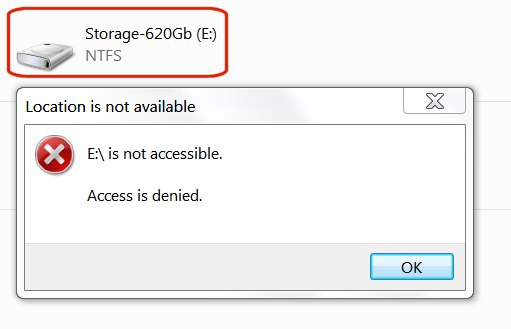
<p style="text-align: justify;">Khi bạn kết nối một ổ đĩa đã sử dụng trước đó với một máy tính mới hoặc máy tính khác hoặc như một ổ đĩa ngoài hoặc ổ nội bộ, bạn sẽ không có quyền truy cập ổ đĩa đó. Khi bạn cố gắng xem, thêm hoặc xóa các file trên ổ đĩa đó, bạn sẽ nhận được thông báo lỗi: &quot;<em>E:\ is not accessible. Access is denied</em>&quot;. Thông báo trên ổ đĩa của bạn có thể khác, nhưng đừng lo, sẽ có cách giải quyết.</p>

<div style="text-align: justify;">Linh kiện máy tính</div>

<p style="text-align: justify;"><img alt="Thông báo lỗi trên ổ cứng" data-i="0" data-src="https://st.quantrimang.com/photos/image/2017/06/08/lay-lai-quyen-truy-cap-o-cung-000.jpg" data-was-processed="true" src="https://st.quantrimang.com/photos/image/2017/06/08/lay-lai-quyen-truy-cap-o-cung-000.jpg" title="Thông báo lỗi trên ổ cứng" /></p>

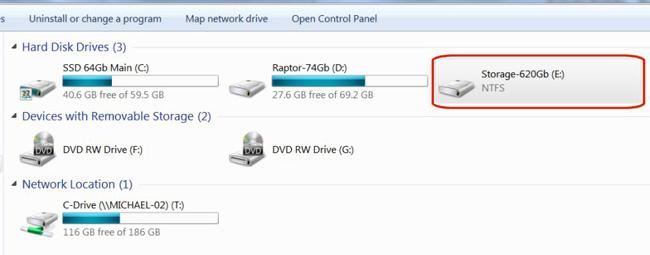
<p style="text-align: justify;">Trong Windows 7, khi bạn nhìn vào các ổ đĩa trong Windows Explorer, một trong những ổ bạn vừa thêm vào sẽ không thông báo bất kì dữ liệu nào về kích thước hoặc không gian trống của nó.</p>

<p style="text-align: justify;"><img alt="Ổ đĩa không hiển thị thông tin" data-i="1" data-src="https://st.quantrimang.com/photos/image/2017/06/08/lay-lai-quyen-truy-cap-o-cung-001.jpg" data-was-processed="true" src="https://st.quantrimang.com/photos/image/2017/06/08/lay-lai-quyen-truy-cap-o-cung-001.jpg" title="Ổ đĩa không hiển thị thông tin" /></p>

<p style="text-align: justify;">Vấn đề này sẽ được khắc phục khá đơn giản với quy trình gồm hai bước. Đầu tiên, bạn phải lấy lại quyền sở hữu của ổ cứng, sau đó cấp quyền cho chính mình làm chủ sở hữu mới.</p>

<p style="text-align: justify;"><strong>Lưu ý</strong>: Không thử điều này trên ổ&nbsp;<em>C:\ drive</em>&nbsp;(boot drive), bởi nó sẽ làm thay đổi hệ thống và khiến bạn phải cài lại Windows.</p>

<h3 style="text-align: justify;">1. Lấy lại quyền sở hữu</h3>

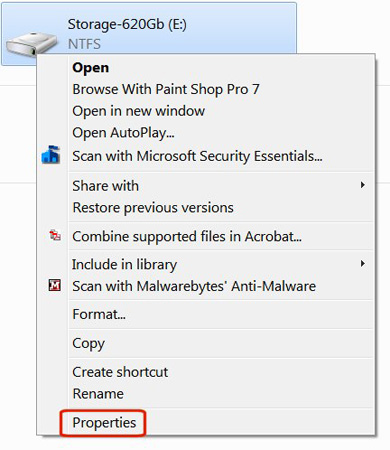
<p style="text-align: justify;">Trong Windows Explorer, kích chuột phải vào ổ đĩa mà bạn muốn sở hữu, sau đó chọn&nbsp;<strong>Properties</strong>&nbsp;từ menu thả xuống.</p>

<p style="text-align: justify;"><img alt="Nhấp chuột phải vào ổ đĩa và chọn Properties" data-i="2" data-src="https://st.quantrimang.com/photos/image/2017/06/08/lay-lai-quyen-truy-cap-o-cung-002.jpg" data-was-processed="true" src="https://st.quantrimang.com/photos/image/2017/06/08/lay-lai-quyen-truy-cap-o-cung-002.jpg" title="Nhấp chuột phải vào ổ đĩa và chọn Properties" /></p>

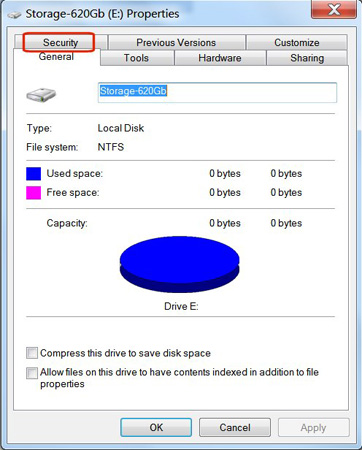
<p style="text-align: justify;">Kích chọn tab&nbsp;<strong>Security</strong>.</p>

<p style="text-align: justify;"><img alt="Kích chọn tab Security" data-i="3" data-src="https://st.quantrimang.com/photos/image/2017/06/08/lay-lai-quyen-truy-cap-o-cung-003.jpg" data-was-processed="true" src="https://st.quantrimang.com/photos/image/2017/06/08/lay-lai-quyen-truy-cap-o-cung-003.jpg" title="Kích chọn tab Security" /></p>

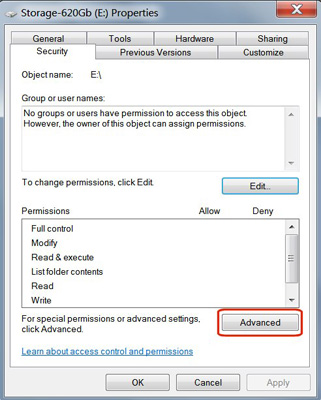
<p style="text-align: justify;">Nhấp chọn nút&nbsp;<strong>Advanced</strong>.</p>

<p style="text-align: justify;"><img alt="Nhấp chọn nút Advanced" data-i="4" data-src="https://st.quantrimang.com/photos/image/2017/06/08/lay-lai-quyen-truy-cap-o-cung-004.jpg" data-was-processed="true" src="https://st.quantrimang.com/photos/image/2017/06/08/lay-lai-quyen-truy-cap-o-cung-004.jpg" title="Nhấp chọn nút Advanced" /></p>

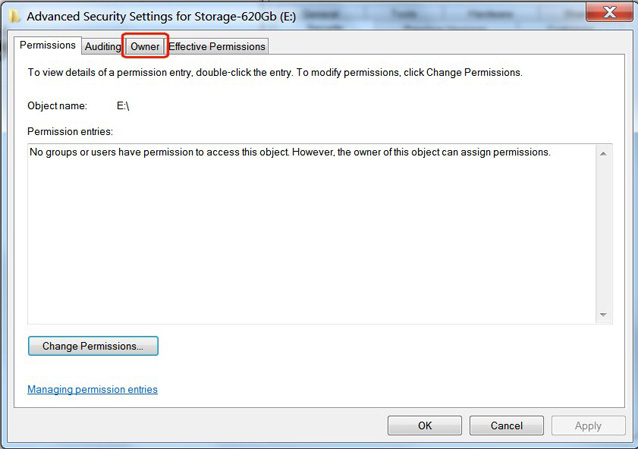
<p style="text-align: justify;">Nhấp vào tab&nbsp;<strong>Owner</strong>&nbsp;trong&nbsp;<strong>Advanced Security Settings</strong>.</p>

<p style="text-align: justify;"><img alt="Nhấp vào tab Owner trong Advanced Security Settings" data-i="5" data-src="https://st.quantrimang.com/photos/image/2017/06/08/lay-lai-quyen-truy-cap-o-cung-005.jpg" data-was-processed="true" src="https://st.quantrimang.com/photos/image/2017/06/08/lay-lai-quyen-truy-cap-o-cung-005.jpg" title="Nhấp vào tab Owner trong Advanced Security Settings" /></p>

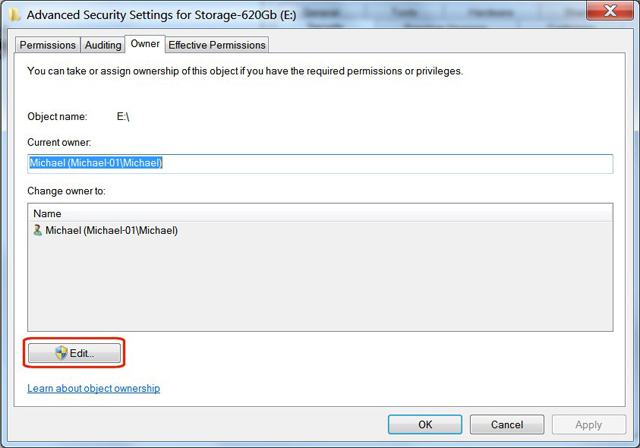
<p style="text-align: justify;">Kích chọn nút&nbsp;<strong>Edit.</strong></p>

<p style="text-align: justify;"><img alt="Kích chọn nút Edit" data-i="6" data-src="https://st.quantrimang.com/photos/image/2017/06/08/lay-lai-quyen-truy-cap-o-cung-006.jpg" data-was-processed="true" src="https://st.quantrimang.com/photos/image/2017/06/08/lay-lai-quyen-truy-cap-o-cung-006.jpg" title="Kích chọn nút Edit" /></p>

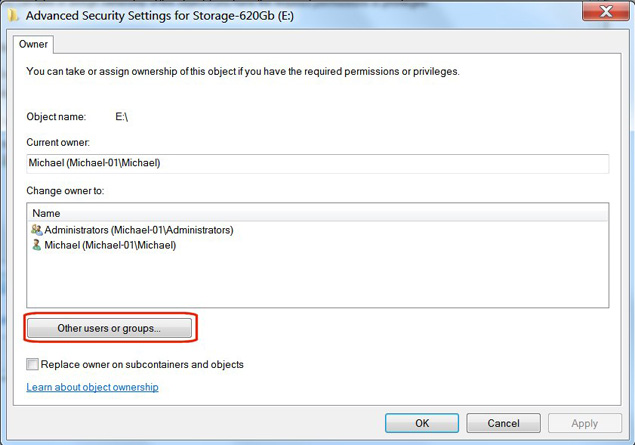
<p style="text-align: justify;">Nhấp chọn nút&nbsp;<strong>Other users or groups.</strong></p>

<p style="text-align: justify;"><img alt="Nhấp chọn nút Other users or groups" data-i="7" data-src="https://st.quantrimang.com/photos/image/2017/06/08/lay-lai-quyen-truy-cap-o-cung-007.jpg" data-was-processed="true" height="445" src="https://st.quantrimang.com/photos/image/2017/06/08/lay-lai-quyen-truy-cap-o-cung-007.jpg" title="Nhấp chọn nút Other users or groups" width="635" /></p>

<div style="text-align: justify;">&nbsp;</div>

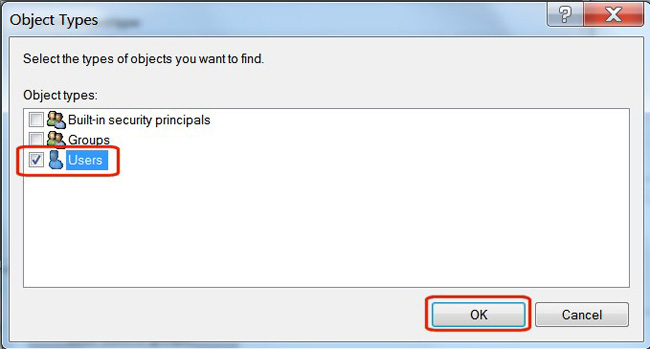
<p style="text-align: justify;">Trong phần “<em>Object Types</em>&quot;, bỏ tích tất cả các ô ngoại trừ Users, sau đó nhấn&nbsp;<strong>OK</strong>.</p>

<p style="text-align: justify;"><img alt="Trong phần “Object Types&#039;, bỏ tích tất cả các ô ngoài từ Users, sau đó nhấn OK" data-i="8" data-src="https://st.quantrimang.com/photos/image/2017/06/08/lay-lai-quyen-truy-cap-o-cung-008.jpg" data-was-processed="true" height="349" src="https://st.quantrimang.com/photos/image/2017/06/08/lay-lai-quyen-truy-cap-o-cung-008.jpg" title="Trong phần “Object Types&#039;, bỏ tích tất cả các ô ngoài từ Users, sau đó nhấn OK" width="650" /></p>

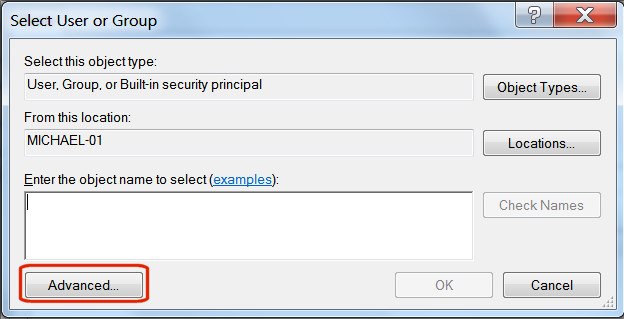
<p style="text-align: justify;">Nhấp chọn nút&nbsp;<strong>Advanced.</strong></p>

<p style="text-align: justify;"><img alt="Nhấp chọn nút Advanced" data-i="9" data-src="https://st.quantrimang.com/photos/image/2017/06/08/lay-lai-quyen-truy-cap-o-cung-009.jpg" data-was-processed="true" height="319" src="https://st.quantrimang.com/photos/image/2017/06/08/lay-lai-quyen-truy-cap-o-cung-009.jpg" title="Nhấp chọn nút Advanced" width="624" /></p>

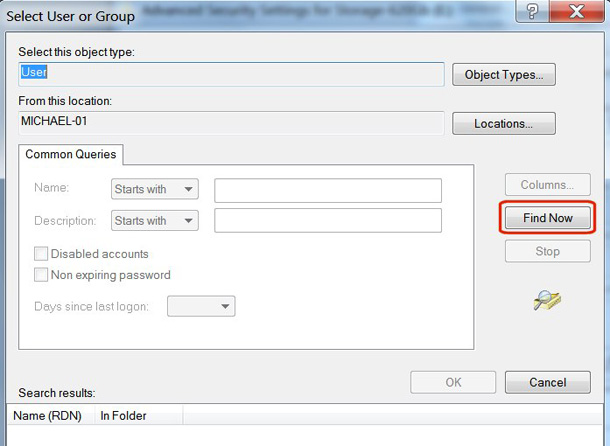
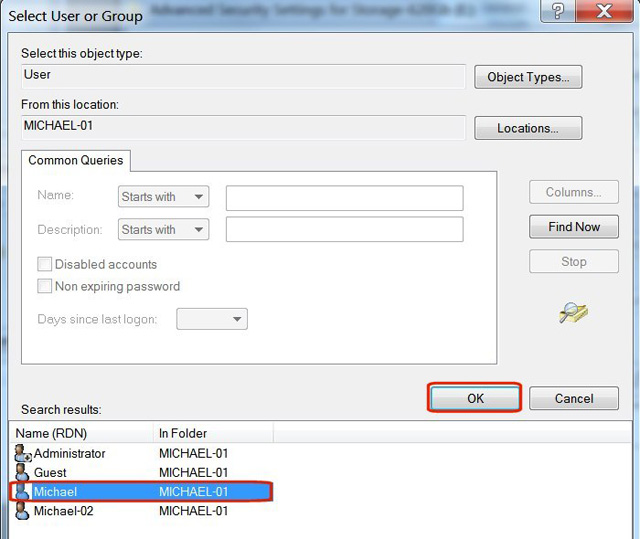
<p style="text-align: justify;">Kích chọn nút&nbsp;<strong>Find Now.</strong></p>

<p style="text-align: justify;"><img alt="Kích chọn nút Find Now" data-i="10" data-src="https://st.quantrimang.com/photos/image/2017/06/08/lay-lai-quyen-truy-cap-o-cung-010.jpg" data-was-processed="true" height="446" src="https://st.quantrimang.com/photos/image/2017/06/08/lay-lai-quyen-truy-cap-o-cung-010.jpg" title="Kích chọn nút Find Now" width="610" /></p>

<p style="text-align: justify;">Trong phần&nbsp;<em>Search Results</em>, kích chọn&nbsp;<strong>user name</strong>&nbsp;mà bạn đăng nhập vào Windows, sau đó nhấn&nbsp;<strong>OK.</strong></p>

<p style="text-align: justify;"><img alt="Kích chọn user name mà bạn đăng nhập vào các cửa sổ, sau đó nhấn OK" data-i="11" data-src="https://st.quantrimang.com/photos/image/2017/06/08/lay-lai-quyen-truy-cap-o-cung-011-1.jpg" data-was-processed="true" src="https://st.quantrimang.com/photos/image/2017/06/08/lay-lai-quyen-truy-cap-o-cung-011-1.jpg" title="Kích chọn user name mà bạn đăng nhập vào các cửa sổ, sau đó nhấn OK" /></p>

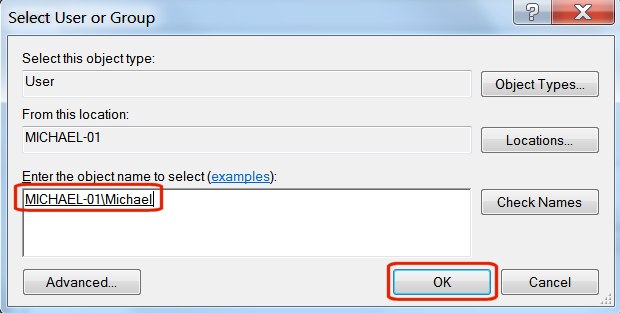
<p style="text-align: justify;">Xác minh tên người dùng đúng trong cửa sổ đối tượng và nhấn&nbsp;<strong>OK.</strong></p>

<div style="text-align: justify;">&nbsp;</div>

<p style="text-align: justify;"><img alt="Xác minh tên người dùng trong cửa số object và nhấn OK" data-i="12" data-src="https://st.quantrimang.com/photos/image/2017/06/08/lay-lai-quyen-truy-cap-o-cung-012.jpg" data-was-processed="true" height="313" src="https://st.quantrimang.com/photos/image/2017/06/08/lay-lai-quyen-truy-cap-o-cung-012.jpg" title="Xác minh tên người dùng trong cửa số object và nhấn OK" width="620" /></p>

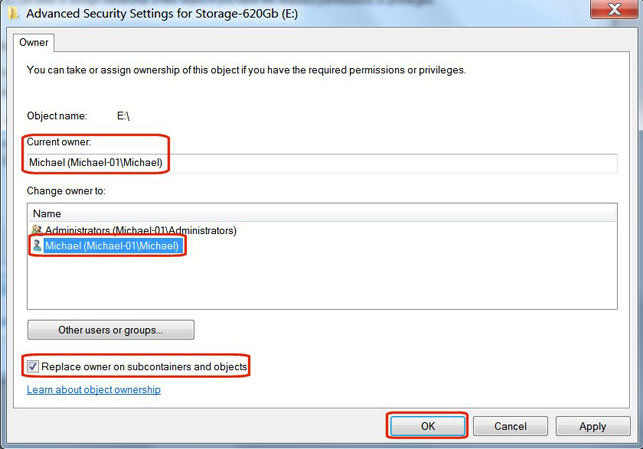
<p style="text-align: justify;">Tích vào ô bên cạnh&nbsp;<strong>Replace owner on subcontainters and objects</strong>.</p>

<p style="text-align: justify;"><img alt="Tích vào ô bên cạnh Replace owner on subcontainters and objects" data-i="13" data-src="https://st.quantrimang.com/photos/image/2017/06/08/lay-lai-quyen-truy-cap-o-cung-013.jpg" data-was-processed="true" height="449" src="https://st.quantrimang.com/photos/image/2017/06/08/lay-lai-quyen-truy-cap-o-cung-013.jpg" title="Tích vào ô bên cạnh Replace owner on subcontainters and objects" width="643" /></p>

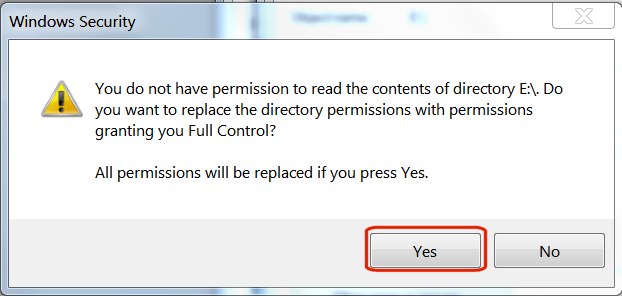
<p style="text-align: justify;">Bạn sẽ nhìn thấy tin nhắn cảnh báo &quot;<em>All permissions will be replaced…</em>&quot;. Điều này rất bình thường. Nhấn chọn&nbsp;<strong>Yes</strong>.</p>

<p style="text-align: justify;"><img alt="Màn hình hiển thị thông báo, nhấn chọn Yes." data-i="14" data-src="https://st.quantrimang.com/photos/image/2017/06/08/lay-lai-quyen-truy-cap-o-cung-014.jpg" data-was-processed="true" height="296" src="https://st.quantrimang.com/photos/image/2017/06/08/lay-lai-quyen-truy-cap-o-cung-014.jpg" title="Màn hình hiển thị thông báo, nhấn chọn Yes." width="622" /></p>

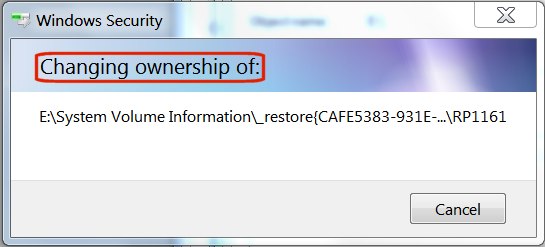
<p style="text-align: justify;">Một cửa sổ trạng thái xuất hiện, thông báo quyền truy cập tệp đã thay đổi.</p>

<p style="text-align: justify;"><img alt="Một cửa sổ trạng thái sẽ hiển thị quyền truy cập tệp" data-i="15" data-src="https://st.quantrimang.com/photos/image/2017/06/08/lay-lai-quyen-truy-cap-o-cung-015.jpg" data-was-processed="true" height="247" src="https://st.quantrimang.com/photos/image/2017/06/08/lay-lai-quyen-truy-cap-o-cung-015.jpg" title="Một cửa sổ trạng thái sẽ hiển thị quyền truy cập tệp" width="545" /></p>

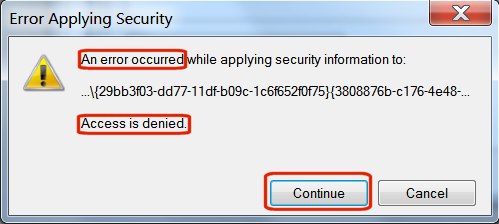
<p style="text-align: justify;">Nếu bạn thấy thông báo lỗi “<em>Access is denied</em>” thì không vấn đề gì cả. Thông báo đó chỉ đề cập đến một tệp hệ thống cụ thể đang được sử dụng. Bạn không cần truy cập vào đó. Chỉ cần nhấn nút&nbsp;<strong>Continue.</strong></p>

<p style="text-align: justify;"><img alt="Nhấn nút Continue khi hiện thông báo lỗi Access is denied" data-i="16" data-src="https://st.quantrimang.com/photos/image/2017/06/08/lay-lai-quyen-truy-cap-o-cung-016.jpg" data-was-processed="true" height="224" src="https://st.quantrimang.com/photos/image/2017/06/08/lay-lai-quyen-truy-cap-o-cung-016.jpg" title="Nhấn nút Continue khi hiện thông báo lỗi Access is denied" width="499" /></p>

<div style="text-align: justify;">&nbsp;</div>

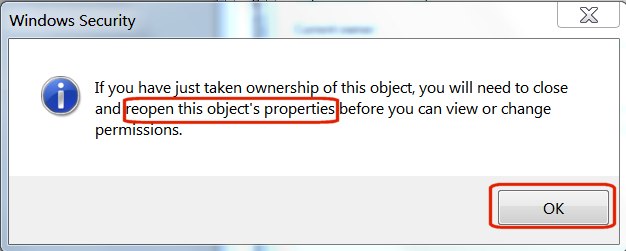
<p style="text-align: justify;">Nhấn&nbsp;<strong>OK</strong>&nbsp;trên thông báo cuối cùng trong cửa sổ Windows Security.</p>

<p style="text-align: justify;"><img alt="Nhấn OK trên thông báo cuối cùng trong cửa sổ Windows Security" data-i="17" data-src="https://st.quantrimang.com/photos/image/2017/06/08/lay-lai-quyen-truy-cap-o-cung-017.jpg" data-was-processed="true" height="251" src="https://st.quantrimang.com/photos/image/2017/06/08/lay-lai-quyen-truy-cap-o-cung-017.jpg" title="Nhấn OK trên thông báo cuối cùng trong cửa sổ Windows Security" width="626" /></p>

<p style="text-align: justify;">Bằng cách làm các bước trên, bạn đã thành công trong việc lấy lại quyền sở hữu ổ cứng rồi đấy.</p>

<h3 style="text-align: justify;">2. Cấp quyền truy cập</h3>

<p style="text-align: justify;">Trong Windows Explorer, nhấp chuột phải vào ổ đĩa mà bạn vừa lấy lại quyền sở hữu, sau đó chọn&nbsp;<strong>Properties</strong>&nbsp;từ menu thả xuống.</p>

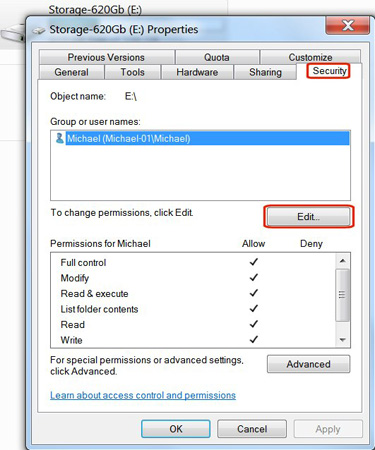
<p style="text-align: justify;">Bên dưới Properties, chọn tab&nbsp;<strong>Security</strong>. Bạn sẽ thấy tên người dùng của mình trong cửa sổ&nbsp;<strong>Group or user names</strong>. Nhấp vào tên người dùng để đánh dấu, sau đó nhấp vào nút&nbsp;<strong>Edit</strong>.</p>

<p style="text-align: justify;"><img alt="Nhấp vào tên người dùng để đánh dấu, sau đó nhấp vào nút Edit" data-i="18" data-src="https://st.quantrimang.com/photos/image/2017/06/08/lay-lai-quyen-truy-cap-o-cung-018.jpg" data-was-processed="true" height="450" src="https://st.quantrimang.com/photos/image/2017/06/08/lay-lai-quyen-truy-cap-o-cung-018.jpg" title="Nhấp vào tên người dùng để đánh dấu, sau đó nhấp vào nút Edit" width="375" /></p>

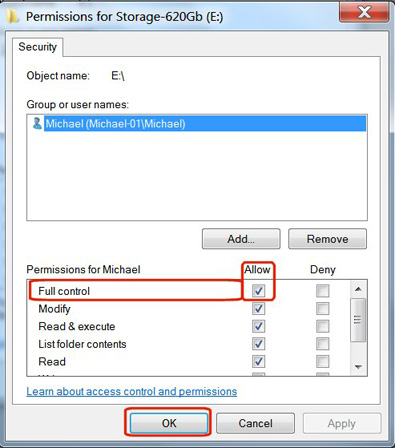
<p style="text-align: justify;">Trong cột&nbsp;<strong>Allow</strong>, tích vào ô&nbsp;<strong>Full control</strong>, sau đó nhấp vào nút&nbsp;<strong>OK</strong>.</p>

<p style="text-align: justify;"><img alt="Tích vào ô Full control, sau đó nhấp vào nút OK trong cột Allow" data-i="19" data-src="https://st.quantrimang.com/photos/image/2017/06/08/lay-lai-quyen-truy-cap-o-cung-019.jpg" data-was-processed="true" height="448" src="https://st.quantrimang.com/photos/image/2017/06/08/lay-lai-quyen-truy-cap-o-cung-019.jpg" title="Tích vào ô Full control, sau đó nhấp vào nút OK trong cột Allow" width="395" /></p>

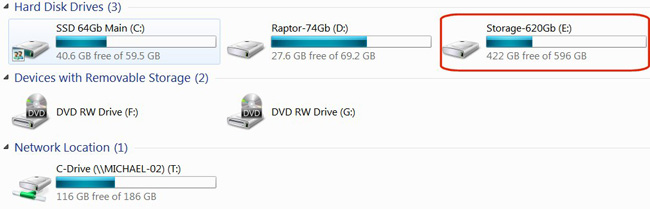
<p style="text-align: justify;"><a data-google-interstitial="false" data-google-vignette="false" href="https://quantrimang.com/cong-nghe/cach-lay-lai-quyen-truy-cap-o-cung-136253#">&nbsp;Ổ đĩa cứng</a>&nbsp;sẽ xuất hiện trong&nbsp;<a data-google-interstitial="false" data-google-vignette="false" href="https://quantrimang.com/cong-nghe/cach-lay-lai-quyen-truy-cap-o-cung-136253#">&nbsp;Windows</a>&nbsp;Explorer với những thông tin về kích thước và dung lượng trống. Bạn có thể nhấp vào nó, xem các thư mục, sau đó thêm, xóa hoặc sửa đổi tập tin nếu cần thiết.</p>

<p style="text-align: justify;"><img alt="Ổ đĩa hiển thị thông tin chi tiết về kích thước và dung lượng trống" data-i="20" data-src="https://st.quantrimang.com/photos/image/2017/06/08/lay-lai-quyen-truy-cap-o-cung-020.jpg" data-was-processed="true" height="209" src="https://st.quantrimang.com/photos/image/2017/06/08/lay-lai-quyen-truy-cap-o-cung-020.jpg" title="Ổ đĩa hiển thị thông tin chi tiết về kích thước và dung lượng trống" width="650" /></p>

<p style="text-align: justify;">Với những thao tác không mấy phức tạp, bạn đã có thể lấy lại quyền truy cập ổ cứng rồi. Nếu bạn gặp lỗi tương tự, đừng quên lôi cách này ra dùng nhé!</p>

<p style="text-align: justify;">Chúc các bạn thành công!</p>

<div style="text-align: justify;">&nbsp;</div>
		</div>
				<div id="author">
						<p>
				<strong>Nguồn tin:</strong>
				Quantrimang.com:
			</p>
		</div>
	</div>
	<div id="footer" class="clearfix">
		<div id="url">
			<strong>URL của bản tin này: </strong><a href="https://www.nguoicodonvn2008.info/vi/news/savefile/kien-thuc-may-tinh/cach-lay-lai-quyen-truy-cap-o-cung-sua-loi-khong-mo-duoc-o-cung-10254.html" title="Cách lấy lại quyền truy cập ổ cứng, sửa lỗi không mở được ổ cứng">https://www.nguoicodonvn2008.info/vi/news/savefile/kien-thuc-may-tinh/cach-lay-lai-quyen-truy-cap-o-cung-sua-loi-khong-mo-duoc-o-cung-10254.html</a>

		</div>
		<div class="clear"></div>
		<div class="copyright">
			&copy; .&#x3A; Nguoicodonvn2008.info - Cõi lòng người cô đơn &#x3A;.
		</div>
		<div id="contact">
			<a href="mailto:admin@nguoicodonvn2008.info">admin@nguoicodonvn2008.info</a>
		</div>
	</div>
</div>
        <div id="timeoutsess" class="chromeframe">
            Bạn đã không sử dụng Site, <a onclick="timeoutsesscancel();" href="https://nguoicodonvn2008.info/#">Bấm vào đây để duy trì trạng thái đăng nhập</a>. Thời gian chờ: <span id="secField"> 60 </span> giây
        </div>
        <div id="openidResult" class="nv-alert" style="display:none"></div>
        <div id="openidBt" data-result="" data-redirect=""></div>
		</script>
		<div class="car-top">
  <span><img src="https://nguoicodonvn2008.info/themes/default/images/car.png" alt=""></span>
</div>
<div id="run_cronjobs" style="visibility:hidden;display:none;"><img alt="cron" src="/index.php?second=cronjobs&amp;p=x2U72F19" width="1" height="1" /></div>
<script src="https://nguoicodonvn2008.info/assets/js/jquery/jquery.min.js"></script>
<script>var nv_base_siteurl="/",nv_lang_data="vi",nv_lang_interface="vi",nv_name_variable="nv",nv_fc_variable="op",nv_lang_variable="language",nv_module_name="news",nv_func_name="savefile",nv_is_user=0, nv_my_ofs=-4,nv_my_abbr="EDT",nv_cookie_prefix="nv4c_e856T",nv_check_pass_mstime=1738000,nv_area_admin=0,nv_safemode=0,theme_responsive=0,nv_recaptcha_ver=2,nv_recaptcha_sitekey="",nv_recaptcha_type="image",XSSsanitize=1;</script>
<script src="https://nguoicodonvn2008.info/assets/js/language/vi.js"></script>
<script src="https://nguoicodonvn2008.info/assets/js/DOMPurify/purify3.js"></script>
<script src="https://nguoicodonvn2008.info/assets/js/global.js"></script>
<script src="https://nguoicodonvn2008.info/assets/js/site.js"></script>
<script src="https://nguoicodonvn2008.info/themes/default/js/news.js"></script>
<script src="https://nguoicodonvn2008.info/themes/default/js/main.js"></script>
<script src="https://nguoicodonvn2008.info/themes/default/js/custom.js"></script>
<script type="application/ld+json">
        {
            "@context": "https://schema.org",
            "@type": "Organization",
            "url": "https://nguoicodonvn2008.info",
            "logo": "https://nguoicodonvn2008.info/uploads/angel.gif"
        }
        </script>
<script src="https://nguoicodonvn2008.info/themes/default/js/bootstrap.min.js"></script>
<script type="text/javascript">
var $scrolltop = $('.car-top');
$scrolltop.on('click', function () {
    $('html,body').animate({
        scrollTop: 0
    }, 800);
    $(this).addClass("car-run");
    setTimeout(function(){ $scrolltop.removeClass('car-run');}, 1000);
    return false;
});
$(window).on('scroll', function ()
{ 
    if($(window).scrollTop() >= 200)
    {
        $scrolltop.addClass("show");
        $scrolltop.addClass("car-down");
    }
    else
    {
       $scrolltop.removeClass("show");
       setTimeout(function(){ $scrolltop.removeClass('car-down');}, 300);
    }
});
</script>
</body>
</html>