<!DOCTYPE html>
    <html lang="vi" xmlns="http://www.w3.org/1999/xhtml" prefix="og: http://ogp.me/ns#">
    <head>
<title>Cách làm mát Raspberry Pi</title>
<meta name="description" content="Cách làm mát Raspberry Pi - Savefile - Tin Tức - https&#x3A;&#x002F;&#x002F;www.nguoicodonvn2008.info&#x002F;vi&#x002F;news&#x002F;savefile&#x002F;kien-thuc-may-tinh&#x002F;cach-lam-mat-raspberry-pi-203.html">
<meta name="author" content=".: Nguoicodonvn2008.info - Cõi lòng người cô đơn :.">
<meta name="copyright" content=".: Nguoicodonvn2008.info - Cõi lòng người cô đơn :. [admin@nguoicodonvn2008.info]">
<meta name="robots" content="index, archive, follow, noodp">
<meta name="googlebot" content="index,archive,follow,noodp">
<meta name="msnbot" content="all,index,follow">
<meta name="generator" content="NukeViet v4.5">
<meta http-equiv="Content-Type" content="text/html; charset=utf-8">
<meta property="og:title" content="Cách làm mát Raspberry Pi">
<meta property="og:type" content="website">
<meta property="og:description" content="Savefile - Tin Tức - https&#x3A;&#x002F;&#x002F;www.nguoicodonvn2008.info&#x002F;vi&#x002F;news&#x002F;savefile&#x002F;kien-thuc-may-tinh&#x002F;cach-lam-mat-raspberry-pi-203.html">
<meta property="og:site_name" content=".&#x3A; Nguoicodonvn2008.info - Cõi lòng người cô đơn &#x3A;.">
<meta property="og:url" content="https://www.nguoicodonvn2008.info/vi/news/savefile/kien-thuc-may-tinh/cach-lam-mat-raspberry-pi-203.html">
<link rel="shortcut icon" href="https://nguoicodonvn2008.info/favicon.ico">
<link rel="canonical" href="https://www.nguoicodonvn2008.info/vi/news/savefile/kien-thuc-may-tinh/cach-lam-mat-raspberry-pi-203.html">
<link rel="alternate" href="https://nguoicodonvn2008.info/vi/news/rss/" title="Tin Tức" type="application/rss+xml">
<link rel="alternate" href="https://nguoicodonvn2008.info/vi/news/rss/karaoke-dual/" title="Tin Tức - Karaoke Dual" type="application/rss+xml">
<link rel="alternate" href="https://nguoicodonvn2008.info/vi/news/rss/nhac-tre/" title="Tin Tức - Nhạc trẻ" type="application/rss+xml">
<link rel="alternate" href="https://nguoicodonvn2008.info/vi/news/rss/tru-tinh/" title="Tin Tức - Trữ tình" type="application/rss+xml">
<link rel="alternate" href="https://nguoicodonvn2008.info/vi/news/rss/nuoc-ngoai/" title="Tin Tức - Nước ngoài" type="application/rss+xml">
<link rel="alternate" href="https://nguoicodonvn2008.info/vi/news/rss/remix/" title="Tin Tức - Remix" type="application/rss+xml">
<link rel="alternate" href="https://nguoicodonvn2008.info/vi/news/rss/tam-su-tinh-yeu/" title="Tin Tức - Tâm sự tình yêu" type="application/rss+xml">
<link rel="alternate" href="https://nguoicodonvn2008.info/vi/news/rss/tho-suu-tam/" title="Tin Tức - Thơ sưu tầm" type="application/rss+xml">
<link rel="alternate" href="https://nguoicodonvn2008.info/vi/news/rss/cuoc-song/" title="Tin Tức - Cuộc sống" type="application/rss+xml">
<link rel="alternate" href="https://nguoicodonvn2008.info/vi/news/rss/phan-mem/" title="Tin Tức - Phần mềm" type="application/rss+xml">
<link rel="alternate" href="https://nguoicodonvn2008.info/vi/news/rss/kien-thuc-may-tinh/" title="Tin Tức - Kiến thức máy tính" type="application/rss+xml">
<link rel="alternate" href="https://nguoicodonvn2008.info/vi/news/rss/hoc-tap/" title="Tin Tức - Học tập" type="application/rss+xml">
<link rel="alternate" href="https://nguoicodonvn2008.info/vi/news/rss/tai-lieu/" title="Tin Tức - Tài liệu" type="application/rss+xml">
<link rel="alternate" href="https://nguoicodonvn2008.info/vi/news/rss/de-thi/" title="Tin Tức - Đề thi" type="application/rss+xml">
<link rel="preload" as="style" href="https://nguoicodonvn2008.info/assets/css/font-awesome.min.css" type="text/css">
<link rel="preload" as="style" href="https://nguoicodonvn2008.info/themes/default/css/bootstrap.non-responsive.css" type="text/css">
<link rel="preload" as="style" href="https://nguoicodonvn2008.info/themes/default/css/style.css" type="text/css">
<link rel="preload" as="style" href="https://nguoicodonvn2008.info/themes/default/css/style.non-responsive.css" type="text/css">
<link rel="preload" as="style" href="https://nguoicodonvn2008.info/themes/default/css/news.css" type="text/css">
<link rel="preload" as="style" href="https://nguoicodonvn2008.info/themes/default/css/custom.css" type="text/css">
<link rel="preload" as="script" href="https://nguoicodonvn2008.info/assets/js/jquery/jquery.min.js" type="text/javascript">
<link rel="preload" as="script" href="https://nguoicodonvn2008.info/assets/js/language/vi.js" type="text/javascript">
<link rel="preload" as="script" href="https://nguoicodonvn2008.info/assets/js/DOMPurify/purify3.js" type="text/javascript">
<link rel="preload" as="script" href="https://nguoicodonvn2008.info/assets/js/global.js" type="text/javascript">
<link rel="preload" as="script" href="https://nguoicodonvn2008.info/assets/js/site.js" type="text/javascript">
<link rel="preload" as="script" href="https://nguoicodonvn2008.info/themes/default/js/news.js" type="text/javascript">
<link rel="preload" as="script" href="https://nguoicodonvn2008.info/themes/default/js/main.js" type="text/javascript">
<link rel="preload" as="script" href="https://nguoicodonvn2008.info/themes/default/js/custom.js" type="text/javascript">
<link rel="preload" as="script" href="https://nguoicodonvn2008.info/themes/default/js/bootstrap.min.js" type="text/javascript">
<link rel="stylesheet" href="https://nguoicodonvn2008.info/assets/css/font-awesome.min.css">
<link rel="stylesheet" href="https://nguoicodonvn2008.info/themes/default/css/bootstrap.non-responsive.css">
<link rel="stylesheet" href="https://nguoicodonvn2008.info/themes/default/css/style.css">
<link rel="stylesheet" href="https://nguoicodonvn2008.info/themes/default/css/style.non-responsive.css">
<link rel="StyleSheet" href="https://nguoicodonvn2008.info/themes/default/css/news.css">
<link rel="stylesheet" href="https://nguoicodonvn2008.info/themes/default/css/custom.css">
<style type="text/css">
	body{background: #fff;}
</style>
    </head>
    <body>
<div id="print">
	<div id="hd_print">
		<h2 class="pull-left">.&#x3A; Nguoicodonvn2008.info - Cõi lòng người cô đơn &#x3A;.</h2>
		<p class="pull-right"><a title=".&#x3A; Nguoicodonvn2008.info - Cõi lòng người cô đơn &#x3A;." href="https://nguoicodonvn2008.info/">https://nguoicodonvn2008.info</a></p>
	</div>
	<div class="clear"></div>
	<hr />
	<div id="content">
		<h1>Cách làm mát Raspberry Pi</h1>
		<ul class="list-inline">
			<li>Chủ nhật - 23/06/2019 10:34</li>
			<li class="hidden-print txtrequired"><em class="fa fa-print">&nbsp;</em><a title="In ra" href="javascript:;" onclick="window.print()">In ra</a></li>
			<li class="hidden-print txtrequired"><em class="fa fa-power-off">&nbsp;</em><a title="Đóng cửa sổ này" href="javascript:;" onclick="window.close()">Đóng cửa sổ này</a></li>
		</ul>
		<div class="clear"></div>
		<div id="hometext">
		</div>
				<div class="imghome">
			<img alt="Cách làm mát Raspberry Pi" src="https://st.quantrimang.com/photos/image/2019/06/22/cach-lam-mat-raspberry-pi-1.jpg" width="460" class="img-thumbnail" />
		</div>
		<div class="clear"></div>
		<div id="bodytext" class="clearfix">
			<p>Máy tính đơn bo&nbsp;Raspberry Pi&nbsp;là một lựa chọn tuyệt vời cho nhiều ứng dụng. Bởi vì Raspberry Pi được thiết kế để sửa đổi, một trong những điều người dùng có thể làm là&nbsp;ép xung&nbsp;Pi. Tuy nhiên, ép xung có thể dẫn đến nhiệt tăng quá cao, gây ra nhiều thiệt hại không thể khắc phục được. Pi được thiết kế để chạy ở mức nhiệt tương đối cao, tuy nhiên, nếu bạn ép xung để đạt hiệu suất tốt nhất từ ​​Pi, bạn có thể gặp sự cố. May mắn thay, bạn có thể ngăn chặn điều này bằng cách làm mát cho Pi. Cùng&nbsp;<strong>Quantrimang.com</strong>&nbsp;tìm hiểu cách làm qua bài viết sau đây nhé!</p>

<h2 id="mcetoc_1ddup1d2r0">Việc làm mát diễn ra như thế nào?</h2>

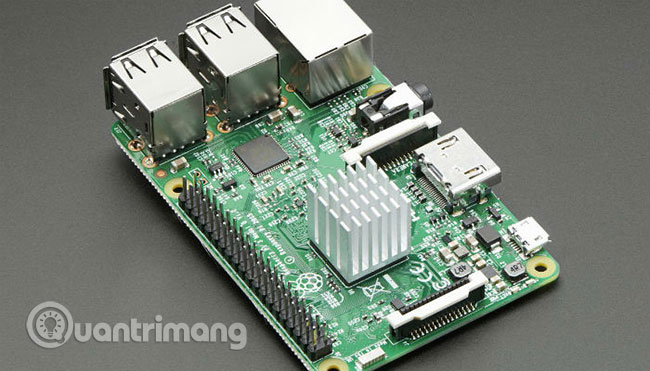
<p>Thiết bị điện tử sinh ra nhiệt. Nhiệt này có thể gây bất lợi cho hiệu suất của các thiết bị điện tử đó, vì vậy giữ cho chúng ở trạng thái mát mẻ là điều tối quan trọng. May mắn thay, có một vài cách hợp lý để thực hiện được điều này. Đầu tiên là với một bộ tản nhiệt (heatsink).</p>

<p><img alt="Quy trình làm mát" data-i="0" data-src="https://st.quantrimang.com/photos/image/2019/06/22/cach-lam-mat-raspberry-pi-1.jpg" data-was-processed="true" height="314" src="https://st.quantrimang.com/photos/image/2019/06/22/cach-lam-mat-raspberry-pi-1.jpg" width="550" /></p>

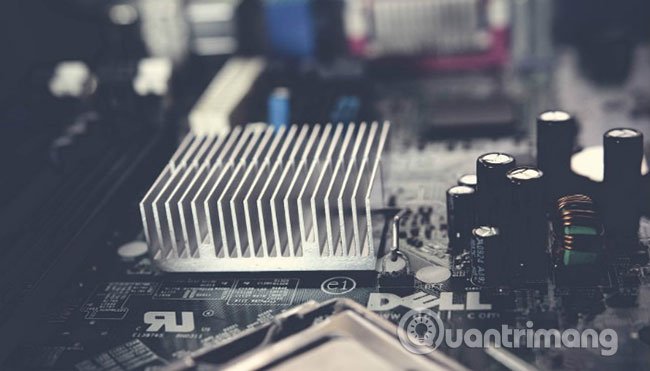
<p>Bộ tản nhiệt là một miếng kim loại, phổ biến nhất là làm từ đồng hoặc nhôm, có một số lá tản (fin) kéo dài theo chiều dọc từ phần đế. Bộ tản nhiệt được áp dụng cho một thành phần điện tử tạo ra nhiệt (trong trường hợp này là&nbsp;<a href="https://quantrimang.com/cpu-la-gi-142876" title="CPU là gì?">CPU</a>). Nhiệt được đưa lên, ra khỏi CPU, vào các lá tản nhiệt, cho phép nhiệt tỏa vào không khí, làm mát CPU.</p>

<p><img alt="Các lá tản làm giảm nhiệt" data-i="1" data-src="https://st.quantrimang.com/photos/image/2019/06/22/cach-lam-mat-raspberry-pi-2.jpg" data-was-processed="true" height="314" src="https://st.quantrimang.com/photos/image/2019/06/22/cach-lam-mat-raspberry-pi-2.jpg" width="550" /></p>

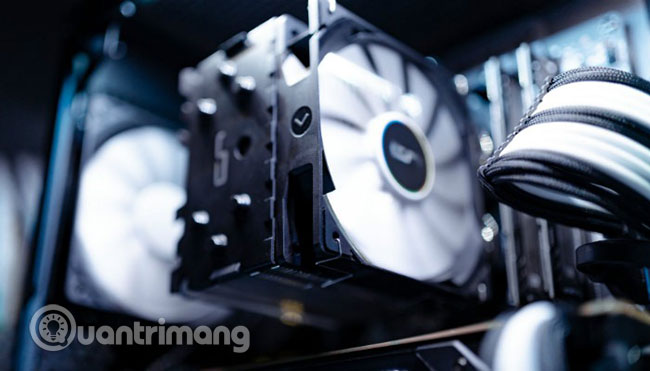
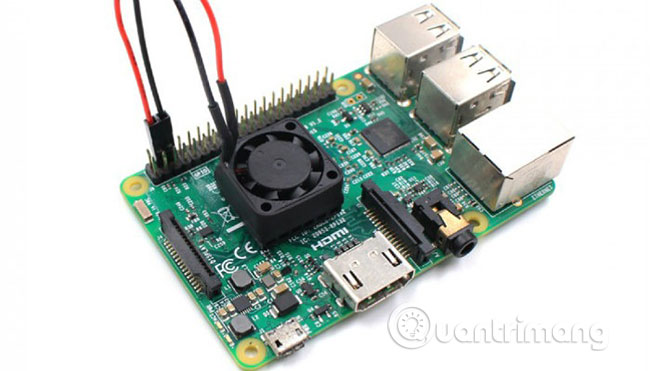
<p>Một cách khác để hạ nhiệt CPU là dùng quạt. Quạt có chức năng làm nhiệt thoát ra khỏi CPU và các thành phần sinh ra nhiệt khác. Điều này làm giảm nhiệt độ chung của CPU, cải thiện hiệu suất và độ ổn định của bộ phận này.</p>

<h2 id="mcetoc_1ddup1d2r1">Điều gì xảy ra nếu Pi quá nóng?</h2>

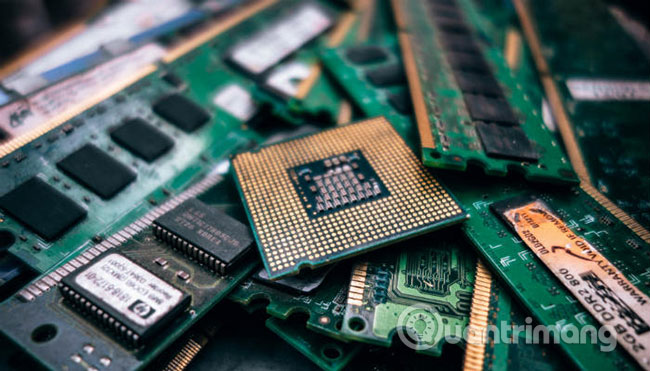
<p>Rõ ràng, nhiệt không tốt cho máy tính. Tiếp xúc kéo dài với nhiệt độ cao có thể làm hỏng bo mạch chủ và các thành phần khác trong máy tính. Nếu bạn không thể khởi động Raspberry Pi, rất có thể CPU đã bị hỏng do nhiệt độ quá cao.</p>

<p><img alt="Điều gì xảy ra nếu Pi quá nóng?" data-i="2" data-src="https://st.quantrimang.com/photos/image/2019/06/22/cach-lam-mat-raspberry-pi-3.jpg" data-was-processed="true" height="314" src="https://st.quantrimang.com/photos/image/2019/06/22/cach-lam-mat-raspberry-pi-3.jpg" width="550" /></p>

<p>Máy tính đơn bo Raspberry Pi được thiết kế để chạy ở mức nhiệt rất lớn, khoảng 80 độ C. Tuy nhiên, nếu bạn đẩy Pi của mình đến giới hạn của nó, thì không có gì lạ khi thấy nhiệt độ tăng đột biến vượt trên cả mức này. Raspberry Pi sẽ cố gắng ngăn chặn thiệt hại bằng cách điều chỉnh lại tốc độ CPU và nỗ lực tự làm mát. Thật không may, điều này sẽ dẫn đến hiệu suất bị giảm và Pi sẽ chạy chậm hơn.</p>

<h2 id="mcetoc_1ddup1d2r2">Heatsink (Bộ tản nhiệt)</h2>

<p><img alt="Heatsink" data-i="3" data-src="https://st.quantrimang.com/photos/image/2019/06/22/cach-lam-mat-raspberry-pi-4.jpg" data-was-processed="true" height="223" src="https://st.quantrimang.com/photos/image/2019/06/22/cach-lam-mat-raspberry-pi-4.jpg" width="481" /></p>

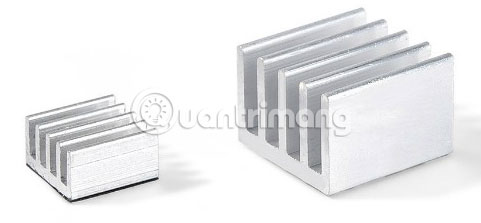
<p>Bộ tản nhiệt cho Raspberry Pi siêu rẻ và thực sự dễ cài đặt. Như bài viết đã đề cập trước đó, hai loại tản nhiệt phổ biến nhất là nhôm và đồng. Cả hai loại này đều có thể được sử dụng với Pi. Tuy nhiên, đồng có tính dẫn nhiệt cao hơn nhôm, cho phép nhiệt đi qua nó nhanh hơn. Điều này có nghĩa là bộ tản nhiệt bằng đồng thường tốt hơn trong việc tản nhiệt so với tùy chọn làm bằng nhôm. Tuy nhiên, đồng là một vật liệu đắt tiền và thường khó chế tạo hơn. Do những yếu tố này, heatsink làm bằng đồng đắt hơn so với các thiết bị làm từ nhôm.</p>
&nbsp;

<h3 id="mcetoc_1ddup1d2r3">Áp dụng bộ tản nhiệt ở đâu?</h3>

<p>Vì CPU, GPU và nhiều bộ phận khác được đặt trong SoC (system on chip), nên bài viết sẽ tập trung vào việc làm mát thành phần này nhiều hơn tất cả các thành phần khác, vì nó tạo ra nhiều nhiệt nhất. Bạn cũng có thể thêm bộ tản nhiệt cho chip bộ nhớ và ethernet/USB controller. Tuy nhiên, bạn sẽ không tăng được nhiều hiệu suất nếu bạn làm như vậy, vì chúng chỉ có thể làm giảm nhiệt độ tổng thể xuống khoảng một độ.</p>

<p><img alt="Áp dụng heatsink" data-i="4" data-src="https://st.quantrimang.com/photos/image/2019/06/22/cach-lam-mat-raspberry-pi-5.jpg" data-was-processed="true" height="314" src="https://st.quantrimang.com/photos/image/2019/06/22/cach-lam-mat-raspberry-pi-5.jpg" width="550" /></p>

<p>Cài đặt một bộ tản nhiệt rất đơn giản. Hầu hết các bộ tản nhiệt có sẵn cho Raspberry Pi đều có băng dính nhiệt được dán sẵn ở phía dưới. Điều này có nghĩa là tất cả những gì bạn phải làm là xác định vị trí SoC và dán bộ tản nhiệt lên phía trên nó. Mặc dù băng keo siêu tiện lợi, nhưng bạn nên sử dụng keo tản nhiệt thay thế. Điều này là do keo tản nhiệt có độ dẫn điện tốt hơn.</p>

<h2 id="mcetoc_1ddup1d2r4">Quạt</h2>

<p>Các quạt phổ biến nhất bạn sẽ thấy cho Raspberry Pi là case fan máy tính kích thước 30mm x 30mm. Tuy nhiên, những quạt có kích thước lớn hơn (và nhỏ hơn) cũng có sẵn. Kích thước quạt bạn sử dụng sẽ phụ thuộc phần lớn vào thiết lập của bạn và loại case bạn sử dụng. Một số case có quạt được tích hợp sẵn, và đối với những trường hợp khác, chẳng hạn như case Raspberry Pi chính thức, có phần trên có thể tháo rời để lắp thêm quạt.</p>

<p><img alt="Quạt tản nhiệt" data-i="5" data-src="https://st.quantrimang.com/photos/image/2019/06/22/cach-lam-mat-raspberry-pi-6.jpg" data-was-processed="true" height="314" src="https://st.quantrimang.com/photos/image/2019/06/22/cach-lam-mat-raspberry-pi-6.jpg" width="550" /></p>

<p>Cho dù bạn muốn không khí mát mẻ bên ngoài được đưa vào hay không khí nóng bên trong bị đẩy ra, sự đồng thuận chung dường như là nếu Pi của bạn nằm trong một vỏ bọc, chẳng hạn như case, bạn đều muốn gắn thêm quạt để làm mát nó. Nếu co thể mở Pi, thì bạn hãy đặt quạt theo một trong hai cách trên. Dù bạn chọn cách nào, miễn là bạn làm không khí lưu thông, bạn sẽ thấy nhiệt độ giảm đáng kể.</p>

<h3 id="mcetoc_1ddup1d2r5">Cách cài đặt quạt</h3>

<p>Mỗi quạt tản nhiệt khác nhau sẽ có hướng dẫn cài đặt khác nhau. Tuy nhiên, hầu hết quạt sẽ được gắn thông qua các đai ốc và bu lông. Quạt sẽ lấy năng lượng từ các chân GPIO (General Purpose Input/Output). Để quạt quay, hãy đặt dây màu đỏ vào chân thứ hai từ bên ngoài của hàng ngoài trên chân GPIO. Tiếp theo, cắm dây màu đen vào chân thứ ba, thuộc cùng một hàng, và bạn đã hoàn tất mọi thứ.</p>

<h2 id="mcetoc_1ddup1d2r6">Làm mát bằng nước</h2>

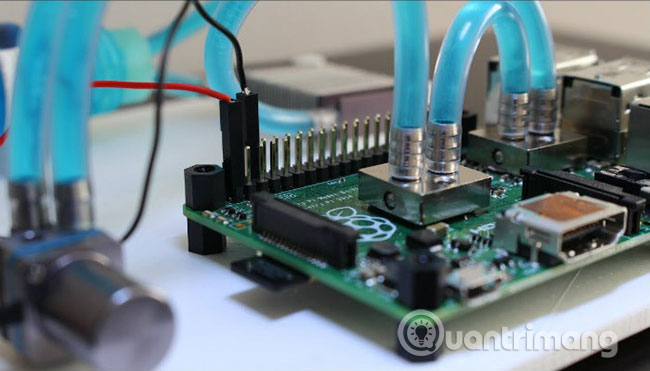
<p>Nếu bạn đã từng build một PC, bạn có thể quen với việc làm mát bằng nước. Làm mát bằng chất lỏng là cách tốt nhất để hạ nhiệt cho PC, vì nước truyền nhiệt tốt hơn rất nhiều so với không khí. Đối với nhiều người, làm mát Raspberry Pi bằng nước là quá mức cần thiết, nhưng bộ dụng cụ để thực hiện việc này vẫn có sẵn, nếu bạn nghĩ rằng bạn cần nó. Một lời cảnh báo: nếu bạn chọn làm mát bằng nước, hãy chắc chắn rằng bạn làm đúng theo hướng dẫn!</p>

<p><img alt="Làm mát bằng nước" data-i="6" data-src="https://st.quantrimang.com/photos/image/2019/06/22/cach-lam-mat-raspberry-pi-7.jpg" data-was-processed="true" height="314" src="https://st.quantrimang.com/photos/image/2019/06/22/cach-lam-mat-raspberry-pi-7.jpg" width="550" /></p>

<p>Với các phương pháp làm mát phù hợp được áp dụng, bạn có thể ép xung Pi để chạy các ứng dụng chuyên sâu như trình giả lập N64 trong RetroPie.</p>

<p>Chúc bạn thực hiện thành công!</p>
		</div>
				<div id="author">
						<p>
				<strong>Nguồn tin:</strong>
				Quantrimang.com
			</p>
		</div>
	</div>
	<div id="footer" class="clearfix">
		<div id="url">
			<strong>URL của bản tin này: </strong><a href="https://www.nguoicodonvn2008.info/vi/news/savefile/kien-thuc-may-tinh/cach-lam-mat-raspberry-pi-203.html" title="Cách làm mát Raspberry Pi">https://www.nguoicodonvn2008.info/vi/news/savefile/kien-thuc-may-tinh/cach-lam-mat-raspberry-pi-203.html</a>

		</div>
		<div class="clear"></div>
		<div class="copyright">
			&copy; .&#x3A; Nguoicodonvn2008.info - Cõi lòng người cô đơn &#x3A;.
		</div>
		<div id="contact">
			<a href="mailto:admin@nguoicodonvn2008.info">admin@nguoicodonvn2008.info</a>
		</div>
	</div>
</div>
        <div id="timeoutsess" class="chromeframe">
            Bạn đã không sử dụng Site, <a onclick="timeoutsesscancel();" href="https://nguoicodonvn2008.info/#">Bấm vào đây để duy trì trạng thái đăng nhập</a>. Thời gian chờ: <span id="secField"> 60 </span> giây
        </div>
        <div id="openidResult" class="nv-alert" style="display:none"></div>
        <div id="openidBt" data-result="" data-redirect=""></div>
		</script>
		<div class="car-top">
  <span><img src="https://nguoicodonvn2008.info/themes/default/images/car.png" alt=""></span>
</div>
<div id="run_cronjobs" style="visibility:hidden;display:none;"><img alt="cron" src="/index.php?second=cronjobs&amp;p=w499VF8T" width="1" height="1" /></div>
<script src="https://nguoicodonvn2008.info/assets/js/jquery/jquery.min.js"></script>
<script>var nv_base_siteurl="/",nv_lang_data="vi",nv_lang_interface="vi",nv_name_variable="nv",nv_fc_variable="op",nv_lang_variable="language",nv_module_name="news",nv_func_name="savefile",nv_is_user=0, nv_my_ofs=-4,nv_my_abbr="EDT",nv_cookie_prefix="nv4c_e856T",nv_check_pass_mstime=1738000,nv_area_admin=0,nv_safemode=0,theme_responsive=0,nv_recaptcha_ver=2,nv_recaptcha_sitekey="",nv_recaptcha_type="image",XSSsanitize=1;</script>
<script src="https://nguoicodonvn2008.info/assets/js/language/vi.js"></script>
<script src="https://nguoicodonvn2008.info/assets/js/DOMPurify/purify3.js"></script>
<script src="https://nguoicodonvn2008.info/assets/js/global.js"></script>
<script src="https://nguoicodonvn2008.info/assets/js/site.js"></script>
<script src="https://nguoicodonvn2008.info/themes/default/js/news.js"></script>
<script src="https://nguoicodonvn2008.info/themes/default/js/main.js"></script>
<script src="https://nguoicodonvn2008.info/themes/default/js/custom.js"></script>
<script type="application/ld+json">
        {
            "@context": "https://schema.org",
            "@type": "Organization",
            "url": "https://nguoicodonvn2008.info",
            "logo": "https://nguoicodonvn2008.info/uploads/angel.gif"
        }
        </script>
<script src="https://nguoicodonvn2008.info/themes/default/js/bootstrap.min.js"></script>
<script type="text/javascript">
var $scrolltop = $('.car-top');
$scrolltop.on('click', function () {
    $('html,body').animate({
        scrollTop: 0
    }, 800);
    $(this).addClass("car-run");
    setTimeout(function(){ $scrolltop.removeClass('car-run');}, 1000);
    return false;
});
$(window).on('scroll', function ()
{ 
    if($(window).scrollTop() >= 200)
    {
        $scrolltop.addClass("show");
        $scrolltop.addClass("car-down");
    }
    else
    {
       $scrolltop.removeClass("show");
       setTimeout(function(){ $scrolltop.removeClass('car-down');}, 300);
    }
});
</script>
</body>
</html>