<!DOCTYPE html>
    <html lang="vi" xmlns="http://www.w3.org/1999/xhtml" prefix="og: http://ogp.me/ns#">
    <head>
<title>Cách kiểm tra lịch sử sudo trong Linux</title>
<meta name="description" content="Cách kiểm tra lịch sử sudo trong Linux - Savefile - Tin Tức -...">
<meta name="author" content=".: Nguoicodonvn2008.info - Cõi lòng người cô đơn :.">
<meta name="copyright" content=".: Nguoicodonvn2008.info - Cõi lòng người cô đơn :. [admin@nguoicodonvn2008.info]">
<meta name="robots" content="index, archive, follow, noodp">
<meta name="googlebot" content="index,archive,follow,noodp">
<meta name="msnbot" content="all,index,follow">
<meta name="generator" content="NukeViet v4.5">
<meta http-equiv="Content-Type" content="text/html; charset=utf-8">
<meta property="og:title" content="Cách kiểm tra lịch sử sudo trong Linux">
<meta property="og:type" content="website">
<meta property="og:description" content="Savefile - Tin Tức - https&#x3A;&#x002F;&#x002F;www.nguoicodonvn2008.info&#x002F;vi&#x002F;news&#x002F;savefile&#x002F;kien-thuc-may-tinh&#x002F;cach-kiem-tra-lich-su-sudo-trong-linux-2853.html">
<meta property="og:site_name" content=".&#x3A; Nguoicodonvn2008.info - Cõi lòng người cô đơn &#x3A;.">
<meta property="og:url" content="https://www.nguoicodonvn2008.info/vi/news/savefile/kien-thuc-may-tinh/cach-kiem-tra-lich-su-sudo-trong-linux-2853.html">
<link rel="shortcut icon" href="https://nguoicodonvn2008.info/favicon.ico">
<link rel="canonical" href="https://www.nguoicodonvn2008.info/vi/news/savefile/kien-thuc-may-tinh/cach-kiem-tra-lich-su-sudo-trong-linux-2853.html">
<link rel="alternate" href="https://nguoicodonvn2008.info/vi/news/rss/" title="Tin Tức" type="application/rss+xml">
<link rel="alternate" href="https://nguoicodonvn2008.info/vi/news/rss/karaoke-dual/" title="Tin Tức - Karaoke Dual" type="application/rss+xml">
<link rel="alternate" href="https://nguoicodonvn2008.info/vi/news/rss/nhac-tre/" title="Tin Tức - Nhạc trẻ" type="application/rss+xml">
<link rel="alternate" href="https://nguoicodonvn2008.info/vi/news/rss/tru-tinh/" title="Tin Tức - Trữ tình" type="application/rss+xml">
<link rel="alternate" href="https://nguoicodonvn2008.info/vi/news/rss/nuoc-ngoai/" title="Tin Tức - Nước ngoài" type="application/rss+xml">
<link rel="alternate" href="https://nguoicodonvn2008.info/vi/news/rss/remix/" title="Tin Tức - Remix" type="application/rss+xml">
<link rel="alternate" href="https://nguoicodonvn2008.info/vi/news/rss/tam-su-tinh-yeu/" title="Tin Tức - Tâm sự tình yêu" type="application/rss+xml">
<link rel="alternate" href="https://nguoicodonvn2008.info/vi/news/rss/tho-suu-tam/" title="Tin Tức - Thơ sưu tầm" type="application/rss+xml">
<link rel="alternate" href="https://nguoicodonvn2008.info/vi/news/rss/cuoc-song/" title="Tin Tức - Cuộc sống" type="application/rss+xml">
<link rel="alternate" href="https://nguoicodonvn2008.info/vi/news/rss/phan-mem/" title="Tin Tức - Phần mềm" type="application/rss+xml">
<link rel="alternate" href="https://nguoicodonvn2008.info/vi/news/rss/kien-thuc-may-tinh/" title="Tin Tức - Kiến thức máy tính" type="application/rss+xml">
<link rel="alternate" href="https://nguoicodonvn2008.info/vi/news/rss/hoc-tap/" title="Tin Tức - Học tập" type="application/rss+xml">
<link rel="alternate" href="https://nguoicodonvn2008.info/vi/news/rss/tai-lieu/" title="Tin Tức - Tài liệu" type="application/rss+xml">
<link rel="alternate" href="https://nguoicodonvn2008.info/vi/news/rss/de-thi/" title="Tin Tức - Đề thi" type="application/rss+xml">
<link rel="preload" as="style" href="https://nguoicodonvn2008.info/assets/css/font-awesome.min.css" type="text/css">
<link rel="preload" as="style" href="https://nguoicodonvn2008.info/themes/default/css/bootstrap.non-responsive.css" type="text/css">
<link rel="preload" as="style" href="https://nguoicodonvn2008.info/themes/default/css/style.css" type="text/css">
<link rel="preload" as="style" href="https://nguoicodonvn2008.info/themes/default/css/style.non-responsive.css" type="text/css">
<link rel="preload" as="style" href="https://nguoicodonvn2008.info/themes/default/css/news.css" type="text/css">
<link rel="preload" as="style" href="https://nguoicodonvn2008.info/themes/default/css/custom.css" type="text/css">
<link rel="preload" as="script" href="https://nguoicodonvn2008.info/assets/js/jquery/jquery.min.js" type="text/javascript">
<link rel="preload" as="script" href="https://nguoicodonvn2008.info/assets/js/language/vi.js" type="text/javascript">
<link rel="preload" as="script" href="https://nguoicodonvn2008.info/assets/js/DOMPurify/purify3.js" type="text/javascript">
<link rel="preload" as="script" href="https://nguoicodonvn2008.info/assets/js/global.js" type="text/javascript">
<link rel="preload" as="script" href="https://nguoicodonvn2008.info/assets/js/site.js" type="text/javascript">
<link rel="preload" as="script" href="https://nguoicodonvn2008.info/themes/default/js/news.js" type="text/javascript">
<link rel="preload" as="script" href="https://nguoicodonvn2008.info/themes/default/js/main.js" type="text/javascript">
<link rel="preload" as="script" href="https://nguoicodonvn2008.info/themes/default/js/custom.js" type="text/javascript">
<link rel="preload" as="script" href="https://nguoicodonvn2008.info/themes/default/js/bootstrap.min.js" type="text/javascript">
<link rel="stylesheet" href="https://nguoicodonvn2008.info/assets/css/font-awesome.min.css">
<link rel="stylesheet" href="https://nguoicodonvn2008.info/themes/default/css/bootstrap.non-responsive.css">
<link rel="stylesheet" href="https://nguoicodonvn2008.info/themes/default/css/style.css">
<link rel="stylesheet" href="https://nguoicodonvn2008.info/themes/default/css/style.non-responsive.css">
<link rel="StyleSheet" href="https://nguoicodonvn2008.info/themes/default/css/news.css">
<link rel="stylesheet" href="https://nguoicodonvn2008.info/themes/default/css/custom.css">
<style type="text/css">
	body{background: #fff;}
</style>
    </head>
    <body>
<div id="print">
	<div id="hd_print">
		<h2 class="pull-left">.&#x3A; Nguoicodonvn2008.info - Cõi lòng người cô đơn &#x3A;.</h2>
		<p class="pull-right"><a title=".&#x3A; Nguoicodonvn2008.info - Cõi lòng người cô đơn &#x3A;." href="https://nguoicodonvn2008.info/">https://nguoicodonvn2008.info</a></p>
	</div>
	<div class="clear"></div>
	<hr />
	<div id="content">
		<h1>Cách kiểm tra lịch sử sudo trong Linux</h1>
		<ul class="list-inline">
			<li>Thứ tư - 07/10/2020 00:54</li>
			<li class="hidden-print txtrequired"><em class="fa fa-print">&nbsp;</em><a title="In ra" href="javascript:;" onclick="window.print()">In ra</a></li>
			<li class="hidden-print txtrequired"><em class="fa fa-power-off">&nbsp;</em><a title="Đóng cửa sổ này" href="javascript:;" onclick="window.close()">Đóng cửa sổ này</a></li>
		</ul>
		<div class="clear"></div>
		<div id="hometext">
		</div>
				<div class="imghome">
			<img alt="Cách kiểm tra lịch sử sudo trong Linux" src="https://st.quantrimang.com/photos/image/2020/10/07/kiem-tra-lich-su-sudo-2.jpg" width="460" class="img-thumbnail" />
		</div>
		<div class="clear"></div>
		<div id="bodytext" class="clearfix">
			<p style="text-align: justify;">Khi bạn chia sẻ máy tính với người khác và cấp cho họ quyền truy cập sudo, bạn nên theo dõi cách họ sử dụng máy tính đó. Rất may, thật dễ dàng để xem lịch sử sudo. Hãy cùng tìm hiểu cách làm chi tiết qua bài viết sau đây!</p>

<h2 style="text-align: justify;">Nhật ký xác thực</h2>

<p style="text-align: justify;">Nhiều service Linux lưu giữ nhật ký để giúp khắc phục sự cố. Rất may, trong số rất nhiều thứ khác, nó cũng lưu giữ một danh sách chi tiết chính xác thông tin mà ta đang tìm kiếm trong bài viết này. Trong danh sách này, bạn có thể kiểm tra xem ai thực thi lệnh nào và vào lúc nào, bằng cách sử dụng sudo. Để tìm thông tin này, nếu bạn đang sử dụng bản phân phối dựa trên Debian hoặc&nbsp;Ubuntu, hãy nhập dòng lệnh sau vào Terminal yêu thích:</p>

<pre id="pre0">
<code>sudo nano /var/log/auth.log</code></pre>

<p style="text-align: justify;">Trong các bản phân phối khác, vị trí có thể thay đổi. Thông tin này có thể ở&nbsp;<strong>/var/log/secure</strong>&nbsp;hoặc&nbsp;<strong>/var/log/audit/audit.log.</strong>&nbsp;Bạn có thể tìm thấy vị trí của file nhật ký này bằng cách kiểm tra file của người dùng sudo. Điều này cũng có thể được tìm thấy ở một vị trí khác tùy thuộc vào bản phân phối. Thông thường, bạn sẽ tìm thấy nó tại&nbsp;<strong>/etc/sudoers.</strong>&nbsp;Mở nó bằng trình soạn thảo văn bản yêu thích của bạn và tìm kiếm mục nhập&nbsp;<strong>logfile.</strong>&nbsp;Giá trị của nó là nơi file đang tìm kiếm được đặt, vì vậy, hãy sửa lại lệnh ở trên để kiểm tra file.</p>

<div style="text-align: justify;">&nbsp;</div>

<h2 style="text-align: justify;">Điều hướng thông tin có được</h2>

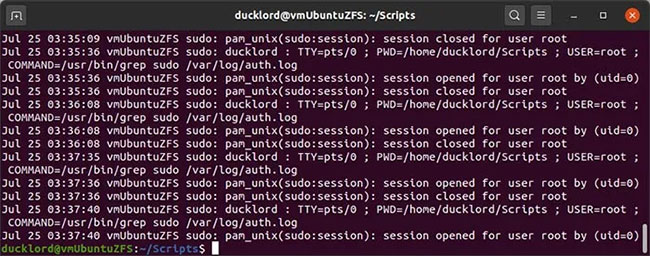
<p style="text-align: justify;">File nhật ký sẽ chứa rất nhiều mục nhập bạn có thể không cần quan tâm. Bạn có thể cuộn qua lần lượt hoặc sử dụng chức năng tìm của trình soạn thảo văn bản để tìm mọi quá trình sử dụng sudo.</p>

<figure>
<div style="text-align: justify;"><img alt="File nhật ký sẽ chứa rất nhiều mục nhập" data-i="0" data-src="https://st.quantrimang.com/photos/image/2020/10/07/kiem-tra-lich-su-sudo-1.jpg" data-was-processed="true" height="366" src="https://st.quantrimang.com/photos/image/2020/10/07/kiem-tra-lich-su-sudo-1.jpg" width="530" /></div>

<figcaption>
<div style="text-align: justify;">File nhật ký sẽ chứa rất nhiều mục nhập</div>
</figcaption>
</figure>

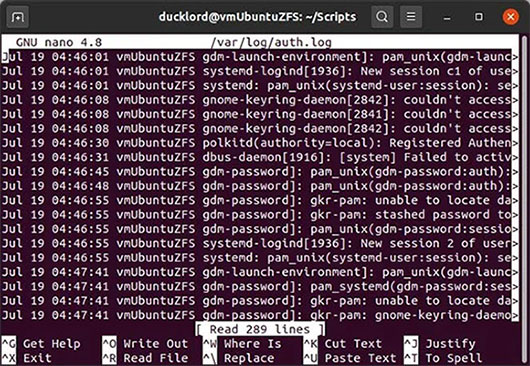
<p style="text-align: justify;">Tuy nhiên, sẽ tốt hơn nếu bạn&nbsp;sử dụng grep. Bằng cách này, bạn có thể lọc nội dung của nhật ký dựa trên một truy vấn đơn giản. Để tìm tất cả các mục sudo trong đó, hãy sử dụng:</p>

<pre id="pre1">
<code>sudo grep sudo /var/log/auth.log</code></pre>

<p style="text-align: justify;">Hãy nhớ cập nhật đường dẫn của file nhật ký thành đường dẫn chính xác cho bản phân phối của bạn.</p>

<p style="text-align: justify;">Lệnh này sẽ hiển thị kết quả trực tiếp trong Terminal.</p>

<figure>
<div style="text-align: justify;"><img alt="Lệnh sẽ hiển thị kết quả trực tiếp trong Terminal" data-i="1" data-src="https://st.quantrimang.com/photos/image/2020/10/07/kiem-tra-lich-su-sudo-2.jpg" data-was-processed="true" height="256" src="https://st.quantrimang.com/photos/image/2020/10/07/kiem-tra-lich-su-sudo-2.jpg" width="650" /></div>

<figcaption>
<div style="text-align: justify;">Lệnh sẽ hiển thị kết quả trực tiếp trong Terminal</div>
</figcaption>
</figure>

<p style="text-align: justify;">Nếu bạn muốn có thông tin ở định dạng file, hãy thêm tùy chọn chuyển hướng sau lệnh:</p>

<pre id="pre2">
<code>sudo grep sudo /var/log/auth.log &gt; sudolist.txt</code></pre>

<p style="text-align: justify;">Khi kiểm tra, bạn sẽ thấy một loạt các mục nhập có ngày, giờ, tên máy tính và lệnh được sử dụng.</p>

<h2 style="text-align: justify;">Bash thông thường</h2>

<p style="text-align: justify;">Nếu chỉ đang tìm kiếm tất cả các lệnh được nhập vào Terminal, bạn có thể xem file&nbsp;<strong>“.bash_history”</strong>&nbsp;nằm trong thư mục Home. Ví dụ, bạn có thể nhập thông tin sau vào một Terminal:</p>

<pre id="pre3">
<code>sudo nano /home/USERNAME/.bash_history</code></pre>

<p style="text-align: justify;">Điều này sẽ hiển thị cho bạn tất cả các lệnh bạn (hoặc người dùng khác) chạy trong Terminal.</p>
		</div>
				<div id="author">
						<p>
				<strong>Nguồn tin:</strong>
				Quantrimang.com
			</p>
		</div>
	</div>
	<div id="footer" class="clearfix">
		<div id="url">
			<strong>URL của bản tin này: </strong><a href="https://www.nguoicodonvn2008.info/vi/news/savefile/kien-thuc-may-tinh/cach-kiem-tra-lich-su-sudo-trong-linux-2853.html" title="Cách kiểm tra lịch sử sudo trong Linux">https://www.nguoicodonvn2008.info/vi/news/savefile/kien-thuc-may-tinh/cach-kiem-tra-lich-su-sudo-trong-linux-2853.html</a>

		</div>
		<div class="clear"></div>
		<div class="copyright">
			&copy; .&#x3A; Nguoicodonvn2008.info - Cõi lòng người cô đơn &#x3A;.
		</div>
		<div id="contact">
			<a href="mailto:admin@nguoicodonvn2008.info">admin@nguoicodonvn2008.info</a>
		</div>
	</div>
</div>
        <div id="timeoutsess" class="chromeframe">
            Bạn đã không sử dụng Site, <a onclick="timeoutsesscancel();" href="https://nguoicodonvn2008.info/#">Bấm vào đây để duy trì trạng thái đăng nhập</a>. Thời gian chờ: <span id="secField"> 60 </span> giây
        </div>
        <div id="openidResult" class="nv-alert" style="display:none"></div>
        <div id="openidBt" data-result="" data-redirect=""></div>
		</script>
		<div class="car-top">
  <span><img src="https://nguoicodonvn2008.info/themes/default/images/car.png" alt=""></span>
</div>
<script src="https://nguoicodonvn2008.info/assets/js/jquery/jquery.min.js"></script>
<script>var nv_base_siteurl="/",nv_lang_data="vi",nv_lang_interface="vi",nv_name_variable="nv",nv_fc_variable="op",nv_lang_variable="language",nv_module_name="news",nv_func_name="savefile",nv_is_user=0, nv_my_ofs=-4,nv_my_abbr="EDT",nv_cookie_prefix="nv4c_e856T",nv_check_pass_mstime=1738000,nv_area_admin=0,nv_safemode=0,theme_responsive=0,nv_recaptcha_ver=2,nv_recaptcha_sitekey="",nv_recaptcha_type="image",XSSsanitize=1;</script>
<script src="https://nguoicodonvn2008.info/assets/js/language/vi.js"></script>
<script src="https://nguoicodonvn2008.info/assets/js/DOMPurify/purify3.js"></script>
<script src="https://nguoicodonvn2008.info/assets/js/global.js"></script>
<script src="https://nguoicodonvn2008.info/assets/js/site.js"></script>
<script src="https://nguoicodonvn2008.info/themes/default/js/news.js"></script>
<script src="https://nguoicodonvn2008.info/themes/default/js/main.js"></script>
<script src="https://nguoicodonvn2008.info/themes/default/js/custom.js"></script>
<script type="application/ld+json">
        {
            "@context": "https://schema.org",
            "@type": "Organization",
            "url": "https://nguoicodonvn2008.info",
            "logo": "https://nguoicodonvn2008.info/uploads/angel.gif"
        }
        </script>
<script src="https://nguoicodonvn2008.info/themes/default/js/bootstrap.min.js"></script>
<script type="text/javascript">
var $scrolltop = $('.car-top');
$scrolltop.on('click', function () {
    $('html,body').animate({
        scrollTop: 0
    }, 800);
    $(this).addClass("car-run");
    setTimeout(function(){ $scrolltop.removeClass('car-run');}, 1000);
    return false;
});
$(window).on('scroll', function ()
{ 
    if($(window).scrollTop() >= 200)
    {
        $scrolltop.addClass("show");
        $scrolltop.addClass("car-down");
    }
    else
    {
       $scrolltop.removeClass("show");
       setTimeout(function(){ $scrolltop.removeClass('car-down');}, 300);
    }
});
</script>
</body>
</html>