<!DOCTYPE html>
    <html lang="vi" xmlns="http://www.w3.org/1999/xhtml" prefix="og: http://ogp.me/ns#">
    <head>
<title>Cách kiểm tra FPS trong game trên máy Mac</title>
<meta name="description" content="Cách kiểm tra FPS trong game trên máy Mac - Savefile - Tin Tức -...">
<meta name="author" content=".: Nguoicodonvn2008.info - Cõi lòng người cô đơn :.">
<meta name="copyright" content=".: Nguoicodonvn2008.info - Cõi lòng người cô đơn :. [admin@nguoicodonvn2008.info]">
<meta name="robots" content="index, archive, follow, noodp">
<meta name="googlebot" content="index,archive,follow,noodp">
<meta name="msnbot" content="all,index,follow">
<meta name="generator" content="NukeViet v4.5">
<meta http-equiv="Content-Type" content="text/html; charset=utf-8">
<meta property="og:title" content="Cách kiểm tra FPS trong game trên máy Mac">
<meta property="og:type" content="website">
<meta property="og:description" content="Savefile - Tin Tức - https&#x3A;&#x002F;&#x002F;www.nguoicodonvn2008.info&#x002F;vi&#x002F;news&#x002F;savefile&#x002F;kien-thuc-may-tinh&#x002F;cach-kiem-tra-fps-trong-game-tren-may-mac-8139.html">
<meta property="og:site_name" content=".&#x3A; Nguoicodonvn2008.info - Cõi lòng người cô đơn &#x3A;.">
<meta property="og:url" content="https://www.nguoicodonvn2008.info/vi/news/savefile/kien-thuc-may-tinh/cach-kiem-tra-fps-trong-game-tren-may-mac-8139.html">
<link rel="shortcut icon" href="https://nguoicodonvn2008.info/favicon.ico">
<link rel="canonical" href="https://www.nguoicodonvn2008.info/vi/news/savefile/kien-thuc-may-tinh/cach-kiem-tra-fps-trong-game-tren-may-mac-8139.html">
<link rel="alternate" href="https://nguoicodonvn2008.info/vi/news/rss/" title="Tin Tức" type="application/rss+xml">
<link rel="alternate" href="https://nguoicodonvn2008.info/vi/news/rss/karaoke-dual/" title="Tin Tức - Karaoke Dual" type="application/rss+xml">
<link rel="alternate" href="https://nguoicodonvn2008.info/vi/news/rss/nhac-tre/" title="Tin Tức - Nhạc trẻ" type="application/rss+xml">
<link rel="alternate" href="https://nguoicodonvn2008.info/vi/news/rss/tru-tinh/" title="Tin Tức - Trữ tình" type="application/rss+xml">
<link rel="alternate" href="https://nguoicodonvn2008.info/vi/news/rss/nuoc-ngoai/" title="Tin Tức - Nước ngoài" type="application/rss+xml">
<link rel="alternate" href="https://nguoicodonvn2008.info/vi/news/rss/remix/" title="Tin Tức - Remix" type="application/rss+xml">
<link rel="alternate" href="https://nguoicodonvn2008.info/vi/news/rss/tam-su-tinh-yeu/" title="Tin Tức - Tâm sự tình yêu" type="application/rss+xml">
<link rel="alternate" href="https://nguoicodonvn2008.info/vi/news/rss/tho-suu-tam/" title="Tin Tức - Thơ sưu tầm" type="application/rss+xml">
<link rel="alternate" href="https://nguoicodonvn2008.info/vi/news/rss/cuoc-song/" title="Tin Tức - Cuộc sống" type="application/rss+xml">
<link rel="alternate" href="https://nguoicodonvn2008.info/vi/news/rss/phan-mem/" title="Tin Tức - Phần mềm" type="application/rss+xml">
<link rel="alternate" href="https://nguoicodonvn2008.info/vi/news/rss/kien-thuc-may-tinh/" title="Tin Tức - Kiến thức máy tính" type="application/rss+xml">
<link rel="alternate" href="https://nguoicodonvn2008.info/vi/news/rss/hoc-tap/" title="Tin Tức - Học tập" type="application/rss+xml">
<link rel="alternate" href="https://nguoicodonvn2008.info/vi/news/rss/tai-lieu/" title="Tin Tức - Tài liệu" type="application/rss+xml">
<link rel="alternate" href="https://nguoicodonvn2008.info/vi/news/rss/de-thi/" title="Tin Tức - Đề thi" type="application/rss+xml">
<link rel="preload" as="style" href="https://nguoicodonvn2008.info/assets/css/font-awesome.min.css" type="text/css">
<link rel="preload" as="style" href="https://nguoicodonvn2008.info/themes/default/css/bootstrap.non-responsive.css" type="text/css">
<link rel="preload" as="style" href="https://nguoicodonvn2008.info/themes/default/css/style.css" type="text/css">
<link rel="preload" as="style" href="https://nguoicodonvn2008.info/themes/default/css/style.non-responsive.css" type="text/css">
<link rel="preload" as="style" href="https://nguoicodonvn2008.info/themes/default/css/news.css" type="text/css">
<link rel="preload" as="style" href="https://nguoicodonvn2008.info/themes/default/css/custom.css" type="text/css">
<link rel="preload" as="script" href="https://nguoicodonvn2008.info/assets/js/jquery/jquery.min.js" type="text/javascript">
<link rel="preload" as="script" href="https://nguoicodonvn2008.info/assets/js/language/vi.js" type="text/javascript">
<link rel="preload" as="script" href="https://nguoicodonvn2008.info/assets/js/DOMPurify/purify3.js" type="text/javascript">
<link rel="preload" as="script" href="https://nguoicodonvn2008.info/assets/js/global.js" type="text/javascript">
<link rel="preload" as="script" href="https://nguoicodonvn2008.info/assets/js/site.js" type="text/javascript">
<link rel="preload" as="script" href="https://nguoicodonvn2008.info/themes/default/js/news.js" type="text/javascript">
<link rel="preload" as="script" href="https://nguoicodonvn2008.info/themes/default/js/main.js" type="text/javascript">
<link rel="preload" as="script" href="https://nguoicodonvn2008.info/themes/default/js/custom.js" type="text/javascript">
<link rel="preload" as="script" href="https://nguoicodonvn2008.info/themes/default/js/bootstrap.min.js" type="text/javascript">
<link rel="stylesheet" href="https://nguoicodonvn2008.info/assets/css/font-awesome.min.css">
<link rel="stylesheet" href="https://nguoicodonvn2008.info/themes/default/css/bootstrap.non-responsive.css">
<link rel="stylesheet" href="https://nguoicodonvn2008.info/themes/default/css/style.css">
<link rel="stylesheet" href="https://nguoicodonvn2008.info/themes/default/css/style.non-responsive.css">
<link rel="StyleSheet" href="https://nguoicodonvn2008.info/themes/default/css/news.css">
<link rel="stylesheet" href="https://nguoicodonvn2008.info/themes/default/css/custom.css">
<style type="text/css">
	body{background: #fff;}
</style>
    </head>
    <body>
<div id="print">
	<div id="hd_print">
		<h2 class="pull-left">.&#x3A; Nguoicodonvn2008.info - Cõi lòng người cô đơn &#x3A;.</h2>
		<p class="pull-right"><a title=".&#x3A; Nguoicodonvn2008.info - Cõi lòng người cô đơn &#x3A;." href="https://nguoicodonvn2008.info/">https://nguoicodonvn2008.info</a></p>
	</div>
	<div class="clear"></div>
	<hr />
	<div id="content">
		<h1>Cách kiểm tra FPS trong game trên máy Mac</h1>
		<ul class="list-inline">
			<li>Thứ năm - 29/02/2024 23:12</li>
			<li class="hidden-print txtrequired"><em class="fa fa-print">&nbsp;</em><a title="In ra" href="javascript:;" onclick="window.print()">In ra</a></li>
			<li class="hidden-print txtrequired"><em class="fa fa-power-off">&nbsp;</em><a title="Đóng cửa sổ này" href="javascript:;" onclick="window.close()">Đóng cửa sổ này</a></li>
		</ul>
		<div class="clear"></div>
		<div id="hometext">
		</div>
				<div class="imghome">
			<img alt="Cách kiểm tra FPS trong game trên máy Mac" src="https://st.quantrimang.com/photos/image/2024/02/29/kiem-tra-fps-trong-game-tren-mac-4.jpg" width="460" class="img-thumbnail" />
		</div>
		<div class="clear"></div>
		<div id="bodytext" class="clearfix">
			<p style="text-align: justify;">Máy Mac không chỉ dành cho công việc nữa! Nhờ Apple Arcade, Steam và nhiều nguồn game chất lượng khác, máy Mac đã trở thành một nền tảng khả thi cho các game thủ. Nhưng việc một game có sẵn trên macOS, điều đó không có nghĩa là nó sẽ chạy trơn tru mà không cần tối ưu hóa cài đặt đồ họa theo cách thủ công. Hướng dẫn này trình bày chi tiết về Frames Per Second (FPS), bước đầu tiên để tinh chỉnh game của bạn để có sự kết hợp hoàn hảo giữa hình ảnh và hiệu suất.</p>

<h2 style="text-align: justify;">Bộ đếm FPS tích hợp</h2>

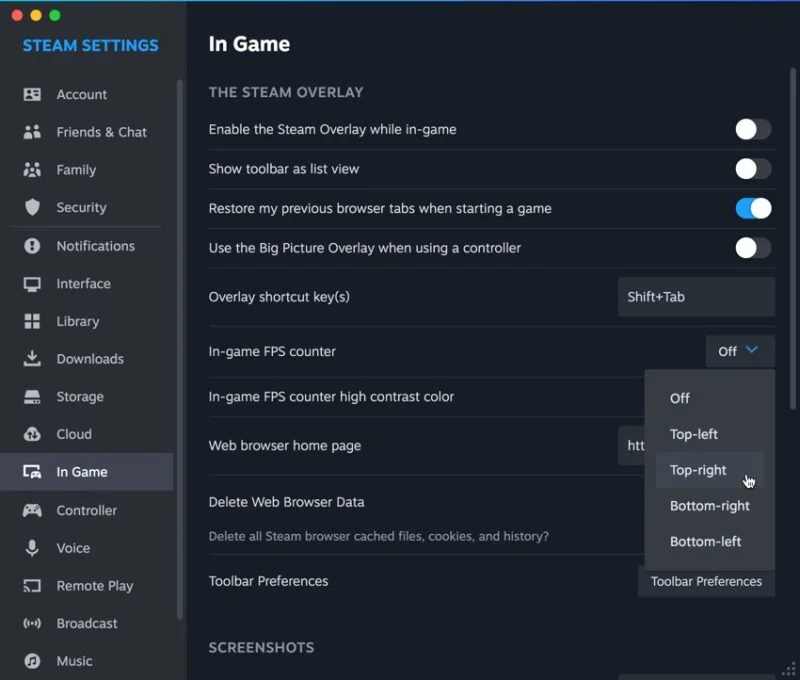
<p style="text-align: justify;">Nhiều game bao gồm bộ đếm FPS tích hợp sẵn mà bạn có thể dễ dàng kích hoạt. Đây thường là cách đơn giản nhất để kiểm tra FPS của bạn.</p>

<figure>
<div style="text-align: justify;"><img alt="Bộ đếm FPS trong vkQuake" data-i="0" data-src="https://st.quantrimang.com/photos/image/2024/02/29/kiem-tra-fps-trong-game-tren-mac-1.jpg" data-was-processed="true" height="453" src="https://st.quantrimang.com/photos/image/2024/02/29/kiem-tra-fps-trong-game-tren-mac-1.jpg" width="800" /></div>

<figcaption>
<div style="text-align: justify;">Bộ đếm FPS trong vkQuake</div>
</figcaption>
</figure>

<p style="text-align: justify;">Nhìn vào đồ họa, màn hình hoặc cài đặt nâng cao của game để xem liệu bạn có tìm thấy tùy chọn bật bộ đếm FPS hay không. Bạn có thể cần sử dụng lệnh console để kích hoạt nó, chẳng hạn như trong các cổng nguồn Quake khác nhau. Tìm kiếm nhanh trên Web cho “&#91;Tên game&#93; FPS counter” sẽ tiết lộ liệu điều này có cần thiết hay không.</p>

<div style="text-align: justify;"><iframe allowtransparency="true" data-google-container-id="a!2" data-google-query-id="COWZ__-O0oQDFTVTwgUd4E4FRg" data-load-complete="true" frameborder="0" height="0" hspace="0" id="aswift_1" marginheight="0" marginwidth="0" name="aswift_1" sandbox="" scrolling="no" vspace="0" width="694"></iframe></div>

<p style="text-align: justify;">Ưu điểm của việc sử dụng bộ đếm FPS gốc trong game là nó có thể được thiết kế riêng cho tựa game đó, có khả năng mang lại cho bạn kết quả đọc chính xác hơn so với các giải pháp có mục đích chung hơn.</p>

<h2 style="text-align: justify;">macOS Performance HUD</h2>

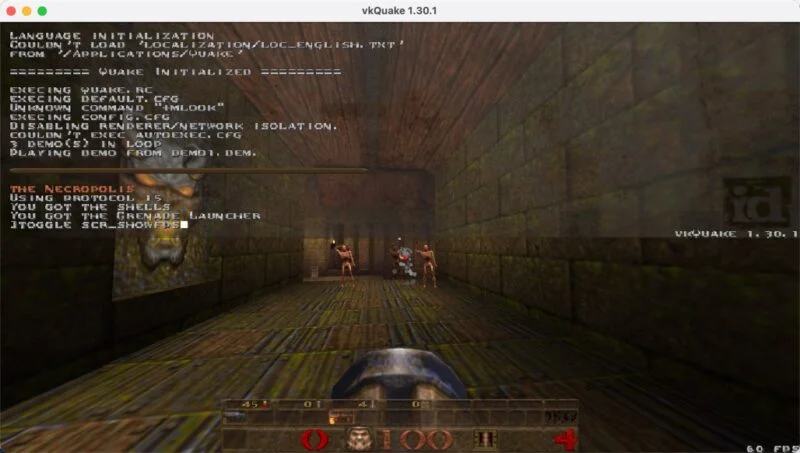
<p style="text-align: justify;">Khi chơi game không có bộ đếm FPS tích hợp, hãy bật macOS Performance HUD (Heads-Up Display) bằng cách nhập lệnh sau trong ứng dụng Terminal:</p>

<pre id="pre0">
<code>/bin/launchctl setenv MTL_HUD_ENABLED 1</code></pre>

<p style="text-align: justify;">&nbsp;</p>

<figure>
<div style="text-align: justify;"><img alt="macOS Performance HUD trong Asphalt 9: Legends" data-adbro-processed="true" data-i="1" data-src="https://st.quantrimang.com/photos/image/2024/02/29/kiem-tra-fps-trong-game-tren-mac-2.jpg" data-was-processed="true" height="479" src="https://st.quantrimang.com/photos/image/2024/02/29/kiem-tra-fps-trong-game-tren-mac-2.jpg" width="800" /></div>

<figcaption>
<div style="text-align: justify;">macOS Performance HUD trong Asphalt 9: Legends</div>
</figcaption>
</figure>

<p style="text-align: justify;">Ngoài ra, nhấn&nbsp;<strong>Shift + F9</strong>&nbsp;(hoặc&nbsp;<strong>Fn + Shift + F9</strong>&nbsp;nếu bạn đang sử dụng laptop) để bật và tắt HUD.</p>

<p style="text-align: justify;">Sau khi được bật, bạn sẽ thấy overlay hiệu suất ở góc trên bên trái của game sử dụng API Metal. Điều này bao gồm nhiều tựa game mới nhất, một số cổng nguồn mở và thậm chí cả các game Windows chạy qua những giải pháp như Crossover.</p>

<p style="text-align: justify;">Để vô hiệu hóa HUD từ ứng dụng Terminal, hãy chạy lệnh sau:</p>

<pre id="pre1">
<code>/bin/launchctl setenv MTL_HUD_ENABLED 0</code></pre>

<p style="text-align: justify;"><strong>Lưu ý</strong>: Nếu bạn đang chơi game trên máy Mac cũ hơn, hãy sử dụng công cụ Quartz Debug, được bao gồm trong gói&nbsp;<strong>Additional Tools for Xcode</strong>. Điều này có thể được tải xuống từ trang web&nbsp;Apple Developer. Thật không may, công cụ cổ xưa này rất không đáng tin cậy trên các phiên bản macOS mới hơn.</p>

<h2 style="text-align: justify;">Steam overlay</h2>

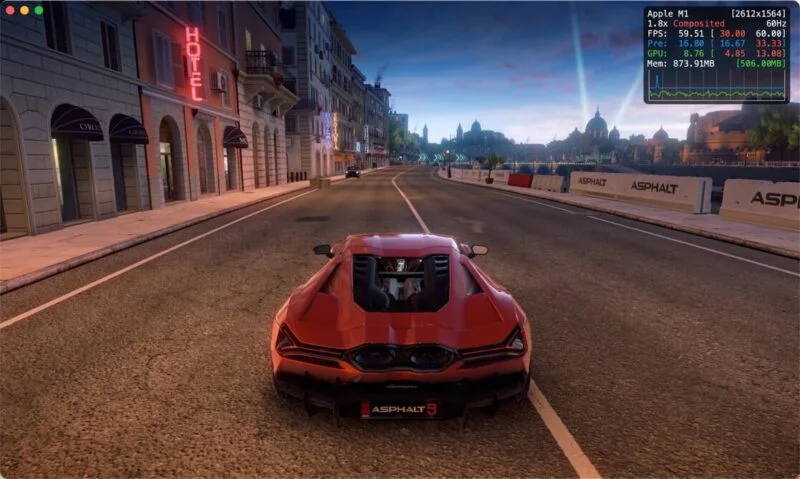
<p style="text-align: justify;">Steam cung cấp bộ đếm FPS trong game linh hoạt, hoạt động đáng tin cậy trên hầu hết các game, ngay cả đối với những tựa game bạn không mua trực tiếp qua cửa hàng Steam.</p>

<div style="text-align: justify;"><iframe allowtransparency="true" data-google-container-id="a!3" data-google-query-id="CPOHgICP0oQDFd9NwgUdufcCrg" data-load-complete="true" frameborder="0" height="0" hspace="0" id="aswift_2" marginheight="0" marginwidth="0" name="aswift_2" sandbox="" scrolling="no" vspace="0" width="694"></iframe></div>

<figure>
<div style="text-align: justify;"><img alt="Bộ đếm FPS Steam ở góc trên bên trái" data-i="2" data-src="https://st.quantrimang.com/photos/image/2024/02/29/kiem-tra-fps-trong-game-tren-mac-3.jpg" data-was-processed="true" height="472" src="https://st.quantrimang.com/photos/image/2024/02/29/kiem-tra-fps-trong-game-tren-mac-3.jpg" width="800" /></div>

<figcaption>
<div style="text-align: justify;">Bộ đếm FPS Steam ở góc trên bên trái</div>
</figcaption>
</figure>

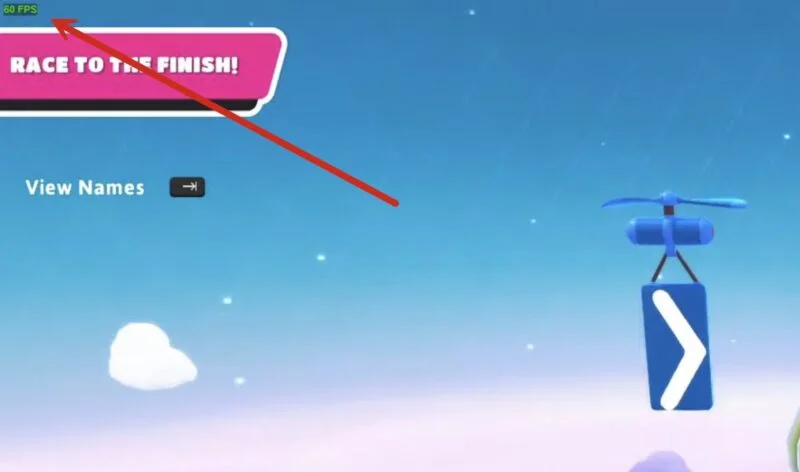
<p style="text-align: justify;">Để bật hiển thị FPS thông qua Steam, hãy bắt đầu bằng cách điều hướng đến&nbsp;<strong>Steam -&gt; Preferences</strong>&nbsp;từ thanh menu. Trong cửa sổ&nbsp;<strong>Preferences</strong>, nhấp vào tab&nbsp;<strong>In-Game</strong>, bật tùy chọn&nbsp;<strong>In-Game FPS Counter</strong>, sau đó đóng cửa sổ&nbsp;<strong>Preferences</strong>.</p>

<figure>
<div style="text-align: justify;"><img alt="Cài đặt bộ đếm FPS của Steam" data-i="3" data-src="https://st.quantrimang.com/photos/image/2024/02/29/kiem-tra-fps-trong-game-tren-mac-4.jpg" data-was-processed="true" height="680" src="https://st.quantrimang.com/photos/image/2024/02/29/kiem-tra-fps-trong-game-tren-mac-4.jpg" width="800" /></div>

<figcaption>
<div style="text-align: justify;">Cài đặt bộ đếm FPS của Steam</div>
</figcaption>
</figure>

<p style="text-align: justify;">Khởi chạy game của bạn và nhấn tổ hợp phím tắt overlay (<strong>Shift + Tab&nbsp;</strong>theo mặc định) để kích hoạt overlay.</p>

<p style="text-align: justify;">Chọn tùy chọn vị trí màn hình cho bộ đếm FPS từ menu drop-down. Ngoài ra, bạn có thể yêu cầu bộ đếm thay đổi màu khi Steam đang lưu ảnh chụp màn hình gameplay, giúp theo dõi hiệu suất theo thời gian dễ dàng hơn.</p>

<p style="text-align: justify;">Với những phương pháp này, bạn sẽ có mọi thứ cần thiết để theo dõi FPS khi chơi game trên máy Mac. Bạn có thể đưa ra quyết định sáng suốt về cài đặt trong game để đạt được trải nghiệm thú vị nhất cho máy cụ thể của mình!</p>
		</div>
				<div id="author">
						<p>
				<strong>Nguồn tin:</strong>
				Quantrimang.com
			</p>
		</div>
	</div>
	<div id="footer" class="clearfix">
		<div id="url">
			<strong>URL của bản tin này: </strong><a href="https://www.nguoicodonvn2008.info/vi/news/savefile/kien-thuc-may-tinh/cach-kiem-tra-fps-trong-game-tren-may-mac-8139.html" title="Cách kiểm tra FPS trong game trên máy Mac">https://www.nguoicodonvn2008.info/vi/news/savefile/kien-thuc-may-tinh/cach-kiem-tra-fps-trong-game-tren-may-mac-8139.html</a>

		</div>
		<div class="clear"></div>
		<div class="copyright">
			&copy; .&#x3A; Nguoicodonvn2008.info - Cõi lòng người cô đơn &#x3A;.
		</div>
		<div id="contact">
			<a href="mailto:admin@nguoicodonvn2008.info">admin@nguoicodonvn2008.info</a>
		</div>
	</div>
</div>
        <div id="timeoutsess" class="chromeframe">
            Bạn đã không sử dụng Site, <a onclick="timeoutsesscancel();" href="https://nguoicodonvn2008.info/#">Bấm vào đây để duy trì trạng thái đăng nhập</a>. Thời gian chờ: <span id="secField"> 60 </span> giây
        </div>
        <div id="openidResult" class="nv-alert" style="display:none"></div>
        <div id="openidBt" data-result="" data-redirect=""></div>
		</script>
		<div class="car-top">
  <span><img src="https://nguoicodonvn2008.info/themes/default/images/car.png" alt=""></span>
</div>
<script src="https://nguoicodonvn2008.info/assets/js/jquery/jquery.min.js"></script>
<script>var nv_base_siteurl="/",nv_lang_data="vi",nv_lang_interface="vi",nv_name_variable="nv",nv_fc_variable="op",nv_lang_variable="language",nv_module_name="news",nv_func_name="savefile",nv_is_user=0, nv_my_ofs=-4,nv_my_abbr="EDT",nv_cookie_prefix="nv4c_e856T",nv_check_pass_mstime=1738000,nv_area_admin=0,nv_safemode=0,theme_responsive=0,nv_recaptcha_ver=2,nv_recaptcha_sitekey="",nv_recaptcha_type="image",XSSsanitize=1;</script>
<script src="https://nguoicodonvn2008.info/assets/js/language/vi.js"></script>
<script src="https://nguoicodonvn2008.info/assets/js/DOMPurify/purify3.js"></script>
<script src="https://nguoicodonvn2008.info/assets/js/global.js"></script>
<script src="https://nguoicodonvn2008.info/assets/js/site.js"></script>
<script src="https://nguoicodonvn2008.info/themes/default/js/news.js"></script>
<script src="https://nguoicodonvn2008.info/themes/default/js/main.js"></script>
<script src="https://nguoicodonvn2008.info/themes/default/js/custom.js"></script>
<script type="application/ld+json">
        {
            "@context": "https://schema.org",
            "@type": "Organization",
            "url": "https://nguoicodonvn2008.info",
            "logo": "https://nguoicodonvn2008.info/uploads/angel.gif"
        }
        </script>
<script src="https://nguoicodonvn2008.info/themes/default/js/bootstrap.min.js"></script>
<script type="text/javascript">
var $scrolltop = $('.car-top');
$scrolltop.on('click', function () {
    $('html,body').animate({
        scrollTop: 0
    }, 800);
    $(this).addClass("car-run");
    setTimeout(function(){ $scrolltop.removeClass('car-run');}, 1000);
    return false;
});
$(window).on('scroll', function ()
{ 
    if($(window).scrollTop() >= 200)
    {
        $scrolltop.addClass("show");
        $scrolltop.addClass("car-down");
    }
    else
    {
       $scrolltop.removeClass("show");
       setTimeout(function(){ $scrolltop.removeClass('car-down');}, 300);
    }
});
</script>
</body>
</html>