<!DOCTYPE html>
    <html lang="vi" xmlns="http://www.w3.org/1999/xhtml" prefix="og: http://ogp.me/ns#">
    <head>
<title>Cách kiểm tra dung lượng Reserved Storage trong Windows 10</title>
<meta name="description" content="Cách kiểm tra dung lượng Reserved Storage trong Windows 10 - Savefile - Tin Tức -...">
<meta name="author" content=".: Nguoicodonvn2008.info - Cõi lòng người cô đơn :.">
<meta name="copyright" content=".: Nguoicodonvn2008.info - Cõi lòng người cô đơn :. [admin@nguoicodonvn2008.info]">
<meta name="robots" content="index, archive, follow, noodp">
<meta name="googlebot" content="index,archive,follow,noodp">
<meta name="msnbot" content="all,index,follow">
<meta name="generator" content="NukeViet v4.5">
<meta http-equiv="Content-Type" content="text/html; charset=utf-8">
<meta property="og:title" content="Cách kiểm tra dung lượng Reserved Storage trong Windows 10">
<meta property="og:type" content="website">
<meta property="og:description" content="Savefile - Tin Tức - https&#x3A;&#x002F;&#x002F;www.nguoicodonvn2008.info&#x002F;vi&#x002F;news&#x002F;savefile&#x002F;kien-thuc-may-tinh&#x002F;cach-kiem-tra-dung-luong-reserved-storage-trong-windows-10-1947.html">
<meta property="og:site_name" content=".&#x3A; Nguoicodonvn2008.info - Cõi lòng người cô đơn &#x3A;.">
<meta property="og:url" content="https://www.nguoicodonvn2008.info/vi/news/savefile/kien-thuc-may-tinh/cach-kiem-tra-dung-luong-reserved-storage-trong-windows-10-1947.html">
<link rel="shortcut icon" href="https://nguoicodonvn2008.info/favicon.ico">
<link rel="canonical" href="https://www.nguoicodonvn2008.info/vi/news/savefile/kien-thuc-may-tinh/cach-kiem-tra-dung-luong-reserved-storage-trong-windows-10-1947.html">
<link rel="alternate" href="https://nguoicodonvn2008.info/vi/news/rss/" title="Tin Tức" type="application/rss+xml">
<link rel="alternate" href="https://nguoicodonvn2008.info/vi/news/rss/karaoke-dual/" title="Tin Tức - Karaoke Dual" type="application/rss+xml">
<link rel="alternate" href="https://nguoicodonvn2008.info/vi/news/rss/nhac-tre/" title="Tin Tức - Nhạc trẻ" type="application/rss+xml">
<link rel="alternate" href="https://nguoicodonvn2008.info/vi/news/rss/tru-tinh/" title="Tin Tức - Trữ tình" type="application/rss+xml">
<link rel="alternate" href="https://nguoicodonvn2008.info/vi/news/rss/nuoc-ngoai/" title="Tin Tức - Nước ngoài" type="application/rss+xml">
<link rel="alternate" href="https://nguoicodonvn2008.info/vi/news/rss/remix/" title="Tin Tức - Remix" type="application/rss+xml">
<link rel="alternate" href="https://nguoicodonvn2008.info/vi/news/rss/tam-su-tinh-yeu/" title="Tin Tức - Tâm sự tình yêu" type="application/rss+xml">
<link rel="alternate" href="https://nguoicodonvn2008.info/vi/news/rss/tho-suu-tam/" title="Tin Tức - Thơ sưu tầm" type="application/rss+xml">
<link rel="alternate" href="https://nguoicodonvn2008.info/vi/news/rss/cuoc-song/" title="Tin Tức - Cuộc sống" type="application/rss+xml">
<link rel="alternate" href="https://nguoicodonvn2008.info/vi/news/rss/phan-mem/" title="Tin Tức - Phần mềm" type="application/rss+xml">
<link rel="alternate" href="https://nguoicodonvn2008.info/vi/news/rss/kien-thuc-may-tinh/" title="Tin Tức - Kiến thức máy tính" type="application/rss+xml">
<link rel="alternate" href="https://nguoicodonvn2008.info/vi/news/rss/hoc-tap/" title="Tin Tức - Học tập" type="application/rss+xml">
<link rel="alternate" href="https://nguoicodonvn2008.info/vi/news/rss/tai-lieu/" title="Tin Tức - Tài liệu" type="application/rss+xml">
<link rel="alternate" href="https://nguoicodonvn2008.info/vi/news/rss/de-thi/" title="Tin Tức - Đề thi" type="application/rss+xml">
<link rel="preload" as="style" href="https://nguoicodonvn2008.info/assets/css/font-awesome.min.css" type="text/css">
<link rel="preload" as="style" href="https://nguoicodonvn2008.info/themes/default/css/bootstrap.non-responsive.css" type="text/css">
<link rel="preload" as="style" href="https://nguoicodonvn2008.info/themes/default/css/style.css" type="text/css">
<link rel="preload" as="style" href="https://nguoicodonvn2008.info/themes/default/css/style.non-responsive.css" type="text/css">
<link rel="preload" as="style" href="https://nguoicodonvn2008.info/themes/default/css/news.css" type="text/css">
<link rel="preload" as="style" href="https://nguoicodonvn2008.info/themes/default/css/custom.css" type="text/css">
<link rel="preload" as="script" href="https://nguoicodonvn2008.info/assets/js/jquery/jquery.min.js" type="text/javascript">
<link rel="preload" as="script" href="https://nguoicodonvn2008.info/assets/js/language/vi.js" type="text/javascript">
<link rel="preload" as="script" href="https://nguoicodonvn2008.info/assets/js/DOMPurify/purify3.js" type="text/javascript">
<link rel="preload" as="script" href="https://nguoicodonvn2008.info/assets/js/global.js" type="text/javascript">
<link rel="preload" as="script" href="https://nguoicodonvn2008.info/assets/js/site.js" type="text/javascript">
<link rel="preload" as="script" href="https://nguoicodonvn2008.info/themes/default/js/news.js" type="text/javascript">
<link rel="preload" as="script" href="https://nguoicodonvn2008.info/themes/default/js/main.js" type="text/javascript">
<link rel="preload" as="script" href="https://nguoicodonvn2008.info/themes/default/js/custom.js" type="text/javascript">
<link rel="preload" as="script" href="https://nguoicodonvn2008.info/themes/default/js/bootstrap.min.js" type="text/javascript">
<link rel="stylesheet" href="https://nguoicodonvn2008.info/assets/css/font-awesome.min.css">
<link rel="stylesheet" href="https://nguoicodonvn2008.info/themes/default/css/bootstrap.non-responsive.css">
<link rel="stylesheet" href="https://nguoicodonvn2008.info/themes/default/css/style.css">
<link rel="stylesheet" href="https://nguoicodonvn2008.info/themes/default/css/style.non-responsive.css">
<link rel="StyleSheet" href="https://nguoicodonvn2008.info/themes/default/css/news.css">
<link rel="stylesheet" href="https://nguoicodonvn2008.info/themes/default/css/custom.css">
<style type="text/css">
	body{background: #fff;}
</style>
    </head>
    <body>
<div id="print">
	<div id="hd_print">
		<h2 class="pull-left">.&#x3A; Nguoicodonvn2008.info - Cõi lòng người cô đơn &#x3A;.</h2>
		<p class="pull-right"><a title=".&#x3A; Nguoicodonvn2008.info - Cõi lòng người cô đơn &#x3A;." href="https://nguoicodonvn2008.info/">https://nguoicodonvn2008.info</a></p>
	</div>
	<div class="clear"></div>
	<hr />
	<div id="content">
		<h1>Cách kiểm tra dung lượng Reserved Storage trong Windows 10</h1>
		<ul class="list-inline">
			<li>Chủ nhật - 12/04/2020 00:30</li>
			<li class="hidden-print txtrequired"><em class="fa fa-print">&nbsp;</em><a title="In ra" href="javascript:;" onclick="window.print()">In ra</a></li>
			<li class="hidden-print txtrequired"><em class="fa fa-power-off">&nbsp;</em><a title="Đóng cửa sổ này" href="javascript:;" onclick="window.close()">Đóng cửa sổ này</a></li>
		</ul>
		<div class="clear"></div>
		<div id="hometext">
		</div>
				<div class="imghome">
			<img alt="Cách kiểm tra dung lượng Reserved Storage trong Windows 10" src="https://st.quantrimang.com/photos/image/2020/04/11/kiem-tra-dung-luong-reserved-storage-3.jpg" width="460" class="img-thumbnail" />
		</div>
		<div class="clear"></div>
		<div id="bodytext" class="clearfix">
			<p>Tính năng Reserved Storage mới có sẵn để thử nghiệm cho người dùng Windows Insider đang chạy bản build 18298 hoặc mới hơn.</p>

<p>Để đảm bảo thiết bị của bạn có thể cập nhật thành công và chạy tốt nhất, Windows dành một phần dung lượng lưu trữ trên thiết bị để sử dụng cho các file tạm thời, bộ nhớ cache và những file khác.</p>

<p>Khi thiết bị thiếu dung lượng, Windows sẽ xóa bộ nhớ được dành riêng này để sử dụng cho các tiến trình khác, như bản cập nhật Windows chẳng hạn. Phần bộ nhớ được dành riêng này cũng giúp giữ cho việc sử dụng không gian ổ đĩa trên thiết bị dễ dự đoán và ổn định hơn.</p>

<p>Hướng dẫn này sẽ chỉ cho bạn cách kiểm tra dung lượng Reserved Storage trong&nbsp;Windows 10.</p>

<h2>Kiểm tra dung lượng Reserved Storage trong Settings</h2>

<p>1. Mở&nbsp;<strong>Settings</strong>&nbsp;và nhấn vào biểu tượng&nbsp;<strong>System.</strong></p>

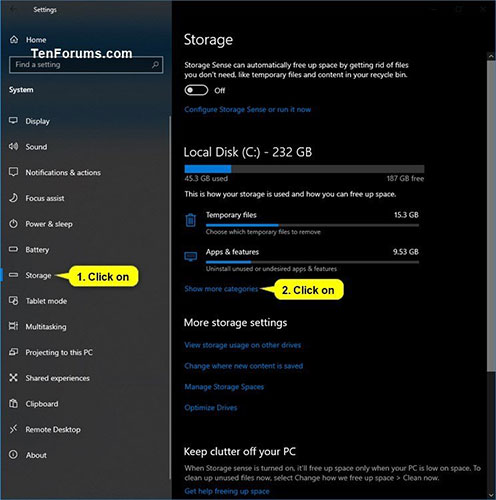
<p>2. Nhấp vào&nbsp;<strong>Storage</strong>&nbsp;ở phía bên trái và nhấn vào liên kết&nbsp;<strong>Show more categories</strong>&nbsp;ở phía bên phải.</p>

<figure><img alt="Nhấp vào Storage ở phía bên trái" data-i="0" data-src="https://st.quantrimang.com/photos/image/2020/04/11/kiem-tra-dung-luong-reserved-storage-1.jpg" data-was-processed="true" height="500" src="https://st.quantrimang.com/photos/image/2020/04/11/kiem-tra-dung-luong-reserved-storage-1.jpg" width="496" />
<figcaption>Nhấp vào Storage ở phía bên trái</figcaption>
</figure>

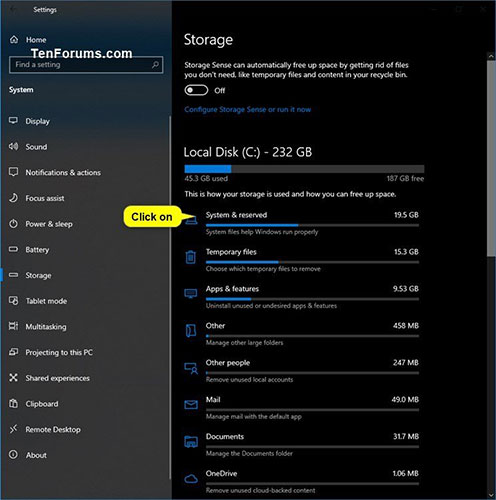
<p>3. Nhấp vào&nbsp;<strong>System &amp; reserved</strong>.</p>

<figure><img alt="Nhấp vào System &amp; reserved" data-i="1" data-src="https://st.quantrimang.com/photos/image/2020/04/11/kiem-tra-dung-luong-reserved-storage-2.jpg" data-was-processed="true" height="500" src="https://st.quantrimang.com/photos/image/2020/04/11/kiem-tra-dung-luong-reserved-storage-2.jpg" width="496" />
<figcaption>Nhấp vào System &amp; reserved</figcaption>
</figure>

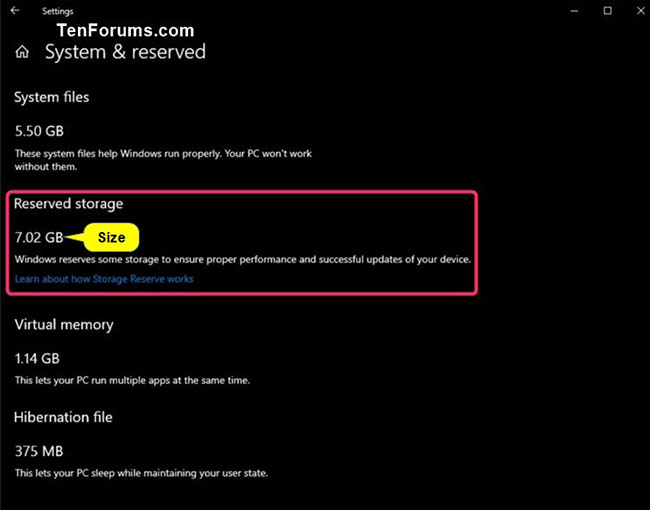
<p>4. Nhìn vào dung lượng trong phần&nbsp;<strong>Reserved storage.</strong></p>

<figure><img alt="Nhìn vào dung lượng trong phần Reserved storage" data-i="2" data-src="https://st.quantrimang.com/photos/image/2020/04/11/kiem-tra-dung-luong-reserved-storage-3.jpg" data-was-processed="true" height="510" src="https://st.quantrimang.com/photos/image/2020/04/11/kiem-tra-dung-luong-reserved-storage-3.jpg" width="650" />
<figcaption>Nhìn vào dung lượng trong phần Reserved storage</figcaption>
</figure>

<p>5 Khi hoàn tất, bạn có thể đóng&nbsp;<strong>Settings</strong>&nbsp;nếu muốn.</p>
&nbsp;

<h2>Kiểm tra dung lượng Reserved Storage trong Command Prompt</h2>

<p><strong>Lưu ý</strong>: Bạn phải đăng nhập với quyền admin để thực hiện tùy chọn này.</p>

<p>1.&nbsp;Mở Command Prompt với quyền admin.</p>

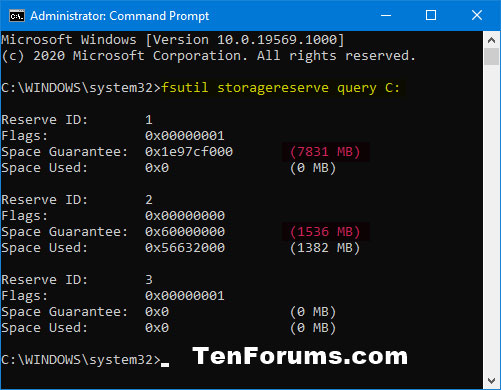
<p>2. Sao chép và dán lệnh bên dưới vào&nbsp;<strong>Command Prompt</strong>&nbsp;và nhấn&nbsp;<code>Enter</code>.</p>

<pre id="pre0">
<code>fsutil storagereserve query C:</code></pre>

<p>3. Bây giờ, bạn sẽ thấy một bản tóm tắt của tất cả Reserved Storage trên ổ C:\ của Windows.</p>

<figure><img alt="Bản tóm tắt của tất cả Reserved Storage trên ổ C:\" data-i="3" data-src="https://st.quantrimang.com/photos/image/2020/04/11/kiem-tra-dung-luong-reserved-storage-4.jpg" data-was-processed="true" height="390" src="https://st.quantrimang.com/photos/image/2020/04/11/kiem-tra-dung-luong-reserved-storage-4.jpg" width="501" />
<figcaption>Bản tóm tắt của tất cả Reserved Storage trên ổ C:\</figcaption>
</figure>

<p>4. Khi hoàn tất, bạn có thể đóng&nbsp;<strong>Command Prompt</strong>&nbsp;nếu muốn.</p>
		</div>
				<div id="author">
						<p>
				<strong>Nguồn tin:</strong>
				Quantrimang.com
			</p>
		</div>
	</div>
	<div id="footer" class="clearfix">
		<div id="url">
			<strong>URL của bản tin này: </strong><a href="https://www.nguoicodonvn2008.info/vi/news/savefile/kien-thuc-may-tinh/cach-kiem-tra-dung-luong-reserved-storage-trong-windows-10-1947.html" title="Cách kiểm tra dung lượng Reserved Storage trong Windows 10">https://www.nguoicodonvn2008.info/vi/news/savefile/kien-thuc-may-tinh/cach-kiem-tra-dung-luong-reserved-storage-trong-windows-10-1947.html</a>

		</div>
		<div class="clear"></div>
		<div class="copyright">
			&copy; .&#x3A; Nguoicodonvn2008.info - Cõi lòng người cô đơn &#x3A;.
		</div>
		<div id="contact">
			<a href="mailto:admin@nguoicodonvn2008.info">admin@nguoicodonvn2008.info</a>
		</div>
	</div>
</div>
        <div id="timeoutsess" class="chromeframe">
            Bạn đã không sử dụng Site, <a onclick="timeoutsesscancel();" href="https://nguoicodonvn2008.info/#">Bấm vào đây để duy trì trạng thái đăng nhập</a>. Thời gian chờ: <span id="secField"> 60 </span> giây
        </div>
        <div id="openidResult" class="nv-alert" style="display:none"></div>
        <div id="openidBt" data-result="" data-redirect=""></div>
		</script>
		<div class="car-top">
  <span><img src="https://nguoicodonvn2008.info/themes/default/images/car.png" alt=""></span>
</div>
<script src="https://nguoicodonvn2008.info/assets/js/jquery/jquery.min.js"></script>
<script>var nv_base_siteurl="/",nv_lang_data="vi",nv_lang_interface="vi",nv_name_variable="nv",nv_fc_variable="op",nv_lang_variable="language",nv_module_name="news",nv_func_name="savefile",nv_is_user=0, nv_my_ofs=-4,nv_my_abbr="EDT",nv_cookie_prefix="nv4c_e856T",nv_check_pass_mstime=1738000,nv_area_admin=0,nv_safemode=0,theme_responsive=0,nv_recaptcha_ver=2,nv_recaptcha_sitekey="",nv_recaptcha_type="image",XSSsanitize=1;</script>
<script src="https://nguoicodonvn2008.info/assets/js/language/vi.js"></script>
<script src="https://nguoicodonvn2008.info/assets/js/DOMPurify/purify3.js"></script>
<script src="https://nguoicodonvn2008.info/assets/js/global.js"></script>
<script src="https://nguoicodonvn2008.info/assets/js/site.js"></script>
<script src="https://nguoicodonvn2008.info/themes/default/js/news.js"></script>
<script src="https://nguoicodonvn2008.info/themes/default/js/main.js"></script>
<script src="https://nguoicodonvn2008.info/themes/default/js/custom.js"></script>
<script type="application/ld+json">
        {
            "@context": "https://schema.org",
            "@type": "Organization",
            "url": "https://nguoicodonvn2008.info",
            "logo": "https://nguoicodonvn2008.info/uploads/angel.gif"
        }
        </script>
<script src="https://nguoicodonvn2008.info/themes/default/js/bootstrap.min.js"></script>
<script type="text/javascript">
var $scrolltop = $('.car-top');
$scrolltop.on('click', function () {
    $('html,body').animate({
        scrollTop: 0
    }, 800);
    $(this).addClass("car-run");
    setTimeout(function(){ $scrolltop.removeClass('car-run');}, 1000);
    return false;
});
$(window).on('scroll', function ()
{ 
    if($(window).scrollTop() >= 200)
    {
        $scrolltop.addClass("show");
        $scrolltop.addClass("car-down");
    }
    else
    {
       $scrolltop.removeClass("show");
       setTimeout(function(){ $scrolltop.removeClass('car-down');}, 300);
    }
});
</script>
</body>
</html>