<!DOCTYPE html>
    <html lang="vi" xmlns="http://www.w3.org/1999/xhtml" prefix="og: http://ogp.me/ns#">
    <head>
<title>Cách kích hoạt&#x002F;vô hiệu hóa Turbo Boost trên máy Mac</title>
<meta name="description" content="Cách kích hoạt&#x002F;vô hiệu hóa Turbo Boost trên máy Mac - Savefile - Tin Tức -...">
<meta name="author" content=".: Nguoicodonvn2008.info - Cõi lòng người cô đơn :.">
<meta name="copyright" content=".: Nguoicodonvn2008.info - Cõi lòng người cô đơn :. [admin@nguoicodonvn2008.info]">
<meta name="robots" content="index, archive, follow, noodp">
<meta name="googlebot" content="index,archive,follow,noodp">
<meta name="msnbot" content="all,index,follow">
<meta name="generator" content="NukeViet v4.5">
<meta http-equiv="Content-Type" content="text/html; charset=utf-8">
<meta property="og:title" content="Cách kích hoạt&#x002F;vô hiệu hóa Turbo Boost trên máy Mac">
<meta property="og:type" content="website">
<meta property="og:description" content="Savefile - Tin Tức - https&#x3A;&#x002F;&#x002F;www.nguoicodonvn2008.info&#x002F;vi&#x002F;news&#x002F;savefile&#x002F;kien-thuc-may-tinh&#x002F;cach-kich-hoat-vo-hieu-hoa-turbo-boost-tren-may-mac-4944.html">
<meta property="og:site_name" content=".&#x3A; Nguoicodonvn2008.info - Cõi lòng người cô đơn &#x3A;.">
<meta property="og:url" content="https://www.nguoicodonvn2008.info/vi/news/savefile/kien-thuc-may-tinh/cach-kich-hoat-vo-hieu-hoa-turbo-boost-tren-may-mac-4944.html">
<link rel="shortcut icon" href="https://nguoicodonvn2008.info/favicon.ico">
<link rel="canonical" href="https://www.nguoicodonvn2008.info/vi/news/savefile/kien-thuc-may-tinh/cach-kich-hoat-vo-hieu-hoa-turbo-boost-tren-may-mac-4944.html">
<link rel="alternate" href="https://nguoicodonvn2008.info/vi/news/rss/" title="Tin Tức" type="application/rss+xml">
<link rel="alternate" href="https://nguoicodonvn2008.info/vi/news/rss/karaoke-dual/" title="Tin Tức - Karaoke Dual" type="application/rss+xml">
<link rel="alternate" href="https://nguoicodonvn2008.info/vi/news/rss/nhac-tre/" title="Tin Tức - Nhạc trẻ" type="application/rss+xml">
<link rel="alternate" href="https://nguoicodonvn2008.info/vi/news/rss/tru-tinh/" title="Tin Tức - Trữ tình" type="application/rss+xml">
<link rel="alternate" href="https://nguoicodonvn2008.info/vi/news/rss/nuoc-ngoai/" title="Tin Tức - Nước ngoài" type="application/rss+xml">
<link rel="alternate" href="https://nguoicodonvn2008.info/vi/news/rss/remix/" title="Tin Tức - Remix" type="application/rss+xml">
<link rel="alternate" href="https://nguoicodonvn2008.info/vi/news/rss/tam-su-tinh-yeu/" title="Tin Tức - Tâm sự tình yêu" type="application/rss+xml">
<link rel="alternate" href="https://nguoicodonvn2008.info/vi/news/rss/tho-suu-tam/" title="Tin Tức - Thơ sưu tầm" type="application/rss+xml">
<link rel="alternate" href="https://nguoicodonvn2008.info/vi/news/rss/cuoc-song/" title="Tin Tức - Cuộc sống" type="application/rss+xml">
<link rel="alternate" href="https://nguoicodonvn2008.info/vi/news/rss/phan-mem/" title="Tin Tức - Phần mềm" type="application/rss+xml">
<link rel="alternate" href="https://nguoicodonvn2008.info/vi/news/rss/kien-thuc-may-tinh/" title="Tin Tức - Kiến thức máy tính" type="application/rss+xml">
<link rel="alternate" href="https://nguoicodonvn2008.info/vi/news/rss/hoc-tap/" title="Tin Tức - Học tập" type="application/rss+xml">
<link rel="alternate" href="https://nguoicodonvn2008.info/vi/news/rss/tai-lieu/" title="Tin Tức - Tài liệu" type="application/rss+xml">
<link rel="alternate" href="https://nguoicodonvn2008.info/vi/news/rss/de-thi/" title="Tin Tức - Đề thi" type="application/rss+xml">
<link rel="preload" as="style" href="https://nguoicodonvn2008.info/assets/css/font-awesome.min.css" type="text/css">
<link rel="preload" as="style" href="https://nguoicodonvn2008.info/themes/default/css/bootstrap.non-responsive.css" type="text/css">
<link rel="preload" as="style" href="https://nguoicodonvn2008.info/themes/default/css/style.css" type="text/css">
<link rel="preload" as="style" href="https://nguoicodonvn2008.info/themes/default/css/style.non-responsive.css" type="text/css">
<link rel="preload" as="style" href="https://nguoicodonvn2008.info/themes/default/css/news.css" type="text/css">
<link rel="preload" as="style" href="https://nguoicodonvn2008.info/themes/default/css/custom.css" type="text/css">
<link rel="preload" as="script" href="https://nguoicodonvn2008.info/assets/js/jquery/jquery.min.js" type="text/javascript">
<link rel="preload" as="script" href="https://nguoicodonvn2008.info/assets/js/language/vi.js" type="text/javascript">
<link rel="preload" as="script" href="https://nguoicodonvn2008.info/assets/js/DOMPurify/purify3.js" type="text/javascript">
<link rel="preload" as="script" href="https://nguoicodonvn2008.info/assets/js/global.js" type="text/javascript">
<link rel="preload" as="script" href="https://nguoicodonvn2008.info/assets/js/site.js" type="text/javascript">
<link rel="preload" as="script" href="https://nguoicodonvn2008.info/themes/default/js/news.js" type="text/javascript">
<link rel="preload" as="script" href="https://nguoicodonvn2008.info/themes/default/js/main.js" type="text/javascript">
<link rel="preload" as="script" href="https://nguoicodonvn2008.info/themes/default/js/custom.js" type="text/javascript">
<link rel="preload" as="script" href="https://nguoicodonvn2008.info/themes/default/js/bootstrap.min.js" type="text/javascript">
<link rel="stylesheet" href="https://nguoicodonvn2008.info/assets/css/font-awesome.min.css">
<link rel="stylesheet" href="https://nguoicodonvn2008.info/themes/default/css/bootstrap.non-responsive.css">
<link rel="stylesheet" href="https://nguoicodonvn2008.info/themes/default/css/style.css">
<link rel="stylesheet" href="https://nguoicodonvn2008.info/themes/default/css/style.non-responsive.css">
<link rel="StyleSheet" href="https://nguoicodonvn2008.info/themes/default/css/news.css">
<link rel="stylesheet" href="https://nguoicodonvn2008.info/themes/default/css/custom.css">
<style type="text/css">
	body{background: #fff;}
</style>
    </head>
    <body>
<div id="print">
	<div id="hd_print">
		<h2 class="pull-left">.&#x3A; Nguoicodonvn2008.info - Cõi lòng người cô đơn &#x3A;.</h2>
		<p class="pull-right"><a title=".&#x3A; Nguoicodonvn2008.info - Cõi lòng người cô đơn &#x3A;." href="https://nguoicodonvn2008.info/">https://nguoicodonvn2008.info</a></p>
	</div>
	<div class="clear"></div>
	<hr />
	<div id="content">
		<h1>Cách kích hoạt&#x002F;vô hiệu hóa Turbo Boost trên máy Mac</h1>
		<ul class="list-inline">
			<li>Thứ năm - 30/12/2021 00:00</li>
			<li class="hidden-print txtrequired"><em class="fa fa-print">&nbsp;</em><a title="In ra" href="javascript:;" onclick="window.print()">In ra</a></li>
			<li class="hidden-print txtrequired"><em class="fa fa-power-off">&nbsp;</em><a title="Đóng cửa sổ này" href="javascript:;" onclick="window.close()">Đóng cửa sổ này</a></li>
		</ul>
		<div class="clear"></div>
		<div id="hometext">
		</div>
				<div class="imghome">
			<img alt="Cách kích hoạt&#x002F;vô hiệu hóa Turbo Boost trên máy Mac" src="https://st.quantrimang.com/photos/image/2021/12/29/turbo-boost-tren-may-mac-8.jpg" width="460" class="img-thumbnail" />
		</div>
		<div class="clear"></div>
		<div id="bodytext" class="clearfix">
			<p style="text-align: justify;">Turbo Boost&nbsp;là một tính năng được tích hợp trên nhiều máy Mac sử dụng bộ vi xử lý Intel. Bạn thậm chí có thể không biết rằng tính năng này tồn tại. Khi bạn cần thêm hiệu suất, macOS sẽ bật Turbo Boost. Khi máy tính ở chế độ chạy không tải hoặc làm một việc gì đó tương tự không làm tốn nhiều năng lượng, macOS sẽ tắt Turbo Boost.</p>

<p style="text-align: justify;">Khả năng tự điều chỉnh này nói chung là ổn trong đa số các trường hợp, nhưng không phải lúc nào cũng vậy. Nếu máy tính của bạn ngày càng cũ và bạn muốn sử dụng pin lâu hơn, bạn có thể điều khiển Turbo Boost theo cách thủ công để sử dụng ít năng lượng hơn.</p>

<h2 style="text-align: justify;">Tìm hiểu xem máy Mac của bạn có tính năng Turbo Boost hay không</h2>

<p style="text-align: justify;">Trước khi tiếp tục, bạn nên xác minh rằng máy Mac của mình thực sự hỗ trợ tính năng Turbo Boost:</p>

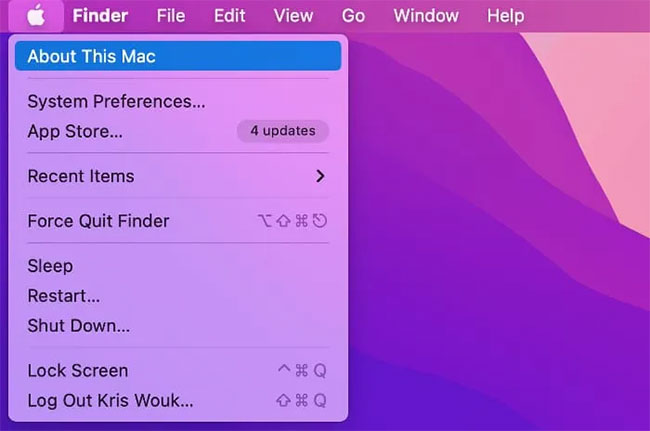
<p style="text-align: justify;">1. Chọn logo&nbsp;<strong>Apple</strong>&nbsp;trong thanh menu của máy Mac và nhấp vào&nbsp;<strong>About This Mac</strong>.</p>

<figure>
<div style="text-align: justify;"><img alt="Nhấp vào About This Mac" data-i="0" data-src="https://st.quantrimang.com/photos/image/2021/12/29/turbo-boost-tren-may-mac-1.jpg" data-was-processed="true" height="431" src="https://st.quantrimang.com/photos/image/2021/12/29/turbo-boost-tren-may-mac-1.jpg" width="650" /></div>

<figcaption>
<div style="text-align: justify;">Nhấp vào About This Mac</div>
</figcaption>
</figure>

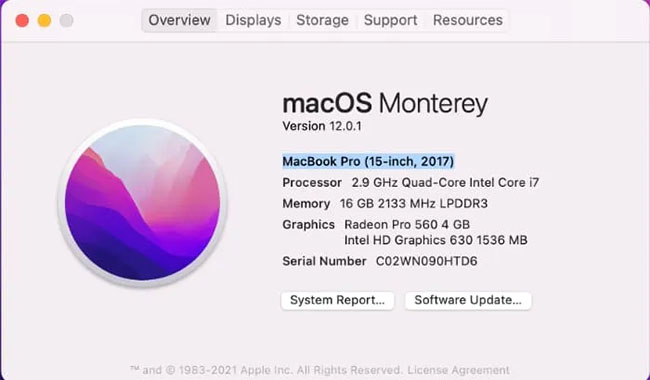
<p style="text-align: justify;">2. Trong tab&nbsp;<strong>Overview</strong>, bạn sẽ tìm thấy tên model đầy đủ của máy Mac. Sao chép thông tin này vào clipboard bằng cách chọn nó và nhấn&nbsp;<strong>Command + C</strong>.</p>

<figure>
<div style="text-align: justify;"><img alt="Tên model máy Mac" data-i="1" data-src="https://st.quantrimang.com/photos/image/2021/12/29/turbo-boost-tren-may-mac-2.jpg" data-was-processed="true" height="380" src="https://st.quantrimang.com/photos/image/2021/12/29/turbo-boost-tren-may-mac-2.jpg" width="650" /></div>

<figcaption>
<div style="text-align: justify;">Tên model máy Mac</div>
</figcaption>
</figure>

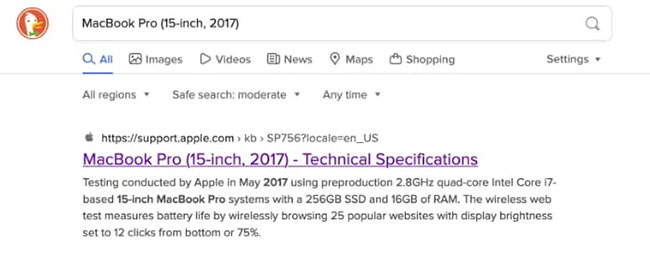
<p style="text-align: justify;">3. Mở công cụ tìm kiếm bạn chọn (ví dụ,&nbsp;Google&nbsp;hoặc&nbsp;DuckDuckGo) và dán thông tin này vào thanh tìm kiếm. Thêm cụm từ&nbsp;<em>“technical specs”</em>&nbsp;vào cuối và nhấn&nbsp;<strong>Enter.</strong></p>

<p style="text-align: justify;">4. Nhấp vào kết quả sẽ đưa bạn đến trang web&nbsp;<em>support.apple.com.</em></p>

<figure>
<div style="text-align: justify;"><img alt="Trang web support.apple.com" data-i="2" data-src="https://st.quantrimang.com/photos/image/2021/12/29/turbo-boost-tren-may-mac-3.jpg" data-was-processed="true" height="262" src="https://st.quantrimang.com/photos/image/2021/12/29/turbo-boost-tren-may-mac-3.jpg" width="650" /></div>

<figcaption>
<div style="text-align: justify;">Trang web support.apple.com</div>
</figcaption>
</figure>

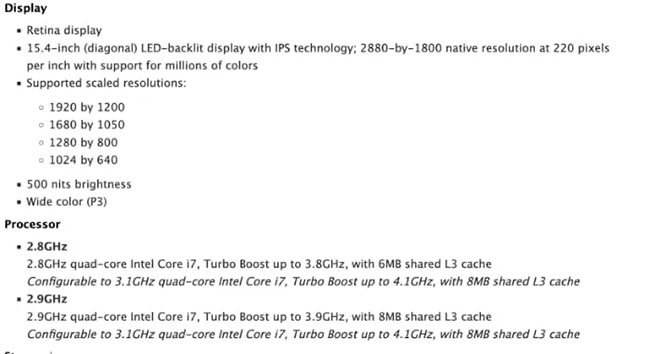
<p style="text-align: justify;">5. Trên trang web hỗ trợ của Apple, hãy kiểm tra phần&nbsp;<strong>Processor.</strong>&nbsp;Nếu máy Mac của bạn hỗ trợ Turbo Boost, nó sẽ được đề cập ở đây.</p>

<figure>
<div style="text-align: justify;"><img alt="Xem máy có hỗ trợ Turbo Boost không" data-i="3" data-src="https://st.quantrimang.com/photos/image/2021/12/29/turbo-boost-tren-may-mac-4.jpg" data-was-processed="true" height="354" src="https://st.quantrimang.com/photos/image/2021/12/29/turbo-boost-tren-may-mac-4.jpg" width="650" /></div>

<figcaption>
<div style="text-align: justify;">Xem máy có hỗ trợ Turbo Boost không</div>
</figcaption>
</figure>

<p style="text-align: justify;">Nếu thông số kỹ thuật không đề cập đến Turbo Boost, máy Mac của bạn có thể không hỗ trợ tính năng này. Nếu bạn có máy Mac mới với&nbsp;<a href="https://quantrimang.com/con-chip-m1-trong-macbook-moi-la-gi-177010" title="Con chip M1 trong MacBook mới là gì?">chip M1</a>, nó sẽ không hỗ trợ Turbo Boost.</p>

<h2 style="text-align: justify;">Cách bật hoặc tắt Turbo Boost</h2>

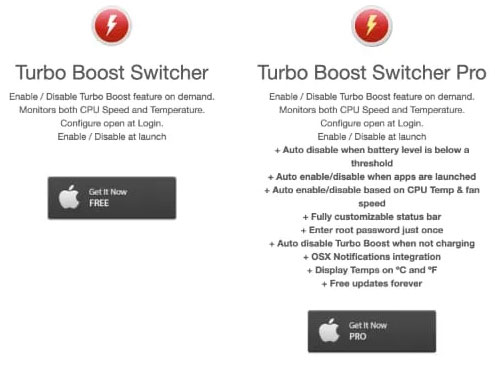
<p style="text-align: justify;">Bạn có thể bật và tắt Turbo Boost theo cách thủ công bằng ứng dụng Turbo Boost Switcher. Turbo Switcher có sẵn dưới dạng ứng dụng miễn phí hoặc trả phí. Hướng dẫn này sẽ sử dụng phiên bản miễn phí. Tải phiên bản miễn phí tại đây:</p>

<pre id="pre0">
<code>http://tbswitcher.rugarciap.com/</code></pre>

<figure>
<div style="text-align: justify;"><img alt="Turbo Switcher có cả phiên bản trả phí và miễn phí" data-i="4" data-src="https://st.quantrimang.com/photos/image/2021/12/29/turbo-boost-tren-may-mac-5.jpg" data-was-processed="true" height="368" src="https://st.quantrimang.com/photos/image/2021/12/29/turbo-boost-tren-may-mac-5.jpg" width="495" /></div>

<figcaption>
<div style="text-align: justify;">Turbo Switcher có cả phiên bản trả phí và miễn phí</div>
</figcaption>
</figure>

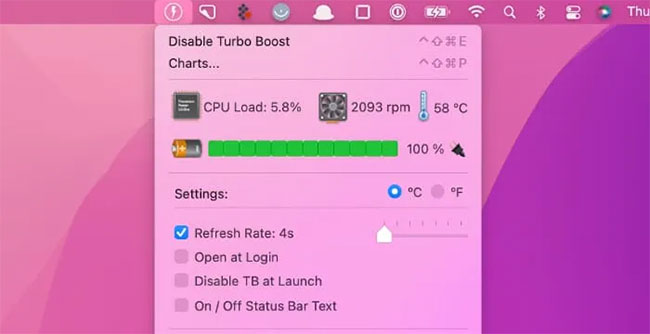
<p style="text-align: justify;">Sau khi bạn đã cài đặt Turbo Boost Switcher, hãy khởi chạy ứng dụng. Nhấp vào biểu tượng mà Turbo Boost đã tự động thêm vào thanh menu của máy Mac.</p>

<figure>
<div style="text-align: justify;"><img alt="Khởi chạy Turbo Boost Switcher" data-i="5" data-src="https://st.quantrimang.com/photos/image/2021/12/29/turbo-boost-tren-may-mac-6.jpg" data-was-processed="true" height="334" src="https://st.quantrimang.com/photos/image/2021/12/29/turbo-boost-tren-may-mac-6.jpg" width="650" /></div>

<figcaption>
<div style="text-align: justify;">Khởi chạy Turbo Boost Switcher</div>
</figcaption>
</figure>

<p style="text-align: justify;">Nếu Turbo Boost đã được bật, bạn sẽ thấy thông báo&nbsp;<strong>Disable Turbo Boost</strong>. Ngược lại, nếu Turbo Boost bị tắt, bạn sẽ thấy thông báo&nbsp;<strong>Enable Turbo Boost</strong>. Bạn có thể sử dụng các cài đặt này để bật và tắt Turbo Boost theo cách thủ công.</p>

<p style="text-align: justify;">Lần đầu tiên bạn cố gắng chuyển đổi Turbo Boost theo cách thủ công, macOS sẽ yêu cầu nhập tên người dùng và mật khẩu admin.</p>

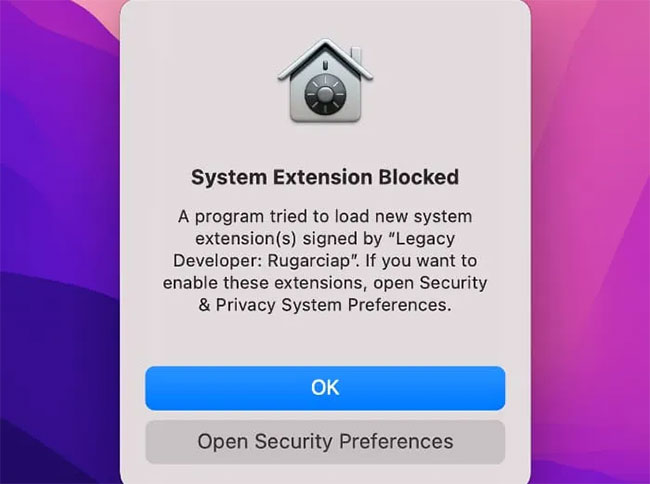
<p style="text-align: justify;">macOS cũng có thể chặn Turbo Boost Switcher chạy. Nếu bạn gặp thông báo&nbsp;<strong>Security &amp; Privacy</strong>, hãy làm theo hướng dẫn trên màn hình để cho phép Turbo Boost Switcher chạy bình thường.</p>

<figure>
<div style="text-align: justify;"><img alt="Làm theo hướng dẫn trên màn hình" data-i="6" data-src="https://st.quantrimang.com/photos/image/2021/12/29/turbo-boost-tren-may-mac-7.jpg" data-was-processed="true" height="484" src="https://st.quantrimang.com/photos/image/2021/12/29/turbo-boost-tren-may-mac-7.jpg" width="650" /></div>

<figcaption>
<div style="text-align: justify;">Làm theo hướng dẫn trên màn hình</div>
</figcaption>
</figure>

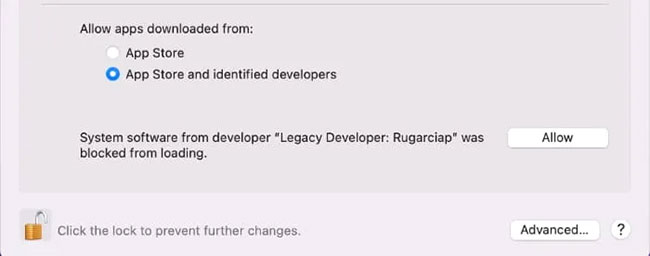
<p style="text-align: justify;">Ngoài ra, bạn có thể bỏ chặn Turbo Boost Switcher theo cách thủ công bằng cách điều hướng đến&nbsp;<strong>Apple &gt; System Preferences… &gt; Security &amp; Privacy</strong>. Tại đây, bạn sẽ thấy một thông báo nhắc bạn bỏ chặn Turbo Boost Switcher.</p>

<figure>
<div style="text-align: justify;"><img alt="Bỏ chặn Turbo Boost Switcher" data-i="7" data-src="https://st.quantrimang.com/photos/image/2021/12/29/turbo-boost-tren-may-mac-8.jpg" data-was-processed="true" height="256" src="https://st.quantrimang.com/photos/image/2021/12/29/turbo-boost-tren-may-mac-8.jpg" width="650" /></div>

<figcaption>
<div style="text-align: justify;">Bỏ chặn Turbo Boost Switcher</div>
</figcaption>
</figure>

<p style="text-align: justify;">Mặc dù giờ đây, bạn có thể điều khiển Turbo Boost theo cách thủ công, nhưng hãy nhớ rằng đây không phải là điều bạn cần làm mọi lúc. Tính năng này thường hoạt động tốt mà không cần bất kỳ sự can thiệp thủ công nào.</p>

<p style="text-align: justify;">Nếu bạn chủ yếu muốn tắt Turbo Boost vì pin cạn kiệt quá nhanh, hãy nhớ rằng đây không phải là thủ phạm duy nhất. Ví dụ, hãy thử buộc thoát ứng dụng bạn không sử dụng để xem liệu điều này có cải thiện thời lượng pin của bạn hay không, sau đó tắt Turbo Boost nếu việc thoát ứng dụng không tạo ra sự khác biệt.</p>
		</div>
				<div id="author">
						<p>
				<strong>Nguồn tin:</strong>
				Quantrimang.com
			</p>
		</div>
	</div>
	<div id="footer" class="clearfix">
		<div id="url">
			<strong>URL của bản tin này: </strong><a href="https://www.nguoicodonvn2008.info/vi/news/savefile/kien-thuc-may-tinh/cach-kich-hoat-vo-hieu-hoa-turbo-boost-tren-may-mac-4944.html" title="Cách kích hoạt&#x002F;vô hiệu hóa Turbo Boost trên máy Mac">https://www.nguoicodonvn2008.info/vi/news/savefile/kien-thuc-may-tinh/cach-kich-hoat-vo-hieu-hoa-turbo-boost-tren-may-mac-4944.html</a>

		</div>
		<div class="clear"></div>
		<div class="copyright">
			&copy; .&#x3A; Nguoicodonvn2008.info - Cõi lòng người cô đơn &#x3A;.
		</div>
		<div id="contact">
			<a href="mailto:admin@nguoicodonvn2008.info">admin@nguoicodonvn2008.info</a>
		</div>
	</div>
</div>
        <div id="timeoutsess" class="chromeframe">
            Bạn đã không sử dụng Site, <a onclick="timeoutsesscancel();" href="https://nguoicodonvn2008.info/#">Bấm vào đây để duy trì trạng thái đăng nhập</a>. Thời gian chờ: <span id="secField"> 60 </span> giây
        </div>
        <div id="openidResult" class="nv-alert" style="display:none"></div>
        <div id="openidBt" data-result="" data-redirect=""></div>
		</script>
		<div class="car-top">
  <span><img src="https://nguoicodonvn2008.info/themes/default/images/car.png" alt=""></span>
</div>
<div id="run_cronjobs" style="visibility:hidden;display:none;"><img alt="cron" src="/index.php?second=cronjobs&amp;p=a9NAIu9j" width="1" height="1" /></div>
<script src="https://nguoicodonvn2008.info/assets/js/jquery/jquery.min.js"></script>
<script>var nv_base_siteurl="/",nv_lang_data="vi",nv_lang_interface="vi",nv_name_variable="nv",nv_fc_variable="op",nv_lang_variable="language",nv_module_name="news",nv_func_name="savefile",nv_is_user=0, nv_my_ofs=-4,nv_my_abbr="EDT",nv_cookie_prefix="nv4c_e856T",nv_check_pass_mstime=1738000,nv_area_admin=0,nv_safemode=0,theme_responsive=0,nv_recaptcha_ver=2,nv_recaptcha_sitekey="",nv_recaptcha_type="image",XSSsanitize=1;</script>
<script src="https://nguoicodonvn2008.info/assets/js/language/vi.js"></script>
<script src="https://nguoicodonvn2008.info/assets/js/DOMPurify/purify3.js"></script>
<script src="https://nguoicodonvn2008.info/assets/js/global.js"></script>
<script src="https://nguoicodonvn2008.info/assets/js/site.js"></script>
<script src="https://nguoicodonvn2008.info/themes/default/js/news.js"></script>
<script src="https://nguoicodonvn2008.info/themes/default/js/main.js"></script>
<script src="https://nguoicodonvn2008.info/themes/default/js/custom.js"></script>
<script type="application/ld+json">
        {
            "@context": "https://schema.org",
            "@type": "Organization",
            "url": "https://nguoicodonvn2008.info",
            "logo": "https://nguoicodonvn2008.info/uploads/angel.gif"
        }
        </script>
<script src="https://nguoicodonvn2008.info/themes/default/js/bootstrap.min.js"></script>
<script type="text/javascript">
var $scrolltop = $('.car-top');
$scrolltop.on('click', function () {
    $('html,body').animate({
        scrollTop: 0
    }, 800);
    $(this).addClass("car-run");
    setTimeout(function(){ $scrolltop.removeClass('car-run');}, 1000);
    return false;
});
$(window).on('scroll', function ()
{ 
    if($(window).scrollTop() >= 200)
    {
        $scrolltop.addClass("show");
        $scrolltop.addClass("car-down");
    }
    else
    {
       $scrolltop.removeClass("show");
       setTimeout(function(){ $scrolltop.removeClass('car-down');}, 300);
    }
});
</script>
</body>
</html>