<!DOCTYPE html>
    <html lang="vi" xmlns="http://www.w3.org/1999/xhtml" prefix="og: http://ogp.me/ns#">
    <head>
<title>Cách kích hoạt và trải nghiệm Windows 11 theme mới được giới thiệu trên Chrome</title>
<meta name="description" content="Cách kích hoạt và trải nghiệm Windows 11 theme mới được giới thiệu trên Chrome - Savefile - Tin Tức -...">
<meta name="author" content=".: Nguoicodonvn2008.info - Cõi lòng người cô đơn :.">
<meta name="copyright" content=".: Nguoicodonvn2008.info - Cõi lòng người cô đơn :. [admin@nguoicodonvn2008.info]">
<meta name="robots" content="index, archive, follow, noodp">
<meta name="googlebot" content="index,archive,follow,noodp">
<meta name="msnbot" content="all,index,follow">
<meta name="generator" content="NukeViet v4.5">
<meta http-equiv="Content-Type" content="text/html; charset=utf-8">
<meta property="og:title" content="Cách kích hoạt và trải nghiệm Windows 11 theme mới được giới thiệu trên Chrome">
<meta property="og:type" content="website">
<meta property="og:description" content="Savefile - Tin Tức -...">
<meta property="og:site_name" content=".&#x3A; Nguoicodonvn2008.info - Cõi lòng người cô đơn &#x3A;.">
<meta property="og:url" content="https://www.nguoicodonvn2008.info/vi/news/savefile/kien-thuc-may-tinh/cach-kich-hoat-va-trai-nghiem-windows-11-theme-moi-duoc-gioi-thieu-tren-chrome-4771.html">
<link rel="shortcut icon" href="https://nguoicodonvn2008.info/favicon.ico">
<link rel="canonical" href="https://www.nguoicodonvn2008.info/vi/news/savefile/kien-thuc-may-tinh/cach-kich-hoat-va-trai-nghiem-windows-11-theme-moi-duoc-gioi-thieu-tren-chrome-4771.html">
<link rel="alternate" href="https://nguoicodonvn2008.info/vi/news/rss/" title="Tin Tức" type="application/rss+xml">
<link rel="alternate" href="https://nguoicodonvn2008.info/vi/news/rss/karaoke-dual/" title="Tin Tức - Karaoke Dual" type="application/rss+xml">
<link rel="alternate" href="https://nguoicodonvn2008.info/vi/news/rss/nhac-tre/" title="Tin Tức - Nhạc trẻ" type="application/rss+xml">
<link rel="alternate" href="https://nguoicodonvn2008.info/vi/news/rss/tru-tinh/" title="Tin Tức - Trữ tình" type="application/rss+xml">
<link rel="alternate" href="https://nguoicodonvn2008.info/vi/news/rss/nuoc-ngoai/" title="Tin Tức - Nước ngoài" type="application/rss+xml">
<link rel="alternate" href="https://nguoicodonvn2008.info/vi/news/rss/remix/" title="Tin Tức - Remix" type="application/rss+xml">
<link rel="alternate" href="https://nguoicodonvn2008.info/vi/news/rss/tam-su-tinh-yeu/" title="Tin Tức - Tâm sự tình yêu" type="application/rss+xml">
<link rel="alternate" href="https://nguoicodonvn2008.info/vi/news/rss/tho-suu-tam/" title="Tin Tức - Thơ sưu tầm" type="application/rss+xml">
<link rel="alternate" href="https://nguoicodonvn2008.info/vi/news/rss/cuoc-song/" title="Tin Tức - Cuộc sống" type="application/rss+xml">
<link rel="alternate" href="https://nguoicodonvn2008.info/vi/news/rss/phan-mem/" title="Tin Tức - Phần mềm" type="application/rss+xml">
<link rel="alternate" href="https://nguoicodonvn2008.info/vi/news/rss/kien-thuc-may-tinh/" title="Tin Tức - Kiến thức máy tính" type="application/rss+xml">
<link rel="alternate" href="https://nguoicodonvn2008.info/vi/news/rss/hoc-tap/" title="Tin Tức - Học tập" type="application/rss+xml">
<link rel="alternate" href="https://nguoicodonvn2008.info/vi/news/rss/tai-lieu/" title="Tin Tức - Tài liệu" type="application/rss+xml">
<link rel="alternate" href="https://nguoicodonvn2008.info/vi/news/rss/de-thi/" title="Tin Tức - Đề thi" type="application/rss+xml">
<link rel="preload" as="style" href="https://nguoicodonvn2008.info/assets/css/font-awesome.min.css" type="text/css">
<link rel="preload" as="style" href="https://nguoicodonvn2008.info/themes/default/css/bootstrap.non-responsive.css" type="text/css">
<link rel="preload" as="style" href="https://nguoicodonvn2008.info/themes/default/css/style.css" type="text/css">
<link rel="preload" as="style" href="https://nguoicodonvn2008.info/themes/default/css/style.non-responsive.css" type="text/css">
<link rel="preload" as="style" href="https://nguoicodonvn2008.info/themes/default/css/news.css" type="text/css">
<link rel="preload" as="style" href="https://nguoicodonvn2008.info/themes/default/css/custom.css" type="text/css">
<link rel="preload" as="script" href="https://nguoicodonvn2008.info/assets/js/jquery/jquery.min.js" type="text/javascript">
<link rel="preload" as="script" href="https://nguoicodonvn2008.info/assets/js/language/vi.js" type="text/javascript">
<link rel="preload" as="script" href="https://nguoicodonvn2008.info/assets/js/DOMPurify/purify3.js" type="text/javascript">
<link rel="preload" as="script" href="https://nguoicodonvn2008.info/assets/js/global.js" type="text/javascript">
<link rel="preload" as="script" href="https://nguoicodonvn2008.info/assets/js/site.js" type="text/javascript">
<link rel="preload" as="script" href="https://nguoicodonvn2008.info/themes/default/js/news.js" type="text/javascript">
<link rel="preload" as="script" href="https://nguoicodonvn2008.info/themes/default/js/main.js" type="text/javascript">
<link rel="preload" as="script" href="https://nguoicodonvn2008.info/themes/default/js/custom.js" type="text/javascript">
<link rel="preload" as="script" href="https://nguoicodonvn2008.info/themes/default/js/bootstrap.min.js" type="text/javascript">
<link rel="stylesheet" href="https://nguoicodonvn2008.info/assets/css/font-awesome.min.css">
<link rel="stylesheet" href="https://nguoicodonvn2008.info/themes/default/css/bootstrap.non-responsive.css">
<link rel="stylesheet" href="https://nguoicodonvn2008.info/themes/default/css/style.css">
<link rel="stylesheet" href="https://nguoicodonvn2008.info/themes/default/css/style.non-responsive.css">
<link rel="StyleSheet" href="https://nguoicodonvn2008.info/themes/default/css/news.css">
<link rel="stylesheet" href="https://nguoicodonvn2008.info/themes/default/css/custom.css">
<style type="text/css">
	body{background: #fff;}
</style>
    </head>
    <body>
<div id="print">
	<div id="hd_print">
		<h2 class="pull-left">.&#x3A; Nguoicodonvn2008.info - Cõi lòng người cô đơn &#x3A;.</h2>
		<p class="pull-right"><a title=".&#x3A; Nguoicodonvn2008.info - Cõi lòng người cô đơn &#x3A;." href="https://nguoicodonvn2008.info/">https://nguoicodonvn2008.info</a></p>
	</div>
	<div class="clear"></div>
	<hr />
	<div id="content">
		<h1>Cách kích hoạt và trải nghiệm Windows 11 theme mới được giới thiệu trên Chrome</h1>
		<ul class="list-inline">
			<li>Thứ sáu - 19/11/2021 23:54</li>
			<li class="hidden-print txtrequired"><em class="fa fa-print">&nbsp;</em><a title="In ra" href="javascript:;" onclick="window.print()">In ra</a></li>
			<li class="hidden-print txtrequired"><em class="fa fa-power-off">&nbsp;</em><a title="Đóng cửa sổ này" href="javascript:;" onclick="window.close()">Đóng cửa sổ này</a></li>
		</ul>
		<div class="clear"></div>
		<div id="hometext">
		</div>
				<div class="imghome">
			<img alt="Cách kích hoạt và trải nghiệm Windows 11 theme mới được giới thiệu trên Chrome" src="https://st.quantrimang.com/photos/image/2021/11/20/windows-11-theme-chrome1.jpg" width="460" class="img-thumbnail" />
		</div>
		<div class="clear"></div>
		<div id="bodytext" class="clearfix">
			<p style="text-align: justify;">Là nền tảng trình duyệt web phổ biến nhất thế giới, Chrome luôn được cập nhật, tinh chỉnh và nâng cấp liên tục nhằm phục vụ tốt nhất thị hiếu cũng như nhu cầu của người dùng. Do đó, với việc Windows 11 đã ra mắt và được đón nhận tích cực trên toàn thế giới, giao diện của Chrome cũng sẽ được tinh chỉnh để phù hợp và liền mạch hơn với ngôn ngữ thiết kế của hệ điều hành mới.</p>

<p style="text-align: justify;">Điểm khác biệt chính về giao diện của Windows 11 so với Windows 10 chủ yếu nằm ở các góc bo tròn và hiệu ứng trong suốt tinh tế. Và những đặc điểm đó đang được Google Lên kế hoạch áp dụng cho Chrome dưới dạng một gói chủ đề tùy chọn.</p>

<p style="text-align: justify;">Cụ thể, trong bản cập nhật 96 vừa ra mắt, Google đã giới thiệu một gói chủ đề (theme) mới giúp mang đến cho Chrome những sự đổi mới trong giao diện để phù hợp hơn với phong cách chung của Windows 11. Gói chủ đề này hiện vẫn đang trong quá trình hoàn thiện và được ẩn dưới dạng một flag. Tuy nhiên nếu muốn, người dùng hoàn toàn có thể kích hoạt và trải nghiệm sớm ngay từ bây giờ. Chỉ cần lưu ý rằng Chrome của bạn phải đang chạy trên phiên bản 96 trở lên.</p>

<p style="text-align: justify;">Cách thức bật các flag để trải nghiệm những tính năng beta trên Chrome nhìn chung rất đơn giản.</p>

<p style="text-align: justify;">Trước tiên, hãy mở trình duyệt Chrome trên máy tính Windows 11 (hoặc 10) của bạn.</p>

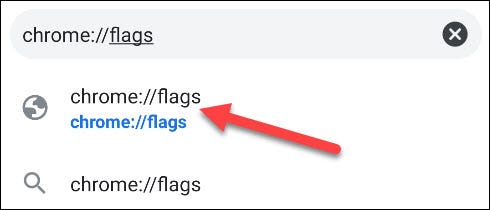
<p style="text-align: justify;">Trên giao diện Chrome hiện ra, bạn nhập từ khóa “<strong>chrome://flags</strong>” vào thanh địa chỉ và nhấn Enter. Thao tác này sẽ đưa bạn đến trang quản lý flag của Chrome, hay còn gọi là Menu Flag.</p>

<p style="text-align: justify;"><img alt="Truy cập “chrome://flags” " data-i="0" data-inimage-loaded="true" data-src="https://st.quantrimang.com/photos/image/2021/11/20/windows-11-theme-chrome1.jpg" data-was-processed="true" height="210" src="https://st.quantrimang.com/photos/image/2021/11/20/windows-11-theme-chrome1.jpg" width="490" /></p>

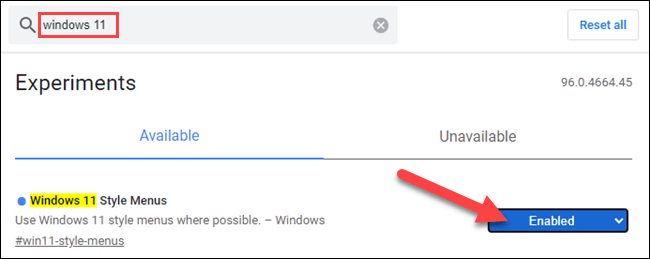
<p style="text-align: justify;">Trên trang quản lý flag hiện ra, bạn nhấp vào hộp tìm kiếm ở trên cùng và tìm từ khóa “<strong>Windows 11</strong>”. Lập tức, flag tương ứng sẽ hiện ra bên dưới. Nhìn sang ô tùy chọn bên phải flag, bạn sẽ thấy một menu thả xuống. Nhấp vào đó và chọn “<strong>Enabled</strong>” (Bật) để kích hoạt flag.</p>

<p style="text-align: justify;"><img alt="Enabled flag" data-i="1" data-src="https://st.quantrimang.com/photos/image/2021/11/20/windows-11-theme-chrome2.png" data-was-processed="true" height="259" src="https://st.quantrimang.com/photos/image/2021/11/20/windows-11-theme-chrome2.png" width="650" /></p>

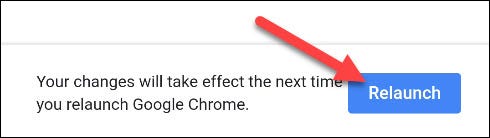
<p style="text-align: justify;">Sau khi bật flag, bạn cần khởi động lại trình duyệt để áp dụng thay đổi. Nhấn vào nút “<strong>Relaunch</strong>” phía dưới cùng và Chrome sẽ tự động khởi chạy lại.</p>

<p style="text-align: justify;"><img alt="Khởi động lại trình duyệt" data-i="2" data-src="https://st.quantrimang.com/photos/image/2021/11/20/windows-11-theme-chrome3.jpg" data-was-processed="true" height="138" src="https://st.quantrimang.com/photos/image/2021/11/20/windows-11-theme-chrome3.jpg" width="490" /></p>

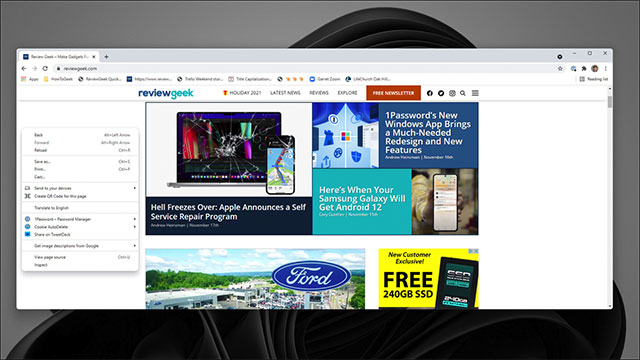
<p style="text-align: justify;">Tất cả chỉ đơn giản có vậy, Chrome của bạn hiện đã khoác lên mình một giao diện với nhiều nét đặc trưng từ Windows 11.</p>

<p style="text-align: justify;"><img alt="Chủ đề mới được áp dụng" data-i="3" data-src="https://st.quantrimang.com/photos/image/2021/11/20/windows-11-theme-chrome4.jpg" data-was-processed="true" height="360" src="https://st.quantrimang.com/photos/image/2021/11/20/windows-11-theme-chrome4.jpg" width="640" /></p>

<p style="text-align: justify;"><strong>Lưu ý:&nbsp;</strong>Mỗi một flag là một tính năng thử nghiệm trên Chrome, và được Google ẩn đi nhằm ngụ ý rằng tính năng đó vẫn đang trong giai đoạn phát triển, hoàn thiện. Google cũng cảnh báo rằng việc kích hoạt và dùng thử flag có thể dẫn đến những rủi ro không báo trước. Chẳng hạn, chúng có thể không hoạt động chính xác và tác động tiêu cực đến hiệu suất trình duyệt của bạn.</p>
		</div>
				<div id="author">
						<p>
				<strong>Nguồn tin:</strong>
				Quantrimang.com
			</p>
		</div>
	</div>
	<div id="footer" class="clearfix">
		<div id="url">
			<strong>URL của bản tin này: </strong><a href="https://www.nguoicodonvn2008.info/vi/news/savefile/kien-thuc-may-tinh/cach-kich-hoat-va-trai-nghiem-windows-11-theme-moi-duoc-gioi-thieu-tren-chrome-4771.html" title="Cách kích hoạt và trải nghiệm Windows 11 theme mới được giới thiệu trên Chrome">https://www.nguoicodonvn2008.info/vi/news/savefile/kien-thuc-may-tinh/cach-kich-hoat-va-trai-nghiem-windows-11-theme-moi-duoc-gioi-thieu-tren-chrome-4771.html</a>

		</div>
		<div class="clear"></div>
		<div class="copyright">
			&copy; .&#x3A; Nguoicodonvn2008.info - Cõi lòng người cô đơn &#x3A;.
		</div>
		<div id="contact">
			<a href="mailto:admin@nguoicodonvn2008.info">admin@nguoicodonvn2008.info</a>
		</div>
	</div>
</div>
        <div id="timeoutsess" class="chromeframe">
            Bạn đã không sử dụng Site, <a onclick="timeoutsesscancel();" href="https://nguoicodonvn2008.info/#">Bấm vào đây để duy trì trạng thái đăng nhập</a>. Thời gian chờ: <span id="secField"> 60 </span> giây
        </div>
        <div id="openidResult" class="nv-alert" style="display:none"></div>
        <div id="openidBt" data-result="" data-redirect=""></div>
		</script>
		<div class="car-top">
  <span><img src="https://nguoicodonvn2008.info/themes/default/images/car.png" alt=""></span>
</div>
<script src="https://nguoicodonvn2008.info/assets/js/jquery/jquery.min.js"></script>
<script>var nv_base_siteurl="/",nv_lang_data="vi",nv_lang_interface="vi",nv_name_variable="nv",nv_fc_variable="op",nv_lang_variable="language",nv_module_name="news",nv_func_name="savefile",nv_is_user=0, nv_my_ofs=-4,nv_my_abbr="EDT",nv_cookie_prefix="nv4c_e856T",nv_check_pass_mstime=1738000,nv_area_admin=0,nv_safemode=0,theme_responsive=0,nv_recaptcha_ver=2,nv_recaptcha_sitekey="",nv_recaptcha_type="image",XSSsanitize=1;</script>
<script src="https://nguoicodonvn2008.info/assets/js/language/vi.js"></script>
<script src="https://nguoicodonvn2008.info/assets/js/DOMPurify/purify3.js"></script>
<script src="https://nguoicodonvn2008.info/assets/js/global.js"></script>
<script src="https://nguoicodonvn2008.info/assets/js/site.js"></script>
<script src="https://nguoicodonvn2008.info/themes/default/js/news.js"></script>
<script src="https://nguoicodonvn2008.info/themes/default/js/main.js"></script>
<script src="https://nguoicodonvn2008.info/themes/default/js/custom.js"></script>
<script type="application/ld+json">
        {
            "@context": "https://schema.org",
            "@type": "Organization",
            "url": "https://nguoicodonvn2008.info",
            "logo": "https://nguoicodonvn2008.info/uploads/angel.gif"
        }
        </script>
<script src="https://nguoicodonvn2008.info/themes/default/js/bootstrap.min.js"></script>
<script type="text/javascript">
var $scrolltop = $('.car-top');
$scrolltop.on('click', function () {
    $('html,body').animate({
        scrollTop: 0
    }, 800);
    $(this).addClass("car-run");
    setTimeout(function(){ $scrolltop.removeClass('car-run');}, 1000);
    return false;
});
$(window).on('scroll', function ()
{ 
    if($(window).scrollTop() >= 200)
    {
        $scrolltop.addClass("show");
        $scrolltop.addClass("car-down");
    }
    else
    {
       $scrolltop.removeClass("show");
       setTimeout(function(){ $scrolltop.removeClass('car-down');}, 300);
    }
});
</script>
</body>
</html>