<!DOCTYPE html>
    <html lang="vi" xmlns="http://www.w3.org/1999/xhtml" prefix="og: http://ogp.me/ns#">
    <head>
<title>Cách kích hoạt tính năng thu nhỏ khi nhấp chuột trong Ubuntu</title>
<meta name="description" content="Cách kích hoạt tính năng thu nhỏ khi nhấp chuột trong Ubuntu - Savefile - Tin Tức -...">
<meta name="author" content=".: Nguoicodonvn2008.info - Cõi lòng người cô đơn :.">
<meta name="copyright" content=".: Nguoicodonvn2008.info - Cõi lòng người cô đơn :. [admin@nguoicodonvn2008.info]">
<meta name="robots" content="index, archive, follow, noodp">
<meta name="googlebot" content="index,archive,follow,noodp">
<meta name="msnbot" content="all,index,follow">
<meta name="generator" content="NukeViet v4.5">
<meta http-equiv="Content-Type" content="text/html; charset=utf-8">
<meta property="og:title" content="Cách kích hoạt tính năng thu nhỏ khi nhấp chuột trong Ubuntu">
<meta property="og:type" content="website">
<meta property="og:description" content="Savefile - Tin Tức - https&#x3A;&#x002F;&#x002F;www.nguoicodonvn2008.info&#x002F;vi&#x002F;news&#x002F;savefile&#x002F;kien-thuc-may-tinh&#x002F;cach-kich-hoat-tinh-nang-thu-nho-khi-nhap-chuot-trong-ubuntu-4847.html">
<meta property="og:site_name" content=".&#x3A; Nguoicodonvn2008.info - Cõi lòng người cô đơn &#x3A;.">
<meta property="og:url" content="https://www.nguoicodonvn2008.info/vi/news/savefile/kien-thuc-may-tinh/cach-kich-hoat-tinh-nang-thu-nho-khi-nhap-chuot-trong-ubuntu-4847.html">
<link rel="shortcut icon" href="https://nguoicodonvn2008.info/favicon.ico">
<link rel="canonical" href="https://www.nguoicodonvn2008.info/vi/news/savefile/kien-thuc-may-tinh/cach-kich-hoat-tinh-nang-thu-nho-khi-nhap-chuot-trong-ubuntu-4847.html">
<link rel="alternate" href="https://nguoicodonvn2008.info/vi/news/rss/" title="Tin Tức" type="application/rss+xml">
<link rel="alternate" href="https://nguoicodonvn2008.info/vi/news/rss/karaoke-dual/" title="Tin Tức - Karaoke Dual" type="application/rss+xml">
<link rel="alternate" href="https://nguoicodonvn2008.info/vi/news/rss/nhac-tre/" title="Tin Tức - Nhạc trẻ" type="application/rss+xml">
<link rel="alternate" href="https://nguoicodonvn2008.info/vi/news/rss/tru-tinh/" title="Tin Tức - Trữ tình" type="application/rss+xml">
<link rel="alternate" href="https://nguoicodonvn2008.info/vi/news/rss/nuoc-ngoai/" title="Tin Tức - Nước ngoài" type="application/rss+xml">
<link rel="alternate" href="https://nguoicodonvn2008.info/vi/news/rss/remix/" title="Tin Tức - Remix" type="application/rss+xml">
<link rel="alternate" href="https://nguoicodonvn2008.info/vi/news/rss/tam-su-tinh-yeu/" title="Tin Tức - Tâm sự tình yêu" type="application/rss+xml">
<link rel="alternate" href="https://nguoicodonvn2008.info/vi/news/rss/tho-suu-tam/" title="Tin Tức - Thơ sưu tầm" type="application/rss+xml">
<link rel="alternate" href="https://nguoicodonvn2008.info/vi/news/rss/cuoc-song/" title="Tin Tức - Cuộc sống" type="application/rss+xml">
<link rel="alternate" href="https://nguoicodonvn2008.info/vi/news/rss/phan-mem/" title="Tin Tức - Phần mềm" type="application/rss+xml">
<link rel="alternate" href="https://nguoicodonvn2008.info/vi/news/rss/kien-thuc-may-tinh/" title="Tin Tức - Kiến thức máy tính" type="application/rss+xml">
<link rel="alternate" href="https://nguoicodonvn2008.info/vi/news/rss/hoc-tap/" title="Tin Tức - Học tập" type="application/rss+xml">
<link rel="alternate" href="https://nguoicodonvn2008.info/vi/news/rss/tai-lieu/" title="Tin Tức - Tài liệu" type="application/rss+xml">
<link rel="alternate" href="https://nguoicodonvn2008.info/vi/news/rss/de-thi/" title="Tin Tức - Đề thi" type="application/rss+xml">
<link rel="preload" as="style" href="https://nguoicodonvn2008.info/assets/css/font-awesome.min.css" type="text/css">
<link rel="preload" as="style" href="https://nguoicodonvn2008.info/themes/default/css/bootstrap.non-responsive.css" type="text/css">
<link rel="preload" as="style" href="https://nguoicodonvn2008.info/themes/default/css/style.css" type="text/css">
<link rel="preload" as="style" href="https://nguoicodonvn2008.info/themes/default/css/style.non-responsive.css" type="text/css">
<link rel="preload" as="style" href="https://nguoicodonvn2008.info/themes/default/css/news.css" type="text/css">
<link rel="preload" as="style" href="https://nguoicodonvn2008.info/themes/default/css/custom.css" type="text/css">
<link rel="preload" as="script" href="https://nguoicodonvn2008.info/assets/js/jquery/jquery.min.js" type="text/javascript">
<link rel="preload" as="script" href="https://nguoicodonvn2008.info/assets/js/language/vi.js" type="text/javascript">
<link rel="preload" as="script" href="https://nguoicodonvn2008.info/assets/js/DOMPurify/purify3.js" type="text/javascript">
<link rel="preload" as="script" href="https://nguoicodonvn2008.info/assets/js/global.js" type="text/javascript">
<link rel="preload" as="script" href="https://nguoicodonvn2008.info/assets/js/site.js" type="text/javascript">
<link rel="preload" as="script" href="https://nguoicodonvn2008.info/themes/default/js/news.js" type="text/javascript">
<link rel="preload" as="script" href="https://nguoicodonvn2008.info/themes/default/js/main.js" type="text/javascript">
<link rel="preload" as="script" href="https://nguoicodonvn2008.info/themes/default/js/custom.js" type="text/javascript">
<link rel="preload" as="script" href="https://nguoicodonvn2008.info/themes/default/js/bootstrap.min.js" type="text/javascript">
<link rel="stylesheet" href="https://nguoicodonvn2008.info/assets/css/font-awesome.min.css">
<link rel="stylesheet" href="https://nguoicodonvn2008.info/themes/default/css/bootstrap.non-responsive.css">
<link rel="stylesheet" href="https://nguoicodonvn2008.info/themes/default/css/style.css">
<link rel="stylesheet" href="https://nguoicodonvn2008.info/themes/default/css/style.non-responsive.css">
<link rel="StyleSheet" href="https://nguoicodonvn2008.info/themes/default/css/news.css">
<link rel="stylesheet" href="https://nguoicodonvn2008.info/themes/default/css/custom.css">
<style type="text/css">
	body{background: #fff;}
</style>
    </head>
    <body>
<div id="print">
	<div id="hd_print">
		<h2 class="pull-left">.&#x3A; Nguoicodonvn2008.info - Cõi lòng người cô đơn &#x3A;.</h2>
		<p class="pull-right"><a title=".&#x3A; Nguoicodonvn2008.info - Cõi lòng người cô đơn &#x3A;." href="https://nguoicodonvn2008.info/">https://nguoicodonvn2008.info</a></p>
	</div>
	<div class="clear"></div>
	<hr />
	<div id="content">
		<h1>Cách kích hoạt tính năng thu nhỏ khi nhấp chuột trong Ubuntu</h1>
		<ul class="list-inline">
			<li>Chủ nhật - 05/12/2021 23:49</li>
			<li class="hidden-print txtrequired"><em class="fa fa-print">&nbsp;</em><a title="In ra" href="javascript:;" onclick="window.print()">In ra</a></li>
			<li class="hidden-print txtrequired"><em class="fa fa-power-off">&nbsp;</em><a title="Đóng cửa sổ này" href="javascript:;" onclick="window.close()">Đóng cửa sổ này</a></li>
		</ul>
		<div class="clear"></div>
		<div id="hometext">
		</div>
				<div class="imghome">
			<img alt="Cách kích hoạt tính năng thu nhỏ khi nhấp chuột trong Ubuntu" src="https://st.quantrimang.com/photos/image/2021/11/23/kich-hoat-tinh-nang-thu-nho-khi-nhap-chuot-trong-ubuntu-2.jpg" width="460" class="img-thumbnail" />
		</div>
		<div class="clear"></div>
		<div id="bodytext" class="clearfix">
			<p style="text-align: justify;">Nhiều người dùng Ubuntu đến với Linux sau khi chuyển từ Windows đang phải tìm cách làm cho hệ thống Linux mới thu nhỏ các cửa sổ đang mở khi nhấp vào biểu tượng thanh tác vụ hoặc thanh công cụ tương ứng. Thật không may,&nbsp;Ubuntu&nbsp;không cung cấp tùy chọn cấu hình trực tiếp để kích hoạt hành vi này.</p>

<p style="text-align: justify;">Mặc dù mọi thứ có thể không rõ ràng ngay lập tức, nhưng điều làm cho Ubuntu trở nên đặc biệt là nhờ việc nó có khả năng tùy biến cao, nếu bạn biết đúng nơi cần tìm. Khi nói đến việc kích hoạt tính năng nhấp chuột để thu nhỏ cửa sổ, bạn không cần phải đi tìm quá xa.</p>

<p style="text-align: justify;">Bạn có thể kích hoạt chức năng nhấp chuột để thu nhỏ thông qua dòng lệnh hoặc giao diện đồ họa. Quantrimang.com sẽ chỉ cho bạn cách thực hiện cả hai qua bài viết sau đây!</p>

<h2 style="text-align: justify;">Kích hoạt tính năng thu nhỏ khi nhấp chuột trong Ubuntu từ dòng lệnh</h2>

<p style="text-align: justify;">Tại&nbsp;Command Prompt&nbsp;của Ubuntu, bạn có thể kích hoạt tính năng thu nhỏ khi nhấp chuột chỉ bằng một lệnh duy nhất.&nbsp;Mở Terminal&nbsp;và nhập lệnh sau:</p>

<pre id="pre0">
<code>gsettings set org.gnome.shell.extensions.dash-to-dock click-action &#039;minimize&#039;</code></pre>

<p style="text-align: justify;">Bạn sẽ không cần phải khởi động lại hệ thống hoặc đăng xuất và đăng nhập lại. Chức năng nhấp để thu nhỏ sẽ được bật ngay lập tức.</p>

<p style="text-align: justify;">Nếu sau đó bạn đổi ý và thấy không thích hành vi mới này, bạn có thể tắt nó bằng cách nhập lệnh sau vào Terminal:</p>

<pre id="pre1">
<code>gsettings reset org.gnome.shell.extensions.dash-to-dock click-action</code></pre>

<h2 style="text-align: justify;">Kích hoạt tính năng thu nhỏ khi nhấp chuột bằng Dconf Editor</h2>

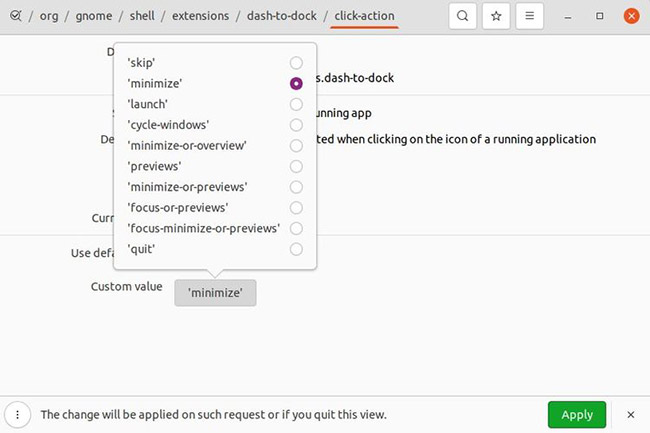
<p style="text-align: justify;">Nếu thích làm việc thông qua giao diện đồ họa, bạn có thể cài đặt Dconf Editor từ Ubuntu Software Center. Chỉ cần mở&nbsp;<strong>Software Center</strong>&nbsp;từ menu&nbsp;<strong>Applications</strong>&nbsp;và nhập&nbsp;<strong>dconf</strong>&nbsp;vào hộp tìm kiếm. Sau đó, nhấp vào&nbsp;<strong>Dconf Editor</strong>&nbsp;và cài đặt ứng dụng.</p>

<figure>
<div style="text-align: justify;"><img alt="Cài đặt Dconf Editor từ Ubuntu Software Center" data-i="0" data-src="https://st.quantrimang.com/photos/image/2021/11/23/kich-hoat-tinh-nang-thu-nho-khi-nhap-chuot-trong-ubuntu-1.jpg" data-was-processed="true" height="147" src="https://st.quantrimang.com/photos/image/2021/11/23/kich-hoat-tinh-nang-thu-nho-khi-nhap-chuot-trong-ubuntu-1.jpg" width="650" /></div>

<figcaption>
<div style="text-align: justify;">Cài đặt Dconf Editor từ Ubuntu Software Center</div>
</figcaption>
</figure>

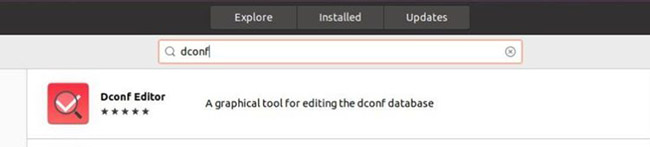
<p style="text-align: justify;">Sau khi cài đặt xong, hãy khởi chạy trình chỉnh sửa và đi tới&nbsp;<strong>org &gt; gnome &gt; shell &gt; extensions &gt; dash-to-dock</strong>. Cuộn xuống một chút cho đến khi bạn tìm thấy thao tác nhấp. Nhấp vào tùy chọn để truy cập cài đặt hành động nhấp chuột.</p>

<figure>
<div style="text-align: justify;"><br />
<img alt="Menu click-action trong Ubuntu Dconf" data-i="1" data-inimage-loaded="true" data-src="https://st.quantrimang.com/photos/image/2021/11/23/kich-hoat-tinh-nang-thu-nho-khi-nhap-chuot-trong-ubuntu-2.jpg" data-was-processed="true" height="433" src="https://st.quantrimang.com/photos/image/2021/11/23/kich-hoat-tinh-nang-thu-nho-khi-nhap-chuot-trong-ubuntu-2.jpg" width="650" /></div>

<figcaption>
<div style="text-align: justify;">Menu click-action trong Ubuntu Dconf</div>
</figcaption>
</figure>

<div style="text-align: justify;">&nbsp;</div>

<p style="text-align: justify;">Tại đây, bạn muốn tắt thanh trượt cho biết sử dụng giá trị mặc định và đặt tùy chọn&nbsp;<strong>Custom value</strong>&nbsp;bên dưới nó thành&nbsp;<strong>Minimize</strong>. Sau đó, chỉ cần nhấp vào&nbsp;<strong>Apply.</strong></p>

<p style="text-align: justify;">Một lần nữa, không cần phải khởi động lại hoặc đăng xuất. Hành vi nhấp để thu nhỏ sẽ có hiệu lực ngay lập tức.</p>

<p style="text-align: justify;">Bây giờ bạn đã bật tính năng nhấp để thu nhỏ, đừng dừng lại ở đó. Hãy tiếp tục khám phá! Còn rất nhiều điều bạn có thể làm để&nbsp;cải thiện hệ thống Ubuntu&nbsp;của mình.</p>

<p style="text-align: justify;">Chúc bạn thực hiện thành công!</p>
		</div>
				<div id="author">
						<p>
				<strong>Nguồn tin:</strong>
				Quantrimang.com
			</p>
		</div>
	</div>
	<div id="footer" class="clearfix">
		<div id="url">
			<strong>URL của bản tin này: </strong><a href="https://www.nguoicodonvn2008.info/vi/news/savefile/kien-thuc-may-tinh/cach-kich-hoat-tinh-nang-thu-nho-khi-nhap-chuot-trong-ubuntu-4847.html" title="Cách kích hoạt tính năng thu nhỏ khi nhấp chuột trong Ubuntu">https://www.nguoicodonvn2008.info/vi/news/savefile/kien-thuc-may-tinh/cach-kich-hoat-tinh-nang-thu-nho-khi-nhap-chuot-trong-ubuntu-4847.html</a>

		</div>
		<div class="clear"></div>
		<div class="copyright">
			&copy; .&#x3A; Nguoicodonvn2008.info - Cõi lòng người cô đơn &#x3A;.
		</div>
		<div id="contact">
			<a href="mailto:admin@nguoicodonvn2008.info">admin@nguoicodonvn2008.info</a>
		</div>
	</div>
</div>
        <div id="timeoutsess" class="chromeframe">
            Bạn đã không sử dụng Site, <a onclick="timeoutsesscancel();" href="https://nguoicodonvn2008.info/#">Bấm vào đây để duy trì trạng thái đăng nhập</a>. Thời gian chờ: <span id="secField"> 60 </span> giây
        </div>
        <div id="openidResult" class="nv-alert" style="display:none"></div>
        <div id="openidBt" data-result="" data-redirect=""></div>
		</script>
		<div class="car-top">
  <span><img src="https://nguoicodonvn2008.info/themes/default/images/car.png" alt=""></span>
</div>
<div id="run_cronjobs" style="visibility:hidden;display:none;"><img alt="cron" src="/index.php?second=cronjobs&amp;p=z2cDN6Pr" width="1" height="1" /></div>
<script src="https://nguoicodonvn2008.info/assets/js/jquery/jquery.min.js"></script>
<script>var nv_base_siteurl="/",nv_lang_data="vi",nv_lang_interface="vi",nv_name_variable="nv",nv_fc_variable="op",nv_lang_variable="language",nv_module_name="news",nv_func_name="savefile",nv_is_user=0, nv_my_ofs=-4,nv_my_abbr="EDT",nv_cookie_prefix="nv4c_e856T",nv_check_pass_mstime=1738000,nv_area_admin=0,nv_safemode=0,theme_responsive=0,nv_recaptcha_ver=2,nv_recaptcha_sitekey="",nv_recaptcha_type="image",XSSsanitize=1;</script>
<script src="https://nguoicodonvn2008.info/assets/js/language/vi.js"></script>
<script src="https://nguoicodonvn2008.info/assets/js/DOMPurify/purify3.js"></script>
<script src="https://nguoicodonvn2008.info/assets/js/global.js"></script>
<script src="https://nguoicodonvn2008.info/assets/js/site.js"></script>
<script src="https://nguoicodonvn2008.info/themes/default/js/news.js"></script>
<script src="https://nguoicodonvn2008.info/themes/default/js/main.js"></script>
<script src="https://nguoicodonvn2008.info/themes/default/js/custom.js"></script>
<script type="application/ld+json">
        {
            "@context": "https://schema.org",
            "@type": "Organization",
            "url": "https://nguoicodonvn2008.info",
            "logo": "https://nguoicodonvn2008.info/uploads/angel.gif"
        }
        </script>
<script src="https://nguoicodonvn2008.info/themes/default/js/bootstrap.min.js"></script>
<script type="text/javascript">
var $scrolltop = $('.car-top');
$scrolltop.on('click', function () {
    $('html,body').animate({
        scrollTop: 0
    }, 800);
    $(this).addClass("car-run");
    setTimeout(function(){ $scrolltop.removeClass('car-run');}, 1000);
    return false;
});
$(window).on('scroll', function ()
{ 
    if($(window).scrollTop() >= 200)
    {
        $scrolltop.addClass("show");
        $scrolltop.addClass("car-down");
    }
    else
    {
       $scrolltop.removeClass("show");
       setTimeout(function(){ $scrolltop.removeClass('car-down');}, 300);
    }
});
</script>
</body>
</html>