<!DOCTYPE html>
    <html lang="vi" xmlns="http://www.w3.org/1999/xhtml" prefix="og: http://ogp.me/ns#">
    <head>
<title>Cách khôi phục tài liệu Word chưa lưu trên máy Mac</title>
<meta name="description" content="Cách khôi phục tài liệu Word chưa lưu trên máy Mac - Savefile - Tin Tức -...">
<meta name="author" content=".: Nguoicodonvn2008.info - Cõi lòng người cô đơn :.">
<meta name="copyright" content=".: Nguoicodonvn2008.info - Cõi lòng người cô đơn :. [admin@nguoicodonvn2008.info]">
<meta name="robots" content="index, archive, follow, noodp">
<meta name="googlebot" content="index,archive,follow,noodp">
<meta name="msnbot" content="all,index,follow">
<meta name="generator" content="NukeViet v4.5">
<meta http-equiv="Content-Type" content="text/html; charset=utf-8">
<meta property="og:title" content="Cách khôi phục tài liệu Word chưa lưu trên máy Mac">
<meta property="og:type" content="website">
<meta property="og:description" content="Savefile - Tin Tức - https&#x3A;&#x002F;&#x002F;www.nguoicodonvn2008.info&#x002F;vi&#x002F;news&#x002F;savefile&#x002F;kien-thuc-may-tinh&#x002F;cach-khoi-phuc-tai-lieu-word-chua-luu-tren-may-mac-9746.html">
<meta property="og:site_name" content=".&#x3A; Nguoicodonvn2008.info - Cõi lòng người cô đơn &#x3A;.">
<meta property="og:url" content="https://www.nguoicodonvn2008.info/vi/news/savefile/kien-thuc-may-tinh/cach-khoi-phuc-tai-lieu-word-chua-luu-tren-may-mac-9746.html">
<link rel="shortcut icon" href="https://nguoicodonvn2008.info/favicon.ico">
<link rel="canonical" href="https://www.nguoicodonvn2008.info/vi/news/savefile/kien-thuc-may-tinh/cach-khoi-phuc-tai-lieu-word-chua-luu-tren-may-mac-9746.html">
<link rel="alternate" href="https://nguoicodonvn2008.info/vi/news/rss/" title="Tin Tức" type="application/rss+xml">
<link rel="alternate" href="https://nguoicodonvn2008.info/vi/news/rss/karaoke-dual/" title="Tin Tức - Karaoke Dual" type="application/rss+xml">
<link rel="alternate" href="https://nguoicodonvn2008.info/vi/news/rss/nhac-tre/" title="Tin Tức - Nhạc trẻ" type="application/rss+xml">
<link rel="alternate" href="https://nguoicodonvn2008.info/vi/news/rss/tru-tinh/" title="Tin Tức - Trữ tình" type="application/rss+xml">
<link rel="alternate" href="https://nguoicodonvn2008.info/vi/news/rss/nuoc-ngoai/" title="Tin Tức - Nước ngoài" type="application/rss+xml">
<link rel="alternate" href="https://nguoicodonvn2008.info/vi/news/rss/remix/" title="Tin Tức - Remix" type="application/rss+xml">
<link rel="alternate" href="https://nguoicodonvn2008.info/vi/news/rss/tam-su-tinh-yeu/" title="Tin Tức - Tâm sự tình yêu" type="application/rss+xml">
<link rel="alternate" href="https://nguoicodonvn2008.info/vi/news/rss/tho-suu-tam/" title="Tin Tức - Thơ sưu tầm" type="application/rss+xml">
<link rel="alternate" href="https://nguoicodonvn2008.info/vi/news/rss/cuoc-song/" title="Tin Tức - Cuộc sống" type="application/rss+xml">
<link rel="alternate" href="https://nguoicodonvn2008.info/vi/news/rss/phan-mem/" title="Tin Tức - Phần mềm" type="application/rss+xml">
<link rel="alternate" href="https://nguoicodonvn2008.info/vi/news/rss/kien-thuc-may-tinh/" title="Tin Tức - Kiến thức máy tính" type="application/rss+xml">
<link rel="alternate" href="https://nguoicodonvn2008.info/vi/news/rss/hoc-tap/" title="Tin Tức - Học tập" type="application/rss+xml">
<link rel="alternate" href="https://nguoicodonvn2008.info/vi/news/rss/tai-lieu/" title="Tin Tức - Tài liệu" type="application/rss+xml">
<link rel="alternate" href="https://nguoicodonvn2008.info/vi/news/rss/de-thi/" title="Tin Tức - Đề thi" type="application/rss+xml">
<link rel="preload" as="style" href="https://nguoicodonvn2008.info/assets/css/font-awesome.min.css" type="text/css">
<link rel="preload" as="style" href="https://nguoicodonvn2008.info/themes/default/css/bootstrap.non-responsive.css" type="text/css">
<link rel="preload" as="style" href="https://nguoicodonvn2008.info/themes/default/css/style.css" type="text/css">
<link rel="preload" as="style" href="https://nguoicodonvn2008.info/themes/default/css/style.non-responsive.css" type="text/css">
<link rel="preload" as="style" href="https://nguoicodonvn2008.info/themes/default/css/news.css" type="text/css">
<link rel="preload" as="style" href="https://nguoicodonvn2008.info/themes/default/css/custom.css" type="text/css">
<link rel="preload" as="script" href="https://nguoicodonvn2008.info/assets/js/jquery/jquery.min.js" type="text/javascript">
<link rel="preload" as="script" href="https://nguoicodonvn2008.info/assets/js/language/vi.js" type="text/javascript">
<link rel="preload" as="script" href="https://nguoicodonvn2008.info/assets/js/DOMPurify/purify3.js" type="text/javascript">
<link rel="preload" as="script" href="https://nguoicodonvn2008.info/assets/js/global.js" type="text/javascript">
<link rel="preload" as="script" href="https://nguoicodonvn2008.info/assets/js/site.js" type="text/javascript">
<link rel="preload" as="script" href="https://nguoicodonvn2008.info/themes/default/js/news.js" type="text/javascript">
<link rel="preload" as="script" href="https://nguoicodonvn2008.info/themes/default/js/main.js" type="text/javascript">
<link rel="preload" as="script" href="https://nguoicodonvn2008.info/themes/default/js/custom.js" type="text/javascript">
<link rel="preload" as="script" href="https://nguoicodonvn2008.info/themes/default/js/bootstrap.min.js" type="text/javascript">
<link rel="stylesheet" href="https://nguoicodonvn2008.info/assets/css/font-awesome.min.css">
<link rel="stylesheet" href="https://nguoicodonvn2008.info/themes/default/css/bootstrap.non-responsive.css">
<link rel="stylesheet" href="https://nguoicodonvn2008.info/themes/default/css/style.css">
<link rel="stylesheet" href="https://nguoicodonvn2008.info/themes/default/css/style.non-responsive.css">
<link rel="StyleSheet" href="https://nguoicodonvn2008.info/themes/default/css/news.css">
<link rel="stylesheet" href="https://nguoicodonvn2008.info/themes/default/css/custom.css">
<style type="text/css">
	body{background: #fff;}
</style>
    </head>
    <body>
<div id="print">
	<div id="hd_print">
		<h2 class="pull-left">.&#x3A; Nguoicodonvn2008.info - Cõi lòng người cô đơn &#x3A;.</h2>
		<p class="pull-right"><a title=".&#x3A; Nguoicodonvn2008.info - Cõi lòng người cô đơn &#x3A;." href="https://nguoicodonvn2008.info/">https://nguoicodonvn2008.info</a></p>
	</div>
	<div class="clear"></div>
	<hr />
	<div id="content">
		<h1>Cách khôi phục tài liệu Word chưa lưu trên máy Mac</h1>
		<ul class="list-inline">
			<li>Chủ nhật - 02/02/2025 20:38</li>
			<li class="hidden-print txtrequired"><em class="fa fa-print">&nbsp;</em><a title="In ra" href="javascript:;" onclick="window.print()">In ra</a></li>
			<li class="hidden-print txtrequired"><em class="fa fa-power-off">&nbsp;</em><a title="Đóng cửa sổ này" href="javascript:;" onclick="window.close()">Đóng cửa sổ này</a></li>
		</ul>
		<div class="clear"></div>
		<div id="hometext">
		</div>
				<div class="imghome">
			<img alt="Cách khôi phục tài liệu Word chưa lưu trên máy Mac" src="https://st.quantrimang.com/photos/image/2025/02/02/lay-lai-file-word-chua-luu-Mac-3.jpg" width="460" class="img-thumbnail" />
		</div>
		<div class="clear"></div>
		<div id="bodytext" class="clearfix">
			<p style="text-align: justify;">Khi đang làm với Word trên máy Mac, đôi khi hệ thống bị sập hoặc lỗi từ Word không thể sửa được, khiến nội dung đang soạn thảo bị mất. Vậy làm sao khôi phục tài liệu Word chưa lưu trên máy Mac? Có một cách để người dùng dễ dàng khôi phục tài liệu Word chưa lưu trên máy Mac, theo bài hướng dẫn dưới đây.</p>

<h2 style="text-align: justify;">1. Khôi phục tệp Word chưa lưu trên máy Mac bằng AutoRecovery</h2>

<p style="text-align: justify;">Cho dù bạn có lưu tài liệu Word hay không, Microsoft Office vẫn tự động lưu dữ liệu vào thư mục AutoRecovery sau mỗi 10 phút.</p>

<p style="text-align: justify;"><strong>Bước 1:</strong></p>

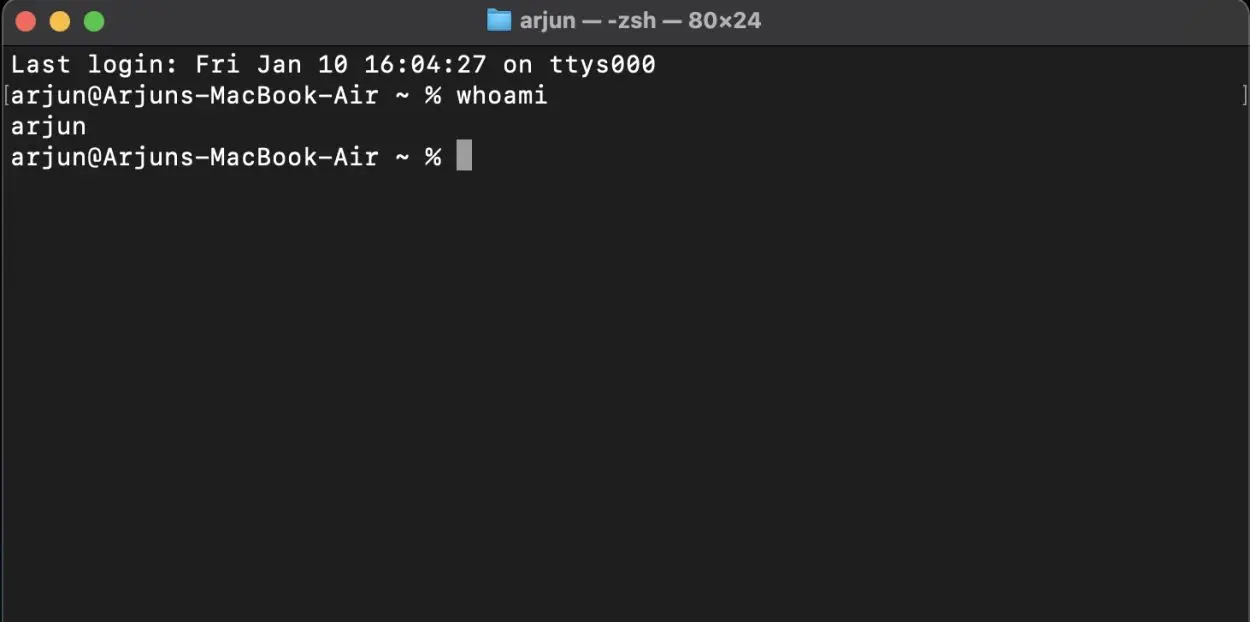
<p style="text-align: justify;">Đầu tiên bạn cần&nbsp;<strong>tìm tên người dùng máy Mac</strong>&nbsp;của mình. Mở&nbsp;<strong>ứng dụng Terminal&nbsp;</strong>rồi&nbsp;<strong>nhập whoami&nbsp;</strong>vào cửa sổ Terminal và nhấn Enter để tìm.</p>

<p style="text-align: justify;"><img alt="Tìm tên người dùng Mac" data-i="0" data-src="https://st.quantrimang.com/photos/image/2025/02/02/lay-lai-file-word-chua-luu-Mac-1.jpg" data-was-processed="true" height="299" src="https://st.quantrimang.com/photos/image/2025/02/02/lay-lai-file-word-chua-luu-Mac-1.jpg" width="600" /></p>

<p style="text-align: justify;"><strong>Bước 2:</strong></p>

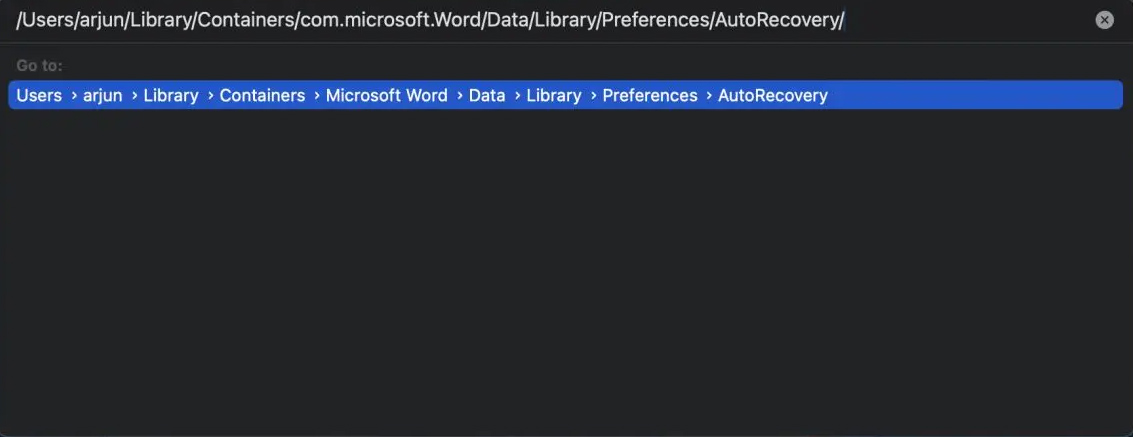
<p style="text-align: justify;">Sau đó&nbsp;<strong>thay thế username</strong>&nbsp;đường dẫn bên dướ<strong>i bằng tên người dùng&nbsp;</strong>mà bạn đã tìm được. Bây giờ, sao chép đường dẫn dưới rồi&nbsp;<strong>dán vào Finder</strong>&nbsp;trên máy tính Mac và chọn&nbsp;<strong>Go -&gt; Go to Folder</strong>.</p>

<pre id="pre0">
<code>/Users/username/Library/Containers/com.microsoft.Word/Data/Library/Preferences/AutoRecovery/</code></pre>

<p style="text-align: justify;"><img alt="Thư mục trên Mac" data-i="1" data-src="https://st.quantrimang.com/photos/image/2025/02/02/lay-lai-file-word-chua-luu-Mac-2.jpg" data-was-processed="true" height="231" src="https://st.quantrimang.com/photos/image/2025/02/02/lay-lai-file-word-chua-luu-Mac-2.jpg" width="600" /></p>

<div style="text-align: justify;">&nbsp;</div>

<p style="text-align: justify;"><strong>Bước 3:</strong></p>

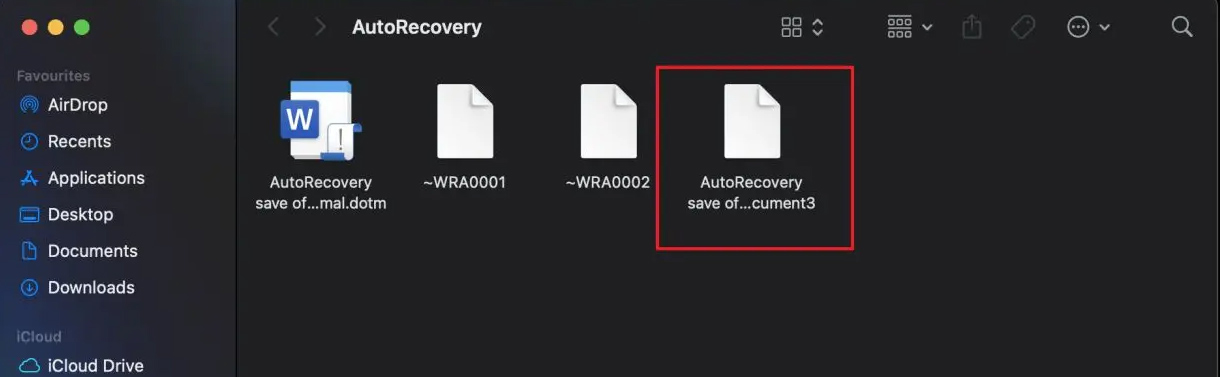
<p style="text-align: justify;"><strong>Thư mục AutoRecovery</strong>&nbsp;hiển thị ngay sau đó. Nhấp đúp vào<strong>&nbsp;tệp bắt đầu bằng AutoRecovery</strong>&nbsp;và&nbsp;<strong>chọn Microsoft Word</strong>&nbsp;để mở tệp đó.</p>

<p style="text-align: justify;">Như vậy bạn đã khôi tệp Word chưa lưu trên máy Mac.</p>

<p style="text-align: justify;"><img alt="Tệp khôi phục Word trên Mac" data-i="2" data-src="https://st.quantrimang.com/photos/image/2025/02/02/lay-lai-file-word-chua-luu-Mac-3.jpg" data-was-processed="true" height="185" src="https://st.quantrimang.com/photos/image/2025/02/02/lay-lai-file-word-chua-luu-Mac-3.jpg" width="600" /></p>

<h2 style="text-align: justify;">Khôi phục tài liệu Word chưa lưu trên máy Mac từ TemporaryItems</h2>

<p style="text-align: justify;">Nếu phương án trên không hiệu quả thì bạn thử tìm tài liệu Word chưa lưu trong thư mục TemporaryItems.</p>

<p style="text-align: justify;"><strong>Bước 1:</strong></p>

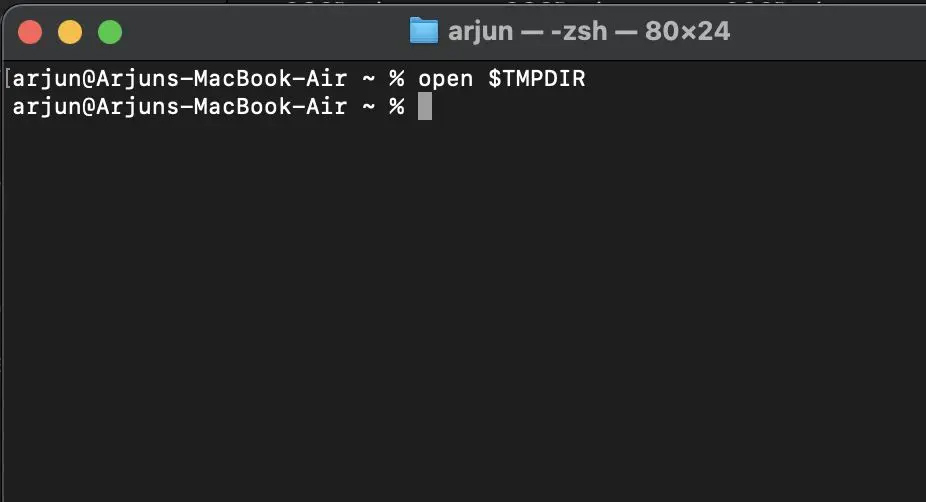
<p style="text-align: justify;">Bạn mở&nbsp;<strong>ứng dụng Terminal&nbsp;</strong>và&nbsp;<strong>dán lệnh — open $TMPDIR</strong>.</p>

<p style="text-align: justify;"><img alt="Truy cập Terminal trên Mac" data-i="3" data-src="https://st.quantrimang.com/photos/image/2025/02/02/lay-lai-file-word-chua-luu-Mac-4.jpg" data-was-processed="true" height="298" src="https://st.quantrimang.com/photos/image/2025/02/02/lay-lai-file-word-chua-luu-Mac-4.jpg" width="550" /></p>

<p style="text-align: justify;"><strong>Bước 2:</strong></p>

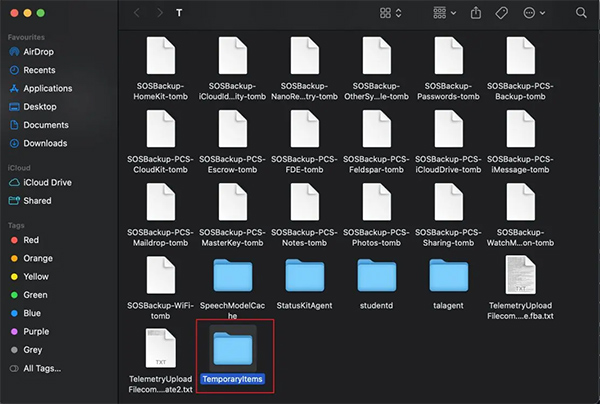
<p style="text-align: justify;">Thao tác này sẽ mở thư mục T. Tiếp theo, cuộn xuống dưới cùng và&nbsp;<strong>mở thư mục TemporaryItems</strong>.</p>

<p style="text-align: justify;"><img alt="Thư mục TemporaryItems trên Mac" data-adbro-processed="true" data-i="4" data-src="https://st.quantrimang.com/photos/image/2025/02/02/lay-lai-file-word-chua-luu-Mac-5.jpg" data-was-processed="true" height="370" src="https://st.quantrimang.com/photos/image/2025/02/02/lay-lai-file-word-chua-luu-Mac-5.jpg" width="550" /></p>

<p style="text-align: justify;"><strong>Bước 3:</strong></p>

<p style="text-align: justify;">Bây giờ, trong thư mục này bạn tìm tài liệu Word.&nbsp;<strong>Tên tệp phải bắt đầu bằng $</strong>&nbsp;và&nbsp;<strong>kết thúc bằng .docx</strong>. Bạn có thể nhấp đúp vào đó để khôi phục tệp Word.</p>

<div style="text-align: justify;">&nbsp;</div>
		</div>
				<div id="author">
						<p>
				<strong>Nguồn tin:</strong>
				Quantrimang.com:
			</p>
		</div>
	</div>
	<div id="footer" class="clearfix">
		<div id="url">
			<strong>URL của bản tin này: </strong><a href="https://www.nguoicodonvn2008.info/vi/news/savefile/kien-thuc-may-tinh/cach-khoi-phuc-tai-lieu-word-chua-luu-tren-may-mac-9746.html" title="Cách khôi phục tài liệu Word chưa lưu trên máy Mac">https://www.nguoicodonvn2008.info/vi/news/savefile/kien-thuc-may-tinh/cach-khoi-phuc-tai-lieu-word-chua-luu-tren-may-mac-9746.html</a>

		</div>
		<div class="clear"></div>
		<div class="copyright">
			&copy; .&#x3A; Nguoicodonvn2008.info - Cõi lòng người cô đơn &#x3A;.
		</div>
		<div id="contact">
			<a href="mailto:admin@nguoicodonvn2008.info">admin@nguoicodonvn2008.info</a>
		</div>
	</div>
</div>
        <div id="timeoutsess" class="chromeframe">
            Bạn đã không sử dụng Site, <a onclick="timeoutsesscancel();" href="https://nguoicodonvn2008.info/#">Bấm vào đây để duy trì trạng thái đăng nhập</a>. Thời gian chờ: <span id="secField"> 60 </span> giây
        </div>
        <div id="openidResult" class="nv-alert" style="display:none"></div>
        <div id="openidBt" data-result="" data-redirect=""></div>
		</script>
		<div class="car-top">
  <span><img src="https://nguoicodonvn2008.info/themes/default/images/car.png" alt=""></span>
</div>
<script src="https://nguoicodonvn2008.info/assets/js/jquery/jquery.min.js"></script>
<script>var nv_base_siteurl="/",nv_lang_data="vi",nv_lang_interface="vi",nv_name_variable="nv",nv_fc_variable="op",nv_lang_variable="language",nv_module_name="news",nv_func_name="savefile",nv_is_user=0, nv_my_ofs=-4,nv_my_abbr="EDT",nv_cookie_prefix="nv4c_e856T",nv_check_pass_mstime=1738000,nv_area_admin=0,nv_safemode=0,theme_responsive=0,nv_recaptcha_ver=2,nv_recaptcha_sitekey="",nv_recaptcha_type="image",XSSsanitize=1;</script>
<script src="https://nguoicodonvn2008.info/assets/js/language/vi.js"></script>
<script src="https://nguoicodonvn2008.info/assets/js/DOMPurify/purify3.js"></script>
<script src="https://nguoicodonvn2008.info/assets/js/global.js"></script>
<script src="https://nguoicodonvn2008.info/assets/js/site.js"></script>
<script src="https://nguoicodonvn2008.info/themes/default/js/news.js"></script>
<script src="https://nguoicodonvn2008.info/themes/default/js/main.js"></script>
<script src="https://nguoicodonvn2008.info/themes/default/js/custom.js"></script>
<script type="application/ld+json">
        {
            "@context": "https://schema.org",
            "@type": "Organization",
            "url": "https://nguoicodonvn2008.info",
            "logo": "https://nguoicodonvn2008.info/uploads/angel.gif"
        }
        </script>
<script src="https://nguoicodonvn2008.info/themes/default/js/bootstrap.min.js"></script>
<script type="text/javascript">
var $scrolltop = $('.car-top');
$scrolltop.on('click', function () {
    $('html,body').animate({
        scrollTop: 0
    }, 800);
    $(this).addClass("car-run");
    setTimeout(function(){ $scrolltop.removeClass('car-run');}, 1000);
    return false;
});
$(window).on('scroll', function ()
{ 
    if($(window).scrollTop() >= 200)
    {
        $scrolltop.addClass("show");
        $scrolltop.addClass("car-down");
    }
    else
    {
       $scrolltop.removeClass("show");
       setTimeout(function(){ $scrolltop.removeClass('car-down');}, 300);
    }
});
</script>
</body>
</html>