<!DOCTYPE html>
    <html lang="vi" xmlns="http://www.w3.org/1999/xhtml" prefix="og: http://ogp.me/ns#">
    <head>
<title>Cách khôi phục giấy phép trên PS5</title>
<meta name="description" content="Cách khôi phục giấy phép trên PS5 - Savefile - Tin Tức - https&#x3A;&#x002F;&#x002F;www.nguoicodonvn2008.info&#x002F;vi&#x002F;news&#x002F;savefile&#x002F;kien-thuc-may-tinh&#x002F;cach-khoi-phuc-giay-phep-tren-ps5-8064.html">
<meta name="author" content=".: Nguoicodonvn2008.info - Cõi lòng người cô đơn :.">
<meta name="copyright" content=".: Nguoicodonvn2008.info - Cõi lòng người cô đơn :. [admin@nguoicodonvn2008.info]">
<meta name="robots" content="index, archive, follow, noodp">
<meta name="googlebot" content="index,archive,follow,noodp">
<meta name="msnbot" content="all,index,follow">
<meta name="generator" content="NukeViet v4.5">
<meta http-equiv="Content-Type" content="text/html; charset=utf-8">
<meta property="og:title" content="Cách khôi phục giấy phép trên PS5">
<meta property="og:type" content="website">
<meta property="og:description" content="Savefile - Tin Tức - https&#x3A;&#x002F;&#x002F;www.nguoicodonvn2008.info&#x002F;vi&#x002F;news&#x002F;savefile&#x002F;kien-thuc-may-tinh&#x002F;cach-khoi-phuc-giay-phep-tren-ps5-8064.html">
<meta property="og:site_name" content=".&#x3A; Nguoicodonvn2008.info - Cõi lòng người cô đơn &#x3A;.">
<meta property="og:url" content="https://www.nguoicodonvn2008.info/vi/news/savefile/kien-thuc-may-tinh/cach-khoi-phuc-giay-phep-tren-ps5-8064.html">
<link rel="shortcut icon" href="https://nguoicodonvn2008.info/favicon.ico">
<link rel="canonical" href="https://www.nguoicodonvn2008.info/vi/news/savefile/kien-thuc-may-tinh/cach-khoi-phuc-giay-phep-tren-ps5-8064.html">
<link rel="alternate" href="https://nguoicodonvn2008.info/vi/news/rss/" title="Tin Tức" type="application/rss+xml">
<link rel="alternate" href="https://nguoicodonvn2008.info/vi/news/rss/karaoke-dual/" title="Tin Tức - Karaoke Dual" type="application/rss+xml">
<link rel="alternate" href="https://nguoicodonvn2008.info/vi/news/rss/nhac-tre/" title="Tin Tức - Nhạc trẻ" type="application/rss+xml">
<link rel="alternate" href="https://nguoicodonvn2008.info/vi/news/rss/tru-tinh/" title="Tin Tức - Trữ tình" type="application/rss+xml">
<link rel="alternate" href="https://nguoicodonvn2008.info/vi/news/rss/nuoc-ngoai/" title="Tin Tức - Nước ngoài" type="application/rss+xml">
<link rel="alternate" href="https://nguoicodonvn2008.info/vi/news/rss/remix/" title="Tin Tức - Remix" type="application/rss+xml">
<link rel="alternate" href="https://nguoicodonvn2008.info/vi/news/rss/tam-su-tinh-yeu/" title="Tin Tức - Tâm sự tình yêu" type="application/rss+xml">
<link rel="alternate" href="https://nguoicodonvn2008.info/vi/news/rss/tho-suu-tam/" title="Tin Tức - Thơ sưu tầm" type="application/rss+xml">
<link rel="alternate" href="https://nguoicodonvn2008.info/vi/news/rss/cuoc-song/" title="Tin Tức - Cuộc sống" type="application/rss+xml">
<link rel="alternate" href="https://nguoicodonvn2008.info/vi/news/rss/phan-mem/" title="Tin Tức - Phần mềm" type="application/rss+xml">
<link rel="alternate" href="https://nguoicodonvn2008.info/vi/news/rss/kien-thuc-may-tinh/" title="Tin Tức - Kiến thức máy tính" type="application/rss+xml">
<link rel="alternate" href="https://nguoicodonvn2008.info/vi/news/rss/hoc-tap/" title="Tin Tức - Học tập" type="application/rss+xml">
<link rel="alternate" href="https://nguoicodonvn2008.info/vi/news/rss/tai-lieu/" title="Tin Tức - Tài liệu" type="application/rss+xml">
<link rel="alternate" href="https://nguoicodonvn2008.info/vi/news/rss/de-thi/" title="Tin Tức - Đề thi" type="application/rss+xml">
<link rel="preload" as="style" href="https://nguoicodonvn2008.info/assets/css/font-awesome.min.css" type="text/css">
<link rel="preload" as="style" href="https://nguoicodonvn2008.info/themes/default/css/bootstrap.non-responsive.css" type="text/css">
<link rel="preload" as="style" href="https://nguoicodonvn2008.info/themes/default/css/style.css" type="text/css">
<link rel="preload" as="style" href="https://nguoicodonvn2008.info/themes/default/css/style.non-responsive.css" type="text/css">
<link rel="preload" as="style" href="https://nguoicodonvn2008.info/themes/default/css/news.css" type="text/css">
<link rel="preload" as="style" href="https://nguoicodonvn2008.info/themes/default/css/custom.css" type="text/css">
<link rel="preload" as="script" href="https://nguoicodonvn2008.info/assets/js/jquery/jquery.min.js" type="text/javascript">
<link rel="preload" as="script" href="https://nguoicodonvn2008.info/assets/js/language/vi.js" type="text/javascript">
<link rel="preload" as="script" href="https://nguoicodonvn2008.info/assets/js/DOMPurify/purify3.js" type="text/javascript">
<link rel="preload" as="script" href="https://nguoicodonvn2008.info/assets/js/global.js" type="text/javascript">
<link rel="preload" as="script" href="https://nguoicodonvn2008.info/assets/js/site.js" type="text/javascript">
<link rel="preload" as="script" href="https://nguoicodonvn2008.info/themes/default/js/news.js" type="text/javascript">
<link rel="preload" as="script" href="https://nguoicodonvn2008.info/themes/default/js/main.js" type="text/javascript">
<link rel="preload" as="script" href="https://nguoicodonvn2008.info/themes/default/js/custom.js" type="text/javascript">
<link rel="preload" as="script" href="https://nguoicodonvn2008.info/themes/default/js/bootstrap.min.js" type="text/javascript">
<link rel="stylesheet" href="https://nguoicodonvn2008.info/assets/css/font-awesome.min.css">
<link rel="stylesheet" href="https://nguoicodonvn2008.info/themes/default/css/bootstrap.non-responsive.css">
<link rel="stylesheet" href="https://nguoicodonvn2008.info/themes/default/css/style.css">
<link rel="stylesheet" href="https://nguoicodonvn2008.info/themes/default/css/style.non-responsive.css">
<link rel="StyleSheet" href="https://nguoicodonvn2008.info/themes/default/css/news.css">
<link rel="stylesheet" href="https://nguoicodonvn2008.info/themes/default/css/custom.css">
<style type="text/css">
	body{background: #fff;}
</style>
    </head>
    <body>
<div id="print">
	<div id="hd_print">
		<h2 class="pull-left">.&#x3A; Nguoicodonvn2008.info - Cõi lòng người cô đơn &#x3A;.</h2>
		<p class="pull-right"><a title=".&#x3A; Nguoicodonvn2008.info - Cõi lòng người cô đơn &#x3A;." href="https://nguoicodonvn2008.info/">https://nguoicodonvn2008.info</a></p>
	</div>
	<div class="clear"></div>
	<hr />
	<div id="content">
		<h1>Cách khôi phục giấy phép trên PS5</h1>
		<ul class="list-inline">
			<li>Thứ ba - 13/02/2024 08:30</li>
			<li class="hidden-print txtrequired"><em class="fa fa-print">&nbsp;</em><a title="In ra" href="javascript:;" onclick="window.print()">In ra</a></li>
			<li class="hidden-print txtrequired"><em class="fa fa-power-off">&nbsp;</em><a title="Đóng cửa sổ này" href="javascript:;" onclick="window.close()">Đóng cửa sổ này</a></li>
		</ul>
		<div class="clear"></div>
		<div id="hometext">
		</div>
				<div class="imghome">
			<img alt="Cách khôi phục giấy phép trên PS5" src="https://st.quantrimang.com/photos/image/2024/02/05/khoi-phuc-giay-phep-tren-ps5-4.jpg" width="460" class="img-thumbnail" />
		</div>
		<div class="clear"></div>
		<div id="bodytext" class="clearfix">
			<p style="text-align: justify;">Nếu&nbsp;game PS5&nbsp;của bạn có biểu tượng ổ khóa bên cạnh hoặc bạn gặp sự cố khi truy cập nội dung có thể tải xuống, bạn có thể cần phải khôi phục giấy phép trên console của mình. Mặc dù quá trình này rất dễ dàng nhưng cũng có thể đáng sợ nếu bạn không hiểu đầy đủ những gì liên quan. Nếu bạn cần khôi phục giấy phép trên console PS5 của mình, đây là cách thực hiện.</p>

<h2 style="text-align: justify;">Khôi phục giấy phép trên PS5 có tác dụng gì?</h2>

<p style="text-align: justify;"><img alt="Tay cầm chơi game PS5 trước màn hình TV" data-i="0" data-src="https://st.quantrimang.com/photos/image/2024/02/05/khoi-phuc-giay-phep-tren-ps5-1.jpg" data-was-processed="true" height="325" src="https://st.quantrimang.com/photos/image/2024/02/05/khoi-phuc-giay-phep-tren-ps5-1.jpg" width="650" /></p>

<p style="text-align: justify;">Khôi phục giấy phép trên&nbsp;PS5&nbsp;của bạn là một quy trình được thiết kế để giúp giải quyết mọi vấn đề bạn có thể gặp phải khi truy cập game hoặc nội dung bạn đã mua.</p>

<p style="text-align: justify;">Đôi khi, thông tin trong thư viện game của bạn khác với thông tin được lưu trữ trên máy chủ game. Khôi phục giấy phép sẽ đồng bộ thông tin này để bạn có thể lấy lại quyền truy cập vào game của mình.</p>

<p style="text-align: justify;">Có nhiều lý do tại sao những khác biệt này xảy ra. Chúng bao gồm các sự cố PlayStation Network, lỗi xác minh giấy phép, sự cố chia sẻ game giữa những console hoặc thậm chí thay đổi chi tiết tài khoản. Ví dụ, vấn đề này có thể phát sinh khi bạn thay đổi tên PSN của mình.</p>

<p style="text-align: justify;">Việc khôi phục giấy phép trên PS5 không làm gián đoạn hoặc ảnh hưởng đến dữ liệu của bạn dưới bất kỳ hình thức nào. Đây là một quy trình an toàn và đơn giản mà bạn có thể chạy bất cứ khi nào gặp sự cố khi truy cập game và nội dung của mình.</p>

<h2 style="text-align: justify;">Khi nào bạn nên khôi phục giấy phép trên PS5 của mình?</h2>

<p style="text-align: justify;">Bạn nên khôi phục giấy phép trên PS5 của mình bất cứ khi nào bạn nhìn thấy biểu tượng ổ khóa bên cạnh tựa game của mình, khi bạn gặp sự cố khi khởi chạy hoặc chơi game hay nếu bạn thấy thông báo lỗi cho biết rằng bạn không sở hữu nội dung đó mặc dù bạn đã mua nó.</p>

<p style="text-align: justify;">Bạn cũng nên cân nhắc việc khôi phục giấy phép PS5 của mình để khắc phục sự cố DLC, chẳng hạn như nếu bạn không thể tìm thấy nội dung đã tải xuống. Việc khôi phục giấy phép cũng có thể có lợi sau khi chuyển sang console PlayStation mới để đảm bảo thông tin của bạn luôn được cập nhật.</p>

<h2 style="text-align: justify;">Cách khôi phục giấy phép trên PS5</h2>

<p style="text-align: justify;">Nếu bạn gặp sự cố khi truy cập một số game và muốn khôi phục giấy phép của mình, bạn có thể thực hiện việc đó chỉ trong vài phút mà không gặp nhiều căng thẳng.</p>

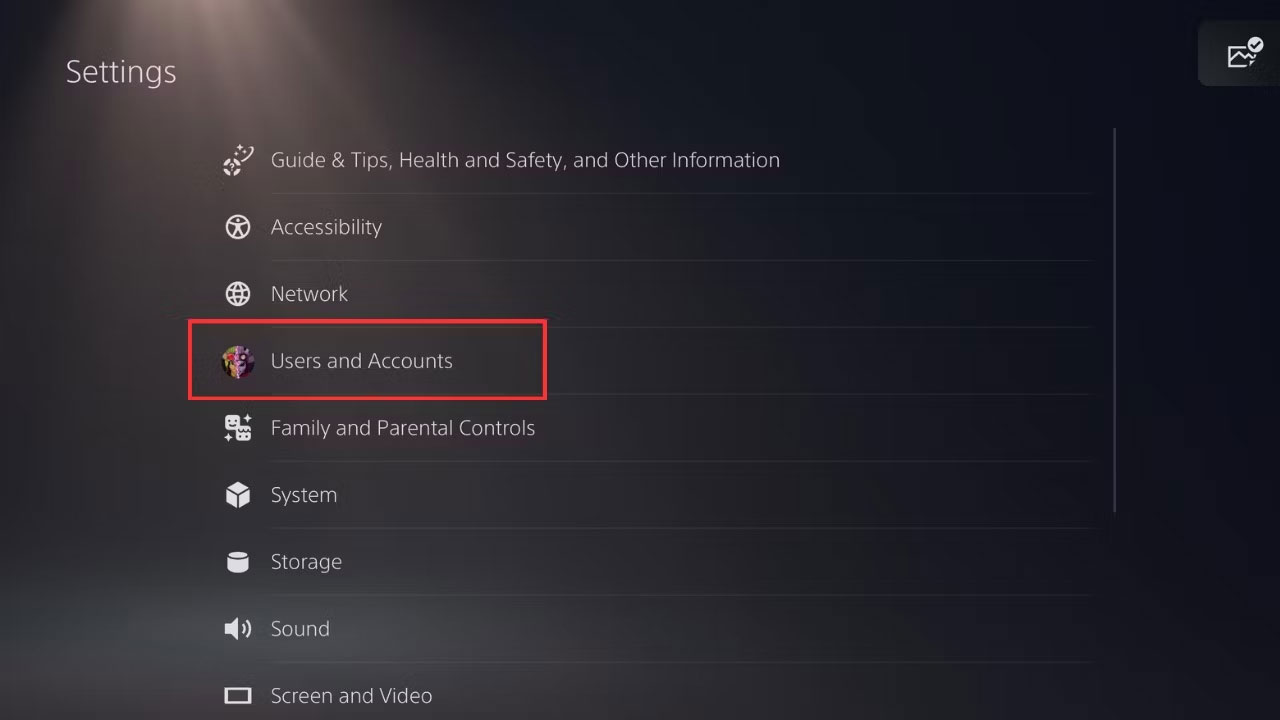
<p style="text-align: justify;">Trước tiên, hãy đi tới cài đặt console của bạn bằng cách chọn biểu tượng bánh răng ở góc trên cùng bên phải và chọn&nbsp;<strong>Users and Accounts</strong>.</p>

<figure>
<div style="text-align: justify;"><img alt="Tùy chọn Users and Accounts trong cài đặt PS5" data-i="1" data-src="https://st.quantrimang.com/photos/image/2024/02/05/khoi-phuc-giay-phep-tren-ps5-2.jpg" data-was-processed="true" height="720" src="https://st.quantrimang.com/photos/image/2024/02/05/khoi-phuc-giay-phep-tren-ps5-2.jpg" width="1280" /></div>

<figcaption>
<div style="text-align: justify;">Tùy chọn Users and Accounts trong cài đặt PS5</div>
</figcaption>
</figure>

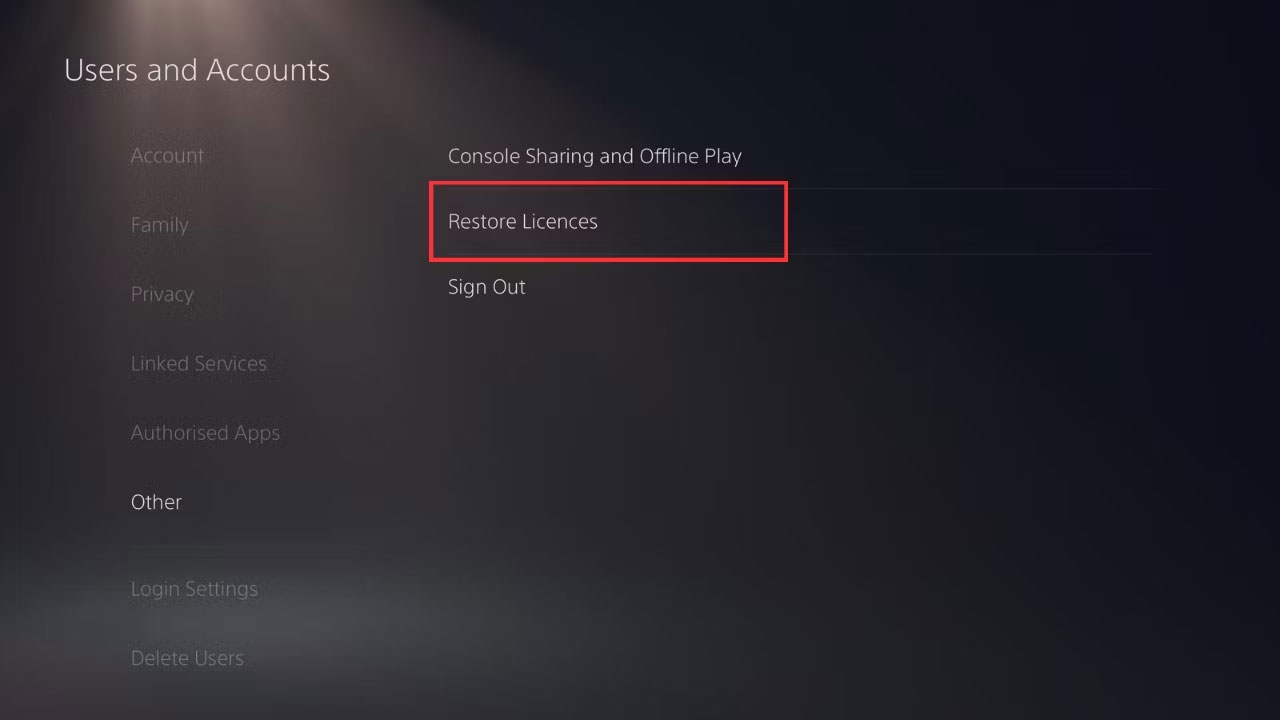
<p style="text-align: justify;">Đi tới&nbsp;<strong>Other</strong>&nbsp;và chọn&nbsp;<strong>Restore Licenses</strong>. Sau đó chọn&nbsp;<strong>Restore</strong>&nbsp;để bắt đầu quá trình.</p>

<figure>
<div style="text-align: justify;"><img alt="Khôi phục cài đặt giấy phép PS5" data-i="2" data-src="https://st.quantrimang.com/photos/image/2024/02/05/khoi-phuc-giay-phep-tren-ps5-3.jpg" data-was-processed="true" height="720" src="https://st.quantrimang.com/photos/image/2024/02/05/khoi-phuc-giay-phep-tren-ps5-3.jpg" width="1280" /></div>

<figcaption>
<div style="text-align: justify;">Khôi phục cài đặt giấy phép PS5</div>
</figcaption>
</figure>

<p style="text-align: justify;">Chỉ mất vài phút trước khi quá trình hoàn tất và bạn có thể nhấn&nbsp;<strong>OK</strong>&nbsp;để tiếp tục chơi game như bình thường.</p>

<h2 style="text-align: justify;">Phải làm gì nếu việc khôi phục giấy phép trên PS5 không có tác dụng?</h2>

<p style="text-align: justify;">Đôi khi, quá trình khôi phục giấy phép có thể không hoạt động do sự cố hoặc ngừng hoạt động của PlayStation Network. Nếu đúng như vậy, hãy đợi một lát cho đến khi mạng hoạt động trở lại trước khi thử lại quy trình.</p>

<p style="text-align: justify;">Nếu bạn đã khôi phục thành công giấy phép của mình nhưng vẫn gặp sự cố khi truy cập game, bạn có thể phải thử các phương pháp khắc phục sự cố khác.</p>

<p style="text-align: justify;">Nếu bạn đang cố truy cập game của mình trên console phụ, nó có thể không nhận ra rằng bạn có quyền truy cập vào game mà bạn đang cố chơi. Trong trường hợp đó, bật Game Sharing trên PS5 có thể giúp giải quyết vấn đề của bạn.</p>

<figure>
<div style="text-align: justify;"><img alt="Chia sẻ console và cài đặt chơi ngoại tuyến PS5" data-i="3" data-src="https://st.quantrimang.com/photos/image/2024/02/05/khoi-phuc-giay-phep-tren-ps5-4.jpg" data-was-processed="true" height="720" src="https://st.quantrimang.com/photos/image/2024/02/05/khoi-phuc-giay-phep-tren-ps5-4.jpg" width="1280" /></div>

<figcaption>
<div style="text-align: justify;">Chia sẻ console và cài đặt chơi ngoại tuyến PS5</div>
</figcaption>
</figure>

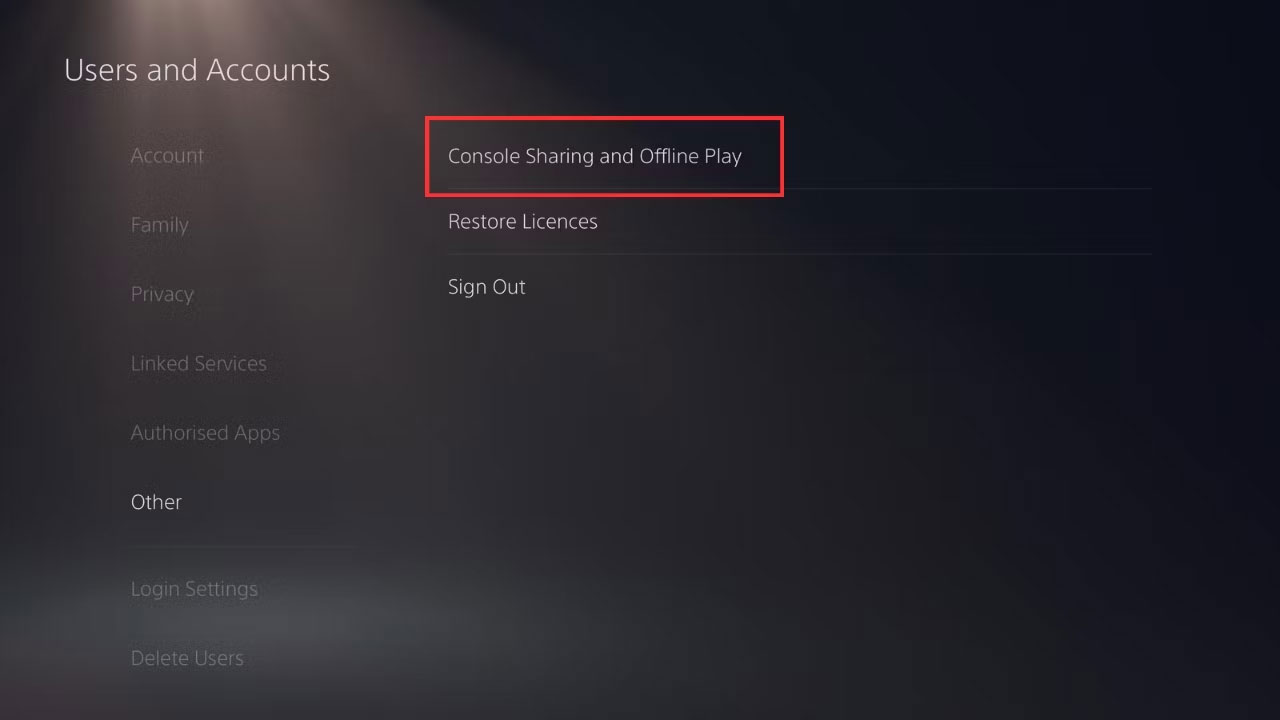
<p style="text-align: justify;">Để làm như vậy, hãy làm theo quy trình tương tự như trước để đến phần&nbsp;<strong>Restore Licenses</strong>, nhưng thay vào đó hãy chọn&nbsp;<strong>Console Sharing and Offline Play</strong>. Chọn&nbsp;<strong>Enable</strong>&nbsp;để kích hoạt Game Sharing. Điều đó sẽ cho phép console phụ của bạn đồng bộ với thông tin trên console chính và khôi phục quyền truy cập của bạn vào nội dung bạn đang cố chơi.</p>

<p style="text-align: justify;">Việc khôi phục giấy phép trên PS5 của bạn có vẻ đáng sợ nhưng nó hoàn toàn an toàn và sẽ không ảnh hưởng tiêu cực đến bất kỳ dữ liệu nào trên console của bạn.</p>

<p style="text-align: justify;">Quá trình này được thiết kế đơn giản để đồng bộ dữ liệu trên console của bạn với dữ liệu được lưu trữ trên PlayStation Network, do đó bạn có thể lấy lại quyền truy cập và tiếp tục chơi các game mà bạn có quyền.</p>
		</div>
				<div id="author">
						<p>
				<strong>Nguồn tin:</strong>
				Quantrimang.com
			</p>
		</div>
	</div>
	<div id="footer" class="clearfix">
		<div id="url">
			<strong>URL của bản tin này: </strong><a href="https://www.nguoicodonvn2008.info/vi/news/savefile/kien-thuc-may-tinh/cach-khoi-phuc-giay-phep-tren-ps5-8064.html" title="Cách khôi phục giấy phép trên PS5">https://www.nguoicodonvn2008.info/vi/news/savefile/kien-thuc-may-tinh/cach-khoi-phuc-giay-phep-tren-ps5-8064.html</a>

		</div>
		<div class="clear"></div>
		<div class="copyright">
			&copy; .&#x3A; Nguoicodonvn2008.info - Cõi lòng người cô đơn &#x3A;.
		</div>
		<div id="contact">
			<a href="mailto:admin@nguoicodonvn2008.info">admin@nguoicodonvn2008.info</a>
		</div>
	</div>
</div>
        <div id="timeoutsess" class="chromeframe">
            Bạn đã không sử dụng Site, <a onclick="timeoutsesscancel();" href="https://nguoicodonvn2008.info/#">Bấm vào đây để duy trì trạng thái đăng nhập</a>. Thời gian chờ: <span id="secField"> 60 </span> giây
        </div>
        <div id="openidResult" class="nv-alert" style="display:none"></div>
        <div id="openidBt" data-result="" data-redirect=""></div>
		</script>
		<div class="car-top">
  <span><img src="https://nguoicodonvn2008.info/themes/default/images/car.png" alt=""></span>
</div>
<script src="https://nguoicodonvn2008.info/assets/js/jquery/jquery.min.js"></script>
<script>var nv_base_siteurl="/",nv_lang_data="vi",nv_lang_interface="vi",nv_name_variable="nv",nv_fc_variable="op",nv_lang_variable="language",nv_module_name="news",nv_func_name="savefile",nv_is_user=0, nv_my_ofs=-4,nv_my_abbr="EDT",nv_cookie_prefix="nv4c_e856T",nv_check_pass_mstime=1738000,nv_area_admin=0,nv_safemode=0,theme_responsive=0,nv_recaptcha_ver=2,nv_recaptcha_sitekey="",nv_recaptcha_type="image",XSSsanitize=1;</script>
<script src="https://nguoicodonvn2008.info/assets/js/language/vi.js"></script>
<script src="https://nguoicodonvn2008.info/assets/js/DOMPurify/purify3.js"></script>
<script src="https://nguoicodonvn2008.info/assets/js/global.js"></script>
<script src="https://nguoicodonvn2008.info/assets/js/site.js"></script>
<script src="https://nguoicodonvn2008.info/themes/default/js/news.js"></script>
<script src="https://nguoicodonvn2008.info/themes/default/js/main.js"></script>
<script src="https://nguoicodonvn2008.info/themes/default/js/custom.js"></script>
<script type="application/ld+json">
        {
            "@context": "https://schema.org",
            "@type": "Organization",
            "url": "https://nguoicodonvn2008.info",
            "logo": "https://nguoicodonvn2008.info/uploads/angel.gif"
        }
        </script>
<script src="https://nguoicodonvn2008.info/themes/default/js/bootstrap.min.js"></script>
<script type="text/javascript">
var $scrolltop = $('.car-top');
$scrolltop.on('click', function () {
    $('html,body').animate({
        scrollTop: 0
    }, 800);
    $(this).addClass("car-run");
    setTimeout(function(){ $scrolltop.removeClass('car-run');}, 1000);
    return false;
});
$(window).on('scroll', function ()
{ 
    if($(window).scrollTop() >= 200)
    {
        $scrolltop.addClass("show");
        $scrolltop.addClass("car-down");
    }
    else
    {
       $scrolltop.removeClass("show");
       setTimeout(function(){ $scrolltop.removeClass('car-down');}, 300);
    }
});
</script>
</body>
</html>