<!DOCTYPE html>
    <html lang="vi" xmlns="http://www.w3.org/1999/xhtml" prefix="og: http://ogp.me/ns#">
    <head>
<title>Cách khắc phục tình trạng Windows Widgets sử dụng CPU ở mức cao</title>
<meta name="description" content="Cách khắc phục tình trạng Windows Widgets sử dụng CPU ở mức cao - Savefile - Tin Tức -...">
<meta name="author" content=".: Nguoicodonvn2008.info - Cõi lòng người cô đơn :.">
<meta name="copyright" content=".: Nguoicodonvn2008.info - Cõi lòng người cô đơn :. [admin@nguoicodonvn2008.info]">
<meta name="robots" content="index, archive, follow, noodp">
<meta name="googlebot" content="index,archive,follow,noodp">
<meta name="msnbot" content="all,index,follow">
<meta name="generator" content="NukeViet v4.5">
<meta http-equiv="Content-Type" content="text/html; charset=utf-8">
<meta property="og:title" content="Cách khắc phục tình trạng Windows Widgets sử dụng CPU ở mức cao">
<meta property="og:type" content="website">
<meta property="og:description" content="Savefile - Tin Tức - https&#x3A;&#x002F;&#x002F;www.nguoicodonvn2008.info&#x002F;vi&#x002F;news&#x002F;savefile&#x002F;kien-thuc-may-tinh&#x002F;cach-khac-phuc-tinh-trang-windows-widgets-su-dung-cpu-o-muc-cao-5567.html">
<meta property="og:site_name" content=".&#x3A; Nguoicodonvn2008.info - Cõi lòng người cô đơn &#x3A;.">
<meta property="og:url" content="https://www.nguoicodonvn2008.info/vi/news/savefile/kien-thuc-may-tinh/cach-khac-phuc-tinh-trang-windows-widgets-su-dung-cpu-o-muc-cao-5567.html">
<link rel="shortcut icon" href="https://nguoicodonvn2008.info/favicon.ico">
<link rel="canonical" href="https://www.nguoicodonvn2008.info/vi/news/savefile/kien-thuc-may-tinh/cach-khac-phuc-tinh-trang-windows-widgets-su-dung-cpu-o-muc-cao-5567.html">
<link rel="alternate" href="https://nguoicodonvn2008.info/vi/news/rss/" title="Tin Tức" type="application/rss+xml">
<link rel="alternate" href="https://nguoicodonvn2008.info/vi/news/rss/karaoke-dual/" title="Tin Tức - Karaoke Dual" type="application/rss+xml">
<link rel="alternate" href="https://nguoicodonvn2008.info/vi/news/rss/nhac-tre/" title="Tin Tức - Nhạc trẻ" type="application/rss+xml">
<link rel="alternate" href="https://nguoicodonvn2008.info/vi/news/rss/tru-tinh/" title="Tin Tức - Trữ tình" type="application/rss+xml">
<link rel="alternate" href="https://nguoicodonvn2008.info/vi/news/rss/nuoc-ngoai/" title="Tin Tức - Nước ngoài" type="application/rss+xml">
<link rel="alternate" href="https://nguoicodonvn2008.info/vi/news/rss/remix/" title="Tin Tức - Remix" type="application/rss+xml">
<link rel="alternate" href="https://nguoicodonvn2008.info/vi/news/rss/tam-su-tinh-yeu/" title="Tin Tức - Tâm sự tình yêu" type="application/rss+xml">
<link rel="alternate" href="https://nguoicodonvn2008.info/vi/news/rss/tho-suu-tam/" title="Tin Tức - Thơ sưu tầm" type="application/rss+xml">
<link rel="alternate" href="https://nguoicodonvn2008.info/vi/news/rss/cuoc-song/" title="Tin Tức - Cuộc sống" type="application/rss+xml">
<link rel="alternate" href="https://nguoicodonvn2008.info/vi/news/rss/phan-mem/" title="Tin Tức - Phần mềm" type="application/rss+xml">
<link rel="alternate" href="https://nguoicodonvn2008.info/vi/news/rss/kien-thuc-may-tinh/" title="Tin Tức - Kiến thức máy tính" type="application/rss+xml">
<link rel="alternate" href="https://nguoicodonvn2008.info/vi/news/rss/hoc-tap/" title="Tin Tức - Học tập" type="application/rss+xml">
<link rel="alternate" href="https://nguoicodonvn2008.info/vi/news/rss/tai-lieu/" title="Tin Tức - Tài liệu" type="application/rss+xml">
<link rel="alternate" href="https://nguoicodonvn2008.info/vi/news/rss/de-thi/" title="Tin Tức - Đề thi" type="application/rss+xml">
<link rel="preload" as="style" href="https://nguoicodonvn2008.info/assets/css/font-awesome.min.css" type="text/css">
<link rel="preload" as="style" href="https://nguoicodonvn2008.info/themes/default/css/bootstrap.non-responsive.css" type="text/css">
<link rel="preload" as="style" href="https://nguoicodonvn2008.info/themes/default/css/style.css" type="text/css">
<link rel="preload" as="style" href="https://nguoicodonvn2008.info/themes/default/css/style.non-responsive.css" type="text/css">
<link rel="preload" as="style" href="https://nguoicodonvn2008.info/themes/default/css/news.css" type="text/css">
<link rel="preload" as="style" href="https://nguoicodonvn2008.info/themes/default/css/custom.css" type="text/css">
<link rel="preload" as="script" href="https://nguoicodonvn2008.info/assets/js/jquery/jquery.min.js" type="text/javascript">
<link rel="preload" as="script" href="https://nguoicodonvn2008.info/assets/js/language/vi.js" type="text/javascript">
<link rel="preload" as="script" href="https://nguoicodonvn2008.info/assets/js/DOMPurify/purify3.js" type="text/javascript">
<link rel="preload" as="script" href="https://nguoicodonvn2008.info/assets/js/global.js" type="text/javascript">
<link rel="preload" as="script" href="https://nguoicodonvn2008.info/assets/js/site.js" type="text/javascript">
<link rel="preload" as="script" href="https://nguoicodonvn2008.info/themes/default/js/news.js" type="text/javascript">
<link rel="preload" as="script" href="https://nguoicodonvn2008.info/themes/default/js/main.js" type="text/javascript">
<link rel="preload" as="script" href="https://nguoicodonvn2008.info/themes/default/js/custom.js" type="text/javascript">
<link rel="preload" as="script" href="https://nguoicodonvn2008.info/themes/default/js/bootstrap.min.js" type="text/javascript">
<link rel="stylesheet" href="https://nguoicodonvn2008.info/assets/css/font-awesome.min.css">
<link rel="stylesheet" href="https://nguoicodonvn2008.info/themes/default/css/bootstrap.non-responsive.css">
<link rel="stylesheet" href="https://nguoicodonvn2008.info/themes/default/css/style.css">
<link rel="stylesheet" href="https://nguoicodonvn2008.info/themes/default/css/style.non-responsive.css">
<link rel="StyleSheet" href="https://nguoicodonvn2008.info/themes/default/css/news.css">
<link rel="stylesheet" href="https://nguoicodonvn2008.info/themes/default/css/custom.css">
<style type="text/css">
	body{background: #fff;}
</style>
    </head>
    <body>
<div id="print">
	<div id="hd_print">
		<h2 class="pull-left">.&#x3A; Nguoicodonvn2008.info - Cõi lòng người cô đơn &#x3A;.</h2>
		<p class="pull-right"><a title=".&#x3A; Nguoicodonvn2008.info - Cõi lòng người cô đơn &#x3A;." href="https://nguoicodonvn2008.info/">https://nguoicodonvn2008.info</a></p>
	</div>
	<div class="clear"></div>
	<hr />
	<div id="content">
		<h1>Cách khắc phục tình trạng Windows Widgets sử dụng CPU ở mức cao</h1>
		<ul class="list-inline">
			<li>Thứ năm - 05/05/2022 00:47</li>
			<li class="hidden-print txtrequired"><em class="fa fa-print">&nbsp;</em><a title="In ra" href="javascript:;" onclick="window.print()">In ra</a></li>
			<li class="hidden-print txtrequired"><em class="fa fa-power-off">&nbsp;</em><a title="Đóng cửa sổ này" href="javascript:;" onclick="window.close()">Đóng cửa sổ này</a></li>
		</ul>
		<div class="clear"></div>
		<div id="hometext">
		</div>
				<div class="imghome">
			<img alt="Cách khắc phục tình trạng Windows Widgets sử dụng CPU ở mức cao" src="https://st.quantrimang.com/photos/image/2022/05/04/khac-phuc-windows-widgets-su-dung-cpu-cao-1.jpg" width="460" class="img-thumbnail" />
		</div>
		<div class="clear"></div>
		<div id="bodytext" class="clearfix">
			<p style="text-align: justify;">Khi một thứ gì đó khiến PC của bạn sử dụng CPU ở mức cao liên tục, đó không phải là tin tốt cho hệ thống. Việc sử dụng CPU cao không chỉ tiêu tốn nhiều tài nguyên hệ thống mà còn làm chậm máy tính. Nếu đã tìm hiểu và nhận thấy rằng gốc rễ của vấn đề nằm ở Windows Widgets, bạn có thể sẽ tò mò muốn biết lý do đằng sau nó và cách khắc phục nó.</p>

<p style="text-align: justify;">Windows Widget hiển thị nhiều thông tin khác nhau, bao gồm dự báo thời tiết, tin tức, điểm số, v.v… Nhưng nếu nó ngốn nhiều tài nguyên CPU của bạn, hãy cân nhắc việc thử các giải pháp dưới đây.</p>

<h2 style="text-align: justify;">Nguyên nhân nào gây ra tình trạng Windows Widgets sử dụng CPU ở mức cao?</h2>

<p style="text-align: justify;">Ngay cả một PC Windows cấp thấp cũng có thể chạy nhiều ứng dụng đồng thời mà không gặp bất kỳ sự cố nào. Mỗi ứng dụng đang chạy sẽ tiêu tốn một phần sức mạnh xử lý của&nbsp;CPU. Nhưng nếu một ứng dụng cụ thể đang tiêu tốn nhiều tài nguyên CPU, thì ứng dụng đó đã xảy ra lỗi.</p>

<p style="text-align: justify;">Khi một ứng dụng có mức tiêu thụ CPU cao trong Windows, nó có thể dẫn đến sự cố và làm chậm hệ thống. Đối với Windows Widgets, nguyên nhân có thể do nhiều ứng dụng chạy ngầm hoặc file hỗ trợ Windows Widgets bị hỏng.</p>

<p style="text-align: justify;">Rất dễ dàng để khắc phục sự cố sử dụng CPU ở mức cao của Windows Widgets. Hãy kiểm tra tất cả các giải pháp một cách chi tiết.</p>

<h2 style="text-align: justify;">1. Cập nhật Windows hoặc khôi phục bản cập nhật gần đây</h2>

<p style="text-align: justify;">Windows liên tục phát hành các bản cập nhật mới theo định kỳ và mỗi bản cập nhật đều đi kèm với việc cải thiện hiệu suất và sửa lỗi. Và việc Widgets tiêu thụ CPU ở mức cao có thể là do một lỗi tạm thời. Trong tình huống này, việc&nbsp;cập nhật hệ thống&nbsp;có thể sẽ phát huy tác dụng.</p>

<p style="text-align: justify;">Ngược lại, bản cập nhật Windows được cài đặt gần đây có thể là thủ phạm. Bản cập nhật bị lỗi có thể gây ra các vấn đề khác nhau, bao gồm cả việc tiêu thụ nhiều CPU từ những ứng dụng hệ thống. Nếu tin rằng đây có thể là căn nguyên của vấn đề, bạn cần phải&nbsp;hoàn nguyên bản cập nhật.</p>

<h2 style="text-align: justify;">2. Tắt Widgets từ Taskbar</h2>

<p style="text-align: justify;">Giải pháp tiếp theo là tắt Widgets từ Taskbar. Bạn có thể làm điều đó bằng cách làm theo các bước dưới đây.</p>

<p style="text-align: justify;"><strong>B1:</strong>&nbsp;Mở Settings.</p>

<p style="text-align: justify;"><strong>B2:</strong>&nbsp;Chọn&nbsp;<strong>Personalization</strong>&nbsp;từ bảng điều khiển bên trái của màn hình.</p>

<p style="text-align: justify;"><strong>B3:</strong>&nbsp;Nhấp vào tùy chọn&nbsp;<strong>Taskbar.</strong></p>

<p style="text-align: justify;"><strong>B4:</strong>&nbsp;Tắt nút chuyển bên cạnh&nbsp;<strong>Widgets.</strong></p>

<p style="text-align: justify;">Kiểm tra xem điều này có khắc phục được sự cố không.</p>

<h2 style="text-align: justify;">3. Thực hiện quét SFC</h2>

<p style="text-align: justify;">System File Checker, hay còn gọi là SFC, là một tiện ích Windows tích hợp sẵn giúp quét và khôi phục các file hệ thống bị hỏng. Trong hệ điều hành Windows, System File Checker được liên kết với Windows Resource Protection và nó bảo vệ các registry key, thư mục và những file hệ thống thiết yếu. Đây là các bước bạn cần làm theo để&nbsp;chạy quét SFC.</p>

<h2 style="text-align: justify;">4. Chạy DISM</h2>

<p style="text-align: justify;">Giải pháp tiếp theo là&nbsp;chạy DISM. Nó sẽ quét hệ thống để tìm những điểm không nhất quán có thể do các lỗi phần cứng khác nhau hoặc những vấn đề ứng dụng gây ra.</p>

<h2 style="text-align: justify;">5. Cài đặt lại Windows web experience Pack</h2>

<p style="text-align: justify;">Nếu không có bước nào hữu ích, bạn sẽ phải cài đặt lại Widgets. Bạn có thể làm điều đó bằng cách thực hiện theo các bước dưới đây.</p>

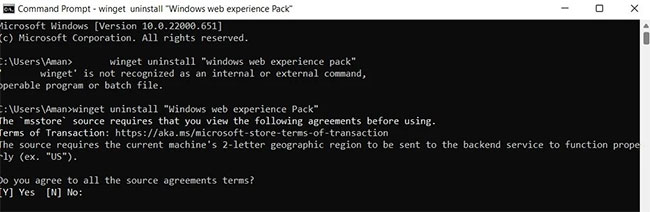
<p style="text-align: justify;"><strong>B1:</strong>&nbsp;Mở cửa sổ Command Prompt&nbsp;bằng cách nhấp vào&nbsp;<strong>Start</strong>&nbsp;và nhập&nbsp;<strong>&quot;command prompt&quot;</strong>&nbsp;vào thanh tìm kiếm.</p>

<p style="text-align: justify;"><strong>B2:</strong>&nbsp;Nhập lệnh sau và nhấn&nbsp;<strong>Enter</strong>:</p>

<pre id="pre0">
<code>winget uninstall &quot;Windows web experience Pack&quot;</code></pre>

<p style="text-align: justify;"><strong>B3:</strong>&nbsp;Nhập<strong>&nbsp;Y</strong>&nbsp;và nhấn&nbsp;<strong>Enter</strong>&nbsp;để xác nhận lựa chọn của bạn.</p>

<figure>
<div style="text-align: justify;"><img alt="Cửa sổ Command Prompt với các lệnh gỡ cài đặt Widgets" data-i="0" data-src="https://st.quantrimang.com/photos/image/2022/05/04/khac-phuc-windows-widgets-su-dung-cpu-cao-1.jpg" data-was-processed="true" height="212" src="https://st.quantrimang.com/photos/image/2022/05/04/khac-phuc-windows-widgets-su-dung-cpu-cao-1.jpg" width="650" /></div>

<figcaption>
<div style="text-align: justify;">Cửa sổ Command Prompt với các lệnh gỡ cài đặt Widgets</div>
</figcaption>
</figure>

<p style="text-align: justify;">Sau khi quá trình gỡ cài đặt hoàn tất, bạn sẽ phải cài đặt lại Widget. Để thực hiện, hãy mở Microsoft Store, nhập&nbsp;<strong>Windows Web Experience Pack</strong>&nbsp;và nhấn&nbsp;<strong>Enter.</strong>&nbsp;Cài đặt gói trên hệ thống của bạn.</p>

<p style="text-align: justify;">Hy vọng các giải pháp trên đã giúp khắc phục sự cố tiêu thụ CPU ở mức cao của Widgets. Tuy nhiên, nếu vẫn gặp sự cố, bạn có thể cân nhắc việc&nbsp;reset PC Windows&nbsp;của mình.</p>
		</div>
				<div id="author">
						<p>
				<strong>Nguồn tin:</strong>
				Quantrimang.com
			</p>
		</div>
	</div>
	<div id="footer" class="clearfix">
		<div id="url">
			<strong>URL của bản tin này: </strong><a href="https://www.nguoicodonvn2008.info/vi/news/savefile/kien-thuc-may-tinh/cach-khac-phuc-tinh-trang-windows-widgets-su-dung-cpu-o-muc-cao-5567.html" title="Cách khắc phục tình trạng Windows Widgets sử dụng CPU ở mức cao">https://www.nguoicodonvn2008.info/vi/news/savefile/kien-thuc-may-tinh/cach-khac-phuc-tinh-trang-windows-widgets-su-dung-cpu-o-muc-cao-5567.html</a>

		</div>
		<div class="clear"></div>
		<div class="copyright">
			&copy; .&#x3A; Nguoicodonvn2008.info - Cõi lòng người cô đơn &#x3A;.
		</div>
		<div id="contact">
			<a href="mailto:admin@nguoicodonvn2008.info">admin@nguoicodonvn2008.info</a>
		</div>
	</div>
</div>
        <div id="timeoutsess" class="chromeframe">
            Bạn đã không sử dụng Site, <a onclick="timeoutsesscancel();" href="https://nguoicodonvn2008.info/#">Bấm vào đây để duy trì trạng thái đăng nhập</a>. Thời gian chờ: <span id="secField"> 60 </span> giây
        </div>
        <div id="openidResult" class="nv-alert" style="display:none"></div>
        <div id="openidBt" data-result="" data-redirect=""></div>
		</script>
		<div class="car-top">
  <span><img src="https://nguoicodonvn2008.info/themes/default/images/car.png" alt=""></span>
</div>
<script src="https://nguoicodonvn2008.info/assets/js/jquery/jquery.min.js"></script>
<script>var nv_base_siteurl="/",nv_lang_data="vi",nv_lang_interface="vi",nv_name_variable="nv",nv_fc_variable="op",nv_lang_variable="language",nv_module_name="news",nv_func_name="savefile",nv_is_user=0, nv_my_ofs=-4,nv_my_abbr="EDT",nv_cookie_prefix="nv4c_e856T",nv_check_pass_mstime=1738000,nv_area_admin=0,nv_safemode=0,theme_responsive=0,nv_recaptcha_ver=2,nv_recaptcha_sitekey="",nv_recaptcha_type="image",XSSsanitize=1;</script>
<script src="https://nguoicodonvn2008.info/assets/js/language/vi.js"></script>
<script src="https://nguoicodonvn2008.info/assets/js/DOMPurify/purify3.js"></script>
<script src="https://nguoicodonvn2008.info/assets/js/global.js"></script>
<script src="https://nguoicodonvn2008.info/assets/js/site.js"></script>
<script src="https://nguoicodonvn2008.info/themes/default/js/news.js"></script>
<script src="https://nguoicodonvn2008.info/themes/default/js/main.js"></script>
<script src="https://nguoicodonvn2008.info/themes/default/js/custom.js"></script>
<script type="application/ld+json">
        {
            "@context": "https://schema.org",
            "@type": "Organization",
            "url": "https://nguoicodonvn2008.info",
            "logo": "https://nguoicodonvn2008.info/uploads/angel.gif"
        }
        </script>
<script src="https://nguoicodonvn2008.info/themes/default/js/bootstrap.min.js"></script>
<script type="text/javascript">
var $scrolltop = $('.car-top');
$scrolltop.on('click', function () {
    $('html,body').animate({
        scrollTop: 0
    }, 800);
    $(this).addClass("car-run");
    setTimeout(function(){ $scrolltop.removeClass('car-run');}, 1000);
    return false;
});
$(window).on('scroll', function ()
{ 
    if($(window).scrollTop() >= 200)
    {
        $scrolltop.addClass("show");
        $scrolltop.addClass("car-down");
    }
    else
    {
       $scrolltop.removeClass("show");
       setTimeout(function(){ $scrolltop.removeClass('car-down');}, 300);
    }
});
</script>
</body>
</html>