<!DOCTYPE html>
    <html lang="vi" xmlns="http://www.w3.org/1999/xhtml" prefix="og: http://ogp.me/ns#">
    <head>
<title>Cách khắc phục sự cố macro trong Excel không hoạt động</title>
<meta name="description" content="Cách khắc phục sự cố macro trong Excel không hoạt động - Savefile - Tin Tức -...">
<meta name="author" content=".: Nguoicodonvn2008.info - Cõi lòng người cô đơn :.">
<meta name="copyright" content=".: Nguoicodonvn2008.info - Cõi lòng người cô đơn :. [admin@nguoicodonvn2008.info]">
<meta name="robots" content="index, archive, follow, noodp">
<meta name="googlebot" content="index,archive,follow,noodp">
<meta name="msnbot" content="all,index,follow">
<meta name="generator" content="NukeViet v4.5">
<meta http-equiv="Content-Type" content="text/html; charset=utf-8">
<meta property="og:title" content="Cách khắc phục sự cố macro trong Excel không hoạt động">
<meta property="og:type" content="website">
<meta property="og:description" content="Savefile - Tin Tức - https&#x3A;&#x002F;&#x002F;www.nguoicodonvn2008.info&#x002F;vi&#x002F;news&#x002F;savefile&#x002F;kien-thuc-may-tinh&#x002F;cach-khac-phuc-su-co-macro-trong-excel-khong-hoat-dong-9169.html">
<meta property="og:site_name" content=".&#x3A; Nguoicodonvn2008.info - Cõi lòng người cô đơn &#x3A;.">
<meta property="og:url" content="https://www.nguoicodonvn2008.info/vi/news/savefile/kien-thuc-may-tinh/cach-khac-phuc-su-co-macro-trong-excel-khong-hoat-dong-9169.html">
<link rel="shortcut icon" href="https://nguoicodonvn2008.info/favicon.ico">
<link rel="canonical" href="https://www.nguoicodonvn2008.info/vi/news/savefile/kien-thuc-may-tinh/cach-khac-phuc-su-co-macro-trong-excel-khong-hoat-dong-9169.html">
<link rel="alternate" href="https://nguoicodonvn2008.info/vi/news/rss/" title="Tin Tức" type="application/rss+xml">
<link rel="alternate" href="https://nguoicodonvn2008.info/vi/news/rss/karaoke-dual/" title="Tin Tức - Karaoke Dual" type="application/rss+xml">
<link rel="alternate" href="https://nguoicodonvn2008.info/vi/news/rss/nhac-tre/" title="Tin Tức - Nhạc trẻ" type="application/rss+xml">
<link rel="alternate" href="https://nguoicodonvn2008.info/vi/news/rss/tru-tinh/" title="Tin Tức - Trữ tình" type="application/rss+xml">
<link rel="alternate" href="https://nguoicodonvn2008.info/vi/news/rss/nuoc-ngoai/" title="Tin Tức - Nước ngoài" type="application/rss+xml">
<link rel="alternate" href="https://nguoicodonvn2008.info/vi/news/rss/remix/" title="Tin Tức - Remix" type="application/rss+xml">
<link rel="alternate" href="https://nguoicodonvn2008.info/vi/news/rss/tam-su-tinh-yeu/" title="Tin Tức - Tâm sự tình yêu" type="application/rss+xml">
<link rel="alternate" href="https://nguoicodonvn2008.info/vi/news/rss/tho-suu-tam/" title="Tin Tức - Thơ sưu tầm" type="application/rss+xml">
<link rel="alternate" href="https://nguoicodonvn2008.info/vi/news/rss/cuoc-song/" title="Tin Tức - Cuộc sống" type="application/rss+xml">
<link rel="alternate" href="https://nguoicodonvn2008.info/vi/news/rss/phan-mem/" title="Tin Tức - Phần mềm" type="application/rss+xml">
<link rel="alternate" href="https://nguoicodonvn2008.info/vi/news/rss/kien-thuc-may-tinh/" title="Tin Tức - Kiến thức máy tính" type="application/rss+xml">
<link rel="alternate" href="https://nguoicodonvn2008.info/vi/news/rss/hoc-tap/" title="Tin Tức - Học tập" type="application/rss+xml">
<link rel="alternate" href="https://nguoicodonvn2008.info/vi/news/rss/tai-lieu/" title="Tin Tức - Tài liệu" type="application/rss+xml">
<link rel="alternate" href="https://nguoicodonvn2008.info/vi/news/rss/de-thi/" title="Tin Tức - Đề thi" type="application/rss+xml">
<link rel="preload" as="style" href="https://nguoicodonvn2008.info/assets/css/font-awesome.min.css" type="text/css">
<link rel="preload" as="style" href="https://nguoicodonvn2008.info/themes/default/css/bootstrap.non-responsive.css" type="text/css">
<link rel="preload" as="style" href="https://nguoicodonvn2008.info/themes/default/css/style.css" type="text/css">
<link rel="preload" as="style" href="https://nguoicodonvn2008.info/themes/default/css/style.non-responsive.css" type="text/css">
<link rel="preload" as="style" href="https://nguoicodonvn2008.info/themes/default/css/news.css" type="text/css">
<link rel="preload" as="style" href="https://nguoicodonvn2008.info/themes/default/css/custom.css" type="text/css">
<link rel="preload" as="script" href="https://nguoicodonvn2008.info/assets/js/jquery/jquery.min.js" type="text/javascript">
<link rel="preload" as="script" href="https://nguoicodonvn2008.info/assets/js/language/vi.js" type="text/javascript">
<link rel="preload" as="script" href="https://nguoicodonvn2008.info/assets/js/DOMPurify/purify3.js" type="text/javascript">
<link rel="preload" as="script" href="https://nguoicodonvn2008.info/assets/js/global.js" type="text/javascript">
<link rel="preload" as="script" href="https://nguoicodonvn2008.info/assets/js/site.js" type="text/javascript">
<link rel="preload" as="script" href="https://nguoicodonvn2008.info/themes/default/js/news.js" type="text/javascript">
<link rel="preload" as="script" href="https://nguoicodonvn2008.info/themes/default/js/main.js" type="text/javascript">
<link rel="preload" as="script" href="https://nguoicodonvn2008.info/themes/default/js/custom.js" type="text/javascript">
<link rel="preload" as="script" href="https://nguoicodonvn2008.info/themes/default/js/bootstrap.min.js" type="text/javascript">
<link rel="stylesheet" href="https://nguoicodonvn2008.info/assets/css/font-awesome.min.css">
<link rel="stylesheet" href="https://nguoicodonvn2008.info/themes/default/css/bootstrap.non-responsive.css">
<link rel="stylesheet" href="https://nguoicodonvn2008.info/themes/default/css/style.css">
<link rel="stylesheet" href="https://nguoicodonvn2008.info/themes/default/css/style.non-responsive.css">
<link rel="StyleSheet" href="https://nguoicodonvn2008.info/themes/default/css/news.css">
<link rel="stylesheet" href="https://nguoicodonvn2008.info/themes/default/css/custom.css">
<style type="text/css">
	body{background: #fff;}
</style>
    </head>
    <body>
<div id="print">
	<div id="hd_print">
		<h2 class="pull-left">.&#x3A; Nguoicodonvn2008.info - Cõi lòng người cô đơn &#x3A;.</h2>
		<p class="pull-right"><a title=".&#x3A; Nguoicodonvn2008.info - Cõi lòng người cô đơn &#x3A;." href="https://nguoicodonvn2008.info/">https://nguoicodonvn2008.info</a></p>
	</div>
	<div class="clear"></div>
	<hr />
	<div id="content">
		<h1>Cách khắc phục sự cố macro trong Excel không hoạt động</h1>
		<ul class="list-inline">
			<li>Thứ sáu - 11/10/2024 23:20</li>
			<li class="hidden-print txtrequired"><em class="fa fa-print">&nbsp;</em><a title="In ra" href="javascript:;" onclick="window.print()">In ra</a></li>
			<li class="hidden-print txtrequired"><em class="fa fa-power-off">&nbsp;</em><a title="Đóng cửa sổ này" href="javascript:;" onclick="window.close()">Đóng cửa sổ này</a></li>
		</ul>
		<div class="clear"></div>
		<div id="hometext">
		</div>
				<div class="imghome">
			<img alt="Cách khắc phục sự cố macro trong Excel không hoạt động" src="https://st.quantrimang.com/photos/image/2023/02/27/macro-trong-excel-khong-hoat-dong-5.jpg" width="460" class="img-thumbnail" />
		</div>
		<div class="clear"></div>
		<div id="bodytext" class="clearfix">
			<h1>&nbsp;</h1>

<p>Macro Excel là một tính năng mạnh mẽ được thiết kế để tự động hóa các tác vụ lặp đi lặp lại, giúp bạn tiết kiệm cả thời gian và công sức. Tuy nhiên, không có gì lạ khi gặp sự cố trong khi bật macro, điều này có thể cực kỳ khó chịu, ngăn cản bạn hợp lý hóa quy trình làm việc của mình.</p>

<p>Trong bài viết này, chúng ta sẽ khám phá một số sự cố tiềm ẩn có thể ngăn bạn bật và sử dụng macro trong Excel, đồng thời cung cấp cho bạn các bản sửa lỗi để giải quyết sự cố.</p>

<h2>Hiểu các vấn đề với macro trong Excel</h2>

<p>Lỗi&nbsp;<em>&quot;Microsoft has blocked macros from runningv&quot;</em>&nbsp;(Microsoft đã chặn macro chạy) là một tính năng bảo mật được phát triển để ngăn mã độc hại (macro có khả năng gây hại) chạy trên máy tính của người dùng. Lỗi này xuất hiện khi người dùng cố gắng chạy macro trong một file và ngay lập tức chặn file chạy.</p>

<p>Tuy nhiên, đôi khi một cảnh báo sai có thể ngăn bạn chạy các file hoàn toàn hợp pháp. May mắn thay, bạn có thể khắc phục sự cố bằng cách điều chỉnh cài đặt bảo mật Microsoft Office có liên quan hoặc bật các macro cụ thể mà bạn tin tưởng.</p>

<p>Điều quan trọng cần lưu ý là bạn không nên áp dụng các bản sửa lỗi này cho các tài liệu đến từ nguồn không đáng tin cậy, vì làm như vậy có thể gây hại cho hệ thống. Dưới đây, Quantrimang.com đã liệt kê một số bản sửa lỗi khác nhau mà bạn có thể thử để giải quyết vấn đề và sử dụng macro mà không gặp bất kỳ sự cố nào.</p>

<h2>Cách khắc phục sự cố macro trong Excel không hoạt động</h2>

<h3>1. Thêm file vào vị trí đáng tin cậy</h3>

<p>Một cách dễ dàng để mở file là thêm nó vào phần&nbsp;<strong>Trusted Locations</strong>&nbsp;của Excel. Khi bạn thêm file hoặc thư mục vào&nbsp;<strong>Trusted Locations</strong>, file hoặc thư mục đó được coi là an toàn để sử dụng và macro hoặc bất kỳ nội dung hoạt động nào khác trong file có thể chạy mà không có bất kỳ cảnh báo nào.</p>
&nbsp;

<p>Đây là cách bạn có thể thêm file được nhắm mục tiêu vào Trusted Locations:</p>

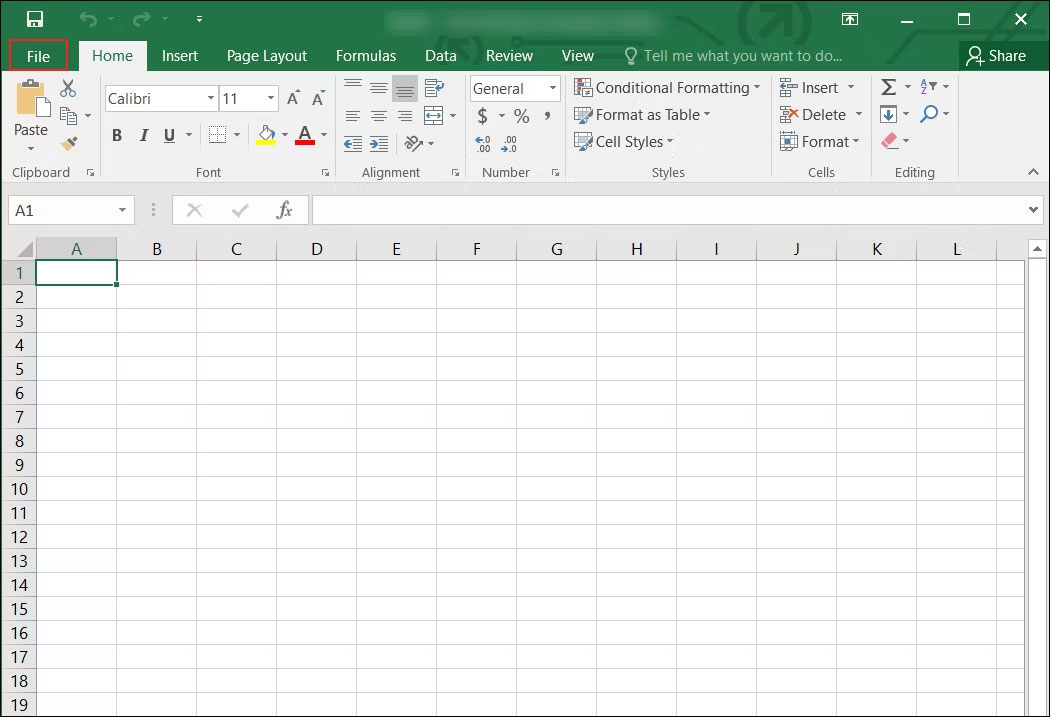
<p>1. Nhấp vào&nbsp;<strong>File</strong>&nbsp;ở góc trên cùng bên phải của cửa sổ.</p>

<figure><img alt="Nhấp vào tùy chọn File trong Excel" data-i="0" data-src="https://st.quantrimang.com/photos/image/2023/02/27/macro-trong-excel-khong-hoat-dong-1.jpg" data-was-processed="true" height="717" src="https://st.quantrimang.com/photos/image/2023/02/27/macro-trong-excel-khong-hoat-dong-1.jpg" width="1050" />
<figcaption>Nhấp vào tùy chọn File trong Excel</figcaption>
</figure>

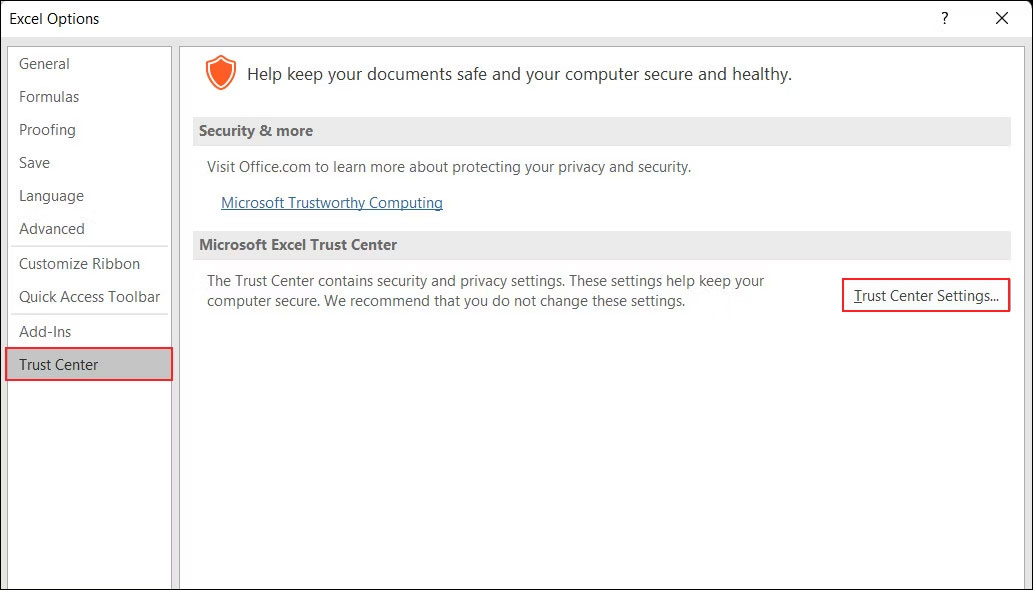
<p>2. Điều hướng đến&nbsp;<strong>Options &gt; Trust Center</strong>.</p>

<p>3. Nhấp vào nút&nbsp;<strong>Trust Center Settings</strong>&nbsp;trong ngăn bên phải.</p>

<figure><img alt="Nhấp vào nút Trust Center Settings trong Excel" data-adbro-processed="true" data-i="1" data-src="https://st.quantrimang.com/photos/image/2023/02/27/macro-trong-excel-khong-hoat-dong-2.jpg" data-was-processed="true" height="590" src="https://st.quantrimang.com/photos/image/2023/02/27/macro-trong-excel-khong-hoat-dong-2.jpg" width="1033" />
<figcaption>Nhấp vào nút Trust Center Settings trong Excel</figcaption>
</figure>
&nbsp;

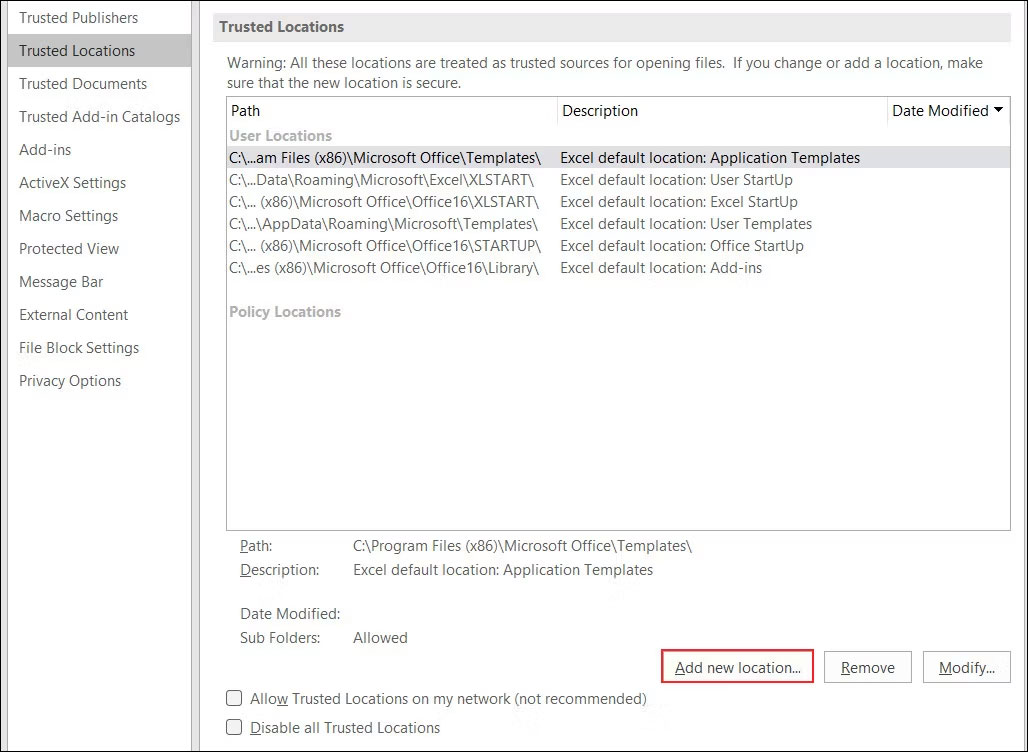
<p>4. Chọn&nbsp;<strong>Trusted Locations &gt; Add new location</strong>&nbsp;và nhấp vào nút&nbsp;<strong>Browse.</strong></p>

<figure><img alt="Thêm một vị trí mới trong menu Trusted Locations trong Excel" data-i="2" data-src="https://st.quantrimang.com/photos/image/2023/02/27/macro-trong-excel-khong-hoat-dong-3.jpg" data-was-processed="true" height="752" src="https://st.quantrimang.com/photos/image/2023/02/27/macro-trong-excel-khong-hoat-dong-3.jpg" width="1028" />
<figcaption>Thêm một vị trí mới trong menu Trusted Locations trong Excel</figcaption>
</figure>

<p>5. Bây giờ, điều hướng đến vị trí mà các file của bạn được tải xuống và nhấp vào&nbsp;<strong>OK.</strong>&nbsp;Vị trí này sẽ được thêm vào Trust Center, có nghĩa là các file ở đây sẽ không bị quét và sẽ được phép chạy mà không có bất kỳ cảnh báo nào.</p>

<p>6. Bạn cũng có thể đánh dấu vào ô&nbsp;<strong>Subfolders of this location are also trusted</strong>&nbsp;trong cùng một hộp thoại.</p>

<p>7. Nhấn&nbsp;<strong>OK</strong>&nbsp;để lưu các thay đổi.</p>

<p>Bây giờ, bạn có thể chạy file được nhắm mục tiêu bằng macro mà không gặp bất kỳ sự cố nào. Ngoài ra, bạn có thể&nbsp;kích hoạt tùy chọn&nbsp;<strong>Enable VBA macros&nbsp;</strong>trong Excel&nbsp;để thực hiện các thay đổi tương tự.</p>

<h3>2. Chỉnh sửa thuộc tính của file</h3>

<p>Bạn cũng có thể bỏ chặn file bằng cách truy cập các thuộc tính để chạy file mà không gặp bất kỳ sự cố nào. Bài viết đã trình bày các bước để thực hiện việc này trên hệ điều hành Windows. Các bước này có thể hơi khác đối với bạn, tùy thuộc vào loại hệ điều hành bạn đang sử dụng. Đây là cách tiến hành:</p>

<p>1.&nbsp;<a href="https://quantrimang.com/cong-nghe/9-cach-kich-hoat-file-explorer-trong-windows-10-118256" title="9 cách kích hoạt File Explorer trong Windows 10">Mở File Explorer</a>&nbsp;và điều hướng đến vị trí lưu file.</p>

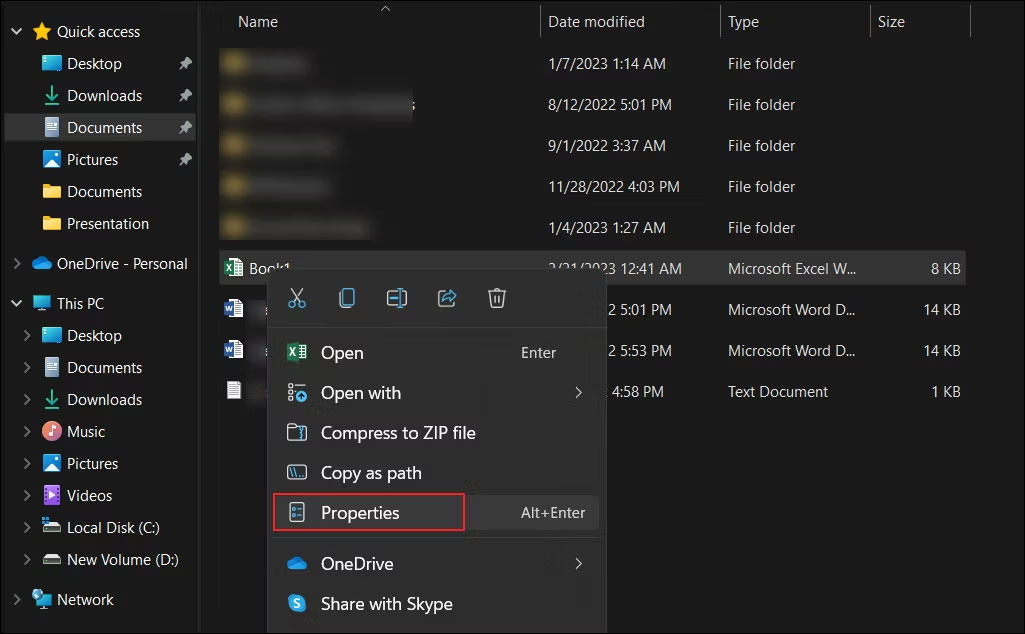
<p>2. Nhấp chuột phải vào nó và chọn&nbsp;<strong>Properties</strong>&nbsp;từ menu ngữ cảnh.</p>

<figure><img alt="Mở thuộc tính file macro Excel trong Windows" data-i="3" data-src="https://st.quantrimang.com/photos/image/2023/02/27/macro-trong-excel-khong-hoat-dong-4.jpg" data-was-processed="true" height="634" src="https://st.quantrimang.com/photos/image/2023/02/27/macro-trong-excel-khong-hoat-dong-4.jpg" width="1025" />
<figcaption>Mở thuộc tính file macro Excel trong Windows</figcaption>
</figure>
&nbsp;

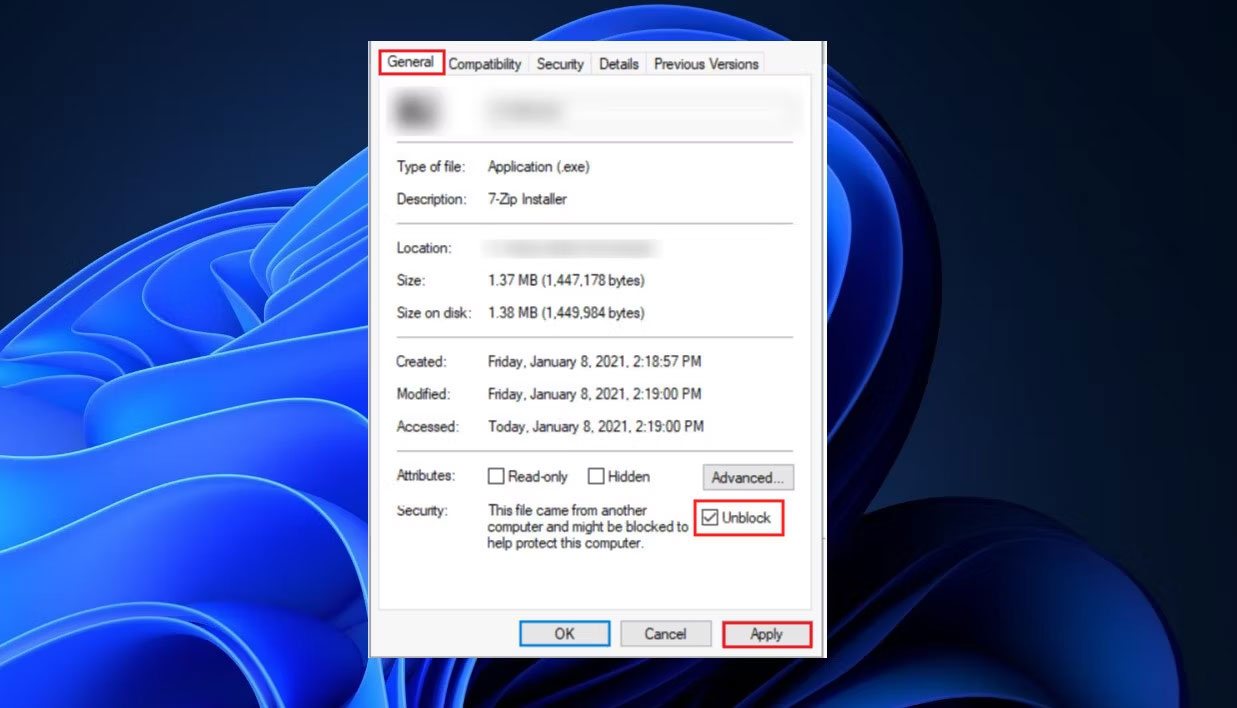
<p>3. Trong hộp thoại&nbsp;<strong>Properties</strong>, đi tới tab&nbsp;<strong>General</strong>&nbsp;và điều hướng đến phần&nbsp;<strong>Security.</strong></p>

<p>4. Đánh dấu vào hộp&nbsp;<strong>Unblock</strong>&nbsp;và nhấp vào&nbsp;<strong>Apply &gt; OK</strong>&nbsp;để lưu các thay đổi.</p>

<figure><img alt="Bỏ chặn bảo mật file từ menu ngữ cảnh trong Windows" data-i="4" data-src="https://st.quantrimang.com/photos/image/2023/02/27/macro-trong-excel-khong-hoat-dong-5.jpg" data-was-processed="true" height="708" src="https://st.quantrimang.com/photos/image/2023/02/27/macro-trong-excel-khong-hoat-dong-5.jpg" width="1237" />
<figcaption>Bỏ chặn bảo mật file từ menu ngữ cảnh trong Windows</figcaption>
</figure>

<p>Bây giờ, bạn có thể thử truy cập file. Hi vọng bạn sẽ không gặp lại lỗi trên nữa. Trong trường hợp bạn sợ rằng các macro có thể gây hại, bạn có thể vô hiệu hóa chúng để truy cập vào file.</p>

<p>Macro cho phép bạn ghi lại chuỗi hành động và sử dụng chúng trong bảng tính của mình chỉ bằng một cú nhấp chuột. Ví dụ, bạn có thể định dạng toàn bộ bảng dữ liệu, tạo biểu đồ và bảng, thực hiện các phép tính phức tạp và tạo báo cáo một cách dễ dàng.</p>

<p>Nếu bạn gặp sự cố khi bật macro, điều này có thể hạn chế khả năng tận dụng tối đa chúng, điều này có thể gây khó chịu. Hy vọng rằng các bản sửa lỗi ở trên sẽ giúp bạn giải quyết mọi sự cố mà bạn có thể gặp phải khi bật macro trong Excel.</p>
		</div>
				<div id="author">
						<p>
				<strong>Nguồn tin:</strong>
				Quantrimang.com:
			</p>
		</div>
	</div>
	<div id="footer" class="clearfix">
		<div id="url">
			<strong>URL của bản tin này: </strong><a href="https://www.nguoicodonvn2008.info/vi/news/savefile/kien-thuc-may-tinh/cach-khac-phuc-su-co-macro-trong-excel-khong-hoat-dong-9169.html" title="Cách khắc phục sự cố macro trong Excel không hoạt động">https://www.nguoicodonvn2008.info/vi/news/savefile/kien-thuc-may-tinh/cach-khac-phuc-su-co-macro-trong-excel-khong-hoat-dong-9169.html</a>

		</div>
		<div class="clear"></div>
		<div class="copyright">
			&copy; .&#x3A; Nguoicodonvn2008.info - Cõi lòng người cô đơn &#x3A;.
		</div>
		<div id="contact">
			<a href="mailto:admin@nguoicodonvn2008.info">admin@nguoicodonvn2008.info</a>
		</div>
	</div>
</div>
        <div id="timeoutsess" class="chromeframe">
            Bạn đã không sử dụng Site, <a onclick="timeoutsesscancel();" href="https://nguoicodonvn2008.info/#">Bấm vào đây để duy trì trạng thái đăng nhập</a>. Thời gian chờ: <span id="secField"> 60 </span> giây
        </div>
        <div id="openidResult" class="nv-alert" style="display:none"></div>
        <div id="openidBt" data-result="" data-redirect=""></div>
		</script>
		<div class="car-top">
  <span><img src="https://nguoicodonvn2008.info/themes/default/images/car.png" alt=""></span>
</div>
<script src="https://nguoicodonvn2008.info/assets/js/jquery/jquery.min.js"></script>
<script>var nv_base_siteurl="/",nv_lang_data="vi",nv_lang_interface="vi",nv_name_variable="nv",nv_fc_variable="op",nv_lang_variable="language",nv_module_name="news",nv_func_name="savefile",nv_is_user=0, nv_my_ofs=-4,nv_my_abbr="EDT",nv_cookie_prefix="nv4c_e856T",nv_check_pass_mstime=1738000,nv_area_admin=0,nv_safemode=0,theme_responsive=0,nv_recaptcha_ver=2,nv_recaptcha_sitekey="",nv_recaptcha_type="image",XSSsanitize=1;</script>
<script src="https://nguoicodonvn2008.info/assets/js/language/vi.js"></script>
<script src="https://nguoicodonvn2008.info/assets/js/DOMPurify/purify3.js"></script>
<script src="https://nguoicodonvn2008.info/assets/js/global.js"></script>
<script src="https://nguoicodonvn2008.info/assets/js/site.js"></script>
<script src="https://nguoicodonvn2008.info/themes/default/js/news.js"></script>
<script src="https://nguoicodonvn2008.info/themes/default/js/main.js"></script>
<script src="https://nguoicodonvn2008.info/themes/default/js/custom.js"></script>
<script type="application/ld+json">
        {
            "@context": "https://schema.org",
            "@type": "Organization",
            "url": "https://nguoicodonvn2008.info",
            "logo": "https://nguoicodonvn2008.info/uploads/angel.gif"
        }
        </script>
<script src="https://nguoicodonvn2008.info/themes/default/js/bootstrap.min.js"></script>
<script type="text/javascript">
var $scrolltop = $('.car-top');
$scrolltop.on('click', function () {
    $('html,body').animate({
        scrollTop: 0
    }, 800);
    $(this).addClass("car-run");
    setTimeout(function(){ $scrolltop.removeClass('car-run');}, 1000);
    return false;
});
$(window).on('scroll', function ()
{ 
    if($(window).scrollTop() >= 200)
    {
        $scrolltop.addClass("show");
        $scrolltop.addClass("car-down");
    }
    else
    {
       $scrolltop.removeClass("show");
       setTimeout(function(){ $scrolltop.removeClass('car-down');}, 300);
    }
});
</script>
</body>
</html>