<!DOCTYPE html>
    <html lang="vi" xmlns="http://www.w3.org/1999/xhtml" prefix="og: http://ogp.me/ns#">
    <head>
<title>Cách khắc phục mã lỗi PIN Windows 0x80040154</title>
<meta name="description" content="Cách khắc phục mã lỗi PIN Windows 0x80040154 - Savefile - Tin Tức -...">
<meta name="author" content=".: Nguoicodonvn2008.info - Cõi lòng người cô đơn :.">
<meta name="copyright" content=".: Nguoicodonvn2008.info - Cõi lòng người cô đơn :. [admin@nguoicodonvn2008.info]">
<meta name="robots" content="index, archive, follow, noodp">
<meta name="googlebot" content="index,archive,follow,noodp">
<meta name="msnbot" content="all,index,follow">
<meta name="generator" content="NukeViet v4.5">
<meta http-equiv="Content-Type" content="text/html; charset=utf-8">
<meta property="og:title" content="Cách khắc phục mã lỗi PIN Windows 0x80040154">
<meta property="og:type" content="website">
<meta property="og:description" content="Savefile - Tin Tức - https&#x3A;&#x002F;&#x002F;www.nguoicodonvn2008.info&#x002F;vi&#x002F;news&#x002F;savefile&#x002F;kien-thuc-may-tinh&#x002F;cach-khac-phuc-ma-loi-pin-windows-0x80040154-5603.html">
<meta property="og:site_name" content=".&#x3A; Nguoicodonvn2008.info - Cõi lòng người cô đơn &#x3A;.">
<meta property="og:url" content="https://www.nguoicodonvn2008.info/vi/news/savefile/kien-thuc-may-tinh/cach-khac-phuc-ma-loi-pin-windows-0x80040154-5603.html">
<link rel="shortcut icon" href="https://nguoicodonvn2008.info/favicon.ico">
<link rel="canonical" href="https://www.nguoicodonvn2008.info/vi/news/savefile/kien-thuc-may-tinh/cach-khac-phuc-ma-loi-pin-windows-0x80040154-5603.html">
<link rel="alternate" href="https://nguoicodonvn2008.info/vi/news/rss/" title="Tin Tức" type="application/rss+xml">
<link rel="alternate" href="https://nguoicodonvn2008.info/vi/news/rss/karaoke-dual/" title="Tin Tức - Karaoke Dual" type="application/rss+xml">
<link rel="alternate" href="https://nguoicodonvn2008.info/vi/news/rss/nhac-tre/" title="Tin Tức - Nhạc trẻ" type="application/rss+xml">
<link rel="alternate" href="https://nguoicodonvn2008.info/vi/news/rss/tru-tinh/" title="Tin Tức - Trữ tình" type="application/rss+xml">
<link rel="alternate" href="https://nguoicodonvn2008.info/vi/news/rss/nuoc-ngoai/" title="Tin Tức - Nước ngoài" type="application/rss+xml">
<link rel="alternate" href="https://nguoicodonvn2008.info/vi/news/rss/remix/" title="Tin Tức - Remix" type="application/rss+xml">
<link rel="alternate" href="https://nguoicodonvn2008.info/vi/news/rss/tam-su-tinh-yeu/" title="Tin Tức - Tâm sự tình yêu" type="application/rss+xml">
<link rel="alternate" href="https://nguoicodonvn2008.info/vi/news/rss/tho-suu-tam/" title="Tin Tức - Thơ sưu tầm" type="application/rss+xml">
<link rel="alternate" href="https://nguoicodonvn2008.info/vi/news/rss/cuoc-song/" title="Tin Tức - Cuộc sống" type="application/rss+xml">
<link rel="alternate" href="https://nguoicodonvn2008.info/vi/news/rss/phan-mem/" title="Tin Tức - Phần mềm" type="application/rss+xml">
<link rel="alternate" href="https://nguoicodonvn2008.info/vi/news/rss/kien-thuc-may-tinh/" title="Tin Tức - Kiến thức máy tính" type="application/rss+xml">
<link rel="alternate" href="https://nguoicodonvn2008.info/vi/news/rss/hoc-tap/" title="Tin Tức - Học tập" type="application/rss+xml">
<link rel="alternate" href="https://nguoicodonvn2008.info/vi/news/rss/tai-lieu/" title="Tin Tức - Tài liệu" type="application/rss+xml">
<link rel="alternate" href="https://nguoicodonvn2008.info/vi/news/rss/de-thi/" title="Tin Tức - Đề thi" type="application/rss+xml">
<link rel="preload" as="style" href="https://nguoicodonvn2008.info/assets/css/font-awesome.min.css" type="text/css">
<link rel="preload" as="style" href="https://nguoicodonvn2008.info/themes/default/css/bootstrap.non-responsive.css" type="text/css">
<link rel="preload" as="style" href="https://nguoicodonvn2008.info/themes/default/css/style.css" type="text/css">
<link rel="preload" as="style" href="https://nguoicodonvn2008.info/themes/default/css/style.non-responsive.css" type="text/css">
<link rel="preload" as="style" href="https://nguoicodonvn2008.info/themes/default/css/news.css" type="text/css">
<link rel="preload" as="style" href="https://nguoicodonvn2008.info/themes/default/css/custom.css" type="text/css">
<link rel="preload" as="script" href="https://nguoicodonvn2008.info/assets/js/jquery/jquery.min.js" type="text/javascript">
<link rel="preload" as="script" href="https://nguoicodonvn2008.info/assets/js/language/vi.js" type="text/javascript">
<link rel="preload" as="script" href="https://nguoicodonvn2008.info/assets/js/DOMPurify/purify3.js" type="text/javascript">
<link rel="preload" as="script" href="https://nguoicodonvn2008.info/assets/js/global.js" type="text/javascript">
<link rel="preload" as="script" href="https://nguoicodonvn2008.info/assets/js/site.js" type="text/javascript">
<link rel="preload" as="script" href="https://nguoicodonvn2008.info/themes/default/js/news.js" type="text/javascript">
<link rel="preload" as="script" href="https://nguoicodonvn2008.info/themes/default/js/main.js" type="text/javascript">
<link rel="preload" as="script" href="https://nguoicodonvn2008.info/themes/default/js/custom.js" type="text/javascript">
<link rel="preload" as="script" href="https://nguoicodonvn2008.info/themes/default/js/bootstrap.min.js" type="text/javascript">
<link rel="stylesheet" href="https://nguoicodonvn2008.info/assets/css/font-awesome.min.css">
<link rel="stylesheet" href="https://nguoicodonvn2008.info/themes/default/css/bootstrap.non-responsive.css">
<link rel="stylesheet" href="https://nguoicodonvn2008.info/themes/default/css/style.css">
<link rel="stylesheet" href="https://nguoicodonvn2008.info/themes/default/css/style.non-responsive.css">
<link rel="StyleSheet" href="https://nguoicodonvn2008.info/themes/default/css/news.css">
<link rel="stylesheet" href="https://nguoicodonvn2008.info/themes/default/css/custom.css">
<style type="text/css">
	body{background: #fff;}
</style>
    </head>
    <body>
<div id="print">
	<div id="hd_print">
		<h2 class="pull-left">.&#x3A; Nguoicodonvn2008.info - Cõi lòng người cô đơn &#x3A;.</h2>
		<p class="pull-right"><a title=".&#x3A; Nguoicodonvn2008.info - Cõi lòng người cô đơn &#x3A;." href="https://nguoicodonvn2008.info/">https://nguoicodonvn2008.info</a></p>
	</div>
	<div class="clear"></div>
	<hr />
	<div id="content">
		<h1>Cách khắc phục mã lỗi PIN Windows 0x80040154</h1>
		<ul class="list-inline">
			<li>Thứ năm - 12/05/2022 23:27</li>
			<li class="hidden-print txtrequired"><em class="fa fa-print">&nbsp;</em><a title="In ra" href="javascript:;" onclick="window.print()">In ra</a></li>
			<li class="hidden-print txtrequired"><em class="fa fa-power-off">&nbsp;</em><a title="Đóng cửa sổ này" href="javascript:;" onclick="window.close()">Đóng cửa sổ này</a></li>
		</ul>
		<div class="clear"></div>
		<div id="hometext">
		</div>
				<div class="imghome">
			<img alt="Cách khắc phục mã lỗi PIN Windows 0x80040154" src="https://st.quantrimang.com/photos/image/2022/05/12/khac-phuc-ma-loi-pin-windows-0x80040154-1.jpg" width="460" class="img-thumbnail" />
		</div>
		<div class="clear"></div>
		<div id="bodytext" class="clearfix">
			<p style="text-align: justify;">Windows Hello&nbsp;là phần mềm bảo mật dựa trên sinh trắc học có sẵn cho Windows 11/10. Nó cho phép người dùng đăng nhập vào tài khoản và ứng dụng của họ bằng cách nhập mã PIN. Tuy nhiên, bạn có thể gặp mã lỗi 0x80040154 khi thiết lập mã PIN. Sau đây là tất cả các giải pháp để loại bỏ mã lỗi PIN Windows 0x80040154.</p>

<h2 style="text-align: justify;">Nguyên nhân gây ra mã lỗi Microsoft 0x80040154?</h2>

<p style="text-align: justify;">Mã lỗi PIN Microsoft 0x80040154 chủ yếu là do thư mục Ngc bị hỏng hoặc TPM bị vô hiệu hóa. Ngoài ra, phiên bản Windows lỗi thời cũng có thể kích hoạt thông báo lỗi này.</p>

<p style="text-align: justify;">May mắn thay, khá dễ dàng để loại bỏ mã lỗi. Hãy kiểm tra tất cả các giải pháp bạn có thể thử trong tình huống này.</p>

<h2 style="text-align: justify;">Cách khắc phục mã lỗi PIN Windows 0x80040154</h2>

<h3 style="text-align: justify;">1. Cập nhật hoặc khôi phục Windows Update</h3>

<p style="text-align: justify;">Microsoft tung ra các bản cập nhật mới theo định kỳ và mỗi bản cập nhật sẽ sửa các lỗi nhỏ và cải thiện hiệu suất hệ thống. Thông báo lỗi có thể là do một lỗi tạm thời. Bạn luôn có thể tải xuống bản cập nhật hệ điều hành mới nhất để loại bỏ những lỗi nhỏ như vậy. Đây là&nbsp;cách tải xuống bản cập nhật Windows mới nhất.</p>

<p style="text-align: justify;">Ngoài ra, lỗi mã PIN có thể do bản cập nhật Windows được cài đặt gần đây. Trong trường hợp này, bạn sẽ phải&nbsp;hoàn nguyên bản cập nhật&nbsp;để khắc phục sự cố.</p>

<h3 style="text-align: justify;">2. Làm sạch thư mục Ngc</h3>

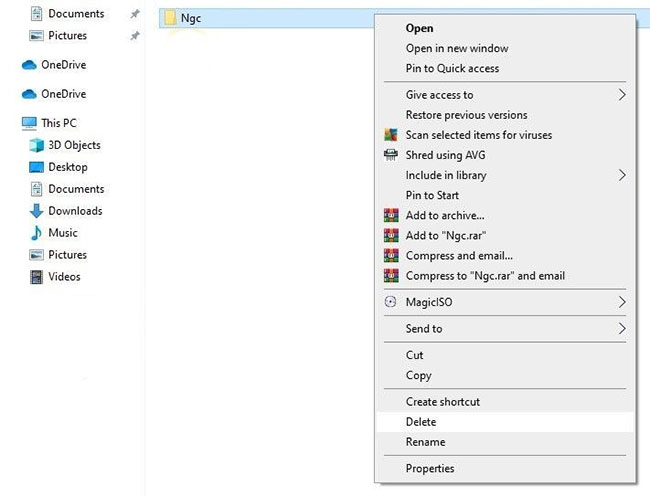
<p style="text-align: justify;">Thông báo lỗi có thể xuất hiện do các thư mục Ngc bị hỏng. Thư mục Ngc có dữ liệu được liên kết với cài đặt mã PIN của Windows 11. Mặc dù không nên tinh chỉnh với thư mục Ngc, bạn không còn lựa chọn nào khác ngoài việc xóa nội dung của nó nếu dữ liệu bị hỏng.</p>

<p style="text-align: justify;">Bạn có thể xóa nội dung của thư mục Ngc bằng cách làm theo các bước dưới đây.</p>

<p style="text-align: justify;"><strong>B1:</strong>&nbsp;Nhấn&nbsp;<strong>Win + R</strong>&nbsp;để&nbsp;mở hộp thoại Run.</p>

<p style="text-align: justify;"><strong>B2:</strong>&nbsp;Nhập lệnh sau và nhấp vào&nbsp;<strong>OK.</strong></p>

<pre id="pre0">
<code>C:\Windows\ServiceProfiles\LocalService\AppData\Local\Microsoft</code></pre>

<p style="text-align: justify;"><strong>B3:</strong>&nbsp;Nhấp chuột phải vào thư mục Ngc và chọn&nbsp;<strong>Delete.</strong></p>

<figure>
<div style="text-align: justify;"><img alt="Xóa thư mục Ngc trong Windows 10" data-i="0" data-src="https://st.quantrimang.com/photos/image/2022/05/12/khac-phuc-ma-loi-pin-windows-0x80040154-1.jpg" data-was-processed="true" height="496" src="https://st.quantrimang.com/photos/image/2022/05/12/khac-phuc-ma-loi-pin-windows-0x80040154-1.jpg" width="650" /></div>

<figcaption>
<div style="text-align: justify;">Xóa thư mục Ngc trong Windows 10</div>
</figcaption>
</figure>

<p style="text-align: justify;"><strong>B4:</strong>&nbsp;Nhấp vào&nbsp;<strong>Yes</strong>&nbsp;để hộp xác nhận xuất hiện.</p>

<p style="text-align: justify;">Tiếp theo,&nbsp;khởi động lại hệ thống&nbsp;và kiểm tra xem sự cố có tiếp diễn hay không. Nếu có, hãy thử giải pháp tiếp theo trong danh sách.</p>

<h3 style="text-align: justify;">3. Thay đổi cài đặt group policy</h3>

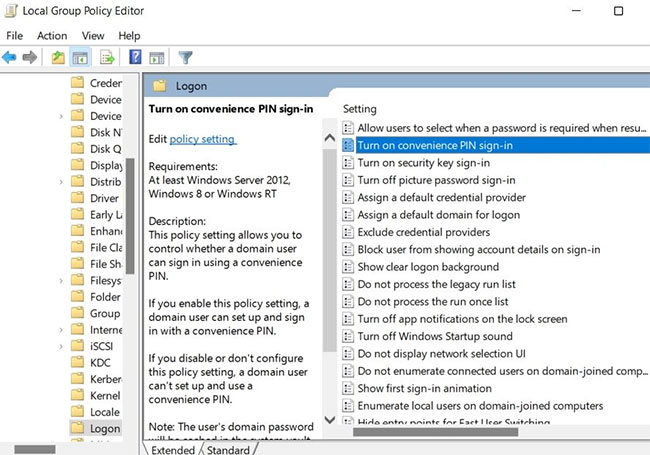
<p style="text-align: justify;">Điều tiếp theo bạn có thể thử là đảm bảo rằng cài đặt đăng nhập Convenience PIN được bật trong Group Policy Editor. Bạn có thể bật cài đặt bằng cách làm theo các bước dưới đây.</p>

<p style="text-align: justify;"><strong>B1:</strong>&nbsp;Mở hộp thoại&nbsp;<strong>Run.</strong></p>

<p style="text-align: justify;"><strong>B2:</strong>&nbsp;Gõ&nbsp;<strong>gpedit.msc</strong>&nbsp;và nhấp vào&nbsp;<strong>OK.</strong></p>

<p style="text-align: justify;"><strong>B3:</strong>&nbsp;Chọn&nbsp;<strong>Administrative Templates</strong>&nbsp;từ ngăn bên trái.</p>

<p style="text-align: justify;"><strong>B4:</strong>&nbsp;Đi tới&nbsp;<strong>System &gt; Logon</strong>.</p>

<p style="text-align: justify;"><strong>B5:</strong>&nbsp;Định vị và nhấp đúp vào&nbsp;<strong>Turn on convenience PIN sign-in</strong>.</p>

<figure>
<div style="text-align: justify;"><img alt="Cài đặt mã PIN" data-i="1" data-src="https://st.quantrimang.com/photos/image/2022/05/12/khac-phuc-ma-loi-pin-windows-0x80040154-2.jpg" data-was-processed="true" height="455" src="https://st.quantrimang.com/photos/image/2022/05/12/khac-phuc-ma-loi-pin-windows-0x80040154-2.jpg" width="650" /></div>

<figcaption>
<div style="text-align: justify;">Cài đặt mã PIN</div>
</figcaption>
</figure>

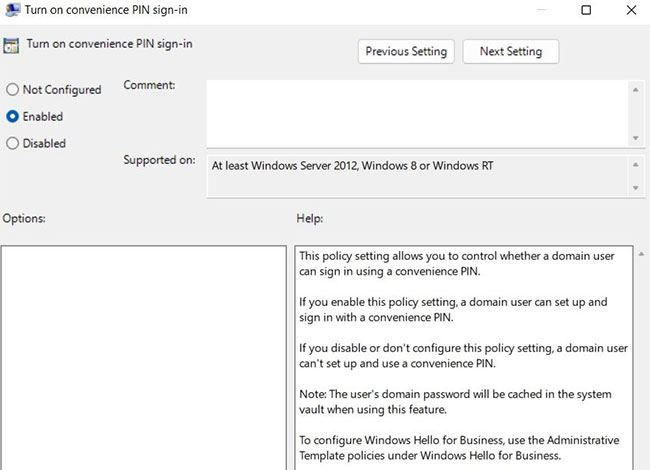
<p style="text-align: justify;"><strong>B6:</strong>&nbsp;Nhấp vào&nbsp;<strong>Enabled.</strong></p>

<figure>
<div style="text-align: justify;"><img alt="Bật cửa sổ đăng nhập bằng mã PIN" data-i="2" data-src="https://st.quantrimang.com/photos/image/2022/05/12/khac-phuc-ma-loi-pin-windows-0x80040154-3.jpg" data-was-processed="true" height="470" src="https://st.quantrimang.com/photos/image/2022/05/12/khac-phuc-ma-loi-pin-windows-0x80040154-3.jpg" width="650" /></div>

<figcaption>
<div style="text-align: justify;">Bật cửa sổ đăng nhập bằng mã PIN</div>
</figcaption>
</figure>

<p style="text-align: justify;"><strong>B7:</strong>&nbsp;Nhấp vào&nbsp;<strong>Apply &gt; OK&nbsp;</strong>để lưu các thay đổi.</p>

<p style="text-align: justify;">Tiếp theo, hãy thử đăng nhập bằng cách nhập mã PIN và kiểm tra xem bạn có còn gặp phải thông báo lỗi hay không.</p>

<h3 style="text-align: justify;">4. Tắt chương trình diệt virus và chạy quét phần mềm độc hại</h3>

<p style="text-align: justify;">Thông báo lỗi có thể xuất hiện do chương trình diệt virus của bên thứ ba được cài đặt trên hệ thống của bạn. Nếu đúng như vậy, hãy tắt chương trình diệt virus. Sau đó,&nbsp;sử dụng Microsoft Defender&nbsp;để quét ngoại tuyến và tìm phần mềm độc hại ẩn.</p>

<h2 style="text-align: justify;">5. Bật TPM</h2>

<p style="text-align: justify;">Mã lỗi 0x80040154 có thể xuất hiện nếu TPM bị tắt trên hệ thống của bạn. Trusted Platform Module, hay còn gọi là TPM, cung cấp các khóa mật mã để giữ cho hệ thống của bạn an toàn và bảo mật. Bạn sẽ phải bật TPM trên hệ thống của mình để khắc phục sự cố. Đây là&nbsp;cách bật TPM trên Windows 11.</p>

<h2 style="text-align: justify;">6. Thay đổi Windows Registry</h2>

<figure>
<div style="text-align: justify;"><img alt="Cửa sổ Windows Registry Editor" data-i="3" data-src="https://st.quantrimang.com/photos/image/2022/05/12/khac-phuc-ma-loi-pin-windows-0x80040154-4.jpg" data-was-processed="true" height="455" src="https://st.quantrimang.com/photos/image/2022/05/12/khac-phuc-ma-loi-pin-windows-0x80040154-4.jpg" width="650" /></div>

<figcaption>
<div style="text-align: justify;">Cửa sổ Windows Registry Editor</div>
</figcaption>
</figure>

<p style="text-align: justify;">Nếu đăng nhập bằng mã PIN bị vô hiệu hóa trong Windows Registry, rất có thể bạn sẽ gặp phải sự cố. Bạn sẽ phải bật tùy chọn để giải quyết vấn đề.</p>

<p style="text-align: justify;">Dưới đây là những thay đổi bạn cần thực hiện trong Windows Registry.</p>

<p style="text-align: justify;"><strong>B1:</strong>&nbsp;Mở hộp thoại&nbsp;<strong>Run</strong>&nbsp;bằng cách nhấn&nbsp;<strong>Win + R</strong>.</p>

<p style="text-align: justify;"><strong>B2:</strong>&nbsp;Gõ&nbsp;<strong>regedit</strong>&nbsp;và nhấp vào&nbsp;<strong>OK.</strong></p>

<p style="text-align: justify;"><strong>B3:</strong>&nbsp;Trong Registry Editor, đi tới vị trí sau.</p>

<pre id="pre1">
<code>HKEY_LOCAL_MACHINE\SOFTWARE\Policies\Microsoft\Windows\System</code></pre>

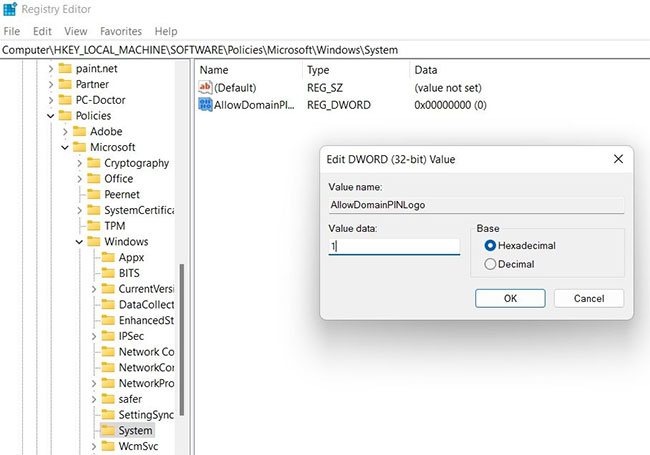
<p style="text-align: justify;"><strong>B4:</strong>&nbsp;Tìm&nbsp;<strong>AllowDomainPINLogo</strong>&nbsp;trong ngăn bên phải. Nếu bạn không thể tìm thấy mục nhập này, hãy nhấp chuột phải vào khoảng trống và chọn&nbsp;<strong>New &gt; DWORD (32-bit) value</strong>.</p>

<p style="text-align: justify;"><strong>B5:</strong>&nbsp;Đặt tên cho giá trị là&nbsp;<strong>AllowDomainPINLogo.</strong></p>

<p style="text-align: justify;"><strong>B6:</strong>&nbsp;Nhấp đúp vào giá trị mới tạo (<strong>AllowDomainPINLogo</strong>) và nhập&nbsp;<strong>1</strong>&nbsp;vào phần&nbsp;<strong>Value data.</strong></p>

<p style="text-align: justify;"><strong>B7:</strong>&nbsp;Thay đổi&nbsp;<strong>Base value</strong>&nbsp;thành&nbsp;<strong>Hexadecimal.</strong></p>

<p style="text-align: justify;"><strong>B8:</strong>&nbsp;Nhấp vào&nbsp;<strong>OK</strong>&nbsp;để lưu các thay đổi.</p>

<p style="text-align: justify;">Khởi động lại hệ thống và kiểm tra xem nó có khắc phục được sự cố không. Nếu không, hãy chuyển sang giải pháp tiếp theo.</p>

<h3 style="text-align: justify;">7. Xác minh tài khoản Microsoft</h3>

<p style="text-align: justify;">Windows Hello sẽ liên tục đưa ra thông báo lỗi nếu tài khoản Microsoft chưa được xác minh. Bạn sẽ phải xác minh tài khoản để khắc phục sự cố.</p>

<p style="text-align: justify;">Đây là cách xác minh tài khoản Microsoft trên Windows 11.</p>

<p style="text-align: justify;"><strong>B1:</strong>&nbsp;Mở Settings&nbsp;bằng cách nhấn&nbsp;<strong>Win + I</strong>.</p>

<p style="text-align: justify;"><strong>B2:</strong>&nbsp;Chọn&nbsp;<strong>Accounts</strong>&nbsp;từ ngăn bên trái.</p>

<p style="text-align: justify;"><strong>B3:</strong>&nbsp;Nhấp vào&nbsp;<strong>Your info.</strong></p>

<p style="text-align: justify;"><strong>B4:</strong>&nbsp;Nhấp vào tùy chọn&nbsp;<strong>Verify</strong>&nbsp;trong&nbsp;<strong>Account settings.</strong></p>

<p style="text-align: justify;"><strong>B5:</strong>&nbsp;Chọn email mà bạn muốn nhận mã xác minh.</p>

<p style="text-align: justify;"><strong>B6:</strong>&nbsp;Nhập mã xác minh và nhấp vào tùy chọn&nbsp;<strong>Verify.</strong></p>

<p style="text-align: justify;">Khởi động lại hệ thống và kiểm tra xem bạn có còn gặp sự cố không.</p>

<h2 style="text-align: justify;">8.&nbsp;Chạy quét SFC</h2>

<p style="text-align: justify;">Các file hệ thống bị hỏng cũng có thể là lý do khiến bạn gặp phải thông báo lỗi này. Bạn có thể sử dụng tính năng quét SFC để loại bỏ các file bị hỏng. System File Checker, hay còn gọi là SFC, tìm kiếm và giải quyết các sự cố file hệ thống bị hỏng.</p>

<p style="text-align: justify;">Hy vọng các giải pháp trên sẽ giúp bạn giải quyết vấn đề. Nhưng trong trường hợp xấu nhất, nếu sự cố vẫn tiếp diễn, bạn sẽ phải&nbsp;khôi phục hệ thống&nbsp;về thời điểm mã PIN còn hoạt động tốt.</p>
		</div>
				<div id="author">
						<p>
				<strong>Nguồn tin:</strong>
				Quantrimang.com
			</p>
		</div>
	</div>
	<div id="footer" class="clearfix">
		<div id="url">
			<strong>URL của bản tin này: </strong><a href="https://www.nguoicodonvn2008.info/vi/news/savefile/kien-thuc-may-tinh/cach-khac-phuc-ma-loi-pin-windows-0x80040154-5603.html" title="Cách khắc phục mã lỗi PIN Windows 0x80040154">https://www.nguoicodonvn2008.info/vi/news/savefile/kien-thuc-may-tinh/cach-khac-phuc-ma-loi-pin-windows-0x80040154-5603.html</a>

		</div>
		<div class="clear"></div>
		<div class="copyright">
			&copy; .&#x3A; Nguoicodonvn2008.info - Cõi lòng người cô đơn &#x3A;.
		</div>
		<div id="contact">
			<a href="mailto:admin@nguoicodonvn2008.info">admin@nguoicodonvn2008.info</a>
		</div>
	</div>
</div>
        <div id="timeoutsess" class="chromeframe">
            Bạn đã không sử dụng Site, <a onclick="timeoutsesscancel();" href="https://nguoicodonvn2008.info/#">Bấm vào đây để duy trì trạng thái đăng nhập</a>. Thời gian chờ: <span id="secField"> 60 </span> giây
        </div>
        <div id="openidResult" class="nv-alert" style="display:none"></div>
        <div id="openidBt" data-result="" data-redirect=""></div>
		</script>
		<div class="car-top">
  <span><img src="https://nguoicodonvn2008.info/themes/default/images/car.png" alt=""></span>
</div>
<script src="https://nguoicodonvn2008.info/assets/js/jquery/jquery.min.js"></script>
<script>var nv_base_siteurl="/",nv_lang_data="vi",nv_lang_interface="vi",nv_name_variable="nv",nv_fc_variable="op",nv_lang_variable="language",nv_module_name="news",nv_func_name="savefile",nv_is_user=0, nv_my_ofs=-4,nv_my_abbr="EDT",nv_cookie_prefix="nv4c_e856T",nv_check_pass_mstime=1738000,nv_area_admin=0,nv_safemode=0,theme_responsive=0,nv_recaptcha_ver=2,nv_recaptcha_sitekey="",nv_recaptcha_type="image",XSSsanitize=1;</script>
<script src="https://nguoicodonvn2008.info/assets/js/language/vi.js"></script>
<script src="https://nguoicodonvn2008.info/assets/js/DOMPurify/purify3.js"></script>
<script src="https://nguoicodonvn2008.info/assets/js/global.js"></script>
<script src="https://nguoicodonvn2008.info/assets/js/site.js"></script>
<script src="https://nguoicodonvn2008.info/themes/default/js/news.js"></script>
<script src="https://nguoicodonvn2008.info/themes/default/js/main.js"></script>
<script src="https://nguoicodonvn2008.info/themes/default/js/custom.js"></script>
<script type="application/ld+json">
        {
            "@context": "https://schema.org",
            "@type": "Organization",
            "url": "https://nguoicodonvn2008.info",
            "logo": "https://nguoicodonvn2008.info/uploads/angel.gif"
        }
        </script>
<script src="https://nguoicodonvn2008.info/themes/default/js/bootstrap.min.js"></script>
<script type="text/javascript">
var $scrolltop = $('.car-top');
$scrolltop.on('click', function () {
    $('html,body').animate({
        scrollTop: 0
    }, 800);
    $(this).addClass("car-run");
    setTimeout(function(){ $scrolltop.removeClass('car-run');}, 1000);
    return false;
});
$(window).on('scroll', function ()
{ 
    if($(window).scrollTop() >= 200)
    {
        $scrolltop.addClass("show");
        $scrolltop.addClass("car-down");
    }
    else
    {
       $scrolltop.removeClass("show");
       setTimeout(function(){ $scrolltop.removeClass('car-down');}, 300);
    }
});
</script>
</body>
</html>