<!DOCTYPE html>
    <html lang="vi" xmlns="http://www.w3.org/1999/xhtml" prefix="og: http://ogp.me/ns#">
    <head>
<title>Cách khắc phục lỗi “We Couldn&#039;t Set Your Default Save Location” trên Windows 11&#x002F;10</title>
<meta name="description" content="Cách khắc phục lỗi “We Couldn&#039;t Set Your Default Save Location” trên Windows 11&#x002F;10 - Savefile - Tin Tức -...">
<meta name="author" content=".: Nguoicodonvn2008.info - Cõi lòng người cô đơn :.">
<meta name="copyright" content=".: Nguoicodonvn2008.info - Cõi lòng người cô đơn :. [admin@nguoicodonvn2008.info]">
<meta name="robots" content="index, archive, follow, noodp">
<meta name="googlebot" content="index,archive,follow,noodp">
<meta name="msnbot" content="all,index,follow">
<meta name="generator" content="NukeViet v4.5">
<meta http-equiv="Content-Type" content="text/html; charset=utf-8">
<meta property="og:title" content="Cách khắc phục lỗi “We Couldn&#039;t Set Your Default Save Location” trên Windows 11&#x002F;10">
<meta property="og:type" content="website">
<meta property="og:description" content="Savefile - Tin Tức -...">
<meta property="og:site_name" content=".&#x3A; Nguoicodonvn2008.info - Cõi lòng người cô đơn &#x3A;.">
<meta property="og:url" content="https://www.nguoicodonvn2008.info/vi/news/savefile/kien-thuc-may-tinh/cach-khac-phuc-loi-we-couldn-t-set-your-default-save-location-tren-windows-11-10-7444.html">
<link rel="shortcut icon" href="https://nguoicodonvn2008.info/favicon.ico">
<link rel="canonical" href="https://www.nguoicodonvn2008.info/vi/news/savefile/kien-thuc-may-tinh/cach-khac-phuc-loi-we-couldn-t-set-your-default-save-location-tren-windows-11-10-7444.html">
<link rel="alternate" href="https://nguoicodonvn2008.info/vi/news/rss/" title="Tin Tức" type="application/rss+xml">
<link rel="alternate" href="https://nguoicodonvn2008.info/vi/news/rss/karaoke-dual/" title="Tin Tức - Karaoke Dual" type="application/rss+xml">
<link rel="alternate" href="https://nguoicodonvn2008.info/vi/news/rss/nhac-tre/" title="Tin Tức - Nhạc trẻ" type="application/rss+xml">
<link rel="alternate" href="https://nguoicodonvn2008.info/vi/news/rss/tru-tinh/" title="Tin Tức - Trữ tình" type="application/rss+xml">
<link rel="alternate" href="https://nguoicodonvn2008.info/vi/news/rss/nuoc-ngoai/" title="Tin Tức - Nước ngoài" type="application/rss+xml">
<link rel="alternate" href="https://nguoicodonvn2008.info/vi/news/rss/remix/" title="Tin Tức - Remix" type="application/rss+xml">
<link rel="alternate" href="https://nguoicodonvn2008.info/vi/news/rss/tam-su-tinh-yeu/" title="Tin Tức - Tâm sự tình yêu" type="application/rss+xml">
<link rel="alternate" href="https://nguoicodonvn2008.info/vi/news/rss/tho-suu-tam/" title="Tin Tức - Thơ sưu tầm" type="application/rss+xml">
<link rel="alternate" href="https://nguoicodonvn2008.info/vi/news/rss/cuoc-song/" title="Tin Tức - Cuộc sống" type="application/rss+xml">
<link rel="alternate" href="https://nguoicodonvn2008.info/vi/news/rss/phan-mem/" title="Tin Tức - Phần mềm" type="application/rss+xml">
<link rel="alternate" href="https://nguoicodonvn2008.info/vi/news/rss/kien-thuc-may-tinh/" title="Tin Tức - Kiến thức máy tính" type="application/rss+xml">
<link rel="alternate" href="https://nguoicodonvn2008.info/vi/news/rss/hoc-tap/" title="Tin Tức - Học tập" type="application/rss+xml">
<link rel="alternate" href="https://nguoicodonvn2008.info/vi/news/rss/tai-lieu/" title="Tin Tức - Tài liệu" type="application/rss+xml">
<link rel="alternate" href="https://nguoicodonvn2008.info/vi/news/rss/de-thi/" title="Tin Tức - Đề thi" type="application/rss+xml">
<link rel="preload" as="style" href="https://nguoicodonvn2008.info/assets/css/font-awesome.min.css" type="text/css">
<link rel="preload" as="style" href="https://nguoicodonvn2008.info/themes/default/css/bootstrap.non-responsive.css" type="text/css">
<link rel="preload" as="style" href="https://nguoicodonvn2008.info/themes/default/css/style.css" type="text/css">
<link rel="preload" as="style" href="https://nguoicodonvn2008.info/themes/default/css/style.non-responsive.css" type="text/css">
<link rel="preload" as="style" href="https://nguoicodonvn2008.info/themes/default/css/news.css" type="text/css">
<link rel="preload" as="style" href="https://nguoicodonvn2008.info/themes/default/css/custom.css" type="text/css">
<link rel="preload" as="script" href="https://nguoicodonvn2008.info/assets/js/jquery/jquery.min.js" type="text/javascript">
<link rel="preload" as="script" href="https://nguoicodonvn2008.info/assets/js/language/vi.js" type="text/javascript">
<link rel="preload" as="script" href="https://nguoicodonvn2008.info/assets/js/DOMPurify/purify3.js" type="text/javascript">
<link rel="preload" as="script" href="https://nguoicodonvn2008.info/assets/js/global.js" type="text/javascript">
<link rel="preload" as="script" href="https://nguoicodonvn2008.info/assets/js/site.js" type="text/javascript">
<link rel="preload" as="script" href="https://nguoicodonvn2008.info/themes/default/js/news.js" type="text/javascript">
<link rel="preload" as="script" href="https://nguoicodonvn2008.info/themes/default/js/main.js" type="text/javascript">
<link rel="preload" as="script" href="https://nguoicodonvn2008.info/themes/default/js/custom.js" type="text/javascript">
<link rel="preload" as="script" href="https://nguoicodonvn2008.info/themes/default/js/bootstrap.min.js" type="text/javascript">
<link rel="stylesheet" href="https://nguoicodonvn2008.info/assets/css/font-awesome.min.css">
<link rel="stylesheet" href="https://nguoicodonvn2008.info/themes/default/css/bootstrap.non-responsive.css">
<link rel="stylesheet" href="https://nguoicodonvn2008.info/themes/default/css/style.css">
<link rel="stylesheet" href="https://nguoicodonvn2008.info/themes/default/css/style.non-responsive.css">
<link rel="StyleSheet" href="https://nguoicodonvn2008.info/themes/default/css/news.css">
<link rel="stylesheet" href="https://nguoicodonvn2008.info/themes/default/css/custom.css">
<style type="text/css">
	body{background: #fff;}
</style>
    </head>
    <body>
<div id="print">
	<div id="hd_print">
		<h2 class="pull-left">.&#x3A; Nguoicodonvn2008.info - Cõi lòng người cô đơn &#x3A;.</h2>
		<p class="pull-right"><a title=".&#x3A; Nguoicodonvn2008.info - Cõi lòng người cô đơn &#x3A;." href="https://nguoicodonvn2008.info/">https://nguoicodonvn2008.info</a></p>
	</div>
	<div class="clear"></div>
	<hr />
	<div id="content">
		<h1>Cách khắc phục lỗi “We Couldn&#039;t Set Your Default Save Location” trên Windows 11&#x002F;10</h1>
		<ul class="list-inline">
			<li>Thứ ba - 22/08/2023 09:34</li>
			<li class="hidden-print txtrequired"><em class="fa fa-print">&nbsp;</em><a title="In ra" href="javascript:;" onclick="window.print()">In ra</a></li>
			<li class="hidden-print txtrequired"><em class="fa fa-power-off">&nbsp;</em><a title="Đóng cửa sổ này" href="javascript:;" onclick="window.close()">Đóng cửa sổ này</a></li>
		</ul>
		<div class="clear"></div>
		<div id="hometext">
		</div>
				<div class="imghome">
			<img alt="Cách khắc phục lỗi “We Couldn&#039;t Set Your Default Save Location” trên Windows 11&#x002F;10" src="https://st.quantrimang.com/photos/image/2023/08/22/sua-loi-we-couldn-t-set-your-default-save-location-1.jpg" width="460" class="img-thumbnail" />
		</div>
		<div class="clear"></div>
		<div id="bodytext" class="clearfix">
			<p style="text-align: justify;">Người dùng đã báo cáo lỗi 0x80070005 hoặc 0x80070539 phát sinh khi họ cố gắng đặt các ứng dụng mới lưu vào những vị trí ổ cứng ngoài khác nhau bằng Settings. Các mã lỗi đó có cùng một thông báo cho biết:<em>&nbsp;“We couldn’t set your default save location”</em>. Điều này có nghĩa là người dùng không thể thay đổi vị trí lưu mặc định cho ứng dụng.</p>

<p style="text-align: justify;">Có phải lỗi đó cũng ngăn bạn thay đổi nơi lưu ứng dụng mới vào không? Nếu đúng như vậy, đây là cách bạn có thể sửa mã lỗi 0x80070005 hoặc 0x80070539 trên Windows 11/10.</p>

<h2 style="text-align: justify;">1. Đặt tài khoản người dùng của bạn thành quản trị viên</h2>

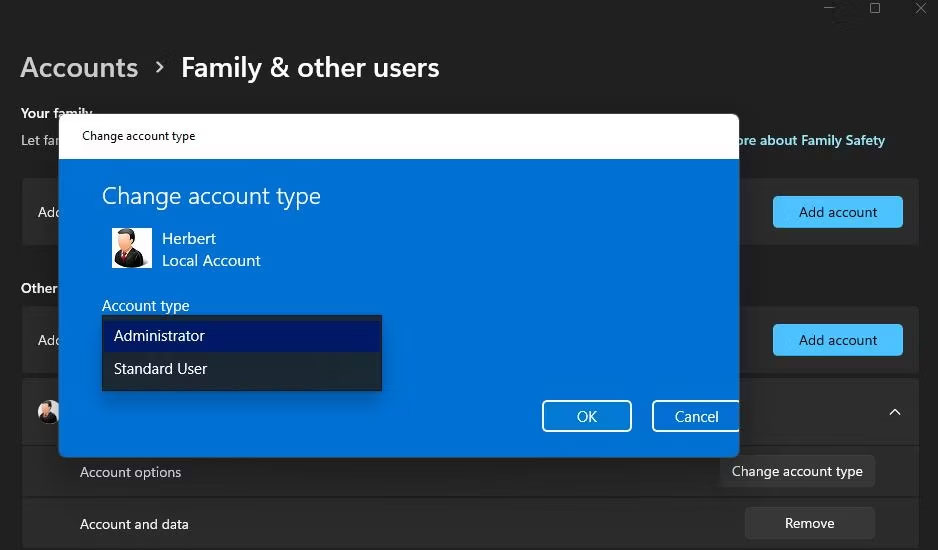
<p style="text-align: justify;">Nếu bạn đang sử dụng tài khoản Windows tiêu chuẩn, hãy thay đổi loại tài khoản người dùng của bạn thành tài khoản admin. Tài khoản người dùng tiêu chuẩn sẽ ngăn bạn áp dụng bất kỳ thay đổi hệ thống phức tạp nào. Thay đổi vị trí lưu ứng dụng là điều bạn có thể cần tới đặc quyền của quản trị viên.</p>

<figure>
<div style="text-align: justify;"><img alt="Menu drop-down Account type" data-i="0" data-src="https://st.quantrimang.com/photos/image/2023/08/22/sua-loi-we-couldn-t-set-your-default-save-location-1.jpg" data-was-processed="true" height="550" src="https://st.quantrimang.com/photos/image/2023/08/22/sua-loi-we-couldn-t-set-your-default-save-location-1.jpg" width="938" /></div>

<figcaption>
<div style="text-align: justify;">Menu drop-down Account type</div>
</figcaption>
</figure>

<h2 style="text-align: justify;">2. Đổi tên thư mục WindowsApps</h2>

<p style="text-align: justify;">Lỗi này có thể phát sinh do thư mục WindowsApps nơi lưu ứng dụng bị hỏng. Đổi tên thư mục WindowsApps trên ổ hoặc phân vùng mà bạn muốn lưu ứng dụng có thể giải quyết vấn đề như vậy. Để làm như vậy, hãy đổi tên thư mục đó như sau:</p>

<p style="text-align: justify;">1. Nếu bạn đang cố đặt ứng dụng lưu trên ổ cứng ngoài, hãy kết nối ổ cứng đó với PC của bạn.</p>

<p style="text-align: justify;">2.&nbsp;<a data-type="internal" href="https://quantrimang.com/cong-nghe/9-cach-kich-hoat-file-explorer-trong-windows-10-118256" title="9 cách kích hoạt File Explorer trong Windows 10">Mở trình điều hướng thư mục File Explorer</a>&nbsp;và nhấp vào&nbsp;<strong>This PC</strong>.</p>

<p style="text-align: justify;">3. Nhấp đúp vào ổ/phân vùng bạn muốn đặt làm vị trí lưu mặc định cho ứng dụng.</p>

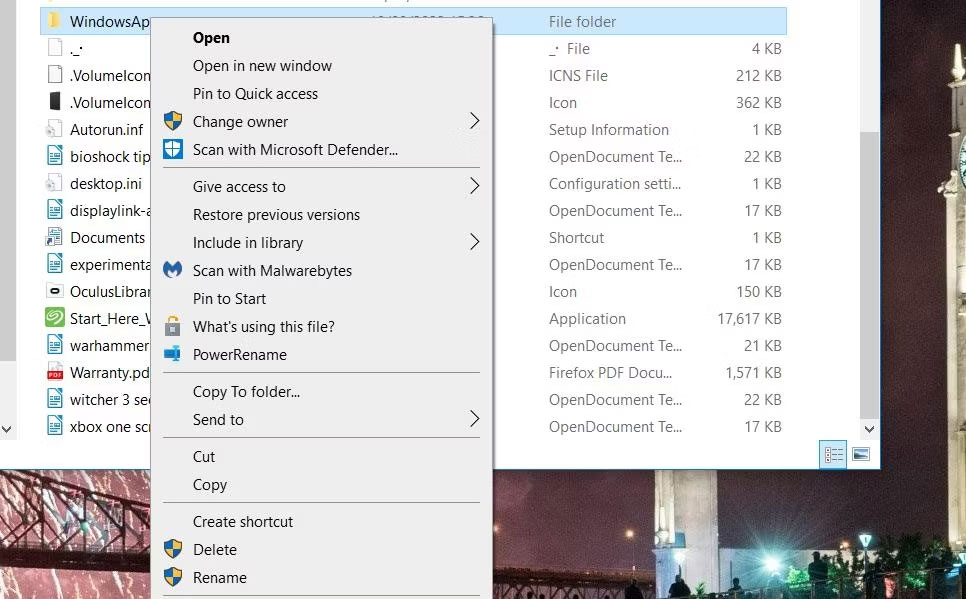
<p style="text-align: justify;">4. Sau đó, nhấp chuột phải vào thư mục WindowsApps và chọn tùy chọn menu ngữ cảnh&nbsp;<strong>Rename</strong>. Bạn sẽ tìm thấy thư mục đó trong thư mục root của ổ.</p>

<figure>
<div style="text-align: justify;"><img alt="Tùy chọn Rename" data-i="1" data-src="https://st.quantrimang.com/photos/image/2023/08/22/sua-loi-we-couldn-t-set-your-default-save-location-2.jpg" data-was-processed="true" height="599" src="https://st.quantrimang.com/photos/image/2023/08/22/sua-loi-we-couldn-t-set-your-default-save-location-2.jpg" width="966" /></div>

<figcaption>
<div style="text-align: justify;">Tùy chọn Rename</div>
</figcaption>
</figure>

<p style="text-align: justify;">5. Đổi tên thư mục thành&nbsp;<strong>WindowsApps.old</strong>&nbsp;và nhấn&nbsp;<strong>Enter.</strong></p>

<p style="text-align: justify;">6. Sau đó, hãy thử thay đổi lại vị trí lưu mặc định cho các ứng dụng thông qua Settings.</p>

<p style="text-align: justify;">Nếu cách này vẫn không hiệu quả, thì hãy chuyển sang giải pháp tiếp theo.</p>

<h2 style="text-align: justify;">3. Xóa hoặc đổi tên thư mục WpSystem</h2>

<p style="text-align: justify;">Nhiều người dùng xác nhận rằng việc đổi tên hoặc xóa thư mục WpSystem sẽ khắc phục lỗi 0x80070005. WpSystem là một thư mục được tạo để lưu trữ dữ liệu ứng dụng. Hãy thử đổi tên thư mục đó thành WpSystem.old trên ổ mà bạn không thể đặt làm vị trí lưu ứng dụng, như đã nêu cho phương pháp trước đó. WpSystem sẽ nằm trong cùng thư mục với thư mục WindowsApps.</p>

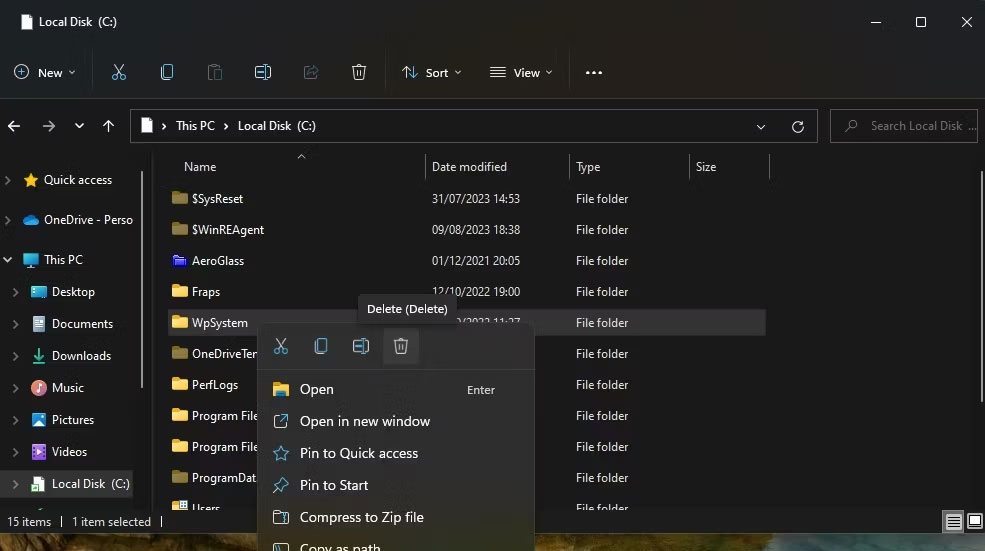
<p style="text-align: justify;">Ngoài ra, hãy xóa thư mục WpSystem. Bạn có thể xóa một file hoặc thư mục trong Explorer bằng cách nhấp chuột phải vào file hoặc thư mục đó và chọn&nbsp;<strong>Delete</strong>. Nếu bạn không thể tìm thấy thư mục đó hoặc giải pháp tiềm năng này không hoạt động, hãy thử giải pháp tiếp theo.</p>

<figure>
<div style="text-align: justify;"><img alt="Tùy chọn Delete" data-i="2" data-src="https://st.quantrimang.com/photos/image/2023/08/22/sua-loi-we-couldn-t-set-your-default-save-location-3.jpg" data-was-processed="true" height="551" src="https://st.quantrimang.com/photos/image/2023/08/22/sua-loi-we-couldn-t-set-your-default-save-location-3.jpg" width="985" /></div>

<figcaption>
<div style="text-align: justify;">Tùy chọn Delete</div>
</figcaption>
</figure>

<h2 style="text-align: justify;">4. Đặt quyền hệ thống đầy đủ cho thư mục System Volume</h2>

<p style="text-align: justify;">Thiết lập quyền đầy đủ cho thư mục System Volume là một cách khắc phục khác đã được xác nhận cho lỗi 0x80070005. Thực hiện theo các bước sau để thiết lập quyền đầy đủ cho thư mục System Volume:</p>

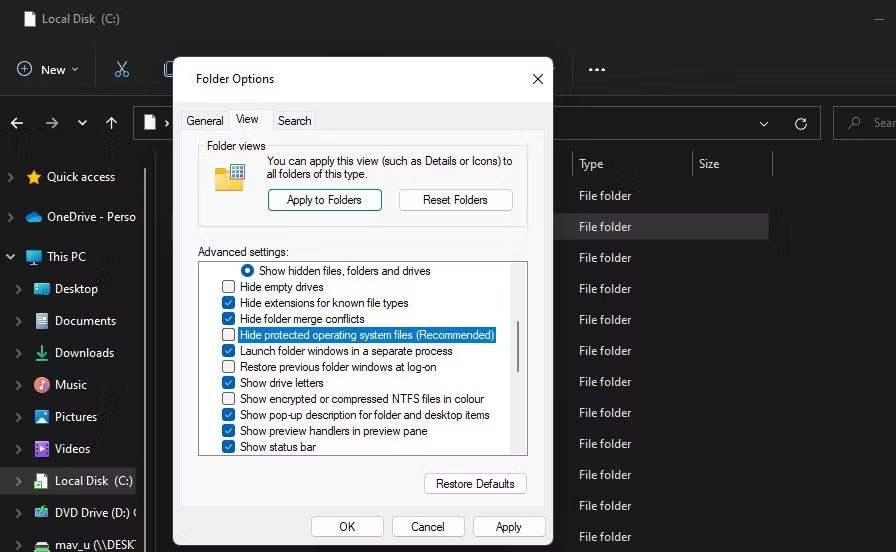
<p style="text-align: justify;">1. Đi vào File Explorer và nhấp vào menu ba chấm&nbsp;<strong>See more</strong>&nbsp;<strong>&gt;</strong>&nbsp;<strong>Options</strong>. Trong Windows 10, nhấp vào&nbsp;<strong>Options</strong>&nbsp;trên tab&nbsp;<strong>View</strong>.</p>

<p style="text-align: justify;">2. Chọn&nbsp;<strong>View</strong>&nbsp;trên cửa sổ Folder Options.</p>

<p style="text-align: justify;">3. Bỏ chọn tùy chọn&nbsp;<strong>Hide protected operating system files (Recommended)</strong>.</p>

<figure>
<div style="text-align: justify;"><img alt="Hộp kiểm Hide protected operating system files" data-i="3" data-src="https://st.quantrimang.com/photos/image/2023/08/22/sua-loi-we-couldn-t-set-your-default-save-location-4.jpg" data-was-processed="true" height="552" src="https://st.quantrimang.com/photos/image/2023/08/22/sua-loi-we-couldn-t-set-your-default-save-location-4.jpg" width="896" /></div>

<figcaption>
<div style="text-align: justify;">Hộp kiểm Hide protected operating system files</div>
</figcaption>
</figure>

<p style="text-align: justify;">4. Chọn&nbsp;<strong>Show hidden files, folders and drives</strong>.</p>

<p style="text-align: justify;">5. Nhấp vào&nbsp;<strong>Apply</strong>&nbsp;để lưu cài đặt Explorer mới.</p>

<p style="text-align: justify;">6. Chọn ổ bạn cần đặt làm vị trí lưu ứng dụng mặc định.</p>

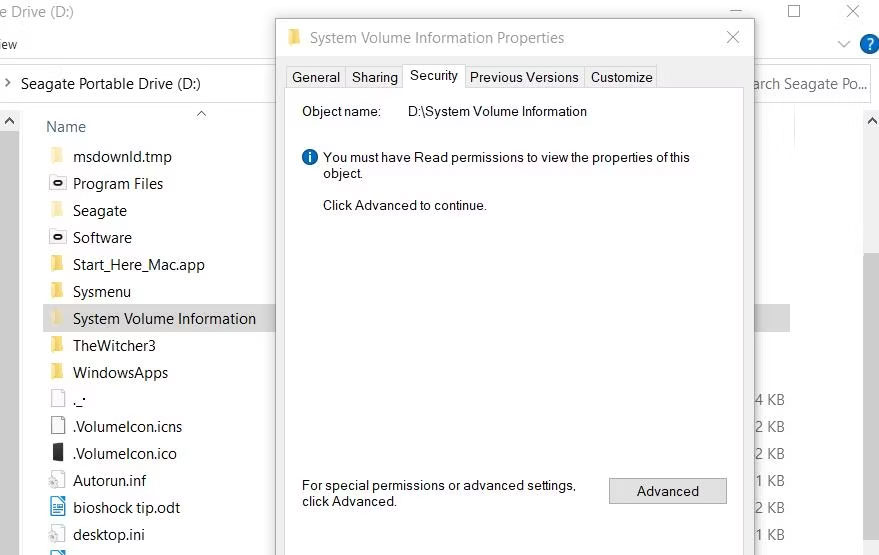
<p style="text-align: justify;">7. Nhấp chuột phải vào thư mục System Volume Information và chọn&nbsp;<strong>Properties</strong>.</p>

<p style="text-align: justify;">8. Nhấp vào&nbsp;<strong>Security &gt; Advanced</strong>&nbsp;để hiển thị cửa sổ&nbsp;<strong>Advanced Security Settings</strong>.</p>

<figure>
<div style="text-align: justify;"><img alt="Tab Security" data-i="4" data-src="https://st.quantrimang.com/photos/image/2023/08/22/sua-loi-we-couldn-t-set-your-default-save-location-5.jpg" data-was-processed="true" height="555" src="https://st.quantrimang.com/photos/image/2023/08/22/sua-loi-we-couldn-t-set-your-default-save-location-5.jpg" width="879" /></div>

<figcaption>
<div style="text-align: justify;">Tab Security</div>
</figcaption>
</figure>

<p style="text-align: justify;">9. Nhấn nút&nbsp;<strong>Continue</strong>.</p>

<p style="text-align: justify;">10. Tiếp theo, nhấp vào&nbsp;<strong>Add</strong>&nbsp;để xem cửa sổ&nbsp;<strong>Permission Entry.</strong></p>

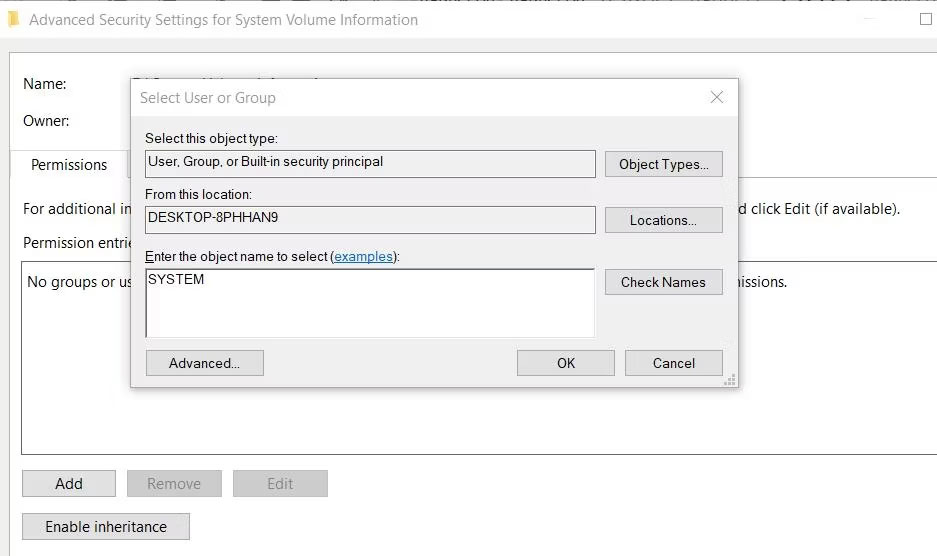
<p style="text-align: justify;">11. Nhấp vào tùy chọn&nbsp;<strong>Select a principal</strong>.</p>

<p style="text-align: justify;">12. Nhập&nbsp;<strong>SYSTEM</strong>&nbsp;bên trong hộp tên đối tượng.</p>

<figure>
<div style="text-align: justify;"><img alt="Cửa sổ chọn người dùng hoặc nhóm" data-i="5" data-src="https://st.quantrimang.com/photos/image/2023/08/22/sua-loi-we-couldn-t-set-your-default-save-location-6.jpg" data-was-processed="true" height="556" src="https://st.quantrimang.com/photos/image/2023/08/22/sua-loi-we-couldn-t-set-your-default-save-location-6.jpg" width="937" /></div>

<figcaption>
<div style="text-align: justify;">Cửa sổ chọn người dùng hoặc nhóm</div>
</figcaption>
</figure>

<p style="text-align: justify;">13. Nhấp vào nút&nbsp;<strong>OK.</strong></p>

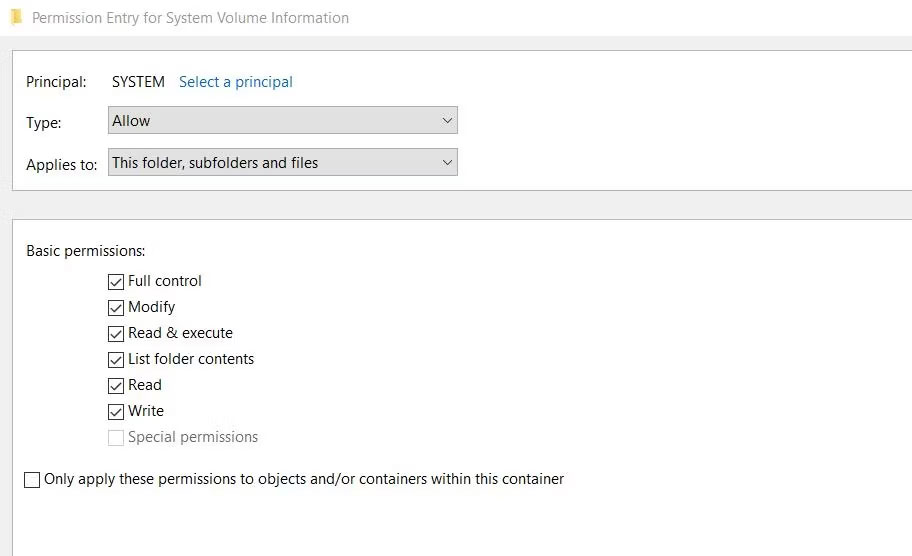
<p style="text-align: justify;">14. Chọn cài đặt&nbsp;<strong>Full control permission</strong>.</p>

<figure>
<div style="text-align: justify;"><img alt="Hộp kiểm Full control permission" data-i="6" data-src="https://st.quantrimang.com/photos/image/2023/08/22/sua-loi-we-couldn-t-set-your-default-save-location-7.jpg" data-was-processed="true" height="556" src="https://st.quantrimang.com/photos/image/2023/08/22/sua-loi-we-couldn-t-set-your-default-save-location-7.jpg" width="912" /></div>

<figcaption>
<div style="text-align: justify;">Hộp kiểm Full control permission</div>
</figcaption>
</figure>

<p style="text-align: justify;">15. Sau đó chọn các tùy chọn&nbsp;<strong>OK</strong>&nbsp;trên cửa sổ&nbsp;<strong>Permission Entry</strong>&nbsp;và&nbsp;<strong>Advanced Security Setting</strong>.</p>

<p style="text-align: justify;">Đóng tất cả các cửa sổ đang mở còn lại. Sau đó,&nbsp;khởi động lại PC&nbsp;và thử thay đổi vị trí lưu mặc định.</p>
		</div>
				<div id="author">
						<p>
				<strong>Nguồn tin:</strong>
				Quantrimang.com
			</p>
		</div>
	</div>
	<div id="footer" class="clearfix">
		<div id="url">
			<strong>URL của bản tin này: </strong><a href="https://www.nguoicodonvn2008.info/vi/news/savefile/kien-thuc-may-tinh/cach-khac-phuc-loi-we-couldn-t-set-your-default-save-location-tren-windows-11-10-7444.html" title="Cách khắc phục lỗi “We Couldn&#039;t Set Your Default Save Location” trên Windows 11&#x002F;10">https://www.nguoicodonvn2008.info/vi/news/savefile/kien-thuc-may-tinh/cach-khac-phuc-loi-we-couldn-t-set-your-default-save-location-tren-windows-11-10-7444.html</a>

		</div>
		<div class="clear"></div>
		<div class="copyright">
			&copy; .&#x3A; Nguoicodonvn2008.info - Cõi lòng người cô đơn &#x3A;.
		</div>
		<div id="contact">
			<a href="mailto:admin@nguoicodonvn2008.info">admin@nguoicodonvn2008.info</a>
		</div>
	</div>
</div>
        <div id="timeoutsess" class="chromeframe">
            Bạn đã không sử dụng Site, <a onclick="timeoutsesscancel();" href="https://nguoicodonvn2008.info/#">Bấm vào đây để duy trì trạng thái đăng nhập</a>. Thời gian chờ: <span id="secField"> 60 </span> giây
        </div>
        <div id="openidResult" class="nv-alert" style="display:none"></div>
        <div id="openidBt" data-result="" data-redirect=""></div>
		</script>
		<div class="car-top">
  <span><img src="https://nguoicodonvn2008.info/themes/default/images/car.png" alt=""></span>
</div>
<script src="https://nguoicodonvn2008.info/assets/js/jquery/jquery.min.js"></script>
<script>var nv_base_siteurl="/",nv_lang_data="vi",nv_lang_interface="vi",nv_name_variable="nv",nv_fc_variable="op",nv_lang_variable="language",nv_module_name="news",nv_func_name="savefile",nv_is_user=0, nv_my_ofs=-4,nv_my_abbr="EDT",nv_cookie_prefix="nv4c_e856T",nv_check_pass_mstime=1738000,nv_area_admin=0,nv_safemode=0,theme_responsive=0,nv_recaptcha_ver=2,nv_recaptcha_sitekey="",nv_recaptcha_type="image",XSSsanitize=1;</script>
<script src="https://nguoicodonvn2008.info/assets/js/language/vi.js"></script>
<script src="https://nguoicodonvn2008.info/assets/js/DOMPurify/purify3.js"></script>
<script src="https://nguoicodonvn2008.info/assets/js/global.js"></script>
<script src="https://nguoicodonvn2008.info/assets/js/site.js"></script>
<script src="https://nguoicodonvn2008.info/themes/default/js/news.js"></script>
<script src="https://nguoicodonvn2008.info/themes/default/js/main.js"></script>
<script src="https://nguoicodonvn2008.info/themes/default/js/custom.js"></script>
<script type="application/ld+json">
        {
            "@context": "https://schema.org",
            "@type": "Organization",
            "url": "https://nguoicodonvn2008.info",
            "logo": "https://nguoicodonvn2008.info/uploads/angel.gif"
        }
        </script>
<script src="https://nguoicodonvn2008.info/themes/default/js/bootstrap.min.js"></script>
<script type="text/javascript">
var $scrolltop = $('.car-top');
$scrolltop.on('click', function () {
    $('html,body').animate({
        scrollTop: 0
    }, 800);
    $(this).addClass("car-run");
    setTimeout(function(){ $scrolltop.removeClass('car-run');}, 1000);
    return false;
});
$(window).on('scroll', function ()
{ 
    if($(window).scrollTop() >= 200)
    {
        $scrolltop.addClass("show");
        $scrolltop.addClass("car-down");
    }
    else
    {
       $scrolltop.removeClass("show");
       setTimeout(function(){ $scrolltop.removeClass('car-down');}, 300);
    }
});
</script>
</body>
</html>