<!DOCTYPE html>
    <html lang="vi" xmlns="http://www.w3.org/1999/xhtml" prefix="og: http://ogp.me/ns#">
    <head>
<title>Cách khắc phục lỗi service &quot;Connected Devices Platform User&quot; sử dụng hết RAM trên Windows</title>
<meta name="description" content="Cách khắc phục lỗi service &quot;Connected Devices Platform User&quot; sử dụng hết RAM trên Windows - Savefile - Tin Tức -...">
<meta name="author" content=".: Nguoicodonvn2008.info - Cõi lòng người cô đơn :.">
<meta name="copyright" content=".: Nguoicodonvn2008.info - Cõi lòng người cô đơn :. [admin@nguoicodonvn2008.info]">
<meta name="robots" content="index, archive, follow, noodp">
<meta name="googlebot" content="index,archive,follow,noodp">
<meta name="msnbot" content="all,index,follow">
<meta name="generator" content="NukeViet v4.5">
<meta http-equiv="Content-Type" content="text/html; charset=utf-8">
<meta property="og:title" content="Cách khắc phục lỗi service &quot;Connected Devices Platform User&quot; sử dụng hết RAM trên Windows">
<meta property="og:type" content="website">
<meta property="og:description" content="Savefile - Tin Tức -...">
<meta property="og:site_name" content=".&#x3A; Nguoicodonvn2008.info - Cõi lòng người cô đơn &#x3A;.">
<meta property="og:url" content="https://www.nguoicodonvn2008.info/vi/news/savefile/kien-thuc-may-tinh/cach-khac-phuc-loi-service-connected-devices-platform-user-su-dung-het-ram-tren-windows-7674.html">
<link rel="shortcut icon" href="https://nguoicodonvn2008.info/favicon.ico">
<link rel="canonical" href="https://www.nguoicodonvn2008.info/vi/news/savefile/kien-thuc-may-tinh/cach-khac-phuc-loi-service-connected-devices-platform-user-su-dung-het-ram-tren-windows-7674.html">
<link rel="alternate" href="https://nguoicodonvn2008.info/vi/news/rss/" title="Tin Tức" type="application/rss+xml">
<link rel="alternate" href="https://nguoicodonvn2008.info/vi/news/rss/karaoke-dual/" title="Tin Tức - Karaoke Dual" type="application/rss+xml">
<link rel="alternate" href="https://nguoicodonvn2008.info/vi/news/rss/nhac-tre/" title="Tin Tức - Nhạc trẻ" type="application/rss+xml">
<link rel="alternate" href="https://nguoicodonvn2008.info/vi/news/rss/tru-tinh/" title="Tin Tức - Trữ tình" type="application/rss+xml">
<link rel="alternate" href="https://nguoicodonvn2008.info/vi/news/rss/nuoc-ngoai/" title="Tin Tức - Nước ngoài" type="application/rss+xml">
<link rel="alternate" href="https://nguoicodonvn2008.info/vi/news/rss/remix/" title="Tin Tức - Remix" type="application/rss+xml">
<link rel="alternate" href="https://nguoicodonvn2008.info/vi/news/rss/tam-su-tinh-yeu/" title="Tin Tức - Tâm sự tình yêu" type="application/rss+xml">
<link rel="alternate" href="https://nguoicodonvn2008.info/vi/news/rss/tho-suu-tam/" title="Tin Tức - Thơ sưu tầm" type="application/rss+xml">
<link rel="alternate" href="https://nguoicodonvn2008.info/vi/news/rss/cuoc-song/" title="Tin Tức - Cuộc sống" type="application/rss+xml">
<link rel="alternate" href="https://nguoicodonvn2008.info/vi/news/rss/phan-mem/" title="Tin Tức - Phần mềm" type="application/rss+xml">
<link rel="alternate" href="https://nguoicodonvn2008.info/vi/news/rss/kien-thuc-may-tinh/" title="Tin Tức - Kiến thức máy tính" type="application/rss+xml">
<link rel="alternate" href="https://nguoicodonvn2008.info/vi/news/rss/hoc-tap/" title="Tin Tức - Học tập" type="application/rss+xml">
<link rel="alternate" href="https://nguoicodonvn2008.info/vi/news/rss/tai-lieu/" title="Tin Tức - Tài liệu" type="application/rss+xml">
<link rel="alternate" href="https://nguoicodonvn2008.info/vi/news/rss/de-thi/" title="Tin Tức - Đề thi" type="application/rss+xml">
<link rel="preload" as="style" href="https://nguoicodonvn2008.info/assets/css/font-awesome.min.css" type="text/css">
<link rel="preload" as="style" href="https://nguoicodonvn2008.info/themes/default/css/bootstrap.non-responsive.css" type="text/css">
<link rel="preload" as="style" href="https://nguoicodonvn2008.info/themes/default/css/style.css" type="text/css">
<link rel="preload" as="style" href="https://nguoicodonvn2008.info/themes/default/css/style.non-responsive.css" type="text/css">
<link rel="preload" as="style" href="https://nguoicodonvn2008.info/themes/default/css/news.css" type="text/css">
<link rel="preload" as="style" href="https://nguoicodonvn2008.info/themes/default/css/custom.css" type="text/css">
<link rel="preload" as="script" href="https://nguoicodonvn2008.info/assets/js/jquery/jquery.min.js" type="text/javascript">
<link rel="preload" as="script" href="https://nguoicodonvn2008.info/assets/js/language/vi.js" type="text/javascript">
<link rel="preload" as="script" href="https://nguoicodonvn2008.info/assets/js/DOMPurify/purify3.js" type="text/javascript">
<link rel="preload" as="script" href="https://nguoicodonvn2008.info/assets/js/global.js" type="text/javascript">
<link rel="preload" as="script" href="https://nguoicodonvn2008.info/assets/js/site.js" type="text/javascript">
<link rel="preload" as="script" href="https://nguoicodonvn2008.info/themes/default/js/news.js" type="text/javascript">
<link rel="preload" as="script" href="https://nguoicodonvn2008.info/themes/default/js/main.js" type="text/javascript">
<link rel="preload" as="script" href="https://nguoicodonvn2008.info/themes/default/js/custom.js" type="text/javascript">
<link rel="preload" as="script" href="https://nguoicodonvn2008.info/themes/default/js/bootstrap.min.js" type="text/javascript">
<link rel="stylesheet" href="https://nguoicodonvn2008.info/assets/css/font-awesome.min.css">
<link rel="stylesheet" href="https://nguoicodonvn2008.info/themes/default/css/bootstrap.non-responsive.css">
<link rel="stylesheet" href="https://nguoicodonvn2008.info/themes/default/css/style.css">
<link rel="stylesheet" href="https://nguoicodonvn2008.info/themes/default/css/style.non-responsive.css">
<link rel="StyleSheet" href="https://nguoicodonvn2008.info/themes/default/css/news.css">
<link rel="stylesheet" href="https://nguoicodonvn2008.info/themes/default/css/custom.css">
<style type="text/css">
	body{background: #fff;}
</style>
    </head>
    <body>
<div id="print">
	<div id="hd_print">
		<h2 class="pull-left">.&#x3A; Nguoicodonvn2008.info - Cõi lòng người cô đơn &#x3A;.</h2>
		<p class="pull-right"><a title=".&#x3A; Nguoicodonvn2008.info - Cõi lòng người cô đơn &#x3A;." href="https://nguoicodonvn2008.info/">https://nguoicodonvn2008.info</a></p>
	</div>
	<div class="clear"></div>
	<hr />
	<div id="content">
		<h1>Cách khắc phục lỗi service &quot;Connected Devices Platform User&quot; sử dụng hết RAM trên Windows</h1>
		<ul class="list-inline">
			<li>Thứ hai - 23/10/2023 09:40</li>
			<li class="hidden-print txtrequired"><em class="fa fa-print">&nbsp;</em><a title="In ra" href="javascript:;" onclick="window.print()">In ra</a></li>
			<li class="hidden-print txtrequired"><em class="fa fa-power-off">&nbsp;</em><a title="Đóng cửa sổ này" href="javascript:;" onclick="window.close()">Đóng cửa sổ này</a></li>
		</ul>
		<div class="clear"></div>
		<div id="hometext">
		</div>
				<div class="imghome">
			<img alt="Cách khắc phục lỗi service &quot;Connected Devices Platform User&quot; sử dụng hết RAM trên Windows" src="https://st.quantrimang.com/photos/image/2023/10/23/service-connected-devices-platform-user-su-dung-het-ram-6.jpg" width="460" class="img-thumbnail" />
		</div>
		<div class="clear"></div>
		<div id="bodytext" class="clearfix">
			<p>Mỗi lần khởi động Windows, service Connected Devices Platform User sẽ upload lên dữ liệu cần thiết mà các thiết bị được kết nối trên máy tính của bạn cần. Nó cũng xác thực và tạo điều kiện giao tiếp giữa chúng.</p>

<p>Khi nó tiêu tốn quá nhiều RAM, điều đó có nghĩa là có thể xảy ra sự cố với tiến trình hoặc các thiết bị được kết nối của bạn. Bài viết dưới đây sẽ chỉ cho bạn cách ngăn service Connected Devices Platform User chiếm dụng bộ nhớ vật lý của bạn.</p>

<h2>1. Vô hiệu hóa service Connected Devices Platform User</h2>

<p>Cách đơn giản nhất để ngăn service Connected Devices Platform User sử dụng quá nhiều RAM là tắt nó. Tuy nhiên, điều này có thể gây ra một số hành vi không mong muốn trên máy tính của bạn. Và nếu điều đó xảy ra, bạn luôn có thể kích hoạt lại service.</p>

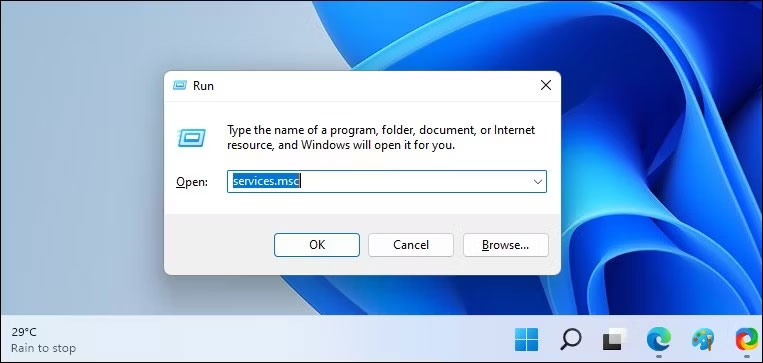
<p>Để tắt service Connected Devices Platform User, nhấn&nbsp;<strong>Win + R</strong>&nbsp;để&nbsp;hiển thị Windows Run. Nhập&nbsp;<strong>services.msc</strong>&nbsp;vào hộp văn bản rồi nhấn phím&nbsp;<strong>Enter</strong>&nbsp;trên bàn phím của bạn.</p>

<figure><img alt="Nhập services.msc vào hộp văn bản" data-i="0" data-src="https://st.quantrimang.com/photos/image/2023/10/23/service-connected-devices-platform-user-su-dung-het-ram-1.jpg" data-was-processed="true" height="363" src="https://st.quantrimang.com/photos/image/2023/10/23/service-connected-devices-platform-user-su-dung-het-ram-1.jpg" width="763" />
<figcaption>Nhập services.msc vào hộp văn bản</figcaption>
</figure>

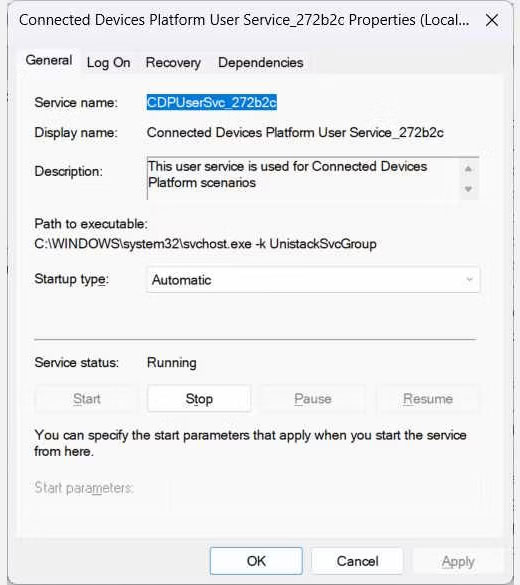
<p>Tìm&nbsp;<strong>Disable Connected Devices Platform User Service</strong>&nbsp;trong danh sách service và nhấp đúp vào service đó. Nhấp vào menu drop-down&nbsp;<strong>Startup type</strong>&nbsp;và chọn&nbsp;<strong>Disabled</strong>. Sau đó, bên dưới&nbsp;<strong>Service status</strong>&nbsp;trong cùng cửa sổ, nhấp vào&nbsp;<strong>Stop.</strong></p>

<figure><img alt="Cửa sổ Connected Devices Platform User Service" data-i="1" data-src="https://st.quantrimang.com/photos/image/2023/10/23/service-connected-devices-platform-user-su-dung-het-ram-2.jpg" data-was-processed="true" height="585" src="https://st.quantrimang.com/photos/image/2023/10/23/service-connected-devices-platform-user-su-dung-het-ram-2.jpg" width="520" />
<figcaption>Cửa sổ Connected Devices Platform User Service</figcaption>
</figure>

<p>Bây giờ, hãy kiểm tra&nbsp;<a data-type="internal" href="https://quantrimang.com/cong-nghe/huong-dan-su-dung-task-manager-83602" title="Tất tần tật về cách sử dụng Task Manager">Task Manager</a>&nbsp;để xem service có còn tiêu tốn quá nhiều RAM hay không.</p>

<h2>2. Xóa file ActivitiesCache.db</h2>

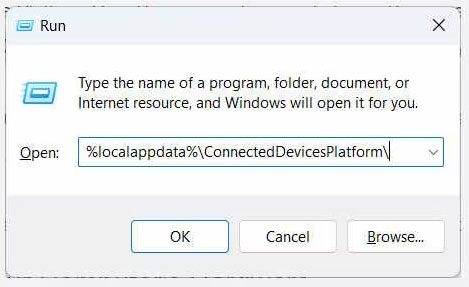
<p>Một số người dùng đã báo cáo rằng việc xóa file ActivitiesCache.db trên máy tính của họ đã giúp giải quyết vấn đề. Để xóa nó, hãy bắt đầu bằng cách tắt service Connected Devices Platform User, như đã thảo luận ở trên. Sau đó, nhấn&nbsp;<strong>Win + R</strong>&nbsp;để mở Windows Run, sao chép và dán&nbsp;<strong>%localappdata%\ConnectedDevicesPlatform\</strong>&nbsp;vào hộp văn bản, rồi nhấn phím&nbsp;<strong>Enter.</strong></p>

<figure><img alt="Dán %localappdata%\ConnectedDevicesPlatform\ vào hộp văn bản" data-i="2" data-src="https://st.quantrimang.com/photos/image/2023/10/23/service-connected-devices-platform-user-su-dung-het-ram-3.jpg" data-was-processed="true" height="287" src="https://st.quantrimang.com/photos/image/2023/10/23/service-connected-devices-platform-user-su-dung-het-ram-3.jpg" width="469" />
<figcaption>Dán %localappdata%\ConnectedDevicesPlatform\ vào hộp văn bản</figcaption>
</figure>

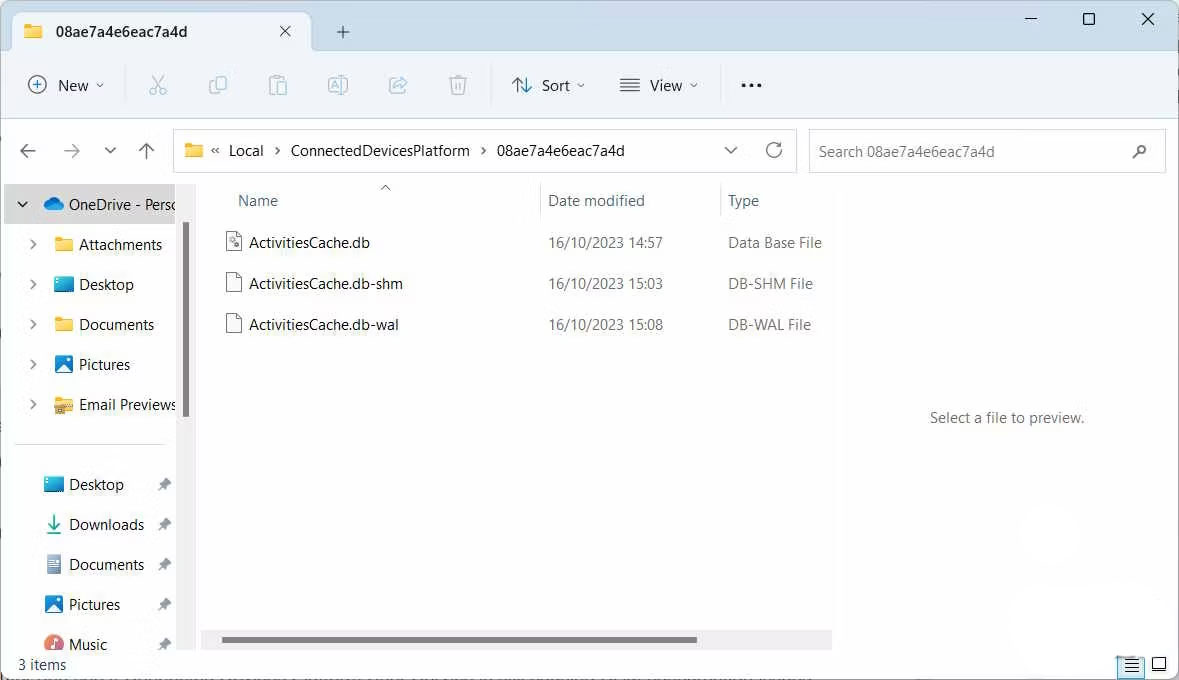
<p>Thao tác này sẽ mở thư mục ConnectedDevicesPlatform. Bạn sẽ thấy một số file và thư mục trong đó, vì vậy hãy mở từng thư mục và xóa file ActivitiesCache.db trong tất cả chúng.</p>

<figure><img alt="Xóa file ActivitiesCache.db trong tất cả các thư mục" data-i="3" data-src="https://st.quantrimang.com/photos/image/2023/10/23/service-connected-devices-platform-user-su-dung-het-ram-4.jpg" data-was-processed="true" height="680" src="https://st.quantrimang.com/photos/image/2023/10/23/service-connected-devices-platform-user-su-dung-het-ram-4.jpg" width="1179" />
<figcaption>Xóa file ActivitiesCache.db trong tất cả các thư mục</figcaption>
</figure>

<p>Sau khi thực hiện xong, hãy&nbsp;khởi động lại máy tính&nbsp;của bạn và xem liệu service Connected Devices Platform User có còn gây ra sự cố tiêu thụ RAM hay không.</p>

<h2>3. Kiểm tra sự cố với phần cứng máy tính</h2>

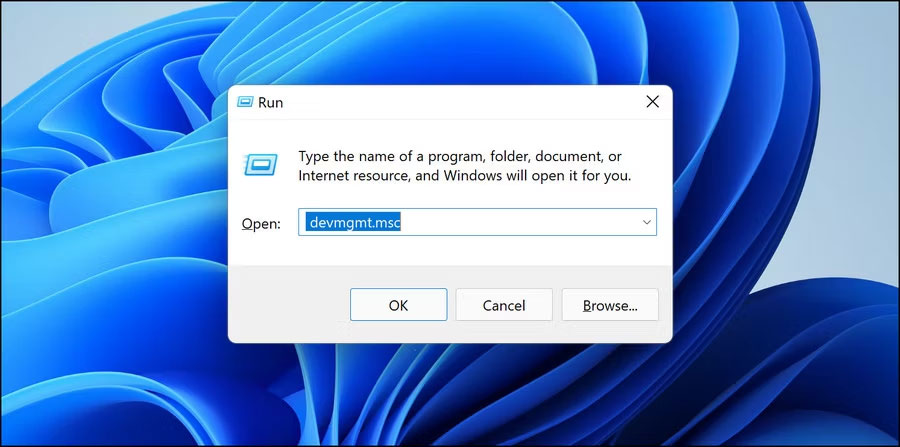
<p>Đôi khi, sự cố có thể phát sinh do một trong các thiết bị được kết nối của bạn gặp sự cố. Để kiểm tra xem các thiết bị được kết nối của bạn có hoạt động bình thường hay không, hãy&nbsp;mở Device Manager&nbsp;bằng cách nhấn&nbsp;<strong>Win + R</strong>, nhập&nbsp;<strong>devmgmt.msc</strong>&nbsp;vào hộp văn bản, sau đó nhấn phím&nbsp;<strong>Enter</strong>&nbsp;trên bàn phím.</p>

<figure><img alt="Nhập devmgmt.msc vào Run" data-i="4" data-src="https://st.quantrimang.com/photos/image/2023/10/23/service-connected-devices-platform-user-su-dung-het-ram-5.jpg" data-was-processed="true" height="447" src="https://st.quantrimang.com/photos/image/2023/10/23/service-connected-devices-platform-user-su-dung-het-ram-5.jpg" width="900" />
<figcaption>Nhập devmgmt.msc vào Run</figcaption>
</figure>

<p>Trong Device Manager, nhấp đúp vào thiết bị mà bạn nghi ngờ đang gây ra sự cố. Điều này sẽ mở cửa sổ thuộc tính của nó.</p>

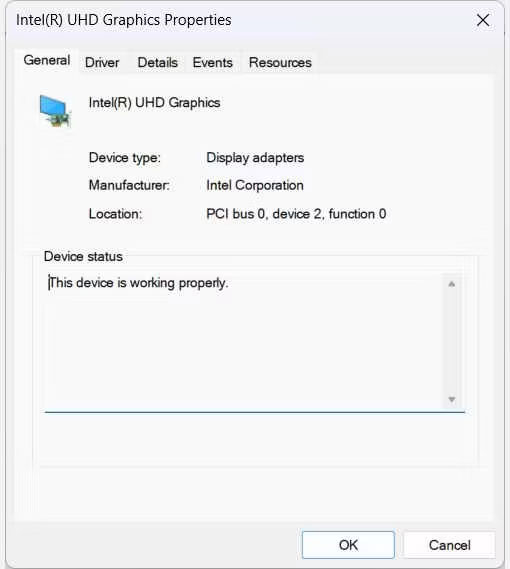
<p>Trong tab&nbsp;<strong>General</strong>&nbsp;của cửa sổ&nbsp;<strong>Properties</strong>, đảm bảo có thông báo&nbsp;<strong>This device is working properly</strong>&nbsp;trong&nbsp;<strong>Device status.</strong></p>

<figure><img alt="Kiểm tra nội dung phần Device status" data-i="5" data-src="https://st.quantrimang.com/photos/image/2023/10/23/service-connected-devices-platform-user-su-dung-het-ram-6.jpg" data-was-processed="true" height="569" src="https://st.quantrimang.com/photos/image/2023/10/23/service-connected-devices-platform-user-su-dung-het-ram-6.jpg" width="510" />
<figcaption>Kiểm tra nội dung phần Device status</figcaption>
</figure>

<p>Nếu không, bạn sẽ thấy thông báo lỗi và mã đi kèm. Hãy ghi lại cả hai để có thể bắt đầu khắc phục sự cố. Bạn có thể bắt đầu bằng cách sử dụng một trong các trình khắc phục sự cố trên Windows để kiểm tra và khắc phục sự cố phần cứng mà bạn đang gặp phải.</p>

<p>Nếu tất cả các bước trên không hiệu quả thì bạn có thể cần sử dụng điểm khôi phục hệ thống mà bạn đã tạo trước khi hệ thống bắt đầu sử dụng quá nhiều RAM. Và nếu cách đó cũng không hiệu quả, bạn có thể phải&nbsp;reset máy tính Windows&nbsp;của mình.</p>
		</div>
				<div id="author">
						<p>
				<strong>Nguồn tin:</strong>
				Quantrimang.com
			</p>
		</div>
	</div>
	<div id="footer" class="clearfix">
		<div id="url">
			<strong>URL của bản tin này: </strong><a href="https://www.nguoicodonvn2008.info/vi/news/savefile/kien-thuc-may-tinh/cach-khac-phuc-loi-service-connected-devices-platform-user-su-dung-het-ram-tren-windows-7674.html" title="Cách khắc phục lỗi service &quot;Connected Devices Platform User&quot; sử dụng hết RAM trên Windows">https://www.nguoicodonvn2008.info/vi/news/savefile/kien-thuc-may-tinh/cach-khac-phuc-loi-service-connected-devices-platform-user-su-dung-het-ram-tren-windows-7674.html</a>

		</div>
		<div class="clear"></div>
		<div class="copyright">
			&copy; .&#x3A; Nguoicodonvn2008.info - Cõi lòng người cô đơn &#x3A;.
		</div>
		<div id="contact">
			<a href="mailto:admin@nguoicodonvn2008.info">admin@nguoicodonvn2008.info</a>
		</div>
	</div>
</div>
        <div id="timeoutsess" class="chromeframe">
            Bạn đã không sử dụng Site, <a onclick="timeoutsesscancel();" href="https://nguoicodonvn2008.info/#">Bấm vào đây để duy trì trạng thái đăng nhập</a>. Thời gian chờ: <span id="secField"> 60 </span> giây
        </div>
        <div id="openidResult" class="nv-alert" style="display:none"></div>
        <div id="openidBt" data-result="" data-redirect=""></div>
		</script>
		<div class="car-top">
  <span><img src="https://nguoicodonvn2008.info/themes/default/images/car.png" alt=""></span>
</div>
<script src="https://nguoicodonvn2008.info/assets/js/jquery/jquery.min.js"></script>
<script>var nv_base_siteurl="/",nv_lang_data="vi",nv_lang_interface="vi",nv_name_variable="nv",nv_fc_variable="op",nv_lang_variable="language",nv_module_name="news",nv_func_name="savefile",nv_is_user=0, nv_my_ofs=-4,nv_my_abbr="EDT",nv_cookie_prefix="nv4c_e856T",nv_check_pass_mstime=1738000,nv_area_admin=0,nv_safemode=0,theme_responsive=0,nv_recaptcha_ver=2,nv_recaptcha_sitekey="",nv_recaptcha_type="image",XSSsanitize=1;</script>
<script src="https://nguoicodonvn2008.info/assets/js/language/vi.js"></script>
<script src="https://nguoicodonvn2008.info/assets/js/DOMPurify/purify3.js"></script>
<script src="https://nguoicodonvn2008.info/assets/js/global.js"></script>
<script src="https://nguoicodonvn2008.info/assets/js/site.js"></script>
<script src="https://nguoicodonvn2008.info/themes/default/js/news.js"></script>
<script src="https://nguoicodonvn2008.info/themes/default/js/main.js"></script>
<script src="https://nguoicodonvn2008.info/themes/default/js/custom.js"></script>
<script type="application/ld+json">
        {
            "@context": "https://schema.org",
            "@type": "Organization",
            "url": "https://nguoicodonvn2008.info",
            "logo": "https://nguoicodonvn2008.info/uploads/angel.gif"
        }
        </script>
<script src="https://nguoicodonvn2008.info/themes/default/js/bootstrap.min.js"></script>
<script type="text/javascript">
var $scrolltop = $('.car-top');
$scrolltop.on('click', function () {
    $('html,body').animate({
        scrollTop: 0
    }, 800);
    $(this).addClass("car-run");
    setTimeout(function(){ $scrolltop.removeClass('car-run');}, 1000);
    return false;
});
$(window).on('scroll', function ()
{ 
    if($(window).scrollTop() >= 200)
    {
        $scrolltop.addClass("show");
        $scrolltop.addClass("car-down");
    }
    else
    {
       $scrolltop.removeClass("show");
       setTimeout(function(){ $scrolltop.removeClass('car-down');}, 300);
    }
});
</script>
</body>
</html>