<!DOCTYPE html>
    <html lang="vi" xmlns="http://www.w3.org/1999/xhtml" prefix="og: http://ogp.me/ns#">
    <head>
<title>Cách khắc phục lỗi Microsoft .NET Framework</title>
<meta name="description" content="Cách khắc phục lỗi Microsoft .NET Framework - Savefile - Tin Tức -...">
<meta name="author" content=".: Nguoicodonvn2008.info - Cõi lòng người cô đơn :.">
<meta name="copyright" content=".: Nguoicodonvn2008.info - Cõi lòng người cô đơn :. [admin@nguoicodonvn2008.info]">
<meta name="robots" content="index, archive, follow, noodp">
<meta name="googlebot" content="index,archive,follow,noodp">
<meta name="msnbot" content="all,index,follow">
<meta name="generator" content="NukeViet v4.5">
<meta http-equiv="Content-Type" content="text/html; charset=utf-8">
<meta property="og:title" content="Cách khắc phục lỗi Microsoft .NET Framework">
<meta property="og:type" content="website">
<meta property="og:description" content="Savefile - Tin Tức - https&#x3A;&#x002F;&#x002F;www.nguoicodonvn2008.info&#x002F;vi&#x002F;news&#x002F;savefile&#x002F;kien-thuc-may-tinh&#x002F;cach-khac-phuc-loi-microsoft-net-framework-8386.html">
<meta property="og:site_name" content=".&#x3A; Nguoicodonvn2008.info - Cõi lòng người cô đơn &#x3A;.">
<meta property="og:url" content="https://www.nguoicodonvn2008.info/vi/news/savefile/kien-thuc-may-tinh/cach-khac-phuc-loi-microsoft-net-framework-8386.html">
<link rel="shortcut icon" href="https://nguoicodonvn2008.info/favicon.ico">
<link rel="canonical" href="https://www.nguoicodonvn2008.info/vi/news/savefile/kien-thuc-may-tinh/cach-khac-phuc-loi-microsoft-net-framework-8386.html">
<link rel="alternate" href="https://nguoicodonvn2008.info/vi/news/rss/" title="Tin Tức" type="application/rss+xml">
<link rel="alternate" href="https://nguoicodonvn2008.info/vi/news/rss/karaoke-dual/" title="Tin Tức - Karaoke Dual" type="application/rss+xml">
<link rel="alternate" href="https://nguoicodonvn2008.info/vi/news/rss/nhac-tre/" title="Tin Tức - Nhạc trẻ" type="application/rss+xml">
<link rel="alternate" href="https://nguoicodonvn2008.info/vi/news/rss/tru-tinh/" title="Tin Tức - Trữ tình" type="application/rss+xml">
<link rel="alternate" href="https://nguoicodonvn2008.info/vi/news/rss/nuoc-ngoai/" title="Tin Tức - Nước ngoài" type="application/rss+xml">
<link rel="alternate" href="https://nguoicodonvn2008.info/vi/news/rss/remix/" title="Tin Tức - Remix" type="application/rss+xml">
<link rel="alternate" href="https://nguoicodonvn2008.info/vi/news/rss/tam-su-tinh-yeu/" title="Tin Tức - Tâm sự tình yêu" type="application/rss+xml">
<link rel="alternate" href="https://nguoicodonvn2008.info/vi/news/rss/tho-suu-tam/" title="Tin Tức - Thơ sưu tầm" type="application/rss+xml">
<link rel="alternate" href="https://nguoicodonvn2008.info/vi/news/rss/cuoc-song/" title="Tin Tức - Cuộc sống" type="application/rss+xml">
<link rel="alternate" href="https://nguoicodonvn2008.info/vi/news/rss/phan-mem/" title="Tin Tức - Phần mềm" type="application/rss+xml">
<link rel="alternate" href="https://nguoicodonvn2008.info/vi/news/rss/kien-thuc-may-tinh/" title="Tin Tức - Kiến thức máy tính" type="application/rss+xml">
<link rel="alternate" href="https://nguoicodonvn2008.info/vi/news/rss/hoc-tap/" title="Tin Tức - Học tập" type="application/rss+xml">
<link rel="alternate" href="https://nguoicodonvn2008.info/vi/news/rss/tai-lieu/" title="Tin Tức - Tài liệu" type="application/rss+xml">
<link rel="alternate" href="https://nguoicodonvn2008.info/vi/news/rss/de-thi/" title="Tin Tức - Đề thi" type="application/rss+xml">
<link rel="preload" as="style" href="https://nguoicodonvn2008.info/assets/css/font-awesome.min.css" type="text/css">
<link rel="preload" as="style" href="https://nguoicodonvn2008.info/themes/default/css/bootstrap.non-responsive.css" type="text/css">
<link rel="preload" as="style" href="https://nguoicodonvn2008.info/themes/default/css/style.css" type="text/css">
<link rel="preload" as="style" href="https://nguoicodonvn2008.info/themes/default/css/style.non-responsive.css" type="text/css">
<link rel="preload" as="style" href="https://nguoicodonvn2008.info/themes/default/css/news.css" type="text/css">
<link rel="preload" as="style" href="https://nguoicodonvn2008.info/themes/default/css/custom.css" type="text/css">
<link rel="preload" as="script" href="https://nguoicodonvn2008.info/assets/js/jquery/jquery.min.js" type="text/javascript">
<link rel="preload" as="script" href="https://nguoicodonvn2008.info/assets/js/language/vi.js" type="text/javascript">
<link rel="preload" as="script" href="https://nguoicodonvn2008.info/assets/js/DOMPurify/purify3.js" type="text/javascript">
<link rel="preload" as="script" href="https://nguoicodonvn2008.info/assets/js/global.js" type="text/javascript">
<link rel="preload" as="script" href="https://nguoicodonvn2008.info/assets/js/site.js" type="text/javascript">
<link rel="preload" as="script" href="https://nguoicodonvn2008.info/themes/default/js/news.js" type="text/javascript">
<link rel="preload" as="script" href="https://nguoicodonvn2008.info/themes/default/js/main.js" type="text/javascript">
<link rel="preload" as="script" href="https://nguoicodonvn2008.info/themes/default/js/custom.js" type="text/javascript">
<link rel="preload" as="script" href="https://nguoicodonvn2008.info/themes/default/js/bootstrap.min.js" type="text/javascript">
<link rel="stylesheet" href="https://nguoicodonvn2008.info/assets/css/font-awesome.min.css">
<link rel="stylesheet" href="https://nguoicodonvn2008.info/themes/default/css/bootstrap.non-responsive.css">
<link rel="stylesheet" href="https://nguoicodonvn2008.info/themes/default/css/style.css">
<link rel="stylesheet" href="https://nguoicodonvn2008.info/themes/default/css/style.non-responsive.css">
<link rel="StyleSheet" href="https://nguoicodonvn2008.info/themes/default/css/news.css">
<link rel="stylesheet" href="https://nguoicodonvn2008.info/themes/default/css/custom.css">
<style type="text/css">
	body{background: #fff;}
</style>
    </head>
    <body>
<div id="print">
	<div id="hd_print">
		<h2 class="pull-left">.&#x3A; Nguoicodonvn2008.info - Cõi lòng người cô đơn &#x3A;.</h2>
		<p class="pull-right"><a title=".&#x3A; Nguoicodonvn2008.info - Cõi lòng người cô đơn &#x3A;." href="https://nguoicodonvn2008.info/">https://nguoicodonvn2008.info</a></p>
	</div>
	<div class="clear"></div>
	<hr />
	<div id="content">
		<h1>Cách khắc phục lỗi Microsoft .NET Framework</h1>
		<ul class="list-inline">
			<li>Thứ ba - 21/05/2024 23:56</li>
			<li class="hidden-print txtrequired"><em class="fa fa-print">&nbsp;</em><a title="In ra" href="javascript:;" onclick="window.print()">In ra</a></li>
			<li class="hidden-print txtrequired"><em class="fa fa-power-off">&nbsp;</em><a title="Đóng cửa sổ này" href="javascript:;" onclick="window.close()">Đóng cửa sổ này</a></li>
		</ul>
		<div class="clear"></div>
		<div id="hometext">
		</div>
				<div class="imghome">
			<img alt="Cách khắc phục lỗi Microsoft .NET Framework" src="https://st.quantrimang.com/photos/image/2024/05/21/sua-loi-microsoft-net-framework-1.jpg" width="460" class="img-thumbnail" />
		</div>
		<div class="clear"></div>
		<div id="bodytext" class="clearfix">
			<p style="text-align: justify;">Bạn có thể thấy một phiên bản lỗi Microsoft .NET Framework khi chạy một ứng dụng được hỗ trợ. Cùng tìm các bản sửa lỗi để khắc phục mọi loại lỗi .NET Framework trong hướng dẫn sau đây!</p>

<h3 style="text-align: justify;">1. Chạy Microsoft .NET Framework Repair</h3>

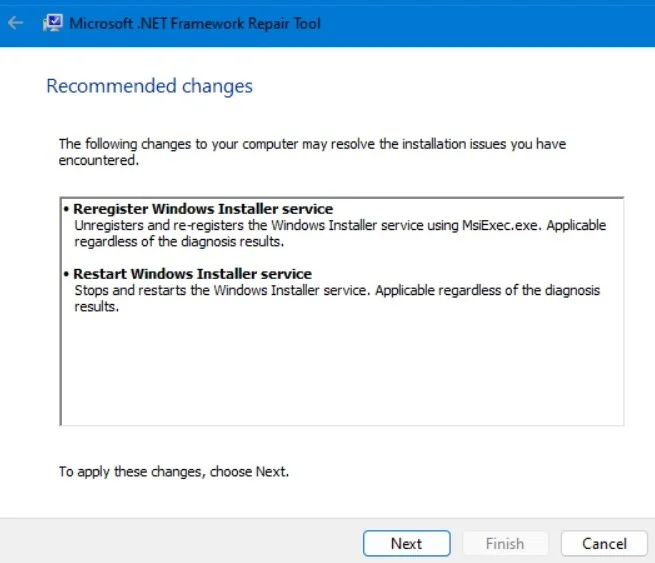
<p style="text-align: justify;">Công cụ Microsoft .NET Framework Repair là một tiện ích hệ thống giúp nhanh chóng giải quyết tận gốc vấn đề .NET mà bạn đang gặp phải. Tải xuống từ&nbsp;trang web Microsoft Support, sau đó chạy nó.</p>

<p style="text-align: justify;">Tiện ích sẽ xác minh các vấn đề hiện tại trên máy tính và đề cập đến những thay đổi được đề xuất. Chỉ cần tiếp tục nhấp vào&nbsp;<strong>Next &gt; Finish</strong>&nbsp;để hoàn tất việc khắc phục sự cố.<br />
<span style="color:rgb(192, 57, 43);"><strong>https://support.microsoft.com/en-us/topic/microsoft-net-framework-repair-tool-is-available-942a01e3-5b8b-7abb-c166-c34a2f4b612a</strong></span></p>

<figure>
<div style="text-align: justify;"><img alt="Chạy công cụ Microsoft .NET Framework Repair với các thay đổi được đề xuất." data-i="0" data-src="https://st.quantrimang.com/photos/image/2024/05/21/sua-loi-microsoft-net-framework-1.jpg" data-was-processed="true" height="563" src="https://st.quantrimang.com/photos/image/2024/05/21/sua-loi-microsoft-net-framework-1.jpg" width="655" /></div>

<figcaption>
<div style="text-align: justify;">Chạy công cụ Microsoft .NET Framework Repair với các thay đổi được đề xuất.</div>
</figcaption>
</figure>

<div style="text-align: justify;">&nbsp;</div>

<h3 style="text-align: justify;">2. Bật hoặc tắt các tính năng Windows trong Control Panel</h3>

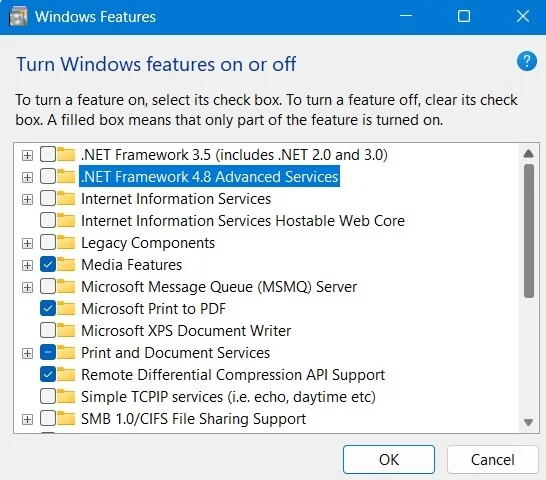
<p style="text-align: justify;">Nếu bạn đang xử lý các file bị hỏng hoặc lỗi trong .NET Framework, việc khắc phục sự cố sẽ dễ dàng hơn bằng cách tắt các tính năng của Windows trong Control Panel, sau đó bật lại.</p>

<p style="text-align: justify;">Mở Control Panel, sau đó đi tới&nbsp;<strong>Programs</strong>&nbsp;-&gt;&nbsp;<strong>Programs and Features</strong>&nbsp;-&gt;&nbsp;<strong>Turn Windows Features On or Off</strong>. Sau khi cửa sổ pop-up mới mở ra, hãy bỏ chọn các hộp tương ứng với service .NET, sau đó nhấp vào&nbsp;<strong>OK.</strong></p>

<figure>
<div style="text-align: justify;"><img alt="Bỏ chọn các tùy chọn .NET trong Turn Windows Features On or Off" data-adbro-processed="true" data-i="1" data-src="https://st.quantrimang.com/photos/image/2024/05/21/sua-loi-microsoft-net-framework-2.jpg" data-was-processed="true" height="480" src="https://st.quantrimang.com/photos/image/2024/05/21/sua-loi-microsoft-net-framework-2.jpg" width="546" /></div>

<figcaption>
<div style="text-align: justify;">Bỏ chọn các tùy chọn .NET trong Turn Windows Features On or Off</div>
</figcaption>
</figure>

<p style="text-align: justify;">Sẽ mất vài giây để áp dụng các thay đổi và tắt .NET Framework trên thiết bị. Bạn có thể kích hoạt lại nó sau khi&nbsp;khởi động lại PC.</p>

<h3 style="text-align: justify;">3. Sử dụng Program Compatibility Troubleshooter</h3>

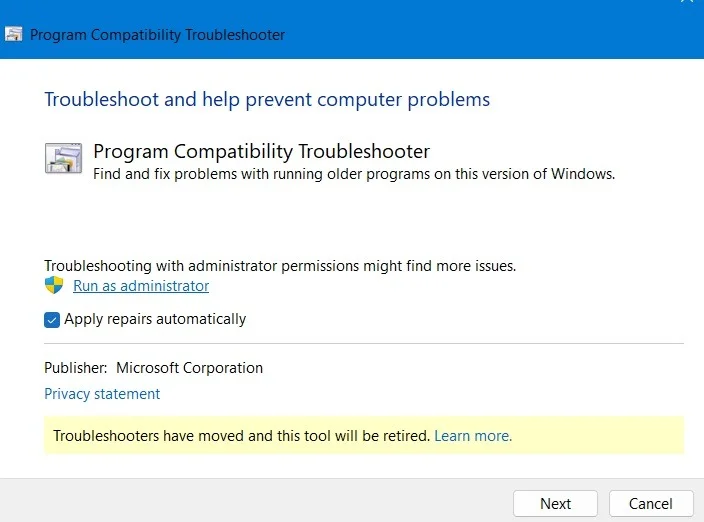
<p style="text-align: justify;">Một trong những cách tốt nhất để đảm bảo các ứng dụng Windows chạy như dự định là mở Program Compatibility Troubleshooter. Nó có thể được truy cập từ menu tìm kiếm hoặc&nbsp;<strong>Settings</strong>&nbsp;-&gt;&nbsp;<strong>System</strong>&nbsp;-&gt;&nbsp;<strong>Troubleshoot</strong>&nbsp;-&gt;&nbsp;<strong>Other Troubleshooters</strong>.</p>

<p style="text-align: justify;">Sau khi khởi động tiện ích, hãy nhấp vào hộp kiểm bên cạnh&nbsp;<strong>Apply repairs automatically</strong>. Làm theo hướng dẫn trên màn hình để xác định ứng dụng đang gặp sự cố và giải quyết sự cố của ứng dụng đó.</p>

<figure>
<div style="text-align: justify;"><img alt="Chạy Program Compatibility Troubleshooter và tự động áp dụng sửa chữa." data-i="2" data-src="https://st.quantrimang.com/photos/image/2024/05/21/sua-loi-microsoft-net-framework-3.jpg" data-was-processed="true" height="522" src="https://st.quantrimang.com/photos/image/2024/05/21/sua-loi-microsoft-net-framework-3.jpg" width="704" /></div>

<figcaption>
<div style="text-align: justify;">Chạy Program Compatibility Troubleshooter và tự động áp dụng sửa chữa.</div>
</figcaption>
</figure>

<div style="text-align: justify;">&nbsp;</div>

<h3 style="text-align: justify;">4. Đặt các biến môi trường Temp/Tmp thành mặc định</h3>

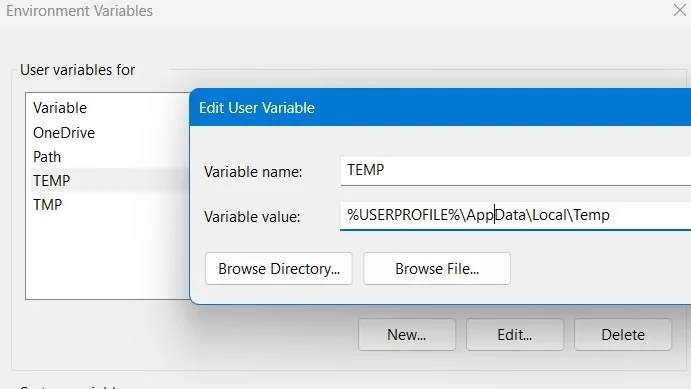
<p style="text-align: justify;">Nếu các biến môi trường Windows không được đặt đúng đường dẫn mặc định, điều đó có thể gây ra nhiều lỗi hệ thống khác nhau, bao gồm cả sự cố .NET Framework.</p>

<p style="text-align: justify;">Đi tới&nbsp;<strong>This PC</strong>&nbsp;trên máy tính, nhấp chuột phải vào nó để chọn&nbsp;<strong>Properties</strong>, sau đó nhấp vào&nbsp;<strong>Advanced system settings</strong>. Chuyển đến tab&nbsp;<strong>Advanced</strong>&nbsp;trong cửa sổ pop-up và chọn&nbsp;<strong>Environment Variables</strong>. Đối với các biến người dùng&nbsp;<strong>Temp</strong>&nbsp;và&nbsp;<strong>Tmp</strong>, hãy đảm bảo rằng giá trị Variable value trỏ đến&nbsp;<strong>“%USERPROFILE%\AppData\Local\Variable Name”.</strong></p>

<figure>
<div style="text-align: justify;"><img alt="Sửa biến môi trường cho Temp thành đường dẫn mặc định của nó." data-i="3" data-src="https://st.quantrimang.com/photos/image/2024/05/21/sua-loi-microsoft-net-framework-4.jpg" data-was-processed="true" height="389" src="https://st.quantrimang.com/photos/image/2024/05/21/sua-loi-microsoft-net-framework-4.jpg" width="691" /></div>

<figcaption>
<div style="text-align: justify;">Sửa biến môi trường cho Temp thành đường dẫn mặc định của nó.</div>
</figcaption>
</figure>

<h3 style="text-align: justify;">5. Gỡ cài đặt Visual Studio</h3>

<p style="text-align: justify;">Các ứng dụng .NET có nhiều ngôn ngữ lập trình cốt lõi, chẳng hạn như HTML, ASP.net, CSS, JavaScript, v.v... Tất cả các ngôn ngữ này đều thuộc về Visual Studio. Nếu bạn có thể làm mà không cần chính chương trình đó, tốt hơn hết là nên gỡ cài đặt nó. Tuy nhiên, nếu sử dụng ứng dụng, hãy đảm bảo rằng bạn luôn cập nhật nó.</p>

<h3 style="text-align: justify;">6. Chạy quét System File Checker</h3>

<p style="text-align: justify;">Để xử lý lỗi .NET Framework, hãy chạy quét System File Checker (SFC) đơn giản. Chắc chắn, điều này sẽ đi sâu vào các framework và thư viện của hệ điều hành Windows 11/10 và khắc phục mọi sự cố đối với .NET framework.</p>

<p style="text-align: justify;">Với tất cả các cách khắc phục sự cố Microsoft .NET Framework đã được xác định, hãy tìm hiểu&nbsp;cách cài đặt phiên bản mới nhất của phần mềm này trên thiết bị Windows.</p>
		</div>
				<div id="author">
						<p>
				<strong>Nguồn tin:</strong>
				Quantrimang.com
			</p>
		</div>
	</div>
	<div id="footer" class="clearfix">
		<div id="url">
			<strong>URL của bản tin này: </strong><a href="https://www.nguoicodonvn2008.info/vi/news/savefile/kien-thuc-may-tinh/cach-khac-phuc-loi-microsoft-net-framework-8386.html" title="Cách khắc phục lỗi Microsoft .NET Framework">https://www.nguoicodonvn2008.info/vi/news/savefile/kien-thuc-may-tinh/cach-khac-phuc-loi-microsoft-net-framework-8386.html</a>

		</div>
		<div class="clear"></div>
		<div class="copyright">
			&copy; .&#x3A; Nguoicodonvn2008.info - Cõi lòng người cô đơn &#x3A;.
		</div>
		<div id="contact">
			<a href="mailto:admin@nguoicodonvn2008.info">admin@nguoicodonvn2008.info</a>
		</div>
	</div>
</div>
        <div id="timeoutsess" class="chromeframe">
            Bạn đã không sử dụng Site, <a onclick="timeoutsesscancel();" href="https://nguoicodonvn2008.info/#">Bấm vào đây để duy trì trạng thái đăng nhập</a>. Thời gian chờ: <span id="secField"> 60 </span> giây
        </div>
        <div id="openidResult" class="nv-alert" style="display:none"></div>
        <div id="openidBt" data-result="" data-redirect=""></div>
		</script>
		<div class="car-top">
  <span><img src="https://nguoicodonvn2008.info/themes/default/images/car.png" alt=""></span>
</div>
<script src="https://nguoicodonvn2008.info/assets/js/jquery/jquery.min.js"></script>
<script>var nv_base_siteurl="/",nv_lang_data="vi",nv_lang_interface="vi",nv_name_variable="nv",nv_fc_variable="op",nv_lang_variable="language",nv_module_name="news",nv_func_name="savefile",nv_is_user=0, nv_my_ofs=-4,nv_my_abbr="EDT",nv_cookie_prefix="nv4c_e856T",nv_check_pass_mstime=1738000,nv_area_admin=0,nv_safemode=0,theme_responsive=0,nv_recaptcha_ver=2,nv_recaptcha_sitekey="",nv_recaptcha_type="image",XSSsanitize=1;</script>
<script src="https://nguoicodonvn2008.info/assets/js/language/vi.js"></script>
<script src="https://nguoicodonvn2008.info/assets/js/DOMPurify/purify3.js"></script>
<script src="https://nguoicodonvn2008.info/assets/js/global.js"></script>
<script src="https://nguoicodonvn2008.info/assets/js/site.js"></script>
<script src="https://nguoicodonvn2008.info/themes/default/js/news.js"></script>
<script src="https://nguoicodonvn2008.info/themes/default/js/main.js"></script>
<script src="https://nguoicodonvn2008.info/themes/default/js/custom.js"></script>
<script type="application/ld+json">
        {
            "@context": "https://schema.org",
            "@type": "Organization",
            "url": "https://nguoicodonvn2008.info",
            "logo": "https://nguoicodonvn2008.info/uploads/angel.gif"
        }
        </script>
<script src="https://nguoicodonvn2008.info/themes/default/js/bootstrap.min.js"></script>
<script type="text/javascript">
var $scrolltop = $('.car-top');
$scrolltop.on('click', function () {
    $('html,body').animate({
        scrollTop: 0
    }, 800);
    $(this).addClass("car-run");
    setTimeout(function(){ $scrolltop.removeClass('car-run');}, 1000);
    return false;
});
$(window).on('scroll', function ()
{ 
    if($(window).scrollTop() >= 200)
    {
        $scrolltop.addClass("show");
        $scrolltop.addClass("car-down");
    }
    else
    {
       $scrolltop.removeClass("show");
       setTimeout(function(){ $scrolltop.removeClass('car-down');}, 300);
    }
});
</script>
</body>
</html>