<!DOCTYPE html>
    <html lang="vi" xmlns="http://www.w3.org/1999/xhtml" prefix="og: http://ogp.me/ns#">
    <head>
<title>Cách khắc phục lỗi máy in &quot;Filter Failed&quot; trên máy Mac</title>
<meta name="description" content="Cách khắc phục lỗi máy in &quot;Filter Failed&quot; trên máy Mac - Savefile - Tin Tức -...">
<meta name="author" content=".: Nguoicodonvn2008.info - Cõi lòng người cô đơn :.">
<meta name="copyright" content=".: Nguoicodonvn2008.info - Cõi lòng người cô đơn :. [admin@nguoicodonvn2008.info]">
<meta name="robots" content="index, archive, follow, noodp">
<meta name="googlebot" content="index,archive,follow,noodp">
<meta name="msnbot" content="all,index,follow">
<meta name="generator" content="NukeViet v4.5">
<meta http-equiv="Content-Type" content="text/html; charset=utf-8">
<meta property="og:title" content="Cách khắc phục lỗi máy in &quot;Filter Failed&quot; trên máy Mac">
<meta property="og:type" content="website">
<meta property="og:description" content="Savefile - Tin Tức - https&#x3A;&#x002F;&#x002F;www.nguoicodonvn2008.info&#x002F;vi&#x002F;news&#x002F;savefile&#x002F;kien-thuc-may-tinh&#x002F;cach-khac-phuc-loi-may-in-filter-failed-tren-may-mac-7830.html">
<meta property="og:site_name" content=".&#x3A; Nguoicodonvn2008.info - Cõi lòng người cô đơn &#x3A;.">
<meta property="og:url" content="https://www.nguoicodonvn2008.info/vi/news/savefile/kien-thuc-may-tinh/cach-khac-phuc-loi-may-in-filter-failed-tren-may-mac-7830.html">
<link rel="shortcut icon" href="https://nguoicodonvn2008.info/favicon.ico">
<link rel="canonical" href="https://www.nguoicodonvn2008.info/vi/news/savefile/kien-thuc-may-tinh/cach-khac-phuc-loi-may-in-filter-failed-tren-may-mac-7830.html">
<link rel="alternate" href="https://nguoicodonvn2008.info/vi/news/rss/" title="Tin Tức" type="application/rss+xml">
<link rel="alternate" href="https://nguoicodonvn2008.info/vi/news/rss/karaoke-dual/" title="Tin Tức - Karaoke Dual" type="application/rss+xml">
<link rel="alternate" href="https://nguoicodonvn2008.info/vi/news/rss/nhac-tre/" title="Tin Tức - Nhạc trẻ" type="application/rss+xml">
<link rel="alternate" href="https://nguoicodonvn2008.info/vi/news/rss/tru-tinh/" title="Tin Tức - Trữ tình" type="application/rss+xml">
<link rel="alternate" href="https://nguoicodonvn2008.info/vi/news/rss/nuoc-ngoai/" title="Tin Tức - Nước ngoài" type="application/rss+xml">
<link rel="alternate" href="https://nguoicodonvn2008.info/vi/news/rss/remix/" title="Tin Tức - Remix" type="application/rss+xml">
<link rel="alternate" href="https://nguoicodonvn2008.info/vi/news/rss/tam-su-tinh-yeu/" title="Tin Tức - Tâm sự tình yêu" type="application/rss+xml">
<link rel="alternate" href="https://nguoicodonvn2008.info/vi/news/rss/tho-suu-tam/" title="Tin Tức - Thơ sưu tầm" type="application/rss+xml">
<link rel="alternate" href="https://nguoicodonvn2008.info/vi/news/rss/cuoc-song/" title="Tin Tức - Cuộc sống" type="application/rss+xml">
<link rel="alternate" href="https://nguoicodonvn2008.info/vi/news/rss/phan-mem/" title="Tin Tức - Phần mềm" type="application/rss+xml">
<link rel="alternate" href="https://nguoicodonvn2008.info/vi/news/rss/kien-thuc-may-tinh/" title="Tin Tức - Kiến thức máy tính" type="application/rss+xml">
<link rel="alternate" href="https://nguoicodonvn2008.info/vi/news/rss/hoc-tap/" title="Tin Tức - Học tập" type="application/rss+xml">
<link rel="alternate" href="https://nguoicodonvn2008.info/vi/news/rss/tai-lieu/" title="Tin Tức - Tài liệu" type="application/rss+xml">
<link rel="alternate" href="https://nguoicodonvn2008.info/vi/news/rss/de-thi/" title="Tin Tức - Đề thi" type="application/rss+xml">
<link rel="preload" as="style" href="https://nguoicodonvn2008.info/assets/css/font-awesome.min.css" type="text/css">
<link rel="preload" as="style" href="https://nguoicodonvn2008.info/themes/default/css/bootstrap.non-responsive.css" type="text/css">
<link rel="preload" as="style" href="https://nguoicodonvn2008.info/themes/default/css/style.css" type="text/css">
<link rel="preload" as="style" href="https://nguoicodonvn2008.info/themes/default/css/style.non-responsive.css" type="text/css">
<link rel="preload" as="style" href="https://nguoicodonvn2008.info/themes/default/css/news.css" type="text/css">
<link rel="preload" as="style" href="https://nguoicodonvn2008.info/themes/default/css/custom.css" type="text/css">
<link rel="preload" as="script" href="https://nguoicodonvn2008.info/assets/js/jquery/jquery.min.js" type="text/javascript">
<link rel="preload" as="script" href="https://nguoicodonvn2008.info/assets/js/language/vi.js" type="text/javascript">
<link rel="preload" as="script" href="https://nguoicodonvn2008.info/assets/js/DOMPurify/purify3.js" type="text/javascript">
<link rel="preload" as="script" href="https://nguoicodonvn2008.info/assets/js/global.js" type="text/javascript">
<link rel="preload" as="script" href="https://nguoicodonvn2008.info/assets/js/site.js" type="text/javascript">
<link rel="preload" as="script" href="https://nguoicodonvn2008.info/themes/default/js/news.js" type="text/javascript">
<link rel="preload" as="script" href="https://nguoicodonvn2008.info/themes/default/js/main.js" type="text/javascript">
<link rel="preload" as="script" href="https://nguoicodonvn2008.info/themes/default/js/custom.js" type="text/javascript">
<link rel="preload" as="script" href="https://nguoicodonvn2008.info/themes/default/js/bootstrap.min.js" type="text/javascript">
<link rel="stylesheet" href="https://nguoicodonvn2008.info/assets/css/font-awesome.min.css">
<link rel="stylesheet" href="https://nguoicodonvn2008.info/themes/default/css/bootstrap.non-responsive.css">
<link rel="stylesheet" href="https://nguoicodonvn2008.info/themes/default/css/style.css">
<link rel="stylesheet" href="https://nguoicodonvn2008.info/themes/default/css/style.non-responsive.css">
<link rel="StyleSheet" href="https://nguoicodonvn2008.info/themes/default/css/news.css">
<link rel="stylesheet" href="https://nguoicodonvn2008.info/themes/default/css/custom.css">
<style type="text/css">
	body{background: #fff;}
</style>
    </head>
    <body>
<div id="print">
	<div id="hd_print">
		<h2 class="pull-left">.&#x3A; Nguoicodonvn2008.info - Cõi lòng người cô đơn &#x3A;.</h2>
		<p class="pull-right"><a title=".&#x3A; Nguoicodonvn2008.info - Cõi lòng người cô đơn &#x3A;." href="https://nguoicodonvn2008.info/">https://nguoicodonvn2008.info</a></p>
	</div>
	<div class="clear"></div>
	<hr />
	<div id="content">
		<h1>Cách khắc phục lỗi máy in &quot;Filter Failed&quot; trên máy Mac</h1>
		<ul class="list-inline">
			<li>Thứ tư - 06/12/2023 09:06</li>
			<li class="hidden-print txtrequired"><em class="fa fa-print">&nbsp;</em><a title="In ra" href="javascript:;" onclick="window.print()">In ra</a></li>
			<li class="hidden-print txtrequired"><em class="fa fa-power-off">&nbsp;</em><a title="Đóng cửa sổ này" href="javascript:;" onclick="window.close()">Đóng cửa sổ này</a></li>
		</ul>
		<div class="clear"></div>
		<div id="hometext">
		</div>
				<div class="imghome">
			<img alt="Cách khắc phục lỗi máy in &quot;Filter Failed&quot; trên máy Mac" src="https://st.quantrimang.com/photos/image/2023/12/06/sua-loi-may-in-filter-failed-tren-mac-4.jpg" width="460" class="img-thumbnail" />
		</div>
		<div class="clear"></div>
		<div id="bodytext" class="clearfix">
			<p style="text-align: justify;">Nếu máy in của bạn đưa ra lỗi &quot;Filter Failed&quot; khi bạn gửi lệnh in từ máy Mac, thì bạn không đơn độc. Sự cố này ảnh hưởng đến máy in của Epson, Canon, HP và nhiều nhãn hiệu khác. Rất may, việc sửa lỗi này cũng dễ dàng như reset hệ thống in macOS và cài đặt driver cập nhật.</p>

<h2 style="text-align: justify;">Nguyên nhân gây ra lỗi máy in &quot;Filter Failed&quot;?</h2>

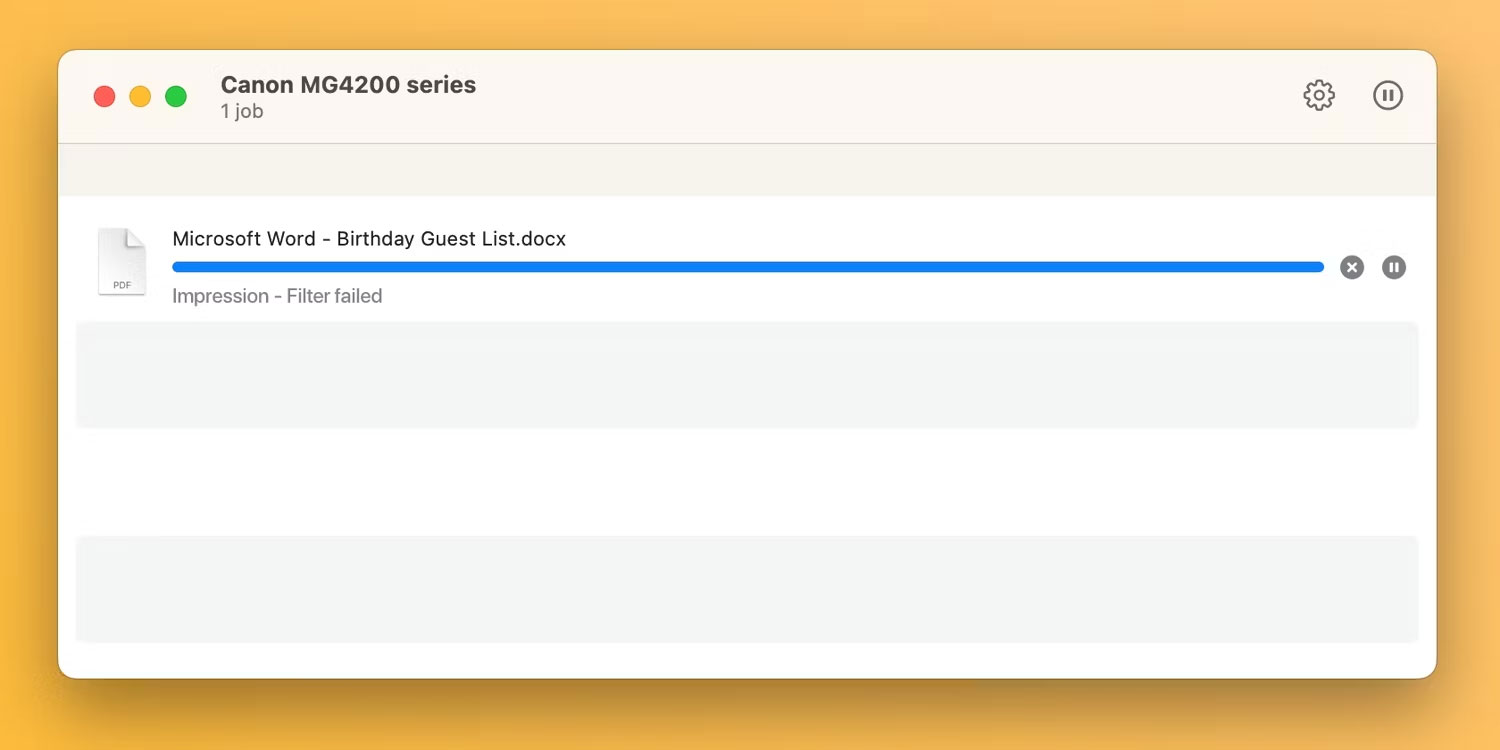
<p style="text-align: justify;">Thủ phạm phổ biến nhất khiến lệnh in gặp lỗi thông báo &quot;Stopped - Filter Failed&quot; hoặc tương tự là driver máy in bị hỏng hoặc không tương thích. Điều này thường xảy ra khi bạn cài đặt hoặc nâng cấp lên phiên bản macOS mới hơn.</p>

<figure>
<div style="text-align: justify;"><img alt="Hàng đợi in macOS với lệnh in hiển thị lỗi Filter Failed" data-i="0" data-src="https://st.quantrimang.com/photos/image/2023/12/06/sua-loi-may-in-filter-failed-tren-mac-1.jpg" data-was-processed="true" height="750" src="https://st.quantrimang.com/photos/image/2023/12/06/sua-loi-may-in-filter-failed-tren-mac-1.jpg" width="1500" /></div>

<figcaption>
<div style="text-align: justify;">Hàng đợi in macOS với lệnh in hiển thị lỗi Filter Failed</div>
</figcaption>
</figure>

<div style="text-align: justify;"><iframe allowtransparency="true" data-google-container-id="a!2" data-google-query-id="CLaquuX9-oIDFQTzTAIdtU8BDQ" data-load-complete="true" frameborder="0" height="0" hspace="0" id="aswift_1" marginheight="0" marginwidth="0" name="aswift_1" sandbox="" scrolling="no" vspace="0" width="694"></iframe></div>

<p style="text-align: justify;">Trong trường hợp đó, driver máy in hiện tại của bạn có thể không tương thích đến mức việc cố gắng in từ bất kỳ ứng dụng nào sẽ dẫn đến lỗi hoặc khiến ứng dụng bị thoát.</p>

<h2 style="text-align: justify;">Các bước để khắc phục lỗi máy in &quot;Filter Failed&quot; trong macOS</h2>

<p style="text-align: justify;">Để khắc phục lỗi máy in &quot;Filter Failed&quot; khét tiếng, trước tiên bạn cần reset hệ thống in, thao tác này sẽ xóa hàng đợi in cũng như xóa máy in và cài đặt preset của bạn. Tiếp theo, bạn nên tải xuống driver mới nhất tương thích với hệ điều hành của mình và thêm lại máy in.</p>

<h3 style="text-align: justify;">1. Reset hệ thống in macOS</h3>

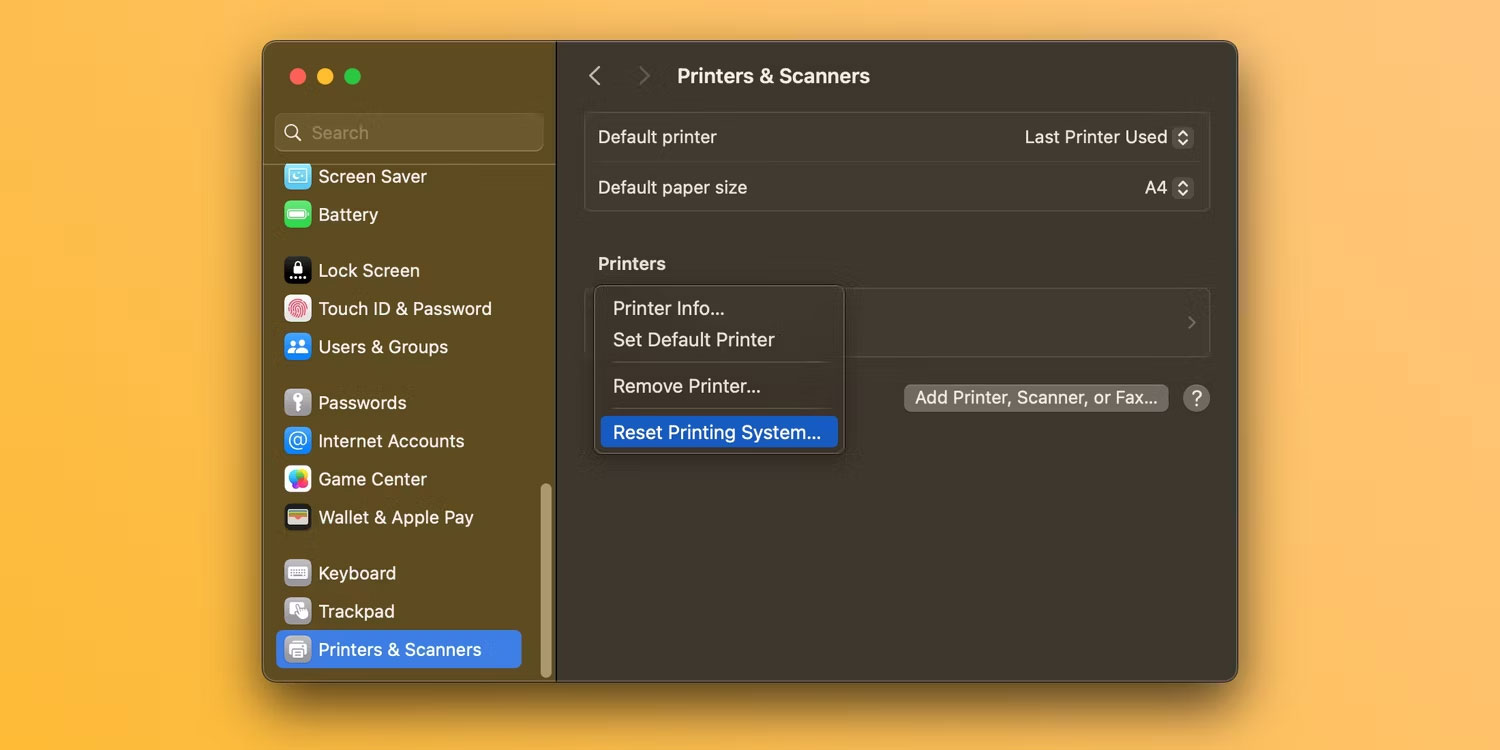
<p style="text-align: justify;">Để reset hệ thống in, hãy chuyển đến menu&nbsp;<strong>Apple &gt; System Settings</strong>&nbsp;từ thanh menu và chọn&nbsp;<strong>Printers &amp; Scanners</strong>&nbsp;từ thanh bên. Sau đó, giữ&nbsp;<strong>Control</strong>&nbsp;khi bấm vào máy in của bạn ở bên phải và chọn&nbsp;<strong>Reset Printing System</strong>.</p>

<figure>
<div style="text-align: justify;"><img alt="Reset hệ thống máy in trong cài đặt hệ thống macOS" data-adbro-processed="true" data-i="1" data-src="https://st.quantrimang.com/photos/image/2023/12/06/sua-loi-may-in-filter-failed-tren-mac-2.jpg" data-was-processed="true" height="750" src="https://st.quantrimang.com/photos/image/2023/12/06/sua-loi-may-in-filter-failed-tren-mac-2.jpg" width="1500" /></div>

<figcaption>
<div style="text-align: justify;">Reset hệ thống máy in trong cài đặt hệ thống macOS</div>
</figcaption>
</figure>

<p style="text-align: justify;">Xác nhận thao tác bằng cách chọn&nbsp;<strong>Reset</strong>&nbsp;(bạn có thể cần nhập mật khẩu admin của mình). Khởi động lại máy Mac và truy cập lại phần này để xác nhận không có thiết bị nào được liệt kê trong&nbsp;<strong>Printers</strong>.</p>

<div style="text-align: justify;"><iframe allowtransparency="true" data-google-container-id="a!3" data-google-query-id="CPfcvuX9-oIDFTYNewcd6kIJSg" data-load-complete="true" frameborder="0" height="0" hspace="0" id="aswift_2" marginheight="0" marginwidth="0" name="aswift_2" sandbox="" scrolling="no" vspace="0" width="694"></iframe></div>

<p style="text-align: justify;"><strong>Lưu ý</strong>: Bạn cũng nên di chuyển thủ công các file driver còn lại từ&nbsp;<strong>~/Library/Printers/</strong>&nbsp;và&nbsp;<strong>~/Library/Printers/PPDs/Contents/Resources/</strong>&nbsp;vào Trash. Nhấp vào&nbsp;<strong>Go &gt; Go to Folder</strong>&nbsp;từ thanh menu để đi tới các thư mục này.</p>

<h3 style="text-align: justify;">2. Cài đặt lại driver và thêm lại máy in</h3>

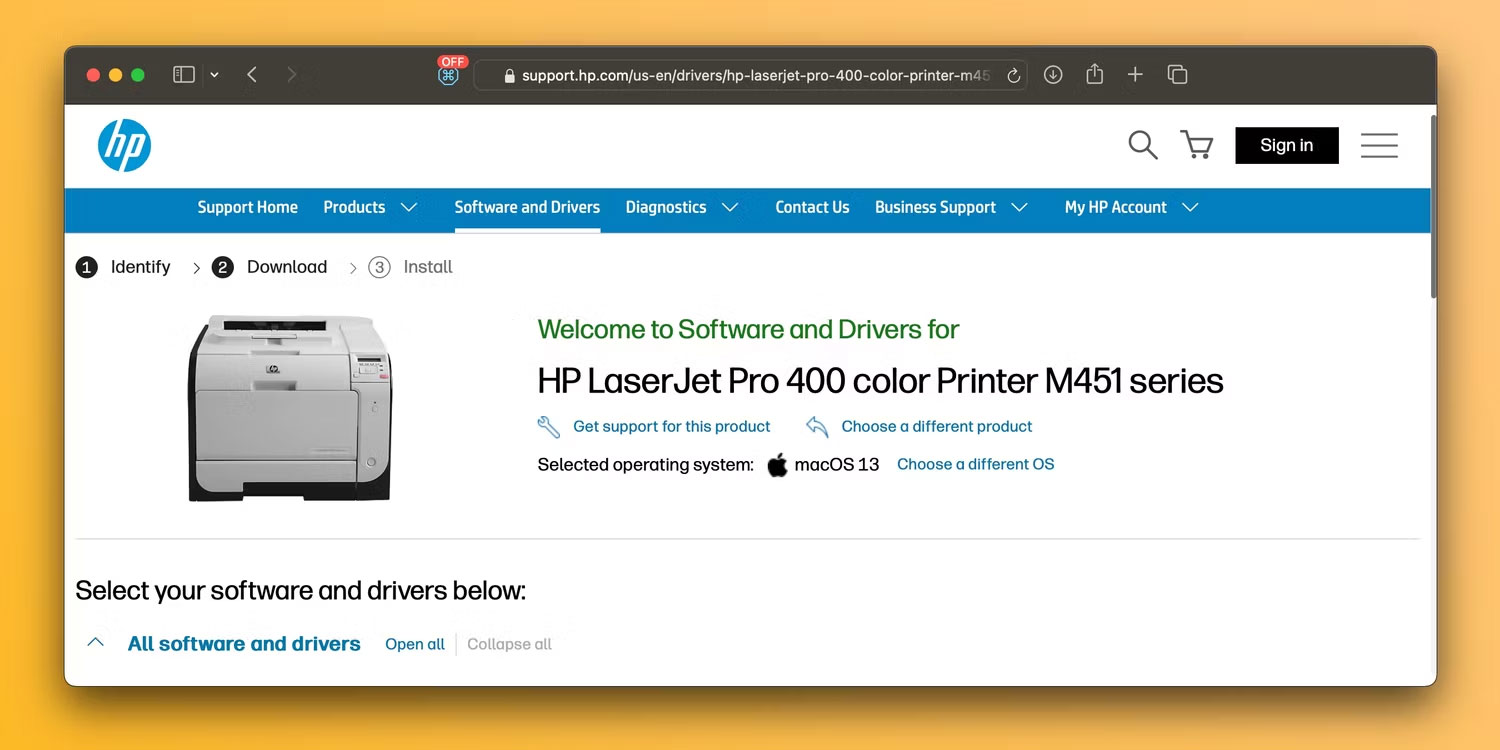
<p style="text-align: justify;">Bắt đầu bằng cách tải xuống phần mềm máy in mới nhất từ trang hỗ trợ của nhà sản xuất. Tuy nhiên, nếu máy in của bạn hỗ trợ AirPrint, bạn có thể bỏ qua bước này một cách an toàn.</p>

<figure>
<div style="text-align: justify;"><img alt="Trang tải driver máy in HP trên trình duyệt Safari" data-i="2" data-src="https://st.quantrimang.com/photos/image/2023/12/06/sua-loi-may-in-filter-failed-tren-mac-3.jpg" data-was-processed="true" height="750" src="https://st.quantrimang.com/photos/image/2023/12/06/sua-loi-may-in-filter-failed-tren-mac-3.jpg" width="1500" /></div>

<figcaption>
<div style="text-align: justify;">Trang tải driver máy in HP trên trình duyệt Safari</div>
</figcaption>
</figure>

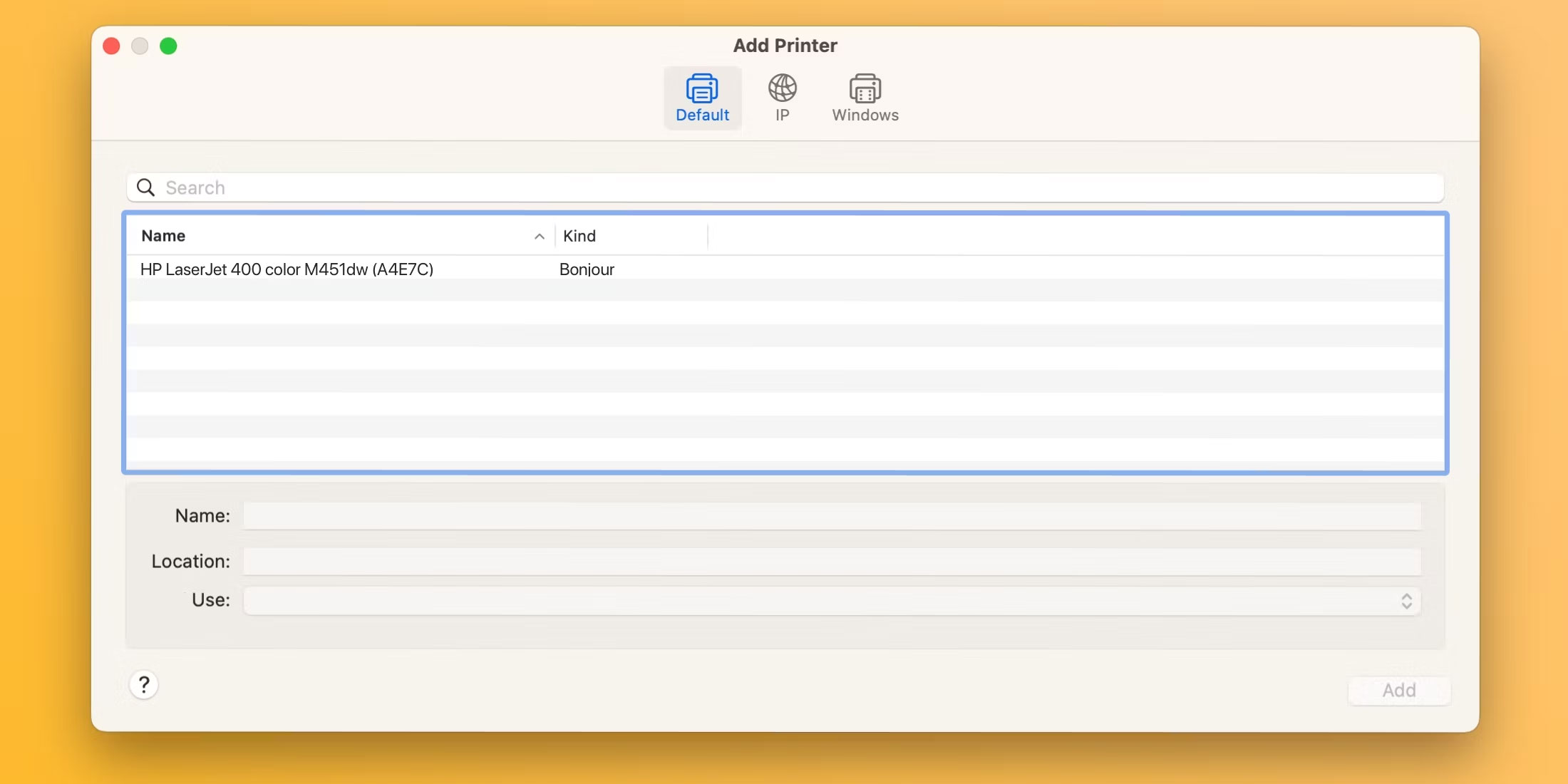
<p style="text-align: justify;">Để thêm máy in vào máy Mac, hãy kết nối máy in với máy tính, bật máy rồi đi tới&nbsp;<strong>System Settings &gt; Printers &amp; Scanners</strong>. Nhấp vào nút&nbsp;<strong>Add Printer, Scanner, or Fax</strong>&nbsp;ở bên phải, chọn tab&nbsp;<strong>Default</strong>, chọn thiết bị của bạn từ danh sách&nbsp;<strong>Printers</strong>&nbsp;và nhấp vào&nbsp;<strong>Add</strong>.</p>

<figure>
<div style="text-align: justify;"><img alt="Thêm hộp thoại Printers trong cài đặt hệ thống macOS Sonoma" data-i="3" data-src="https://st.quantrimang.com/photos/image/2023/12/06/sua-loi-may-in-filter-failed-tren-mac-4.jpg" data-was-processed="true" height="1100" src="https://st.quantrimang.com/photos/image/2023/12/06/sua-loi-may-in-filter-failed-tren-mac-4.jpg" width="2200" /></div>

<figcaption>
<div style="text-align: justify;">Thêm hộp thoại Printers trong cài đặt hệ thống macOS Sonoma</div>
</figcaption>
</figure>

<p style="text-align: justify;">Khi driver máy in được cài đặt lại và máy in được thêm lại, bạn sẽ có thể in tài liệu trên máy Mac từ Microsoft Word, Preview và các ứng dụng khác mà không gặp lỗi &quot;Filter Failed&quot;.</p>

<h3 style="text-align: justify;">3. Các cách sửa lỗi máy in chung khác nên thử</h3>

<p style="text-align: justify;">Trang hỗ trợ in macOS của Apple cung cấp một số cách sửa lỗi chung có thể hữu ích khi khắc phục sự cố máy in, bao gồm các mẹo sau:</p>

<ul>
	<li style="text-align: justify;">Xác minh rằng máy in có đủ mực</li>
	<li style="text-align: justify;">Kiểm tra kết nối và cáp USB</li>
	<li style="text-align: justify;">Tắt tiện ích mở rộng hộp thoại Print</li>
	<li style="text-align: justify;">Hãy thử in từ một ứng dụng khác</li>
	<li style="text-align: justify;">Khởi động lại máy Mac và máy in của bạn</li>
</ul>

<p style="text-align: justify;">Đôi khi, những sự cố như thế này có thể xảy ra sau khi cài đặt bản cập nhật macOS mới. Tuy nhiên, với các bước này, bạn có thể khắc phục lỗi &quot;Filter Failed&quot; và giúp máy in của bạn hoạt động trở lại trong vòng vài phút.</p>

<p style="text-align: justify;">Vì macOS không còn tích hợp driver máy in nữa nên hãy đảm bảo máy in tiếp theo của bạn hỗ trợ&nbsp;công nghệ AirPrint của Apple, cho phép bạn in mà không cần tải xuống hoặc cài đặt driver.</p>
		</div>
				<div id="author">
						<p>
				<strong>Nguồn tin:</strong>
				Quantrimang.com
			</p>
		</div>
	</div>
	<div id="footer" class="clearfix">
		<div id="url">
			<strong>URL của bản tin này: </strong><a href="https://www.nguoicodonvn2008.info/vi/news/savefile/kien-thuc-may-tinh/cach-khac-phuc-loi-may-in-filter-failed-tren-may-mac-7830.html" title="Cách khắc phục lỗi máy in &quot;Filter Failed&quot; trên máy Mac">https://www.nguoicodonvn2008.info/vi/news/savefile/kien-thuc-may-tinh/cach-khac-phuc-loi-may-in-filter-failed-tren-may-mac-7830.html</a>

		</div>
		<div class="clear"></div>
		<div class="copyright">
			&copy; .&#x3A; Nguoicodonvn2008.info - Cõi lòng người cô đơn &#x3A;.
		</div>
		<div id="contact">
			<a href="mailto:admin@nguoicodonvn2008.info">admin@nguoicodonvn2008.info</a>
		</div>
	</div>
</div>
        <div id="timeoutsess" class="chromeframe">
            Bạn đã không sử dụng Site, <a onclick="timeoutsesscancel();" href="https://nguoicodonvn2008.info/#">Bấm vào đây để duy trì trạng thái đăng nhập</a>. Thời gian chờ: <span id="secField"> 60 </span> giây
        </div>
        <div id="openidResult" class="nv-alert" style="display:none"></div>
        <div id="openidBt" data-result="" data-redirect=""></div>
		</script>
		<div class="car-top">
  <span><img src="https://nguoicodonvn2008.info/themes/default/images/car.png" alt=""></span>
</div>
<div id="run_cronjobs" style="visibility:hidden;display:none;"><img alt="cron" src="/index.php?second=cronjobs&amp;p=i45cwIO2" width="1" height="1" /></div>
<script src="https://nguoicodonvn2008.info/assets/js/jquery/jquery.min.js"></script>
<script>var nv_base_siteurl="/",nv_lang_data="vi",nv_lang_interface="vi",nv_name_variable="nv",nv_fc_variable="op",nv_lang_variable="language",nv_module_name="news",nv_func_name="savefile",nv_is_user=0, nv_my_ofs=-4,nv_my_abbr="EDT",nv_cookie_prefix="nv4c_e856T",nv_check_pass_mstime=1738000,nv_area_admin=0,nv_safemode=0,theme_responsive=0,nv_recaptcha_ver=2,nv_recaptcha_sitekey="",nv_recaptcha_type="image",XSSsanitize=1;</script>
<script src="https://nguoicodonvn2008.info/assets/js/language/vi.js"></script>
<script src="https://nguoicodonvn2008.info/assets/js/DOMPurify/purify3.js"></script>
<script src="https://nguoicodonvn2008.info/assets/js/global.js"></script>
<script src="https://nguoicodonvn2008.info/assets/js/site.js"></script>
<script src="https://nguoicodonvn2008.info/themes/default/js/news.js"></script>
<script src="https://nguoicodonvn2008.info/themes/default/js/main.js"></script>
<script src="https://nguoicodonvn2008.info/themes/default/js/custom.js"></script>
<script type="application/ld+json">
        {
            "@context": "https://schema.org",
            "@type": "Organization",
            "url": "https://nguoicodonvn2008.info",
            "logo": "https://nguoicodonvn2008.info/uploads/angel.gif"
        }
        </script>
<script src="https://nguoicodonvn2008.info/themes/default/js/bootstrap.min.js"></script>
<script type="text/javascript">
var $scrolltop = $('.car-top');
$scrolltop.on('click', function () {
    $('html,body').animate({
        scrollTop: 0
    }, 800);
    $(this).addClass("car-run");
    setTimeout(function(){ $scrolltop.removeClass('car-run');}, 1000);
    return false;
});
$(window).on('scroll', function ()
{ 
    if($(window).scrollTop() >= 200)
    {
        $scrolltop.addClass("show");
        $scrolltop.addClass("car-down");
    }
    else
    {
       $scrolltop.removeClass("show");
       setTimeout(function(){ $scrolltop.removeClass('car-down');}, 300);
    }
});
</script>
</body>
</html>