<!DOCTYPE html>
    <html lang="vi" xmlns="http://www.w3.org/1999/xhtml" prefix="og: http://ogp.me/ns#">
    <head>
<title>Cách khắc phục lỗi &quot;Folder Cannot Be Shared&quot; trong Windows</title>
<meta name="description" content="Cách khắc phục lỗi &quot;Folder Cannot Be Shared&quot; trong Windows - Savefile - Tin Tức -...">
<meta name="author" content=".: Nguoicodonvn2008.info - Cõi lòng người cô đơn :.">
<meta name="copyright" content=".: Nguoicodonvn2008.info - Cõi lòng người cô đơn :. [admin@nguoicodonvn2008.info]">
<meta name="robots" content="index, archive, follow, noodp">
<meta name="googlebot" content="index,archive,follow,noodp">
<meta name="msnbot" content="all,index,follow">
<meta name="generator" content="NukeViet v4.5">
<meta http-equiv="Content-Type" content="text/html; charset=utf-8">
<meta property="og:title" content="Cách khắc phục lỗi &quot;Folder Cannot Be Shared&quot; trong Windows">
<meta property="og:type" content="website">
<meta property="og:description" content="Savefile - Tin Tức - https&#x3A;&#x002F;&#x002F;www.nguoicodonvn2008.info&#x002F;vi&#x002F;news&#x002F;savefile&#x002F;kien-thuc-may-tinh&#x002F;cach-khac-phuc-loi-folder-cannot-be-shared-trong-windows-6071.html">
<meta property="og:site_name" content=".&#x3A; Nguoicodonvn2008.info - Cõi lòng người cô đơn &#x3A;.">
<meta property="og:url" content="https://www.nguoicodonvn2008.info/vi/news/savefile/kien-thuc-may-tinh/cach-khac-phuc-loi-folder-cannot-be-shared-trong-windows-6071.html">
<link rel="shortcut icon" href="https://nguoicodonvn2008.info/favicon.ico">
<link rel="canonical" href="https://www.nguoicodonvn2008.info/vi/news/savefile/kien-thuc-may-tinh/cach-khac-phuc-loi-folder-cannot-be-shared-trong-windows-6071.html">
<link rel="alternate" href="https://nguoicodonvn2008.info/vi/news/rss/" title="Tin Tức" type="application/rss+xml">
<link rel="alternate" href="https://nguoicodonvn2008.info/vi/news/rss/karaoke-dual/" title="Tin Tức - Karaoke Dual" type="application/rss+xml">
<link rel="alternate" href="https://nguoicodonvn2008.info/vi/news/rss/nhac-tre/" title="Tin Tức - Nhạc trẻ" type="application/rss+xml">
<link rel="alternate" href="https://nguoicodonvn2008.info/vi/news/rss/tru-tinh/" title="Tin Tức - Trữ tình" type="application/rss+xml">
<link rel="alternate" href="https://nguoicodonvn2008.info/vi/news/rss/nuoc-ngoai/" title="Tin Tức - Nước ngoài" type="application/rss+xml">
<link rel="alternate" href="https://nguoicodonvn2008.info/vi/news/rss/remix/" title="Tin Tức - Remix" type="application/rss+xml">
<link rel="alternate" href="https://nguoicodonvn2008.info/vi/news/rss/tam-su-tinh-yeu/" title="Tin Tức - Tâm sự tình yêu" type="application/rss+xml">
<link rel="alternate" href="https://nguoicodonvn2008.info/vi/news/rss/tho-suu-tam/" title="Tin Tức - Thơ sưu tầm" type="application/rss+xml">
<link rel="alternate" href="https://nguoicodonvn2008.info/vi/news/rss/cuoc-song/" title="Tin Tức - Cuộc sống" type="application/rss+xml">
<link rel="alternate" href="https://nguoicodonvn2008.info/vi/news/rss/phan-mem/" title="Tin Tức - Phần mềm" type="application/rss+xml">
<link rel="alternate" href="https://nguoicodonvn2008.info/vi/news/rss/kien-thuc-may-tinh/" title="Tin Tức - Kiến thức máy tính" type="application/rss+xml">
<link rel="alternate" href="https://nguoicodonvn2008.info/vi/news/rss/hoc-tap/" title="Tin Tức - Học tập" type="application/rss+xml">
<link rel="alternate" href="https://nguoicodonvn2008.info/vi/news/rss/tai-lieu/" title="Tin Tức - Tài liệu" type="application/rss+xml">
<link rel="alternate" href="https://nguoicodonvn2008.info/vi/news/rss/de-thi/" title="Tin Tức - Đề thi" type="application/rss+xml">
<link rel="preload" as="style" href="https://nguoicodonvn2008.info/assets/css/font-awesome.min.css" type="text/css">
<link rel="preload" as="style" href="https://nguoicodonvn2008.info/themes/default/css/bootstrap.non-responsive.css" type="text/css">
<link rel="preload" as="style" href="https://nguoicodonvn2008.info/themes/default/css/style.css" type="text/css">
<link rel="preload" as="style" href="https://nguoicodonvn2008.info/themes/default/css/style.non-responsive.css" type="text/css">
<link rel="preload" as="style" href="https://nguoicodonvn2008.info/themes/default/css/news.css" type="text/css">
<link rel="preload" as="style" href="https://nguoicodonvn2008.info/themes/default/css/custom.css" type="text/css">
<link rel="preload" as="script" href="https://nguoicodonvn2008.info/assets/js/jquery/jquery.min.js" type="text/javascript">
<link rel="preload" as="script" href="https://nguoicodonvn2008.info/assets/js/language/vi.js" type="text/javascript">
<link rel="preload" as="script" href="https://nguoicodonvn2008.info/assets/js/DOMPurify/purify3.js" type="text/javascript">
<link rel="preload" as="script" href="https://nguoicodonvn2008.info/assets/js/global.js" type="text/javascript">
<link rel="preload" as="script" href="https://nguoicodonvn2008.info/assets/js/site.js" type="text/javascript">
<link rel="preload" as="script" href="https://nguoicodonvn2008.info/themes/default/js/news.js" type="text/javascript">
<link rel="preload" as="script" href="https://nguoicodonvn2008.info/themes/default/js/main.js" type="text/javascript">
<link rel="preload" as="script" href="https://nguoicodonvn2008.info/themes/default/js/custom.js" type="text/javascript">
<link rel="preload" as="script" href="https://nguoicodonvn2008.info/themes/default/js/bootstrap.min.js" type="text/javascript">
<link rel="stylesheet" href="https://nguoicodonvn2008.info/assets/css/font-awesome.min.css">
<link rel="stylesheet" href="https://nguoicodonvn2008.info/themes/default/css/bootstrap.non-responsive.css">
<link rel="stylesheet" href="https://nguoicodonvn2008.info/themes/default/css/style.css">
<link rel="stylesheet" href="https://nguoicodonvn2008.info/themes/default/css/style.non-responsive.css">
<link rel="StyleSheet" href="https://nguoicodonvn2008.info/themes/default/css/news.css">
<link rel="stylesheet" href="https://nguoicodonvn2008.info/themes/default/css/custom.css">
<style type="text/css">
	body{background: #fff;}
</style>
    </head>
    <body>
<div id="print">
	<div id="hd_print">
		<h2 class="pull-left">.&#x3A; Nguoicodonvn2008.info - Cõi lòng người cô đơn &#x3A;.</h2>
		<p class="pull-right"><a title=".&#x3A; Nguoicodonvn2008.info - Cõi lòng người cô đơn &#x3A;." href="https://nguoicodonvn2008.info/">https://nguoicodonvn2008.info</a></p>
	</div>
	<div class="clear"></div>
	<hr />
	<div id="content">
		<h1>Cách khắc phục lỗi &quot;Folder Cannot Be Shared&quot; trong Windows</h1>
		<ul class="list-inline">
			<li>Thứ năm - 15/09/2022 00:54</li>
			<li class="hidden-print txtrequired"><em class="fa fa-print">&nbsp;</em><a title="In ra" href="javascript:;" onclick="window.print()">In ra</a></li>
			<li class="hidden-print txtrequired"><em class="fa fa-power-off">&nbsp;</em><a title="Đóng cửa sổ này" href="javascript:;" onclick="window.close()">Đóng cửa sổ này</a></li>
		</ul>
		<div class="clear"></div>
		<div id="hometext">
		</div>
				<div class="imghome">
			<img alt="Cách khắc phục lỗi &quot;Folder Cannot Be Shared&quot; trong Windows" src="https://st.quantrimang.com/photos/image/2022/09/14/khac-phuc-loi-folder-cannot-be-shared-1.jpg" width="460" class="img-thumbnail" />
		</div>
		<div class="clear"></div>
		<div id="bodytext" class="clearfix">
			<p style="text-align: justify;">Windows giúp bạn dễ dàng chia sẻ các file và thư mục qua mạng cục bộ... ít nhất là trong hầu hết mọi trường hợp. Đôi khi, bạn có thể gặp phải thông báo lỗi &quot;Folder Cannot Be Shared&quot;. Đây là một vấn đề khó chịu, nhưng có thể được giải quyết khá dễ dàng. Dưới đây là cách sửa lỗi &quot;Folder Cannot Be Shared&quot; trên Windows.</p>

<h2 style="text-align: justify;">1. Thêm một ngoại lệ cho phần mềm diệt virus</h2>

<p style="text-align: justify;">Phần mềm diệt virus&nbsp;của bạn có thể ngăn các file được chia sẻ, ngay cả qua mạng cục bộ. Đây là lý do rất có thể khiến bạn thấy thông báo lỗi.</p>

<p style="text-align: justify;">Bạn có thể nhanh chóng kiểm tra lý thuyết này bằng cách tạm thời tắt phần mềm diệt virus và kiểm tra xem lỗi có còn không. Nếu lỗi không còn xảy ra, thì phần mềm diệt virus của bạn là nguyên nhân.</p>

<p style="text-align: justify;">Nhưng đừng lo lắng, bạn không cần phải tắt phần mềm diệt virus và khiến PC của bạn gặp phải các mối đe dọa. Câu trả lời là thiết lập một ngoại lệ hoặc loại trừ cho thư mục chia sẻ.</p>

<p style="text-align: justify;">Cách chính xác để thực hiện việc này sẽ khác nhau, tùy thuộc vào phần mềm diệt virus mà bạn sử dụng. Bạn thường có thể tìm thấy phần ngoại lệ trong menu cài đặt của phần mềm diệt virus. Đây là cách thực hiện trong Windows Security.</p>

<p style="text-align: justify;"><strong>Bước 1</strong>: Trong Windows 11, mở&nbsp;<strong>Settings &gt; Privacy &amp; Security &gt; Windows Security &gt; Virus &amp; Threat Protection</strong>. Trong Windows 10, nó có trong&nbsp;<strong>Update &amp; Security</strong>.</p>

<p style="text-align: justify;"><strong>Bước 2</strong>: Nhấp vào&nbsp;<strong>Manage Settings</strong>&nbsp;trong tiêu đề&nbsp;<strong>Virus &amp; Threat Protection Settings</strong>, và cuộn xuống cuối trang.</p>

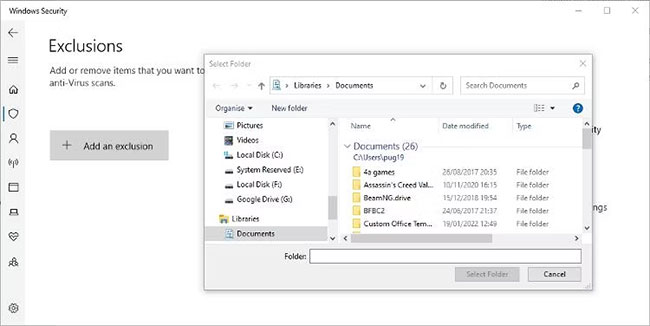
<p style="text-align: justify;"><strong>Bước 3</strong>: Nhấp vào&nbsp;<strong>Add or Remove Exclusions</strong>, sau đó nhấp vào nút&nbsp;<strong>Add an Exclusion</strong>.</p>

<p style="text-align: justify;"><strong>Bước 4</strong>: Điều hướng đến thư mục được chia sẻ và chọn nó để thêm vào.</p>

<figure>
<div style="text-align: justify;"><img alt="Đặt ngoại lệ trong Windows Security" data-i="0" data-src="https://st.quantrimang.com/photos/image/2022/09/14/khac-phuc-loi-folder-cannot-be-shared-1.jpg" data-was-processed="true" height="326" src="https://st.quantrimang.com/photos/image/2022/09/14/khac-phuc-loi-folder-cannot-be-shared-1.jpg" width="650" /></div>

<figcaption>
<div style="text-align: justify;">Đặt ngoại lệ trong Windows Security</div>
</figcaption>
</figure>

<p style="text-align: justify;">Xem hướng dẫn đầy đủ của Quantrimang.com để&nbsp;thêm ngoại lệ trong Windows Security&nbsp;để biết thêm thông tin.</p>

<h2 style="text-align: justify;">2. Cung cấp cho tất cả người dùng mạng toàn quyền kiểm soát thư mục trong Advanced Sharing</h2>

<p style="text-align: justify;">Giả sử bạn tin tưởng những người sử dụng mạng cục bộ, bạn có thể cho mọi người toàn quyền kiểm soát thư mục. Điều này có thể không mong muốn nếu mạng cục bộ nằm trong môi trường kinh doanh, nhưng nó sẽ không thành vấn đề trên mạng gia đình.</p>

<p style="text-align: justify;"><strong>Bước 1</strong>: Bấm chuột phải vào thư mục bạn muốn chia sẻ với toàn quyền kiểm soát và chọn&nbsp;<strong>Properties</strong>&nbsp;từ menu.</p>

<p style="text-align: justify;"><strong>Bước 2</strong>: Nhấp vào tab&nbsp;<strong>Sharing</strong>&nbsp;và sau đó nhấp vào nút&nbsp;<strong>Advanced Sharing</strong>.</p>

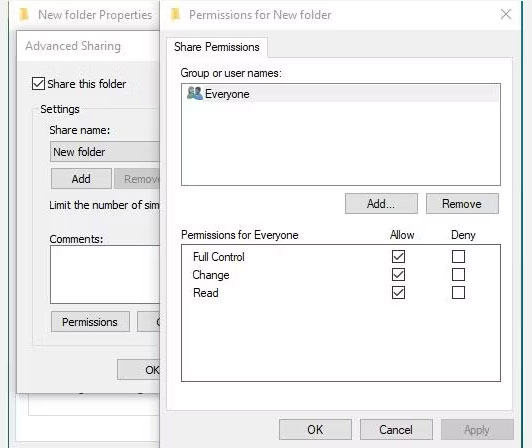
<p style="text-align: justify;"><strong>Bước 3</strong>: Chọn tùy chọn&nbsp;<strong>Share this folder</strong>, sau đó bấm vào nút&nbsp;<strong>Permissions.</strong></p>

<p style="text-align: justify;"><strong>Bước 4</strong>: Sau đó, bạn có thể chọn&nbsp;<strong>Everyone</strong>&nbsp;và chọn hộp bên cạnh để cho phép toàn quyền kiểm soát (<strong>Full Control</strong>).</p>

<figure>
<div style="text-align: justify;"><img alt="Thay đổi quyền truy cập chia sẻ thư mục trong Windows" data-i="1" data-src="https://st.quantrimang.com/photos/image/2022/09/14/khac-phuc-loi-folder-cannot-be-shared-2.jpg" data-was-processed="true" height="448" src="https://st.quantrimang.com/photos/image/2022/09/14/khac-phuc-loi-folder-cannot-be-shared-2.jpg" width="532" /></div>

<figcaption>
<div style="text-align: justify;">Thay đổi quyền truy cập chia sẻ thư mục trong Windows</div>
</figcaption>
</figure>

<p style="text-align: justify;"><strong>Bước 5</strong>: Nếu bạn đang lên kế hoạch sử dụng mật khẩu bảo vệ để chia sẻ, hãy nhấp vào&nbsp;<strong>Add &gt; Advanced &gt; Find Now</strong>.</p>

<p style="text-align: justify;"><strong>Bước 6</strong>: Chọn&nbsp;<strong>Authenticated Users</strong>, bấm&nbsp;<strong>OK</strong>, sau đó chọn&nbsp;<strong>Full Control.</strong>&nbsp;Sau đó, bạn có thể thoát cài đặt chia sẻ thư mục.</p>

<p style="text-align: justify;">Bạn có thể cần phải&nbsp;khởi động lại máy tính&nbsp;của mình trước khi thay đổi cài đặt có hiệu lực.</p>

<p style="text-align: justify;">Hãy nhớ rằng điều này sẽ cho phép bất kỳ ai trong mạng cục bộ truy cập vào các file được chia sẻ. Bạn sẽ quyết định xem bản sửa lỗi này có phù hợp với mạng cục bộ mà bạn đang kết nối hay không.</p>

<h2 style="text-align: justify;">3. Vô hiệu hóa Password Protected Sharing</h2>

<p style="text-align: justify;">Đây là một cách khác để ngăn lỗi xảy ra đi kèm với một số rủi ro. Tốt hơn là bảo vệ các file và thư mục được chia sẻ bằng mật khẩu. Nhưng nếu bạn tin tưởng những người và thiết bị trên mạng cục bộ, bạn có thể loại bỏ biện pháp bảo vệ đó.</p>

<p style="text-align: justify;"><strong>Bước 1</strong>:&nbsp;Mở Control Panel. Bạn có thể nhập nó vào&nbsp;<strong>Windows Search</strong>&nbsp;nếu bạn không biết phải tìm nó ở đâu.</p>

<p style="text-align: justify;"><strong>Bước 2</strong>: Mở&nbsp;<strong>Network and Sharing Center</strong>&nbsp;và nhấp vào&nbsp;<strong>Change Advanced Sharing Settings</strong>.</p>

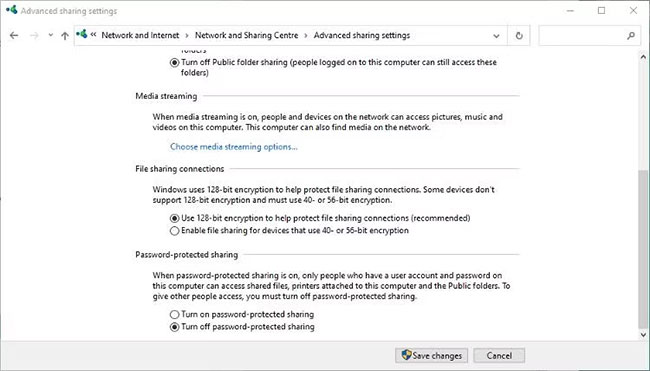
<p style="text-align: justify;"><strong>Bước 3</strong>: Mở rộng phần&nbsp;<strong>All Networks</strong>&nbsp;và tắt tùy chọn&nbsp;<strong>Password Protected Sharing.</strong></p>

<p style="text-align: justify;"><strong>Bước 4</strong>: Lưu các thay đổi và đóng&nbsp;<strong>Control Panel.</strong></p>

<figure>
<div style="text-align: justify;"><img alt="Cài đặt chia sẻ nâng cao trong Windows Control Panel" data-i="2" data-src="https://st.quantrimang.com/photos/image/2022/09/14/khac-phuc-loi-folder-cannot-be-shared-3.jpg" data-was-processed="true" height="371" src="https://st.quantrimang.com/photos/image/2022/09/14/khac-phuc-loi-folder-cannot-be-shared-3.jpg" width="650" /></div>

<figcaption>
<div style="text-align: justify;">Cài đặt chia sẻ nâng cao trong Windows Control Panel</div>
</figcaption>
</figure>

<p style="text-align: justify;">Hướng dẫn của Quantrimang.com về&nbsp;cách chia sẻ file trên Windows&nbsp;là một nơi tuyệt vời để tìm hiểu thêm nếu bạn chưa quen thuộc với chủ đề này.</p>

<p style="text-align: justify;">Vấn đề không thể chia sẻ thư mục qua mạng cục bộ không phải là hiếm. Nó thường do phần mềm diệt virus của bạn gây ra và có thể dễ dàng giải quyết. Hy vọng rằng các bước trên đây sẽ giúp bạn tìm ra nguyên nhân của lỗi này, cách khắc phục và chia sẻ lại file của bạn qua mạng cục bộ.</p>
		</div>
				<div id="author">
						<p>
				<strong>Nguồn tin:</strong>
				Quantrimang.com
			</p>
		</div>
	</div>
	<div id="footer" class="clearfix">
		<div id="url">
			<strong>URL của bản tin này: </strong><a href="https://www.nguoicodonvn2008.info/vi/news/savefile/kien-thuc-may-tinh/cach-khac-phuc-loi-folder-cannot-be-shared-trong-windows-6071.html" title="Cách khắc phục lỗi &quot;Folder Cannot Be Shared&quot; trong Windows">https://www.nguoicodonvn2008.info/vi/news/savefile/kien-thuc-may-tinh/cach-khac-phuc-loi-folder-cannot-be-shared-trong-windows-6071.html</a>

		</div>
		<div class="clear"></div>
		<div class="copyright">
			&copy; .&#x3A; Nguoicodonvn2008.info - Cõi lòng người cô đơn &#x3A;.
		</div>
		<div id="contact">
			<a href="mailto:admin@nguoicodonvn2008.info">admin@nguoicodonvn2008.info</a>
		</div>
	</div>
</div>
        <div id="timeoutsess" class="chromeframe">
            Bạn đã không sử dụng Site, <a onclick="timeoutsesscancel();" href="https://nguoicodonvn2008.info/#">Bấm vào đây để duy trì trạng thái đăng nhập</a>. Thời gian chờ: <span id="secField"> 60 </span> giây
        </div>
        <div id="openidResult" class="nv-alert" style="display:none"></div>
        <div id="openidBt" data-result="" data-redirect=""></div>
		</script>
		<div class="car-top">
  <span><img src="https://nguoicodonvn2008.info/themes/default/images/car.png" alt=""></span>
</div>
<script src="https://nguoicodonvn2008.info/assets/js/jquery/jquery.min.js"></script>
<script>var nv_base_siteurl="/",nv_lang_data="vi",nv_lang_interface="vi",nv_name_variable="nv",nv_fc_variable="op",nv_lang_variable="language",nv_module_name="news",nv_func_name="savefile",nv_is_user=0, nv_my_ofs=-4,nv_my_abbr="EDT",nv_cookie_prefix="nv4c_e856T",nv_check_pass_mstime=1738000,nv_area_admin=0,nv_safemode=0,theme_responsive=0,nv_recaptcha_ver=2,nv_recaptcha_sitekey="",nv_recaptcha_type="image",XSSsanitize=1;</script>
<script src="https://nguoicodonvn2008.info/assets/js/language/vi.js"></script>
<script src="https://nguoicodonvn2008.info/assets/js/DOMPurify/purify3.js"></script>
<script src="https://nguoicodonvn2008.info/assets/js/global.js"></script>
<script src="https://nguoicodonvn2008.info/assets/js/site.js"></script>
<script src="https://nguoicodonvn2008.info/themes/default/js/news.js"></script>
<script src="https://nguoicodonvn2008.info/themes/default/js/main.js"></script>
<script src="https://nguoicodonvn2008.info/themes/default/js/custom.js"></script>
<script type="application/ld+json">
        {
            "@context": "https://schema.org",
            "@type": "Organization",
            "url": "https://nguoicodonvn2008.info",
            "logo": "https://nguoicodonvn2008.info/uploads/angel.gif"
        }
        </script>
<script src="https://nguoicodonvn2008.info/themes/default/js/bootstrap.min.js"></script>
<script type="text/javascript">
var $scrolltop = $('.car-top');
$scrolltop.on('click', function () {
    $('html,body').animate({
        scrollTop: 0
    }, 800);
    $(this).addClass("car-run");
    setTimeout(function(){ $scrolltop.removeClass('car-run');}, 1000);
    return false;
});
$(window).on('scroll', function ()
{ 
    if($(window).scrollTop() >= 200)
    {
        $scrolltop.addClass("show");
        $scrolltop.addClass("car-down");
    }
    else
    {
       $scrolltop.removeClass("show");
       setTimeout(function(){ $scrolltop.removeClass('car-down');}, 300);
    }
});
</script>
</body>
</html>