<!DOCTYPE html>
    <html lang="vi" xmlns="http://www.w3.org/1999/xhtml" prefix="og: http://ogp.me/ns#">
    <head>
<title>Cách gỡ cài đặt Symantec Endpoint Protection &#40;SEP&#41;</title>
<meta name="description" content="Cách gỡ cài đặt Symantec Endpoint Protection &#40;SEP&#41; - Savefile - Tin Tức -...">
<meta name="author" content=".: Nguoicodonvn2008.info - Cõi lòng người cô đơn :.">
<meta name="copyright" content=".: Nguoicodonvn2008.info - Cõi lòng người cô đơn :. [admin@nguoicodonvn2008.info]">
<meta name="robots" content="index, archive, follow, noodp">
<meta name="googlebot" content="index,archive,follow,noodp">
<meta name="msnbot" content="all,index,follow">
<meta name="generator" content="NukeViet v4.5">
<meta http-equiv="Content-Type" content="text/html; charset=utf-8">
<meta property="og:title" content="Cách gỡ cài đặt Symantec Endpoint Protection &#40;SEP&#41;">
<meta property="og:type" content="website">
<meta property="og:description" content="Savefile - Tin Tức - https&#x3A;&#x002F;&#x002F;www.nguoicodonvn2008.info&#x002F;vi&#x002F;news&#x002F;savefile&#x002F;kien-thuc-may-tinh&#x002F;cach-go-cai-dat-symantec-endpoint-protection-sep-2210.html">
<meta property="og:site_name" content=".&#x3A; Nguoicodonvn2008.info - Cõi lòng người cô đơn &#x3A;.">
<meta property="og:url" content="https://www.nguoicodonvn2008.info/vi/news/savefile/kien-thuc-may-tinh/cach-go-cai-dat-symantec-endpoint-protection-sep-2210.html">
<link rel="shortcut icon" href="https://nguoicodonvn2008.info/favicon.ico">
<link rel="canonical" href="https://www.nguoicodonvn2008.info/vi/news/savefile/kien-thuc-may-tinh/cach-go-cai-dat-symantec-endpoint-protection-sep-2210.html">
<link rel="alternate" href="https://nguoicodonvn2008.info/vi/news/rss/" title="Tin Tức" type="application/rss+xml">
<link rel="alternate" href="https://nguoicodonvn2008.info/vi/news/rss/karaoke-dual/" title="Tin Tức - Karaoke Dual" type="application/rss+xml">
<link rel="alternate" href="https://nguoicodonvn2008.info/vi/news/rss/nhac-tre/" title="Tin Tức - Nhạc trẻ" type="application/rss+xml">
<link rel="alternate" href="https://nguoicodonvn2008.info/vi/news/rss/tru-tinh/" title="Tin Tức - Trữ tình" type="application/rss+xml">
<link rel="alternate" href="https://nguoicodonvn2008.info/vi/news/rss/nuoc-ngoai/" title="Tin Tức - Nước ngoài" type="application/rss+xml">
<link rel="alternate" href="https://nguoicodonvn2008.info/vi/news/rss/remix/" title="Tin Tức - Remix" type="application/rss+xml">
<link rel="alternate" href="https://nguoicodonvn2008.info/vi/news/rss/tam-su-tinh-yeu/" title="Tin Tức - Tâm sự tình yêu" type="application/rss+xml">
<link rel="alternate" href="https://nguoicodonvn2008.info/vi/news/rss/tho-suu-tam/" title="Tin Tức - Thơ sưu tầm" type="application/rss+xml">
<link rel="alternate" href="https://nguoicodonvn2008.info/vi/news/rss/cuoc-song/" title="Tin Tức - Cuộc sống" type="application/rss+xml">
<link rel="alternate" href="https://nguoicodonvn2008.info/vi/news/rss/phan-mem/" title="Tin Tức - Phần mềm" type="application/rss+xml">
<link rel="alternate" href="https://nguoicodonvn2008.info/vi/news/rss/kien-thuc-may-tinh/" title="Tin Tức - Kiến thức máy tính" type="application/rss+xml">
<link rel="alternate" href="https://nguoicodonvn2008.info/vi/news/rss/hoc-tap/" title="Tin Tức - Học tập" type="application/rss+xml">
<link rel="alternate" href="https://nguoicodonvn2008.info/vi/news/rss/tai-lieu/" title="Tin Tức - Tài liệu" type="application/rss+xml">
<link rel="alternate" href="https://nguoicodonvn2008.info/vi/news/rss/de-thi/" title="Tin Tức - Đề thi" type="application/rss+xml">
<link rel="preload" as="style" href="https://nguoicodonvn2008.info/assets/css/font-awesome.min.css" type="text/css">
<link rel="preload" as="style" href="https://nguoicodonvn2008.info/themes/default/css/bootstrap.non-responsive.css" type="text/css">
<link rel="preload" as="style" href="https://nguoicodonvn2008.info/themes/default/css/style.css" type="text/css">
<link rel="preload" as="style" href="https://nguoicodonvn2008.info/themes/default/css/style.non-responsive.css" type="text/css">
<link rel="preload" as="style" href="https://nguoicodonvn2008.info/themes/default/css/news.css" type="text/css">
<link rel="preload" as="style" href="https://nguoicodonvn2008.info/themes/default/css/custom.css" type="text/css">
<link rel="preload" as="script" href="https://nguoicodonvn2008.info/assets/js/jquery/jquery.min.js" type="text/javascript">
<link rel="preload" as="script" href="https://nguoicodonvn2008.info/assets/js/language/vi.js" type="text/javascript">
<link rel="preload" as="script" href="https://nguoicodonvn2008.info/assets/js/DOMPurify/purify3.js" type="text/javascript">
<link rel="preload" as="script" href="https://nguoicodonvn2008.info/assets/js/global.js" type="text/javascript">
<link rel="preload" as="script" href="https://nguoicodonvn2008.info/assets/js/site.js" type="text/javascript">
<link rel="preload" as="script" href="https://nguoicodonvn2008.info/themes/default/js/news.js" type="text/javascript">
<link rel="preload" as="script" href="https://nguoicodonvn2008.info/themes/default/js/main.js" type="text/javascript">
<link rel="preload" as="script" href="https://nguoicodonvn2008.info/themes/default/js/custom.js" type="text/javascript">
<link rel="preload" as="script" href="https://nguoicodonvn2008.info/themes/default/js/bootstrap.min.js" type="text/javascript">
<link rel="stylesheet" href="https://nguoicodonvn2008.info/assets/css/font-awesome.min.css">
<link rel="stylesheet" href="https://nguoicodonvn2008.info/themes/default/css/bootstrap.non-responsive.css">
<link rel="stylesheet" href="https://nguoicodonvn2008.info/themes/default/css/style.css">
<link rel="stylesheet" href="https://nguoicodonvn2008.info/themes/default/css/style.non-responsive.css">
<link rel="StyleSheet" href="https://nguoicodonvn2008.info/themes/default/css/news.css">
<link rel="stylesheet" href="https://nguoicodonvn2008.info/themes/default/css/custom.css">
<style type="text/css">
	body{background: #fff;}
</style>
    </head>
    <body>
<div id="print">
	<div id="hd_print">
		<h2 class="pull-left">.&#x3A; Nguoicodonvn2008.info - Cõi lòng người cô đơn &#x3A;.</h2>
		<p class="pull-right"><a title=".&#x3A; Nguoicodonvn2008.info - Cõi lòng người cô đơn &#x3A;." href="https://nguoicodonvn2008.info/">https://nguoicodonvn2008.info</a></p>
	</div>
	<div class="clear"></div>
	<hr />
	<div id="content">
		<h1>Cách gỡ cài đặt Symantec Endpoint Protection &#40;SEP&#41;</h1>
		<ul class="list-inline">
			<li>Thứ bảy - 13/06/2020 00:58</li>
			<li class="hidden-print txtrequired"><em class="fa fa-print">&nbsp;</em><a title="In ra" href="javascript:;" onclick="window.print()">In ra</a></li>
			<li class="hidden-print txtrequired"><em class="fa fa-power-off">&nbsp;</em><a title="Đóng cửa sổ này" href="javascript:;" onclick="window.close()">Đóng cửa sổ này</a></li>
		</ul>
		<div class="clear"></div>
		<div id="hometext">
		</div>
				<div class="imghome">
			<img alt="Cách gỡ cài đặt Symantec Endpoint Protection &#40;SEP&#41;" src="https://st.quantrimang.com/photos/image/2020/06/13/go-cai-dat-symantec-endpoint-protection-6.jpg" width="460" class="img-thumbnail" />
		</div>
		<div class="clear"></div>
		<div id="bodytext" class="clearfix">
			<p style="text-align: justify;">Bạn cần gỡ cài đặt Symantec Endpoint Protection để khắc phục một số vấn đề? Bạn đang tìm kiếm một giải pháp hiệu quả để gỡ cài đặt hoàn toàn Symantec Endpoint Protection và xóa triệt để tất cả các file của nó ra khỏi PC?</p>

<p style="text-align: justify;">Đừng lo! Bài viết sau đây sẽ cung cấp hướng dẫn chi tiết về cách gỡ cài đặt hoàn toàn Symantec Endpoint Protection.</p>

<h2 id="mcetoc_1ealtg1j60" style="text-align: justify;">Phương pháp 1: Gỡ cài đặt Symantec Endpoint Protection thông qua Programs and Features</h2>

<p style="text-align: justify;">Khi một chương trình mới được cài đặt trên hệ thống, chương trình đó sẽ được thêm vào danh sách trong&nbsp;<strong>Programs and Features</strong>. Khi muốn gỡ cài đặt chương trình, bạn có thể truy cập&nbsp;<strong>Programs and Features</strong>&nbsp;để gỡ cài đặt chương trình. Vì vậy, khi bạn muốn gỡ cài đặt Symantec Endpoint Protection, giải pháp đầu tiên là gỡ cài đặt nó thông qua&nbsp;<strong>Programs and Features</strong>.</p>

<p style="text-align: justify;">1. Mở&nbsp;<strong>Programs and Features</strong>.</p>

<ul>
	<li style="text-align: justify;">Windows Vista và Windows 7: Bấm Start, gõ&nbsp;<strong>uninstall a program</strong>&nbsp;trong hộp&nbsp;<strong>Search programs and files,</strong>&nbsp;rồi bấm vào kết quả.</li>
</ul>

<ul>
	<li style="text-align: justify;">Windows 8, Windows 8.1 và Windows 10: Mở&nbsp;menu WinX&nbsp;bằng cách nhấn&nbsp;<strong>Win + X,</strong>&nbsp;sau đó bấm vào&nbsp;<strong>Programs and Features</strong>.</li>
</ul>

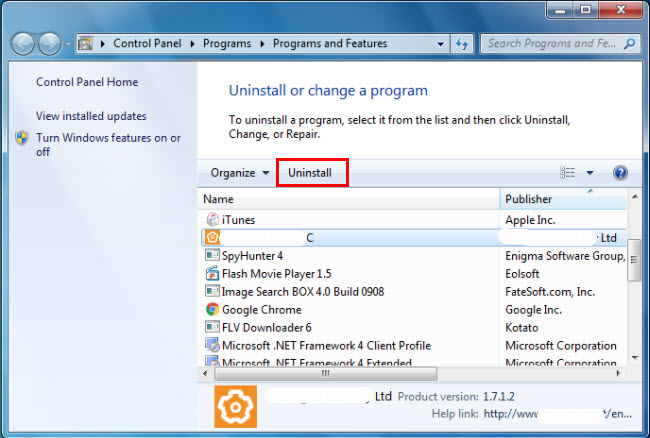
<p style="text-align: justify;">2. Tìm kiếm&nbsp;<strong>Symantec Endpoint Protection</strong>&nbsp;trong danh sách, nhấp vào nó và sau đó chọn&nbsp;<strong>Uninstall</strong>&nbsp;để bắt đầu gỡ cài đặt.</p>

<figure>
<div style="text-align: justify;"><img alt="Gỡ cài đặt Symantec Endpoint Protection thông qua Programs and Features" data-i="0" data-src="https://st.quantrimang.com/photos/image/2020/06/13/go-cai-dat-symantec-endpoint-protection-1.jpg" data-was-processed="true" height="438" src="https://st.quantrimang.com/photos/image/2020/06/13/go-cai-dat-symantec-endpoint-protection-1.jpg" width="650" /></div>

<figcaption>
<div style="text-align: justify;">Gỡ cài đặt Symantec Endpoint Protection thông qua Programs and Features</div>
</figcaption>
</figure>

<div style="text-align: justify;">&nbsp;</div>

<h2 id="mcetoc_1ealtg1j71" style="text-align: justify;">Phương pháp 2: Gỡ cài đặt Symantec Endpoint Protection bằng uninstaller.exe</h2>

<p style="text-align: justify;">Hầu hết các chương trình máy tính có một file thực thi có tên&nbsp;<strong>uninst000.exe</strong>&nbsp;hoặc&nbsp;<strong>uninstall.exe</strong>&nbsp;hay một cái gì đó tương tự. Bạn có thể tìm thấy các file này trong thư mục cài đặt của Symantec Endpoint Protection.</p>

<p style="text-align: justify;">1. Chuyển đến thư mục cài đặt của Symantec Endpoint Protection.</p>

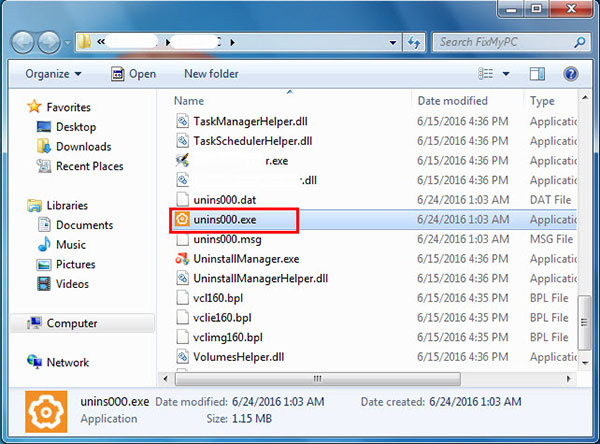
<p style="text-align: justify;">2. Tìm&nbsp;<strong>uninstall.exe</strong>&nbsp;hoặc&nbsp;<strong>unins000.exe.</strong></p>

<figure>
<div style="text-align: justify;"><img alt="Gỡ cài đặt Symantec Endpoint Protection thông qua Programs and Features" data-i="1" data-src="https://st.quantrimang.com/photos/image/2020/06/13/go-cai-dat-symantec-endpoint-protection-2.jpg" data-was-processed="true" height="444" src="https://st.quantrimang.com/photos/image/2020/06/13/go-cai-dat-symantec-endpoint-protection-2.jpg" width="600" /></div>

<figcaption>
<div style="text-align: justify;">Gỡ cài đặt Symantec Endpoint Protection thông qua Programs and Features</div>
</figcaption>
</figure>

<p style="text-align: justify;">3. Nhấp đúp chuột vào trình gỡ cài đặt và làm theo trình hướng dẫn để gỡ cài đặt Symantec Endpoint Protection.</p>

<h2 id="mcetoc_1ealtg1j72" style="text-align: justify;">Phương pháp 3: Gỡ cài đặt Symantec Endpoint Protection thông qua System Restore</h2>

<p style="text-align: justify;">System Restore&nbsp;là một tiện ích đi kèm với hệ điều hành Windows và giúp người dùng máy tính khôi phục hệ thống về trạng thái trước đó, cũng như xóa các chương trình can thiệp vào hoạt động của máy tính.</p>

<p style="text-align: justify;">Nếu đã tạo điểm khôi phục hệ thống trước khi cài đặt chương trình, thì bạn có thể sử dụng System Restore để khôi phục hệ thống của mình và xóa hoàn toàn các chương trình không mong muốn như Symantec Endpoint Protection. Bạn nên sao lưu các file và dữ liệu cá nhân trước khi thực hiện khôi phục hệ thống.</p>

<p style="text-align: justify;">1. Đóng tất cả các file và chương trình đang mở.</p>

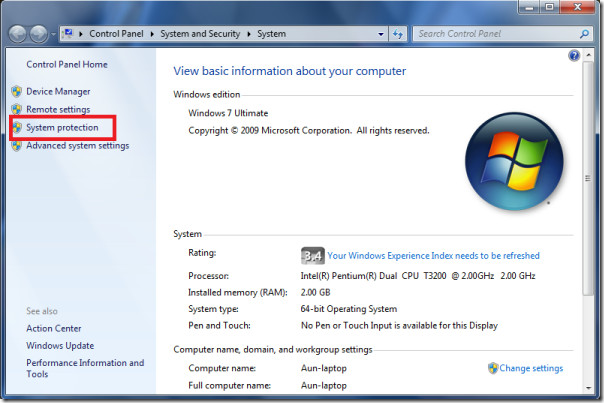
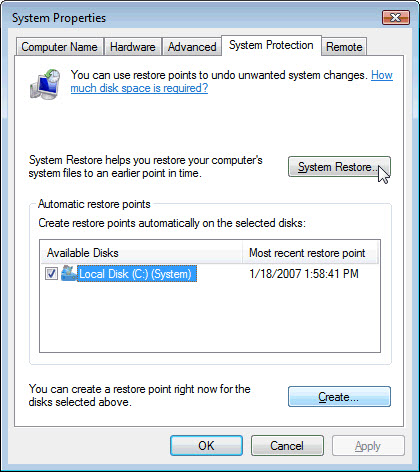
<p style="text-align: justify;">2. Trên desktop, bấm chuột phải vào&nbsp;<strong>Computer</strong>&nbsp;và chọn&nbsp;<strong>Properties.</strong>&nbsp;Cửa sổ&nbsp;<strong>System</strong>&nbsp;sẽ hiển thị.</p>

<p style="text-align: justify;">3. Ở phía bên trái của cửa sổ System, bấm&nbsp;<strong>System Protection.</strong>&nbsp;Cửa sổ&nbsp;<strong>System Properties</strong>&nbsp;sẽ hiển thị.</p>

<figure>
<div style="text-align: justify;"><img alt="Cửa sổ System Properties sẽ hiển thị" data-i="2" data-src="https://st.quantrimang.com/photos/image/2020/06/13/go-cai-dat-symantec-endpoint-protection-3.jpg" data-was-processed="true" height="403" src="https://st.quantrimang.com/photos/image/2020/06/13/go-cai-dat-symantec-endpoint-protection-3.jpg" width="604" /></div>

<figcaption>
<div style="text-align: justify;">Cửa sổ System Properties sẽ hiển thị</div>
</figcaption>
</figure>

<p style="text-align: justify;">4. Nhấp vào&nbsp;<strong>System Restore</strong>&nbsp;và cửa sổ&nbsp;<strong>System Restore</strong>&nbsp;sẽ hiển thị.</p>

<figure>
<div style="text-align: justify;"><img alt="Nhấp vào System Restore" data-i="3" data-src="https://st.quantrimang.com/photos/image/2020/06/13/go-cai-dat-symantec-endpoint-protection-4.jpg" data-was-processed="true" height="472" src="https://st.quantrimang.com/photos/image/2020/06/13/go-cai-dat-symantec-endpoint-protection-4.jpg" width="420" /></div>

<figcaption>
<div style="text-align: justify;">Nhấp vào System Restore</div>
</figcaption>
</figure>

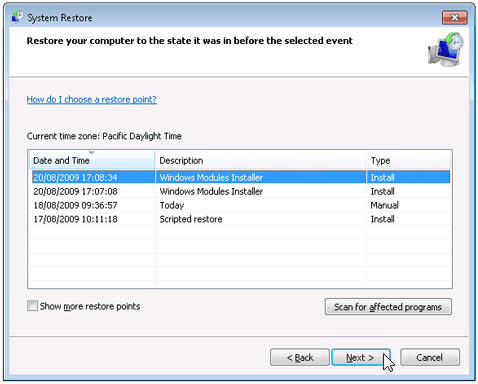
<p style="text-align: justify;">5. Chọn&nbsp;<strong>Choose a different restore point</strong>&nbsp;và nhấp vào&nbsp;<strong>Next.</strong></p>

<p style="text-align: justify;">6. Chọn một ngày và thời gian từ danh sách, sau đó nhấp vào&nbsp;<strong>Next.</strong>&nbsp;Bạn nên biết rằng tất cả các chương trình và driver được cài đặt sau ngày và giờ đã chọn có thể không hoạt động đúng và cần phải được cài đặt lại.</p>

<figure>
<div style="text-align: justify;"><img alt="Chọn một ngày và thời gian từ danh sách" data-i="4" data-src="https://st.quantrimang.com/photos/image/2020/06/13/go-cai-dat-symantec-endpoint-protection-5.jpg" data-was-processed="true" height="384" src="https://st.quantrimang.com/photos/image/2020/06/13/go-cai-dat-symantec-endpoint-protection-5.jpg" width="478" /></div>

<figcaption>
<div style="text-align: justify;">Chọn một ngày và thời gian từ danh sách</div>
</figcaption>
</figure>

<p style="text-align: justify;">7. Nhấp vào&nbsp;<strong>Finish</strong>&nbsp;khi cửa sổ&nbsp;<strong>Confirm your restore point</strong>&nbsp;xuất hiện.</p>

<p style="text-align: justify;">8. Nhấp vào&nbsp;<strong>Yes</strong>&nbsp;để xác nhận lại.</p>

<div style="text-align: justify;">&nbsp;</div>

<h2 id="mcetoc_1ealtg1j73" style="text-align: justify;">Phương pháp 4: Gỡ cài đặt Symantec Endpoint Protection bằng chương trình diệt virus</h2>

<p style="text-align: justify;">Ngày nay, phần mềm độc hại xuất hiện như các ứng dụng máy tính thông thường nhưng khó gỡ bỏ khỏi máy tính hơn nhiều. Phần mềm độc hại như vậy xâm nhập vào máy tính với sự trợ giúp của Trojan và phần mềm gián điệp.</p>

<p style="text-align: justify;">Phần mềm độc hại máy tính khác như chương trình phần mềm quảng cáo hoặc các chương trình không mong muốn cũng rất khó để loại bỏ. Chúng thường được cài đặt trên hệ thống bằng cách đi kèm với phần mềm phần mềm miễn phí, như quay video, game hoặc trình chuyển đổi PDF.</p>

<p style="text-align: justify;">Chúng có thể dễ dàng bỏ qua việc phát hiện các chương trình diệt virus trên hệ thống. Nếu không thể xóa Symantec Endpoint Protection như các chương trình khác, thì bạn nên kiểm tra xem đó có phải là phần mềm độc hại hay không.&nbsp;</p>

<h2 id="mcetoc_1ealtg1j74" style="text-align: justify;">Phương pháp 5: Cài đặt lại Symantec Endpoint Protection để gỡ cài đặt</h2>

<p style="text-align: justify;">Khi file cần thiết để gỡ cài đặt Symantec Endpoint Protection bị hỏng hoặc thiếu, sẽ không thể gỡ cài đặt chương trình. Trong trường hợp như vậy, cài đặt lại Symantec Endpoint Protection có thể thực hiện thủ thuật.</p>

<p style="text-align: justify;">Chạy trình cài đặt trong ổ đĩa gốc hoặc file tải xuống để cài đặt lại chương trình. Đôi khi, trình cài đặt có thể cho phép bạn sửa chữa hoặc gỡ cài đặt chương trình.</p>

<h2 id="mcetoc_1ealtg1j75" style="text-align: justify;">Phương pháp 6: Sử dụng lệnh Uninstall được hiển thị trong Registry</h2>

<p style="text-align: justify;">Khi một chương trình được cài đặt trên máy tính, Windows sẽ lưu các cài đặt và thông tin của nó trong registry, bao gồm lệnh&nbsp;<strong>Uninstall</strong>&nbsp;để gỡ cài đặt chương trình. Bạn có thể thử phương pháp này để gỡ cài đặt Symantec Endpoint Protection. Hãy chỉnh sửa cẩn thận registry, bởi vì bất kỳ lỗi nào ở đó có thể làm cho hệ thống ngừng hoạt động.</p>

<p style="text-align: justify;">1. Giữ các phím&nbsp;<code>Win</code>+<code>R</code>&nbsp;để mở lệnh&nbsp;<strong>Run</strong>, nhập&nbsp;<strong>regedit</strong>&nbsp;vào hộp và bấm&nbsp;<strong>OK.</strong></p>

<p style="text-align: justify;">2. Điều hướng đến registry key sau và tìm:</p>

<pre id="pre0">
<code>HKEY_LOCAL_MACHINE\SOFTWARE\Microsoft\Windows\CurrentVersion\Uninstall</code></pre>

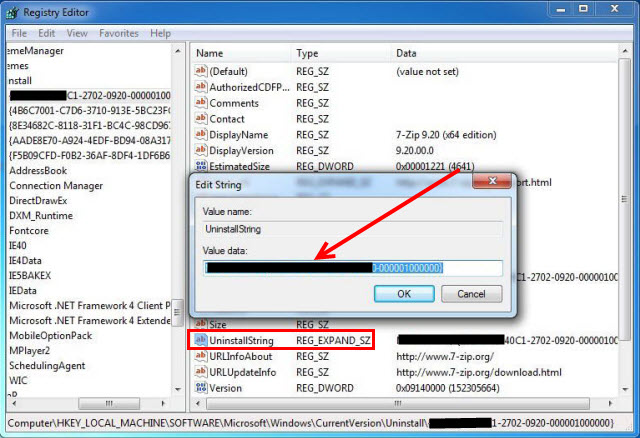
<p style="text-align: justify;">3. Nhấp đúp chuột vào giá trị&nbsp;<strong>UninstallString</strong>&nbsp;và sao chép&nbsp;<strong>Value Data</strong>&nbsp;của nó.</p>

<figure>
<div style="text-align: justify;"><img alt="Nhấp đúp chuột vào giá trị UninstallString và sao chép Value Data của nó" data-i="5" data-src="https://st.quantrimang.com/photos/image/2020/06/13/go-cai-dat-symantec-endpoint-protection-6.jpg" data-was-processed="true" height="438" src="https://st.quantrimang.com/photos/image/2020/06/13/go-cai-dat-symantec-endpoint-protection-6.jpg" width="640" /></div>

<figcaption>
<div style="text-align: justify;">Nhấp đúp chuột vào giá trị UninstallString và sao chép Value Data của nó</div>
</figcaption>
</figure>

<p style="text-align: justify;">4. Giữ&nbsp;<strong>Win+R</strong>&nbsp;để mở lệnh&nbsp;<strong>Run</strong>, dán&nbsp;<strong>Value Data</strong>&nbsp;vào hộp và nhấp&nbsp;<strong>OK.</strong></p>

<p style="text-align: justify;">5. Làm theo trình hướng dẫn để gỡ cài đặt Symantec Endpoint Protection.</p>

<div style="text-align: justify;">&nbsp;</div>

<h2 id="mcetoc_1ealtg1j76" style="text-align: justify;">Phương pháp 7: Gỡ cài đặt Symantec Endpoint Protection bằng chương trình gỡ cài đặt của bên thứ ba</h2>

<p style="text-align: justify;">Việc gỡ cài đặt thủ công Symantec Endpoint Protection đòi hỏi sự kiên nhẫn. Và không ai có thể chắc chắn rằng gỡ cài đặt thủ công sẽ loại bỏ hoàn toàn Symantec Endpoint Protection và xóa tất cả các file của nó.</p>

<p style="text-align: justify;">Việc gỡ cài đặt không hoàn toàn sẽ để lại nhiều mục vô dụng và không hợp lệ trong registry, làm ảnh hưởng xấu đến hiệu suất máy tính. Quá nhiều file vô dụng cũng chiếm không gian trống của ổ cứng và làm chậm tốc độ PC. Vì vậy, bạn nên gỡ cài đặt Symantec Endpoint Protection bằng một chương trình gỡ cài đặt của bên thứ ba đáng tin cậy, có thể quét hệ thống, xác định tất cả các file của Symantec Endpoint Protection và xóa hoàn toàn chúng.</p>

<p style="text-align: justify;">Bạn có thể dùng thử&nbsp;Special Uninstaller.:&nbsp;<strong><span style="color:rgb(192, 57, 43);">https://www.specialuninstaller.com/download.html</span></strong></p>
		</div>
				<div id="author">
						<p>
				<strong>Nguồn tin:</strong>
				Quantrimang.com
			</p>
		</div>
	</div>
	<div id="footer" class="clearfix">
		<div id="url">
			<strong>URL của bản tin này: </strong><a href="https://www.nguoicodonvn2008.info/vi/news/savefile/kien-thuc-may-tinh/cach-go-cai-dat-symantec-endpoint-protection-sep-2210.html" title="Cách gỡ cài đặt Symantec Endpoint Protection &#40;SEP&#41;">https://www.nguoicodonvn2008.info/vi/news/savefile/kien-thuc-may-tinh/cach-go-cai-dat-symantec-endpoint-protection-sep-2210.html</a>

		</div>
		<div class="clear"></div>
		<div class="copyright">
			&copy; .&#x3A; Nguoicodonvn2008.info - Cõi lòng người cô đơn &#x3A;.
		</div>
		<div id="contact">
			<a href="mailto:admin@nguoicodonvn2008.info">admin@nguoicodonvn2008.info</a>
		</div>
	</div>
</div>
        <div id="timeoutsess" class="chromeframe">
            Bạn đã không sử dụng Site, <a onclick="timeoutsesscancel();" href="https://nguoicodonvn2008.info/#">Bấm vào đây để duy trì trạng thái đăng nhập</a>. Thời gian chờ: <span id="secField"> 60 </span> giây
        </div>
        <div id="openidResult" class="nv-alert" style="display:none"></div>
        <div id="openidBt" data-result="" data-redirect=""></div>
		</script>
		<div class="car-top">
  <span><img src="https://nguoicodonvn2008.info/themes/default/images/car.png" alt=""></span>
</div>
<script src="https://nguoicodonvn2008.info/assets/js/jquery/jquery.min.js"></script>
<script>var nv_base_siteurl="/",nv_lang_data="vi",nv_lang_interface="vi",nv_name_variable="nv",nv_fc_variable="op",nv_lang_variable="language",nv_module_name="news",nv_func_name="savefile",nv_is_user=0, nv_my_ofs=-4,nv_my_abbr="EDT",nv_cookie_prefix="nv4c_e856T",nv_check_pass_mstime=1738000,nv_area_admin=0,nv_safemode=0,theme_responsive=0,nv_recaptcha_ver=2,nv_recaptcha_sitekey="",nv_recaptcha_type="image",XSSsanitize=1;</script>
<script src="https://nguoicodonvn2008.info/assets/js/language/vi.js"></script>
<script src="https://nguoicodonvn2008.info/assets/js/DOMPurify/purify3.js"></script>
<script src="https://nguoicodonvn2008.info/assets/js/global.js"></script>
<script src="https://nguoicodonvn2008.info/assets/js/site.js"></script>
<script src="https://nguoicodonvn2008.info/themes/default/js/news.js"></script>
<script src="https://nguoicodonvn2008.info/themes/default/js/main.js"></script>
<script src="https://nguoicodonvn2008.info/themes/default/js/custom.js"></script>
<script type="application/ld+json">
        {
            "@context": "https://schema.org",
            "@type": "Organization",
            "url": "https://nguoicodonvn2008.info",
            "logo": "https://nguoicodonvn2008.info/uploads/angel.gif"
        }
        </script>
<script src="https://nguoicodonvn2008.info/themes/default/js/bootstrap.min.js"></script>
<script type="text/javascript">
var $scrolltop = $('.car-top');
$scrolltop.on('click', function () {
    $('html,body').animate({
        scrollTop: 0
    }, 800);
    $(this).addClass("car-run");
    setTimeout(function(){ $scrolltop.removeClass('car-run');}, 1000);
    return false;
});
$(window).on('scroll', function ()
{ 
    if($(window).scrollTop() >= 200)
    {
        $scrolltop.addClass("show");
        $scrolltop.addClass("car-down");
    }
    else
    {
       $scrolltop.removeClass("show");
       setTimeout(function(){ $scrolltop.removeClass('car-down');}, 300);
    }
});
</script>
</body>
</html>