<!DOCTYPE html>
    <html lang="vi" xmlns="http://www.w3.org/1999/xhtml" prefix="og: http://ogp.me/ns#">
    <head>
<title>Cách ghim một thư mục hoặc tệp vào thanh Dock trên Mac Công nghệ  macOS</title>
<meta name="description" content="Cách ghim một thư mục hoặc tệp vào thanh Dock trên Mac Công nghệ macOS - Savefile - Tin Tức -...">
<meta name="author" content=".: Nguoicodonvn2008.info - Cõi lòng người cô đơn :.">
<meta name="copyright" content=".: Nguoicodonvn2008.info - Cõi lòng người cô đơn :. [admin@nguoicodonvn2008.info]">
<meta name="robots" content="index, archive, follow, noodp">
<meta name="googlebot" content="index,archive,follow,noodp">
<meta name="msnbot" content="all,index,follow">
<meta name="generator" content="NukeViet v4.5">
<meta http-equiv="Content-Type" content="text/html; charset=utf-8">
<meta property="og:title" content="Cách ghim một thư mục hoặc tệp vào thanh Dock trên Mac Công nghệ  macOS">
<meta property="og:type" content="website">
<meta property="og:description" content="Savefile - Tin Tức -...">
<meta property="og:site_name" content=".&#x3A; Nguoicodonvn2008.info - Cõi lòng người cô đơn &#x3A;.">
<meta property="og:url" content="https://www.nguoicodonvn2008.info/vi/news/savefile/kien-thuc-may-tinh/cach-ghim-mot-thu-muc-hoac-tep-vao-thanh-dock-tren-mac-cong-nghe-macos-3717.html">
<link rel="shortcut icon" href="https://nguoicodonvn2008.info/favicon.ico">
<link rel="canonical" href="https://www.nguoicodonvn2008.info/vi/news/savefile/kien-thuc-may-tinh/cach-ghim-mot-thu-muc-hoac-tep-vao-thanh-dock-tren-mac-cong-nghe-macos-3717.html">
<link rel="alternate" href="https://nguoicodonvn2008.info/vi/news/rss/" title="Tin Tức" type="application/rss+xml">
<link rel="alternate" href="https://nguoicodonvn2008.info/vi/news/rss/karaoke-dual/" title="Tin Tức - Karaoke Dual" type="application/rss+xml">
<link rel="alternate" href="https://nguoicodonvn2008.info/vi/news/rss/nhac-tre/" title="Tin Tức - Nhạc trẻ" type="application/rss+xml">
<link rel="alternate" href="https://nguoicodonvn2008.info/vi/news/rss/tru-tinh/" title="Tin Tức - Trữ tình" type="application/rss+xml">
<link rel="alternate" href="https://nguoicodonvn2008.info/vi/news/rss/nuoc-ngoai/" title="Tin Tức - Nước ngoài" type="application/rss+xml">
<link rel="alternate" href="https://nguoicodonvn2008.info/vi/news/rss/remix/" title="Tin Tức - Remix" type="application/rss+xml">
<link rel="alternate" href="https://nguoicodonvn2008.info/vi/news/rss/tam-su-tinh-yeu/" title="Tin Tức - Tâm sự tình yêu" type="application/rss+xml">
<link rel="alternate" href="https://nguoicodonvn2008.info/vi/news/rss/tho-suu-tam/" title="Tin Tức - Thơ sưu tầm" type="application/rss+xml">
<link rel="alternate" href="https://nguoicodonvn2008.info/vi/news/rss/cuoc-song/" title="Tin Tức - Cuộc sống" type="application/rss+xml">
<link rel="alternate" href="https://nguoicodonvn2008.info/vi/news/rss/phan-mem/" title="Tin Tức - Phần mềm" type="application/rss+xml">
<link rel="alternate" href="https://nguoicodonvn2008.info/vi/news/rss/kien-thuc-may-tinh/" title="Tin Tức - Kiến thức máy tính" type="application/rss+xml">
<link rel="alternate" href="https://nguoicodonvn2008.info/vi/news/rss/hoc-tap/" title="Tin Tức - Học tập" type="application/rss+xml">
<link rel="alternate" href="https://nguoicodonvn2008.info/vi/news/rss/tai-lieu/" title="Tin Tức - Tài liệu" type="application/rss+xml">
<link rel="alternate" href="https://nguoicodonvn2008.info/vi/news/rss/de-thi/" title="Tin Tức - Đề thi" type="application/rss+xml">
<link rel="preload" as="style" href="https://nguoicodonvn2008.info/assets/css/font-awesome.min.css" type="text/css">
<link rel="preload" as="style" href="https://nguoicodonvn2008.info/themes/default/css/bootstrap.non-responsive.css" type="text/css">
<link rel="preload" as="style" href="https://nguoicodonvn2008.info/themes/default/css/style.css" type="text/css">
<link rel="preload" as="style" href="https://nguoicodonvn2008.info/themes/default/css/style.non-responsive.css" type="text/css">
<link rel="preload" as="style" href="https://nguoicodonvn2008.info/themes/default/css/news.css" type="text/css">
<link rel="preload" as="style" href="https://nguoicodonvn2008.info/themes/default/css/custom.css" type="text/css">
<link rel="preload" as="script" href="https://nguoicodonvn2008.info/assets/js/jquery/jquery.min.js" type="text/javascript">
<link rel="preload" as="script" href="https://nguoicodonvn2008.info/assets/js/language/vi.js" type="text/javascript">
<link rel="preload" as="script" href="https://nguoicodonvn2008.info/assets/js/DOMPurify/purify3.js" type="text/javascript">
<link rel="preload" as="script" href="https://nguoicodonvn2008.info/assets/js/global.js" type="text/javascript">
<link rel="preload" as="script" href="https://nguoicodonvn2008.info/assets/js/site.js" type="text/javascript">
<link rel="preload" as="script" href="https://nguoicodonvn2008.info/themes/default/js/news.js" type="text/javascript">
<link rel="preload" as="script" href="https://nguoicodonvn2008.info/themes/default/js/main.js" type="text/javascript">
<link rel="preload" as="script" href="https://nguoicodonvn2008.info/themes/default/js/custom.js" type="text/javascript">
<link rel="preload" as="script" href="https://nguoicodonvn2008.info/themes/default/js/bootstrap.min.js" type="text/javascript">
<link rel="stylesheet" href="https://nguoicodonvn2008.info/assets/css/font-awesome.min.css">
<link rel="stylesheet" href="https://nguoicodonvn2008.info/themes/default/css/bootstrap.non-responsive.css">
<link rel="stylesheet" href="https://nguoicodonvn2008.info/themes/default/css/style.css">
<link rel="stylesheet" href="https://nguoicodonvn2008.info/themes/default/css/style.non-responsive.css">
<link rel="StyleSheet" href="https://nguoicodonvn2008.info/themes/default/css/news.css">
<link rel="stylesheet" href="https://nguoicodonvn2008.info/themes/default/css/custom.css">
<style type="text/css">
	body{background: #fff;}
</style>
    </head>
    <body>
<div id="print">
	<div id="hd_print">
		<h2 class="pull-left">.&#x3A; Nguoicodonvn2008.info - Cõi lòng người cô đơn &#x3A;.</h2>
		<p class="pull-right"><a title=".&#x3A; Nguoicodonvn2008.info - Cõi lòng người cô đơn &#x3A;." href="https://nguoicodonvn2008.info/">https://nguoicodonvn2008.info</a></p>
	</div>
	<div class="clear"></div>
	<hr />
	<div id="content">
		<h1>Cách ghim một thư mục hoặc tệp vào thanh Dock trên Mac Công nghệ  macOS</h1>
		<ul class="list-inline">
			<li>Chủ nhật - 07/03/2021 03:58</li>
			<li class="hidden-print txtrequired"><em class="fa fa-print">&nbsp;</em><a title="In ra" href="javascript:;" onclick="window.print()">In ra</a></li>
			<li class="hidden-print txtrequired"><em class="fa fa-power-off">&nbsp;</em><a title="Đóng cửa sổ này" href="javascript:;" onclick="window.close()">Đóng cửa sổ này</a></li>
		</ul>
		<div class="clear"></div>
		<div id="hometext">
		</div>
				<div class="imghome">
			<img alt="Cách ghim một thư mục hoặc tệp vào thanh Dock trên Mac Công nghệ  macOS" src="https://st.quantrimang.com/photos/image/2021/02/24/cach-ghim-mot-thu-muc-hoac-tep-vao-thanh-dock-tren-mac1.jpg" width="460" class="img-thumbnail" />
		</div>
		<div class="clear"></div>
		<div id="bodytext" class="clearfix">
			<p style="text-align: justify;">Dock là một công cụ đa năng trên macOS mà bạn có thể tùy chỉnh theo ý thích của mình. Nó cũng có thể giúp truy cập nhanh vào một thư mục hoặc tệp mà không cần phải điều hướng tới&nbsp; Finder như thông thường. Hãy cùng tìm hiểu cách ghim một thư mục hoặc tệp vào thanh Dock trên Mac để tiện truy cập nhanh khi cần.</p>

<p style="text-align: justify;">Đầu tiên, hãy mở ứng dụng Finder và truy cập đến vị trí của thư mục hoặc tệp mà bạn muốn ghim vào thanh dock.</p>

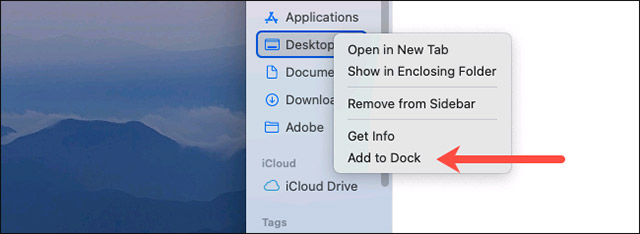
<p style="text-align: justify;">Để ghim một thư mục đang nằm trong danh sách &quot;<strong>Favorites</strong>&quot; ở bên trái, bạn chỉ cần nhấp chuột phải vào thư mục đó và chọn &quot;<strong>Add to Dock</strong>&quot;.</p>

<p style="text-align: justify;"><img alt="Chọn &#039;Add to Dock&#039;" data-i="0" data-src="https://st.quantrimang.com/photos/image/2021/02/24/cach-ghim-mot-thu-muc-hoac-tep-vao-thanh-dock-tren-mac1.jpg" data-was-processed="true" height="234" src="https://st.quantrimang.com/photos/image/2021/02/24/cach-ghim-mot-thu-muc-hoac-tep-vao-thanh-dock-tren-mac1.jpg" width="640" /></p>

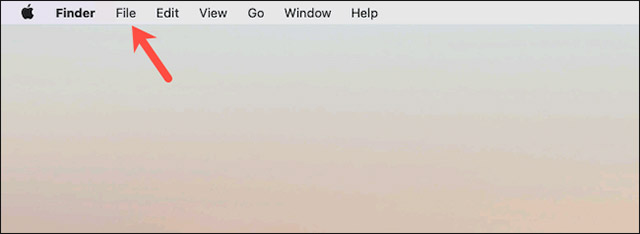
<p style="text-align: justify;">Đối với các tệp và thư mục không nằm trong danh sách &quot;<strong>Favorites</strong>&quot; này, bạn hãy nhấp một lần vào tệp hoặc thư mục, sau đó bấm vào menu “<strong>File</strong>” ở góc trên bên trái của màn hình.</p>

<p style="text-align: justify;"><img alt="Bấm vào menu “File”" data-i="1" data-src="https://st.quantrimang.com/photos/image/2021/02/24/cach-ghim-mot-thu-muc-hoac-tep-vao-thanh-dock-tren-mac2.jpg" data-was-processed="true" height="234" src="https://st.quantrimang.com/photos/image/2021/02/24/cach-ghim-mot-thu-muc-hoac-tep-vao-thanh-dock-tren-mac2.jpg" width="640" /></p>

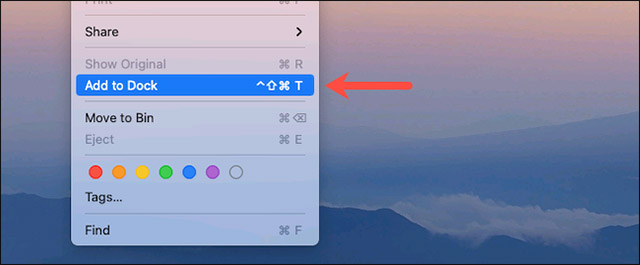
<p style="text-align: justify;">Giữ phím “<strong>Shift</strong>” trên bàn phím trong giây lát cho đến khi màn hình hiển thị tùy chọn “<strong>Add to Dock</strong>”. Nhấp vào tùy chọn đó và một shortcut cho tệp hoặc thư mục tương ứng sẽ tự động được tạo trong thanh dock.</p>

<p style="text-align: justify;"><img alt="Nhấp vào “Add to Dock”" data-i="2" data-src="https://st.quantrimang.com/photos/image/2021/02/24/cach-ghim-mot-thu-muc-hoac-tep-vao-thanh-dock-tren-mac3.jpg" data-was-processed="true" height="265" src="https://st.quantrimang.com/photos/image/2021/02/24/cach-ghim-mot-thu-muc-hoac-tep-vao-thanh-dock-tren-mac3.jpg" width="640" /></p>

<p style="text-align: justify;">Ngoài ra, bạn có thể bấm chọn tệp hoặc thư mục, sau đó nhấn tổ hợp phím&nbsp;<strong>Ctrl + Cmd + Shift + T</strong>. Hoặc đơn giản hơn, bạn chỉ cần nhấn và kéo tệp hoặc thư mục đó xuống khu vực phía bên phải của thanh dock.</p>

<p style="text-align: justify;"><img alt="Kéo tệp hoặc thư mục xuống khu vực phía bên phải của thanh dock" data-i="3" data-src="https://st.quantrimang.com/photos/image/2021/02/24/cach-ghim-mot-thu-muc-hoac-tep-vao-thanh-dock-tren-mac4.jpg" data-was-processed="true" height="303" src="https://st.quantrimang.com/photos/image/2021/02/24/cach-ghim-mot-thu-muc-hoac-tep-vao-thanh-dock-tren-mac4.jpg" width="640" /></p>

<p style="text-align: justify;">Trong trường hợp bạn đã thêm một thư mục vào dock, có thể thực hiện thêm một số điều chỉnh với nó.</p>

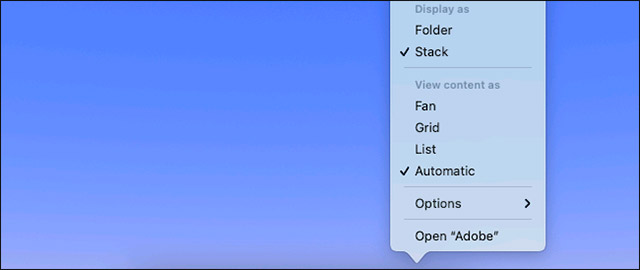
<p style="text-align: justify;">Theo mặc định, thư mục sẽ xuất hiện dưới dạng một chồng các hình thu nhỏ tương ứng với các tệp bên trong nó. Để ẩn nội dung và chuyển sang biểu tượng thư mục tiêu chuẩn, bạn hãy nhấp chuột phải vào thư mục trong thanh dock, bấm vào “<strong>Display As</strong>” và chọn “<strong>Folder</strong>”.</p>

<p style="text-align: justify;"><img alt="Chọn “Folder”" data-i="4" data-src="https://st.quantrimang.com/photos/image/2021/02/24/cach-ghim-mot-thu-muc-hoac-tep-vao-thanh-dock-tren-mac5.jpg" data-was-processed="true" height="270" src="https://st.quantrimang.com/photos/image/2021/02/24/cach-ghim-mot-thu-muc-hoac-tep-vao-thanh-dock-tren-mac5.jpg" width="640" /></p>

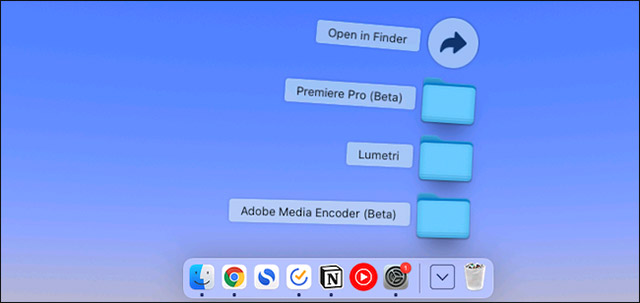
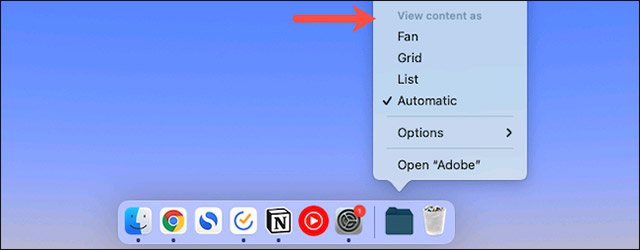
<p style="text-align: justify;">Tương tự, khi bạn nhấp vào một thư mục từ thanh dock, danh sách các tệp theo bố cục giống như hình chiếc quạt sẽ mở ra. Để thay đổi danh sách đó thành danh sách hiển thị thông thường hoặc dạng lưới quen thuộc, hãy nhấp chuột phải vào thư mục và chọn “<strong>Grid</strong>” hoặc “<strong>List</strong>” từ menu “<strong>View Content As</strong>”.</p>

<p style="text-align: justify;"><img alt="Chọn “Grid” hoặc “List” từ menu “View Content As”." data-i="5" data-src="https://st.quantrimang.com/photos/image/2021/02/24/cach-ghim-mot-thu-muc-hoac-tep-vao-thanh-dock-tren-mac6.jpg" data-was-processed="true" height="250" src="https://st.quantrimang.com/photos/image/2021/02/24/cach-ghim-mot-thu-muc-hoac-tep-vao-thanh-dock-tren-mac6.jpg" width="640" /></p>

<p style="text-align: justify;">Cũng có tùy chọn để bạn quy định cách sắp xếp các tệp của thư mục đã ghim trong thanh dock. Chỉ cần nhấp chuột phải vào thư mục và chọn một tùy chọn mà bạn muốn trong phần “<strong>Sort By</strong>”.</p>

<p style="text-align: justify;"><img alt="Chọn một tùy chọn trong phần “Sort By”" data-i="6" data-src="https://st.quantrimang.com/photos/image/2021/02/24/cach-ghim-mot-thu-muc-hoac-tep-vao-thanh-dock-tren-mac7.jpg" data-was-processed="true" height="171" src="https://st.quantrimang.com/photos/image/2021/02/24/cach-ghim-mot-thu-muc-hoac-tep-vao-thanh-dock-tren-mac7.jpg" width="650" /></p>

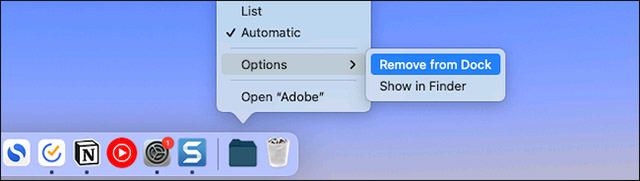
<p style="text-align: justify;">Để xóa một tệp hoặc một thư mục khỏi dock, hãy nhấp chuột phải vào nó và điều hướng đến “<strong>Options &gt; Remove From Dock</strong>”.</p>

<p style="text-align: justify;"><img alt="Chọn &#039;Remove From Dock”" data-i="7" data-src="https://st.quantrimang.com/photos/image/2021/02/24/cach-ghim-mot-thu-muc-hoac-tep-vao-thanh-dock-tren-mac8.jpg" data-was-processed="true" height="181" src="https://st.quantrimang.com/photos/image/2021/02/24/cach-ghim-mot-thu-muc-hoac-tep-vao-thanh-dock-tren-mac8.jpg" width="640" /></p>
		</div>
				<div id="author">
						<p>
				<strong>Nguồn tin:</strong>
				Quantrimang.com
			</p>
		</div>
	</div>
	<div id="footer" class="clearfix">
		<div id="url">
			<strong>URL của bản tin này: </strong><a href="https://www.nguoicodonvn2008.info/vi/news/savefile/kien-thuc-may-tinh/cach-ghim-mot-thu-muc-hoac-tep-vao-thanh-dock-tren-mac-cong-nghe-macos-3717.html" title="Cách ghim một thư mục hoặc tệp vào thanh Dock trên Mac Công nghệ  macOS">https://www.nguoicodonvn2008.info/vi/news/savefile/kien-thuc-may-tinh/cach-ghim-mot-thu-muc-hoac-tep-vao-thanh-dock-tren-mac-cong-nghe-macos-3717.html</a>

		</div>
		<div class="clear"></div>
		<div class="copyright">
			&copy; .&#x3A; Nguoicodonvn2008.info - Cõi lòng người cô đơn &#x3A;.
		</div>
		<div id="contact">
			<a href="mailto:admin@nguoicodonvn2008.info">admin@nguoicodonvn2008.info</a>
		</div>
	</div>
</div>
        <div id="timeoutsess" class="chromeframe">
            Bạn đã không sử dụng Site, <a onclick="timeoutsesscancel();" href="https://nguoicodonvn2008.info/#">Bấm vào đây để duy trì trạng thái đăng nhập</a>. Thời gian chờ: <span id="secField"> 60 </span> giây
        </div>
        <div id="openidResult" class="nv-alert" style="display:none"></div>
        <div id="openidBt" data-result="" data-redirect=""></div>
		</script>
		<div class="car-top">
  <span><img src="https://nguoicodonvn2008.info/themes/default/images/car.png" alt=""></span>
</div>
<div id="run_cronjobs" style="visibility:hidden;display:none;"><img alt="cron" src="/index.php?second=cronjobs&amp;p=m1KQvW48" width="1" height="1" /></div>
<script src="https://nguoicodonvn2008.info/assets/js/jquery/jquery.min.js"></script>
<script>var nv_base_siteurl="/",nv_lang_data="vi",nv_lang_interface="vi",nv_name_variable="nv",nv_fc_variable="op",nv_lang_variable="language",nv_module_name="news",nv_func_name="savefile",nv_is_user=0, nv_my_ofs=-4,nv_my_abbr="EDT",nv_cookie_prefix="nv4c_e856T",nv_check_pass_mstime=1738000,nv_area_admin=0,nv_safemode=0,theme_responsive=0,nv_recaptcha_ver=2,nv_recaptcha_sitekey="",nv_recaptcha_type="image",XSSsanitize=1;</script>
<script src="https://nguoicodonvn2008.info/assets/js/language/vi.js"></script>
<script src="https://nguoicodonvn2008.info/assets/js/DOMPurify/purify3.js"></script>
<script src="https://nguoicodonvn2008.info/assets/js/global.js"></script>
<script src="https://nguoicodonvn2008.info/assets/js/site.js"></script>
<script src="https://nguoicodonvn2008.info/themes/default/js/news.js"></script>
<script src="https://nguoicodonvn2008.info/themes/default/js/main.js"></script>
<script src="https://nguoicodonvn2008.info/themes/default/js/custom.js"></script>
<script type="application/ld+json">
        {
            "@context": "https://schema.org",
            "@type": "Organization",
            "url": "https://nguoicodonvn2008.info",
            "logo": "https://nguoicodonvn2008.info/uploads/angel.gif"
        }
        </script>
<script src="https://nguoicodonvn2008.info/themes/default/js/bootstrap.min.js"></script>
<script type="text/javascript">
var $scrolltop = $('.car-top');
$scrolltop.on('click', function () {
    $('html,body').animate({
        scrollTop: 0
    }, 800);
    $(this).addClass("car-run");
    setTimeout(function(){ $scrolltop.removeClass('car-run');}, 1000);
    return false;
});
$(window).on('scroll', function ()
{ 
    if($(window).scrollTop() >= 200)
    {
        $scrolltop.addClass("show");
        $scrolltop.addClass("car-down");
    }
    else
    {
       $scrolltop.removeClass("show");
       setTimeout(function(){ $scrolltop.removeClass('car-down');}, 300);
    }
});
</script>
</body>
</html>