<!DOCTYPE html>
    <html lang="vi" xmlns="http://www.w3.org/1999/xhtml" prefix="og: http://ogp.me/ns#">
    <head>
<title>Cách ghi âm thanh hệ thống trên Linux</title>
<meta name="description" content="Cách ghi âm thanh hệ thống trên Linux - Savefile - Tin Tức -...">
<meta name="author" content=".: Nguoicodonvn2008.info - Cõi lòng người cô đơn :.">
<meta name="copyright" content=".: Nguoicodonvn2008.info - Cõi lòng người cô đơn :. [admin@nguoicodonvn2008.info]">
<meta name="robots" content="index, archive, follow, noodp">
<meta name="googlebot" content="index,archive,follow,noodp">
<meta name="msnbot" content="all,index,follow">
<meta name="generator" content="NukeViet v4.5">
<meta http-equiv="Content-Type" content="text/html; charset=utf-8">
<meta property="og:title" content="Cách ghi âm thanh hệ thống trên Linux">
<meta property="og:type" content="website">
<meta property="og:description" content="Savefile - Tin Tức - https&#x3A;&#x002F;&#x002F;www.nguoicodonvn2008.info&#x002F;vi&#x002F;news&#x002F;savefile&#x002F;kien-thuc-may-tinh&#x002F;cach-ghi-am-thanh-he-thong-tren-linux-2758.html">
<meta property="og:site_name" content=".&#x3A; Nguoicodonvn2008.info - Cõi lòng người cô đơn &#x3A;.">
<meta property="og:url" content="https://www.nguoicodonvn2008.info/vi/news/savefile/kien-thuc-may-tinh/cach-ghi-am-thanh-he-thong-tren-linux-2758.html">
<link rel="shortcut icon" href="https://nguoicodonvn2008.info/favicon.ico">
<link rel="canonical" href="https://www.nguoicodonvn2008.info/vi/news/savefile/kien-thuc-may-tinh/cach-ghi-am-thanh-he-thong-tren-linux-2758.html">
<link rel="alternate" href="https://nguoicodonvn2008.info/vi/news/rss/" title="Tin Tức" type="application/rss+xml">
<link rel="alternate" href="https://nguoicodonvn2008.info/vi/news/rss/karaoke-dual/" title="Tin Tức - Karaoke Dual" type="application/rss+xml">
<link rel="alternate" href="https://nguoicodonvn2008.info/vi/news/rss/nhac-tre/" title="Tin Tức - Nhạc trẻ" type="application/rss+xml">
<link rel="alternate" href="https://nguoicodonvn2008.info/vi/news/rss/tru-tinh/" title="Tin Tức - Trữ tình" type="application/rss+xml">
<link rel="alternate" href="https://nguoicodonvn2008.info/vi/news/rss/nuoc-ngoai/" title="Tin Tức - Nước ngoài" type="application/rss+xml">
<link rel="alternate" href="https://nguoicodonvn2008.info/vi/news/rss/remix/" title="Tin Tức - Remix" type="application/rss+xml">
<link rel="alternate" href="https://nguoicodonvn2008.info/vi/news/rss/tam-su-tinh-yeu/" title="Tin Tức - Tâm sự tình yêu" type="application/rss+xml">
<link rel="alternate" href="https://nguoicodonvn2008.info/vi/news/rss/tho-suu-tam/" title="Tin Tức - Thơ sưu tầm" type="application/rss+xml">
<link rel="alternate" href="https://nguoicodonvn2008.info/vi/news/rss/cuoc-song/" title="Tin Tức - Cuộc sống" type="application/rss+xml">
<link rel="alternate" href="https://nguoicodonvn2008.info/vi/news/rss/phan-mem/" title="Tin Tức - Phần mềm" type="application/rss+xml">
<link rel="alternate" href="https://nguoicodonvn2008.info/vi/news/rss/kien-thuc-may-tinh/" title="Tin Tức - Kiến thức máy tính" type="application/rss+xml">
<link rel="alternate" href="https://nguoicodonvn2008.info/vi/news/rss/hoc-tap/" title="Tin Tức - Học tập" type="application/rss+xml">
<link rel="alternate" href="https://nguoicodonvn2008.info/vi/news/rss/tai-lieu/" title="Tin Tức - Tài liệu" type="application/rss+xml">
<link rel="alternate" href="https://nguoicodonvn2008.info/vi/news/rss/de-thi/" title="Tin Tức - Đề thi" type="application/rss+xml">
<link rel="preload" as="style" href="https://nguoicodonvn2008.info/assets/css/font-awesome.min.css" type="text/css">
<link rel="preload" as="style" href="https://nguoicodonvn2008.info/themes/default/css/bootstrap.non-responsive.css" type="text/css">
<link rel="preload" as="style" href="https://nguoicodonvn2008.info/themes/default/css/style.css" type="text/css">
<link rel="preload" as="style" href="https://nguoicodonvn2008.info/themes/default/css/style.non-responsive.css" type="text/css">
<link rel="preload" as="style" href="https://nguoicodonvn2008.info/themes/default/css/news.css" type="text/css">
<link rel="preload" as="style" href="https://nguoicodonvn2008.info/themes/default/css/custom.css" type="text/css">
<link rel="preload" as="script" href="https://nguoicodonvn2008.info/assets/js/jquery/jquery.min.js" type="text/javascript">
<link rel="preload" as="script" href="https://nguoicodonvn2008.info/assets/js/language/vi.js" type="text/javascript">
<link rel="preload" as="script" href="https://nguoicodonvn2008.info/assets/js/DOMPurify/purify3.js" type="text/javascript">
<link rel="preload" as="script" href="https://nguoicodonvn2008.info/assets/js/global.js" type="text/javascript">
<link rel="preload" as="script" href="https://nguoicodonvn2008.info/assets/js/site.js" type="text/javascript">
<link rel="preload" as="script" href="https://nguoicodonvn2008.info/themes/default/js/news.js" type="text/javascript">
<link rel="preload" as="script" href="https://nguoicodonvn2008.info/themes/default/js/main.js" type="text/javascript">
<link rel="preload" as="script" href="https://nguoicodonvn2008.info/themes/default/js/custom.js" type="text/javascript">
<link rel="preload" as="script" href="https://nguoicodonvn2008.info/themes/default/js/bootstrap.min.js" type="text/javascript">
<link rel="stylesheet" href="https://nguoicodonvn2008.info/assets/css/font-awesome.min.css">
<link rel="stylesheet" href="https://nguoicodonvn2008.info/themes/default/css/bootstrap.non-responsive.css">
<link rel="stylesheet" href="https://nguoicodonvn2008.info/themes/default/css/style.css">
<link rel="stylesheet" href="https://nguoicodonvn2008.info/themes/default/css/style.non-responsive.css">
<link rel="StyleSheet" href="https://nguoicodonvn2008.info/themes/default/css/news.css">
<link rel="stylesheet" href="https://nguoicodonvn2008.info/themes/default/css/custom.css">
<style type="text/css">
	body{background: #fff;}
</style>
    </head>
    <body>
<div id="print">
	<div id="hd_print">
		<h2 class="pull-left">.&#x3A; Nguoicodonvn2008.info - Cõi lòng người cô đơn &#x3A;.</h2>
		<p class="pull-right"><a title=".&#x3A; Nguoicodonvn2008.info - Cõi lòng người cô đơn &#x3A;." href="https://nguoicodonvn2008.info/">https://nguoicodonvn2008.info</a></p>
	</div>
	<div class="clear"></div>
	<hr />
	<div id="content">
		<h1>Cách ghi âm thanh hệ thống trên Linux</h1>
		<ul class="list-inline">
			<li>Thứ hai - 21/09/2020 00:57</li>
			<li class="hidden-print txtrequired"><em class="fa fa-print">&nbsp;</em><a title="In ra" href="javascript:;" onclick="window.print()">In ra</a></li>
			<li class="hidden-print txtrequired"><em class="fa fa-power-off">&nbsp;</em><a title="Đóng cửa sổ này" href="javascript:;" onclick="window.close()">Đóng cửa sổ này</a></li>
		</ul>
		<div class="clear"></div>
		<div id="hometext">
		</div>
				<div class="imghome">
			<img alt="Cách ghi âm thanh hệ thống trên Linux" src="https://st.quantrimang.com/photos/image/2020/09/21/ghi-am-thanh-he-thong-tren-linux-1.jpg" width="460" class="img-thumbnail" />
		</div>
		<div class="clear"></div>
		<div id="bodytext" class="clearfix">
			<p style="text-align: justify;">Một trong những điểm thú vị nhất,&nbsp;Linux&nbsp;là một “ứng cử viên” vô cùng khả thi với tư cách một máy trạm sáng tạo. Ví dụ, đối với việc tạo âm thanh, có một số công cụ tiêu chuẩn tuyệt vời có sẵn cho người dùng, như Audacity và Ardor. Nhìn chung, đây là một hệ thống mạnh mẽ và linh hoạt. Hướng dẫn này chỉ cho bạn cách ghi lại âm thanh trong Linux, cả từ micro và hệ thống, bằng cách sử dụng Audacity và PulseAudio.</p>

<h2 style="text-align: justify;">Cài đặt Audacity</h2>

<p style="text-align: justify;">Audacity có sẵn trong rất nhiều bản phân phối. Nó thường có sẵn trong các kho lưu trữ chính.</p>

<p style="text-align: justify;">Đối với bản phân phối Debian/Ubuntu/dựa trên Ubuntu:</p>

<pre id="pre0">
<code>sudo apt install audacity</code></pre>

<p style="text-align: justify;">Đối với Fedora:</p>

<pre id="pre1">
<code>sudo dnf install audacity</code></pre>

<p style="text-align: justify;">Đối với OpenSuse:</p>

<pre id="pre2">
<code>sudo zypper install audacity</code></pre>

<p style="text-align: justify;">Đối với&nbsp;Arch Linux:</p>

<pre id="pre3">
<code>sudo pacman -S install audacity</code></pre>

<p style="text-align: justify;">Nếu bạn thích Snaps hoặc Flatpaks, cả hai đều có sẵn.</p>

<pre id="pre4">
<code>flatpak install flathub org.audacityteam.Audacity</code></pre>

<p style="text-align: justify;">Hoặc:</p>

<pre id="pre5">
<code>sudo snap install audacity</code></pre>

<div style="text-align: justify;">&nbsp;</div>

<h2 style="text-align: justify;">Cài đặt PulseAudio Volume Control</h2>

<p style="text-align: justify;">Đây là ứng dụng bạn sẽ sử dụng để ghi lại âm thanh từ hệ thống. Đó là một cách tuyệt vời để thu thập âm thanh từ video, bài hát hoặc các phương tiện khác để sử dụng sau đó. Nếu bạn từng thắc mắc làm cách nào mọi người có được các mẫu âm thanh chất lượng cao, thì đây là một cách để làm điều đó.</p>

<p style="text-align: justify;">PulseAudio Volume Control có sẵn trong hầu hết các kho lưu trữ lớn. Bạn sẽ sử dụng những lệnh tương tự như trên để cài đặt nó.</p>

<p style="text-align: justify;">Đối với bản phân phối Debian/Ubuntu/dựa trên Ubuntu:</p>

<pre id="pre6">
<code>sudo apt install pavucontrol</code></pre>

<p style="text-align: justify;">Đối với Fedora:</p>

<pre id="pre7">
<code>sudo dnf install pavucontrol</code></pre>

<p style="text-align: justify;">Đối với OpenSuse:</p>

<pre id="pre8">
<code>sudo zypper install pavucontrol</code></pre>

<p style="text-align: justify;">Đối với Arch Linux:</p>

<pre id="pre9">
<code>sudo pacman -S install pavucontrol</code></pre>

<p style="text-align: justify;">PulseAudio Volume Control cũng có sẵn dưới dạng Flatpak nhưng không phải là Snap.</p>

<pre id="pre10">
<code>flatpak install org.pulseaudio.pavucontrol</code></pre>

<h2 style="text-align: justify;">Ghi âm từ micro</h2>

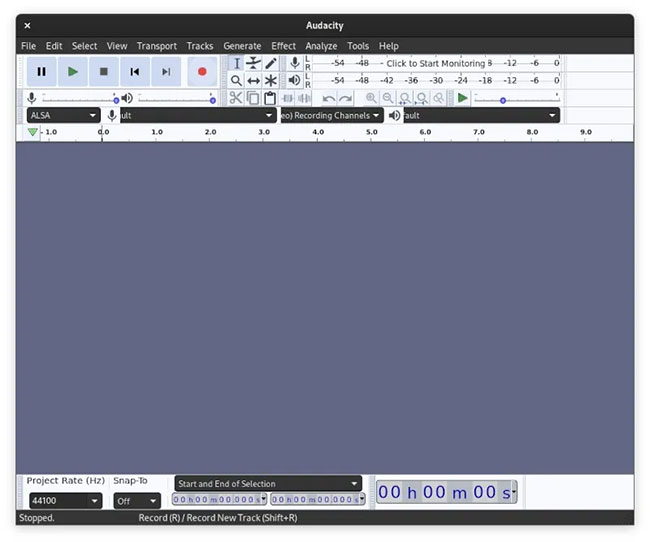
<p style="text-align: justify;">Khi bạn đã cắm micro vào hệ thống, hãy mở Audacity. Nó sẽ tự động tìm thấy phần cứng và mở ra để sẵn sàng ghi.</p>

<figure data-inimage-loaded="true">
<div style="text-align: justify;"><br />
<img alt="Ghi âm từ micro bằng Audacity" data-i="0" data-src="https://st.quantrimang.com/photos/image/2020/09/21/ghi-am-thanh-he-thong-tren-linux-1.jpg" data-was-processed="true" height="542" src="https://st.quantrimang.com/photos/image/2020/09/21/ghi-am-thanh-he-thong-tren-linux-1.jpg" width="650" /></div>

<figcaption>
<div style="text-align: justify;">Ghi âm từ micro bằng Audacity</div>
</figcaption>
</figure>

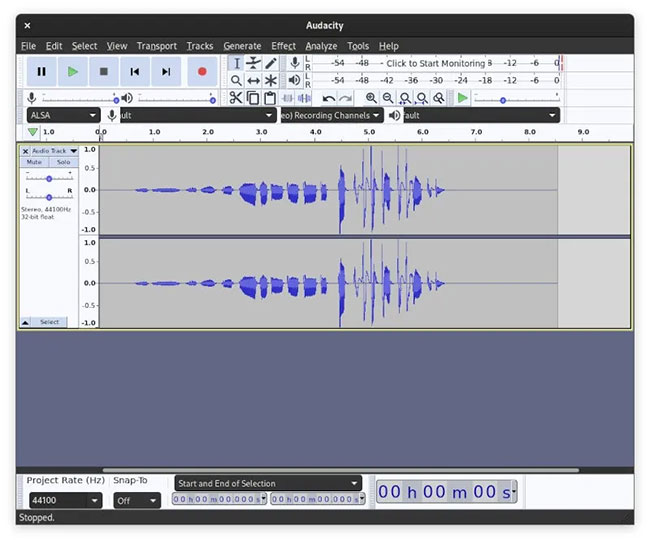
<p style="text-align: justify;">Chỉ cần nhấp vào nút ghi lớn màu đỏ. Mọi thứ chỉ đơn giản như vậy thôi! Audacity là một công cụ đơn giản để sử dụng nên rất khó để xảy ra sai sót.</p>

<figure>
<div style="text-align: justify;"><img alt="Chỉ cần nhấp vào nút ghi lớn màu đỏ để bắt đầu ghi" data-i="1" data-src="https://st.quantrimang.com/photos/image/2020/09/21/ghi-am-thanh-he-thong-tren-linux-2.jpg" data-was-processed="true" height="540" src="https://st.quantrimang.com/photos/image/2020/09/21/ghi-am-thanh-he-thong-tren-linux-2.jpg" width="650" /></div>

<figcaption>
<div style="text-align: justify;">Chỉ cần nhấp vào nút ghi lớn màu đỏ để bắt đầu ghi</div>
</figcaption>
</figure>

<div style="text-align: justify;">&nbsp;</div>

<h2 style="text-align: justify;">Ghi âm từ hệ thống</h2>

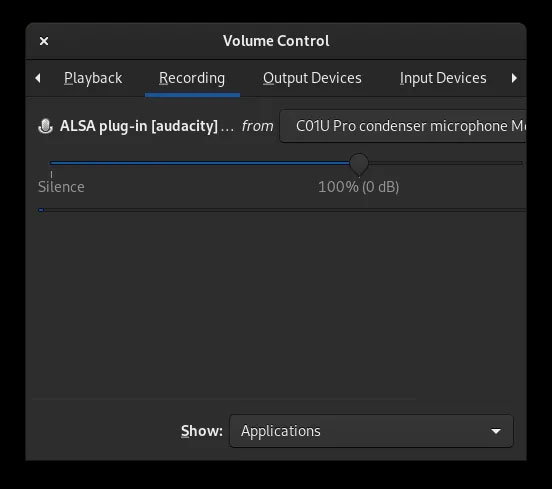
<p style="text-align: justify;">Cái này phức tạp hơn một chút. Nhấn nút ghi, giống như trên. Thao tác này sẽ bắt đầu ghi từ micro. Sau khi bạn đã ghi âm, hãy mở PulseAudio Volume Control và điều hướng đến tab&nbsp;<strong>“Recording”.</strong></p>

<figure>
<div style="text-align: justify;"><img alt="Điều hướng đến tab “Recording”" data-i="2" data-src="https://st.quantrimang.com/photos/image/2020/09/21/ghi-am-thanh-he-thong-tren-linux-3.jpg" data-was-processed="true" height="489" src="https://st.quantrimang.com/photos/image/2020/09/21/ghi-am-thanh-he-thong-tren-linux-3.jpg" width="552" /></div>

<figcaption>
<div style="text-align: justify;">Điều hướng đến tab “Recording”</div>
</figcaption>
</figure>

<p style="text-align: justify;">Nhấp vào menu drop-down có nội dung:&nbsp;<strong>“ALSA plug-in &#91;audacity&#93;… from”</strong>.</p>

<p style="text-align: justify;">Chọn tùy chọn có nội dung:&nbsp;<strong>“Monitor of Built-In Analog Stereo”</strong>. Thao tác này sẽ theo dõi những thông tin ứng dụng đang gửi đến PulseAudio và ghi lại thông tin đó thay vì âm thanh phát ra từ micro.</p>

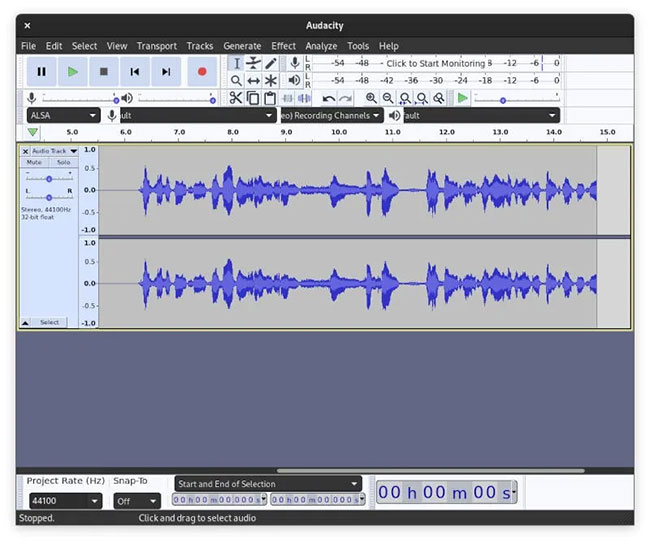
<p style="text-align: justify;">Từ đó, hãy tiếp tục và phát bất kỳ âm thanh nào bạn muốn và bạn sẽ thấy âm thanh đó hiển thị trong Audacity khi nó phát. Bạn có thể dừng ghi âm và xử lý bất kỳ âm thanh nào bạn đang ghi, giống như bất kỳ đầu vào âm thanh nào khác vào Audacity.</p>

<figure>
<div style="text-align: justify;"><img alt="Bạn có thể dừng ghi âm và xử lý bất kỳ âm thanh nào đang ghi" data-i="3" data-src="https://st.quantrimang.com/photos/image/2020/09/21/ghi-am-thanh-he-thong-tren-linux-4.jpg" data-was-processed="true" height="543" src="https://st.quantrimang.com/photos/image/2020/09/21/ghi-am-thanh-he-thong-tren-linux-4.jpg" width="650" /></div>

<figcaption>
<div style="text-align: justify;">Bạn có thể dừng ghi âm và xử lý bất kỳ âm thanh nào đang ghi</div>
</figcaption>
</figure>

<p style="text-align: justify;">Hy vọng bạn đã học được một vài điều hữu ích về Audacity và PulseAudio Volume Control. Giờ bạn đã biết cách ghi lại âm thanh hệ thống của mình trong Linux rồi đấy!</p>
		</div>
				<div id="author">
						<p>
				<strong>Nguồn tin:</strong>
				Quantrimang.com
			</p>
		</div>
	</div>
	<div id="footer" class="clearfix">
		<div id="url">
			<strong>URL của bản tin này: </strong><a href="https://www.nguoicodonvn2008.info/vi/news/savefile/kien-thuc-may-tinh/cach-ghi-am-thanh-he-thong-tren-linux-2758.html" title="Cách ghi âm thanh hệ thống trên Linux">https://www.nguoicodonvn2008.info/vi/news/savefile/kien-thuc-may-tinh/cach-ghi-am-thanh-he-thong-tren-linux-2758.html</a>

		</div>
		<div class="clear"></div>
		<div class="copyright">
			&copy; .&#x3A; Nguoicodonvn2008.info - Cõi lòng người cô đơn &#x3A;.
		</div>
		<div id="contact">
			<a href="mailto:admin@nguoicodonvn2008.info">admin@nguoicodonvn2008.info</a>
		</div>
	</div>
</div>
        <div id="timeoutsess" class="chromeframe">
            Bạn đã không sử dụng Site, <a onclick="timeoutsesscancel();" href="https://nguoicodonvn2008.info/#">Bấm vào đây để duy trì trạng thái đăng nhập</a>. Thời gian chờ: <span id="secField"> 60 </span> giây
        </div>
        <div id="openidResult" class="nv-alert" style="display:none"></div>
        <div id="openidBt" data-result="" data-redirect=""></div>
		</script>
		<div class="car-top">
  <span><img src="https://nguoicodonvn2008.info/themes/default/images/car.png" alt=""></span>
</div>
<script src="https://nguoicodonvn2008.info/assets/js/jquery/jquery.min.js"></script>
<script>var nv_base_siteurl="/",nv_lang_data="vi",nv_lang_interface="vi",nv_name_variable="nv",nv_fc_variable="op",nv_lang_variable="language",nv_module_name="news",nv_func_name="savefile",nv_is_user=0, nv_my_ofs=-4,nv_my_abbr="EDT",nv_cookie_prefix="nv4c_e856T",nv_check_pass_mstime=1738000,nv_area_admin=0,nv_safemode=0,theme_responsive=0,nv_recaptcha_ver=2,nv_recaptcha_sitekey="",nv_recaptcha_type="image",XSSsanitize=1;</script>
<script src="https://nguoicodonvn2008.info/assets/js/language/vi.js"></script>
<script src="https://nguoicodonvn2008.info/assets/js/DOMPurify/purify3.js"></script>
<script src="https://nguoicodonvn2008.info/assets/js/global.js"></script>
<script src="https://nguoicodonvn2008.info/assets/js/site.js"></script>
<script src="https://nguoicodonvn2008.info/themes/default/js/news.js"></script>
<script src="https://nguoicodonvn2008.info/themes/default/js/main.js"></script>
<script src="https://nguoicodonvn2008.info/themes/default/js/custom.js"></script>
<script type="application/ld+json">
        {
            "@context": "https://schema.org",
            "@type": "Organization",
            "url": "https://nguoicodonvn2008.info",
            "logo": "https://nguoicodonvn2008.info/uploads/angel.gif"
        }
        </script>
<script src="https://nguoicodonvn2008.info/themes/default/js/bootstrap.min.js"></script>
<script type="text/javascript">
var $scrolltop = $('.car-top');
$scrolltop.on('click', function () {
    $('html,body').animate({
        scrollTop: 0
    }, 800);
    $(this).addClass("car-run");
    setTimeout(function(){ $scrolltop.removeClass('car-run');}, 1000);
    return false;
});
$(window).on('scroll', function ()
{ 
    if($(window).scrollTop() >= 200)
    {
        $scrolltop.addClass("show");
        $scrolltop.addClass("car-down");
    }
    else
    {
       $scrolltop.removeClass("show");
       setTimeout(function(){ $scrolltop.removeClass('car-down');}, 300);
    }
});
</script>
</body>
</html>