<!DOCTYPE html>
    <html lang="vi" xmlns="http://www.w3.org/1999/xhtml" prefix="og: http://ogp.me/ns#">
    <head>
<title>Cách format thẻ SD trên Windows</title>
<meta name="description" content="Cách format thẻ SD trên Windows - Savefile - Tin Tức - https&#x3A;&#x002F;&#x002F;www.nguoicodonvn2008.info&#x002F;vi&#x002F;news&#x002F;savefile&#x002F;kien-thuc-may-tinh&#x002F;cach-format-the-sd-tren-windows-6605.html">
<meta name="author" content=".: Nguoicodonvn2008.info - Cõi lòng người cô đơn :.">
<meta name="copyright" content=".: Nguoicodonvn2008.info - Cõi lòng người cô đơn :. [admin@nguoicodonvn2008.info]">
<meta name="robots" content="index, archive, follow, noodp">
<meta name="googlebot" content="index,archive,follow,noodp">
<meta name="msnbot" content="all,index,follow">
<meta name="generator" content="NukeViet v4.5">
<meta http-equiv="Content-Type" content="text/html; charset=utf-8">
<meta property="og:title" content="Cách format thẻ SD trên Windows">
<meta property="og:type" content="website">
<meta property="og:description" content="Savefile - Tin Tức - https&#x3A;&#x002F;&#x002F;www.nguoicodonvn2008.info&#x002F;vi&#x002F;news&#x002F;savefile&#x002F;kien-thuc-may-tinh&#x002F;cach-format-the-sd-tren-windows-6605.html">
<meta property="og:site_name" content=".&#x3A; Nguoicodonvn2008.info - Cõi lòng người cô đơn &#x3A;.">
<meta property="og:url" content="https://www.nguoicodonvn2008.info/vi/news/savefile/kien-thuc-may-tinh/cach-format-the-sd-tren-windows-6605.html">
<link rel="shortcut icon" href="https://nguoicodonvn2008.info/favicon.ico">
<link rel="canonical" href="https://www.nguoicodonvn2008.info/vi/news/savefile/kien-thuc-may-tinh/cach-format-the-sd-tren-windows-6605.html">
<link rel="alternate" href="https://nguoicodonvn2008.info/vi/news/rss/" title="Tin Tức" type="application/rss+xml">
<link rel="alternate" href="https://nguoicodonvn2008.info/vi/news/rss/karaoke-dual/" title="Tin Tức - Karaoke Dual" type="application/rss+xml">
<link rel="alternate" href="https://nguoicodonvn2008.info/vi/news/rss/nhac-tre/" title="Tin Tức - Nhạc trẻ" type="application/rss+xml">
<link rel="alternate" href="https://nguoicodonvn2008.info/vi/news/rss/tru-tinh/" title="Tin Tức - Trữ tình" type="application/rss+xml">
<link rel="alternate" href="https://nguoicodonvn2008.info/vi/news/rss/nuoc-ngoai/" title="Tin Tức - Nước ngoài" type="application/rss+xml">
<link rel="alternate" href="https://nguoicodonvn2008.info/vi/news/rss/remix/" title="Tin Tức - Remix" type="application/rss+xml">
<link rel="alternate" href="https://nguoicodonvn2008.info/vi/news/rss/tam-su-tinh-yeu/" title="Tin Tức - Tâm sự tình yêu" type="application/rss+xml">
<link rel="alternate" href="https://nguoicodonvn2008.info/vi/news/rss/tho-suu-tam/" title="Tin Tức - Thơ sưu tầm" type="application/rss+xml">
<link rel="alternate" href="https://nguoicodonvn2008.info/vi/news/rss/cuoc-song/" title="Tin Tức - Cuộc sống" type="application/rss+xml">
<link rel="alternate" href="https://nguoicodonvn2008.info/vi/news/rss/phan-mem/" title="Tin Tức - Phần mềm" type="application/rss+xml">
<link rel="alternate" href="https://nguoicodonvn2008.info/vi/news/rss/kien-thuc-may-tinh/" title="Tin Tức - Kiến thức máy tính" type="application/rss+xml">
<link rel="alternate" href="https://nguoicodonvn2008.info/vi/news/rss/hoc-tap/" title="Tin Tức - Học tập" type="application/rss+xml">
<link rel="alternate" href="https://nguoicodonvn2008.info/vi/news/rss/tai-lieu/" title="Tin Tức - Tài liệu" type="application/rss+xml">
<link rel="alternate" href="https://nguoicodonvn2008.info/vi/news/rss/de-thi/" title="Tin Tức - Đề thi" type="application/rss+xml">
<link rel="preload" as="style" href="https://nguoicodonvn2008.info/assets/css/font-awesome.min.css" type="text/css">
<link rel="preload" as="style" href="https://nguoicodonvn2008.info/themes/default/css/bootstrap.non-responsive.css" type="text/css">
<link rel="preload" as="style" href="https://nguoicodonvn2008.info/themes/default/css/style.css" type="text/css">
<link rel="preload" as="style" href="https://nguoicodonvn2008.info/themes/default/css/style.non-responsive.css" type="text/css">
<link rel="preload" as="style" href="https://nguoicodonvn2008.info/themes/default/css/news.css" type="text/css">
<link rel="preload" as="style" href="https://nguoicodonvn2008.info/themes/default/css/custom.css" type="text/css">
<link rel="preload" as="script" href="https://nguoicodonvn2008.info/assets/js/jquery/jquery.min.js" type="text/javascript">
<link rel="preload" as="script" href="https://nguoicodonvn2008.info/assets/js/language/vi.js" type="text/javascript">
<link rel="preload" as="script" href="https://nguoicodonvn2008.info/assets/js/DOMPurify/purify3.js" type="text/javascript">
<link rel="preload" as="script" href="https://nguoicodonvn2008.info/assets/js/global.js" type="text/javascript">
<link rel="preload" as="script" href="https://nguoicodonvn2008.info/assets/js/site.js" type="text/javascript">
<link rel="preload" as="script" href="https://nguoicodonvn2008.info/themes/default/js/news.js" type="text/javascript">
<link rel="preload" as="script" href="https://nguoicodonvn2008.info/themes/default/js/main.js" type="text/javascript">
<link rel="preload" as="script" href="https://nguoicodonvn2008.info/themes/default/js/custom.js" type="text/javascript">
<link rel="preload" as="script" href="https://nguoicodonvn2008.info/themes/default/js/bootstrap.min.js" type="text/javascript">
<link rel="stylesheet" href="https://nguoicodonvn2008.info/assets/css/font-awesome.min.css">
<link rel="stylesheet" href="https://nguoicodonvn2008.info/themes/default/css/bootstrap.non-responsive.css">
<link rel="stylesheet" href="https://nguoicodonvn2008.info/themes/default/css/style.css">
<link rel="stylesheet" href="https://nguoicodonvn2008.info/themes/default/css/style.non-responsive.css">
<link rel="StyleSheet" href="https://nguoicodonvn2008.info/themes/default/css/news.css">
<link rel="stylesheet" href="https://nguoicodonvn2008.info/themes/default/css/custom.css">
<style type="text/css">
	body{background: #fff;}
</style>
    </head>
    <body>
<div id="print">
	<div id="hd_print">
		<h2 class="pull-left">.&#x3A; Nguoicodonvn2008.info - Cõi lòng người cô đơn &#x3A;.</h2>
		<p class="pull-right"><a title=".&#x3A; Nguoicodonvn2008.info - Cõi lòng người cô đơn &#x3A;." href="https://nguoicodonvn2008.info/">https://nguoicodonvn2008.info</a></p>
	</div>
	<div class="clear"></div>
	<hr />
	<div id="content">
		<h1>Cách format thẻ SD trên Windows</h1>
		<ul class="list-inline">
			<li>Thứ sáu - 13/01/2023 23:54</li>
			<li class="hidden-print txtrequired"><em class="fa fa-print">&nbsp;</em><a title="In ra" href="javascript:;" onclick="window.print()">In ra</a></li>
			<li class="hidden-print txtrequired"><em class="fa fa-power-off">&nbsp;</em><a title="Đóng cửa sổ này" href="javascript:;" onclick="window.close()">Đóng cửa sổ này</a></li>
		</ul>
		<div class="clear"></div>
		<div id="hometext">
		</div>
				<div class="imghome">
			<img alt="Cách format thẻ SD trên Windows" src="https://st.quantrimang.com/photos/image/2023/01/13/format-the-sd-tren-windows-1.jpg" width="460" class="img-thumbnail" />
		</div>
		<div class="clear"></div>
		<div id="bodytext" class="clearfix">
			<p style="text-align: justify;">Thẻ SD là một giải pháp tiện dụng để lưu giữ và truy cập dữ liệu khi đang di chuyển. Giống như các thiết bị lưu trữ khác như USB hoặc ổ cứng, bạn có thể dễ dàng format thẻ SD của mình khi không cần dữ liệu đã lưu nữa hoặc muốn lưu trữ thứ gì khác.</p>

<p style="text-align: justify;">Trong bài viết này, Quantrimang.com sẽ đề cập đến hai phương pháp hàng đầu để format thẻ SD. Hãy nhớ rằng, cả hai phương pháp được thảo luận ở đây đều không phải là &quot;tốt nhất&quot; hay &quot;nhanh nhất&quot;; tùy thuộc vào tình huống và yêu cầu, bạn có thể chọn một trong các phương pháp được liệt kê bên dưới.</p>

<h2 style="text-align: justify;">Cách format thẻ SD trên Windows</h2>

<p style="text-align: justify;">Như đã nói ở trên, có nhiều cách khác nhau để format thẻ SD của bạn, tùy thuộc vào cách bạn muốn sử dụng hoặc lưu trữ những thứ có trong đó. Các định dạng phổ biến nhất để giữ thẻ SD của bạn là exFAT hoặc NTFS (xem phần&nbsp;so sánh FAT32 với exFAT&nbsp;để biết thông tin về vị trí của từng định dạng).</p>

<p style="text-align: justify;">NTFS phù hợp hơn nếu bạn muốn sử dụng driver hoặc trong trường hợp này là thẻ SD, chỉ trong hệ điều hành Windows. Mặt khác, exFAT sẽ hữu ích hơn nếu bạn có ý định làm cho thẻ SD của mình độc lập với hệ thống.</p>

<p style="text-align: justify;">Bây giờ, hãy xem các cách khác nhau để format thẻ SD của bạn.</p>

<h3 style="text-align: justify;">Format thẻ SD trên Windows thông qua File Explorer</h3>

<p style="text-align: justify;">Sau khi bạn cắm thẻ SD vào PC, một driver mới sẽ xuất hiện trong File Explorer.</p>

<p style="text-align: justify;">Lưu ý rằng một số máy tính không có khe cắm cụ thể cho thẻ SD. Nếu rơi vào trường hợp đó, bạn sẽ phải sử dụng đầu đọc thẻ. Đặt thẻ SD của bạn vào đầu đọc thẻ và cắm nó vào khe cắm USB.</p>

<p style="text-align: justify;">Sau khi cắm thẻ SD, đây là cách bạn có thể bắt đầu format thẻ SD trên Windows:</p>

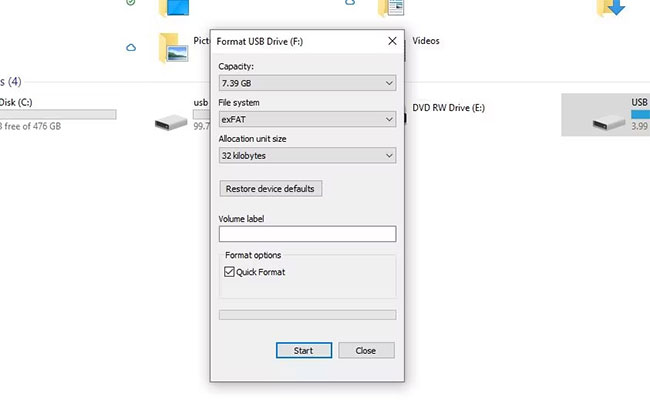
<p style="text-align: justify;">1. Nhấp chuột phải vào ổ chứa thẻ SD và chọn&nbsp;<strong>Format.</strong></p>

<p style="text-align: justify;">2. Trong hộp thoại&nbsp;<strong>Format</strong>, đặt&nbsp;<strong>File system</strong>&nbsp;là&nbsp;<strong>exFat.</strong></p>

<p style="text-align: justify;">3. Cuối cùng, nhấp vào&nbsp;<strong>Start</strong>&nbsp;để bắt đầu quá trình format.</p>

<p style="text-align: justify;">4. Bấm vào&nbsp;<strong>OK.</strong></p>

<figure>
<div style="text-align: justify;"><img alt="Ổ chứa thẻ SD" data-i="0" data-src="https://st.quantrimang.com/photos/image/2023/01/13/format-the-sd-tren-windows-1.jpg" data-was-processed="true" height="410" src="https://st.quantrimang.com/photos/image/2023/01/13/format-the-sd-tren-windows-1.jpg" width="650" /></div>

<figcaption>
<div style="text-align: justify;">Ổ chứa thẻ SD</div>
</figcaption>
</figure>

<p style="text-align: justify;">Tùy thuộc vào kích thước và dữ liệu của thẻ SD, thẻ sẽ bị xóa sạch sau vài giây.</p>

<h3 style="text-align: justify;">Format thẻ SD Windows bằng Command Prompt</h3>

<p style="text-align: justify;">Command Prompt&nbsp;là trình thông dịch dòng lệnh mặc định trên Windows cho phép bạn tương tác và điều khiển tất cả PC của mình từ một nơi duy nhất.</p>

<p style="text-align: justify;">Bạn cũng có thể sử dụng nó để format thẻ SD của mình một cách dễ dàng. Đây là cách thực hiện:</p>

<p style="text-align: justify;">1. Đi tới thanh tìm kiếm trong menu Start, nhập&nbsp;<strong>cmd</strong>&nbsp;và&nbsp;khởi chạy Command Prompt với quyền admin.</p>

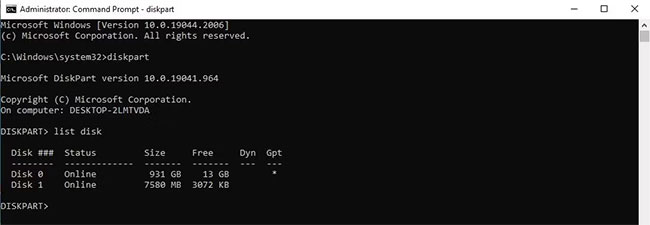
<p style="text-align: justify;">2. Trong Command Prompt, nhập&nbsp;<strong>diskpart</strong>&nbsp;và nhấn&nbsp;<strong>Enter.</strong></p>

<p style="text-align: justify;">3. Tiếp theo, nhập&nbsp;<strong>“list disk”</strong>&nbsp;và nhấn&nbsp;<strong>Enter</strong>&nbsp;lần nữa. Bây giờ, bạn sẽ thấy số sê-ri của thẻ SD.</p>

<figure>
<div style="text-align: justify;"><img alt="Nhập lệnh “list disk”" data-i="1" data-src="https://st.quantrimang.com/photos/image/2023/01/13/format-the-sd-tren-windows-2.jpg" data-was-processed="true" height="225" src="https://st.quantrimang.com/photos/image/2023/01/13/format-the-sd-tren-windows-2.jpg" width="650" /></div>

<figcaption>
<div style="text-align: justify;">Nhập lệnh “list disk”</div>
</figcaption>
</figure>

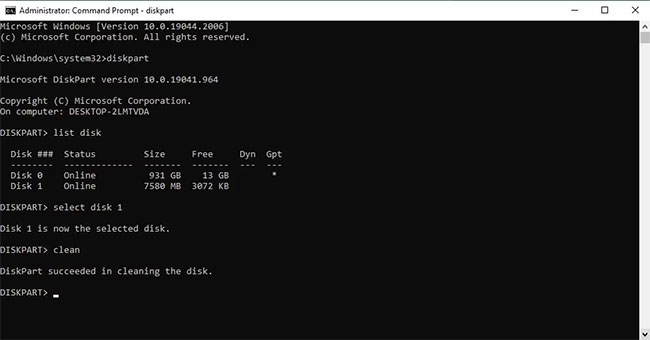
<p style="text-align: justify;">4. Tiếp theo, gõ lệnh sau và nhấn&nbsp;<strong>Enter</strong>:</p>

<pre id="pre0">
<code>select disk 0</code></pre>

<p style="text-align: justify;">5. Trong lệnh trên, thay thế&nbsp;<strong>0</strong>&nbsp;bằng số ổ đĩa được phân bổ cho thẻ SD của bạn từ lệnh thứ ba. Trong trường hợp ví dụ, đó là&nbsp;<strong>Disk 1</strong>. Vì vậy, lệnh sẽ trở thành như sau:</p>

<pre id="pre1">
<code>select disk 1</code></pre>

<p style="text-align: justify;">6. Cuối cùng, nhập&nbsp;<strong>clean</strong>&nbsp;và nhấn&nbsp;<strong>Enter.</strong></p>

<p style="text-align: justify;">Thẻ SD sẽ bị xóa sạch tất cả dữ liệu.</p>

<figure>
<div style="text-align: justify;"><img alt="Format thẻ SD thông qua CMD" data-i="2" data-src="https://st.quantrimang.com/photos/image/2023/01/13/format-the-sd-tren-windows-3.jpg" data-was-processed="true" height="340" src="https://st.quantrimang.com/photos/image/2023/01/13/format-the-sd-tren-windows-3.jpg" width="650" /></div>

<figcaption>
<div style="text-align: justify;">Format thẻ SD thông qua CMD</div>
</figcaption>
</figure>

<p style="text-align: justify;">Nhưng việc format mới chỉ được thực hiện một nửa. Hãy nhớ rằng, bất cứ khi nào bạn format bất kỳ ổ nào bằng Command Prompt, bạn sẽ phải phân vùng ổ đó sau khi dọn dẹp. Để bắt đầu, gõ lệnh sau và nhấn&nbsp;<strong>Enter</strong>:</p>

<pre id="pre2">
<code>create partition primary</code></pre>

<p style="text-align: justify;">Sau đó, nhập một trong các lệnh sau (NTFS hoặc exFAT) rồi nhấn&nbsp;<strong>Enter</strong>:</p>

<pre id="pre3">
<code>&amp;ldquo;format fs=ntfs&amp;rdquo; </code></pre>

<p style="text-align: justify;">Hoặc:</p>

<pre id="pre4">
<code>&amp;ldquo;format fs=exfat&amp;rdquo;</code></pre>

<p style="text-align: justify;">Tùy thuộc vào khả năng của PC, quá trình phân vùng sẽ kết thúc sau vài phút.</p>

<p style="text-align: justify;">Bạn có thể thêm ký tự ổ từ chính cmd nếu muốn. Thay thế&nbsp;<strong>“E”</strong>&nbsp;bằng bất cứ thứ gì bạn muốn gán cho ổ của mình bằng lệnh sau:</p>

<pre id="pre5">
<code>assign letter=E</code></pre>

<p style="text-align: justify;">Format nhanh là tất cả những gì bạn cần để tiếp tục sử dụng thẻ SD nhiều lần, ít nhất là cho đến khi nó bị hỏng. Nếu thực sự có một số vấn đề với chính thẻ SD, thì mua một thẻ mới có lẽ là lựa chọn tốt nhất cho bạn.</p>
		</div>
				<div id="author">
						<p>
				<strong>Nguồn tin:</strong>
				Quantrimang.com
			</p>
		</div>
	</div>
	<div id="footer" class="clearfix">
		<div id="url">
			<strong>URL của bản tin này: </strong><a href="https://www.nguoicodonvn2008.info/vi/news/savefile/kien-thuc-may-tinh/cach-format-the-sd-tren-windows-6605.html" title="Cách format thẻ SD trên Windows">https://www.nguoicodonvn2008.info/vi/news/savefile/kien-thuc-may-tinh/cach-format-the-sd-tren-windows-6605.html</a>

		</div>
		<div class="clear"></div>
		<div class="copyright">
			&copy; .&#x3A; Nguoicodonvn2008.info - Cõi lòng người cô đơn &#x3A;.
		</div>
		<div id="contact">
			<a href="mailto:admin@nguoicodonvn2008.info">admin@nguoicodonvn2008.info</a>
		</div>
	</div>
</div>
        <div id="timeoutsess" class="chromeframe">
            Bạn đã không sử dụng Site, <a onclick="timeoutsesscancel();" href="https://nguoicodonvn2008.info/#">Bấm vào đây để duy trì trạng thái đăng nhập</a>. Thời gian chờ: <span id="secField"> 60 </span> giây
        </div>
        <div id="openidResult" class="nv-alert" style="display:none"></div>
        <div id="openidBt" data-result="" data-redirect=""></div>
		</script>
		<div class="car-top">
  <span><img src="https://nguoicodonvn2008.info/themes/default/images/car.png" alt=""></span>
</div>
<script src="https://nguoicodonvn2008.info/assets/js/jquery/jquery.min.js"></script>
<script>var nv_base_siteurl="/",nv_lang_data="vi",nv_lang_interface="vi",nv_name_variable="nv",nv_fc_variable="op",nv_lang_variable="language",nv_module_name="news",nv_func_name="savefile",nv_is_user=0, nv_my_ofs=-4,nv_my_abbr="EDT",nv_cookie_prefix="nv4c_e856T",nv_check_pass_mstime=1738000,nv_area_admin=0,nv_safemode=0,theme_responsive=0,nv_recaptcha_ver=2,nv_recaptcha_sitekey="",nv_recaptcha_type="image",XSSsanitize=1;</script>
<script src="https://nguoicodonvn2008.info/assets/js/language/vi.js"></script>
<script src="https://nguoicodonvn2008.info/assets/js/DOMPurify/purify3.js"></script>
<script src="https://nguoicodonvn2008.info/assets/js/global.js"></script>
<script src="https://nguoicodonvn2008.info/assets/js/site.js"></script>
<script src="https://nguoicodonvn2008.info/themes/default/js/news.js"></script>
<script src="https://nguoicodonvn2008.info/themes/default/js/main.js"></script>
<script src="https://nguoicodonvn2008.info/themes/default/js/custom.js"></script>
<script type="application/ld+json">
        {
            "@context": "https://schema.org",
            "@type": "Organization",
            "url": "https://nguoicodonvn2008.info",
            "logo": "https://nguoicodonvn2008.info/uploads/angel.gif"
        }
        </script>
<script src="https://nguoicodonvn2008.info/themes/default/js/bootstrap.min.js"></script>
<script type="text/javascript">
var $scrolltop = $('.car-top');
$scrolltop.on('click', function () {
    $('html,body').animate({
        scrollTop: 0
    }, 800);
    $(this).addClass("car-run");
    setTimeout(function(){ $scrolltop.removeClass('car-run');}, 1000);
    return false;
});
$(window).on('scroll', function ()
{ 
    if($(window).scrollTop() >= 200)
    {
        $scrolltop.addClass("show");
        $scrolltop.addClass("car-down");
    }
    else
    {
       $scrolltop.removeClass("show");
       setTimeout(function(){ $scrolltop.removeClass('car-down');}, 300);
    }
});
</script>
</body>
</html>