<!DOCTYPE html>
    <html lang="vi" xmlns="http://www.w3.org/1999/xhtml" prefix="og: http://ogp.me/ns#">
    <head>
<title>Cách fix lỗi phương trình Word không hiển thị đúng dạng</title>
<meta name="description" content="Cách fix lỗi phương trình Word không hiển thị đúng dạng - Savefile - Tin Tức -...">
<meta name="author" content=".: Nguoicodonvn2008.info - Cõi lòng người cô đơn :.">
<meta name="copyright" content=".: Nguoicodonvn2008.info - Cõi lòng người cô đơn :. [admin@nguoicodonvn2008.info]">
<meta name="robots" content="index, archive, follow, noodp">
<meta name="googlebot" content="index,archive,follow,noodp">
<meta name="msnbot" content="all,index,follow">
<meta name="generator" content="NukeViet v4.5">
<meta http-equiv="Content-Type" content="text/html; charset=utf-8">
<meta property="og:title" content="Cách fix lỗi phương trình Word không hiển thị đúng dạng">
<meta property="og:type" content="website">
<meta property="og:description" content="Savefile - Tin Tức - https&#x3A;&#x002F;&#x002F;www.nguoicodonvn2008.info&#x002F;vi&#x002F;news&#x002F;savefile&#x002F;kien-thuc-may-tinh&#x002F;cach-fix-loi-phuong-trinh-word-khong-hien-thi-dung-dang-11569.html">
<meta property="og:site_name" content=".&#x3A; Nguoicodonvn2008.info - Cõi lòng người cô đơn &#x3A;.">
<meta property="og:url" content="https://www.nguoicodonvn2008.info/vi/news/savefile/kien-thuc-may-tinh/cach-fix-loi-phuong-trinh-word-khong-hien-thi-dung-dang-11569.html">
<link rel="shortcut icon" href="https://nguoicodonvn2008.info/favicon.ico">
<link rel="canonical" href="https://www.nguoicodonvn2008.info/vi/news/savefile/kien-thuc-may-tinh/cach-fix-loi-phuong-trinh-word-khong-hien-thi-dung-dang-11569.html">
<link rel="alternate" href="https://nguoicodonvn2008.info/vi/news/rss/" title="Tin Tức" type="application/rss+xml">
<link rel="alternate" href="https://nguoicodonvn2008.info/vi/news/rss/karaoke-dual/" title="Tin Tức - Karaoke Dual" type="application/rss+xml">
<link rel="alternate" href="https://nguoicodonvn2008.info/vi/news/rss/nhac-tre/" title="Tin Tức - Nhạc trẻ" type="application/rss+xml">
<link rel="alternate" href="https://nguoicodonvn2008.info/vi/news/rss/tru-tinh/" title="Tin Tức - Trữ tình" type="application/rss+xml">
<link rel="alternate" href="https://nguoicodonvn2008.info/vi/news/rss/nuoc-ngoai/" title="Tin Tức - Nước ngoài" type="application/rss+xml">
<link rel="alternate" href="https://nguoicodonvn2008.info/vi/news/rss/remix/" title="Tin Tức - Remix" type="application/rss+xml">
<link rel="alternate" href="https://nguoicodonvn2008.info/vi/news/rss/tam-su-tinh-yeu/" title="Tin Tức - Tâm sự tình yêu" type="application/rss+xml">
<link rel="alternate" href="https://nguoicodonvn2008.info/vi/news/rss/tho-suu-tam/" title="Tin Tức - Thơ sưu tầm" type="application/rss+xml">
<link rel="alternate" href="https://nguoicodonvn2008.info/vi/news/rss/cuoc-song/" title="Tin Tức - Cuộc sống" type="application/rss+xml">
<link rel="alternate" href="https://nguoicodonvn2008.info/vi/news/rss/phan-mem/" title="Tin Tức - Phần mềm" type="application/rss+xml">
<link rel="alternate" href="https://nguoicodonvn2008.info/vi/news/rss/kien-thuc-may-tinh/" title="Tin Tức - Kiến thức máy tính" type="application/rss+xml">
<link rel="alternate" href="https://nguoicodonvn2008.info/vi/news/rss/hoc-tap/" title="Tin Tức - Học tập" type="application/rss+xml">
<link rel="alternate" href="https://nguoicodonvn2008.info/vi/news/rss/tai-lieu/" title="Tin Tức - Tài liệu" type="application/rss+xml">
<link rel="alternate" href="https://nguoicodonvn2008.info/vi/news/rss/de-thi/" title="Tin Tức - Đề thi" type="application/rss+xml">
<link rel="preload" as="style" href="https://nguoicodonvn2008.info/assets/css/font-awesome.min.css" type="text/css">
<link rel="preload" as="style" href="https://nguoicodonvn2008.info/themes/default/css/bootstrap.non-responsive.css" type="text/css">
<link rel="preload" as="style" href="https://nguoicodonvn2008.info/themes/default/css/style.css" type="text/css">
<link rel="preload" as="style" href="https://nguoicodonvn2008.info/themes/default/css/style.non-responsive.css" type="text/css">
<link rel="preload" as="style" href="https://nguoicodonvn2008.info/themes/default/css/news.css" type="text/css">
<link rel="preload" as="style" href="https://nguoicodonvn2008.info/themes/default/css/custom.css" type="text/css">
<link rel="preload" as="script" href="https://nguoicodonvn2008.info/assets/js/jquery/jquery.min.js" type="text/javascript">
<link rel="preload" as="script" href="https://nguoicodonvn2008.info/assets/js/language/vi.js" type="text/javascript">
<link rel="preload" as="script" href="https://nguoicodonvn2008.info/assets/js/DOMPurify/purify3.js" type="text/javascript">
<link rel="preload" as="script" href="https://nguoicodonvn2008.info/assets/js/global.js" type="text/javascript">
<link rel="preload" as="script" href="https://nguoicodonvn2008.info/assets/js/site.js" type="text/javascript">
<link rel="preload" as="script" href="https://nguoicodonvn2008.info/themes/default/js/news.js" type="text/javascript">
<link rel="preload" as="script" href="https://nguoicodonvn2008.info/themes/default/js/main.js" type="text/javascript">
<link rel="preload" as="script" href="https://nguoicodonvn2008.info/themes/default/js/custom.js" type="text/javascript">
<link rel="preload" as="script" href="https://nguoicodonvn2008.info/themes/default/js/bootstrap.min.js" type="text/javascript">
<link rel="stylesheet" href="https://nguoicodonvn2008.info/assets/css/font-awesome.min.css">
<link rel="stylesheet" href="https://nguoicodonvn2008.info/themes/default/css/bootstrap.non-responsive.css">
<link rel="stylesheet" href="https://nguoicodonvn2008.info/themes/default/css/style.css">
<link rel="stylesheet" href="https://nguoicodonvn2008.info/themes/default/css/style.non-responsive.css">
<link rel="StyleSheet" href="https://nguoicodonvn2008.info/themes/default/css/news.css">
<link rel="stylesheet" href="https://nguoicodonvn2008.info/themes/default/css/custom.css">
<style type="text/css">
	body{background: #fff;}
</style>
    </head>
    <body>
<div id="print">
	<div id="hd_print">
		<h2 class="pull-left">.&#x3A; Nguoicodonvn2008.info - Cõi lòng người cô đơn &#x3A;.</h2>
		<p class="pull-right"><a title=".&#x3A; Nguoicodonvn2008.info - Cõi lòng người cô đơn &#x3A;." href="https://nguoicodonvn2008.info/">https://nguoicodonvn2008.info</a></p>
	</div>
	<div class="clear"></div>
	<hr />
	<div id="content">
		<h1>Cách fix lỗi phương trình Word không hiển thị đúng dạng</h1>
		<ul class="list-inline">
			<li>Thứ hai - 10/11/2025 22:10</li>
			<li class="hidden-print txtrequired"><em class="fa fa-print">&nbsp;</em><a title="In ra" href="javascript:;" onclick="window.print()">In ra</a></li>
			<li class="hidden-print txtrequired"><em class="fa fa-power-off">&nbsp;</em><a title="Đóng cửa sổ này" href="javascript:;" onclick="window.close()">Đóng cửa sổ này</a></li>
		</ul>
		<div class="clear"></div>
		<div id="hometext">
		</div>
				<div class="imghome">
			<img alt="Cách fix lỗi phương trình Word không hiển thị đúng dạng" src="https://st.quantrimang.com/photos/image/2025/11/07/Word-loi-phuong-trinh-9.jpg" width="460" class="img-thumbnail" />
		</div>
		<div class="clear"></div>
		<div id="bodytext" class="clearfix">
			<p style="text-align: justify;">Equation trong Word&nbsp;rất quan trọng với các thầy cô và học sinh, khi trình bày các bài toán và phép tính một cách dễ dàng hơn, chuẩn xác hơn. Tuy nhiên không phải lúc nào công cụ Equation cũng hoạt động trơn tru, có thể xảy ra một vài lỗi như phương trình không hiển thị đúng dạng trong Toán học chẳng hạn. Dưới đây là hướng dẫn fix lỗi phương trình Word không hiển thị đúng dạng.</p>

<div style="text-align: justify;">&nbsp;</div>

<h2 style="text-align: justify;">Bật định dạng Unicode</h2>

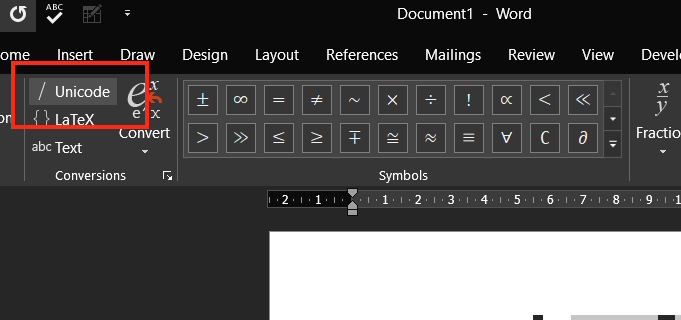
<p style="text-align: justify;">Bạn&nbsp;<strong>nhấn vào Insert rồi chọn Equation</strong>, sau đó<strong>&nbsp;chọn nút Unicode</strong>&nbsp;để sử dụng định dạng này cho phương trình bạn nhập trên Word.</p>

<p style="text-align: justify;"><img alt="Bật định dạng Unicode" data-i="0" data-src="https://st.quantrimang.com/photos/image/2025/11/07/Word-loi-phuong-trinh-1.jpg" data-was-processed="true" height="282" src="https://st.quantrimang.com/photos/image/2025/11/07/Word-loi-phuong-trinh-1.jpg" width="600" /></p>

<h2 style="text-align: justify;">Tạo chế độ chuyên nghiệp cho phương trình</h2>

<p style="text-align: justify;"><strong>Bước 1:</strong></p>

<p style="text-align: justify;">Chúng ta bôi&nbsp;<strong>đen phương trình</strong>&nbsp;muốn chuyển sang dạng chuyên nghiệp.</p>

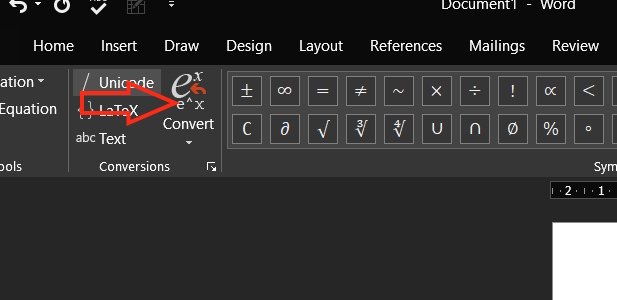
<p style="text-align: justify;">Bạn mở công cụ phương trình bằng cách&nbsp;<strong>nhấn tổ hợp phím Alt + =</strong>. Sau đó bạn&nbsp;<strong>nhấn vào tab Equations</strong>&nbsp;rồi nhấn tiếp vào&nbsp;<strong>Convert</strong>.</p>

<p style="text-align: justify;"><img alt="Chuyển đổi nội dung" data-i="1" data-src="https://st.quantrimang.com/photos/image/2025/11/07/Word-loi-phuong-trinh-2.jpg" data-was-processed="true" height="300" src="https://st.quantrimang.com/photos/image/2025/11/07/Word-loi-phuong-trinh-2.jpg" width="617" /></p>

<p style="text-align: justify;"><strong>Bước 2:</strong></p>

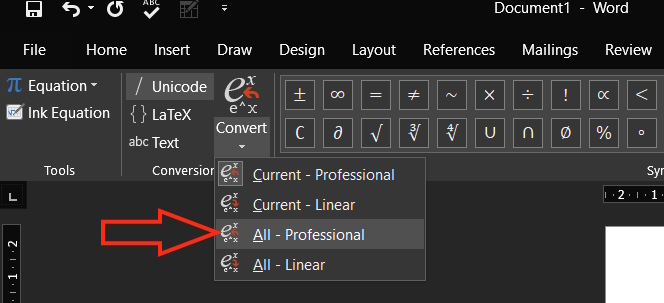
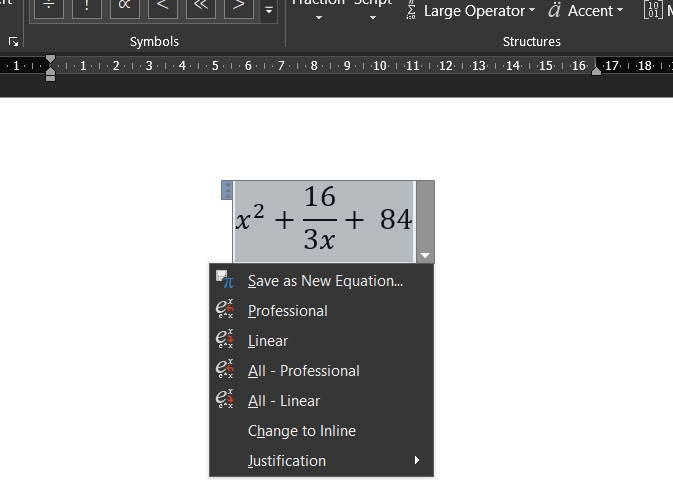
<p style="text-align: justify;">Người dùng&nbsp;<strong>nhấn chọn All-Professional</strong>&nbsp;trong menu hiển thị để chuyển phương trình bạn cần sang dạng chuyên nghiệp.</p>

<p style="text-align: justify;"><img alt="Chuyển sang dạng chuyên nghiệp" data-i="2" data-src="https://st.quantrimang.com/photos/image/2025/11/07/Word-loi-phuong-trinh-3.jpg" data-was-processed="true" height="274" src="https://st.quantrimang.com/photos/image/2025/11/07/Word-loi-phuong-trinh-3.jpg" width="600" /></p>

<p style="text-align: justify;">Ngay sau đó bạn thấy phương trình hiển thị đúng định dạng như hình dưới đây.</p>

<p style="text-align: justify;">&nbsp;</p>

<div style="text-align: justify;"><br />
<img alt="Hiện đúng dạng phương trình" data-adbro-processed="true" data-i="3" data-src="https://st.quantrimang.com/photos/image/2025/11/07/Word-loi-phuong-trinh-4.jpg" data-was-processed="true" height="392" src="https://st.quantrimang.com/photos/image/2025/11/07/Word-loi-phuong-trinh-4.jpg" width="550" /><br />
&nbsp;</div>

<h2 style="text-align: justify;">Xóa các mẫu trong Word</h2>

<p style="text-align: justify;">Các mẫu có sẵn định dạng và quy tắc riêng trong Word có thể xung đột với việc chọn chế độ phương trình. Việc xóa chúng khỏi thư mục AppData (nơi lưu trữ cài đặt và thông tin phần mềm) có thể giải quyết vấn đề trong Word.</p>

<p style="text-align: justify;"><strong>Bước 1:</strong></p>

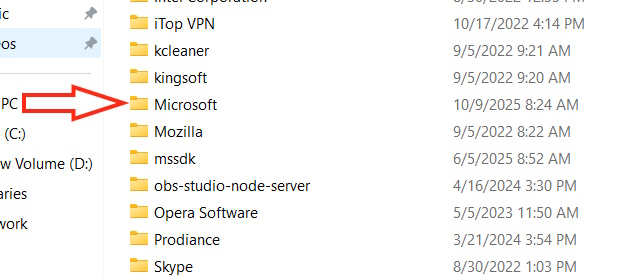
<p style="text-align: justify;">Bạn mở&nbsp;<strong>hộp thoại Run</strong>&nbsp;rồi&nbsp;<strong>nhập %appdata%&nbsp;</strong>và nhấn OK. Sau đó, bạn&nbsp;<strong>nhấn vào thư mục Microsoft&nbsp;</strong>để truy cập.</p>

<p style="text-align: justify;"><img alt="Thư mục Microsoft" data-i="4" data-src="https://st.quantrimang.com/photos/image/2025/11/07/Word-loi-phuong-trinh-6.jpg" data-was-processed="true" height="277" src="https://st.quantrimang.com/photos/image/2025/11/07/Word-loi-phuong-trinh-6.jpg" width="632" /></p>

<p style="text-align: justify;"><strong>Bước 2:</strong></p>

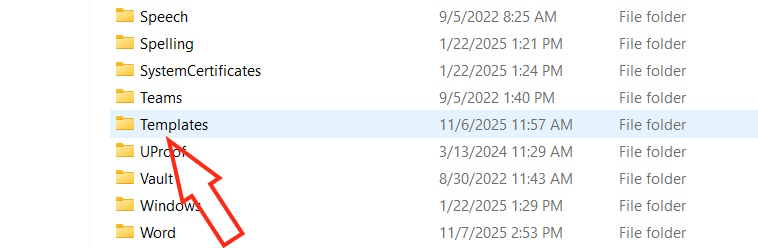
<p style="text-align: justify;">Nhấn tiếp vào&nbsp;<strong>thư mục Templates</strong>.</p>

<p style="text-align: justify;"><img alt="Thư mục Templates" data-i="5" data-src="https://st.quantrimang.com/photos/image/2025/11/07/Word-loi-phuong-trinh-7.jpg" data-was-processed="true" height="206" src="https://st.quantrimang.com/photos/image/2025/11/07/Word-loi-phuong-trinh-7.jpg" width="630" /></p>

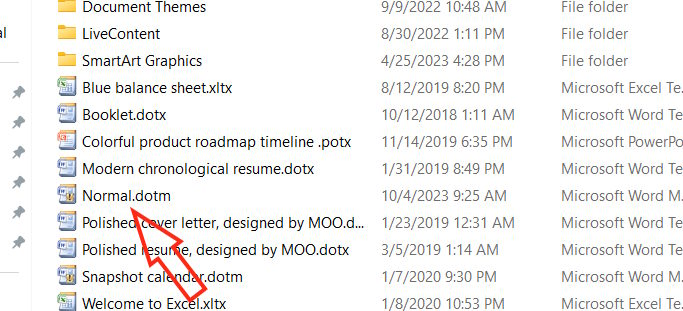
<p style="text-align: justify;">Bạn sẽ thấy danh sách các mẫu cho toàn bộ bộ Word của mình. Bạn cần&nbsp;<strong>xóa các tệp &quot;.dotm&quot;, cụ thể là Normal.dotm</strong>&nbsp;là được. Sau đó khởi động lại Word.</p>

<p style="text-align: justify;"><img alt="Xóa các mẫu trong Word" data-i="6" data-src="https://st.quantrimang.com/photos/image/2025/11/07/Word-loi-phuong-trinh-8.jpg" data-was-processed="true" height="287" src="https://st.quantrimang.com/photos/image/2025/11/07/Word-loi-phuong-trinh-8.jpg" width="630" /></p>

<h2 style="text-align: justify;">Xóa Add-ons trong Word</h2>

<p style="text-align: justify;">Các tiện ích bổ sung của bên thứ ba, ngoài việc làm chậm thời gian tải, còn có thể xung đột với các quy trình của Microsoft Word. Bạn có thể xóa add-ons đó để giải quyết vấn đề đang mắc với phương trình trong Word.</p>

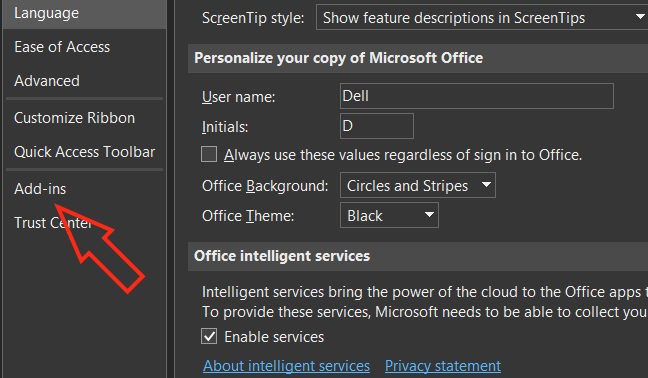
<p style="text-align: justify;">Bạn nhấn vào<strong>&nbsp;File &gt; Options &gt; Add-ons</strong>&nbsp;để tiến hành điều chỉnh.</p>

<p style="text-align: justify;"><img alt=" Add-ons Word" data-i="7" data-src="https://st.quantrimang.com/photos/image/2025/11/07/Word-loi-phuong-trinh-9.jpg" data-was-processed="true" height="350" src="https://st.quantrimang.com/photos/image/2025/11/07/Word-loi-phuong-trinh-9.jpg" width="600" /></p>

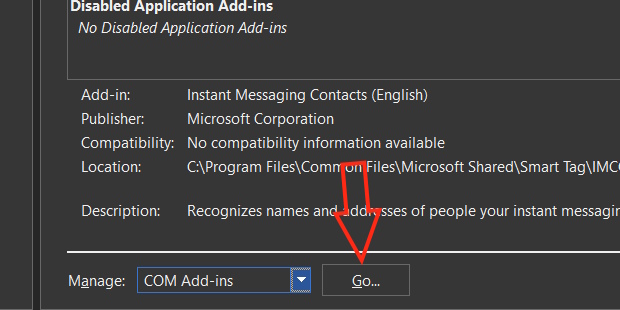
<p style="text-align: justify;">Chuyển sang giao diện bên cạnh bạn<strong>&nbsp;nhấn Add-ons rồi chọn OK</strong>&nbsp;để truy cập giao diện quản lý add-ons đã cài đặt trong Word.</p>

<p style="text-align: justify;">Sau đó bạn bỏ chọn tại add-ons muốn gỡ khỏi Word rồi nhấn OK để lưu lại.</p>

<p style="text-align: justify;"><img alt=" Gỡ Add-ons Word" data-i="8" data-src="https://st.quantrimang.com/photos/image/2025/11/07/Word-loi-phuong-trinh-10.jpg" data-was-processed="true" height="310" src="https://st.quantrimang.com/photos/image/2025/11/07/Word-loi-phuong-trinh-10.jpg" width="620" /></p>

<p style="text-align: justify;">Cuối cùng khởi động lại Word để thay đổi được áp dụng.</p>
		</div>
				<div id="author">
						<p>
				<strong>Nguồn tin:</strong>
				Quantrimang.com:
			</p>
		</div>
	</div>
	<div id="footer" class="clearfix">
		<div id="url">
			<strong>URL của bản tin này: </strong><a href="https://www.nguoicodonvn2008.info/vi/news/savefile/kien-thuc-may-tinh/cach-fix-loi-phuong-trinh-word-khong-hien-thi-dung-dang-11569.html" title="Cách fix lỗi phương trình Word không hiển thị đúng dạng">https://www.nguoicodonvn2008.info/vi/news/savefile/kien-thuc-may-tinh/cach-fix-loi-phuong-trinh-word-khong-hien-thi-dung-dang-11569.html</a>

		</div>
		<div class="clear"></div>
		<div class="copyright">
			&copy; .&#x3A; Nguoicodonvn2008.info - Cõi lòng người cô đơn &#x3A;.
		</div>
		<div id="contact">
			<a href="mailto:admin@nguoicodonvn2008.info">admin@nguoicodonvn2008.info</a>
		</div>
	</div>
</div>
        <div id="timeoutsess" class="chromeframe">
            Bạn đã không sử dụng Site, <a onclick="timeoutsesscancel();" href="https://nguoicodonvn2008.info/#">Bấm vào đây để duy trì trạng thái đăng nhập</a>. Thời gian chờ: <span id="secField"> 60 </span> giây
        </div>
        <div id="openidResult" class="nv-alert" style="display:none"></div>
        <div id="openidBt" data-result="" data-redirect=""></div>
		</script>
		<div class="car-top">
  <span><img src="https://nguoicodonvn2008.info/themes/default/images/car.png" alt=""></span>
</div>
<script src="https://nguoicodonvn2008.info/assets/js/jquery/jquery.min.js"></script>
<script>var nv_base_siteurl="/",nv_lang_data="vi",nv_lang_interface="vi",nv_name_variable="nv",nv_fc_variable="op",nv_lang_variable="language",nv_module_name="news",nv_func_name="savefile",nv_is_user=0, nv_my_ofs=-4,nv_my_abbr="EDT",nv_cookie_prefix="nv4c_e856T",nv_check_pass_mstime=1738000,nv_area_admin=0,nv_safemode=0,theme_responsive=0,nv_recaptcha_ver=2,nv_recaptcha_sitekey="",nv_recaptcha_type="image",XSSsanitize=1;</script>
<script src="https://nguoicodonvn2008.info/assets/js/language/vi.js"></script>
<script src="https://nguoicodonvn2008.info/assets/js/DOMPurify/purify3.js"></script>
<script src="https://nguoicodonvn2008.info/assets/js/global.js"></script>
<script src="https://nguoicodonvn2008.info/assets/js/site.js"></script>
<script src="https://nguoicodonvn2008.info/themes/default/js/news.js"></script>
<script src="https://nguoicodonvn2008.info/themes/default/js/main.js"></script>
<script src="https://nguoicodonvn2008.info/themes/default/js/custom.js"></script>
<script type="application/ld+json">
        {
            "@context": "https://schema.org",
            "@type": "Organization",
            "url": "https://nguoicodonvn2008.info",
            "logo": "https://nguoicodonvn2008.info/uploads/angel.gif"
        }
        </script>
<script src="https://nguoicodonvn2008.info/themes/default/js/bootstrap.min.js"></script>
<script type="text/javascript">
var $scrolltop = $('.car-top');
$scrolltop.on('click', function () {
    $('html,body').animate({
        scrollTop: 0
    }, 800);
    $(this).addClass("car-run");
    setTimeout(function(){ $scrolltop.removeClass('car-run');}, 1000);
    return false;
});
$(window).on('scroll', function ()
{ 
    if($(window).scrollTop() >= 200)
    {
        $scrolltop.addClass("show");
        $scrolltop.addClass("car-down");
    }
    else
    {
       $scrolltop.removeClass("show");
       setTimeout(function(){ $scrolltop.removeClass('car-down');}, 300);
    }
});
</script>
</body>
</html>