<!DOCTYPE html>
    <html lang="vi" xmlns="http://www.w3.org/1999/xhtml" prefix="og: http://ogp.me/ns#">
    <head>
<title>Cách dùng Sticky Bit để quản lý file trên thư mục chia sẻ trong Linux</title>
<meta name="description" content="Cách dùng Sticky Bit để quản lý file trên thư mục chia sẻ trong Linux - Savefile - Tin Tức -...">
<meta name="author" content=".: Nguoicodonvn2008.info - Cõi lòng người cô đơn :.">
<meta name="copyright" content=".: Nguoicodonvn2008.info - Cõi lòng người cô đơn :. [admin@nguoicodonvn2008.info]">
<meta name="robots" content="index, archive, follow, noodp">
<meta name="googlebot" content="index,archive,follow,noodp">
<meta name="msnbot" content="all,index,follow">
<meta name="generator" content="NukeViet v4.5">
<meta http-equiv="Content-Type" content="text/html; charset=utf-8">
<meta property="og:title" content="Cách dùng Sticky Bit để quản lý file trên thư mục chia sẻ trong Linux">
<meta property="og:type" content="website">
<meta property="og:description" content="Savefile - Tin Tức - https&#x3A;&#x002F;&#x002F;www.nguoicodonvn2008.info&#x002F;vi&#x002F;news&#x002F;savefile&#x002F;kien-thuc-may-tinh&#x002F;cach-dung-sticky-bit-de-quan-ly-file-tren-thu-muc-chia-se-trong-linux-1655.html">
<meta property="og:site_name" content=".&#x3A; Nguoicodonvn2008.info - Cõi lòng người cô đơn &#x3A;.">
<meta property="og:url" content="https://www.nguoicodonvn2008.info/vi/news/savefile/kien-thuc-may-tinh/cach-dung-sticky-bit-de-quan-ly-file-tren-thu-muc-chia-se-trong-linux-1655.html">
<link rel="shortcut icon" href="https://nguoicodonvn2008.info/favicon.ico">
<link rel="canonical" href="https://www.nguoicodonvn2008.info/vi/news/savefile/kien-thuc-may-tinh/cach-dung-sticky-bit-de-quan-ly-file-tren-thu-muc-chia-se-trong-linux-1655.html">
<link rel="alternate" href="https://nguoicodonvn2008.info/vi/news/rss/" title="Tin Tức" type="application/rss+xml">
<link rel="alternate" href="https://nguoicodonvn2008.info/vi/news/rss/karaoke-dual/" title="Tin Tức - Karaoke Dual" type="application/rss+xml">
<link rel="alternate" href="https://nguoicodonvn2008.info/vi/news/rss/nhac-tre/" title="Tin Tức - Nhạc trẻ" type="application/rss+xml">
<link rel="alternate" href="https://nguoicodonvn2008.info/vi/news/rss/tru-tinh/" title="Tin Tức - Trữ tình" type="application/rss+xml">
<link rel="alternate" href="https://nguoicodonvn2008.info/vi/news/rss/nuoc-ngoai/" title="Tin Tức - Nước ngoài" type="application/rss+xml">
<link rel="alternate" href="https://nguoicodonvn2008.info/vi/news/rss/remix/" title="Tin Tức - Remix" type="application/rss+xml">
<link rel="alternate" href="https://nguoicodonvn2008.info/vi/news/rss/tam-su-tinh-yeu/" title="Tin Tức - Tâm sự tình yêu" type="application/rss+xml">
<link rel="alternate" href="https://nguoicodonvn2008.info/vi/news/rss/tho-suu-tam/" title="Tin Tức - Thơ sưu tầm" type="application/rss+xml">
<link rel="alternate" href="https://nguoicodonvn2008.info/vi/news/rss/cuoc-song/" title="Tin Tức - Cuộc sống" type="application/rss+xml">
<link rel="alternate" href="https://nguoicodonvn2008.info/vi/news/rss/phan-mem/" title="Tin Tức - Phần mềm" type="application/rss+xml">
<link rel="alternate" href="https://nguoicodonvn2008.info/vi/news/rss/kien-thuc-may-tinh/" title="Tin Tức - Kiến thức máy tính" type="application/rss+xml">
<link rel="alternate" href="https://nguoicodonvn2008.info/vi/news/rss/hoc-tap/" title="Tin Tức - Học tập" type="application/rss+xml">
<link rel="alternate" href="https://nguoicodonvn2008.info/vi/news/rss/tai-lieu/" title="Tin Tức - Tài liệu" type="application/rss+xml">
<link rel="alternate" href="https://nguoicodonvn2008.info/vi/news/rss/de-thi/" title="Tin Tức - Đề thi" type="application/rss+xml">
<link rel="preload" as="style" href="https://nguoicodonvn2008.info/assets/css/font-awesome.min.css" type="text/css">
<link rel="preload" as="style" href="https://nguoicodonvn2008.info/themes/default/css/bootstrap.non-responsive.css" type="text/css">
<link rel="preload" as="style" href="https://nguoicodonvn2008.info/themes/default/css/style.css" type="text/css">
<link rel="preload" as="style" href="https://nguoicodonvn2008.info/themes/default/css/style.non-responsive.css" type="text/css">
<link rel="preload" as="style" href="https://nguoicodonvn2008.info/themes/default/css/news.css" type="text/css">
<link rel="preload" as="style" href="https://nguoicodonvn2008.info/themes/default/css/custom.css" type="text/css">
<link rel="preload" as="script" href="https://nguoicodonvn2008.info/assets/js/jquery/jquery.min.js" type="text/javascript">
<link rel="preload" as="script" href="https://nguoicodonvn2008.info/assets/js/language/vi.js" type="text/javascript">
<link rel="preload" as="script" href="https://nguoicodonvn2008.info/assets/js/DOMPurify/purify3.js" type="text/javascript">
<link rel="preload" as="script" href="https://nguoicodonvn2008.info/assets/js/global.js" type="text/javascript">
<link rel="preload" as="script" href="https://nguoicodonvn2008.info/assets/js/site.js" type="text/javascript">
<link rel="preload" as="script" href="https://nguoicodonvn2008.info/themes/default/js/news.js" type="text/javascript">
<link rel="preload" as="script" href="https://nguoicodonvn2008.info/themes/default/js/main.js" type="text/javascript">
<link rel="preload" as="script" href="https://nguoicodonvn2008.info/themes/default/js/custom.js" type="text/javascript">
<link rel="preload" as="script" href="https://nguoicodonvn2008.info/themes/default/js/bootstrap.min.js" type="text/javascript">
<link rel="stylesheet" href="https://nguoicodonvn2008.info/assets/css/font-awesome.min.css">
<link rel="stylesheet" href="https://nguoicodonvn2008.info/themes/default/css/bootstrap.non-responsive.css">
<link rel="stylesheet" href="https://nguoicodonvn2008.info/themes/default/css/style.css">
<link rel="stylesheet" href="https://nguoicodonvn2008.info/themes/default/css/style.non-responsive.css">
<link rel="StyleSheet" href="https://nguoicodonvn2008.info/themes/default/css/news.css">
<link rel="stylesheet" href="https://nguoicodonvn2008.info/themes/default/css/custom.css">
<style type="text/css">
	body{background: #fff;}
</style>
    </head>
    <body>
<div id="print">
	<div id="hd_print">
		<h2 class="pull-left">.&#x3A; Nguoicodonvn2008.info - Cõi lòng người cô đơn &#x3A;.</h2>
		<p class="pull-right"><a title=".&#x3A; Nguoicodonvn2008.info - Cõi lòng người cô đơn &#x3A;." href="https://nguoicodonvn2008.info/">https://nguoicodonvn2008.info</a></p>
	</div>
	<div class="clear"></div>
	<hr />
	<div id="content">
		<h1>Cách dùng Sticky Bit để quản lý file trên thư mục chia sẻ trong Linux</h1>
		<ul class="list-inline">
			<li>Thứ ba - 11/02/2020 00:01</li>
			<li class="hidden-print txtrequired"><em class="fa fa-print">&nbsp;</em><a title="In ra" href="javascript:;" onclick="window.print()">In ra</a></li>
			<li class="hidden-print txtrequired"><em class="fa fa-power-off">&nbsp;</em><a title="Đóng cửa sổ này" href="javascript:;" onclick="window.close()">Đóng cửa sổ này</a></li>
		</ul>
		<div class="clear"></div>
		<div id="hometext">
		</div>
				<div class="imghome">
			<img alt="Cách dùng Sticky Bit để quản lý file trên thư mục chia sẻ trong Linux" src="https://st.quantrimang.com/photos/image/2020/02/10/dung-sticky-bit-quan-ly-file-tren-thu-muc-dung-chung-4.jpg" width="460" class="img-thumbnail" />
		</div>
		<div class="clear"></div>
		<div id="bodytext" class="clearfix">
			<p style="text-align: justify;">Kể từ khi ra mắt,&nbsp;Linux&nbsp;đã được thiết kế để hỗ trợ môi trường nhiều người dùng. Với nhiều người dùng và nhóm trên một hệ thống làm việc, việc gặp các thư mục được chia sẻ giữa những người dùng cùng nhóm là điều khá phổ biến và các vấn đề cũng phát sinh từ việc chia sẻ file trong thư mục.</p>

<p style="text-align: justify;">Trong bài viết này,&nbsp;<strong>Quantrimang.com</strong>&nbsp;sẽ thảo luận về cách bạn có thể sử dụng các sticky bit để tinh chỉnh quyền truy cập file trên những thư mục được chia sẻ.</p>

<p style="text-align: justify;">Với mục đích minh họa, bài viết có một hệ thống với 3 người dùng&nbsp;<strong>- john1, john2</strong>&nbsp;và<strong>&nbsp;john3</strong>, tất cả đều là thành viên của nhóm chung.</p>

<p style="text-align: justify;">Giả sử&nbsp;<strong>“john1”</strong>&nbsp;tạo ra một thư mục mới có tên là&nbsp;<strong>“shared-dir”</strong>, được chia sẻ giữa tất cả những người dùng của nhóm&nbsp;<strong>johns.</strong></p>

<p style="text-align: justify;">Với lệnh&nbsp;<code>ls</code>, ta có thể xem quyền cho&nbsp;<strong>“shared-dir”</strong>, được hiểu như sau: Chỉ&nbsp;<strong>“john1”</strong>&nbsp;có thể đọc nội dung cũng như ghi vào thư mục. Vì ta đang làm việc với một thư mục dùng chung, nên mục đích là làm cho tất cả người dùng của nhóm có thể ghi vào&nbsp;<strong>“shared-dir”.</strong></p>

<p style="text-align: justify;">Để làm như vậy, ta sẽ sửa đổi các quyền bằng cách sử dụng lệnh&nbsp;<code>chmod</code>. Ta sẽ bổ sung quyền ghi cho tất cả những người dùng của nhóm&nbsp;<strong>johns</strong>, như bên dưới.</p>

<figure>
<div style="text-align: justify;"><img alt="Quyền ghi cho tất cả những người dùng của nhóm johns" data-i="0" data-src="https://st.quantrimang.com/photos/image/2020/02/10/dung-sticky-bit-quan-ly-file-tren-thu-muc-dung-chung-1.jpg" data-was-processed="true" height="21" src="https://st.quantrimang.com/photos/image/2020/02/10/dung-sticky-bit-quan-ly-file-tren-thu-muc-dung-chung-1.jpg" width="330" /></div>

<figcaption>
<div style="text-align: justify;">Quyền ghi cho tất cả những người dùng của nhóm johns</div>
</figcaption>
</figure>

<p style="text-align: justify;">Ta có thể xem các quyền được cập nhật cho&nbsp;<strong>“shared-dir”</strong>&nbsp;như được hiển thị bên dưới. Phần được gạch chân màu vàng cho thấy rằng nhóm&nbsp;<strong>johns</strong>&nbsp;đã được cấp quyền ghi.</p>

<h2 style="text-align: justify;">Thêm file vào thư mục được chia sẻ</h2>

<p style="text-align: justify;">Bây giờ,&nbsp;<strong>john1</strong>&nbsp;thêm hai file (<strong>j1_file1.txt</strong>&nbsp;và<strong>&nbsp;j1_file2.txt</strong>) vào&nbsp;<strong>“shared-dir”.</strong></p>

<p style="text-align: justify;">Để dễ hiểu, hai ký tự đầu tiên của tên file đồng nghĩa với tên người dùng.</p>

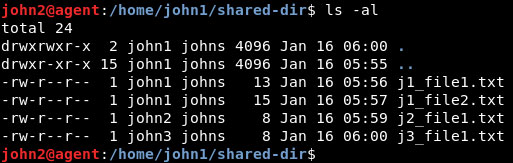
<p style="text-align: justify;">Tương tự như vậy,&nbsp;<strong>john2</strong>&nbsp;cũng có thể ghi vào thư mục&nbsp;<strong>“shared-dir”.</strong></p>

<p style="text-align: justify;">Hiện tại có 4 file trong&nbsp;<strong>“shared-dir”.</strong></p>

<figure>
<div style="text-align: justify;"><img alt="4 file trong “shared-dir”" data-i="1" data-src="https://st.quantrimang.com/photos/image/2020/02/10/dung-sticky-bit-quan-ly-file-tren-thu-muc-dung-chung-2.jpg" data-was-processed="true" height="163" src="https://st.quantrimang.com/photos/image/2020/02/10/dung-sticky-bit-quan-ly-file-tren-thu-muc-dung-chung-2.jpg" width="513" /></div>

<figcaption>
<div style="text-align: justify;">4 file trong “shared-dir”</div>
</figcaption>
</figure>

<h2 style="text-align: justify;">Có vấn đề gì với các thiết lập hiện tại không?</h2>

<p style="text-align: justify;">File&nbsp;<strong>j1_file1.txt</strong>&nbsp;được tạo bởi bởi&nbsp;<strong>john1</strong>, chủ sở hữu file. Bây giờ,&nbsp;<strong>john2</strong>&nbsp;đăng nhập và cố gắng xóa file này và anh ta sẽ có thể làm như vậy.</p>

<p style="text-align: justify;"><strong>“john1”</strong>&nbsp;là chủ sở hữu file, nhưng&nbsp;<strong>“john2”</strong>&nbsp;có thể xóa nó bởi vì quyền ghi được trao cho tất cả các thành viên của nhóm&nbsp;<strong>johns.</strong></p>

<p style="text-align: justify;">Kịch bản này không lý tưởng. Ta muốn tất cả người dùng có thể ghi vào thư mục, nhưng chỉ chủ sở hữu file mới có thể xóa tệp. Làm thế nào có thể đạt được điều này?</p>

<div style="text-align: justify;">&nbsp;</div>

<h2 style="text-align: justify;">Giới thiệu sticky bit</h2>

<p style="text-align: justify;">Sticky bit là một quyền đặc biệt, được thiết lập trên một thư mục cấp quyền ghi cho toàn bộ nhóm. Bit này đảm bảo rằng tất cả các thành viên của nhóm có thể ghi vào thư mục, nhưng chỉ người tạo file, hay chủ sở hữu file, mới có thể xóa nó.</p>

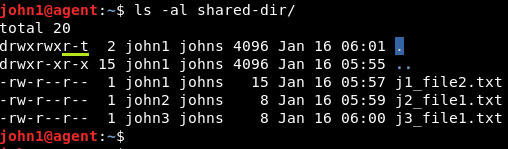
<p style="text-align: justify;">Lệnh&nbsp;<code>chmod</code>&nbsp;với flag -<strong>t</strong>&nbsp;có thể được sử dụng để đặt sticky bit trên một thư mục.</p>

<p style="text-align: justify;">Quyền được cập nhật có thể được nhìn thấy dưới đây.</p>

<figure>
<div style="text-align: justify;"><img alt="Quyền được cập nhật" data-i="2" data-src="https://st.quantrimang.com/photos/image/2020/02/10/dung-sticky-bit-quan-ly-file-tren-thu-muc-dung-chung-3.jpg" data-was-processed="true" height="149" src="https://st.quantrimang.com/photos/image/2020/02/10/dung-sticky-bit-quan-ly-file-tren-thu-muc-dung-chung-3.jpg" width="508" /></div>

<figcaption>
<div style="text-align: justify;">Quyền được cập nhật</div>
</figcaption>
</figure>

<p style="text-align: justify;">Bây giờ, nếu&nbsp;<strong>“john2”</strong>&nbsp;cố gắng xóa file&nbsp;<strong>“j1_file2.txt”</strong>&nbsp;được tạo bởi&nbsp;<strong>“john1”,</strong>&nbsp;thì hoạt động đó sẽ không được phép.</p>

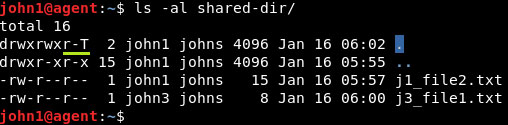
<p style="text-align: justify;">Nếu bạn xóa quyền thực thi đối với những người khác, thì sự tồn tại của sticky bit trên thư mục được thể hiện bằng chữ&nbsp;<code>T</code>&nbsp;hoa trong phần&nbsp;<strong>“others”</strong>&nbsp;của chuỗi quyền. Các hành vi của sticky bit trên thư mục vẫn giữ nguyên.</p>

<figure>
<div style="text-align: justify;"><img alt="Sự tồn tại của sticky bit trên thư mục được thể hiện bằng chữ T hoa" data-i="3" data-src="https://st.quantrimang.com/photos/image/2020/02/10/dung-sticky-bit-quan-ly-file-tren-thu-muc-dung-chung-4.jpg" data-was-processed="true" height="125" src="https://st.quantrimang.com/photos/image/2020/02/10/dung-sticky-bit-quan-ly-file-tren-thu-muc-dung-chung-4.jpg" width="508" /></div>

<figcaption>
<div style="text-align: justify;">Sự tồn tại của sticky bit trên thư mục được thể hiện bằng chữ T hoa</div>
</figcaption>
</figure>

<h2 style="text-align: justify;">Biến thể của lệnh chmod</h2>

<p style="text-align: justify;">Dạng số của lệnh&nbsp;<code>chmod</code>&nbsp;cũng có thể được sử dụng để đặt sticky bit trên một thư mục.</p>

<pre id="pre0">
<code>chmod nxyz &lt;file_name&gt;</code></pre>

<p style="text-align: justify;">Trong đó:</p>

<ul>
	<li style="text-align: justify;"><strong>n = 1</strong>: Đề cập đến sticky bit. Các giá trị khác của n đề cập đến các quyền đặc biệt khác.</li>
	<li style="text-align: justify;"><strong>x</strong>: Quyền đối với chủ sở hữu file.</li>
	<li style="text-align: justify;"><strong>y</strong>: Quyền được cấp cho nhóm có quyền truy cập vào file.</li>
	<li style="text-align: justify;"><strong>z</strong>: Quyền cho những người khác</li>
</ul>

<p style="text-align: justify;">Để thiết lập sticky bit trên&nbsp;<strong>“shared-dir”</strong>, hãy sử dụng lệnh sau:</p>

<pre id="pre1">
<code>chmod 1755 shared-dir</code></pre>

<p style="text-align: justify;">Lệnh tạo ra kết quả tương tự như sử dụng&nbsp;<strong>+t</strong>&nbsp;trên các quyền mặc định hiện có.</p>

<p style="text-align: justify;">Việc sử dụng sticky bit chỉ phù hợp cho các thư mục và sẽ không có ý nghĩa khi sử dụng cho các file.</p>
		</div>
				<div id="author">
						<p>
				<strong>Nguồn tin:</strong>
				Quantrimang.com
			</p>
		</div>
	</div>
	<div id="footer" class="clearfix">
		<div id="url">
			<strong>URL của bản tin này: </strong><a href="https://www.nguoicodonvn2008.info/vi/news/savefile/kien-thuc-may-tinh/cach-dung-sticky-bit-de-quan-ly-file-tren-thu-muc-chia-se-trong-linux-1655.html" title="Cách dùng Sticky Bit để quản lý file trên thư mục chia sẻ trong Linux">https://www.nguoicodonvn2008.info/vi/news/savefile/kien-thuc-may-tinh/cach-dung-sticky-bit-de-quan-ly-file-tren-thu-muc-chia-se-trong-linux-1655.html</a>

		</div>
		<div class="clear"></div>
		<div class="copyright">
			&copy; .&#x3A; Nguoicodonvn2008.info - Cõi lòng người cô đơn &#x3A;.
		</div>
		<div id="contact">
			<a href="mailto:admin@nguoicodonvn2008.info">admin@nguoicodonvn2008.info</a>
		</div>
	</div>
</div>
        <div id="timeoutsess" class="chromeframe">
            Bạn đã không sử dụng Site, <a onclick="timeoutsesscancel();" href="https://nguoicodonvn2008.info/#">Bấm vào đây để duy trì trạng thái đăng nhập</a>. Thời gian chờ: <span id="secField"> 60 </span> giây
        </div>
        <div id="openidResult" class="nv-alert" style="display:none"></div>
        <div id="openidBt" data-result="" data-redirect=""></div>
		</script>
		<div class="car-top">
  <span><img src="https://nguoicodonvn2008.info/themes/default/images/car.png" alt=""></span>
</div>
<script src="https://nguoicodonvn2008.info/assets/js/jquery/jquery.min.js"></script>
<script>var nv_base_siteurl="/",nv_lang_data="vi",nv_lang_interface="vi",nv_name_variable="nv",nv_fc_variable="op",nv_lang_variable="language",nv_module_name="news",nv_func_name="savefile",nv_is_user=0, nv_my_ofs=-4,nv_my_abbr="EDT",nv_cookie_prefix="nv4c_e856T",nv_check_pass_mstime=1738000,nv_area_admin=0,nv_safemode=0,theme_responsive=0,nv_recaptcha_ver=2,nv_recaptcha_sitekey="",nv_recaptcha_type="image",XSSsanitize=1;</script>
<script src="https://nguoicodonvn2008.info/assets/js/language/vi.js"></script>
<script src="https://nguoicodonvn2008.info/assets/js/DOMPurify/purify3.js"></script>
<script src="https://nguoicodonvn2008.info/assets/js/global.js"></script>
<script src="https://nguoicodonvn2008.info/assets/js/site.js"></script>
<script src="https://nguoicodonvn2008.info/themes/default/js/news.js"></script>
<script src="https://nguoicodonvn2008.info/themes/default/js/main.js"></script>
<script src="https://nguoicodonvn2008.info/themes/default/js/custom.js"></script>
<script type="application/ld+json">
        {
            "@context": "https://schema.org",
            "@type": "Organization",
            "url": "https://nguoicodonvn2008.info",
            "logo": "https://nguoicodonvn2008.info/uploads/angel.gif"
        }
        </script>
<script src="https://nguoicodonvn2008.info/themes/default/js/bootstrap.min.js"></script>
<script type="text/javascript">
var $scrolltop = $('.car-top');
$scrolltop.on('click', function () {
    $('html,body').animate({
        scrollTop: 0
    }, 800);
    $(this).addClass("car-run");
    setTimeout(function(){ $scrolltop.removeClass('car-run');}, 1000);
    return false;
});
$(window).on('scroll', function ()
{ 
    if($(window).scrollTop() >= 200)
    {
        $scrolltop.addClass("show");
        $scrolltop.addClass("car-down");
    }
    else
    {
       $scrolltop.removeClass("show");
       setTimeout(function(){ $scrolltop.removeClass('car-down');}, 300);
    }
});
</script>
</body>
</html>