<!DOCTYPE html>
    <html lang="vi" xmlns="http://www.w3.org/1999/xhtml" prefix="og: http://ogp.me/ns#">
    <head>
<title>Cách dùng Sport Streaming xem bóng đá trên Windows 10</title>
<meta name="description" content="Cách dùng Sport Streaming xem bóng đá trên Windows 10 - Savefile - Tin Tức -...">
<meta name="author" content=".: Nguoicodonvn2008.info - Cõi lòng người cô đơn :.">
<meta name="copyright" content=".: Nguoicodonvn2008.info - Cõi lòng người cô đơn :. [admin@nguoicodonvn2008.info]">
<meta name="robots" content="index, archive, follow, noodp">
<meta name="googlebot" content="index,archive,follow,noodp">
<meta name="msnbot" content="all,index,follow">
<meta name="generator" content="NukeViet v4.5">
<meta http-equiv="Content-Type" content="text/html; charset=utf-8">
<meta property="og:title" content="Cách dùng Sport Streaming xem bóng đá trên Windows 10">
<meta property="og:type" content="website">
<meta property="og:description" content="Savefile - Tin Tức - https&#x3A;&#x002F;&#x002F;www.nguoicodonvn2008.info&#x002F;vi&#x002F;news&#x002F;savefile&#x002F;kien-thuc-may-tinh&#x002F;cach-dung-sport-streaming-xem-bong-da-tren-windows-10-298.html">
<meta property="og:site_name" content=".&#x3A; Nguoicodonvn2008.info - Cõi lòng người cô đơn &#x3A;.">
<meta property="og:url" content="https://www.nguoicodonvn2008.info/vi/news/savefile/kien-thuc-may-tinh/cach-dung-sport-streaming-xem-bong-da-tren-windows-10-298.html">
<link rel="shortcut icon" href="https://nguoicodonvn2008.info/favicon.ico">
<link rel="canonical" href="https://www.nguoicodonvn2008.info/vi/news/savefile/kien-thuc-may-tinh/cach-dung-sport-streaming-xem-bong-da-tren-windows-10-298.html">
<link rel="alternate" href="https://nguoicodonvn2008.info/vi/news/rss/" title="Tin Tức" type="application/rss+xml">
<link rel="alternate" href="https://nguoicodonvn2008.info/vi/news/rss/karaoke-dual/" title="Tin Tức - Karaoke Dual" type="application/rss+xml">
<link rel="alternate" href="https://nguoicodonvn2008.info/vi/news/rss/nhac-tre/" title="Tin Tức - Nhạc trẻ" type="application/rss+xml">
<link rel="alternate" href="https://nguoicodonvn2008.info/vi/news/rss/tru-tinh/" title="Tin Tức - Trữ tình" type="application/rss+xml">
<link rel="alternate" href="https://nguoicodonvn2008.info/vi/news/rss/nuoc-ngoai/" title="Tin Tức - Nước ngoài" type="application/rss+xml">
<link rel="alternate" href="https://nguoicodonvn2008.info/vi/news/rss/remix/" title="Tin Tức - Remix" type="application/rss+xml">
<link rel="alternate" href="https://nguoicodonvn2008.info/vi/news/rss/tam-su-tinh-yeu/" title="Tin Tức - Tâm sự tình yêu" type="application/rss+xml">
<link rel="alternate" href="https://nguoicodonvn2008.info/vi/news/rss/tho-suu-tam/" title="Tin Tức - Thơ sưu tầm" type="application/rss+xml">
<link rel="alternate" href="https://nguoicodonvn2008.info/vi/news/rss/cuoc-song/" title="Tin Tức - Cuộc sống" type="application/rss+xml">
<link rel="alternate" href="https://nguoicodonvn2008.info/vi/news/rss/phan-mem/" title="Tin Tức - Phần mềm" type="application/rss+xml">
<link rel="alternate" href="https://nguoicodonvn2008.info/vi/news/rss/kien-thuc-may-tinh/" title="Tin Tức - Kiến thức máy tính" type="application/rss+xml">
<link rel="alternate" href="https://nguoicodonvn2008.info/vi/news/rss/hoc-tap/" title="Tin Tức - Học tập" type="application/rss+xml">
<link rel="alternate" href="https://nguoicodonvn2008.info/vi/news/rss/tai-lieu/" title="Tin Tức - Tài liệu" type="application/rss+xml">
<link rel="alternate" href="https://nguoicodonvn2008.info/vi/news/rss/de-thi/" title="Tin Tức - Đề thi" type="application/rss+xml">
<link rel="preload" as="style" href="https://nguoicodonvn2008.info/assets/css/font-awesome.min.css" type="text/css">
<link rel="preload" as="style" href="https://nguoicodonvn2008.info/themes/default/css/bootstrap.non-responsive.css" type="text/css">
<link rel="preload" as="style" href="https://nguoicodonvn2008.info/themes/default/css/style.css" type="text/css">
<link rel="preload" as="style" href="https://nguoicodonvn2008.info/themes/default/css/style.non-responsive.css" type="text/css">
<link rel="preload" as="style" href="https://nguoicodonvn2008.info/themes/default/css/news.css" type="text/css">
<link rel="preload" as="style" href="https://nguoicodonvn2008.info/themes/default/css/custom.css" type="text/css">
<link rel="preload" as="script" href="https://nguoicodonvn2008.info/assets/js/jquery/jquery.min.js" type="text/javascript">
<link rel="preload" as="script" href="https://nguoicodonvn2008.info/assets/js/language/vi.js" type="text/javascript">
<link rel="preload" as="script" href="https://nguoicodonvn2008.info/assets/js/DOMPurify/purify3.js" type="text/javascript">
<link rel="preload" as="script" href="https://nguoicodonvn2008.info/assets/js/global.js" type="text/javascript">
<link rel="preload" as="script" href="https://nguoicodonvn2008.info/assets/js/site.js" type="text/javascript">
<link rel="preload" as="script" href="https://nguoicodonvn2008.info/themes/default/js/news.js" type="text/javascript">
<link rel="preload" as="script" href="https://nguoicodonvn2008.info/themes/default/js/main.js" type="text/javascript">
<link rel="preload" as="script" href="https://nguoicodonvn2008.info/themes/default/js/custom.js" type="text/javascript">
<link rel="preload" as="script" href="https://nguoicodonvn2008.info/themes/default/js/bootstrap.min.js" type="text/javascript">
<link rel="stylesheet" href="https://nguoicodonvn2008.info/assets/css/font-awesome.min.css">
<link rel="stylesheet" href="https://nguoicodonvn2008.info/themes/default/css/bootstrap.non-responsive.css">
<link rel="stylesheet" href="https://nguoicodonvn2008.info/themes/default/css/style.css">
<link rel="stylesheet" href="https://nguoicodonvn2008.info/themes/default/css/style.non-responsive.css">
<link rel="StyleSheet" href="https://nguoicodonvn2008.info/themes/default/css/news.css">
<link rel="stylesheet" href="https://nguoicodonvn2008.info/themes/default/css/custom.css">
<style type="text/css">
	body{background: #fff;}
</style>
    </head>
    <body>
<div id="print">
	<div id="hd_print">
		<h2 class="pull-left">.&#x3A; Nguoicodonvn2008.info - Cõi lòng người cô đơn &#x3A;.</h2>
		<p class="pull-right"><a title=".&#x3A; Nguoicodonvn2008.info - Cõi lòng người cô đơn &#x3A;." href="https://nguoicodonvn2008.info/">https://nguoicodonvn2008.info</a></p>
	</div>
	<div class="clear"></div>
	<hr />
	<div id="content">
		<h1>Cách dùng Sport Streaming xem bóng đá trên Windows 10</h1>
		<ul class="list-inline">
			<li>Chủ nhật - 30/06/2019 02:21</li>
			<li class="hidden-print txtrequired"><em class="fa fa-print">&nbsp;</em><a title="In ra" href="javascript:;" onclick="window.print()">In ra</a></li>
			<li class="hidden-print txtrequired"><em class="fa fa-power-off">&nbsp;</em><a title="Đóng cửa sổ này" href="javascript:;" onclick="window.close()">Đóng cửa sổ này</a></li>
		</ul>
		<div class="clear"></div>
		<div id="hometext">
		</div>
				<div class="imghome">
			<img alt="Cách dùng Sport Streaming xem bóng đá trên Windows 10" src="https://st.quantrimang.com/photos/image/2019/06/27/Sport-Streaming-xem-bong-da-1.jpg" width="460" class="img-thumbnail" />
		</div>
		<div class="clear"></div>
		<div id="bodytext" class="clearfix">
			<p>Để xem bóng đá trực tiếp bạn sẽ nghĩ ngay đến&nbsp;SpoCast, phần mềm xem bóng đá trực tiếp hoàn toàn miễn phí. Nếu sử dụng Windows 10 thì người nên thử thêm ứng dụng Sport Streaming, cũng có tính năng phát sóng các trận cầu đinh trên khắp thế giới, nhưng kèm theo nhiều môn thể thao khác. Ứng dụng Sport Streaming tập trung lên sóng các môn thể thao, như bóng đá, bóng rổ, bóng bầu dục, bóng ném,… Các giải bóng đá nổi tiếng cũng được Sport Streaming tiếp sóng gồm Champions League, Europa League, Ngoại hạng Anh, La Liga, Bundesliga, Serie A,… Bài viết dưới đây sẽ hướng dẫn bạn đọc cách sử dụng ứng dụng Sport Streaming trên Windows 10.<br  />
Hướng dẫn xem bóng đá trên Sport Streaming</p>

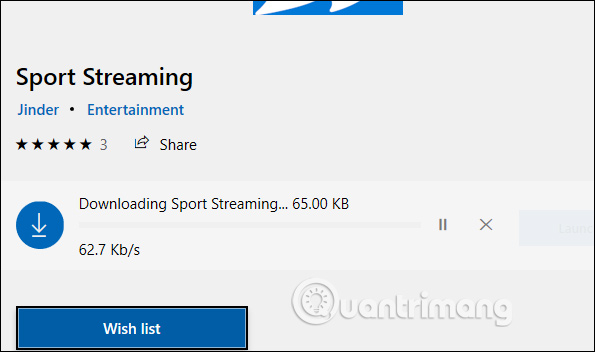
<p><strong>Bước 1:</strong></p>

<p>Người dùng tải ứng dụng Sport Streaming cho Windows 10 theo link dưới đây rồi tiến hành cài đặt.</p>

<ul>
	<li><a href="https://quantrimang.com/url?q=aHR0cHM6Ly93d3cubWljcm9zb2Z0LmNvbS9lbi11cy9wL3Nwb3J0LXN0cmVhbWluZy85cDk4Z3Z0OHoyMzc%3D" rel="nofollow noopener" target="_blank" title="Tải ứng dụng Sport Streaming Windows 10">Tải ứng dụng Sport Streaming Windows 10</a></li>
</ul>

<p><img alt="Cài ứng dụng" data-i="0" data-src="https://st.quantrimang.com/photos/image/2019/06/27/Sport-Streaming-xem-bong-da-1.jpg" data-was-processed="true" height="352" src="https://st.quantrimang.com/photos/image/2019/06/27/Sport-Streaming-xem-bong-da-1.jpg" width="595" /></p>

<p><strong>Bước 2:</strong></p>

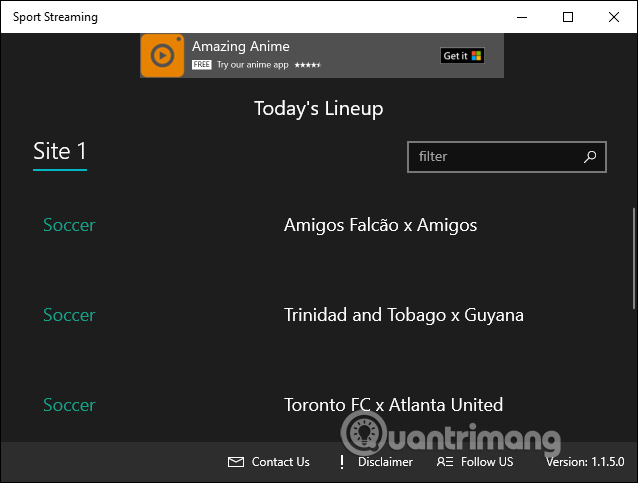
<p>Trong giao diện ứng dụng người dùng sẽ thấy danh sách các trận đấu đang diễn ra nếu có, hoặc sắp diễn ra. Các giải đấu lớn trên thế giới đều được ứng dụng cập nhật nhanh chóng và hỗ trợ phát tới người dùng.</p>

<p><img alt="Danh sách giải đấu" data-i="1" data-src="https://st.quantrimang.com/photos/image/2019/06/27/Sport-Streaming-xem-bong-da-2.jpg" data-was-processed="true" height="454" src="https://st.quantrimang.com/photos/image/2019/06/27/Sport-Streaming-xem-bong-da-2.jpg" width="600" /></p>

<p><strong>Bước 3:</strong></p>

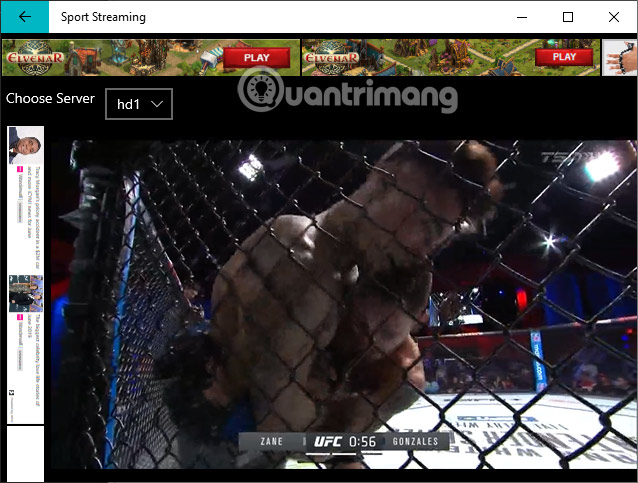
<p>Để xem trận bóng hay giải đấu nào bạn chỉ cần nhấn vào tên để theo dõi là được.</p>

<p><img alt="Xem trực tiếp" data-i="2" data-src="https://st.quantrimang.com/photos/image/2019/06/27/Sport-Streaming-xem-bong-da-3.jpg" data-was-processed="true" height="454" src="https://st.quantrimang.com/photos/image/2019/06/27/Sport-Streaming-xem-bong-da-3.jpg" width="600" /></p>

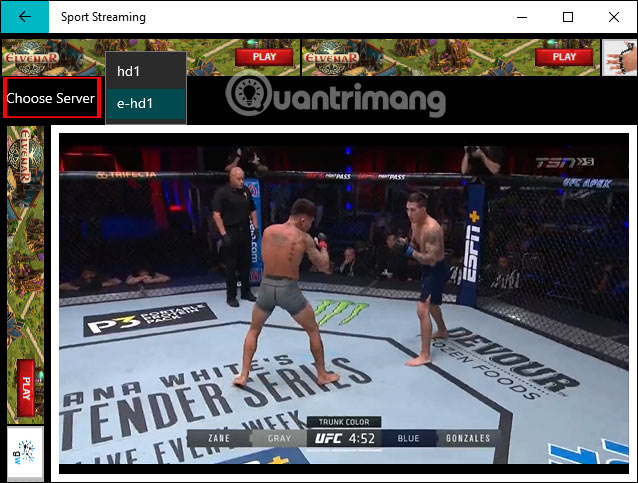
<p>Trong quá trình xem người dùng cũng có tùy chọn thay đổi sang server khác khi xem gặp vấn đề, bị lỗi không bắt nội dung được. Người dùng nhấn chọn vào&nbsp;<strong>mục Choose Server</strong>rồi chọn server mới.</p>

<p><img alt="Chọn server mới" data-i="3" data-src="https://st.quantrimang.com/photos/image/2019/06/27/Sport-Streaming-xem-bong-da-4.jpg" data-was-processed="true" height="454" src="https://st.quantrimang.com/photos/image/2019/06/27/Sport-Streaming-xem-bong-da-4.jpg" width="600" /></p>

<p><strong>Bước 4:</strong></p>

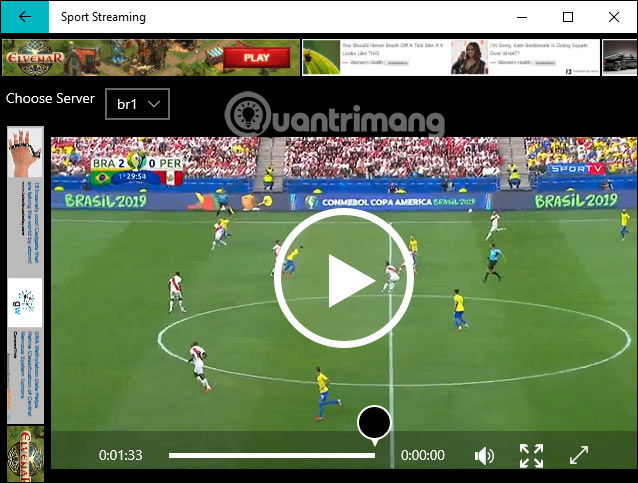
<p>Khi xem trực tiếp các trận đấu bóng hay những môn thể thao khác, người dùng không có tùy chọn tua lại để xem nhưng có tùy chọn dừng phát sóng.</p>

<p><img alt="Tạm dừng" data-i="4" data-src="https://st.quantrimang.com/photos/image/2019/06/27/Sport-Streaming-xem-bong-da-5.jpg" data-was-processed="true" height="454" src="https://st.quantrimang.com/photos/image/2019/06/27/Sport-Streaming-xem-bong-da-5.jpg" width="600" /></p>

<p>Những thao tác sử dụng ứng dụng Sport Streaming rất đơn giản và không có nhiều bước thiết lập hay tùy chỉnh. Chúng ta sẽ nhận ngay được thông báo và danh sách những trấn đấu thể thao trên giao diện để theo dõi. Người dùng chỉ nhấn chọn để xem là được.</p>

<p>Chúc các bạn thực hiện thành công!</p>
		</div>
				<div id="author">
						<p>
				<strong>Nguồn tin:</strong>
				Quantrimang.com
			</p>
		</div>
	</div>
	<div id="footer" class="clearfix">
		<div id="url">
			<strong>URL của bản tin này: </strong><a href="https://www.nguoicodonvn2008.info/vi/news/savefile/kien-thuc-may-tinh/cach-dung-sport-streaming-xem-bong-da-tren-windows-10-298.html" title="Cách dùng Sport Streaming xem bóng đá trên Windows 10">https://www.nguoicodonvn2008.info/vi/news/savefile/kien-thuc-may-tinh/cach-dung-sport-streaming-xem-bong-da-tren-windows-10-298.html</a>

		</div>
		<div class="clear"></div>
		<div class="copyright">
			&copy; .&#x3A; Nguoicodonvn2008.info - Cõi lòng người cô đơn &#x3A;.
		</div>
		<div id="contact">
			<a href="mailto:admin@nguoicodonvn2008.info">admin@nguoicodonvn2008.info</a>
		</div>
	</div>
</div>
        <div id="timeoutsess" class="chromeframe">
            Bạn đã không sử dụng Site, <a onclick="timeoutsesscancel();" href="https://nguoicodonvn2008.info/#">Bấm vào đây để duy trì trạng thái đăng nhập</a>. Thời gian chờ: <span id="secField"> 60 </span> giây
        </div>
        <div id="openidResult" class="nv-alert" style="display:none"></div>
        <div id="openidBt" data-result="" data-redirect=""></div>
		</script>
		<div class="car-top">
  <span><img src="https://nguoicodonvn2008.info/themes/default/images/car.png" alt=""></span>
</div>
<script src="https://nguoicodonvn2008.info/assets/js/jquery/jquery.min.js"></script>
<script>var nv_base_siteurl="/",nv_lang_data="vi",nv_lang_interface="vi",nv_name_variable="nv",nv_fc_variable="op",nv_lang_variable="language",nv_module_name="news",nv_func_name="savefile",nv_is_user=0, nv_my_ofs=-4,nv_my_abbr="EDT",nv_cookie_prefix="nv4c_e856T",nv_check_pass_mstime=1738000,nv_area_admin=0,nv_safemode=0,theme_responsive=0,nv_recaptcha_ver=2,nv_recaptcha_sitekey="",nv_recaptcha_type="image",XSSsanitize=1;</script>
<script src="https://nguoicodonvn2008.info/assets/js/language/vi.js"></script>
<script src="https://nguoicodonvn2008.info/assets/js/DOMPurify/purify3.js"></script>
<script src="https://nguoicodonvn2008.info/assets/js/global.js"></script>
<script src="https://nguoicodonvn2008.info/assets/js/site.js"></script>
<script src="https://nguoicodonvn2008.info/themes/default/js/news.js"></script>
<script src="https://nguoicodonvn2008.info/themes/default/js/main.js"></script>
<script src="https://nguoicodonvn2008.info/themes/default/js/custom.js"></script>
<script type="application/ld+json">
        {
            "@context": "https://schema.org",
            "@type": "Organization",
            "url": "https://nguoicodonvn2008.info",
            "logo": "https://nguoicodonvn2008.info/uploads/angel.gif"
        }
        </script>
<script src="https://nguoicodonvn2008.info/themes/default/js/bootstrap.min.js"></script>
<script type="text/javascript">
var $scrolltop = $('.car-top');
$scrolltop.on('click', function () {
    $('html,body').animate({
        scrollTop: 0
    }, 800);
    $(this).addClass("car-run");
    setTimeout(function(){ $scrolltop.removeClass('car-run');}, 1000);
    return false;
});
$(window).on('scroll', function ()
{ 
    if($(window).scrollTop() >= 200)
    {
        $scrolltop.addClass("show");
        $scrolltop.addClass("car-down");
    }
    else
    {
       $scrolltop.removeClass("show");
       setTimeout(function(){ $scrolltop.removeClass('car-down');}, 300);
    }
});
</script>
</body>
</html>