<!DOCTYPE html>
    <html lang="vi" xmlns="http://www.w3.org/1999/xhtml" prefix="og: http://ogp.me/ns#">
    <head>
<title>Cách dùng Free Crypt chia sẻ file, mã hóa văn bản</title>
<meta name="description" content="Cách dùng Free Crypt chia sẻ file, mã hóa văn bản - Savefile - Tin Tức -...">
<meta name="author" content=".: Nguoicodonvn2008.info - Cõi lòng người cô đơn :.">
<meta name="copyright" content=".: Nguoicodonvn2008.info - Cõi lòng người cô đơn :. [admin@nguoicodonvn2008.info]">
<meta name="robots" content="index, archive, follow, noodp">
<meta name="googlebot" content="index,archive,follow,noodp">
<meta name="msnbot" content="all,index,follow">
<meta name="generator" content="NukeViet v4.5">
<meta http-equiv="Content-Type" content="text/html; charset=utf-8">
<meta property="og:title" content="Cách dùng Free Crypt chia sẻ file, mã hóa văn bản">
<meta property="og:type" content="website">
<meta property="og:description" content="Savefile - Tin Tức - https&#x3A;&#x002F;&#x002F;www.nguoicodonvn2008.info&#x002F;vi&#x002F;news&#x002F;savefile&#x002F;kien-thuc-may-tinh&#x002F;cach-dung-free-crypt-chia-se-file-ma-hoa-van-ban-134.html">
<meta property="og:site_name" content=".&#x3A; Nguoicodonvn2008.info - Cõi lòng người cô đơn &#x3A;.">
<meta property="og:url" content="https://www.nguoicodonvn2008.info/vi/news/savefile/kien-thuc-may-tinh/cach-dung-free-crypt-chia-se-file-ma-hoa-van-ban-134.html">
<link rel="shortcut icon" href="https://nguoicodonvn2008.info/favicon.ico">
<link rel="canonical" href="https://www.nguoicodonvn2008.info/vi/news/savefile/kien-thuc-may-tinh/cach-dung-free-crypt-chia-se-file-ma-hoa-van-ban-134.html">
<link rel="alternate" href="https://nguoicodonvn2008.info/vi/news/rss/" title="Tin Tức" type="application/rss+xml">
<link rel="alternate" href="https://nguoicodonvn2008.info/vi/news/rss/karaoke-dual/" title="Tin Tức - Karaoke Dual" type="application/rss+xml">
<link rel="alternate" href="https://nguoicodonvn2008.info/vi/news/rss/nhac-tre/" title="Tin Tức - Nhạc trẻ" type="application/rss+xml">
<link rel="alternate" href="https://nguoicodonvn2008.info/vi/news/rss/tru-tinh/" title="Tin Tức - Trữ tình" type="application/rss+xml">
<link rel="alternate" href="https://nguoicodonvn2008.info/vi/news/rss/nuoc-ngoai/" title="Tin Tức - Nước ngoài" type="application/rss+xml">
<link rel="alternate" href="https://nguoicodonvn2008.info/vi/news/rss/remix/" title="Tin Tức - Remix" type="application/rss+xml">
<link rel="alternate" href="https://nguoicodonvn2008.info/vi/news/rss/tam-su-tinh-yeu/" title="Tin Tức - Tâm sự tình yêu" type="application/rss+xml">
<link rel="alternate" href="https://nguoicodonvn2008.info/vi/news/rss/tho-suu-tam/" title="Tin Tức - Thơ sưu tầm" type="application/rss+xml">
<link rel="alternate" href="https://nguoicodonvn2008.info/vi/news/rss/cuoc-song/" title="Tin Tức - Cuộc sống" type="application/rss+xml">
<link rel="alternate" href="https://nguoicodonvn2008.info/vi/news/rss/phan-mem/" title="Tin Tức - Phần mềm" type="application/rss+xml">
<link rel="alternate" href="https://nguoicodonvn2008.info/vi/news/rss/kien-thuc-may-tinh/" title="Tin Tức - Kiến thức máy tính" type="application/rss+xml">
<link rel="alternate" href="https://nguoicodonvn2008.info/vi/news/rss/hoc-tap/" title="Tin Tức - Học tập" type="application/rss+xml">
<link rel="alternate" href="https://nguoicodonvn2008.info/vi/news/rss/tai-lieu/" title="Tin Tức - Tài liệu" type="application/rss+xml">
<link rel="alternate" href="https://nguoicodonvn2008.info/vi/news/rss/de-thi/" title="Tin Tức - Đề thi" type="application/rss+xml">
<link rel="preload" as="style" href="https://nguoicodonvn2008.info/assets/css/font-awesome.min.css" type="text/css">
<link rel="preload" as="style" href="https://nguoicodonvn2008.info/themes/default/css/bootstrap.non-responsive.css" type="text/css">
<link rel="preload" as="style" href="https://nguoicodonvn2008.info/themes/default/css/style.css" type="text/css">
<link rel="preload" as="style" href="https://nguoicodonvn2008.info/themes/default/css/style.non-responsive.css" type="text/css">
<link rel="preload" as="style" href="https://nguoicodonvn2008.info/themes/default/css/news.css" type="text/css">
<link rel="preload" as="style" href="https://nguoicodonvn2008.info/themes/default/css/custom.css" type="text/css">
<link rel="preload" as="script" href="https://nguoicodonvn2008.info/assets/js/jquery/jquery.min.js" type="text/javascript">
<link rel="preload" as="script" href="https://nguoicodonvn2008.info/assets/js/language/vi.js" type="text/javascript">
<link rel="preload" as="script" href="https://nguoicodonvn2008.info/assets/js/DOMPurify/purify3.js" type="text/javascript">
<link rel="preload" as="script" href="https://nguoicodonvn2008.info/assets/js/global.js" type="text/javascript">
<link rel="preload" as="script" href="https://nguoicodonvn2008.info/assets/js/site.js" type="text/javascript">
<link rel="preload" as="script" href="https://nguoicodonvn2008.info/themes/default/js/news.js" type="text/javascript">
<link rel="preload" as="script" href="https://nguoicodonvn2008.info/themes/default/js/main.js" type="text/javascript">
<link rel="preload" as="script" href="https://nguoicodonvn2008.info/themes/default/js/custom.js" type="text/javascript">
<link rel="preload" as="script" href="https://nguoicodonvn2008.info/themes/default/js/bootstrap.min.js" type="text/javascript">
<link rel="stylesheet" href="https://nguoicodonvn2008.info/assets/css/font-awesome.min.css">
<link rel="stylesheet" href="https://nguoicodonvn2008.info/themes/default/css/bootstrap.non-responsive.css">
<link rel="stylesheet" href="https://nguoicodonvn2008.info/themes/default/css/style.css">
<link rel="stylesheet" href="https://nguoicodonvn2008.info/themes/default/css/style.non-responsive.css">
<link rel="StyleSheet" href="https://nguoicodonvn2008.info/themes/default/css/news.css">
<link rel="stylesheet" href="https://nguoicodonvn2008.info/themes/default/css/custom.css">
<style type="text/css">
	body{background: #fff;}
</style>
    </head>
    <body>
<div id="print">
	<div id="hd_print">
		<h2 class="pull-left">.&#x3A; Nguoicodonvn2008.info - Cõi lòng người cô đơn &#x3A;.</h2>
		<p class="pull-right"><a title=".&#x3A; Nguoicodonvn2008.info - Cõi lòng người cô đơn &#x3A;." href="https://nguoicodonvn2008.info/">https://nguoicodonvn2008.info</a></p>
	</div>
	<div class="clear"></div>
	<hr />
	<div id="content">
		<h1>Cách dùng Free Crypt chia sẻ file, mã hóa văn bản</h1>
		<ul class="list-inline">
			<li>Thứ tư - 19/06/2019 01:23</li>
			<li class="hidden-print txtrequired"><em class="fa fa-print">&nbsp;</em><a title="In ra" href="javascript:;" onclick="window.print()">In ra</a></li>
			<li class="hidden-print txtrequired"><em class="fa fa-power-off">&nbsp;</em><a title="Đóng cửa sổ này" href="javascript:;" onclick="window.close()">Đóng cửa sổ này</a></li>
		</ul>
		<div class="clear"></div>
		<div id="hometext">
		</div>
				<div class="imghome">
			<img alt="Cách dùng Free Crypt chia sẻ file, mã hóa văn bản" src="https://st.quantrimang.com/photos/image/2019/06/13/Free-Crypt-cong-cu-online-17.jpg" width="460" class="img-thumbnail" />
		</div>
		<div class="clear"></div>
		<div id="bodytext" class="clearfix">
			<p>Free Crypt là dịch vụ đa chức năng, hỗ trợ người dùng gửi file trực tuyến không giới hạn định dạng hay số lượng file gửi, viết ghi chú, mã hóa hoặc giải mã văn bản hay tập tin,… hoàn toàn miễn phí. Sử dụng Free Crypt không cần phải tạo tài khoản mà vẫn sử dụng đầy đủ tính năng mà website cung cấp. Bài viết dưới đây sẽ hướng dẫn bạn đọc cách sử dụng một số công cụ tiêu biểu của Free Crypt.</p>

<ul>
	<li><a href="https://quantrimang.com/trang-web-chia-se-file-tu-huy-162370" title="7 trang web chia sẻ file tự hủy">7 trang web chia sẻ file tự hủy</a></li>
	<li><a href="https://quantrimang.com/cach-ma-hoa-file-chuan-aes-256-bit-ngay-tren-trinh-duyet-chrome-148501" title="Cách mã hóa file chuẩn AES 256-bit ngay trên trình duyệt Chrome">Cách mã hóa file chuẩn AES 256-bit ngay trên trình duyệt Chrome</a></li>
	<li><a href="https://quantrimang.com/cach-ma-hoa-file-tren-google-drive-bang-syncrypto-156632" title="Cách mã hóa file trên Google Drive bằng Syncrypto">Cách mã hóa file trên Google Drive bằng Syncrypto</a></li>
	<li><a href="https://quantrimang.com/top-phan-mem-ma-hoa-tot-nhat-cho-windows-151301" title="Top 20 phần mềm mã hóa tốt nhất cho Windows">Top 20 phần mềm mã hóa tốt nhất cho Windows</a></li>
</ul>

<h2>Hướng dẫn dùng Free Crypt</h2>

<p>Trước hết người dùng truy cập vào link dưới đây để vào trang chủ của Free Crypt.</p>

<pre id="pre0">
<code>https://freecrypt.org/</code></pre>

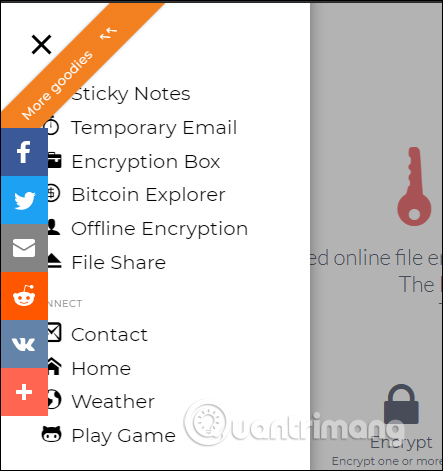
<p>Tại giao diện trang chúng ta nhấn vào&nbsp;<strong>biểu tượng 3 dấu gạch ngang</strong>&nbsp;ở góc trái ngoài cùng để hiện danh sách các công cụ mà Free Crypt hỗ trợ.</p>

<p><img alt="Danh sách công cụ" data-i="0" data-src="https://st.quantrimang.com/photos/image/2019/06/13/Free-Crypt-cong-cu-online-1.jpg" data-was-processed="true" height="471" src="https://st.quantrimang.com/photos/image/2019/06/13/Free-Crypt-cong-cu-online-1.jpg" width="443" /></p>

<h3>1. Viết ghi chú trên Free Crypt (Sticky Notes)</h3>

<p><strong>Bước 1:</strong></p>

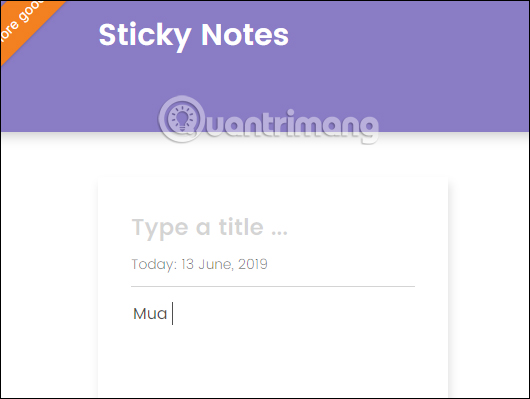
<p>Hiển thị giao diện nhập ghi chú. Người dùng nhập tiêu đề tại&nbsp;<strong>Type a title</strong>, nhập nội dung tại&nbsp;<strong>Type a description</strong>.</p>

<p><img alt="Nhập nội dung ghi chú" data-i="1" data-src="https://st.quantrimang.com/photos/image/2019/06/13/Free-Crypt-cong-cu-online-18.jpg" data-was-processed="true" height="399" src="https://st.quantrimang.com/photos/image/2019/06/13/Free-Crypt-cong-cu-online-18.jpg" width="530" /></p>

<p><strong>Bước 2:</strong></p>

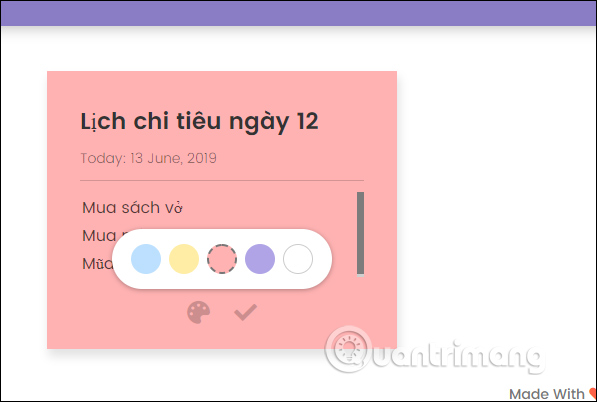
<p>Nếu muốn chúng ta cũng có thể tạo màu cho ghi chú bằng cách nhấn vào&nbsp;<strong>biểu tượng bảng màu</strong>. Cuối cùng nhấn vào&nbsp;<strong>dấu tích v</strong>&nbsp;để lưu lại.</p>

<p><img alt="Chọn bảng màu" data-i="2" data-src="https://st.quantrimang.com/photos/image/2019/06/13/Free-Crypt-cong-cu-online-2.jpg" data-was-processed="true" height="402" src="https://st.quantrimang.com/photos/image/2019/06/13/Free-Crypt-cong-cu-online-2.jpg" width="597" /></p>

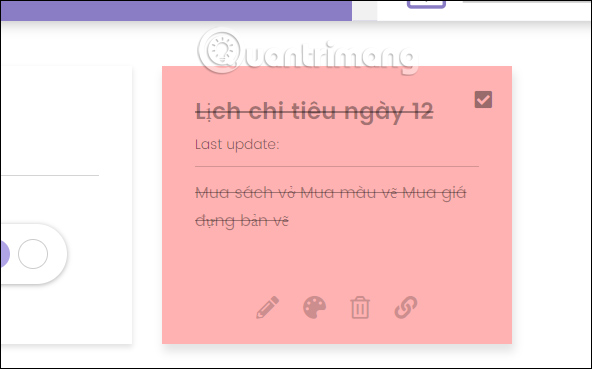
<p>Kết quả ghi chú hiển thị trong giao diện Sticky Notes như hình dưới đây. Trong khung ghi chú người dùng có thêm một số tùy chọn gồm chỉnh sửa, đổi lại khung màu, xóa ghi chú, chia sẻ ghi chú. Ghi chú này luôn hiển thị trong giao diện của Free Crypt trừ khi người dùng đóng trình duyệt. Nếu thực hiện xong ghi chú chỉ cần tích vào ô vuông để gạch chéo là được.</p>

<p><img alt="Hiện ghi chú" data-i="3" data-src="https://st.quantrimang.com/photos/image/2019/06/13/Free-Crypt-cong-cu-online-3.jpg" data-was-processed="true" height="369" src="https://st.quantrimang.com/photos/image/2019/06/13/Free-Crypt-cong-cu-online-3.jpg" width="592" /></p>
<iframe allowfullscreen="true" allowtransparency="true" frameborder="0" height="193" hspace="0" id="aswift_2" marginheight="0" marginwidth="0" name="aswift_2" scrolling="no" vspace="0" width="770"></iframe>

<h3>2. Mã hóa văn bản trên Free Crypt (Encryption Box)</h3>

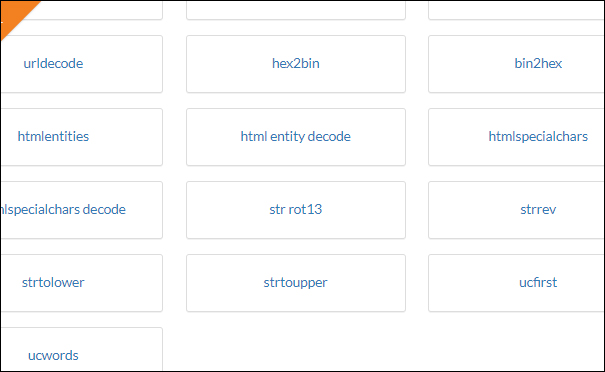
<p>Tính năng mã hóa, giải mã văn bản này cho phép người dùng mã hóa theo 59 chuẩn mã hóa phổ biển.</p>

<p><img alt="Các chuẩn mã hóa" data-i="4" data-src="https://st.quantrimang.com/photos/image/2019/06/13/Free-Crypt-cong-cu-online-4.jpg" data-was-processed="true" height="372" src="https://st.quantrimang.com/photos/image/2019/06/13/Free-Crypt-cong-cu-online-4.jpg" width="605" /></p>

<p><strong>Bước 1:</strong></p>

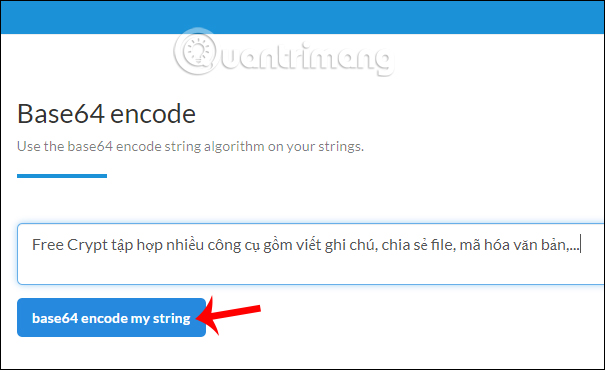
<p>Người dùng&nbsp;<strong>lựa chọn chuẩn mã hóa</strong>&nbsp;được cung cấp rồi nhập nội dung văn bản trong khung string, rồi nhấn base64 encode my string.</p>

<p><img alt="Mã hóa nội dung" data-i="5" data-src="https://st.quantrimang.com/photos/image/2019/06/13/Free-Crypt-cong-cu-online-5.jpg" data-was-processed="true" height="370" src="https://st.quantrimang.com/photos/image/2019/06/13/Free-Crypt-cong-cu-online-5.jpg" width="605" /></p>

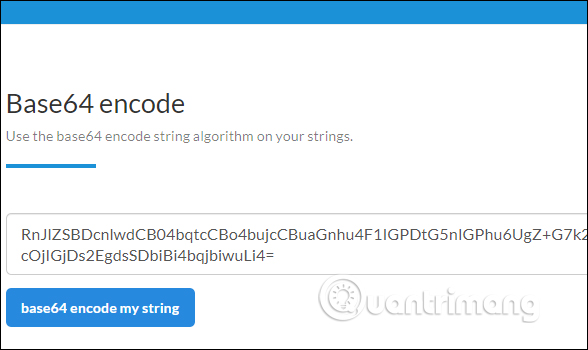
<p>Kết quả người dùng thấy nội dung mã hóa ngay ở bên dưới.</p>

<p><img alt="Nội dung mã hóa" data-i="6" data-src="https://st.quantrimang.com/photos/image/2019/06/13/Free-Crypt-cong-cu-online-6.jpg" data-was-processed="true" height="350" src="https://st.quantrimang.com/photos/image/2019/06/13/Free-Crypt-cong-cu-online-6.jpg" width="588" /></p>

<p><strong>Bước 2:</strong></p>

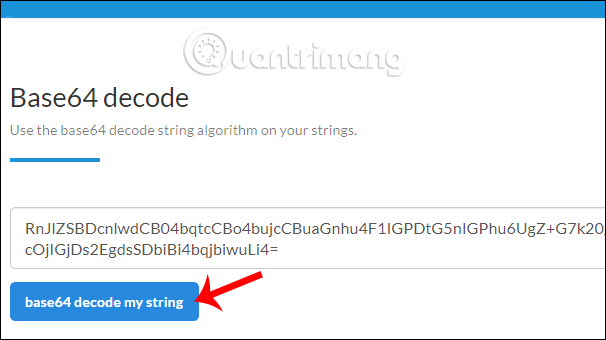
<p>Tiếp đó chúng ta lựa chọn một&nbsp;<strong>chuẩn giải mã</strong>.&nbsp;<strong>Nhập nội dung mã hóa</strong>&nbsp;và khung rồi cũng nhấn base64 decode. Các công cụ đều thì theo 1 cặp mã hóa và giải mã nên chúng ta cần chọn đúng để sử dụng.</p>

<p><img alt="Giải mã nội dung" data-i="7" data-src="https://st.quantrimang.com/photos/image/2019/06/13/Free-Crypt-cong-cu-online-7.jpg" data-was-processed="true" height="340" src="https://st.quantrimang.com/photos/image/2019/06/13/Free-Crypt-cong-cu-online-7.jpg" width="606" /></p>

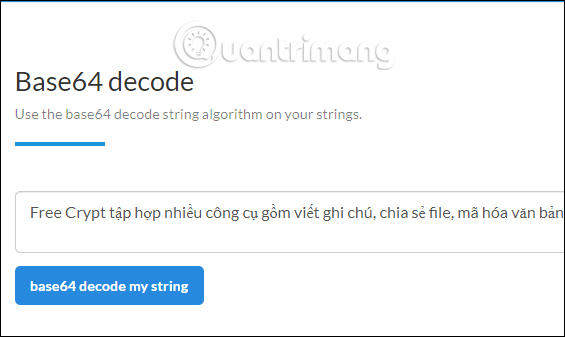
<p>Kết quả nội dung đã giải mã hiển thị như bên dưới đây.</p>

<p><img alt="Nội dung đã giải mã" data-i="8" data-src="https://st.quantrimang.com/photos/image/2019/06/13/Free-Crypt-cong-cu-online-8.jpg" data-was-processed="true" height="337" src="https://st.quantrimang.com/photos/image/2019/06/13/Free-Crypt-cong-cu-online-8.jpg" width="565" /></p>

<h3>3. Mã hóa, giải mã tập tin (Offline Encryption)</h3>

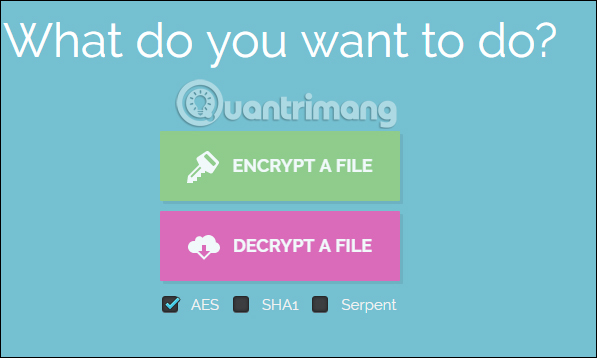
<p>Công cụ này cho phép mã hóa, giải mã tập tin theo chuẩn AES, SHA1, Serpent.</p>

<p><img alt="Mã hóa tập tin" data-i="9" data-src="https://st.quantrimang.com/photos/image/2019/06/13/Free-Crypt-cong-cu-online-9.jpg" data-was-processed="true" height="358" src="https://st.quantrimang.com/photos/image/2019/06/13/Free-Crypt-cong-cu-online-9.jpg" width="597" /></p>

<p><strong>Bước 1:</strong></p>

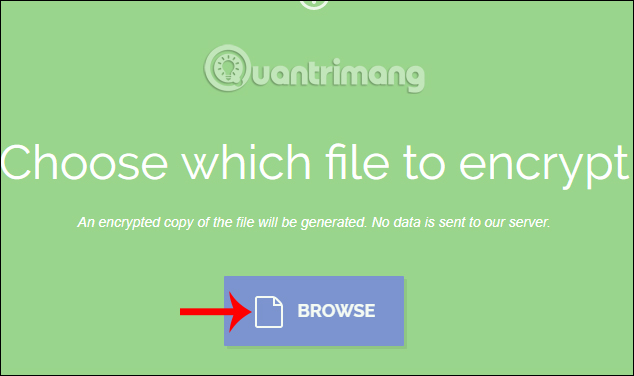
<p>Tại giao diện trang chúng nhấn chọn vào Encrypt a file để mã hóa file. Nhấn vào nút Browse để chọn tập tin, chỉ cho giới hạn một file.</p>

<p><img alt="Tải tập tin" data-i="10" data-src="https://st.quantrimang.com/photos/image/2019/06/13/Free-Crypt-cong-cu-online-10.jpg" data-was-processed="true" height="376" src="https://st.quantrimang.com/photos/image/2019/06/13/Free-Crypt-cong-cu-online-10.jpg" width="634" /></p>

<p><strong>Bước 2:</strong></p>

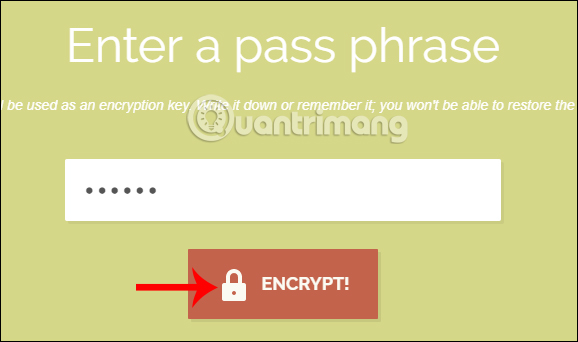
<p>Tiếp theo người dùng nhập&nbsp;<strong>mật khẩu bảo mật cho file,</strong>&nbsp;tối thiểu 5 ký tự rồi&nbsp;<strong>nhấn Encrypt</strong>&nbsp;để tiến hành mã hóa tập tin.</p>

<p><img alt="Nhập mật khẩu bảo mật file" data-i="11" data-src="https://st.quantrimang.com/photos/image/2019/06/13/Free-Crypt-cong-cu-online-11.jpg" data-was-processed="true" height="342" src="https://st.quantrimang.com/photos/image/2019/06/13/Free-Crypt-cong-cu-online-11.jpg" width="578" /></p>

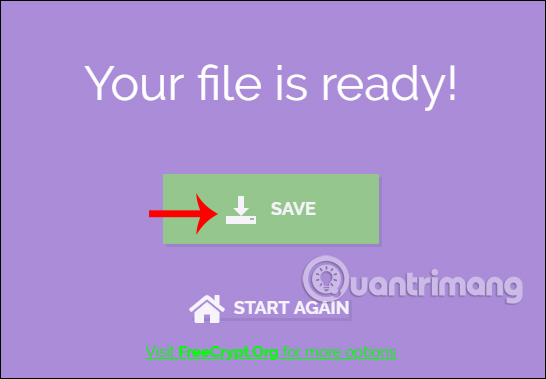
<p>Cuối cùng nhấn&nbsp;<strong>nút Save</strong>&nbsp;để lưu lại file mã hóa có định dạng là fry.</p>

<p><img alt="Tải tập tin" data-i="12" data-src="https://st.quantrimang.com/photos/image/2019/06/13/Free-Crypt-cong-cu-online-12.jpg" data-was-processed="true" height="379" src="https://st.quantrimang.com/photos/image/2019/06/13/Free-Crypt-cong-cu-online-12.jpg" width="546" /></p>

<p><strong>Bước 3:</strong></p>

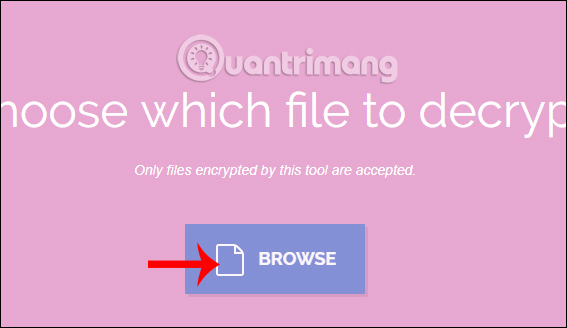
<p>Để giải mã tập tin chúng ta nhấn chọn vào&nbsp;<strong>Decrypt a file</strong>. Sau đó nhấn vào<strong>&nbsp;nút Browse</strong>&nbsp;rồi chọn tập tin mã hóa được tạo bởi dịch cụ.</p>

<p><img alt="Tải file đã mã hóa" data-i="13" data-src="https://st.quantrimang.com/photos/image/2019/06/13/Free-Crypt-cong-cu-online-13.jpg" data-was-processed="true" height="328" src="https://st.quantrimang.com/photos/image/2019/06/13/Free-Crypt-cong-cu-online-13.jpg" width="567" /></p>

<p><strong>Bước 4:</strong></p>

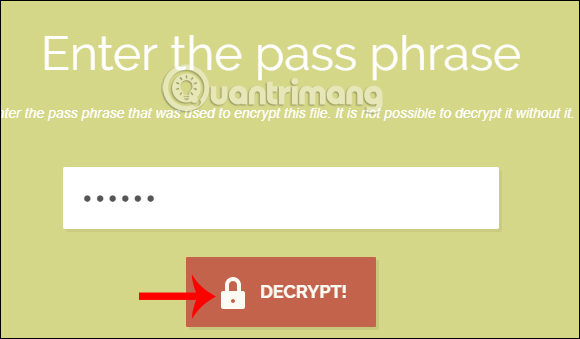
<p>Cuối cùng<strong>&nbsp;nhập mật khẩu mã hóa file</strong>&nbsp;mà bạn đã đặt rồi&nbsp;<strong>nhấn Decrypt</strong>&nbsp;để giải mã tập tin.</p>

<p>Khi giải mã hoa xong chúng ta cũng nhấn&nbsp;<strong>nút Save</strong>&nbsp;để tải file hoàn chỉnh xuống.</p>

<p><img alt="File đã giải mã" data-i="14" data-src="https://st.quantrimang.com/photos/image/2019/06/13/Free-Crypt-cong-cu-online-14.jpg" data-was-processed="true" height="376" src="https://st.quantrimang.com/photos/image/2019/06/13/Free-Crypt-cong-cu-online-14.jpg" width="634" /></p>

<h3>4. Chia sẻ file trên Free Crypt (File Share)</h3>

<p>Tính năng này cho phép tải file có dung lượng 100MB và tự động hủy sau 7 ngày.</p>

<p><strong>Bước 1:</strong></p>

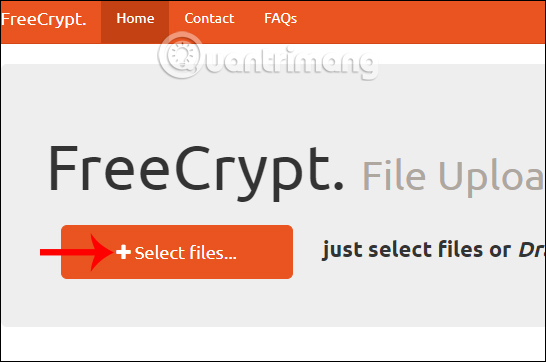
<p>Tại giao diện trang người dùng nhấn vào&nbsp;<strong>Select files</strong>&nbsp;để tải file lên hoặc kéo và thả file vào trong giao diện.</p>

<p><img alt="Tải file" data-i="15" data-src="https://st.quantrimang.com/photos/image/2019/06/13/Free-Crypt-cong-cu-online-15.jpg" data-was-processed="true" height="362" src="https://st.quantrimang.com/photos/image/2019/06/13/Free-Crypt-cong-cu-online-15.jpg" width="546" /></p>

<p><strong>Bước 2:</strong></p>

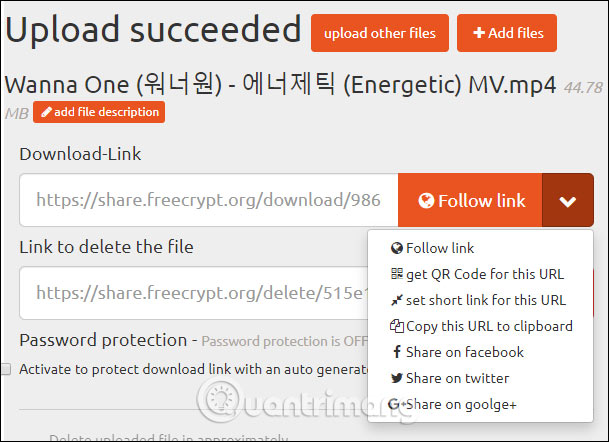
<p>Khi đã upload file tải thành công người dùng nhận được liên kết chia sẻ chung của toàn bộ file và hoặc tùy chọn link khác.</p>

<p><img alt="Link chia sẻ file" data-i="16" data-src="https://st.quantrimang.com/photos/image/2019/06/13/Free-Crypt-cong-cu-online-16.jpg" data-was-processed="true" height="442" src="https://st.quantrimang.com/photos/image/2019/06/13/Free-Crypt-cong-cu-online-16.jpg" width="609" /></p>

<p><strong>Bước 3:</strong></p>

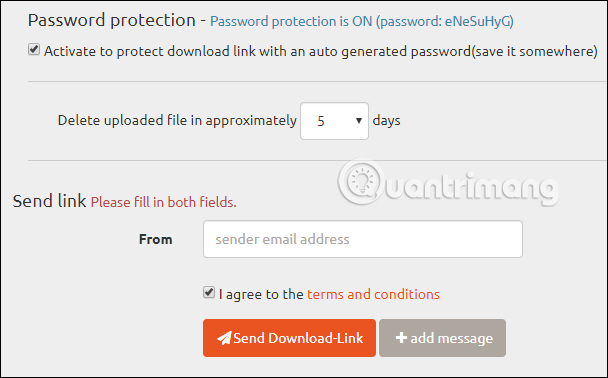
<p>Tiếp đến bên dưới người dùng có thêm một số tùy chọn như bật chế độ mật khẩu cho file, thời gian file tự động hủy, gửi link qua email và thêm tin nhắn.</p>

<p><img alt="Tải tập tin" data-i="17" data-src="https://st.quantrimang.com/photos/image/2019/06/13/Free-Crypt-cong-cu-online-17.jpg" data-was-processed="true" height="378" src="https://st.quantrimang.com/photos/image/2019/06/13/Free-Crypt-cong-cu-online-17.jpg" width="608" /></p>

<p>Trên đây là cách dùng một số công cụ cơ bản của Free Crypt. Tất cả các công cụ đều sử dụng hoàn toàn miễn phí và người dùng không cần phải đăng ký tài khoản.</p>

<p>Chúc các bạn thực hiện thành công!</p>
		</div>
				<div id="author">
						<p>
				<strong>Nguồn tin:</strong>
				Quantrimang.com
			</p>
		</div>
	</div>
	<div id="footer" class="clearfix">
		<div id="url">
			<strong>URL của bản tin này: </strong><a href="https://www.nguoicodonvn2008.info/vi/news/savefile/kien-thuc-may-tinh/cach-dung-free-crypt-chia-se-file-ma-hoa-van-ban-134.html" title="Cách dùng Free Crypt chia sẻ file, mã hóa văn bản">https://www.nguoicodonvn2008.info/vi/news/savefile/kien-thuc-may-tinh/cach-dung-free-crypt-chia-se-file-ma-hoa-van-ban-134.html</a>

		</div>
		<div class="clear"></div>
		<div class="copyright">
			&copy; .&#x3A; Nguoicodonvn2008.info - Cõi lòng người cô đơn &#x3A;.
		</div>
		<div id="contact">
			<a href="mailto:admin@nguoicodonvn2008.info">admin@nguoicodonvn2008.info</a>
		</div>
	</div>
</div>
        <div id="timeoutsess" class="chromeframe">
            Bạn đã không sử dụng Site, <a onclick="timeoutsesscancel();" href="https://nguoicodonvn2008.info/#">Bấm vào đây để duy trì trạng thái đăng nhập</a>. Thời gian chờ: <span id="secField"> 60 </span> giây
        </div>
        <div id="openidResult" class="nv-alert" style="display:none"></div>
        <div id="openidBt" data-result="" data-redirect=""></div>
		</script>
		<div class="car-top">
  <span><img src="https://nguoicodonvn2008.info/themes/default/images/car.png" alt=""></span>
</div>
<div id="run_cronjobs" style="visibility:hidden;display:none;"><img alt="cron" src="/index.php?second=cronjobs&amp;p=z2m10UJK" width="1" height="1" /></div>
<script src="https://nguoicodonvn2008.info/assets/js/jquery/jquery.min.js"></script>
<script>var nv_base_siteurl="/",nv_lang_data="vi",nv_lang_interface="vi",nv_name_variable="nv",nv_fc_variable="op",nv_lang_variable="language",nv_module_name="news",nv_func_name="savefile",nv_is_user=0, nv_my_ofs=-4,nv_my_abbr="EDT",nv_cookie_prefix="nv4c_e856T",nv_check_pass_mstime=1738000,nv_area_admin=0,nv_safemode=0,theme_responsive=0,nv_recaptcha_ver=2,nv_recaptcha_sitekey="",nv_recaptcha_type="image",XSSsanitize=1;</script>
<script src="https://nguoicodonvn2008.info/assets/js/language/vi.js"></script>
<script src="https://nguoicodonvn2008.info/assets/js/DOMPurify/purify3.js"></script>
<script src="https://nguoicodonvn2008.info/assets/js/global.js"></script>
<script src="https://nguoicodonvn2008.info/assets/js/site.js"></script>
<script src="https://nguoicodonvn2008.info/themes/default/js/news.js"></script>
<script src="https://nguoicodonvn2008.info/themes/default/js/main.js"></script>
<script src="https://nguoicodonvn2008.info/themes/default/js/custom.js"></script>
<script type="application/ld+json">
        {
            "@context": "https://schema.org",
            "@type": "Organization",
            "url": "https://nguoicodonvn2008.info",
            "logo": "https://nguoicodonvn2008.info/uploads/angel.gif"
        }
        </script>
<script src="https://nguoicodonvn2008.info/themes/default/js/bootstrap.min.js"></script>
<script type="text/javascript">
var $scrolltop = $('.car-top');
$scrolltop.on('click', function () {
    $('html,body').animate({
        scrollTop: 0
    }, 800);
    $(this).addClass("car-run");
    setTimeout(function(){ $scrolltop.removeClass('car-run');}, 1000);
    return false;
});
$(window).on('scroll', function ()
{ 
    if($(window).scrollTop() >= 200)
    {
        $scrolltop.addClass("show");
        $scrolltop.addClass("car-down");
    }
    else
    {
       $scrolltop.removeClass("show");
       setTimeout(function(){ $scrolltop.removeClass('car-down');}, 300);
    }
});
</script>
</body>
</html>