<!DOCTYPE html>
    <html lang="vi" xmlns="http://www.w3.org/1999/xhtml" prefix="og: http://ogp.me/ns#">
    <head>
<title>Cách đọc tài liệu Markdown trong Linux terminal với Glow</title>
<meta name="description" content="Cách đọc tài liệu Markdown trong Linux terminal với Glow - Savefile - Tin Tức -...">
<meta name="author" content=".: Nguoicodonvn2008.info - Cõi lòng người cô đơn :.">
<meta name="copyright" content=".: Nguoicodonvn2008.info - Cõi lòng người cô đơn :. [admin@nguoicodonvn2008.info]">
<meta name="robots" content="index, archive, follow, noodp">
<meta name="googlebot" content="index,archive,follow,noodp">
<meta name="msnbot" content="all,index,follow">
<meta name="generator" content="NukeViet v4.5">
<meta http-equiv="Content-Type" content="text/html; charset=utf-8">
<meta property="og:title" content="Cách đọc tài liệu Markdown trong Linux terminal với Glow">
<meta property="og:type" content="website">
<meta property="og:description" content="Savefile - Tin Tức - https&#x3A;&#x002F;&#x002F;www.nguoicodonvn2008.info&#x002F;vi&#x002F;news&#x002F;savefile&#x002F;kien-thuc-may-tinh&#x002F;cach-doc-tai-lieu-markdown-trong-linux-terminal-voi-glow-6435.html">
<meta property="og:site_name" content=".&#x3A; Nguoicodonvn2008.info - Cõi lòng người cô đơn &#x3A;.">
<meta property="og:url" content="https://www.nguoicodonvn2008.info/vi/news/savefile/kien-thuc-may-tinh/cach-doc-tai-lieu-markdown-trong-linux-terminal-voi-glow-6435.html">
<link rel="shortcut icon" href="https://nguoicodonvn2008.info/favicon.ico">
<link rel="canonical" href="https://www.nguoicodonvn2008.info/vi/news/savefile/kien-thuc-may-tinh/cach-doc-tai-lieu-markdown-trong-linux-terminal-voi-glow-6435.html">
<link rel="alternate" href="https://nguoicodonvn2008.info/vi/news/rss/" title="Tin Tức" type="application/rss+xml">
<link rel="alternate" href="https://nguoicodonvn2008.info/vi/news/rss/karaoke-dual/" title="Tin Tức - Karaoke Dual" type="application/rss+xml">
<link rel="alternate" href="https://nguoicodonvn2008.info/vi/news/rss/nhac-tre/" title="Tin Tức - Nhạc trẻ" type="application/rss+xml">
<link rel="alternate" href="https://nguoicodonvn2008.info/vi/news/rss/tru-tinh/" title="Tin Tức - Trữ tình" type="application/rss+xml">
<link rel="alternate" href="https://nguoicodonvn2008.info/vi/news/rss/nuoc-ngoai/" title="Tin Tức - Nước ngoài" type="application/rss+xml">
<link rel="alternate" href="https://nguoicodonvn2008.info/vi/news/rss/remix/" title="Tin Tức - Remix" type="application/rss+xml">
<link rel="alternate" href="https://nguoicodonvn2008.info/vi/news/rss/tam-su-tinh-yeu/" title="Tin Tức - Tâm sự tình yêu" type="application/rss+xml">
<link rel="alternate" href="https://nguoicodonvn2008.info/vi/news/rss/tho-suu-tam/" title="Tin Tức - Thơ sưu tầm" type="application/rss+xml">
<link rel="alternate" href="https://nguoicodonvn2008.info/vi/news/rss/cuoc-song/" title="Tin Tức - Cuộc sống" type="application/rss+xml">
<link rel="alternate" href="https://nguoicodonvn2008.info/vi/news/rss/phan-mem/" title="Tin Tức - Phần mềm" type="application/rss+xml">
<link rel="alternate" href="https://nguoicodonvn2008.info/vi/news/rss/kien-thuc-may-tinh/" title="Tin Tức - Kiến thức máy tính" type="application/rss+xml">
<link rel="alternate" href="https://nguoicodonvn2008.info/vi/news/rss/hoc-tap/" title="Tin Tức - Học tập" type="application/rss+xml">
<link rel="alternate" href="https://nguoicodonvn2008.info/vi/news/rss/tai-lieu/" title="Tin Tức - Tài liệu" type="application/rss+xml">
<link rel="alternate" href="https://nguoicodonvn2008.info/vi/news/rss/de-thi/" title="Tin Tức - Đề thi" type="application/rss+xml">
<link rel="preload" as="style" href="https://nguoicodonvn2008.info/assets/css/font-awesome.min.css" type="text/css">
<link rel="preload" as="style" href="https://nguoicodonvn2008.info/themes/default/css/bootstrap.non-responsive.css" type="text/css">
<link rel="preload" as="style" href="https://nguoicodonvn2008.info/themes/default/css/style.css" type="text/css">
<link rel="preload" as="style" href="https://nguoicodonvn2008.info/themes/default/css/style.non-responsive.css" type="text/css">
<link rel="preload" as="style" href="https://nguoicodonvn2008.info/themes/default/css/news.css" type="text/css">
<link rel="preload" as="style" href="https://nguoicodonvn2008.info/themes/default/css/custom.css" type="text/css">
<link rel="preload" as="script" href="https://nguoicodonvn2008.info/assets/js/jquery/jquery.min.js" type="text/javascript">
<link rel="preload" as="script" href="https://nguoicodonvn2008.info/assets/js/language/vi.js" type="text/javascript">
<link rel="preload" as="script" href="https://nguoicodonvn2008.info/assets/js/DOMPurify/purify3.js" type="text/javascript">
<link rel="preload" as="script" href="https://nguoicodonvn2008.info/assets/js/global.js" type="text/javascript">
<link rel="preload" as="script" href="https://nguoicodonvn2008.info/assets/js/site.js" type="text/javascript">
<link rel="preload" as="script" href="https://nguoicodonvn2008.info/themes/default/js/news.js" type="text/javascript">
<link rel="preload" as="script" href="https://nguoicodonvn2008.info/themes/default/js/main.js" type="text/javascript">
<link rel="preload" as="script" href="https://nguoicodonvn2008.info/themes/default/js/custom.js" type="text/javascript">
<link rel="preload" as="script" href="https://nguoicodonvn2008.info/themes/default/js/bootstrap.min.js" type="text/javascript">
<link rel="stylesheet" href="https://nguoicodonvn2008.info/assets/css/font-awesome.min.css">
<link rel="stylesheet" href="https://nguoicodonvn2008.info/themes/default/css/bootstrap.non-responsive.css">
<link rel="stylesheet" href="https://nguoicodonvn2008.info/themes/default/css/style.css">
<link rel="stylesheet" href="https://nguoicodonvn2008.info/themes/default/css/style.non-responsive.css">
<link rel="StyleSheet" href="https://nguoicodonvn2008.info/themes/default/css/news.css">
<link rel="stylesheet" href="https://nguoicodonvn2008.info/themes/default/css/custom.css">
<style type="text/css">
	body{background: #fff;}
</style>
    </head>
    <body>
<div id="print">
	<div id="hd_print">
		<h2 class="pull-left">.&#x3A; Nguoicodonvn2008.info - Cõi lòng người cô đơn &#x3A;.</h2>
		<p class="pull-right"><a title=".&#x3A; Nguoicodonvn2008.info - Cõi lòng người cô đơn &#x3A;." href="https://nguoicodonvn2008.info/">https://nguoicodonvn2008.info</a></p>
	</div>
	<div class="clear"></div>
	<hr />
	<div id="content">
		<h1>Cách đọc tài liệu Markdown trong Linux terminal với Glow</h1>
		<ul class="list-inline">
			<li>Thứ sáu - 09/12/2022 23:07</li>
			<li class="hidden-print txtrequired"><em class="fa fa-print">&nbsp;</em><a title="In ra" href="javascript:;" onclick="window.print()">In ra</a></li>
			<li class="hidden-print txtrequired"><em class="fa fa-power-off">&nbsp;</em><a title="Đóng cửa sổ này" href="javascript:;" onclick="window.close()">Đóng cửa sổ này</a></li>
		</ul>
		<div class="clear"></div>
		<div id="hometext">
		</div>
				<div class="imghome">
			<img alt="Cách đọc tài liệu Markdown trong Linux terminal với Glow" src="https://st.quantrimang.com/photos/image/2022/12/10/doc-tai-lieu-markdown-trong-terminal-voi-glow-2.jpg" width="460" class="img-thumbnail" />
		</div>
		<div class="clear"></div>
		<div id="bodytext" class="clearfix">
			<p style="text-align: justify;">Markdown rất phù hợp để viết và cho phép bạn định dạng tài liệu trong bất kỳ trình soạn thảo văn bản nào, sử dụng các tính năng phong phú bao gồm heading, trích đoạn code, in đậm, in nghiêng, checklist, dấu đầu dòng, bảng, v.v... Nhưng mặc dù Markdown rất dễ viết trong trình chỉnh sửa chẳng hạn như&nbsp;nano, nhưng nó không dễ đọc trong terminal.</p>

<p style="text-align: justify;">Glow là một tiện ích dòng lệnh hiển thị các tài liệu Markdown theo cách chúng được đọc.</p>

<h2 style="text-align: justify;">Cách cài đặt Glow trên Linux</h2>

<p style="text-align: justify;">Mặc dù Glow không có sẵn trong kho chính thức của hầu hết các bản phân phối Linux, nhưng bạn vẫn có thể dễ dàng cài đặt nó.</p>

<h3 style="text-align: justify;">Trên Debian và các dẫn xuất của nó</h3>

<p style="text-align: justify;">Để cài đặt Glow trên&nbsp;các bản phân phối dựa trên Ubuntu&nbsp;và Debian, trước tiên, bạn cần thêm key Glow GPG rồi thêm kho lưu trữ của nó vào danh sách nguồn của hệ thống.</p>

<p style="text-align: justify;">Thêm key này vào keyring và kho lưu trữ vào nguồn của bạn bằng cách sử dụng:</p>

<pre id="pre0">
<code>sudo mkdir -p /etc/apt/keyrings
curl -fsSL https://repo.charm.sh/apt/gpg.key | sudo gpg --dearmor -o /etc/apt/keyrings/charm.gpg
echo &quot;deb &#91;signed-by=/etc/apt/keyrings/charm.gpg&#93; https://repo.charm.sh/apt/&quot; | sudo tee /etc/apt/sources.list.d/charm.list</code></pre>

<p style="text-align: justify;">Cập nhật danh sách gói của hệ thống, sau đó cài đặt Glow với:</p>

<pre id="pre1">
<code>sudo apt update
sudo apt install glow</code></pre>

<h3 style="text-align: justify;">Cài đặt Glow trên Fedora</h3>

<p style="text-align: justify;">Để tải xuống và cài đặt Glow trên Fedora, RHEL và các bản phân phối dựa trên RPM khác, trước tiên hãy chạy lệnh sau:</p>

<pre id="pre2">
<code>echo &#039;&#91;charm&#93;
name=Charm
baseurl=https://repo.charm.sh/yum/
enabled=1
gpgcheck=1
gpgkey=https://repo.charm.sh/yum/gpg.key&#039; | sudo tee /etc/yum.repos.d/charm.repo</code></pre>

<p style="text-align: justify;">Sau đó, cài đặt Glow bằng cách gõ:</p>

<pre id="pre3">
<code>sudo yum install glow</code></pre>

<h3 style="text-align: justify;">Trên Arch Linux và các dẫn xuất của nó</h3>

<p style="text-align: justify;">Bạn có thể cài đặt Glow trên các bản phân phối dựa trên Arch bằng trình quản lý gói mặc định, Pacman.</p>

<pre id="pre4">
<code>sudo pacman -S glow</code></pre>

<h3 style="text-align: justify;">Cài đặt Glow dưới dạng Snap</h3>

<p style="text-align: justify;">Nếu đủ may mắn để có một hệ thống được Snap Store độc quyền của Canonical hỗ trợ, bạn có thể cài đặt Glow với:</p>

<pre id="pre5">
<code>sudo snap install glow</code></pre>

<h2 style="text-align: justify;">Sử dụng Glow để đọc tài liệu Markdown trong Terminal</h2>

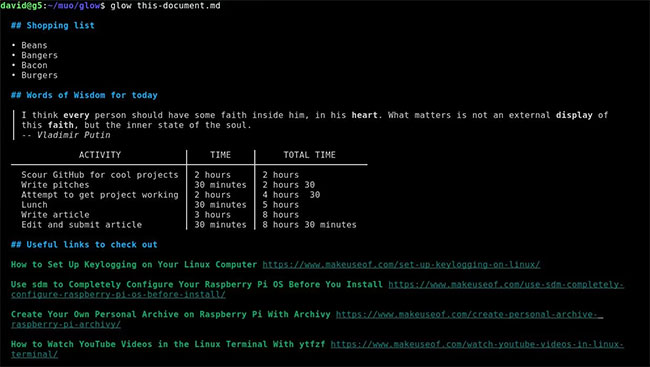
<p style="text-align: justify;">Cách đơn giản nhất để sử dụng Glow là chuyển cho nó một file Markdown làm đối số:</p>

<pre id="pre6">
<code>glow this-document.md</code></pre>

<figure>
<div style="text-align: justify;"><img alt="Chuyển cho Glow một file Markdown làm đối số" data-i="0" data-src="https://st.quantrimang.com/photos/image/2022/12/10/doc-tai-lieu-markdown-trong-terminal-voi-glow-2.jpg" data-was-processed="true" height="367" src="https://st.quantrimang.com/photos/image/2022/12/10/doc-tai-lieu-markdown-trong-terminal-voi-glow-2.jpg" width="650" /></div>

<figcaption>
<div style="text-align: justify;">Chuyển cho Glow một file Markdown làm đối số</div>
</figcaption>
</figure>

<p style="text-align: justify;">Như bạn có thể thấy, Glow đã hiển thị một tài liệu khó, hoàn chỉnh với chữ in đậm và in nghiêng, văn bản được trích dẫn, bảng, danh sách và liên kết với anchor text (văn bản neo).</p>

<p style="text-align: justify;">Điều đó khá gọn gàng và Glow cũng đi kèm với giao diện người dùng terminal. Bạn có thể kích hoạt nó với:</p>

<pre id="pre7">
<code>glow</code></pre>

<p style="text-align: justify;">...và Glow sẽ hiển thị cho bạn một danh sách đệ quy các file Markdown cục bộ. Bạn có thể điều hướng danh sách bằng các phím mũi tên trên bàn phím và nhấn&nbsp;<strong>Return</strong>&nbsp;để chọn một danh sách. Nhấn&nbsp;<strong>Esc</strong>&nbsp;sẽ đưa bạn trở lại menu chính.</p>

<p style="text-align: justify;">Bạn có thể khởi chạy Glow trong bất kỳ thư mục nào bằng cách thêm đường dẫn thư mục làm đối số:</p>

<pre id="pre8">
<code>glow ~/my/markdown/file/dump/</code></pre>

<p style="text-align: justify;">Glow giúp bạn dễ dàng sắp xếp các file Markdown để tham khảo nhanh sau này. Chỉ cần mở bất kỳ tài liệu Markdown nào bằng Glow TUI và nhấn&nbsp;<strong>S</strong>&nbsp;trên bàn phím.</p>

<p style="text-align: justify;">Ngoài ra, nếu bạn không thích mở TUI đầy đủ để lưu trữ tài liệu Markdown ngay trước mặt, hãy chạy:</p>

<pre id="pre9">
<code>glow stash this-document.md</code></pre>

<p style="text-align: justify;">Bạn có thể tìm thấy các bài viết được lưu trữ của mình từ TUI chính bằng cách sử dụng phím Tab để điều hướng đến tab&nbsp;<strong>&quot;stash&quot;.</strong></p>

<h2 style="text-align: justify;">Sử dụng Glow để đọc tài liệu Markdown trực tuyến</h2>

<p style="text-align: justify;">Glow hoạt động hoàn hảo với các file GitHub README và nếu bạn biết tên của kho lưu trữ mình muốn, thì:</p>

<pre id="pre10">
<code>glow github.com/charmbracelet/glow</code></pre>

<p style="text-align: justify;">...sẽ dẫn đến việc Glow README được tìm nạp từ GitHub và hiển thị dưới dạng đầu ra tiêu chuẩn.</p>

<p style="text-align: justify;">Nếu file Markdown của bạn ở nơi khác, bạn có thể sử dụng:</p>

<pre id="pre11">
<code>glow https://host.tld/file.md</code></pre>

<h2 style="text-align: justify;">Tùy chỉnh Glow để hiển thị Markdown trong Terminal</h2>

<p style="text-align: justify;">Hiện tại, Glow hoạt động tốt và sẽ cố gắng phát hiện color scheme của terminal trước khi trình bày cho bạn Markdown được định dạng. Bạn có thể thay đổi các giá trị mặc định nếu muốn và có thể chọn theme sáng hoặc tối bằng switch&nbsp;<strong>-s.</strong></p>

<pre id="pre12">
<code>glow -s light</code></pre>

<p style="text-align: justify;">Hoặc chuyển sang chế độ tối với:</p>

<pre id="pre13">
<code>glow -s dark</code></pre>

<p style="text-align: justify;">Nếu có biểu định kiểu tùy chỉnh, bạn cũng có thể dễ dàng sử dụng nó với Glow:</p>

<pre id="pre14">
<code>glow -s mystyle.json</code></pre>

<p style="text-align: justify;">Đọc tài liệu Markdown trong terminal là một cải thiện chất lượng cuộc sống rất lớn và có nghĩa là bạn không cần phải sử dụng tài nguyên hệ thống để mở một ứng dụng hoặc trình duyệt dựa trên GUI khác.</p>

<p style="text-align: justify;">Nếu bạn thích nghỉ ngơi khi đọc các tài liệu Markdown dài, bạn cũng có thể tìm kiếm các video YouTube từ terminal của mình!</p>
		</div>
				<div id="author">
						<p>
				<strong>Nguồn tin:</strong>
				Quantrimang.com
			</p>
		</div>
	</div>
	<div id="footer" class="clearfix">
		<div id="url">
			<strong>URL của bản tin này: </strong><a href="https://www.nguoicodonvn2008.info/vi/news/savefile/kien-thuc-may-tinh/cach-doc-tai-lieu-markdown-trong-linux-terminal-voi-glow-6435.html" title="Cách đọc tài liệu Markdown trong Linux terminal với Glow">https://www.nguoicodonvn2008.info/vi/news/savefile/kien-thuc-may-tinh/cach-doc-tai-lieu-markdown-trong-linux-terminal-voi-glow-6435.html</a>

		</div>
		<div class="clear"></div>
		<div class="copyright">
			&copy; .&#x3A; Nguoicodonvn2008.info - Cõi lòng người cô đơn &#x3A;.
		</div>
		<div id="contact">
			<a href="mailto:admin@nguoicodonvn2008.info">admin@nguoicodonvn2008.info</a>
		</div>
	</div>
</div>
        <div id="timeoutsess" class="chromeframe">
            Bạn đã không sử dụng Site, <a onclick="timeoutsesscancel();" href="https://nguoicodonvn2008.info/#">Bấm vào đây để duy trì trạng thái đăng nhập</a>. Thời gian chờ: <span id="secField"> 60 </span> giây
        </div>
        <div id="openidResult" class="nv-alert" style="display:none"></div>
        <div id="openidBt" data-result="" data-redirect=""></div>
		</script>
		<div class="car-top">
  <span><img src="https://nguoicodonvn2008.info/themes/default/images/car.png" alt=""></span>
</div>
<script src="https://nguoicodonvn2008.info/assets/js/jquery/jquery.min.js"></script>
<script>var nv_base_siteurl="/",nv_lang_data="vi",nv_lang_interface="vi",nv_name_variable="nv",nv_fc_variable="op",nv_lang_variable="language",nv_module_name="news",nv_func_name="savefile",nv_is_user=0, nv_my_ofs=-4,nv_my_abbr="EDT",nv_cookie_prefix="nv4c_e856T",nv_check_pass_mstime=1738000,nv_area_admin=0,nv_safemode=0,theme_responsive=0,nv_recaptcha_ver=2,nv_recaptcha_sitekey="",nv_recaptcha_type="image",XSSsanitize=1;</script>
<script src="https://nguoicodonvn2008.info/assets/js/language/vi.js"></script>
<script src="https://nguoicodonvn2008.info/assets/js/DOMPurify/purify3.js"></script>
<script src="https://nguoicodonvn2008.info/assets/js/global.js"></script>
<script src="https://nguoicodonvn2008.info/assets/js/site.js"></script>
<script src="https://nguoicodonvn2008.info/themes/default/js/news.js"></script>
<script src="https://nguoicodonvn2008.info/themes/default/js/main.js"></script>
<script src="https://nguoicodonvn2008.info/themes/default/js/custom.js"></script>
<script type="application/ld+json">
        {
            "@context": "https://schema.org",
            "@type": "Organization",
            "url": "https://nguoicodonvn2008.info",
            "logo": "https://nguoicodonvn2008.info/uploads/angel.gif"
        }
        </script>
<script src="https://nguoicodonvn2008.info/themes/default/js/bootstrap.min.js"></script>
<script type="text/javascript">
var $scrolltop = $('.car-top');
$scrolltop.on('click', function () {
    $('html,body').animate({
        scrollTop: 0
    }, 800);
    $(this).addClass("car-run");
    setTimeout(function(){ $scrolltop.removeClass('car-run');}, 1000);
    return false;
});
$(window).on('scroll', function ()
{ 
    if($(window).scrollTop() >= 200)
    {
        $scrolltop.addClass("show");
        $scrolltop.addClass("car-down");
    }
    else
    {
       $scrolltop.removeClass("show");
       setTimeout(function(){ $scrolltop.removeClass('car-down');}, 300);
    }
});
</script>
</body>
</html>