<!DOCTYPE html>
    <html lang="vi" xmlns="http://www.w3.org/1999/xhtml" prefix="og: http://ogp.me/ns#">
    <head>
<title>Cách dịch trang web trên Firefox</title>
<meta name="description" content="Cách dịch trang web trên Firefox - Savefile - Tin Tức - https&#x3A;&#x002F;&#x002F;www.nguoicodonvn2008.info&#x002F;vi&#x002F;news&#x002F;savefile&#x002F;kien-thuc-may-tinh&#x002F;cach-dich-trang-web-tren-firefox-8692.html">
<meta name="author" content=".: Nguoicodonvn2008.info - Cõi lòng người cô đơn :.">
<meta name="copyright" content=".: Nguoicodonvn2008.info - Cõi lòng người cô đơn :. [admin@nguoicodonvn2008.info]">
<meta name="robots" content="index, archive, follow, noodp">
<meta name="googlebot" content="index,archive,follow,noodp">
<meta name="msnbot" content="all,index,follow">
<meta name="generator" content="NukeViet v4.5">
<meta http-equiv="Content-Type" content="text/html; charset=utf-8">
<meta property="og:title" content="Cách dịch trang web trên Firefox">
<meta property="og:type" content="website">
<meta property="og:description" content="Savefile - Tin Tức - https&#x3A;&#x002F;&#x002F;www.nguoicodonvn2008.info&#x002F;vi&#x002F;news&#x002F;savefile&#x002F;kien-thuc-may-tinh&#x002F;cach-dich-trang-web-tren-firefox-8692.html">
<meta property="og:site_name" content=".&#x3A; Nguoicodonvn2008.info - Cõi lòng người cô đơn &#x3A;.">
<meta property="og:url" content="https://www.nguoicodonvn2008.info/vi/news/savefile/kien-thuc-may-tinh/cach-dich-trang-web-tren-firefox-8692.html">
<link rel="shortcut icon" href="https://nguoicodonvn2008.info/favicon.ico">
<link rel="canonical" href="https://www.nguoicodonvn2008.info/vi/news/savefile/kien-thuc-may-tinh/cach-dich-trang-web-tren-firefox-8692.html">
<link rel="alternate" href="https://nguoicodonvn2008.info/vi/news/rss/" title="Tin Tức" type="application/rss+xml">
<link rel="alternate" href="https://nguoicodonvn2008.info/vi/news/rss/karaoke-dual/" title="Tin Tức - Karaoke Dual" type="application/rss+xml">
<link rel="alternate" href="https://nguoicodonvn2008.info/vi/news/rss/nhac-tre/" title="Tin Tức - Nhạc trẻ" type="application/rss+xml">
<link rel="alternate" href="https://nguoicodonvn2008.info/vi/news/rss/tru-tinh/" title="Tin Tức - Trữ tình" type="application/rss+xml">
<link rel="alternate" href="https://nguoicodonvn2008.info/vi/news/rss/nuoc-ngoai/" title="Tin Tức - Nước ngoài" type="application/rss+xml">
<link rel="alternate" href="https://nguoicodonvn2008.info/vi/news/rss/remix/" title="Tin Tức - Remix" type="application/rss+xml">
<link rel="alternate" href="https://nguoicodonvn2008.info/vi/news/rss/tam-su-tinh-yeu/" title="Tin Tức - Tâm sự tình yêu" type="application/rss+xml">
<link rel="alternate" href="https://nguoicodonvn2008.info/vi/news/rss/tho-suu-tam/" title="Tin Tức - Thơ sưu tầm" type="application/rss+xml">
<link rel="alternate" href="https://nguoicodonvn2008.info/vi/news/rss/cuoc-song/" title="Tin Tức - Cuộc sống" type="application/rss+xml">
<link rel="alternate" href="https://nguoicodonvn2008.info/vi/news/rss/phan-mem/" title="Tin Tức - Phần mềm" type="application/rss+xml">
<link rel="alternate" href="https://nguoicodonvn2008.info/vi/news/rss/kien-thuc-may-tinh/" title="Tin Tức - Kiến thức máy tính" type="application/rss+xml">
<link rel="alternate" href="https://nguoicodonvn2008.info/vi/news/rss/hoc-tap/" title="Tin Tức - Học tập" type="application/rss+xml">
<link rel="alternate" href="https://nguoicodonvn2008.info/vi/news/rss/tai-lieu/" title="Tin Tức - Tài liệu" type="application/rss+xml">
<link rel="alternate" href="https://nguoicodonvn2008.info/vi/news/rss/de-thi/" title="Tin Tức - Đề thi" type="application/rss+xml">
<link rel="preload" as="style" href="https://nguoicodonvn2008.info/assets/css/font-awesome.min.css" type="text/css">
<link rel="preload" as="style" href="https://nguoicodonvn2008.info/themes/default/css/bootstrap.non-responsive.css" type="text/css">
<link rel="preload" as="style" href="https://nguoicodonvn2008.info/themes/default/css/style.css" type="text/css">
<link rel="preload" as="style" href="https://nguoicodonvn2008.info/themes/default/css/style.non-responsive.css" type="text/css">
<link rel="preload" as="style" href="https://nguoicodonvn2008.info/themes/default/css/news.css" type="text/css">
<link rel="preload" as="style" href="https://nguoicodonvn2008.info/themes/default/css/custom.css" type="text/css">
<link rel="preload" as="script" href="https://nguoicodonvn2008.info/assets/js/jquery/jquery.min.js" type="text/javascript">
<link rel="preload" as="script" href="https://nguoicodonvn2008.info/assets/js/language/vi.js" type="text/javascript">
<link rel="preload" as="script" href="https://nguoicodonvn2008.info/assets/js/DOMPurify/purify3.js" type="text/javascript">
<link rel="preload" as="script" href="https://nguoicodonvn2008.info/assets/js/global.js" type="text/javascript">
<link rel="preload" as="script" href="https://nguoicodonvn2008.info/assets/js/site.js" type="text/javascript">
<link rel="preload" as="script" href="https://nguoicodonvn2008.info/themes/default/js/news.js" type="text/javascript">
<link rel="preload" as="script" href="https://nguoicodonvn2008.info/themes/default/js/main.js" type="text/javascript">
<link rel="preload" as="script" href="https://nguoicodonvn2008.info/themes/default/js/custom.js" type="text/javascript">
<link rel="preload" as="script" href="https://nguoicodonvn2008.info/themes/default/js/bootstrap.min.js" type="text/javascript">
<link rel="stylesheet" href="https://nguoicodonvn2008.info/assets/css/font-awesome.min.css">
<link rel="stylesheet" href="https://nguoicodonvn2008.info/themes/default/css/bootstrap.non-responsive.css">
<link rel="stylesheet" href="https://nguoicodonvn2008.info/themes/default/css/style.css">
<link rel="stylesheet" href="https://nguoicodonvn2008.info/themes/default/css/style.non-responsive.css">
<link rel="StyleSheet" href="https://nguoicodonvn2008.info/themes/default/css/news.css">
<link rel="stylesheet" href="https://nguoicodonvn2008.info/themes/default/css/custom.css">
<style type="text/css">
	body{background: #fff;}
</style>
    </head>
    <body>
<div id="print">
	<div id="hd_print">
		<h2 class="pull-left">.&#x3A; Nguoicodonvn2008.info - Cõi lòng người cô đơn &#x3A;.</h2>
		<p class="pull-right"><a title=".&#x3A; Nguoicodonvn2008.info - Cõi lòng người cô đơn &#x3A;." href="https://nguoicodonvn2008.info/">https://nguoicodonvn2008.info</a></p>
	</div>
	<div class="clear"></div>
	<hr />
	<div id="content">
		<h1>Cách dịch trang web trên Firefox</h1>
		<ul class="list-inline">
			<li>Thứ tư - 17/07/2024 23:36</li>
			<li class="hidden-print txtrequired"><em class="fa fa-print">&nbsp;</em><a title="In ra" href="javascript:;" onclick="window.print()">In ra</a></li>
			<li class="hidden-print txtrequired"><em class="fa fa-power-off">&nbsp;</em><a title="Đóng cửa sổ này" href="javascript:;" onclick="window.close()">Đóng cửa sổ này</a></li>
		</ul>
		<div class="clear"></div>
		<div id="hometext">
		</div>
				<div class="imghome">
			<img alt="Cách dịch trang web trên Firefox" src="https://st.quantrimang.com/photos/image/2019/03/01/Simple-Translate-dich-tu-Firefox-16.jpg" width="460" class="img-thumbnail" />
		</div>
		<div class="clear"></div>
		<div id="bodytext" class="clearfix">
			<p style="text-align: justify;">Trình duyệt Firefox đã cung cấp tùy chọn dịch trang web với nội dung mà chúng ta lựa chọn trong tài liệu. Khi bạn cập nhật trình duyệt Firefox lên bản 128, nếu bôi đen nội dung nào đó thì sẽ thấy tùy chọn dịch nội dung ở menu chuột phải. Trình duyệt hiện đang hỗ trợ dịch với một số ngôn ngữ để chúng ta lựa chọn. Dưới đây là hướng dẫn dịch trang web sang tiếng Việt trên Firefox.</p>

<h2 style="text-align: justify;">Hướng dẫn dịch trang web trên Firefox</h2>

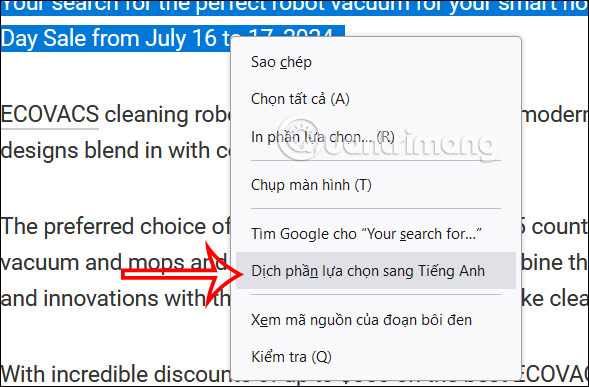
<p style="text-align: justify;"><strong>Bước 1:</strong></p>

<p style="text-align: justify;">Người dùng truy cập trang web bất kỳ sau đó<strong>&nbsp;khoanh vùng nội dung muốn dịch</strong>&nbsp;trên Firefox. Tiếp đến nhấn chuột phải và chọn&nbsp;<strong>Dịch phần lựa chọn sang tiếng Anh</strong>&nbsp;đang được để mặc định theo trình duyệt.</p>

<p style="text-align: justify;"><img alt="Tùy chọn dịch nội dung trên Firefox" data-i="0" data-src="https://st.quantrimang.com/photos/image/2024/07/16/Firefox-dich-trang-web-1.jpg" data-was-processed="true" height="387" src="https://st.quantrimang.com/photos/image/2024/07/16/Firefox-dich-trang-web-1.jpg" width="589" /></p>

<p style="text-align: justify;"><strong>Bước 2:</strong></p>

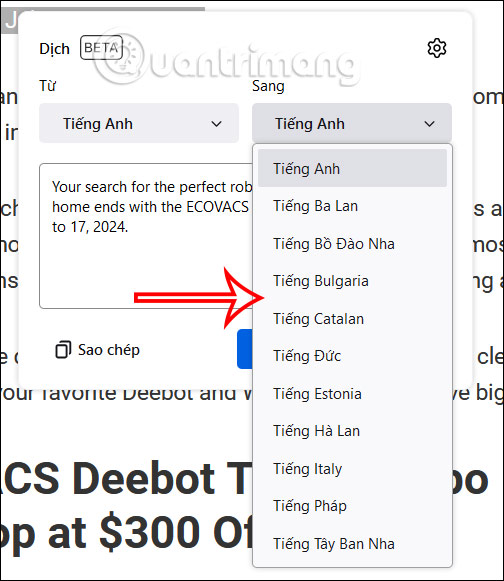
<p style="text-align: justify;">Lúc này bạn sẽ nhìn thấy giao diện bản dịch nội dung trên Firefox như hình dưới đây. Để&nbsp;<strong>đổi ngôn ngữ dịch đích</strong>,<strong>&nbsp;tại Sang</strong>&nbsp;bạn&nbsp;<strong>chọn ngôn ngữ</strong>&nbsp;mình muốn. Hiện tại thì trình duyệt Firefox chưa hỗ trợ dịch trang web sang tiếng Việt.</p>

<p style="text-align: justify;"><img alt="Đổi ngôn ngữ dịch trên Firefox" data-i="1" data-src="https://st.quantrimang.com/photos/image/2024/07/16/Firefox-dich-trang-web-2.jpg" data-was-processed="true" height="461" src="https://st.quantrimang.com/photos/image/2024/07/16/Firefox-dich-trang-web-2.jpg" width="400" /></p>

<div style="text-align: justify;">&nbsp;</div>

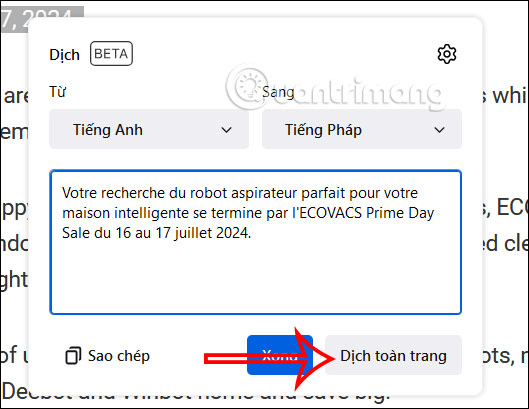
<p style="text-align: justify;">Chẳng hạn chọn dịch sang tiếng Pháp và bạn sẽ thấy kết quả dịch như hình. Ngoài ra ở bên dưới bạn sẽ thấy&nbsp;<strong>tùy chọn Dịch toàn trang</strong>&nbsp;để thực hiện.</p>

<p style="text-align: justify;"><img alt="Dịch toàn trang web trên Firefox" data-adbro-processed="true" data-i="2" data-src="https://st.quantrimang.com/photos/image/2024/07/16/Firefox-dich-trang-web-3.jpg" data-was-processed="true" height="371" src="https://st.quantrimang.com/photos/image/2024/07/16/Firefox-dich-trang-web-3.jpg" width="480" /></p>

<p style="text-align: justify;"><strong>Bước 3:</strong></p>

<p style="text-align: justify;">Ngay lập tức trang web trên Firefox đã được dịch sang ngôn ngữ mà bạn chọn.</p>

<p style="text-align: justify;"><img alt="Dịch trang web trên Firefox" data-i="3" data-src="https://st.quantrimang.com/photos/image/2024/07/16/Firefox-dich-trang-web-4.jpg" data-was-processed="true" height="420" src="https://st.quantrimang.com/photos/image/2024/07/16/Firefox-dich-trang-web-4.jpg" width="550" /></p>

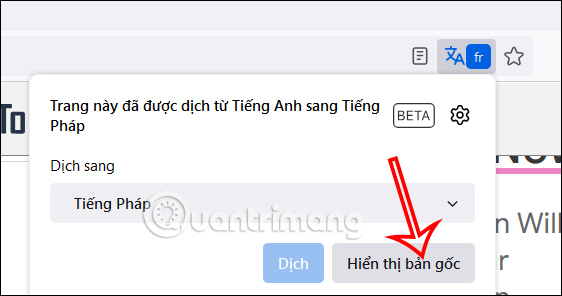
<p style="text-align: justify;">Để&nbsp;<strong>quay về ngôn ngữ gốc</strong>, bạn nhìn lên thanh địa chỉ rồi nhấn vào&nbsp;<strong>biểu tượng dịch</strong>. Sau đó chúng ta nhấn tiếp vào&nbsp;<strong>Hiển thị bản gốc</strong>&nbsp;để quay trở về ngôn ngữ gốc của trang web.</p>

<p style="text-align: justify;"><img alt="Hiện bản gốc ngôn ngữ web trên Firefox" data-i="4" data-src="https://st.quantrimang.com/photos/image/2024/07/16/Firefox-dich-trang-web-5.jpg" data-was-processed="true" height="290" src="https://st.quantrimang.com/photos/image/2024/07/16/Firefox-dich-trang-web-5.jpg" width="550" /></p>

<div style="text-align: justify;">&nbsp;</div>

<p style="text-align: justify;"><strong>Bước 4:</strong></p>

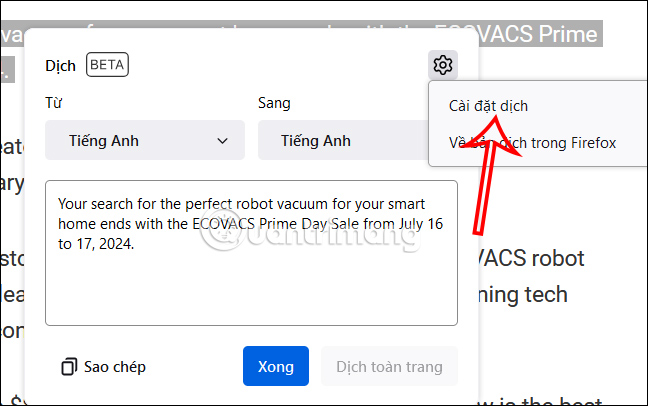
<p style="text-align: justify;">Ngoài ra khi nhấn vào&nbsp;<strong>biểu tượng bánh răng cưa</strong>, chọn&nbsp;<strong>Cài đặt dịch&nbsp;</strong>sẽ được truy cập vào tùy chỉnh tính năng dịch trên Firefox.</p>

<p style="text-align: justify;"><img alt="Cài đặt dịch trên Firefox" data-i="5" data-src="https://st.quantrimang.com/photos/image/2024/07/16/Firefox-dich-trang-web-6.jpg" data-was-processed="true" height="345" src="https://st.quantrimang.com/photos/image/2024/07/16/Firefox-dich-trang-web-6.jpg" width="550" /></p>

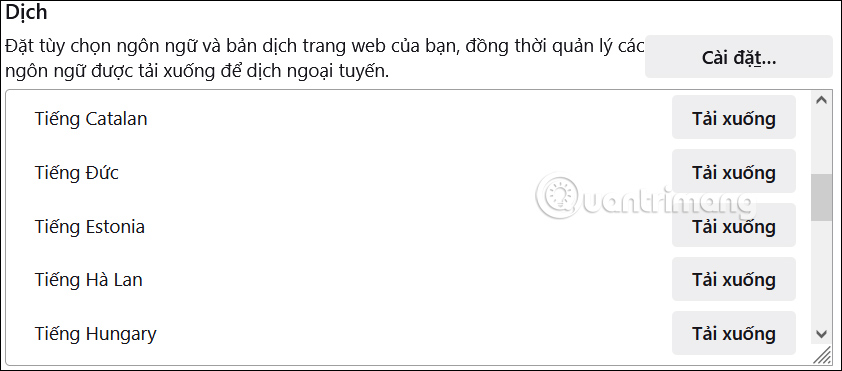
<p style="text-align: justify;">Lúc này bạn sẽ thấy danh sách các ngôn ngữ hỗ trợ dịch trang web trên Firefox. Chúng ta có thể nhấn Tải xuống để tải ngôn ngữ dịch ngoại tuyến.</p>

<p style="text-align: justify;"><img alt="Tải ngôn ngữ dịch ngoại tuyến trên Firefox" data-i="6" data-src="https://st.quantrimang.com/photos/image/2024/07/16/Firefox-dich-trang-web-7.jpg" data-was-processed="true" height="282" src="https://st.quantrimang.com/photos/image/2024/07/16/Firefox-dich-trang-web-7.jpg" width="640" /></p>

<h2 style="text-align: justify;">Hướng dẫn tra từ trên Firefox bằng Simple Translate</h2>

<p style="text-align: justify;"><strong>Bước 1:</strong></p>

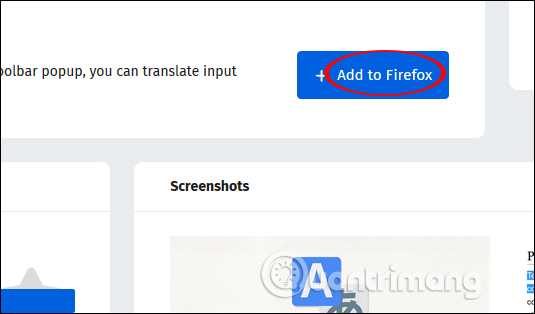
<p style="text-align: justify;">Người dùng nhấn vào link dưới đây để cài đặt tiện ích Simple Translate trên Firefox.</p>

<ul>
	<li style="text-align: justify;">Tải tiện ích&nbsp;<a href="https://quantrimang.com/url?q=aHR0cHM6Ly9hZGRvbnMubW96aWxsYS5vcmcvZW4tVVMvZmlyZWZveC9hZGRvbi9zaW1wbGUtdHJhbnNsYXRlLw%3D%3D" rel="nofollow noopener" target="_blank" title="Simple Translate Firefox">Simple Translate Firefox</a></li>
</ul>

<p style="text-align: justify;"><img alt="Cài đặt tiện ích" data-i="7" data-src="https://st.quantrimang.com/photos/image/2019/03/01/Simple-Translate-dich-tu-Firefox-1.jpg" data-was-processed="true" height="314" src="https://st.quantrimang.com/photos/image/2019/03/01/Simple-Translate-dich-tu-Firefox-1.jpg" width="535" /></p>

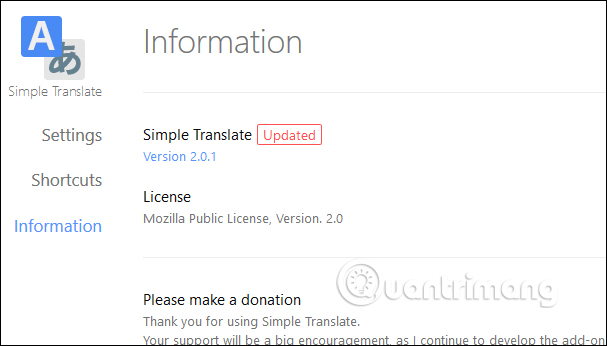
<p style="text-align: justify;">Sau khi cài đặt xong bạn sẽ được chuyển sang giao diện web mới với thông tin về phiên bản tiện ích đang dùng.</p>

<p style="text-align: justify;"><img alt="Thông tin tiện ích" data-i="8" data-src="https://st.quantrimang.com/photos/image/2019/03/01/Simple-Translate-dich-tu-Firefox-2.jpg" data-was-processed="true" height="346" src="https://st.quantrimang.com/photos/image/2019/03/01/Simple-Translate-dich-tu-Firefox-2.jpg" width="607" /></p>

<p style="text-align: justify;"><strong>Bước 2:</strong></p>

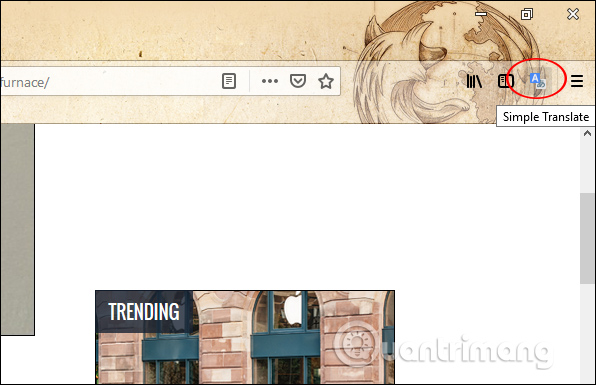
<p style="text-align: justify;">Bây giờ bạn mở trang web muốn dịch, bôi đen từ hoặc đoạn văn bản cần dịch rồi nhấn vào<strong>&nbsp;biểu tượng tiện ích</strong>&nbsp;trên thanh truy cập địa chỉ.</p>

<div style="text-align: justify;">&nbsp;</div>

<p style="text-align: justify;"><img alt="Chọn nội dung dịch" data-i="9" data-src="https://st.quantrimang.com/photos/image/2019/03/01/Simple-Translate-dich-tu-Firefox-3.jpg" data-was-processed="true" height="385" src="https://st.quantrimang.com/photos/image/2019/03/01/Simple-Translate-dich-tu-Firefox-3.jpg" width="596" /></p>

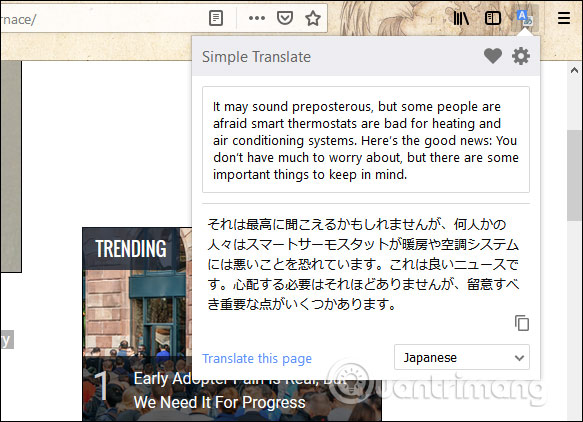
<p style="text-align: justify;">Ngay sau đó bạn sẽ thấy nội dung được chuyển sang ngôn ngữ khác.</p>

<p style="text-align: justify;"><img alt="Dịch từ ngữ " data-i="10" data-src="https://st.quantrimang.com/photos/image/2019/03/01/Simple-Translate-dich-tu-Firefox-4.jpg" data-was-processed="true" height="422" src="https://st.quantrimang.com/photos/image/2019/03/01/Simple-Translate-dich-tu-Firefox-4.jpg" width="583" /></p>

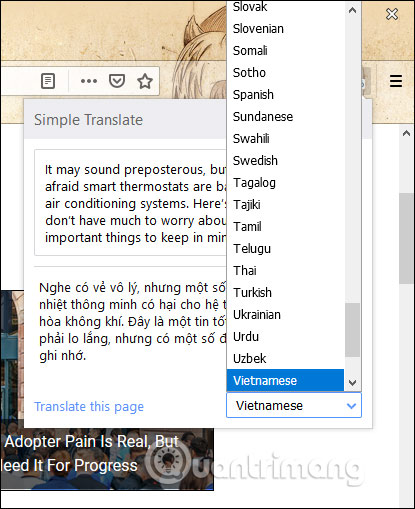
<p style="text-align: justify;">Nếu muốn chuyển ngôn ngữ đích thì nhấn vào phần&nbsp;<strong>Translate this page</strong>&nbsp;rồi chọn loại ngôn ngữ muốn dịch sang.</p>

<p style="text-align: justify;"><img alt="Chuyển đổi ngôn ngữ" data-i="11" data-src="https://st.quantrimang.com/photos/image/2019/03/01/Simple-Translate-dich-tu-Firefox-5.jpg" data-was-processed="true" height="509" src="https://st.quantrimang.com/photos/image/2019/03/01/Simple-Translate-dich-tu-Firefox-5.jpg" width="415" /></p>

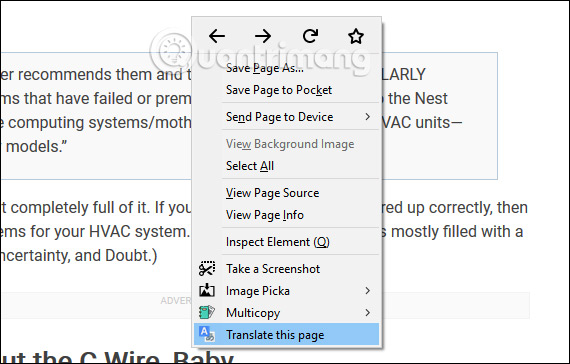
<p style="text-align: justify;">Ngoài ra tiện ích cũng hỗ trợ dịch toàn bộ trang web qua Google Dịch, dịch link liên kết và dịch tab đang chọn. Để&nbsp;<strong>dịch toàn bộ trang web</strong>&nbsp;chỉ cần click chuột phải vào bất cứ vị trí nào trên trang và chọn&nbsp;<strong>Translate this page</strong>&nbsp;để dịch.</p>

<p style="text-align: justify;"><img alt="Dịch toàn bộ trang web" data-i="12" data-src="https://st.quantrimang.com/photos/image/2019/03/01/Simple-Translate-dich-tu-Firefox-7.jpg" data-was-processed="true" height="364" src="https://st.quantrimang.com/photos/image/2019/03/01/Simple-Translate-dich-tu-Firefox-7.jpg" width="570" /></p>

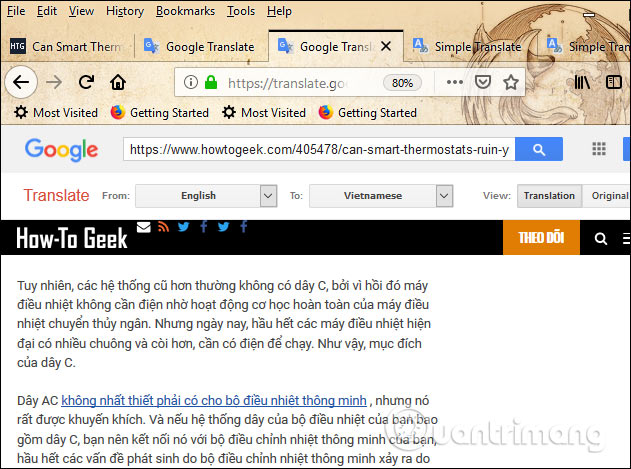
<p style="text-align: justify;">Sau đó chúng ta sẽ được tới trang web Google Dịch để tiến hành dịch toàn nội dung trên trang.</p>

<p style="text-align: justify;"><img alt="Dịch trên Google" data-i="13" data-src="https://st.quantrimang.com/photos/image/2019/03/01/Simple-Translate-dich-tu-Firefox-8.jpg" data-was-processed="true" height="469" src="https://st.quantrimang.com/photos/image/2019/03/01/Simple-Translate-dich-tu-Firefox-8.jpg" width="631" /></p>

<div style="text-align: justify;">&nbsp;</div>

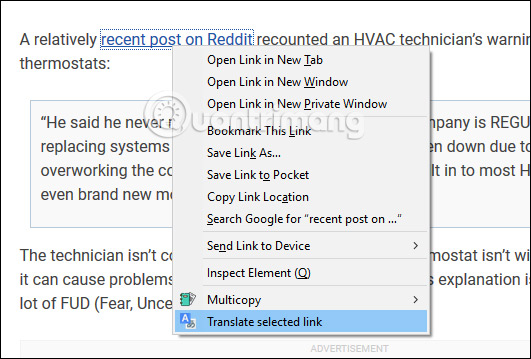
<p style="text-align: justify;">Cách dịch link liên kết cũng tương tự, nhấn chuột phải vào link rồi chọn&nbsp;<strong>Translate selected link</strong>. Bạn cũng được chuyển sang trang dịch trên Google Dịch để sử dụng.</p>

<p style="text-align: justify;"><img alt="Dịch link" data-i="14" data-src="https://st.quantrimang.com/photos/image/2019/03/01/Simple-Translate-dich-tu-Firefox-9.jpg" data-was-processed="true" height="359" src="https://st.quantrimang.com/photos/image/2019/03/01/Simple-Translate-dich-tu-Firefox-9.jpg" width="531" /></p>

<p style="text-align: justify;"><strong>Bước 3:</strong></p>

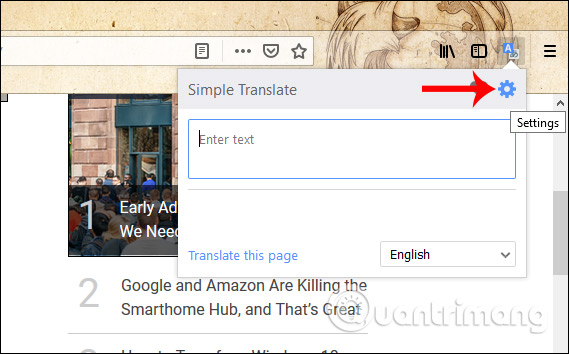
<p style="text-align: justify;">Để tiện ích dịch Simple Translate hoạt động hiệu quả hơn thì chúng ta nên thay đổi lại một số thiết lập. Nhấn vào biểu tượng tiện ích trên trình duyệt, rồi nhấn tiếp vào&nbsp;<strong>biểu tượng bánh răng cưa</strong>.</p>

<p style="text-align: justify;"><img alt="Thiết lập tiện ích" data-i="15" data-src="https://st.quantrimang.com/photos/image/2019/03/01/Simple-Translate-dich-tu-Firefox-10.jpg" data-was-processed="true" height="354" src="https://st.quantrimang.com/photos/image/2019/03/01/Simple-Translate-dich-tu-Firefox-10.jpg" width="569" /></p>

<p style="text-align: justify;"><strong>Bước 4:</strong></p>

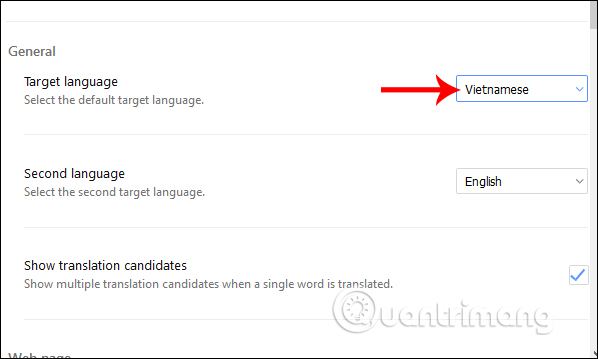
<p style="text-align: justify;">Chuyển sang trang web thiết lập riêng cho tiện ích. Giao diện được chia thành 5 mục chính với những nội dung thiết lập khác nhau. Với<strong>&nbsp;mục General</strong>&nbsp;người dùng có thể chọn 2 ngôn ngữ đích tại Target language. Như vậy khi dịch thì công cụ ưu tiên chuyển sang ngôn ngữ đích mặc định đó, nên chọn Vietnamese tại default target.</p>

<p style="text-align: justify;">Nếu muốn thêm phần giải nghĩa khi chọn dịch từ đơn thì kích hoạt Show multiple translation candidates when a single word is translated.</p>

<p style="text-align: justify;"><img alt="Chọn ngôn ngữ " data-i="16" data-src="https://st.quantrimang.com/photos/image/2019/03/01/Simple-Translate-dich-tu-Firefox-19.jpg" data-was-processed="true" height="359" src="https://st.quantrimang.com/photos/image/2019/03/01/Simple-Translate-dich-tu-Firefox-19.jpg" width="598" /></p>

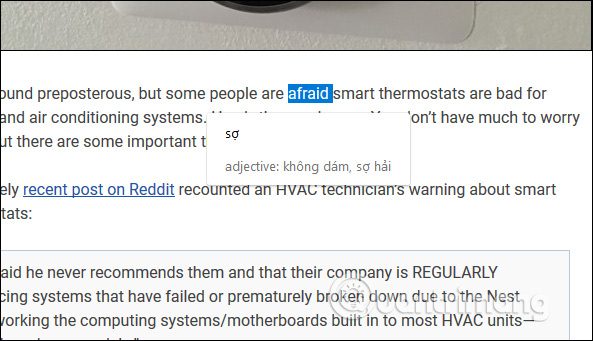
<p style="text-align: justify;">Định nghĩa của từ sẽ thêm phần từ thuộc loại gì như hình dưới đây.</p>

<p style="text-align: justify;"><img alt="Thêm định nghĩa từ" data-i="17" data-src="https://st.quantrimang.com/photos/image/2019/03/01/Simple-Translate-dich-tu-Firefox-12.jpg" data-was-processed="true" height="341" src="https://st.quantrimang.com/photos/image/2019/03/01/Simple-Translate-dich-tu-Firefox-12.jpg" width="593" /></p>

<p style="text-align: justify;"><strong>Bước 5:</strong></p>

<p style="text-align: justify;">Tiếp xuống dưới&nbsp;<strong>phần Web page</strong>&nbsp;để chỉnh sửa các kiểu dịch khác nhau.</p>

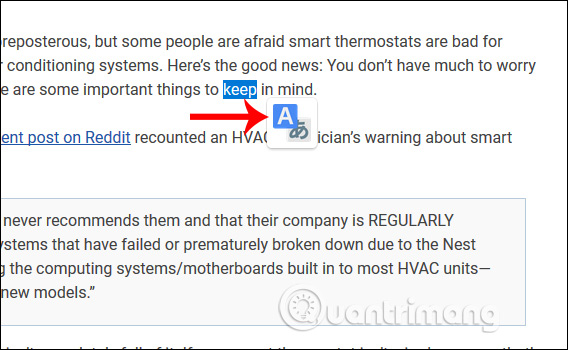
<p style="text-align: justify;"><strong>Display translation button</strong>: Hiển thị nút dịch từ ngữ để mở khung dịch nội dung. Biểu tượng dịch sẽ như hình dưới và chúng ta chỉ cần nhấp vào nó để hiện ngay đoạn dịch. Có thể điều chỉnh kích thước và vị trí hiển thị nút dịch tại phần Style bên dưới.</p>

<p style="text-align: justify;"><img alt="Hiện nút dịch" data-i="18" data-src="https://st.quantrimang.com/photos/image/2019/03/01/Simple-Translate-dich-tu-Firefox-13.jpg" data-was-processed="true" height="350" src="https://st.quantrimang.com/photos/image/2019/03/01/Simple-Translate-dich-tu-Firefox-13.jpg" width="568" /></p>

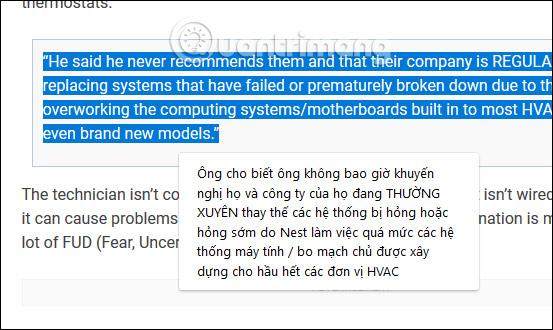
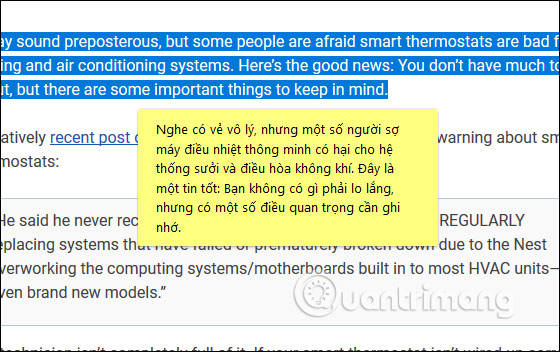
<p style="text-align: justify;"><strong>Display translation panel</strong>: Hiển thị khung dịch mà không cần phải nhấn biểu tượng dịch như trên. Khi đó người dùng chỉ cần bôi đen từ cần dịch và hiển thị ngay khung kết quả dịch.</p>

<p style="text-align: justify;"><img alt="Hiện khung dịch ngay" data-i="19" data-src="https://st.quantrimang.com/photos/image/2019/03/01/Simple-Translate-dich-tu-Firefox-14.jpg" data-was-processed="true" height="330" src="https://st.quantrimang.com/photos/image/2019/03/01/Simple-Translate-dich-tu-Firefox-14.jpg" width="553" /></p>

<div style="text-align: justify;">&nbsp;</div>

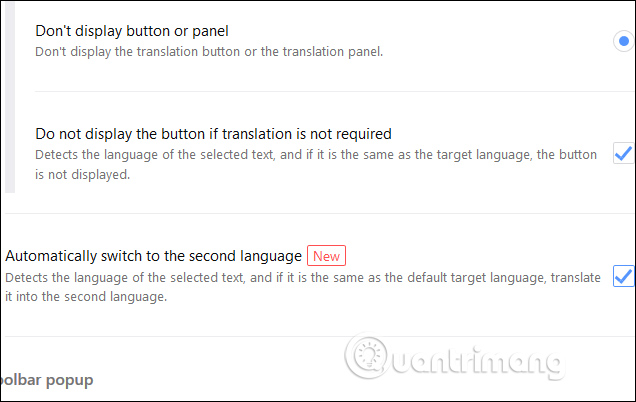
<p style="text-align: justify;"><strong>Don&#039;t display button or panel</strong>: Không hiển thị biểu tượng dịch lẫn khung dịch. Như vậy người dùng chỉ dùng qua khung dịch tại biểu tượng tiện ích ở thanh truy cập địa chỉ trình duyệt.</p>

<p style="text-align: justify;"><strong>Do not display the button if translation is not required</strong>: Tiện ích phát hiện ngôn ngữ và nếu trùng với ngôn ngữ đích thì biểu tượng dịch sẽ không hiển thị khi bôi đen từ ngữ.</p>

<p style="text-align: justify;"><strong>Automatically switch to the second language</strong>: Tiện ích phát hiện ngôn ngữ và nếu giống với ngôn ngữ đích mặc định thì tự động chuyển sang ngôn ngữ đích thứ 2. Phần này phụ thuộc vào việc bạn thiết lập ngôn ngữ tại mục đầu tiên General.</p>

<p style="text-align: justify;"><img alt="Tùy chỉnh mục dịch" data-i="20" data-src="https://st.quantrimang.com/photos/image/2019/03/01/Simple-Translate-dich-tu-Firefox-15.jpg" data-was-processed="true" height="402" src="https://st.quantrimang.com/photos/image/2019/03/01/Simple-Translate-dich-tu-Firefox-15.jpg" width="636" /></p>

<p style="text-align: justify;"><strong>Bước 6:</strong></p>

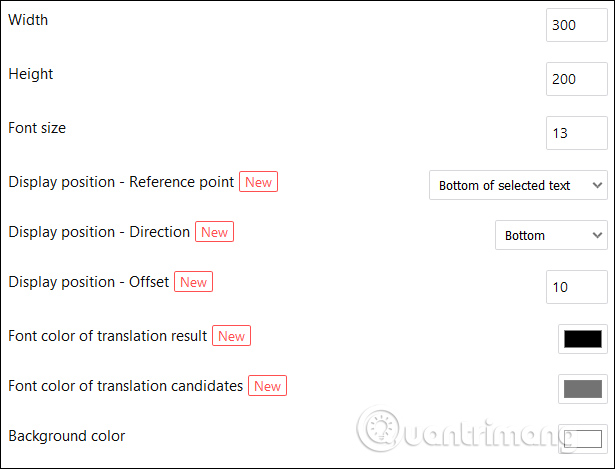
<p style="text-align: justify;">Tại&nbsp;<strong>mục Style</strong>&nbsp;sẽ tùy chỉnh giao diện hiển thị của nút bấm và khung dịch.&nbsp;<strong>Translation Button</strong>&nbsp;để chỉnh biểu tượng dịch và phần&nbsp;<strong>Translation Panel</strong>&nbsp;chỉnh khung dịch. Với khung dịch thì có thể chọn độ dài chiều ngang Width và Height cho độ dài chiều dọc, cỡ chữ ở Font size và Background color là màu nền.</p>

<p style="text-align: justify;"><img alt="Thiết lập nút và khung dịch" data-i="21" data-src="https://st.quantrimang.com/photos/image/2019/03/01/Simple-Translate-dich-tu-Firefox-16.jpg" data-was-processed="true" height="469" src="https://st.quantrimang.com/photos/image/2019/03/01/Simple-Translate-dich-tu-Firefox-16.jpg" width="615" /></p>

<p style="text-align: justify;">Nếu thay đổi màu nền thì nên chọn màu sắc nhìn rõ, êm mắt, không nên chọn màu quá tối để phù hợp với màu sắc của nội dung sau khi dịch.</p>

<p style="text-align: justify;">Những mục còn lại để nguyên như thiết lập cũng được.</p>

<p style="text-align: justify;"><img alt="Đổi màu nền khung dịch" data-i="22" data-src="https://st.quantrimang.com/photos/image/2019/03/01/Simple-Translate-dich-tu-Firefox-17.jpg" data-was-processed="true" height="352" src="https://st.quantrimang.com/photos/image/2019/03/01/Simple-Translate-dich-tu-Firefox-17.jpg" width="560" /></p>

<p style="text-align: justify;"><strong>Bước 7:</strong></p>

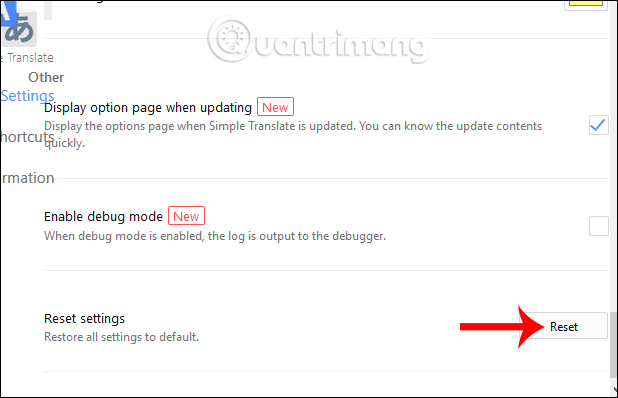
<p style="text-align: justify;">Nếu muốn quay lại những thiết lập trước đó thì nhấn vào&nbsp;<strong>nút Reset tại phần Reset settings</strong>.</p>

<p style="text-align: justify;"><img alt="Reset nội dung" data-i="23" data-src="https://st.quantrimang.com/photos/image/2019/03/01/Simple-Translate-dich-tu-Firefox-18.jpg" data-was-processed="true" height="398" src="https://st.quantrimang.com/photos/image/2019/03/01/Simple-Translate-dich-tu-Firefox-18.jpg" width="618" /></p>

<p style="text-align: justify;">Một tiện ích rất hữu ích để người dùng có thể dịch ngay từ ngữ hoặc đoạn văn trên trang web hiện tại của Firefox. Simple Translate mang tới rất nhiều tùy chọn thiết lập để dịch nội dung trên trang web, phù hợp với nhu cầu của từng người.</p>

<p style="text-align: justify;">Chúc các bạn thực hiện thành công!</p>

<div style="text-align: justify;">&nbsp;</div>
		</div>
				<div id="author">
						<p>
				<strong>Nguồn tin:</strong>
				Quantrimang.com:
			</p>
		</div>
	</div>
	<div id="footer" class="clearfix">
		<div id="url">
			<strong>URL của bản tin này: </strong><a href="https://www.nguoicodonvn2008.info/vi/news/savefile/kien-thuc-may-tinh/cach-dich-trang-web-tren-firefox-8692.html" title="Cách dịch trang web trên Firefox">https://www.nguoicodonvn2008.info/vi/news/savefile/kien-thuc-may-tinh/cach-dich-trang-web-tren-firefox-8692.html</a>

		</div>
		<div class="clear"></div>
		<div class="copyright">
			&copy; .&#x3A; Nguoicodonvn2008.info - Cõi lòng người cô đơn &#x3A;.
		</div>
		<div id="contact">
			<a href="mailto:admin@nguoicodonvn2008.info">admin@nguoicodonvn2008.info</a>
		</div>
	</div>
</div>
        <div id="timeoutsess" class="chromeframe">
            Bạn đã không sử dụng Site, <a onclick="timeoutsesscancel();" href="https://nguoicodonvn2008.info/#">Bấm vào đây để duy trì trạng thái đăng nhập</a>. Thời gian chờ: <span id="secField"> 60 </span> giây
        </div>
        <div id="openidResult" class="nv-alert" style="display:none"></div>
        <div id="openidBt" data-result="" data-redirect=""></div>
		</script>
		<div class="car-top">
  <span><img src="https://nguoicodonvn2008.info/themes/default/images/car.png" alt=""></span>
</div>
<script src="https://nguoicodonvn2008.info/assets/js/jquery/jquery.min.js"></script>
<script>var nv_base_siteurl="/",nv_lang_data="vi",nv_lang_interface="vi",nv_name_variable="nv",nv_fc_variable="op",nv_lang_variable="language",nv_module_name="news",nv_func_name="savefile",nv_is_user=0, nv_my_ofs=-4,nv_my_abbr="EDT",nv_cookie_prefix="nv4c_e856T",nv_check_pass_mstime=1738000,nv_area_admin=0,nv_safemode=0,theme_responsive=0,nv_recaptcha_ver=2,nv_recaptcha_sitekey="",nv_recaptcha_type="image",XSSsanitize=1;</script>
<script src="https://nguoicodonvn2008.info/assets/js/language/vi.js"></script>
<script src="https://nguoicodonvn2008.info/assets/js/DOMPurify/purify3.js"></script>
<script src="https://nguoicodonvn2008.info/assets/js/global.js"></script>
<script src="https://nguoicodonvn2008.info/assets/js/site.js"></script>
<script src="https://nguoicodonvn2008.info/themes/default/js/news.js"></script>
<script src="https://nguoicodonvn2008.info/themes/default/js/main.js"></script>
<script src="https://nguoicodonvn2008.info/themes/default/js/custom.js"></script>
<script type="application/ld+json">
        {
            "@context": "https://schema.org",
            "@type": "Organization",
            "url": "https://nguoicodonvn2008.info",
            "logo": "https://nguoicodonvn2008.info/uploads/angel.gif"
        }
        </script>
<script src="https://nguoicodonvn2008.info/themes/default/js/bootstrap.min.js"></script>
<script type="text/javascript">
var $scrolltop = $('.car-top');
$scrolltop.on('click', function () {
    $('html,body').animate({
        scrollTop: 0
    }, 800);
    $(this).addClass("car-run");
    setTimeout(function(){ $scrolltop.removeClass('car-run');}, 1000);
    return false;
});
$(window).on('scroll', function ()
{ 
    if($(window).scrollTop() >= 200)
    {
        $scrolltop.addClass("show");
        $scrolltop.addClass("car-down");
    }
    else
    {
       $scrolltop.removeClass("show");
       setTimeout(function(){ $scrolltop.removeClass('car-down');}, 300);
    }
});
</script>
</body>
</html>