<!DOCTYPE html>
    <html lang="vi" xmlns="http://www.w3.org/1999/xhtml" prefix="og: http://ogp.me/ns#">
    <head>
<title>Cách đăng nhập vào SSH server bằng GPG key</title>
<meta name="description" content="Cách đăng nhập vào SSH server bằng GPG key - Savefile - Tin Tức -...">
<meta name="author" content=".: Nguoicodonvn2008.info - Cõi lòng người cô đơn :.">
<meta name="copyright" content=".: Nguoicodonvn2008.info - Cõi lòng người cô đơn :. [admin@nguoicodonvn2008.info]">
<meta name="robots" content="index, archive, follow, noodp">
<meta name="googlebot" content="index,archive,follow,noodp">
<meta name="msnbot" content="all,index,follow">
<meta name="generator" content="NukeViet v4.5">
<meta http-equiv="Content-Type" content="text/html; charset=utf-8">
<meta property="og:title" content="Cách đăng nhập vào SSH server bằng GPG key">
<meta property="og:type" content="website">
<meta property="og:description" content="Savefile - Tin Tức - https&#x3A;&#x002F;&#x002F;www.nguoicodonvn2008.info&#x002F;vi&#x002F;news&#x002F;savefile&#x002F;kien-thuc-may-tinh&#x002F;cach-dang-nhap-vao-ssh-server-bang-gpg-key-8398.html">
<meta property="og:site_name" content=".&#x3A; Nguoicodonvn2008.info - Cõi lòng người cô đơn &#x3A;.">
<meta property="og:url" content="https://www.nguoicodonvn2008.info/vi/news/savefile/kien-thuc-may-tinh/cach-dang-nhap-vao-ssh-server-bang-gpg-key-8398.html">
<link rel="shortcut icon" href="https://nguoicodonvn2008.info/favicon.ico">
<link rel="canonical" href="https://www.nguoicodonvn2008.info/vi/news/savefile/kien-thuc-may-tinh/cach-dang-nhap-vao-ssh-server-bang-gpg-key-8398.html">
<link rel="alternate" href="https://nguoicodonvn2008.info/vi/news/rss/" title="Tin Tức" type="application/rss+xml">
<link rel="alternate" href="https://nguoicodonvn2008.info/vi/news/rss/karaoke-dual/" title="Tin Tức - Karaoke Dual" type="application/rss+xml">
<link rel="alternate" href="https://nguoicodonvn2008.info/vi/news/rss/nhac-tre/" title="Tin Tức - Nhạc trẻ" type="application/rss+xml">
<link rel="alternate" href="https://nguoicodonvn2008.info/vi/news/rss/tru-tinh/" title="Tin Tức - Trữ tình" type="application/rss+xml">
<link rel="alternate" href="https://nguoicodonvn2008.info/vi/news/rss/nuoc-ngoai/" title="Tin Tức - Nước ngoài" type="application/rss+xml">
<link rel="alternate" href="https://nguoicodonvn2008.info/vi/news/rss/remix/" title="Tin Tức - Remix" type="application/rss+xml">
<link rel="alternate" href="https://nguoicodonvn2008.info/vi/news/rss/tam-su-tinh-yeu/" title="Tin Tức - Tâm sự tình yêu" type="application/rss+xml">
<link rel="alternate" href="https://nguoicodonvn2008.info/vi/news/rss/tho-suu-tam/" title="Tin Tức - Thơ sưu tầm" type="application/rss+xml">
<link rel="alternate" href="https://nguoicodonvn2008.info/vi/news/rss/cuoc-song/" title="Tin Tức - Cuộc sống" type="application/rss+xml">
<link rel="alternate" href="https://nguoicodonvn2008.info/vi/news/rss/phan-mem/" title="Tin Tức - Phần mềm" type="application/rss+xml">
<link rel="alternate" href="https://nguoicodonvn2008.info/vi/news/rss/kien-thuc-may-tinh/" title="Tin Tức - Kiến thức máy tính" type="application/rss+xml">
<link rel="alternate" href="https://nguoicodonvn2008.info/vi/news/rss/hoc-tap/" title="Tin Tức - Học tập" type="application/rss+xml">
<link rel="alternate" href="https://nguoicodonvn2008.info/vi/news/rss/tai-lieu/" title="Tin Tức - Tài liệu" type="application/rss+xml">
<link rel="alternate" href="https://nguoicodonvn2008.info/vi/news/rss/de-thi/" title="Tin Tức - Đề thi" type="application/rss+xml">
<link rel="preload" as="style" href="https://nguoicodonvn2008.info/assets/css/font-awesome.min.css" type="text/css">
<link rel="preload" as="style" href="https://nguoicodonvn2008.info/themes/default/css/bootstrap.non-responsive.css" type="text/css">
<link rel="preload" as="style" href="https://nguoicodonvn2008.info/themes/default/css/style.css" type="text/css">
<link rel="preload" as="style" href="https://nguoicodonvn2008.info/themes/default/css/style.non-responsive.css" type="text/css">
<link rel="preload" as="style" href="https://nguoicodonvn2008.info/themes/default/css/news.css" type="text/css">
<link rel="preload" as="style" href="https://nguoicodonvn2008.info/themes/default/css/custom.css" type="text/css">
<link rel="preload" as="script" href="https://nguoicodonvn2008.info/assets/js/jquery/jquery.min.js" type="text/javascript">
<link rel="preload" as="script" href="https://nguoicodonvn2008.info/assets/js/language/vi.js" type="text/javascript">
<link rel="preload" as="script" href="https://nguoicodonvn2008.info/assets/js/DOMPurify/purify3.js" type="text/javascript">
<link rel="preload" as="script" href="https://nguoicodonvn2008.info/assets/js/global.js" type="text/javascript">
<link rel="preload" as="script" href="https://nguoicodonvn2008.info/assets/js/site.js" type="text/javascript">
<link rel="preload" as="script" href="https://nguoicodonvn2008.info/themes/default/js/news.js" type="text/javascript">
<link rel="preload" as="script" href="https://nguoicodonvn2008.info/themes/default/js/main.js" type="text/javascript">
<link rel="preload" as="script" href="https://nguoicodonvn2008.info/themes/default/js/custom.js" type="text/javascript">
<link rel="preload" as="script" href="https://nguoicodonvn2008.info/themes/default/js/bootstrap.min.js" type="text/javascript">
<link rel="stylesheet" href="https://nguoicodonvn2008.info/assets/css/font-awesome.min.css">
<link rel="stylesheet" href="https://nguoicodonvn2008.info/themes/default/css/bootstrap.non-responsive.css">
<link rel="stylesheet" href="https://nguoicodonvn2008.info/themes/default/css/style.css">
<link rel="stylesheet" href="https://nguoicodonvn2008.info/themes/default/css/style.non-responsive.css">
<link rel="StyleSheet" href="https://nguoicodonvn2008.info/themes/default/css/news.css">
<link rel="stylesheet" href="https://nguoicodonvn2008.info/themes/default/css/custom.css">
<style type="text/css">
	body{background: #fff;}
</style>
    </head>
    <body>
<div id="print">
	<div id="hd_print">
		<h2 class="pull-left">.&#x3A; Nguoicodonvn2008.info - Cõi lòng người cô đơn &#x3A;.</h2>
		<p class="pull-right"><a title=".&#x3A; Nguoicodonvn2008.info - Cõi lòng người cô đơn &#x3A;." href="https://nguoicodonvn2008.info/">https://nguoicodonvn2008.info</a></p>
	</div>
	<div class="clear"></div>
	<hr />
	<div id="content">
		<h1>Cách đăng nhập vào SSH server bằng GPG key</h1>
		<ul class="list-inline">
			<li>Thứ sáu - 24/05/2024 23:30</li>
			<li class="hidden-print txtrequired"><em class="fa fa-print">&nbsp;</em><a title="In ra" href="javascript:;" onclick="window.print()">In ra</a></li>
			<li class="hidden-print txtrequired"><em class="fa fa-power-off">&nbsp;</em><a title="Đóng cửa sổ này" href="javascript:;" onclick="window.close()">Đóng cửa sổ này</a></li>
		</ul>
		<div class="clear"></div>
		<div id="hometext">
		</div>
				<div class="imghome">
			<img alt="Cách đăng nhập vào SSH server bằng GPG key" src="https://st.quantrimang.com/photos/image/2024/05/24/dang-nhap-ssh-server-bang-gpg-key-5.jpg" width="460" class="img-thumbnail" />
		</div>
		<div class="clear"></div>
		<div id="bodytext" class="clearfix">
			<p style="text-align: justify;">Duy trì thông tin đăng nhập&nbsp;SSH&nbsp;là một phần quan trọng trong giao thức bảo mật của mọi quản trị viên. Bài viết hôm nay sẽ chỉ cho bạn cách có thể giảm bớt các key cần duy trì bằng cách liên kết thông tin đăng nhập SSH với GPG key.</p>

<h2 style="text-align: justify;">Chuẩn bị GPG key cho SSH</h2>

<p style="text-align: justify;">Bước đầu tiên khi sử dụng GPG key trên SSH là tạo subkey mới. Việc làm này sẽ cho phép chia sẻ chi tiết xác thực SSH mà không ảnh hưởng đến danh tính GPG chính của bạn.</p>

<p style="text-align: justify;">Bắt đầu bằng cách mở GPG prompt cho key chính:</p>

<pre id="pre0">
<code>gpg --expert --edit-key YOUR-KEY@EMAIL.ADDRESS</code></pre>

<p style="text-align: justify;"><strong>Lưu ý</strong>: Bạn có thể tìm địa chỉ email cho key chính của mình bằng cách liệt kê nội dung của key:&nbsp;<strong>gpg --list-keys</strong>.</p>

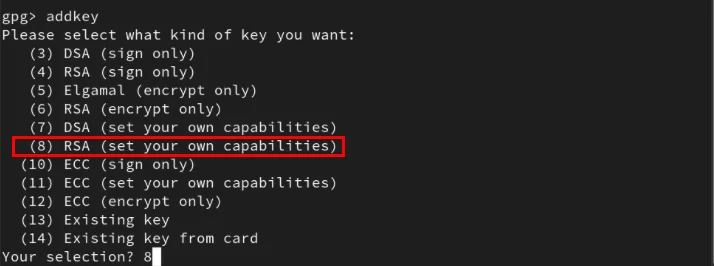
<p style="text-align: justify;">Nhập&nbsp;<strong>“addkey”</strong>&nbsp;trên GPG prompt, chọn&nbsp;<strong>“8”</strong>, sau đó nhấn&nbsp;<strong>Enter.</strong></p>

<figure>
<div style="text-align: justify;"><img alt="Template RSA tùy chỉnh cho subkey GPG" data-i="0" data-src="https://st.quantrimang.com/photos/image/2024/05/24/dang-nhap-ssh-server-bang-gpg-key-1.jpg" data-was-processed="true" height="266" src="https://st.quantrimang.com/photos/image/2024/05/24/dang-nhap-ssh-server-bang-gpg-key-1.jpg" width="714" /></div>

<figcaption>
<div style="text-align: justify;">Template RSA tùy chỉnh cho subkey GPG</div>
</figcaption>
</figure>

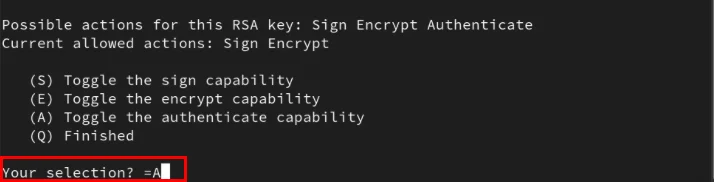
<p style="text-align: justify;">Đặt khả năng của subkey thành&nbsp;<strong>“=A”</strong>&nbsp;rồi nhấn&nbsp;<strong>Enter.</strong></p>

<figure>
<div style="text-align: justify;"><img alt="Quá trình thiết lập khả năng xác thực cho subkey GPG" data-adbro-processed="true" data-i="1" data-src="https://st.quantrimang.com/photos/image/2024/05/24/dang-nhap-ssh-server-bang-gpg-key-2.jpg" data-was-processed="true" height="182" src="https://st.quantrimang.com/photos/image/2024/05/24/dang-nhap-ssh-server-bang-gpg-key-2.jpg" width="714" /></div>

<figcaption>
<div style="text-align: justify;">Quá trình thiết lập khả năng xác thực cho subkey GPG</div>
</figcaption>
</figure>

<div style="text-align: justify;"><iframe allow="autoplay" allowtransparency="true" aria-label="Advertisement" data-google-container-id="a!2" data-google-query-id="CNeavsDup4YDFX3tTAIddkMM6A" data-load-complete="true" frameborder="0" height="0" hspace="0" id="aswift_1" marginheight="0" marginwidth="0" name="aswift_1" sandbox="allow-scripts allow-same-origin allow-forms allow-presentation" scrolling="no" tabindex="0" title="Advertisement" vspace="0" width="694"></iframe></div>

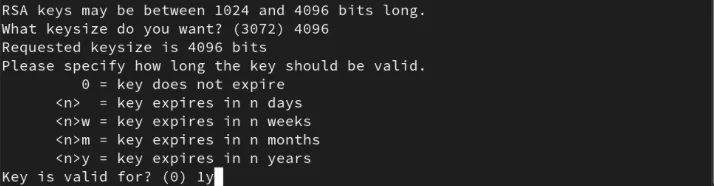
<p style="text-align: justify;">Nhập&nbsp;<strong>“4096”</strong>&nbsp;vào lời nhắc kích thước key, sau đó nhấn&nbsp;<strong>Enter</strong>.</p>

<p style="text-align: justify;">Đặt khoảng thời gian hợp lý cho tính hợp lệ của subkey. Trong trường hợp này, ví dụ sẽ gõ&nbsp;<strong>“1y”</strong>&nbsp;để làm cho subkey mới chỉ có hiệu lực trong một năm.</p>

<figure>
<div style="text-align: justify;"><img alt="Các giá trị về kích thước key và tính hợp lệ của subkey" data-i="2" data-src="https://st.quantrimang.com/photos/image/2024/05/24/dang-nhap-ssh-server-bang-gpg-key-3.jpg" data-was-processed="true" height="186" src="https://st.quantrimang.com/photos/image/2024/05/24/dang-nhap-ssh-server-bang-gpg-key-3.jpg" width="714" /></div>

<figcaption>
<div style="text-align: justify;">Các giá trị về kích thước key và tính hợp lệ của subkey</div>
</figcaption>
</figure>

<p style="text-align: justify;">Tạo subkey GPG mới bằng cách nhập&nbsp;<strong>“y”</strong>, sau đó nhấn&nbsp;<strong>Enter</strong>&nbsp;trên lời nhắc xác nhận của trình hướng dẫn.</p>

<p style="text-align: justify;">Gõ&nbsp;<strong>“quit”</strong>, sau đó nhấn&nbsp;<strong>Enter</strong>&nbsp;để thoát khỏi GPG prompt.</p>

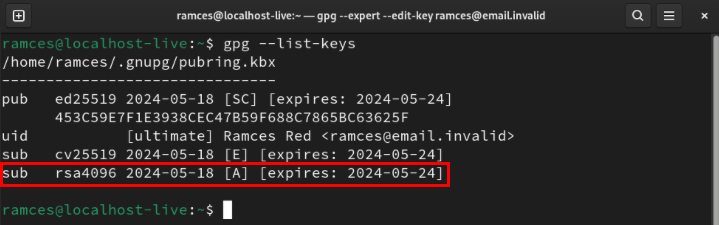
<p style="text-align: justify;">Xác nhận rằng subkey mới đang hoạt động bình thường bằng cách lấy thông tin chi tiết về key chính:</p>

<pre id="pre1">
<code>gpg --list-keys YOUR-KEY@EMAIL.ADDRESS</code></pre>

<figure>
<div style="text-align: justify;"><img alt="Subkey xác thực bổ sung bên dưới key chính." data-i="3" data-src="https://st.quantrimang.com/photos/image/2024/05/24/dang-nhap-ssh-server-bang-gpg-key-4.jpg" data-was-processed="true" height="225" src="https://st.quantrimang.com/photos/image/2024/05/24/dang-nhap-ssh-server-bang-gpg-key-4.jpg" width="719" /></div>

<figcaption>
<div style="text-align: justify;">Subkey xác thực bổ sung bên dưới key chính.</div>
</figcaption>
</figure>

<h2 style="text-align: justify;">Kích hoạt hỗ trợ SSH trong GPG</h2>

<p style="text-align: justify;">Khi subkey được thiết lập và chạy, giờ đây bạn có thể cấu hình daemon SSH của mình để chấp nhận các yêu cầu gpg-agent đến. Để làm điều đó, hãy thêm&nbsp;<strong>“enable-ssh-support”</strong>&nbsp;vào file&nbsp;<strong>“gpg-agent.conf”</strong>&nbsp;của người dùng hiện tại:</p>

<pre id="pre2">
<code>echo &quot;enable-ssh-support&quot; &gt;&gt; ~/.gnupg/gpg-agent.conf</code></pre>

<p style="text-align: justify;">Mở file “.bashrc” bằng trình soạn thảo văn bản yêu thích:</p>

<pre id="pre3">
<code>nano ~/.bashrc</code></pre>

<p style="text-align: justify;">Dán các dòng code sau vào cuối file .bashrc:</p>

<pre id="pre4">
<code>export SSH_AUTH_SOCK=$(gpgconf --list-dirs agent-ssh-socket)&lt;br&gt;gpgconf --launch gpg-agent</code></pre>

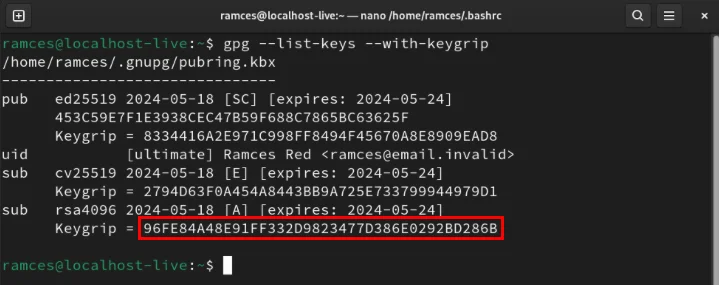
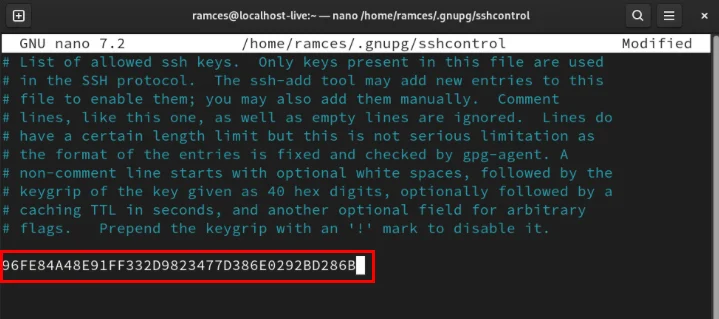
<p style="text-align: justify;">Lưu file bashrc, sau đó in keygrip của subkey:</p>

<pre id="pre5">
<code>gpg --list-keys --with-keygrip</code></pre>

<figure>
<div style="text-align: justify;"><img alt="Keygrip của subkey GPG." data-i="4" data-src="https://st.quantrimang.com/photos/image/2024/05/24/dang-nhap-ssh-server-bang-gpg-key-5.jpg" data-was-processed="true" height="285" src="https://st.quantrimang.com/photos/image/2024/05/24/dang-nhap-ssh-server-bang-gpg-key-5.jpg" width="719" /></div>

<figcaption>
<div style="text-align: justify;">Keygrip của subkey GPG.</div>
</figcaption>
</figure>

<div style="text-align: justify;"><iframe allow="autoplay" allowtransparency="true" aria-label="Advertisement" data-google-container-id="a!3" data-google-query-id="CJCwv8Dup4YDFbftTAId8WcMQw" data-load-complete="true" frameborder="0" height="0" hspace="0" id="aswift_2" marginheight="0" marginwidth="0" name="aswift_2" sandbox="allow-scripts allow-same-origin allow-forms allow-presentation" scrolling="no" tabindex="0" title="Advertisement" vspace="0" width="694"></iframe></div>

<p style="text-align: justify;">Sao chép keygrip của subkey, sau đó tạo file&nbsp;<strong>“sshcontrol”</strong>&nbsp;trong thư mục&nbsp;<strong>.gnupg</strong>:</p>

<pre id="pre6">
<code>nano ~/.gnupg/sshcontrol</code></pre>

<p style="text-align: justify;">Dán keygrip danh tính của bạn vào trong file mới, sau đó lưu nó.</p>

<figure>
<div style="text-align: justify;"><img alt="Keygrip của subkey trên file sshcontrol" data-i="5" data-src="https://st.quantrimang.com/photos/image/2024/05/24/dang-nhap-ssh-server-bang-gpg-key-6.jpg" data-was-processed="true" height="319" src="https://st.quantrimang.com/photos/image/2024/05/24/dang-nhap-ssh-server-bang-gpg-key-6.jpg" width="719" /></div>

<figcaption>
<div style="text-align: justify;">Keygrip của subkey trên file sshcontrol</div>
</figcaption>
</figure>

<p style="text-align: justify;">Áp dụng cấu hình SSH và GPG mới bằng cách load lại file bashrc trên phiên terminal hiện tại:</p>

<pre id="pre7">
<code>source ~/.bashrc</code></pre>

<p style="text-align: justify;">Kiểm tra xem daemon SSH hiện có hoạt động bình thường hay không bằng cách liệt kê SSH public key của nó:</p>

<pre id="pre8">
<code>ssh-add -l</code></pre>

<figure>
<div style="text-align: justify;"><img alt="GPG key đã load cho SSH." data-i="6" data-src="https://st.quantrimang.com/photos/image/2024/05/24/dang-nhap-ssh-server-bang-gpg-key-7.jpg" data-was-processed="true" height="117" src="https://st.quantrimang.com/photos/image/2024/05/24/dang-nhap-ssh-server-bang-gpg-key-7.jpg" width="719" /></div>

<figcaption>
<div style="text-align: justify;">GPG key đã load cho SSH.</div>
</figcaption>
</figure>

<h2 style="text-align: justify;">Xuất và kiểm tra GPG key</h2>

<p style="text-align: justify;">Tại thời điểm này, bạn đã có daemon SSH được liên kết chính xác với GPG agent của mình. Để sử dụng nó, hãy tạo key xuất SSH bằng lệnh sau:</p>

<pre id="pre9">
<code>gpg --ssh-export-key YOUR-KEY@EMAIL.ADDRESS &gt; ~/authorized_keys</code></pre>

<p style="text-align: justify;">Đặt các bit quyền của key xuất thành chỉ người dùng mới có thể đọc và ghi được:</p>

<pre id="pre10">
<code>chmod 600 ~/authorized_keys</code></pre>

<p style="text-align: justify;">Gửi file ủy quyền mới đến máy chủ từ xa bằng scp:</p>

<pre id="pre11">
<code>scp ~/authorized_keys YOUR-REMOTE.SERVER.DOMAIN:~/.ssh/authorized_keys</code></pre>

<p style="text-align: justify;">Đăng nhập vào máy chủ từ xa, sau đó khởi động lại daemon SSH để áp dụng key mới:</p>

<pre id="pre12">
<code>sudo systemctl restart ssh.service</code></pre>

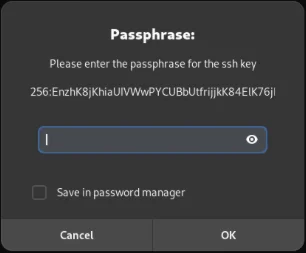
<p style="text-align: justify;">Nhấn&nbsp;<strong>Ctrl + D</strong>, sau đó đăng nhập lại vào máy chủ SSH từ xa. Thao tác này sẽ đưa ra lời nhắc mới yêu cầu nhập mật khẩu GPG key chính.</p>

<figure>
<div style="text-align: justify;"><img alt="Lời nhắc mật khẩu GPG của Gnome cho SSH." data-i="7" data-src="https://st.quantrimang.com/photos/image/2024/05/24/dang-nhap-ssh-server-bang-gpg-key-8.jpg" data-was-processed="true" height="253" src="https://st.quantrimang.com/photos/image/2024/05/24/dang-nhap-ssh-server-bang-gpg-key-8.jpg" width="306" /></div>

<figcaption>
<div style="text-align: justify;">Lời nhắc mật khẩu GPG của Gnome cho SSH.</div>
</figcaption>
</figure>

<p style="text-align: justify;">Liên kết GPG key với daemon SSH và xuất nó sang máy chủ từ xa chỉ là một số điều bạn có thể thực hiện với SSH. Khám phá những gì có thể làm với phần mềm tuyệt vời này bằng cách sử dụng SSH với các UNIX pipe trong Linux.</p>
		</div>
				<div id="author">
						<p>
				<strong>Nguồn tin:</strong>
				Quantrimang.com:
			</p>
		</div>
	</div>
	<div id="footer" class="clearfix">
		<div id="url">
			<strong>URL của bản tin này: </strong><a href="https://www.nguoicodonvn2008.info/vi/news/savefile/kien-thuc-may-tinh/cach-dang-nhap-vao-ssh-server-bang-gpg-key-8398.html" title="Cách đăng nhập vào SSH server bằng GPG key">https://www.nguoicodonvn2008.info/vi/news/savefile/kien-thuc-may-tinh/cach-dang-nhap-vao-ssh-server-bang-gpg-key-8398.html</a>

		</div>
		<div class="clear"></div>
		<div class="copyright">
			&copy; .&#x3A; Nguoicodonvn2008.info - Cõi lòng người cô đơn &#x3A;.
		</div>
		<div id="contact">
			<a href="mailto:admin@nguoicodonvn2008.info">admin@nguoicodonvn2008.info</a>
		</div>
	</div>
</div>
        <div id="timeoutsess" class="chromeframe">
            Bạn đã không sử dụng Site, <a onclick="timeoutsesscancel();" href="https://nguoicodonvn2008.info/#">Bấm vào đây để duy trì trạng thái đăng nhập</a>. Thời gian chờ: <span id="secField"> 60 </span> giây
        </div>
        <div id="openidResult" class="nv-alert" style="display:none"></div>
        <div id="openidBt" data-result="" data-redirect=""></div>
		</script>
		<div class="car-top">
  <span><img src="https://nguoicodonvn2008.info/themes/default/images/car.png" alt=""></span>
</div>
<script src="https://nguoicodonvn2008.info/assets/js/jquery/jquery.min.js"></script>
<script>var nv_base_siteurl="/",nv_lang_data="vi",nv_lang_interface="vi",nv_name_variable="nv",nv_fc_variable="op",nv_lang_variable="language",nv_module_name="news",nv_func_name="savefile",nv_is_user=0, nv_my_ofs=-4,nv_my_abbr="EDT",nv_cookie_prefix="nv4c_e856T",nv_check_pass_mstime=1738000,nv_area_admin=0,nv_safemode=0,theme_responsive=0,nv_recaptcha_ver=2,nv_recaptcha_sitekey="",nv_recaptcha_type="image",XSSsanitize=1;</script>
<script src="https://nguoicodonvn2008.info/assets/js/language/vi.js"></script>
<script src="https://nguoicodonvn2008.info/assets/js/DOMPurify/purify3.js"></script>
<script src="https://nguoicodonvn2008.info/assets/js/global.js"></script>
<script src="https://nguoicodonvn2008.info/assets/js/site.js"></script>
<script src="https://nguoicodonvn2008.info/themes/default/js/news.js"></script>
<script src="https://nguoicodonvn2008.info/themes/default/js/main.js"></script>
<script src="https://nguoicodonvn2008.info/themes/default/js/custom.js"></script>
<script type="application/ld+json">
        {
            "@context": "https://schema.org",
            "@type": "Organization",
            "url": "https://nguoicodonvn2008.info",
            "logo": "https://nguoicodonvn2008.info/uploads/angel.gif"
        }
        </script>
<script src="https://nguoicodonvn2008.info/themes/default/js/bootstrap.min.js"></script>
<script type="text/javascript">
var $scrolltop = $('.car-top');
$scrolltop.on('click', function () {
    $('html,body').animate({
        scrollTop: 0
    }, 800);
    $(this).addClass("car-run");
    setTimeout(function(){ $scrolltop.removeClass('car-run');}, 1000);
    return false;
});
$(window).on('scroll', function ()
{ 
    if($(window).scrollTop() >= 200)
    {
        $scrolltop.addClass("show");
        $scrolltop.addClass("car-down");
    }
    else
    {
       $scrolltop.removeClass("show");
       setTimeout(function(){ $scrolltop.removeClass('car-down');}, 300);
    }
});
</script>
</body>
</html>