<!DOCTYPE html>
    <html lang="vi" xmlns="http://www.w3.org/1999/xhtml" prefix="og: http://ogp.me/ns#">
    <head>
<title>Cách chuyển video thành MP3</title>
<meta name="description" content="Cách chuyển video thành MP3 - Savefile - Tin Tức - https&#x3A;&#x002F;&#x002F;www.nguoicodonvn2008.info&#x002F;vi&#x002F;news&#x002F;savefile&#x002F;kien-thuc-may-tinh&#x002F;cach-chuyen-video-thanh-mp3-11651.html">
<meta name="author" content=".: Nguoicodonvn2008.info - Cõi lòng người cô đơn :.">
<meta name="copyright" content=".: Nguoicodonvn2008.info - Cõi lòng người cô đơn :. [admin@nguoicodonvn2008.info]">
<meta name="robots" content="index, archive, follow, noodp">
<meta name="googlebot" content="index,archive,follow,noodp">
<meta name="msnbot" content="all,index,follow">
<meta name="generator" content="NukeViet v4.5">
<meta http-equiv="Content-Type" content="text/html; charset=utf-8">
<meta property="og:title" content="Cách chuyển video thành MP3">
<meta property="og:type" content="website">
<meta property="og:description" content="Savefile - Tin Tức - https&#x3A;&#x002F;&#x002F;www.nguoicodonvn2008.info&#x002F;vi&#x002F;news&#x002F;savefile&#x002F;kien-thuc-may-tinh&#x002F;cach-chuyen-video-thanh-mp3-11651.html">
<meta property="og:site_name" content=".&#x3A; Nguoicodonvn2008.info - Cõi lòng người cô đơn &#x3A;.">
<meta property="og:url" content="https://www.nguoicodonvn2008.info/vi/news/savefile/kien-thuc-may-tinh/cach-chuyen-video-thanh-mp3-11651.html">
<link rel="shortcut icon" href="https://nguoicodonvn2008.info/favicon.ico">
<link rel="canonical" href="https://www.nguoicodonvn2008.info/vi/news/savefile/kien-thuc-may-tinh/cach-chuyen-video-thanh-mp3-11651.html">
<link rel="alternate" href="https://nguoicodonvn2008.info/vi/news/rss/" title="Tin Tức" type="application/rss+xml">
<link rel="alternate" href="https://nguoicodonvn2008.info/vi/news/rss/karaoke-dual/" title="Tin Tức - Karaoke Dual" type="application/rss+xml">
<link rel="alternate" href="https://nguoicodonvn2008.info/vi/news/rss/nhac-tre/" title="Tin Tức - Nhạc trẻ" type="application/rss+xml">
<link rel="alternate" href="https://nguoicodonvn2008.info/vi/news/rss/tru-tinh/" title="Tin Tức - Trữ tình" type="application/rss+xml">
<link rel="alternate" href="https://nguoicodonvn2008.info/vi/news/rss/nuoc-ngoai/" title="Tin Tức - Nước ngoài" type="application/rss+xml">
<link rel="alternate" href="https://nguoicodonvn2008.info/vi/news/rss/remix/" title="Tin Tức - Remix" type="application/rss+xml">
<link rel="alternate" href="https://nguoicodonvn2008.info/vi/news/rss/tam-su-tinh-yeu/" title="Tin Tức - Tâm sự tình yêu" type="application/rss+xml">
<link rel="alternate" href="https://nguoicodonvn2008.info/vi/news/rss/tho-suu-tam/" title="Tin Tức - Thơ sưu tầm" type="application/rss+xml">
<link rel="alternate" href="https://nguoicodonvn2008.info/vi/news/rss/cuoc-song/" title="Tin Tức - Cuộc sống" type="application/rss+xml">
<link rel="alternate" href="https://nguoicodonvn2008.info/vi/news/rss/phan-mem/" title="Tin Tức - Phần mềm" type="application/rss+xml">
<link rel="alternate" href="https://nguoicodonvn2008.info/vi/news/rss/kien-thuc-may-tinh/" title="Tin Tức - Kiến thức máy tính" type="application/rss+xml">
<link rel="alternate" href="https://nguoicodonvn2008.info/vi/news/rss/hoc-tap/" title="Tin Tức - Học tập" type="application/rss+xml">
<link rel="alternate" href="https://nguoicodonvn2008.info/vi/news/rss/tai-lieu/" title="Tin Tức - Tài liệu" type="application/rss+xml">
<link rel="alternate" href="https://nguoicodonvn2008.info/vi/news/rss/de-thi/" title="Tin Tức - Đề thi" type="application/rss+xml">
<link rel="preload" as="style" href="https://nguoicodonvn2008.info/assets/css/font-awesome.min.css" type="text/css">
<link rel="preload" as="style" href="https://nguoicodonvn2008.info/themes/default/css/bootstrap.non-responsive.css" type="text/css">
<link rel="preload" as="style" href="https://nguoicodonvn2008.info/themes/default/css/style.css" type="text/css">
<link rel="preload" as="style" href="https://nguoicodonvn2008.info/themes/default/css/style.non-responsive.css" type="text/css">
<link rel="preload" as="style" href="https://nguoicodonvn2008.info/themes/default/css/news.css" type="text/css">
<link rel="preload" as="style" href="https://nguoicodonvn2008.info/themes/default/css/custom.css" type="text/css">
<link rel="preload" as="script" href="https://nguoicodonvn2008.info/assets/js/jquery/jquery.min.js" type="text/javascript">
<link rel="preload" as="script" href="https://nguoicodonvn2008.info/assets/js/language/vi.js" type="text/javascript">
<link rel="preload" as="script" href="https://nguoicodonvn2008.info/assets/js/DOMPurify/purify3.js" type="text/javascript">
<link rel="preload" as="script" href="https://nguoicodonvn2008.info/assets/js/global.js" type="text/javascript">
<link rel="preload" as="script" href="https://nguoicodonvn2008.info/assets/js/site.js" type="text/javascript">
<link rel="preload" as="script" href="https://nguoicodonvn2008.info/themes/default/js/news.js" type="text/javascript">
<link rel="preload" as="script" href="https://nguoicodonvn2008.info/themes/default/js/main.js" type="text/javascript">
<link rel="preload" as="script" href="https://nguoicodonvn2008.info/themes/default/js/custom.js" type="text/javascript">
<link rel="preload" as="script" href="https://nguoicodonvn2008.info/themes/default/js/bootstrap.min.js" type="text/javascript">
<link rel="stylesheet" href="https://nguoicodonvn2008.info/assets/css/font-awesome.min.css">
<link rel="stylesheet" href="https://nguoicodonvn2008.info/themes/default/css/bootstrap.non-responsive.css">
<link rel="stylesheet" href="https://nguoicodonvn2008.info/themes/default/css/style.css">
<link rel="stylesheet" href="https://nguoicodonvn2008.info/themes/default/css/style.non-responsive.css">
<link rel="StyleSheet" href="https://nguoicodonvn2008.info/themes/default/css/news.css">
<link rel="stylesheet" href="https://nguoicodonvn2008.info/themes/default/css/custom.css">
<style type="text/css">
	body{background: #fff;}
</style>
    </head>
    <body>
<div id="print">
	<div id="hd_print">
		<h2 class="pull-left">.&#x3A; Nguoicodonvn2008.info - Cõi lòng người cô đơn &#x3A;.</h2>
		<p class="pull-right"><a title=".&#x3A; Nguoicodonvn2008.info - Cõi lòng người cô đơn &#x3A;." href="https://nguoicodonvn2008.info/">https://nguoicodonvn2008.info</a></p>
	</div>
	<div class="clear"></div>
	<hr />
	<div id="content">
		<h1>Cách chuyển video thành MP3</h1>
		<ul class="list-inline">
			<li>Thứ ba - 18/11/2025 21:52</li>
			<li class="hidden-print txtrequired"><em class="fa fa-print">&nbsp;</em><a title="In ra" href="javascript:;" onclick="window.print()">In ra</a></li>
			<li class="hidden-print txtrequired"><em class="fa fa-power-off">&nbsp;</em><a title="Đóng cửa sổ này" href="javascript:;" onclick="window.close()">Đóng cửa sổ này</a></li>
		</ul>
		<div class="clear"></div>
		<div id="hometext">
		</div>
				<div class="imghome">
			<img alt="Cách chuyển video thành MP3" src="https://st.quantrimang.com/photos/image/2018/03/09/OffMp3-convert-video-sang-mp3-convert.jpg" width="460" class="img-thumbnail" />
		</div>
		<div class="clear"></div>
		<div id="bodytext" class="clearfix">
			<p style="text-align: justify;">Để chuyển video thành mp3 trên máy tính cực kỳ đơn giản, không cần tới những phần mềm chỉnh sửa video hỗ trợ khi bạn có rất nhiều công cụ online. Chúng ta chỉ cần đăng video lên trang web, hoặc paste URL video như&nbsp;chuyển video YouTube sang MP3&nbsp;chẳng hạn, ngay sau đó bạn sẽ có được file âm thanh convert từ video. Dưới đây là hướng dẫn chuyển video thành mp3 trên máy tính.</p>

<div style="text-align: justify;">&nbsp;</div>

<h2 id="mcetoc_1id3ms0sp6j4" style="text-align: justify;">Chuyển video sang file âm thanh bằng VLC (desktop)</h2>

<p style="text-align: justify;">VLC&nbsp;là trình phát media mã nguồn mở tuyệt vời hỗ trợ nhiều định dạng file âm thanh và video. Vì VLC cũng miễn phí nên ứng dụng này hoàn toàn phù hợp với mọi công việc chuyển đổi media mà bạn có thể cần thực hiện khi sử dụng PC.</p>

<p style="text-align: justify;">VLC có sẵn trên Windows, MacOS và Linux, đồng thời cũng có thể tải xuống điện thoại thông minh Android hoặc iOS của bạn. Sau khi tải VLC từ trang web chính thức, tất cả những gì bạn cần làm là chạy trình cài đặt và trả lời một vài lời nhắc đơn giản.</p>

<figure>
<div style="text-align: justify;"><img alt="" data-adbro-processed="true" data-i="0" data-src="https://st.quantrimang.com/photos/image/2024/11/20/cach-chuyen-video-sang-am-thanh-1.png" data-was-processed="true" height="524" src="https://st.quantrimang.com/photos/image/2024/11/20/cach-chuyen-video-sang-am-thanh-1.png" width="825" /></div>
</figure>

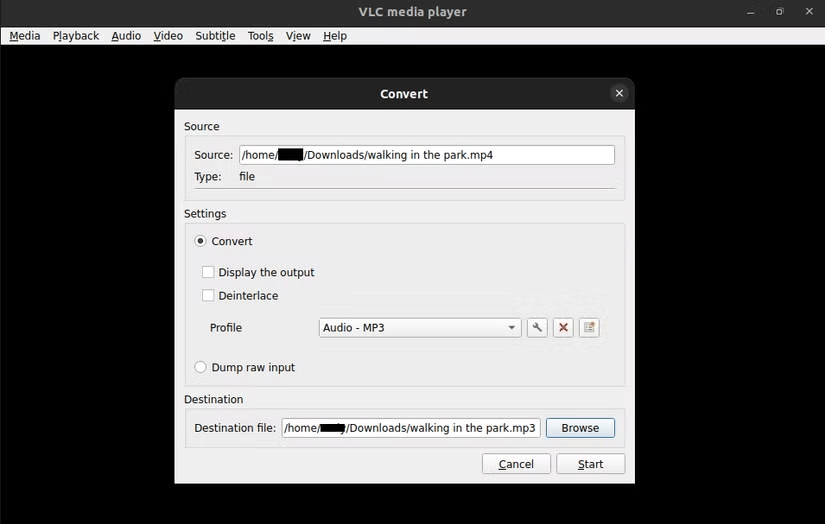
<p style="text-align: justify;">Sau khi mở VLC Media Player, bạn có thể chuyển đổi video sang âm thanh theo các bước sau:</p>

<ol>
	<li style="text-align: justify;">Điều hướng đến&nbsp;<strong>Media &gt; Convert/Save</strong>&nbsp;và nhấp vào&nbsp;<strong>Add</strong>.</li>
	<li style="text-align: justify;">Chọn và mở video mà bạn muốn chuyển đổi.</li>
	<li style="text-align: justify;">Trong danh sách drop-down&nbsp;<strong>Profile</strong>, hãy chọn định dạng âm thanh ưa thích của bạn (<strong>Audio - MP3</strong>&nbsp;phù hợp cho hầu hết các mục đích).</li>
	<li style="text-align: justify;">Nhấp vào nút&nbsp;<strong>Browse</strong>&nbsp;bên cạnh&nbsp;<strong>Destination file</strong>&nbsp;và chọn nơi bạn muốn lưu file âm thanh.</li>
	<li style="text-align: justify;">Nhấn&nbsp;<strong>Start</strong>&nbsp;và đợi vài phút để VLC chuyển đổi video của bạn thành file âm thanh.</li>
</ol>

<h2 id="mcetoc_1id3ms0sp6j5" style="text-align: justify;">Chuyển video thành âm thanh bằng Video to MP3 Converter (Android)</h2>

<p style="text-align: justify;">Nếu bạn muốn chuyển đổi video sang âm thanh trực tiếp từ ứng dụng trên điện thoại Android, Video to MP3 Converter là lựa chọn tuyệt vời. Ứng dụng này có khả năng trích xuất âm thanh chất lượng cao từ hầu hết các video và cũng hỗ trợ một số khả năng chỉnh sửa.</p>

<figure>
<div style="text-align: justify;"><img alt="" data-i="1" data-src="https://st.quantrimang.com/photos/image/2024/11/20/cach-chuyen-video-sang-am-thanh-2.png" data-was-processed="true" height="796" src="https://st.quantrimang.com/photos/image/2024/11/20/cach-chuyen-video-sang-am-thanh-2.png" width="1650" /></div>
</figure>

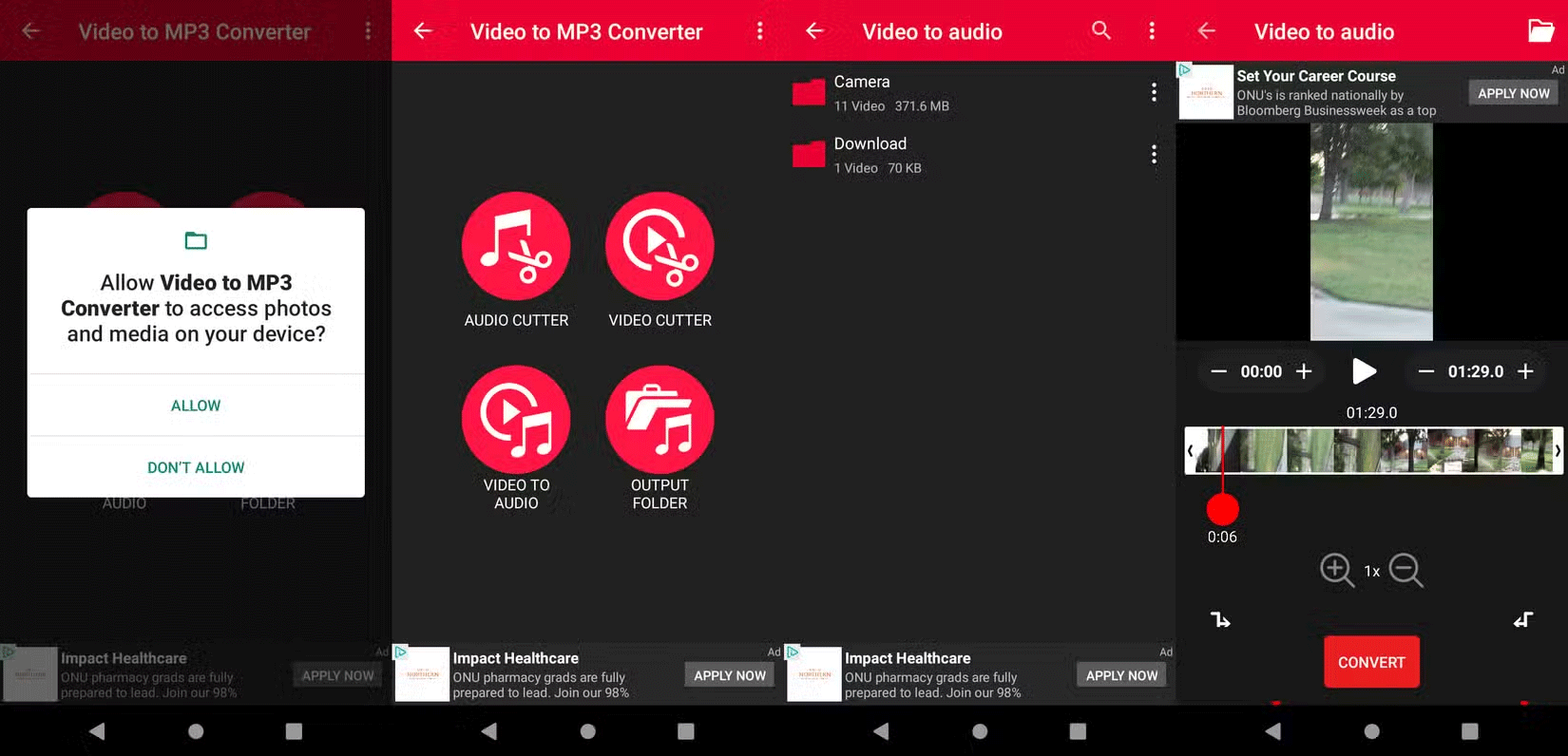
<p style="text-align: justify;">Bạn có thể cài đặt&nbsp;Video to MP3 Converter từ Google Play Store. Sau khi ứng dụng hoàn tất cài đặt, bạn có thể chuyển đổi video sang âm thanh bằng cách làm theo các bước dưới đây:<br />
<span style="color:rgb(192, 57, 43);"><strong>https://play.google.com/store/apps/details?id=mp3videoconverter.videotomp3converter.audioconverter</strong></span></p>

<ol>
	<li style="text-align: justify;">Mở ứng dụng Video to MP3 Converter.</li>
	<li style="text-align: justify;">Nhấn vào nút&nbsp;<strong>Video to Audio</strong>.</li>
	<li style="text-align: justify;">Điều hướng qua các file và tìm video mà bạn muốn chuyển đổi.</li>
	<li style="text-align: justify;">Nhấn vào&nbsp;<strong>Convert</strong>&nbsp;và đợi thông báo thư mục đầu ra xuất hiện. Sau đó, thưởng thức file âm thanh mới của bạn.</li>
</ol>

<h2 id="mcetoc_1id3ms0sp6j6" style="text-align: justify;">Chuyển đổi video sang âm thanh bằng Media Converter - Video to MP3 (iOS)</h2>

<p style="text-align: justify;">Nếu bạn có iPhone hoặc iPad, Media Converter - Video to MP3 là ứng dụng hoàn hảo để chuyển đổi file video sang âm thanh. Giống như Video to MP3 Converter, Media Converter - Video to MP3 miễn phí sử dụng và hỗ trợ nhiều định dạng âm thanh đầu ra.</p>

<figure>
<div style="text-align: justify;"><img alt="" data-i="2" data-src="https://st.quantrimang.com/photos/image/2024/11/20/cach-chuyen-video-sang-am-thanh-3.png" data-was-processed="true" height="979" src="https://st.quantrimang.com/photos/image/2024/11/20/cach-chuyen-video-sang-am-thanh-3.png" width="1650" /></div>
</figure>

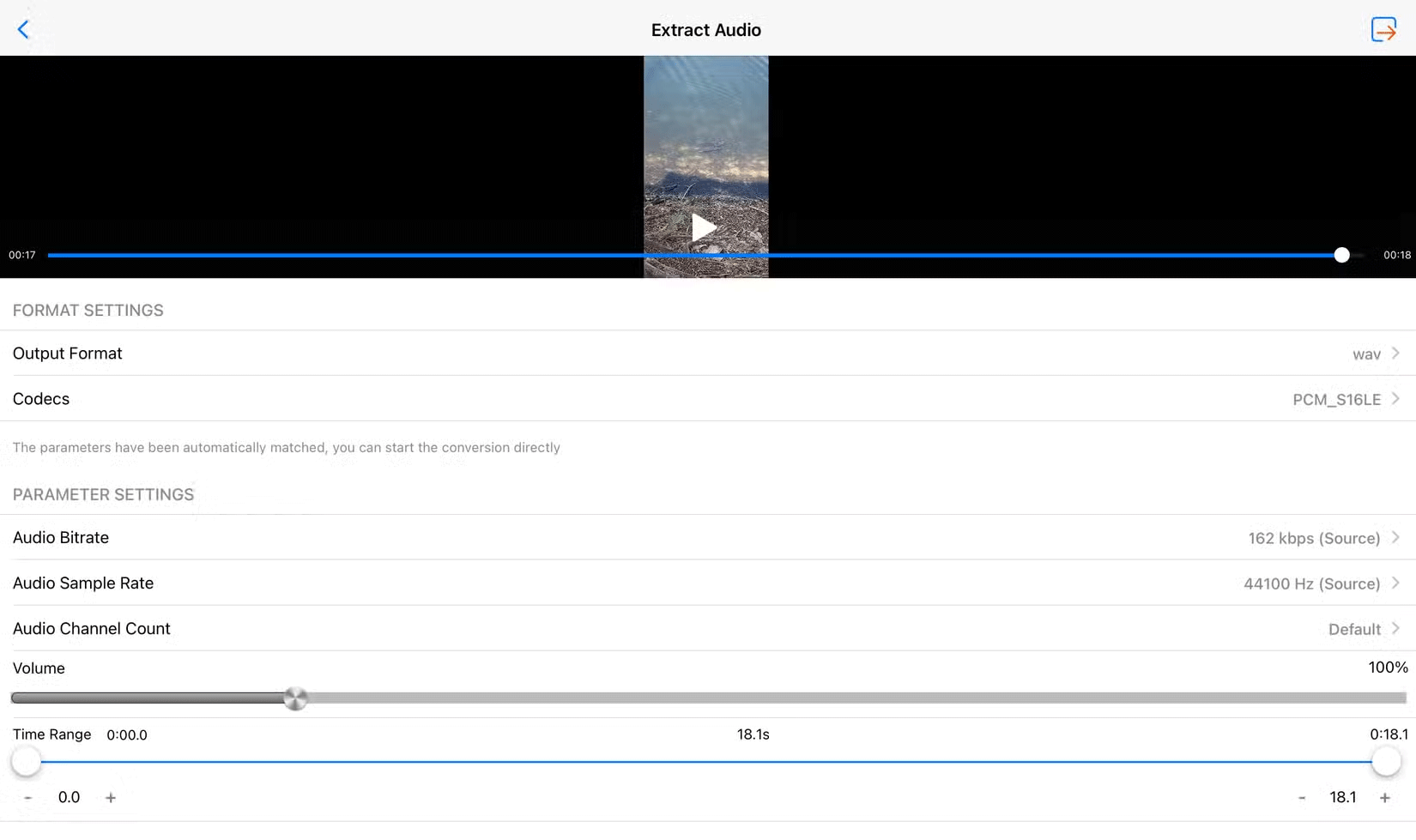
<p style="text-align: justify;">Bạn có thể&nbsp;<a href="https://quantrimang.com/url?u=aHR0cHM6Ly9hcHBzLmFwcGxlLmNvbS91cy9hcHAvbWVkaWEtY29udmVydGVyLXZpZGVvLXRvLW1wMy9pZDEyOTQyMDc2NzU%3D" rel="nofollow noopener" target="_blank">tải Media Converter - Video to MP3 trực tiếp từ App Store</a>. Sau khi ứng dụng cài đặt, bạn có thể chuyển đổi video của mình thành âm thanh bằng cách làm theo các bước sau:</p>

<ol>
	<li style="text-align: justify;">Mở ứng dụng Media Converter - Video to MP3.</li>
	<li style="text-align: justify;">Khi được nhắc, hãy cấp bất kỳ quyền nào mà ứng dụng cần để hoạt động.</li>
	<li style="text-align: justify;">Nhấn vào nút&nbsp;<strong>Video to Audio</strong>, sau đó chọn video bạn muốn chuyển đổi khi được nhắc.</li>
	<li style="text-align: justify;">Chọn định dạng file âm thanh ưa thích và điều chỉnh bất kỳ cài đặt nào khác nếu cần.</li>
	<li style="text-align: justify;">Nhấn vào biểu tượng ở góc trên bên phải màn hình để chuyển đổi file video thành âm thanh.</li>
	<li style="text-align: justify;">Nhấn vào nút&nbsp;<strong>More</strong>&nbsp;của file âm thanh để gửi hoặc lưu file.</li>
</ol>

<h2 id="mcetoc_1id3ms0sp6j7" style="text-align: justify;">Chuyển đổi video thành âm thanh bằng VidConverter (trình duyệt)</h2>

<p style="text-align: justify;">Một trong số các công cụ tốt nhất mà bạn có thể sử dụng để chuyển đổi video thành âm thanh là VidConverter. Giống như Convertio, VidConverter là một công cụ chuyển đổi file dựa trên web - vì vậy bạn có thể sử dụng nó từ bất kỳ thiết bị nào. Ngoài việc chuyển đổi file, nó cũng có thể tải xuống và chuyển đổi video từ các liên kết trên web.</p>

<figure>
<div style="text-align: justify;"><img alt="" data-i="3" data-src="https://st.quantrimang.com/photos/image/2024/11/20/cach-chuyen-video-sang-am-thanh-4.png" data-was-processed="true" height="608" src="https://st.quantrimang.com/photos/image/2024/11/20/cach-chuyen-video-sang-am-thanh-4.png" width="732" /></div>
</figure>

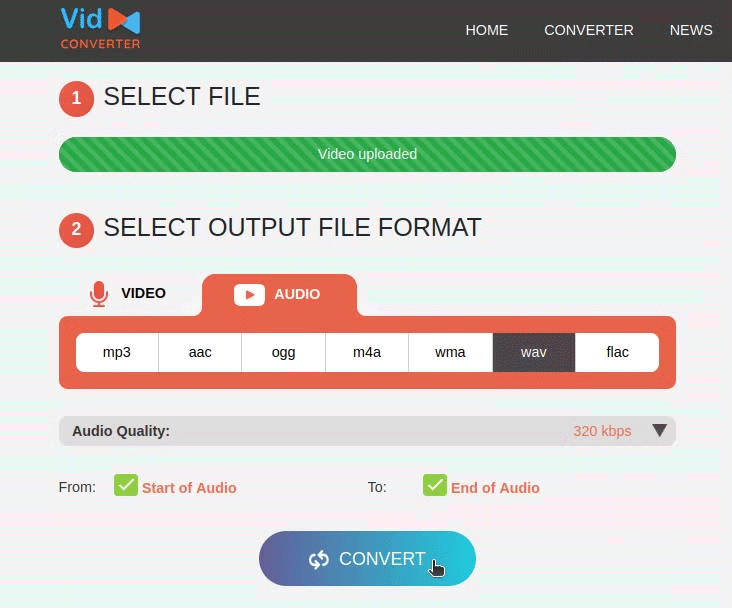
<p style="text-align: justify;">Bạn có thể chuyển đổi video sang âm thanh bằng VidConverter bằng cách làm theo các bước sau:</p>

<ol>
	<li style="text-align: justify;">Truy cập trang web VidConverter, sau đó chọn một trong hai tùy chọn:&nbsp;<strong>Convert A Video Link/URL</strong>&nbsp;hoặc&nbsp;<strong>Convert A Video File</strong>.:<span style="color:rgb(39, 174, 96);"><strong>&nbsp;https://vidconverteronline.com/</strong></span></li>
	<li style="text-align: justify;">Upload file video lên hoặc dán URL video của bạn.</li>
	<li style="text-align: justify;">Chọn loại file đầu ra âm thanh ưa thích và điều chỉnh cài đặt của bạn theo ý muốn.</li>
	<li style="text-align: justify;">Nhấp vào&nbsp;<strong>Convert</strong>&nbsp;để bắt đầu chuyển đổi loại file.</li>
	<li style="text-align: justify;">Sau khi quá trình chuyển đổi hoàn tất, hãy nhấp vào&nbsp;<strong>Download</strong>&nbsp;và thưởng thức file âm thanh mới của bạn.</li>
</ol>

<p style="text-align: justify;"><strong>Lưu ý</strong>: VidConverter có giới hạn kích thước file là 200MB.</p>

<h2 id="mcetoc_1id3ms0sp6j8" style="text-align: justify;">Chuyển video thành mp3 trên Convertio</h2>

<p style="text-align: justify;"><strong>Bước 1:</strong></p>

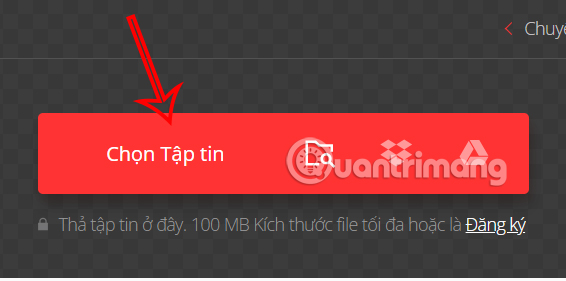
<p style="text-align: justify;">Bạn truy cập vào link trang web ở dưới đây, sau đó&nbsp;<strong>nhấn vào nút Chọn Tập tin&nbsp;</strong>để tải video có trong máy tính, hoặc tải video qua các phương thức được hỗ trợ khác trên trang web.</p>

<pre id="pre0">
<code>https://convertio.co/vn/mp4-mp3/</code></pre>

<p style="text-align: justify;"><img alt="Chuyển video thành mp3 trên Convertio" data-i="4" data-src="https://st.quantrimang.com/photos/image/2024/09/19/chuyen-video-thanh-mp3-1.jpg" data-was-processed="true" height="281" src="https://st.quantrimang.com/photos/image/2024/09/19/chuyen-video-thanh-mp3-1.jpg" width="566" /></p>

<p style="text-align: justify;"><strong>Bước 2:</strong></p>

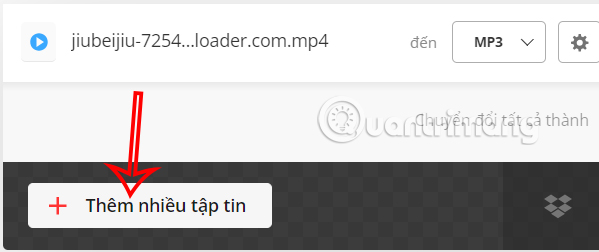
<p style="text-align: justify;">Người dùng có thể tải thêm nhiều video khác muốn chuyển sang mp3. Sau đó&nbsp;<strong>nhấn Chuyển đổi</strong>&nbsp;để thực hiện.</p>

<p style="text-align: justify;"><img alt="Tải thêm video trên Convertio" data-i="5" data-src="https://st.quantrimang.com/photos/image/2024/09/19/chuyen-video-thanh-mp3-2.jpg" data-was-processed="true" height="252" src="https://st.quantrimang.com/photos/image/2024/09/19/chuyen-video-thanh-mp3-2.jpg" width="599" /></p>

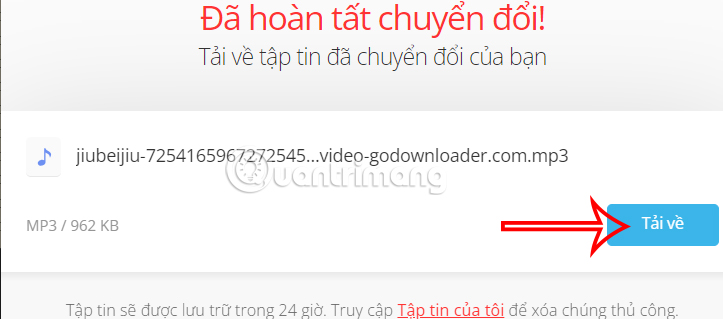
<p style="text-align: justify;">Quá trình chuyển video sang mp3 được thực hiện ngay sau đó. Khi quá trình này thành công thì bạn nhấn Tải về là được.</p>

<p style="text-align: justify;"><img alt="Tải file âm thanh trên Convertio" data-i="6" data-src="https://st.quantrimang.com/photos/image/2024/09/19/chuyen-video-thanh-mp3-3.jpg" data-was-processed="true" height="269" src="https://st.quantrimang.com/photos/image/2024/09/19/chuyen-video-thanh-mp3-3.jpg" width="609" /></p>

<h2 id="mcetoc_1id3ms0sp6j9" style="text-align: justify;">Conver video sang file MP3 trên online-audio-converter</h2>

<p style="text-align: justify;">Chúng ta truy cập vào trang web theo link dưới đây.</p>

<pre id="pre1">
<code>https://online-audio-converter.com/</code></pre>

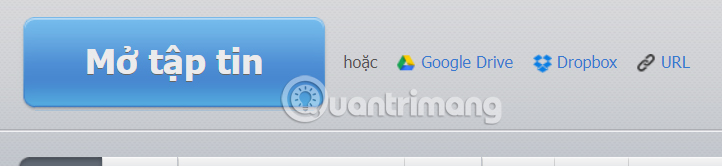
<p style="text-align: justify;">Sau đó bạn cũng&nbsp;<strong>tải video muốn chuyển sang mp3</strong>&nbsp;thông qua các tùy chọn tải như hình dưới đây.</p>

<p style="text-align: justify;"><img alt="Convert video sang file MP3 trên online-audio-converter" data-i="7" data-src="https://st.quantrimang.com/photos/image/2024/09/19/chuyen-video-thanh-mp3-4.jpg" data-was-processed="true" height="147" src="https://st.quantrimang.com/photos/image/2024/09/19/chuyen-video-thanh-mp3-4.jpg" width="640" /></p>

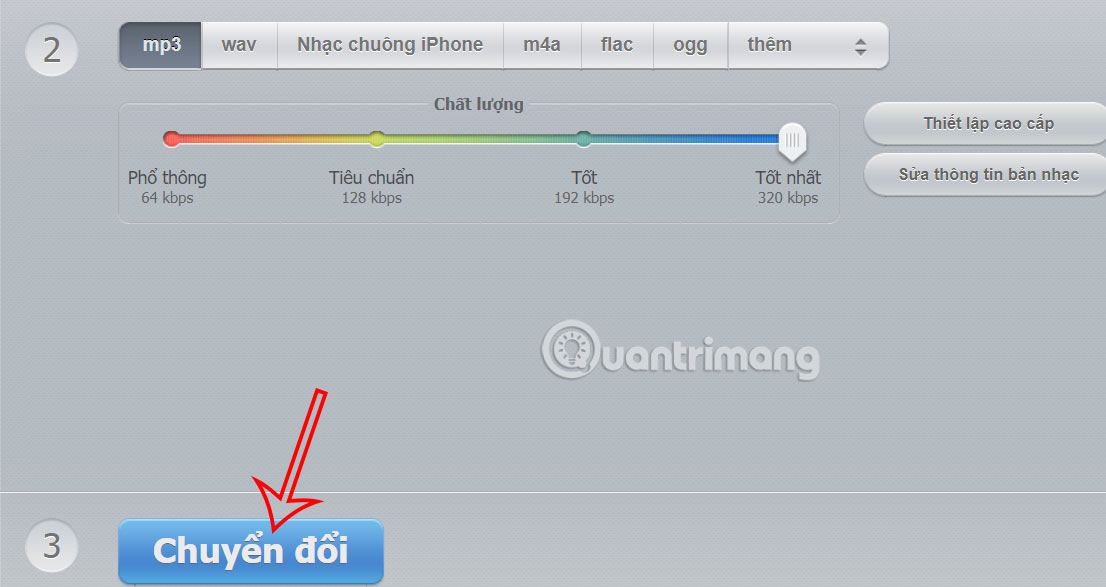
<p style="text-align: justify;">Tiếp tục bên dưới bạn chọn loại mp3 muốn chuyển sang, bao gồm&nbsp;<a href="https://quantrimang.com/cong-nghe/huong-dan-tao-nhac-chuong-tren-iphone-bang-3utools-128828" title="Hướng dẫn tạo nhạc chuông trên iPhone bằng 3uTools">tạo nhạc chuông iPhone</a>, rồi chọn chất lượng cho file âm thanh. Cuối cùng bạn<strong>&nbsp;nhấn Chuyển đổi</strong>&nbsp;ở bên dưới để thực hiện là được.</p>

<p style="text-align: justify;"><img alt="Tải file MP3 trên online-audio-converter" data-i="8" data-src="https://st.quantrimang.com/photos/image/2024/09/19/chuyen-video-thanh-mp3-5.jpg" data-was-processed="true" height="340" src="https://st.quantrimang.com/photos/image/2024/09/19/chuyen-video-thanh-mp3-5.jpg" width="640" /></p>

<h2 id="mcetoc_1id3ms0sp6ja" style="text-align: justify;">Hướng dẫn chuyển video sang mp3 trên Onlineconvertfree</h2>

<pre id="pre2">
<code>https://onlineconvertfree.com/vn/convert-format/video-to-mp3/</code></pre>

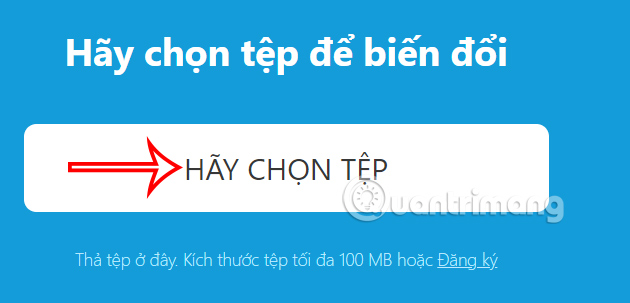
<p style="text-align: justify;">Chúng ta cũng thực hiện tải video muốn chuyển sang mp3 lên trang web.</p>

<p style="text-align: justify;"><img alt="Chuyển video sang mp3 trên Onlineconvertfree" data-i="9" data-src="https://st.quantrimang.com/photos/image/2024/09/19/chuyen-video-thanh-mp3-6.jpg" data-was-processed="true" height="289" src="https://st.quantrimang.com/photos/image/2024/09/19/chuyen-video-thanh-mp3-6.jpg" width="600" /></p>

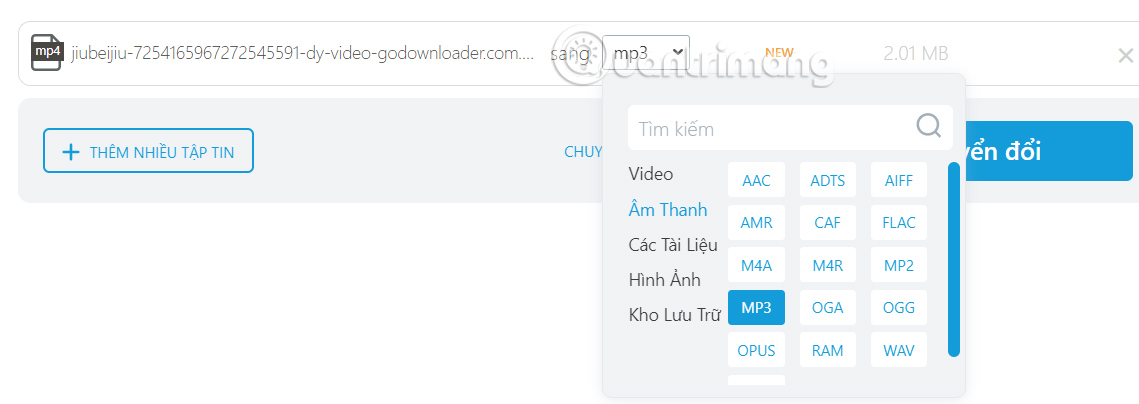
<p style="text-align: justify;">Trang web cũng hỗ trợ bạn tải nhiều video để chuyển đổi sang mp3. Bên cạnh đó chúng ta cũng có thể lựa chọn định dạng khác mà mình muốn.<strong>&nbsp;Nhấn Chuyển đổi</strong>&nbsp;để thực hiện.</p>

<p style="text-align: justify;"><img alt="Chuyển video sang mp3 trên Onlineconvertfree" data-i="10" data-src="https://st.quantrimang.com/photos/image/2024/09/19/chuyen-video-thanh-mp3-7.jpg" data-was-processed="true" height="213" src="https://st.quantrimang.com/photos/image/2024/09/19/chuyen-video-thanh-mp3-7.jpg" width="600" /></p>

<p style="text-align: justify;">File âm thanh cũng hiển thị sau đó để bạn nhấn Tải. Với trường hợp tài nhiều video để chuyển đổi thì sẽ tải xuống dưới dạng file zip.</p>

<h2 id="mcetoc_1id3ms0sp6jb" style="text-align: justify;">Audio online convert chuyển video sang mp3</h2>

<pre id="pre3">
<code>https://audio.online-convert.com/vi/convert-to-mp3</code></pre>

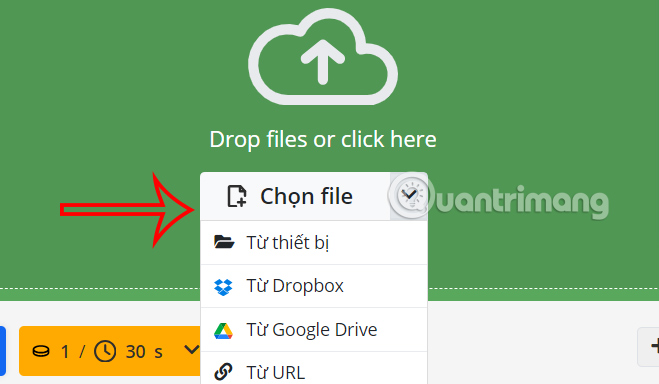
<p style="text-align: justify;">Tại trang web bạn&nbsp;<strong>nhấn vào Chọn file</strong>&nbsp;để tải video có sẵn, hoặc nhấn biểu tượng mũi tên để chọn cách thức đăng video khác.</p>

<p style="text-align: justify;"><img alt="Audio online convert chuyển video sang mp3" data-i="11" data-src="https://st.quantrimang.com/photos/image/2024/09/19/chuyen-video-thanh-mp3-8.jpg" data-was-processed="true" height="350" src="https://st.quantrimang.com/photos/image/2024/09/19/chuyen-video-thanh-mp3-8.jpg" width="600" /></p>

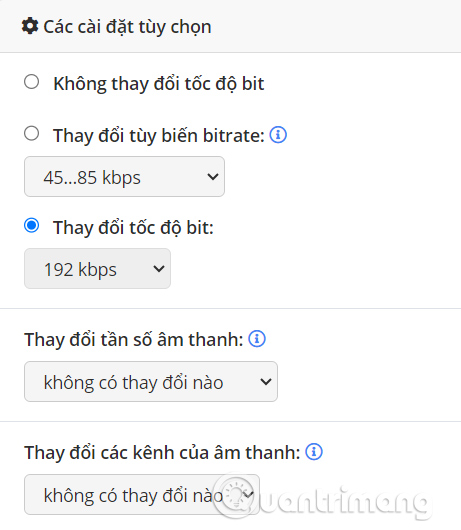
<p style="text-align: justify;">Sau khi tải video lên, bạn có thể tải thêm video khác để chuyển đổi. Bên dưới là một số thiết lập cho âm thanh đầu ra nếu cần.</p>

<p style="text-align: justify;"><img alt="Thiết lập chuyển video sang mp3" data-i="12" data-src="https://st.quantrimang.com/photos/image/2024/09/19/chuyen-video-thanh-mp3-9.jpg" data-was-processed="true" height="530" src="https://st.quantrimang.com/photos/image/2024/09/19/chuyen-video-thanh-mp3-9.jpg" width="461" /></p>

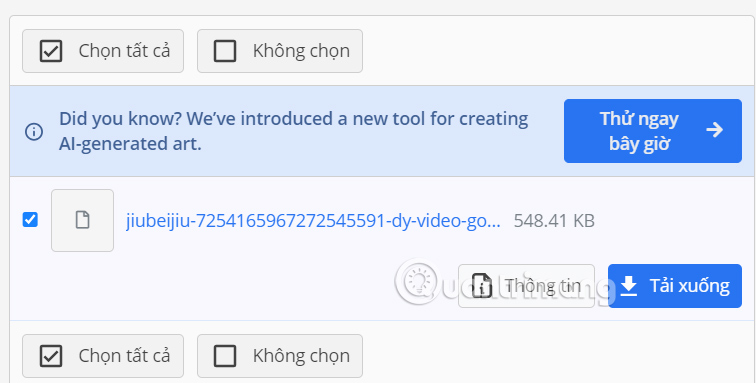
<p style="text-align: justify;">Nhấn<strong>&nbsp;Bắt đầu&nbsp;</strong>để tiến hành chuyển video thành file âm thanh. Kết quả bạn sẽ thấy nút tải file âm thanh về máy tính.</p>

<p style="text-align: justify;"><img alt="Tải file mp3 trên Audio online convert" data-i="13" data-src="https://st.quantrimang.com/photos/image/2024/09/19/chuyen-video-thanh-mp3-10.jpg" data-was-processed="true" height="304" src="https://st.quantrimang.com/photos/image/2024/09/19/chuyen-video-thanh-mp3-10.jpg" width="600" /></p>

<h2 id="mcetoc_1id3ms0sp6jc" style="text-align: justify;">Cách dùng OffMp3 convert video sang mp3 online</h2>

<p style="text-align: justify;">OffMp3 hỗ trợ chuyển đổi video thành file mp3 trên rất nhiều trang web video phổ biến hiện nay, gồm Youtube, Facebook, Twitter, Dailymotion, Vimeo và Instagram. Tốc độ convert video sang file âm thanh trên OffMp3 khá nhanh và bạn hoàn toàn có thể sử dụng miễn phí. Bài viết dưới đây sẽ hướng dẫn bạn đọc cách sử dụng OffMp3 chuyển đổi video sang file mp3 trực tuyến.</p>

<p style="text-align: justify;"><strong>Bước 1:</strong></p>

<p style="text-align: justify;">Đầu tiên bạn truy cập link dưới đây để đến&nbsp;trang chủ của dịch vụ OffMp3. Tại giao diện trang chủ hãy&nbsp;<strong>dán URL video</strong>&nbsp;muốn chuyển đổi sang file âm thanh, rồi nhấn vào&nbsp;<strong>nút Convert</strong>.<br />
<span style="color:rgb(231, 76, 60);"><strong>https://offmp3.com/</strong></span></p>

<p style="text-align: justify;"><img alt="Dán URL video " data-i="14" data-src="https://st.quantrimang.com/photos/image/2018/03/09/OffMp3-convert-video-sang-mp3-convert.jpg" data-was-processed="true" height="398" src="https://st.quantrimang.com/photos/image/2018/03/09/OffMp3-convert-video-sang-mp3-convert.jpg" width="598" /></p>

<p style="text-align: justify;"><strong>Bước 2:</strong></p>

<p style="text-align: justify;">Chờ quá trình chuyển đổi thành công bạn sẽ thấy thông báo như hình dưới đây. Click vào nút Click here hoặc nhấn vào&nbsp;<strong>Download MP3</strong>&nbsp;để tải file về máy tính.</p>

<p style="text-align: justify;"><img alt="Tải nhạc mp3 " data-i="15" data-src="https://st.quantrimang.com/photos/image/2018/03/09/OffMp3-convert-video-sang-mp3-download.jpg" data-was-processed="true" height="347" src="https://st.quantrimang.com/photos/image/2018/03/09/OffMp3-convert-video-sang-mp3-download.jpg" width="630" /></p>

<p style="text-align: justify;">Ngay lập tức file âm thanh sẽ được tải xuống máy tính.</p>

<p style="text-align: justify;"><img alt="Tải file âm thanh convert từ mp3 " data-i="16" data-src="https://st.quantrimang.com/photos/image/2018/03/09/OffMp3-convert-video-sang-mp3-tai.jpg" data-was-processed="true" height="315" src="https://st.quantrimang.com/photos/image/2018/03/09/OffMp3-convert-video-sang-mp3-tai.jpg" width="543" /></p>

<p style="text-align: justify;">Ngoài ra nếu người dùng có nhu cầu tải các định dạng khác nhau của video thì có thể nhấn vào nút&nbsp;<strong>Download Video / MP4</strong>.</p>

<p style="text-align: justify;"><img alt="Tải video" data-i="17" data-src="https://st.quantrimang.com/photos/image/2018/03/09/OffMp3-convert-video-sang-mp3-video.jpg" data-was-processed="true" height="271" src="https://st.quantrimang.com/photos/image/2018/03/09/OffMp3-convert-video-sang-mp3-video.jpg" width="578" /></p>

<p style="text-align: justify;">Trang web OffMp3 sẽ liên kết với trang web 9xbuddy để người dùng có thể lựa chọn tải video theo định dạng khác mà mình muốn. Nhấn&nbsp;<strong>nút Download Now</strong>&nbsp;để tải video xuống máy tính.</p>

<p style="text-align: justify;"><img alt="Định dạng video " data-i="18" data-src="https://st.quantrimang.com/photos/image/2018/03/09/OffMp3-convert-video-sang-mp3-dinh-dang.jpg" data-was-processed="true" height="491" src="https://st.quantrimang.com/photos/image/2018/03/09/OffMp3-convert-video-sang-mp3-dinh-dang.jpg" width="600" /></p>

<p style="text-align: justify;">Với dịch vụ OffMp3 bạn đã có thêm công cụ để chuyển đổi video sang file âm thanh trên nhiều trang web video phổ biến, đặc biệt là Youtube. Chúng ta chỉ cần dán URL video cần chuyển đổi sang file mp3 và OffMp3 sẽ thực hiện quá trình chuyển đổi là xong.</p>

<div style="text-align: justify;">&nbsp;</div>
		</div>
				<div id="author">
						<p>
				<strong>Nguồn tin:</strong>
				Quantrimang.com:
			</p>
		</div>
	</div>
	<div id="footer" class="clearfix">
		<div id="url">
			<strong>URL của bản tin này: </strong><a href="https://www.nguoicodonvn2008.info/vi/news/savefile/kien-thuc-may-tinh/cach-chuyen-video-thanh-mp3-11651.html" title="Cách chuyển video thành MP3">https://www.nguoicodonvn2008.info/vi/news/savefile/kien-thuc-may-tinh/cach-chuyen-video-thanh-mp3-11651.html</a>

		</div>
		<div class="clear"></div>
		<div class="copyright">
			&copy; .&#x3A; Nguoicodonvn2008.info - Cõi lòng người cô đơn &#x3A;.
		</div>
		<div id="contact">
			<a href="mailto:admin@nguoicodonvn2008.info">admin@nguoicodonvn2008.info</a>
		</div>
	</div>
</div>
        <div id="timeoutsess" class="chromeframe">
            Bạn đã không sử dụng Site, <a onclick="timeoutsesscancel();" href="https://nguoicodonvn2008.info/#">Bấm vào đây để duy trì trạng thái đăng nhập</a>. Thời gian chờ: <span id="secField"> 60 </span> giây
        </div>
        <div id="openidResult" class="nv-alert" style="display:none"></div>
        <div id="openidBt" data-result="" data-redirect=""></div>
		</script>
		<div class="car-top">
  <span><img src="https://nguoicodonvn2008.info/themes/default/images/car.png" alt=""></span>
</div>
<script src="https://nguoicodonvn2008.info/assets/js/jquery/jquery.min.js"></script>
<script>var nv_base_siteurl="/",nv_lang_data="vi",nv_lang_interface="vi",nv_name_variable="nv",nv_fc_variable="op",nv_lang_variable="language",nv_module_name="news",nv_func_name="savefile",nv_is_user=0, nv_my_ofs=-4,nv_my_abbr="EDT",nv_cookie_prefix="nv4c_e856T",nv_check_pass_mstime=1738000,nv_area_admin=0,nv_safemode=0,theme_responsive=0,nv_recaptcha_ver=2,nv_recaptcha_sitekey="",nv_recaptcha_type="image",XSSsanitize=1;</script>
<script src="https://nguoicodonvn2008.info/assets/js/language/vi.js"></script>
<script src="https://nguoicodonvn2008.info/assets/js/DOMPurify/purify3.js"></script>
<script src="https://nguoicodonvn2008.info/assets/js/global.js"></script>
<script src="https://nguoicodonvn2008.info/assets/js/site.js"></script>
<script src="https://nguoicodonvn2008.info/themes/default/js/news.js"></script>
<script src="https://nguoicodonvn2008.info/themes/default/js/main.js"></script>
<script src="https://nguoicodonvn2008.info/themes/default/js/custom.js"></script>
<script type="application/ld+json">
        {
            "@context": "https://schema.org",
            "@type": "Organization",
            "url": "https://nguoicodonvn2008.info",
            "logo": "https://nguoicodonvn2008.info/uploads/angel.gif"
        }
        </script>
<script src="https://nguoicodonvn2008.info/themes/default/js/bootstrap.min.js"></script>
<script type="text/javascript">
var $scrolltop = $('.car-top');
$scrolltop.on('click', function () {
    $('html,body').animate({
        scrollTop: 0
    }, 800);
    $(this).addClass("car-run");
    setTimeout(function(){ $scrolltop.removeClass('car-run');}, 1000);
    return false;
});
$(window).on('scroll', function ()
{ 
    if($(window).scrollTop() >= 200)
    {
        $scrolltop.addClass("show");
        $scrolltop.addClass("car-down");
    }
    else
    {
       $scrolltop.removeClass("show");
       setTimeout(function(){ $scrolltop.removeClass('car-down');}, 300);
    }
});
</script>
</body>
</html>