<!DOCTYPE html>
    <html lang="vi" xmlns="http://www.w3.org/1999/xhtml" prefix="og: http://ogp.me/ns#">
    <head>
<title>Cách chuyển thư mục Download sang ổ khác trên Windows 11</title>
<meta name="description" content="Cách chuyển thư mục Download sang ổ khác trên Windows 11 - Savefile - Tin Tức -...">
<meta name="author" content=".: Nguoicodonvn2008.info - Cõi lòng người cô đơn :.">
<meta name="copyright" content=".: Nguoicodonvn2008.info - Cõi lòng người cô đơn :. [admin@nguoicodonvn2008.info]">
<meta name="robots" content="index, archive, follow, noodp">
<meta name="googlebot" content="index,archive,follow,noodp">
<meta name="msnbot" content="all,index,follow">
<meta name="generator" content="NukeViet v4.5">
<meta http-equiv="Content-Type" content="text/html; charset=utf-8">
<meta property="og:title" content="Cách chuyển thư mục Download sang ổ khác trên Windows 11">
<meta property="og:type" content="website">
<meta property="og:description" content="Savefile - Tin Tức - https&#x3A;&#x002F;&#x002F;www.nguoicodonvn2008.info&#x002F;vi&#x002F;news&#x002F;savefile&#x002F;kien-thuc-may-tinh&#x002F;cach-chuyen-thu-muc-download-sang-o-khac-tren-windows-11-8301.html">
<meta property="og:site_name" content=".&#x3A; Nguoicodonvn2008.info - Cõi lòng người cô đơn &#x3A;.">
<meta property="og:url" content="https://www.nguoicodonvn2008.info/vi/news/savefile/kien-thuc-may-tinh/cach-chuyen-thu-muc-download-sang-o-khac-tren-windows-11-8301.html">
<link rel="shortcut icon" href="https://nguoicodonvn2008.info/favicon.ico">
<link rel="canonical" href="https://www.nguoicodonvn2008.info/vi/news/savefile/kien-thuc-may-tinh/cach-chuyen-thu-muc-download-sang-o-khac-tren-windows-11-8301.html">
<link rel="alternate" href="https://nguoicodonvn2008.info/vi/news/rss/" title="Tin Tức" type="application/rss+xml">
<link rel="alternate" href="https://nguoicodonvn2008.info/vi/news/rss/karaoke-dual/" title="Tin Tức - Karaoke Dual" type="application/rss+xml">
<link rel="alternate" href="https://nguoicodonvn2008.info/vi/news/rss/nhac-tre/" title="Tin Tức - Nhạc trẻ" type="application/rss+xml">
<link rel="alternate" href="https://nguoicodonvn2008.info/vi/news/rss/tru-tinh/" title="Tin Tức - Trữ tình" type="application/rss+xml">
<link rel="alternate" href="https://nguoicodonvn2008.info/vi/news/rss/nuoc-ngoai/" title="Tin Tức - Nước ngoài" type="application/rss+xml">
<link rel="alternate" href="https://nguoicodonvn2008.info/vi/news/rss/remix/" title="Tin Tức - Remix" type="application/rss+xml">
<link rel="alternate" href="https://nguoicodonvn2008.info/vi/news/rss/tam-su-tinh-yeu/" title="Tin Tức - Tâm sự tình yêu" type="application/rss+xml">
<link rel="alternate" href="https://nguoicodonvn2008.info/vi/news/rss/tho-suu-tam/" title="Tin Tức - Thơ sưu tầm" type="application/rss+xml">
<link rel="alternate" href="https://nguoicodonvn2008.info/vi/news/rss/cuoc-song/" title="Tin Tức - Cuộc sống" type="application/rss+xml">
<link rel="alternate" href="https://nguoicodonvn2008.info/vi/news/rss/phan-mem/" title="Tin Tức - Phần mềm" type="application/rss+xml">
<link rel="alternate" href="https://nguoicodonvn2008.info/vi/news/rss/kien-thuc-may-tinh/" title="Tin Tức - Kiến thức máy tính" type="application/rss+xml">
<link rel="alternate" href="https://nguoicodonvn2008.info/vi/news/rss/hoc-tap/" title="Tin Tức - Học tập" type="application/rss+xml">
<link rel="alternate" href="https://nguoicodonvn2008.info/vi/news/rss/tai-lieu/" title="Tin Tức - Tài liệu" type="application/rss+xml">
<link rel="alternate" href="https://nguoicodonvn2008.info/vi/news/rss/de-thi/" title="Tin Tức - Đề thi" type="application/rss+xml">
<link rel="preload" as="style" href="https://nguoicodonvn2008.info/assets/css/font-awesome.min.css" type="text/css">
<link rel="preload" as="style" href="https://nguoicodonvn2008.info/themes/default/css/bootstrap.non-responsive.css" type="text/css">
<link rel="preload" as="style" href="https://nguoicodonvn2008.info/themes/default/css/style.css" type="text/css">
<link rel="preload" as="style" href="https://nguoicodonvn2008.info/themes/default/css/style.non-responsive.css" type="text/css">
<link rel="preload" as="style" href="https://nguoicodonvn2008.info/themes/default/css/news.css" type="text/css">
<link rel="preload" as="style" href="https://nguoicodonvn2008.info/themes/default/css/custom.css" type="text/css">
<link rel="preload" as="script" href="https://nguoicodonvn2008.info/assets/js/jquery/jquery.min.js" type="text/javascript">
<link rel="preload" as="script" href="https://nguoicodonvn2008.info/assets/js/language/vi.js" type="text/javascript">
<link rel="preload" as="script" href="https://nguoicodonvn2008.info/assets/js/DOMPurify/purify3.js" type="text/javascript">
<link rel="preload" as="script" href="https://nguoicodonvn2008.info/assets/js/global.js" type="text/javascript">
<link rel="preload" as="script" href="https://nguoicodonvn2008.info/assets/js/site.js" type="text/javascript">
<link rel="preload" as="script" href="https://nguoicodonvn2008.info/themes/default/js/news.js" type="text/javascript">
<link rel="preload" as="script" href="https://nguoicodonvn2008.info/themes/default/js/main.js" type="text/javascript">
<link rel="preload" as="script" href="https://nguoicodonvn2008.info/themes/default/js/custom.js" type="text/javascript">
<link rel="preload" as="script" href="https://nguoicodonvn2008.info/themes/default/js/bootstrap.min.js" type="text/javascript">
<link rel="stylesheet" href="https://nguoicodonvn2008.info/assets/css/font-awesome.min.css">
<link rel="stylesheet" href="https://nguoicodonvn2008.info/themes/default/css/bootstrap.non-responsive.css">
<link rel="stylesheet" href="https://nguoicodonvn2008.info/themes/default/css/style.css">
<link rel="stylesheet" href="https://nguoicodonvn2008.info/themes/default/css/style.non-responsive.css">
<link rel="StyleSheet" href="https://nguoicodonvn2008.info/themes/default/css/news.css">
<link rel="stylesheet" href="https://nguoicodonvn2008.info/themes/default/css/custom.css">
<style type="text/css">
	body{background: #fff;}
</style>
    </head>
    <body>
<div id="print">
	<div id="hd_print">
		<h2 class="pull-left">.&#x3A; Nguoicodonvn2008.info - Cõi lòng người cô đơn &#x3A;.</h2>
		<p class="pull-right"><a title=".&#x3A; Nguoicodonvn2008.info - Cõi lòng người cô đơn &#x3A;." href="https://nguoicodonvn2008.info/">https://nguoicodonvn2008.info</a></p>
	</div>
	<div class="clear"></div>
	<hr />
	<div id="content">
		<h1>Cách chuyển thư mục Download sang ổ khác trên Windows 11</h1>
		<ul class="list-inline">
			<li>Thứ sáu - 12/04/2024 02:15</li>
			<li class="hidden-print txtrequired"><em class="fa fa-print">&nbsp;</em><a title="In ra" href="javascript:;" onclick="window.print()">In ra</a></li>
			<li class="hidden-print txtrequired"><em class="fa fa-power-off">&nbsp;</em><a title="Đóng cửa sổ này" href="javascript:;" onclick="window.close()">Đóng cửa sổ này</a></li>
		</ul>
		<div class="clear"></div>
		<div id="hometext">
		</div>
				<div class="imghome">
			<img alt="Cách chuyển thư mục Download sang ổ khác trên Windows 11" src="https://st.quantrimang.com/photos/image/2024/04/11/Chuyen-thu-muc-Download-Windows-11-2.jpg" width="460" class="img-thumbnail" />
		</div>
		<div class="clear"></div>
		<div id="bodytext" class="clearfix">
			<p style="text-align: justify;">Dung lượng ổ C thường sẽ thấp hơn những phân vùng khác trong máy tính của bạn, tuy vậy đây lại là ổ quan trọng nhất, và đôi khi bạn sẽ không thể cài đặt những phần mềm quan trọng sang những ổ khác vì làm như vậy thì chúng sẽ không hoạt động.</p>

<p style="text-align: justify;">Và dung lượng ổ C thường sẽ phải dư ra một khoảng dung lượng, như vậy mới giúp máy tính của bạn hoạt động mượt mà hơn. Nên thường người dùng sẽ chuyển thư mục Download sang những ổ khác có dung lượng lớn hơn.</p>

<p style="text-align: justify;">Việc này nhằm giúp giảm bớt gánh nặng dung lượng cho ổ C và giúp máy tính của bạn hoạt động mượt mà hơn. Nếu bạn muốn chuyển thư mục Download hay những thư mục như Document, Desktop sang ổ khác trên Windows 11, hãy làm theo hướng dẫn ở dưới đây nhé.</p>

<div style="text-align: justify;">&nbsp;</div>

<h2 style="text-align: justify;">Cách chuyển thư mục Download từ ổ C sang ổ khác trên Windows 11</h2>

<p style="text-align: justify;"><strong>LƯU Ý QUAN TRỌNG:</strong>&nbsp;Không sử dụng hướng dẫn này nếu ổ cứng của bạn được mã hóa.</p>

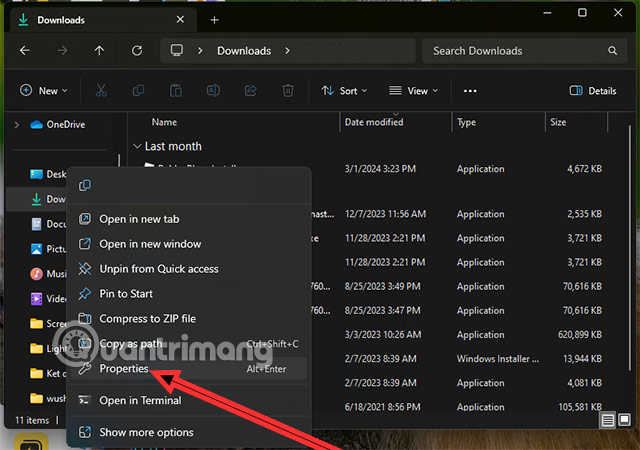
<p style="text-align: justify;"><strong>Bước 1:&nbsp;</strong>Chọn thư mục mà bạn muốn chuyển sang ổ khác bằng cách nhấp chuột phải vào thư mục đó rồi chọn Properties &gt;</p>

<figure>
<div style="text-align: justify;"><img alt="chuyển thư mục download sang ổ E" data-i="0" data-src="https://st.quantrimang.com/photos/image/2024/04/11/Chuyen-thu-muc-Download-Windows-11-2.jpg" data-was-processed="true" height="450" src="https://st.quantrimang.com/photos/image/2024/04/11/Chuyen-thu-muc-Download-Windows-11-2.jpg" width="640" /></div>
</figure>

<div style="text-align: justify;"><iframe allowtransparency="true" aria-label="Advertisement" data-google-container-id="a!2" data-google-query-id="CK7qoZODvIUDFaRSwgUdt-MOyw" data-load-complete="true" frameborder="0" height="0" hspace="0" id="aswift_1" marginheight="0" marginwidth="0" name="aswift_1" sandbox="" scrolling="no" tabindex="0" title="Advertisement" vspace="0" width="694"></iframe></div>

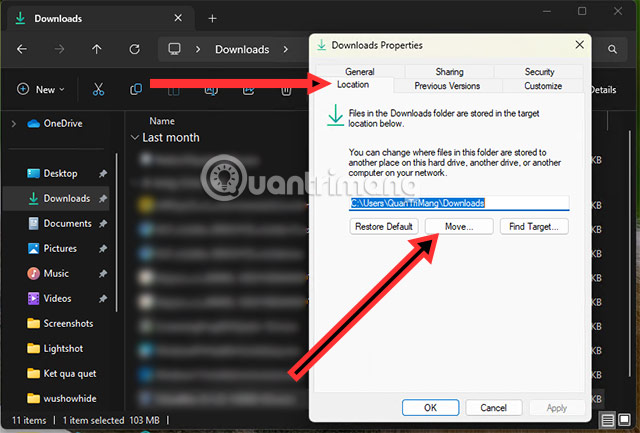
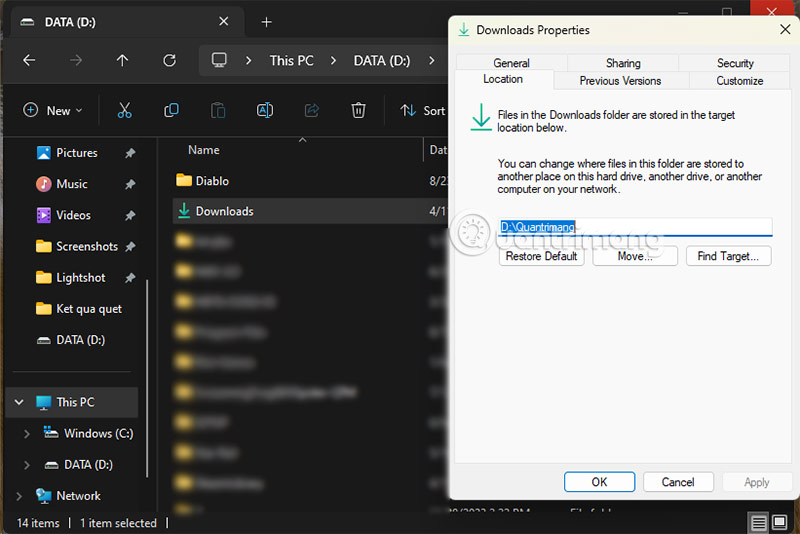
<p style="text-align: justify;"><strong>Bước 2:&nbsp;</strong>Trong Properties của thư mục bạn vừa chọn, chọn tab Location, ở đây bạn sẽ thấy đường dẫn lưu thư mục ở dưới. Có 3 tùy chọn mà bạn có thể chọn ở dưới,&nbsp;<strong>chọn Move để thay đổi nơi chứa thư mục Download.</strong></p>

<figure>
<div style="text-align: justify;"><img alt="chuyển thư mục download sang ổ F " data-adbro-processed="true" data-i="1" data-src="https://st.quantrimang.com/photos/image/2024/04/11/Chuyen-thu-muc-Download-Windows-11-3.jpg" data-was-processed="true" height="433" src="https://st.quantrimang.com/photos/image/2024/04/11/Chuyen-thu-muc-Download-Windows-11-3.jpg" width="640" /></div>
</figure>

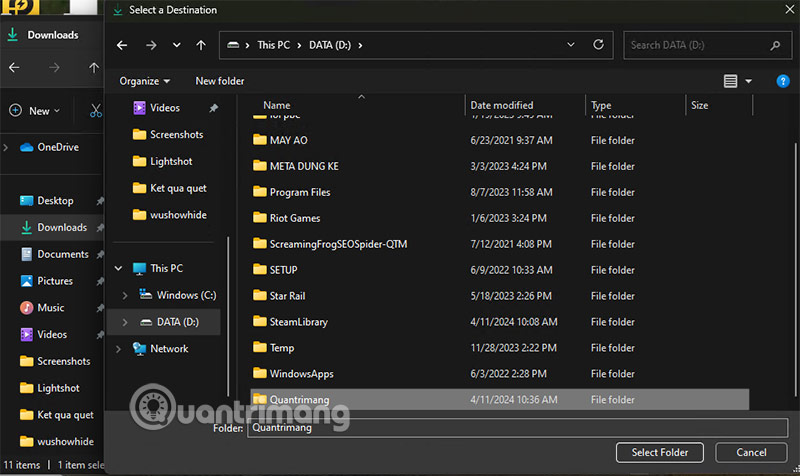
<p style="text-align: justify;"><strong>Bước 3:&nbsp;</strong>Tiếp theo bạn hãy chuyển sang ổ D hoặc ổ E để giải phóng thư mục cho ổ C, sau khi đã chọn ổ để chứa thư mục Download, bạn hãy chọn&nbsp;<strong>Select Folder</strong>&nbsp;ở dưới để hoàn tất việc chọn thư mục.</p>

<figure>
<div style="text-align: justify;"><img alt="chuyển thư mục download sang ổ D win11" data-i="2" data-src="https://st.quantrimang.com/photos/image/2024/04/11/Chuyen-thu-muc-Download-Windows-11-5.jpg" data-was-processed="true" height="476" src="https://st.quantrimang.com/photos/image/2024/04/11/Chuyen-thu-muc-Download-Windows-11-5.jpg" width="800" /></div>
</figure>

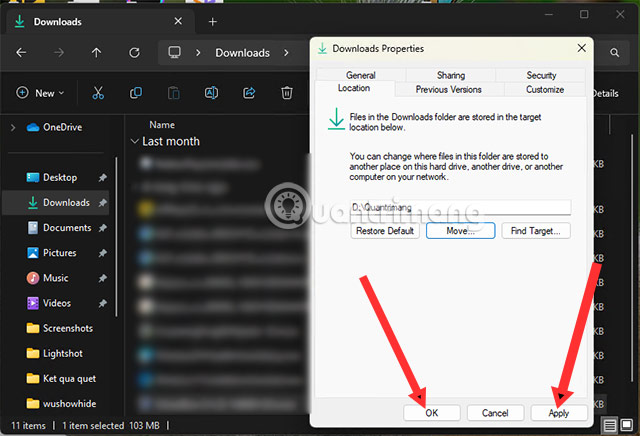
<p style="text-align: justify;"><strong>Bước 4:</strong>&nbsp;Sau khi đã chọn xong vùng để chứa thư mục&nbsp;<strong>Download</strong>, bạn hãy chọn&nbsp;<strong>Apply và OK</strong>&nbsp;để hoàn tất việc thay đổi thư mục.</p>

<figure>
<div style="text-align: justify;"><img alt="cách chuyển thư mục download sang ổ D trên windows 11" data-i="3" data-src="https://st.quantrimang.com/photos/image/2024/04/11/Chuyen-thu-muc-Download-Windows-11-6.jpg" data-was-processed="true" height="436" src="https://st.quantrimang.com/photos/image/2024/04/11/Chuyen-thu-muc-Download-Windows-11-6.jpg" width="640" /></div>
</figure>

<div style="text-align: justify;"><iframe allowtransparency="true" aria-label="Advertisement" data-google-container-id="a!3" data-google-query-id="CK2qopODvIUDFehRwgUdMYUNvg" data-load-complete="true" frameborder="0" height="0" hspace="0" id="aswift_2" marginheight="0" marginwidth="0" name="aswift_2" sandbox="" scrolling="no" tabindex="0" title="Advertisement" vspace="0" width="694"></iframe></div>

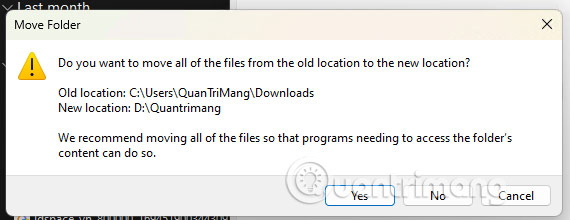
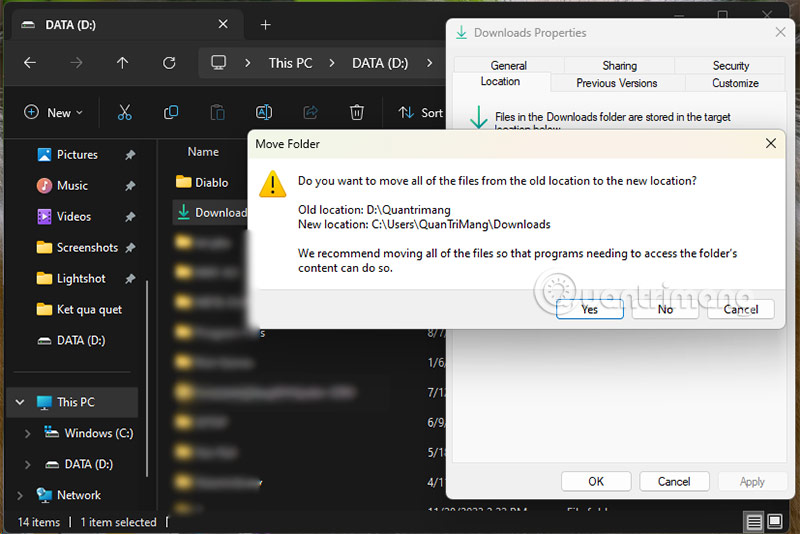
<p style="text-align: justify;">Sẽ có một cảnh báo hiện ra rằng bạn có muốn di chuyển thư mục Download từ vị trí mặc định là ổ C sang vị trí mới hay không. Kèm với đó là toàn bộ dữ liệu trong thư mục Download này sẽ được chuyển sang vị trí mới. Chọn Yes để đồng ý chuyển thư mục Downloads.</p>

<figure>
<div style="text-align: justify;"><img alt="đổi thư mục download sang ổ D" data-i="4" data-src="https://st.quantrimang.com/photos/image/2024/04/11/Chuyen-thu-muc-Download-Windows-11-7.jpg" data-was-processed="true" height="220" src="https://st.quantrimang.com/photos/image/2024/04/11/Chuyen-thu-muc-Download-Windows-11-7.jpg" width="570" /></div>
</figure>

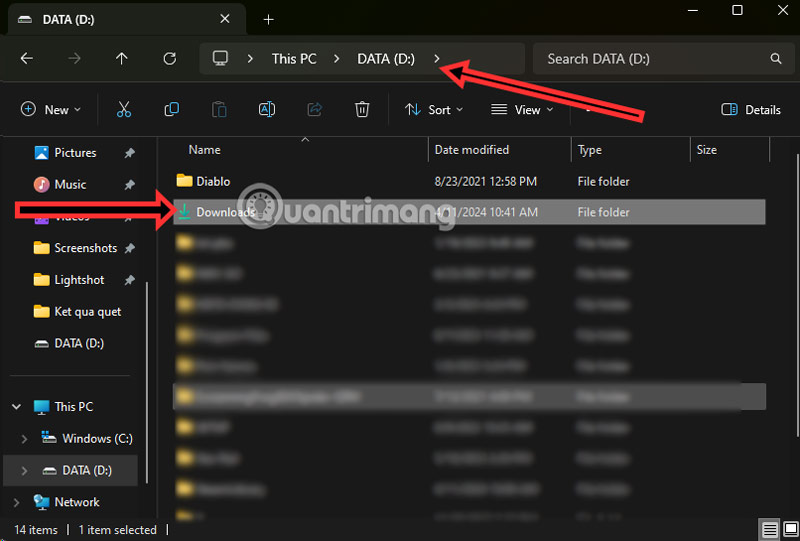
<p style="text-align: justify;">Việc bạn làm tiếp theo chỉ là chờ đợi thư mục Download được chuyển sang phân vùng mới mà bạn đã chọn. Toàn bộ thư mục cũng sẽ được chuyển sang phân vùng mới này.</p>

<figure>
<div style="text-align: justify;"><img alt="đổi thư mục download sang ổ E win 11" data-i="5" data-src="https://st.quantrimang.com/photos/image/2024/04/11/Chuyen-thu-muc-Download-Windows-11-8.jpg" data-was-processed="true" height="541" src="https://st.quantrimang.com/photos/image/2024/04/11/Chuyen-thu-muc-Download-Windows-11-8.jpg" width="800" /></div>
</figure>

<p style="text-align: justify;">Trong Quick Access, bạn vẫn sẽ thấy thư mục Download này hiển thị nếu bạn có hoạt động liên quan đến thư mục này.</p>

<figure>
<div style="text-align: justify;"><img alt="đổi thư mục download sang ổ D win 11" data-i="6" data-src="https://st.quantrimang.com/photos/image/2024/04/11/Chuyen-thu-muc-Download-Windows-11-9.jpg" data-was-processed="true" height="534" src="https://st.quantrimang.com/photos/image/2024/04/11/Chuyen-thu-muc-Download-Windows-11-9.jpg" width="800" /></div>
</figure>

<h2 style="text-align: justify;">Đặt lại thư mục vừa chuyển về vị trí ban đầu</h2>

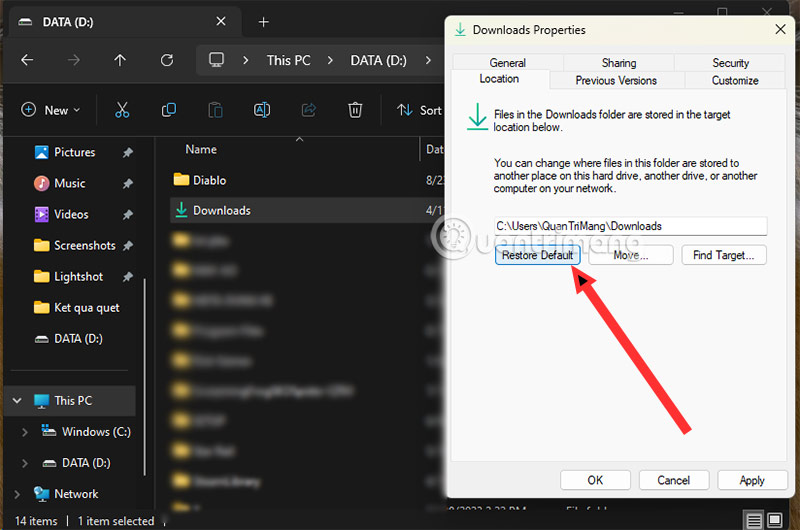
<p style="text-align: justify;">Để chuyển thư mục Download và những thư mục mà bạn đã chuyển từ ổ C về lại vị trí ban đầu. Bạn chỉ cần nhấp chuột phải vào thư mục Download và lại chọn Properties &gt; Location và chọn Restore Default.</p>

<div style="text-align: justify;"><iframe allowtransparency="true" aria-label="Advertisement" data-google-container-id="a!4" data-google-query-id="CL2yqpSDvIUDFdpFwgUdkToIAA" data-load-complete="true" frameborder="0" height="0" hspace="0" id="aswift_3" marginheight="0" marginwidth="0" name="aswift_3" sandbox="" scrolling="no" tabindex="0" title="Advertisement" vspace="0" width="694"></iframe></div>

<figure>
<div style="text-align: justify;"><img alt="cách đổi thư mục download sang ổ D trên windows 11" data-i="7" data-src="https://st.quantrimang.com/photos/image/2024/04/11/Chuyen-thu-muc-Download-Windows-11-10.jpg" data-was-processed="true" height="530" src="https://st.quantrimang.com/photos/image/2024/04/11/Chuyen-thu-muc-Download-Windows-11-10.jpg" width="800" /></div>
</figure>

<p style="text-align: justify;">Sẽ có một thông báo tương tự như lúc bạn chuyển thư mục này từ ổ C sang một ổ khác, và mọi dữ liệu trong ổ này cũng sẽ được chuyển đi sang khu vực mới mà bạn chọn. Lưu ý rằng khi chuyển về ổ C, bạn phải đảm bảo rằng ổ C của bạn có đủ dung lượng mới có thể chuyển thư mục đó về.</p>

<figure>
<div style="text-align: justify;"><img alt="đổi thư mục download sang ổ D" data-i="8" data-src="https://st.quantrimang.com/photos/image/2024/04/11/Chuyen-thu-muc-Download-Windows-11-11.jpg" data-was-processed="true" height="534" src="https://st.quantrimang.com/photos/image/2024/04/11/Chuyen-thu-muc-Download-Windows-11-11.jpg" width="800" /></div>
</figure>

<h2 style="text-align: justify;">Ưu và nhược điểm khi bạn chuyển thư mục Download sang ổ khác</h2>

<h3 style="text-align: justify;">Ưu điểm</h3>

<ul>
	<li style="text-align: justify;"><strong>Giải phóng dung lượng ổ C:</strong>&nbsp;Ổ C thường chứa hệ điều hành và các chương trình quan trọng, nên việc di chuyển thư mục Download sang ổ khác có thể giúp giải phóng dung lượng ổ C, giúp máy tính của bạn hoạt động một cách mượt mà hơn.</li>
	<li style="text-align: justify;"><strong>Tăng tốc độ truy cập dữ liệu:</strong>&nbsp;Ổ Nếu bạn đang sử dụng ổ C là HDD, bạn có thể chuyển thư mục Download sang ổ SSD. Ổ SSD thường có tốc độ truy cập dữ liệu nhanh hơn ổ HDD, di chuyển thư mục Download sang ổ SSD có thể giúp tăng tốc độ tải xuống và truy cập tệp tin.</li>
	<li style="text-align: justify;"><strong>Tổ chức dữ liệu hiệu quả hơn:</strong>&nbsp;Việc di chuyển thư mục Download sang ổ khác giúp bạn phân chia dữ liệu rõ ràng hơn, dễ dàng quản lý và tìm kiếm tệp tin mà bạn đã tải xuống.</li>
</ul>

<h3 style="text-align: justify;">Nhược điểm</h3>

<ul>
	<li style="text-align: justify;"><strong>Ảnh hưởng nhất định đến phần mềm:</strong>&nbsp;Một số phần mềm/ ứng dụng có thể được cấu hình để lưu tệp tin vào thư mục Download mặc định. Di chuyển thư mục Download có thể khiến các ứng dụng này không hoạt động bình thường. Ví dụ như bạn dùng&nbsp;Capcut, lấy file tại thư mục Download và khi chuyển thư mục Download sang ổ khác, Capcut có thể sẽ mất dữ liệu khi bạn mở lại trình edit video.</li>
	<li style="text-align: justify;"><strong>Cập nhật liên kết:</strong>&nbsp;Nếu có liên kết đến các tệp tin trong thư mục Download, bạn cần cập nhật liên kết sau khi di chuyển thư mục.</li>
</ul>

<p style="text-align: justify;">Tóm lại, việc di chuyển thư mục Download từ ổ C sang những ổ khác thì bạn cần phải lưu ý một số những thay đổi ở trên. Bạn nên cân nhắc nhu cầu của bản thân trước khi quyết định di chuyển thư mục.</p>

<div style="text-align: justify;"><iframe allowtransparency="true" aria-label="Advertisement" data-google-container-id="a!5" data-google-query-id="CNTZ85SDvIUDFfJQwgUd0U8Bog" data-load-complete="true" frameborder="0" height="0" hspace="0" id="aswift_4" marginheight="0" marginwidth="0" name="aswift_4" sandbox="" scrolling="no" tabindex="0" title="Advertisement" vspace="0" width="694"></iframe></div>

<p style="text-align: justify;"><strong>Một số lời khuyên trước khi thực hiện chuyển thư mục Download hay những thư mục khác từ ổ C sang ổ khác:</strong></p>

<ul>
	<li style="text-align: justify;">Nên sao lưu dữ liệu trong thư mục Download trước khi di chuyển.</li>
	<li style="text-align: justify;">Sau khi di chuyển thư mục Download, bạn cần cập nhật vị trí mới trong các ứng dụng sử dụng thư mục này.</li>
	<li style="text-align: justify;">Bạn có thể sử dụng các phần mềm di chuyển thư mục chuyên dụng để di chuyển thư mục Download.</li>
</ul>
		</div>
				<div id="author">
						<p>
				<strong>Nguồn tin:</strong>
				Quantrimang.com
			</p>
		</div>
	</div>
	<div id="footer" class="clearfix">
		<div id="url">
			<strong>URL của bản tin này: </strong><a href="https://www.nguoicodonvn2008.info/vi/news/savefile/kien-thuc-may-tinh/cach-chuyen-thu-muc-download-sang-o-khac-tren-windows-11-8301.html" title="Cách chuyển thư mục Download sang ổ khác trên Windows 11">https://www.nguoicodonvn2008.info/vi/news/savefile/kien-thuc-may-tinh/cach-chuyen-thu-muc-download-sang-o-khac-tren-windows-11-8301.html</a>

		</div>
		<div class="clear"></div>
		<div class="copyright">
			&copy; .&#x3A; Nguoicodonvn2008.info - Cõi lòng người cô đơn &#x3A;.
		</div>
		<div id="contact">
			<a href="mailto:admin@nguoicodonvn2008.info">admin@nguoicodonvn2008.info</a>
		</div>
	</div>
</div>
        <div id="timeoutsess" class="chromeframe">
            Bạn đã không sử dụng Site, <a onclick="timeoutsesscancel();" href="https://nguoicodonvn2008.info/#">Bấm vào đây để duy trì trạng thái đăng nhập</a>. Thời gian chờ: <span id="secField"> 60 </span> giây
        </div>
        <div id="openidResult" class="nv-alert" style="display:none"></div>
        <div id="openidBt" data-result="" data-redirect=""></div>
		</script>
		<div class="car-top">
  <span><img src="https://nguoicodonvn2008.info/themes/default/images/car.png" alt=""></span>
</div>
<div id="run_cronjobs" style="visibility:hidden;display:none;"><img alt="cron" src="/index.php?second=cronjobs&amp;p=g2NVZ30u" width="1" height="1" /></div>
<script src="https://nguoicodonvn2008.info/assets/js/jquery/jquery.min.js"></script>
<script>var nv_base_siteurl="/",nv_lang_data="vi",nv_lang_interface="vi",nv_name_variable="nv",nv_fc_variable="op",nv_lang_variable="language",nv_module_name="news",nv_func_name="savefile",nv_is_user=0, nv_my_ofs=-4,nv_my_abbr="EDT",nv_cookie_prefix="nv4c_e856T",nv_check_pass_mstime=1738000,nv_area_admin=0,nv_safemode=0,theme_responsive=0,nv_recaptcha_ver=2,nv_recaptcha_sitekey="",nv_recaptcha_type="image",XSSsanitize=1;</script>
<script src="https://nguoicodonvn2008.info/assets/js/language/vi.js"></script>
<script src="https://nguoicodonvn2008.info/assets/js/DOMPurify/purify3.js"></script>
<script src="https://nguoicodonvn2008.info/assets/js/global.js"></script>
<script src="https://nguoicodonvn2008.info/assets/js/site.js"></script>
<script src="https://nguoicodonvn2008.info/themes/default/js/news.js"></script>
<script src="https://nguoicodonvn2008.info/themes/default/js/main.js"></script>
<script src="https://nguoicodonvn2008.info/themes/default/js/custom.js"></script>
<script type="application/ld+json">
        {
            "@context": "https://schema.org",
            "@type": "Organization",
            "url": "https://nguoicodonvn2008.info",
            "logo": "https://nguoicodonvn2008.info/uploads/angel.gif"
        }
        </script>
<script src="https://nguoicodonvn2008.info/themes/default/js/bootstrap.min.js"></script>
<script type="text/javascript">
var $scrolltop = $('.car-top');
$scrolltop.on('click', function () {
    $('html,body').animate({
        scrollTop: 0
    }, 800);
    $(this).addClass("car-run");
    setTimeout(function(){ $scrolltop.removeClass('car-run');}, 1000);
    return false;
});
$(window).on('scroll', function ()
{ 
    if($(window).scrollTop() >= 200)
    {
        $scrolltop.addClass("show");
        $scrolltop.addClass("car-down");
    }
    else
    {
       $scrolltop.removeClass("show");
       setTimeout(function(){ $scrolltop.removeClass('car-down');}, 300);
    }
});
</script>
</body>
</html>