<!DOCTYPE html>
    <html lang="vi" xmlns="http://www.w3.org/1999/xhtml" prefix="og: http://ogp.me/ns#">
    <head>
<title>Cách chuyển file CSV sang Excel hàng loạt</title>
<meta name="description" content="Cách chuyển file CSV sang Excel hàng loạt - Savefile - Tin Tức -...">
<meta name="author" content=".: Nguoicodonvn2008.info - Cõi lòng người cô đơn :.">
<meta name="copyright" content=".: Nguoicodonvn2008.info - Cõi lòng người cô đơn :. [admin@nguoicodonvn2008.info]">
<meta name="robots" content="index, archive, follow, noodp">
<meta name="googlebot" content="index,archive,follow,noodp">
<meta name="msnbot" content="all,index,follow">
<meta name="generator" content="NukeViet v4.5">
<meta http-equiv="Content-Type" content="text/html; charset=utf-8">
<meta property="og:title" content="Cách chuyển file CSV sang Excel hàng loạt">
<meta property="og:type" content="website">
<meta property="og:description" content="Savefile - Tin Tức - https&#x3A;&#x002F;&#x002F;www.nguoicodonvn2008.info&#x002F;vi&#x002F;news&#x002F;savefile&#x002F;kien-thuc-may-tinh&#x002F;cach-chuyen-file-csv-sang-excel-hang-loat-1376.html">
<meta property="og:site_name" content=".&#x3A; Nguoicodonvn2008.info - Cõi lòng người cô đơn &#x3A;.">
<meta property="og:url" content="https://www.nguoicodonvn2008.info/vi/news/savefile/kien-thuc-may-tinh/cach-chuyen-file-csv-sang-excel-hang-loat-1376.html">
<link rel="shortcut icon" href="https://nguoicodonvn2008.info/favicon.ico">
<link rel="canonical" href="https://www.nguoicodonvn2008.info/vi/news/savefile/kien-thuc-may-tinh/cach-chuyen-file-csv-sang-excel-hang-loat-1376.html">
<link rel="alternate" href="https://nguoicodonvn2008.info/vi/news/rss/" title="Tin Tức" type="application/rss+xml">
<link rel="alternate" href="https://nguoicodonvn2008.info/vi/news/rss/karaoke-dual/" title="Tin Tức - Karaoke Dual" type="application/rss+xml">
<link rel="alternate" href="https://nguoicodonvn2008.info/vi/news/rss/nhac-tre/" title="Tin Tức - Nhạc trẻ" type="application/rss+xml">
<link rel="alternate" href="https://nguoicodonvn2008.info/vi/news/rss/tru-tinh/" title="Tin Tức - Trữ tình" type="application/rss+xml">
<link rel="alternate" href="https://nguoicodonvn2008.info/vi/news/rss/nuoc-ngoai/" title="Tin Tức - Nước ngoài" type="application/rss+xml">
<link rel="alternate" href="https://nguoicodonvn2008.info/vi/news/rss/remix/" title="Tin Tức - Remix" type="application/rss+xml">
<link rel="alternate" href="https://nguoicodonvn2008.info/vi/news/rss/tam-su-tinh-yeu/" title="Tin Tức - Tâm sự tình yêu" type="application/rss+xml">
<link rel="alternate" href="https://nguoicodonvn2008.info/vi/news/rss/tho-suu-tam/" title="Tin Tức - Thơ sưu tầm" type="application/rss+xml">
<link rel="alternate" href="https://nguoicodonvn2008.info/vi/news/rss/cuoc-song/" title="Tin Tức - Cuộc sống" type="application/rss+xml">
<link rel="alternate" href="https://nguoicodonvn2008.info/vi/news/rss/phan-mem/" title="Tin Tức - Phần mềm" type="application/rss+xml">
<link rel="alternate" href="https://nguoicodonvn2008.info/vi/news/rss/kien-thuc-may-tinh/" title="Tin Tức - Kiến thức máy tính" type="application/rss+xml">
<link rel="alternate" href="https://nguoicodonvn2008.info/vi/news/rss/hoc-tap/" title="Tin Tức - Học tập" type="application/rss+xml">
<link rel="alternate" href="https://nguoicodonvn2008.info/vi/news/rss/tai-lieu/" title="Tin Tức - Tài liệu" type="application/rss+xml">
<link rel="alternate" href="https://nguoicodonvn2008.info/vi/news/rss/de-thi/" title="Tin Tức - Đề thi" type="application/rss+xml">
<link rel="preload" as="style" href="https://nguoicodonvn2008.info/assets/css/font-awesome.min.css" type="text/css">
<link rel="preload" as="style" href="https://nguoicodonvn2008.info/themes/default/css/bootstrap.non-responsive.css" type="text/css">
<link rel="preload" as="style" href="https://nguoicodonvn2008.info/themes/default/css/style.css" type="text/css">
<link rel="preload" as="style" href="https://nguoicodonvn2008.info/themes/default/css/style.non-responsive.css" type="text/css">
<link rel="preload" as="style" href="https://nguoicodonvn2008.info/themes/default/css/news.css" type="text/css">
<link rel="preload" as="style" href="https://nguoicodonvn2008.info/themes/default/css/custom.css" type="text/css">
<link rel="preload" as="script" href="https://nguoicodonvn2008.info/assets/js/jquery/jquery.min.js" type="text/javascript">
<link rel="preload" as="script" href="https://nguoicodonvn2008.info/assets/js/language/vi.js" type="text/javascript">
<link rel="preload" as="script" href="https://nguoicodonvn2008.info/assets/js/DOMPurify/purify3.js" type="text/javascript">
<link rel="preload" as="script" href="https://nguoicodonvn2008.info/assets/js/global.js" type="text/javascript">
<link rel="preload" as="script" href="https://nguoicodonvn2008.info/assets/js/site.js" type="text/javascript">
<link rel="preload" as="script" href="https://nguoicodonvn2008.info/themes/default/js/news.js" type="text/javascript">
<link rel="preload" as="script" href="https://nguoicodonvn2008.info/themes/default/js/main.js" type="text/javascript">
<link rel="preload" as="script" href="https://nguoicodonvn2008.info/themes/default/js/custom.js" type="text/javascript">
<link rel="preload" as="script" href="https://nguoicodonvn2008.info/themes/default/js/bootstrap.min.js" type="text/javascript">
<link rel="stylesheet" href="https://nguoicodonvn2008.info/assets/css/font-awesome.min.css">
<link rel="stylesheet" href="https://nguoicodonvn2008.info/themes/default/css/bootstrap.non-responsive.css">
<link rel="stylesheet" href="https://nguoicodonvn2008.info/themes/default/css/style.css">
<link rel="stylesheet" href="https://nguoicodonvn2008.info/themes/default/css/style.non-responsive.css">
<link rel="StyleSheet" href="https://nguoicodonvn2008.info/themes/default/css/news.css">
<link rel="stylesheet" href="https://nguoicodonvn2008.info/themes/default/css/custom.css">
<style type="text/css">
	body{background: #fff;}
</style>
    </head>
    <body>
<div id="print">
	<div id="hd_print">
		<h2 class="pull-left">.&#x3A; Nguoicodonvn2008.info - Cõi lòng người cô đơn &#x3A;.</h2>
		<p class="pull-right"><a title=".&#x3A; Nguoicodonvn2008.info - Cõi lòng người cô đơn &#x3A;." href="https://nguoicodonvn2008.info/">https://nguoicodonvn2008.info</a></p>
	</div>
	<div class="clear"></div>
	<hr />
	<div id="content">
		<h1>Cách chuyển file CSV sang Excel hàng loạt</h1>
		<ul class="list-inline">
			<li>Thứ ba - 26/11/2019 06:50</li>
			<li class="hidden-print txtrequired"><em class="fa fa-print">&nbsp;</em><a title="In ra" href="javascript:;" onclick="window.print()">In ra</a></li>
			<li class="hidden-print txtrequired"><em class="fa fa-power-off">&nbsp;</em><a title="Đóng cửa sổ này" href="javascript:;" onclick="window.close()">Đóng cửa sổ này</a></li>
		</ul>
		<div class="clear"></div>
		<div id="hometext">
		</div>
				<div class="imghome">
			<img alt="Cách chuyển file CSV sang Excel hàng loạt" src="https://st.quantrimang.com/photos/image/2019/11/22/doi-file-CSV-sang-Excel-hang-loat-12.jpg" width="460" class="img-thumbnail" />
		</div>
		<div class="clear"></div>
		<div id="bodytext" class="clearfix">
			<p style="text-align: justify;">File CSV thường được sử dụng nhiều với dân kế toán do các cấu trúc hàm và lệnh đã thực hiện trước đó được giữ lại. Hiện tại file CSV đã có thể mở trên Excel, hay&nbsp;mở file CSV trên Google Sheets&nbsp;dễ dàng. Tuy nhiên file CSV khi làm việc trên Excel có thể gặp một số lỗi như&nbsp;lỗi tiếng Việt khi mở file CSV trong Excel&nbsp;chẳng hạn. Vì vậy có nhiều người muốn chuyển đổi file CSV sang file Excel để làm việc thuận tiện hơn.</p>

<p style="text-align: justify;">Để chuyển file CSV sang định dạng Excel có nhiều cách thực hiện khác nhau. Nếu bạn muốn chuyển đổi hàng loạt file CSV sang Excel thì có thể tham khảo bài viết dưới đây của Quản trị mạng. Chỉ với vài thao tác đơn giản, chúng ta đã có ngay các file XLS hoặc XLSX Excel dễ dàng, mà không cần nhờ phần mềm hỗ trợ.</p>

<div style="text-align: justify;">&nbsp;</div>

<h2 style="text-align: justify;">1. Chuyển file CSV sang file XLS hàng loạt</h2>

<p style="text-align: justify;"><strong>Bước 1:</strong></p>

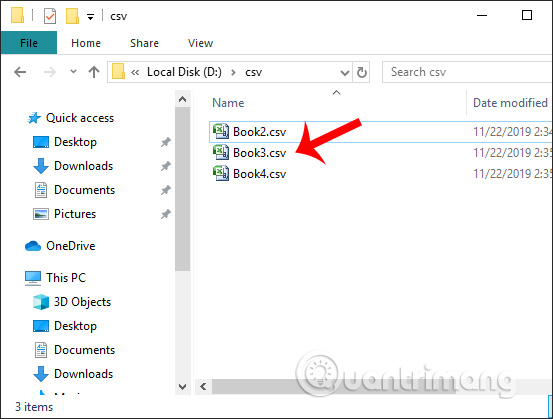
<p style="text-align: justify;">Trước hết chúng ta sẽ&nbsp;<strong>nhóm các file CSV cần chuyển đổi sang định dạng XLS vào cùng 1 thư mục</strong>&nbsp;như hình dưới đây.</p>

<p style="text-align: justify;"><img alt="Nhóm file CSV" data-i="0" data-src="https://st.quantrimang.com/photos/image/2019/11/22/doi-file-CSV-sang-Excel-hang-loat-1.jpg" data-was-processed="true" height="419" src="https://st.quantrimang.com/photos/image/2019/11/22/doi-file-CSV-sang-Excel-hang-loat-1.jpg" width="553" /></p>

<p style="text-align: justify;"><strong>Bước 2:</strong></p>

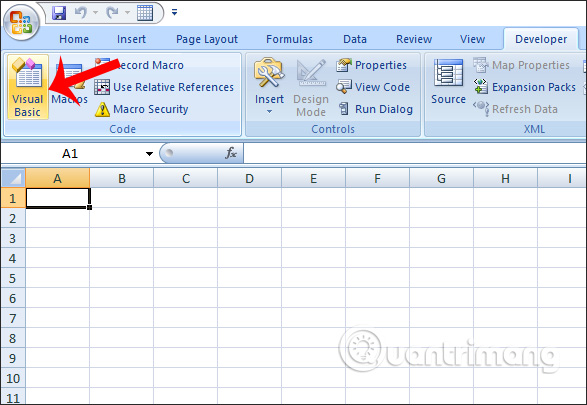
<p style="text-align: justify;">Tiếp đến người dùng mở Excel rồi nhấn vào&nbsp;<strong>tab Developer</strong>&nbsp;rồi nhấn tiếp vào&nbsp;<strong>Visual Basic</strong>.</p>

<p style="text-align: justify;"><img alt="Developer" data-i="1" data-src="https://st.quantrimang.com/photos/image/2019/11/22/doi-file-CSV-sang-Excel-hang-loat-2.jpg" data-was-processed="true" height="405" src="https://st.quantrimang.com/photos/image/2019/11/22/doi-file-CSV-sang-Excel-hang-loat-2.jpg" width="587" /></p>

<p style="text-align: justify;"><strong>Bước 3:</strong></p>

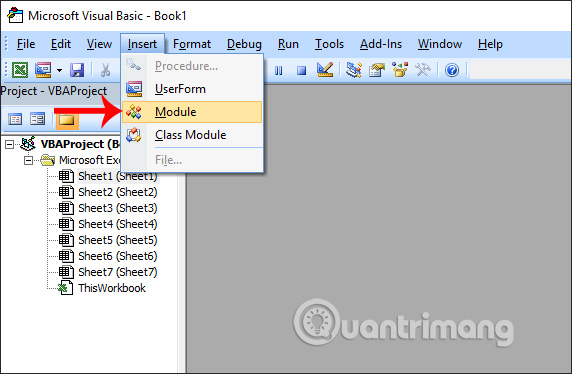
<p style="text-align: justify;">Chuyển sang giao diện mới người dùng nhấn vào<strong>&nbsp;Insert</strong>&nbsp;rồi chọn<strong>&nbsp;Module</strong>&nbsp;để mở giao diện nhập mã code VBA trong Excel.</p>

<p style="text-align: justify;"><img alt="Mở giao diện nhập mã code" data-i="2" data-src="https://st.quantrimang.com/photos/image/2019/11/22/doi-file-CSV-sang-Excel-hang-loat-3.jpg" data-was-processed="true" height="374" src="https://st.quantrimang.com/photos/image/2019/11/22/doi-file-CSV-sang-Excel-hang-loat-3.jpg" width="572" /></p>

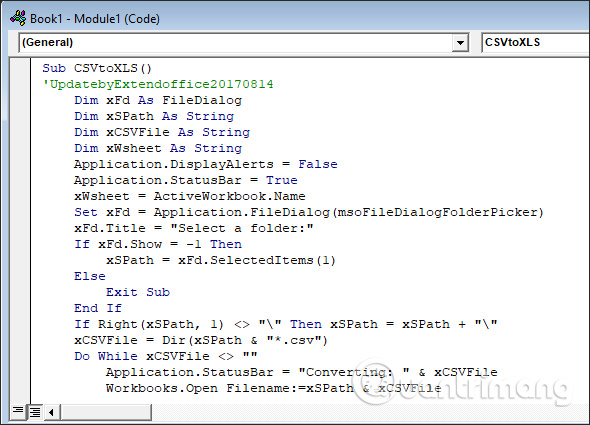
<p style="text-align: justify;">Sau đó chúng ta&nbsp;<strong>paste mã code</strong>&nbsp;dưới đây vào giao diện trong Excel.</p>

<pre id="pre0">
<code>Sub CSVtoXLS()
 &#039;UpdatebyExtendoffice20170814
     Dim xFd As FileDialog
     Dim xSPath As String
     Dim xCSVFile As String
     Dim xWsheet As String
     Application.DisplayAlerts = False
     Application.StatusBar = True
     xWsheet = ActiveWorkbook.Name
     Set xFd = Application.FileDialog(msoFileDialogFolderPicker)
     xFd.Title = &quot;Select a folder:&quot;
     If xFd.Show = -1 Then
         xSPath = xFd.SelectedItems(1)
     Else
         Exit Sub
     End If
     If Right(xSPath, 1) &lt;&gt; &quot;\&quot; Then xSPath = xSPath + &quot;\&quot;
     xCSVFile = Dir(xSPath &amp; &quot;*.csv&quot;)
     Do While xCSVFile &lt;&gt; &quot;&quot;
         Application.StatusBar = &quot;Converting: &quot; &amp; xCSVFile
         Workbooks.Open Filename:=xSPath &amp; xCSVFile
         ActiveWorkbook.SaveAs Replace(xSPath &amp; xCSVFile, &quot;.csv&quot;, &quot;.xls&quot;, vbTextCompare), xlNormal
         ActiveWorkbook.Close
         Windows(xWsheet).Activate
         xCSVFile = Dir
     Loop
     Application.StatusBar = False
     Application.DisplayAlerts = True
 End Sub</code></pre>

<p style="text-align: justify;"><img alt="Nhập mã code" data-i="3" data-src="https://st.quantrimang.com/photos/image/2019/11/22/doi-file-CSV-sang-Excel-hang-loat-4.jpg" data-was-processed="true" height="425" src="https://st.quantrimang.com/photos/image/2019/11/22/doi-file-CSV-sang-Excel-hang-loat-4.jpg" width="590" /></p>

<p style="text-align: justify;"><strong>Bước 4:</strong></p>

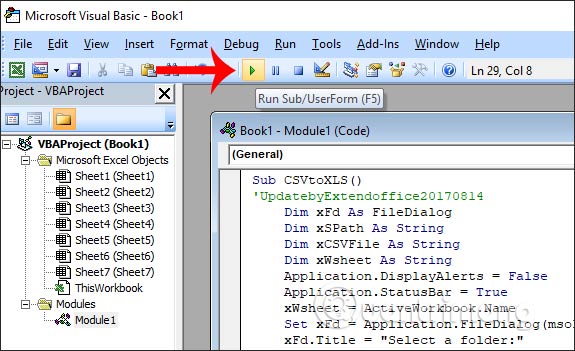
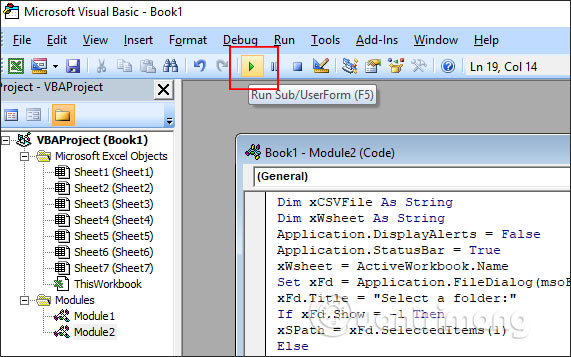
<p style="text-align: justify;">Cuối cùng nhấn vào&nbsp;<strong>biểu tượng Run</strong>&nbsp;ở thanh công cụ bên trên như hình dưới đây để chạy code VBA.</p>

<p style="text-align: justify;"><img alt="Nhấn Run" data-i="4" data-src="https://st.quantrimang.com/photos/image/2019/11/22/doi-file-CSV-sang-Excel-hang-loat-5.jpg" data-was-processed="true" height="351" src="https://st.quantrimang.com/photos/image/2019/11/22/doi-file-CSV-sang-Excel-hang-loat-5.jpg" width="575" /></p>

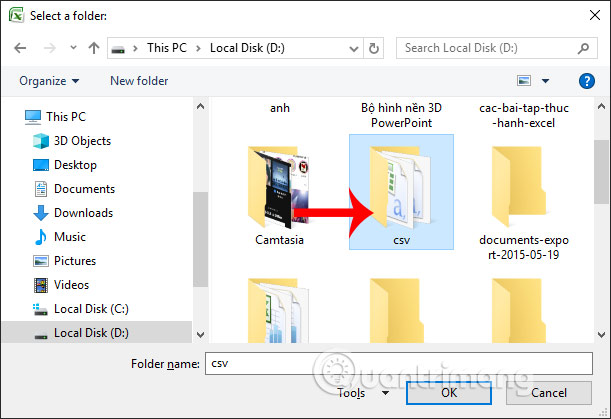
<p style="text-align: justify;">Lúc này hiển thị thư mục trên máy tính để chúng ta&nbsp;<strong>chọn folder chứa file CSV</strong>&nbsp;cần chuyển sang file Excel, nhấn OK. Ngay sau đó code VBA sẽ chạy và chuyển đổi file. Khi kết thúc quá trình chuyển đổi bạn mở thư mục file CSV đã lưu trước đó.</p>

<p style="text-align: justify;"><img alt="Chọn thư mục CSV" data-i="5" data-src="https://st.quantrimang.com/photos/image/2019/11/22/doi-file-CSV-sang-Excel-hang-loat-6.jpg" data-was-processed="true" height="419" src="https://st.quantrimang.com/photos/image/2019/11/22/doi-file-CSV-sang-Excel-hang-loat-6.jpg" width="611" /></p>

<p style="text-align: justify;"><strong>Bước 5:</strong></p>

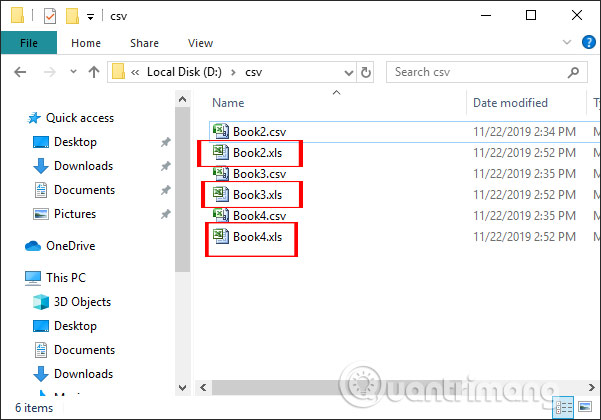
<p style="text-align: justify;">Kết quả chúng ta sẽ nhìn thấy&nbsp;<strong>các file XLS</strong>&nbsp;như hình dưới đây.</p>

<p style="text-align: justify;"><img alt="CSV sang XLS" data-i="6" data-src="https://st.quantrimang.com/photos/image/2019/11/22/doi-file-CSV-sang-Excel-hang-loat-7.jpg" data-was-processed="true" height="420" src="https://st.quantrimang.com/photos/image/2019/11/22/doi-file-CSV-sang-Excel-hang-loat-7.jpg" width="601" /></p>

<div style="text-align: justify;">&nbsp;</div>

<h2 style="text-align: justify;">2. Chuyển file CSV sang file XLSX hàng loạt</h2>

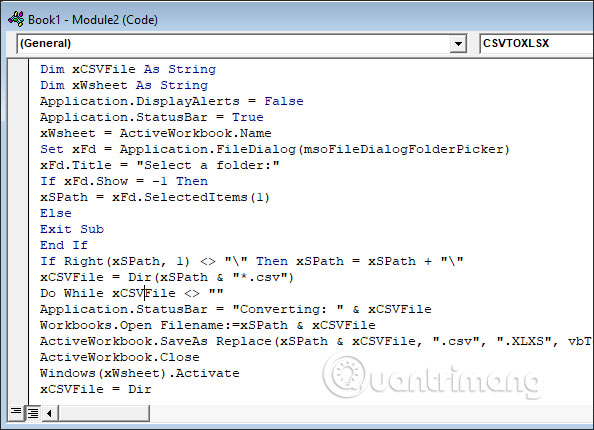
<p style="text-align: justify;">Ngoài chuyển đổi CSV sang XLS như trên chúng ta cũng có thể chuyển file CSV sang XLSX dễ dàng. Trước hết bạn cũng mở trình soạn code VBA trên Excel rồi nhập đoạn mã code như dưới đây.</p>

<pre id="pre1">
<code>Sub CSVTOXLSX()
 &#039;UpdatebyExtendoffice20170814
 Dim xFd As FileDialog
 Dim xSPath As String
 Dim xCSVFile As String
 Dim xWsheet As String
 Application.DisplayAlerts = False
 Application.StatusBar = True
 xWsheet = ActiveWorkbook.Name
 Set xFd = Application.FileDialog(msoFileDialogFolderPicker)
 xFd.Title = &quot;Select a folder:&quot;
 If xFd.Show = -1 Then
 xSPath = xFd.SelectedItems(1)
 Else
 Exit Sub
 End If
 If Right(xSPath, 1) &lt;&gt; &quot;\&quot; Then xSPath = xSPath + &quot;\&quot;
 xCSVFile = Dir(xSPath &amp; &quot;*.csv&quot;)
 Do While xCSVFile &lt;&gt; &quot;&quot;
 Application.StatusBar = &quot;Converting: &quot; &amp; xCSVFile
 Workbooks.Open Filename:=xSPath &amp; xCSVFile
 ActiveWorkbook.SaveAs Replace(xSPath &amp; xCSVFile, &quot;.csv&quot;, &quot;.XLXS&quot;, vbTextCompare), xlWorkbookDefault
 ActiveWorkbook.Close
 Windows(xWsheet).Activate
 xCSVFile = Dir
 Loop
 Application.StatusBar = False
 Application.DisplayAlerts = True
 End Sub</code></pre>

<p style="text-align: justify;"><img alt="Code chuyển CSV sang XLXS" data-i="7" data-src="https://st.quantrimang.com/photos/image/2019/11/22/doi-file-CSV-sang-Excel-hang-loat-8.jpg" data-was-processed="true" height="430" src="https://st.quantrimang.com/photos/image/2019/11/22/doi-file-CSV-sang-Excel-hang-loat-8.jpg" width="594" /></p>

<p style="text-align: justify;">Sau đó nhấn vào<strong>&nbsp;nút Run</strong>&nbsp;để chạy code VBA.</p>

<p style="text-align: justify;"><img alt="Chạy code" data-i="8" data-src="https://st.quantrimang.com/photos/image/2019/11/22/doi-file-CSV-sang-Excel-hang-loat-9.jpg" data-was-processed="true" height="357" src="https://st.quantrimang.com/photos/image/2019/11/22/doi-file-CSV-sang-Excel-hang-loat-9.jpg" width="571" /></p>

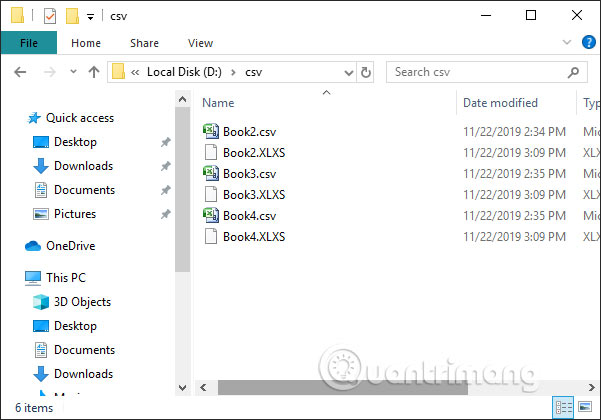
<p style="text-align: justify;">Khi hoàn thành quá trình chuyển đổi và mở thư mục chứa file CSV bạn sẽ nhìn thấy các file XLXS được chuyển đổi sang.</p>

<p style="text-align: justify;"><img alt="File XLXS" data-i="9" data-src="https://st.quantrimang.com/photos/image/2019/11/22/doi-file-CSV-sang-Excel-hang-loat-10.jpg" data-was-processed="true" height="420" src="https://st.quantrimang.com/photos/image/2019/11/22/doi-file-CSV-sang-Excel-hang-loat-10.jpg" width="601" /></p>

<h2 style="text-align: justify;">3. Chuyển file CSV sang Excel online</h2>

<p style="text-align: justify;">Các công cụ chuyển đổi trực tuyến hiện nay cũng đã hỗ trợ chuyển nhiều file cùng lúc, thuận tiện cho người dùng khi làm việc. Có rất nhiều công cụ chuyển đổi định dạng file như Onlineconvertfree chẳng hạn.</p>

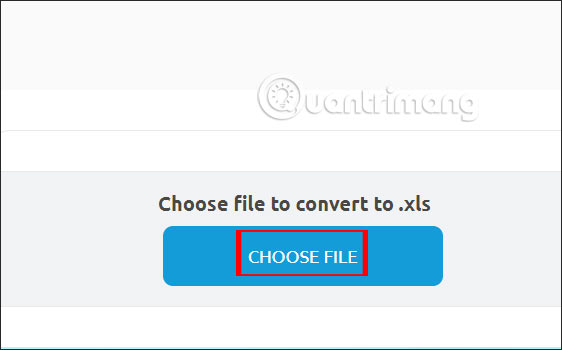
<p style="text-align: justify;">Chúng ta truy cập vào link dưới đây để mở ngay phần chuyển đổi CSV sang XLS. Nếu muốn đổi sang XLXS thì bạn chỉ cần thay đổi lại mục chuyển đổi định dạng là được. Sau đó nhấn&nbsp;<strong>Choose File</strong>&nbsp;để tải các file CSV lên.</p>

<pre id="pre2">
<code>https://onlineconvertfree.com/convert-format/csv-to-xls/</code></pre>

<p style="text-align: justify;"><img alt="Tải file" data-i="10" data-src="https://st.quantrimang.com/photos/image/2019/11/22/doi-file-CSV-sang-Excel-hang-loat-11.jpg" data-was-processed="true" height="350" src="https://st.quantrimang.com/photos/image/2019/11/22/doi-file-CSV-sang-Excel-hang-loat-11.jpg" width="562" /></p>

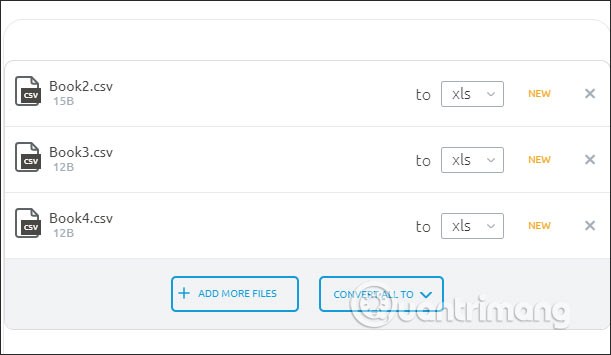
<p style="text-align: justify;">Cuối cùng&nbsp;<strong>nhấn Convert</strong>&nbsp;để tiến hành chuyển đổi là xong.</p>

<p style="text-align: justify;"><img alt="Nhấn Convert" data-i="11" data-src="https://st.quantrimang.com/photos/image/2019/11/22/doi-file-CSV-sang-Excel-hang-loat-12.jpg" data-was-processed="true" height="355" src="https://st.quantrimang.com/photos/image/2019/11/22/doi-file-CSV-sang-Excel-hang-loat-12.jpg" width="611" /></p>

<p style="text-align: justify;">Như vậy chúng ta đã có các cách chuyển đổi hàng loạt file CSV sang file Excel rồi. Nếu bạn không rành về mã code VBA trong Excel thì có thể dùng các công cụ chuyển đổi online cũng rất tiện ích.</p>

<p style="text-align: justify;">Chúc các bạn thực hiện thành công!</p>
		</div>
				<div id="author">
						<p>
				<strong>Nguồn tin:</strong>
				Quantrimang.com
			</p>
		</div>
	</div>
	<div id="footer" class="clearfix">
		<div id="url">
			<strong>URL của bản tin này: </strong><a href="https://www.nguoicodonvn2008.info/vi/news/savefile/kien-thuc-may-tinh/cach-chuyen-file-csv-sang-excel-hang-loat-1376.html" title="Cách chuyển file CSV sang Excel hàng loạt">https://www.nguoicodonvn2008.info/vi/news/savefile/kien-thuc-may-tinh/cach-chuyen-file-csv-sang-excel-hang-loat-1376.html</a>

		</div>
		<div class="clear"></div>
		<div class="copyright">
			&copy; .&#x3A; Nguoicodonvn2008.info - Cõi lòng người cô đơn &#x3A;.
		</div>
		<div id="contact">
			<a href="mailto:admin@nguoicodonvn2008.info">admin@nguoicodonvn2008.info</a>
		</div>
	</div>
</div>
        <div id="timeoutsess" class="chromeframe">
            Bạn đã không sử dụng Site, <a onclick="timeoutsesscancel();" href="https://nguoicodonvn2008.info/#">Bấm vào đây để duy trì trạng thái đăng nhập</a>. Thời gian chờ: <span id="secField"> 60 </span> giây
        </div>
        <div id="openidResult" class="nv-alert" style="display:none"></div>
        <div id="openidBt" data-result="" data-redirect=""></div>
		</script>
		<div class="car-top">
  <span><img src="https://nguoicodonvn2008.info/themes/default/images/car.png" alt=""></span>
</div>
<script src="https://nguoicodonvn2008.info/assets/js/jquery/jquery.min.js"></script>
<script>var nv_base_siteurl="/",nv_lang_data="vi",nv_lang_interface="vi",nv_name_variable="nv",nv_fc_variable="op",nv_lang_variable="language",nv_module_name="news",nv_func_name="savefile",nv_is_user=0, nv_my_ofs=-4,nv_my_abbr="EDT",nv_cookie_prefix="nv4c_e856T",nv_check_pass_mstime=1738000,nv_area_admin=0,nv_safemode=0,theme_responsive=0,nv_recaptcha_ver=2,nv_recaptcha_sitekey="",nv_recaptcha_type="image",XSSsanitize=1;</script>
<script src="https://nguoicodonvn2008.info/assets/js/language/vi.js"></script>
<script src="https://nguoicodonvn2008.info/assets/js/DOMPurify/purify3.js"></script>
<script src="https://nguoicodonvn2008.info/assets/js/global.js"></script>
<script src="https://nguoicodonvn2008.info/assets/js/site.js"></script>
<script src="https://nguoicodonvn2008.info/themes/default/js/news.js"></script>
<script src="https://nguoicodonvn2008.info/themes/default/js/main.js"></script>
<script src="https://nguoicodonvn2008.info/themes/default/js/custom.js"></script>
<script type="application/ld+json">
        {
            "@context": "https://schema.org",
            "@type": "Organization",
            "url": "https://nguoicodonvn2008.info",
            "logo": "https://nguoicodonvn2008.info/uploads/angel.gif"
        }
        </script>
<script src="https://nguoicodonvn2008.info/themes/default/js/bootstrap.min.js"></script>
<script type="text/javascript">
var $scrolltop = $('.car-top');
$scrolltop.on('click', function () {
    $('html,body').animate({
        scrollTop: 0
    }, 800);
    $(this).addClass("car-run");
    setTimeout(function(){ $scrolltop.removeClass('car-run');}, 1000);
    return false;
});
$(window).on('scroll', function ()
{ 
    if($(window).scrollTop() >= 200)
    {
        $scrolltop.addClass("show");
        $scrolltop.addClass("car-down");
    }
    else
    {
       $scrolltop.removeClass("show");
       setTimeout(function(){ $scrolltop.removeClass('car-down');}, 300);
    }
});
</script>
</body>
</html>