<!DOCTYPE html>
    <html lang="vi" xmlns="http://www.w3.org/1999/xhtml" prefix="og: http://ogp.me/ns#">
    <head>
<title>Cách chèn tài liệu Word vào ghi chú OneNote</title>
<meta name="description" content="Cách chèn tài liệu Word vào ghi chú OneNote - Savefile - Tin Tức -...">
<meta name="author" content=".: Nguoicodonvn2008.info - Cõi lòng người cô đơn :.">
<meta name="copyright" content=".: Nguoicodonvn2008.info - Cõi lòng người cô đơn :. [admin@nguoicodonvn2008.info]">
<meta name="robots" content="index, archive, follow, noodp">
<meta name="googlebot" content="index,archive,follow,noodp">
<meta name="msnbot" content="all,index,follow">
<meta name="generator" content="NukeViet v4.5">
<meta http-equiv="Content-Type" content="text/html; charset=utf-8">
<meta property="og:title" content="Cách chèn tài liệu Word vào ghi chú OneNote">
<meta property="og:type" content="website">
<meta property="og:description" content="Savefile - Tin Tức - https&#x3A;&#x002F;&#x002F;www.nguoicodonvn2008.info&#x002F;vi&#x002F;news&#x002F;savefile&#x002F;kien-thuc-may-tinh&#x002F;cach-chen-tai-lieu-word-vao-ghi-chu-onenote-4283.html">
<meta property="og:site_name" content=".&#x3A; Nguoicodonvn2008.info - Cõi lòng người cô đơn &#x3A;.">
<meta property="og:url" content="https://www.nguoicodonvn2008.info/vi/news/savefile/kien-thuc-may-tinh/cach-chen-tai-lieu-word-vao-ghi-chu-onenote-4283.html">
<link rel="shortcut icon" href="https://nguoicodonvn2008.info/favicon.ico">
<link rel="canonical" href="https://www.nguoicodonvn2008.info/vi/news/savefile/kien-thuc-may-tinh/cach-chen-tai-lieu-word-vao-ghi-chu-onenote-4283.html">
<link rel="alternate" href="https://nguoicodonvn2008.info/vi/news/rss/" title="Tin Tức" type="application/rss+xml">
<link rel="alternate" href="https://nguoicodonvn2008.info/vi/news/rss/karaoke-dual/" title="Tin Tức - Karaoke Dual" type="application/rss+xml">
<link rel="alternate" href="https://nguoicodonvn2008.info/vi/news/rss/nhac-tre/" title="Tin Tức - Nhạc trẻ" type="application/rss+xml">
<link rel="alternate" href="https://nguoicodonvn2008.info/vi/news/rss/tru-tinh/" title="Tin Tức - Trữ tình" type="application/rss+xml">
<link rel="alternate" href="https://nguoicodonvn2008.info/vi/news/rss/nuoc-ngoai/" title="Tin Tức - Nước ngoài" type="application/rss+xml">
<link rel="alternate" href="https://nguoicodonvn2008.info/vi/news/rss/remix/" title="Tin Tức - Remix" type="application/rss+xml">
<link rel="alternate" href="https://nguoicodonvn2008.info/vi/news/rss/tam-su-tinh-yeu/" title="Tin Tức - Tâm sự tình yêu" type="application/rss+xml">
<link rel="alternate" href="https://nguoicodonvn2008.info/vi/news/rss/tho-suu-tam/" title="Tin Tức - Thơ sưu tầm" type="application/rss+xml">
<link rel="alternate" href="https://nguoicodonvn2008.info/vi/news/rss/cuoc-song/" title="Tin Tức - Cuộc sống" type="application/rss+xml">
<link rel="alternate" href="https://nguoicodonvn2008.info/vi/news/rss/phan-mem/" title="Tin Tức - Phần mềm" type="application/rss+xml">
<link rel="alternate" href="https://nguoicodonvn2008.info/vi/news/rss/kien-thuc-may-tinh/" title="Tin Tức - Kiến thức máy tính" type="application/rss+xml">
<link rel="alternate" href="https://nguoicodonvn2008.info/vi/news/rss/hoc-tap/" title="Tin Tức - Học tập" type="application/rss+xml">
<link rel="alternate" href="https://nguoicodonvn2008.info/vi/news/rss/tai-lieu/" title="Tin Tức - Tài liệu" type="application/rss+xml">
<link rel="alternate" href="https://nguoicodonvn2008.info/vi/news/rss/de-thi/" title="Tin Tức - Đề thi" type="application/rss+xml">
<link rel="preload" as="style" href="https://nguoicodonvn2008.info/assets/css/font-awesome.min.css" type="text/css">
<link rel="preload" as="style" href="https://nguoicodonvn2008.info/themes/default/css/bootstrap.non-responsive.css" type="text/css">
<link rel="preload" as="style" href="https://nguoicodonvn2008.info/themes/default/css/style.css" type="text/css">
<link rel="preload" as="style" href="https://nguoicodonvn2008.info/themes/default/css/style.non-responsive.css" type="text/css">
<link rel="preload" as="style" href="https://nguoicodonvn2008.info/themes/default/css/news.css" type="text/css">
<link rel="preload" as="style" href="https://nguoicodonvn2008.info/themes/default/css/custom.css" type="text/css">
<link rel="preload" as="script" href="https://nguoicodonvn2008.info/assets/js/jquery/jquery.min.js" type="text/javascript">
<link rel="preload" as="script" href="https://nguoicodonvn2008.info/assets/js/language/vi.js" type="text/javascript">
<link rel="preload" as="script" href="https://nguoicodonvn2008.info/assets/js/DOMPurify/purify3.js" type="text/javascript">
<link rel="preload" as="script" href="https://nguoicodonvn2008.info/assets/js/global.js" type="text/javascript">
<link rel="preload" as="script" href="https://nguoicodonvn2008.info/assets/js/site.js" type="text/javascript">
<link rel="preload" as="script" href="https://nguoicodonvn2008.info/themes/default/js/news.js" type="text/javascript">
<link rel="preload" as="script" href="https://nguoicodonvn2008.info/themes/default/js/main.js" type="text/javascript">
<link rel="preload" as="script" href="https://nguoicodonvn2008.info/themes/default/js/custom.js" type="text/javascript">
<link rel="preload" as="script" href="https://nguoicodonvn2008.info/themes/default/js/bootstrap.min.js" type="text/javascript">
<link rel="stylesheet" href="https://nguoicodonvn2008.info/assets/css/font-awesome.min.css">
<link rel="stylesheet" href="https://nguoicodonvn2008.info/themes/default/css/bootstrap.non-responsive.css">
<link rel="stylesheet" href="https://nguoicodonvn2008.info/themes/default/css/style.css">
<link rel="stylesheet" href="https://nguoicodonvn2008.info/themes/default/css/style.non-responsive.css">
<link rel="StyleSheet" href="https://nguoicodonvn2008.info/themes/default/css/news.css">
<link rel="stylesheet" href="https://nguoicodonvn2008.info/themes/default/css/custom.css">
<style type="text/css">
	body{background: #fff;}
</style>
    </head>
    <body>
<div id="print">
	<div id="hd_print">
		<h2 class="pull-left">.&#x3A; Nguoicodonvn2008.info - Cõi lòng người cô đơn &#x3A;.</h2>
		<p class="pull-right"><a title=".&#x3A; Nguoicodonvn2008.info - Cõi lòng người cô đơn &#x3A;." href="https://nguoicodonvn2008.info/">https://nguoicodonvn2008.info</a></p>
	</div>
	<div class="clear"></div>
	<hr />
	<div id="content">
		<h1>Cách chèn tài liệu Word vào ghi chú OneNote</h1>
		<ul class="list-inline">
			<li>Thứ ba - 22/06/2021 00:51</li>
			<li class="hidden-print txtrequired"><em class="fa fa-print">&nbsp;</em><a title="In ra" href="javascript:;" onclick="window.print()">In ra</a></li>
			<li class="hidden-print txtrequired"><em class="fa fa-power-off">&nbsp;</em><a title="Đóng cửa sổ này" href="javascript:;" onclick="window.close()">Đóng cửa sổ này</a></li>
		</ul>
		<div class="clear"></div>
		<div id="hometext">
		</div>
				<div class="imghome">
			<img alt="Cách chèn tài liệu Word vào ghi chú OneNote" src="https://st.quantrimang.com/photos/image/2021/06/12/chen-tai-lieu-word-vao-ghi-chu-onenote5.png" width="460" class="img-thumbnail" />
		</div>
		<div class="clear"></div>
		<div id="bodytext" class="clearfix">
			<p style="text-align: justify;">Có thể bạn chưa biết nhưng Microsoft OneNote được tích hợp tính năng cho phép người dùng chèn trực tiếp tài liệu Word bất kỳ dưới dạng tệp đính kèm trong Notebook của mình. Đặc biệt nếu bạn cập nhật tài liệu Word, những thay đổi đó cũng hoàn toàn có thể được phản ánh trong Notebook chỉ bằng một vài cú nhấp chuột. Đây là cách thực hiện.</p>

<p style="text-align: justify;">Trước tiên, khởi chạy OneNote và mở Notebook mà bạn muốn chèn tài liệu Word vào. Nếu chưa tạo Notebook, bạn có thể làm điều này bằng cách bấm chọn File &gt; New từ thanh menu.</p>

<div style="text-align: justify;">&nbsp;</div>

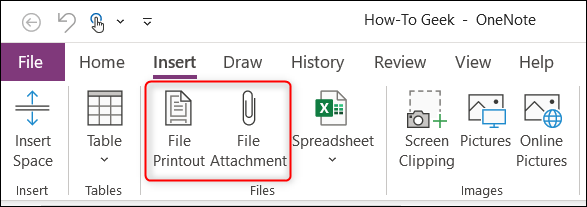
<p style="text-align: justify;">Tiếp theo, nhấp vào tab “Insert”. Bạn sẽ thấy có ba tùy chọn trong nhóm “Files”, nhưng chúng ta sẽ chỉ sử dụng hai trong số này, đó là “File Printout” và “File Attachment” (trên Mac là “PDF Printout” và “File Attachment”).</p>

<p style="text-align: justify;"><img alt="“File Printout” và “File Attachment”" data-i="0" data-src="https://st.quantrimang.com/photos/image/2021/06/12/chen-tai-lieu-word-vao-ghi-chu-onenote1.png" data-was-processed="true" height="207" src="https://st.quantrimang.com/photos/image/2021/06/12/chen-tai-lieu-word-vao-ghi-chu-onenote1.png" width="587" /></p>

<p style="text-align: justify;">Cụ thể, “File Attachment” sẽ cho phép bạn chèn một liên kết trỏ đến tệp gốc. Trong khi với “File Printout” (hoặc “PDF Printout”), bạn sẽ vừa có thể chèn một liên kết cũng như thêm nội dung trong tệp tài liệu vào ghi chú của mình.</p>

<p style="text-align: justify;">Cần lưu ý rằng về bản chất, tùy chọn File Printout (và PDF Printout) sẽ “chụp nhanh” nội dung hiện thời của tệp đính kèm (như dạng một bản in) và chèn nó dưới dạng hình ảnh. Cả “ File Printout” và “PDF Printout” đều hoạt động theo cách tương tự. Tuy nhiên, “PDF Printout” sẽ chỉ giới hạn ở các tệp PDF. Trong tình huống này, thứ chúng ta muốn chèn là một tài liệu Word, do đó tùy chọn File Printout sẽ được sử dụng.</p>

<div style="text-align: justify;">&nbsp;</div>

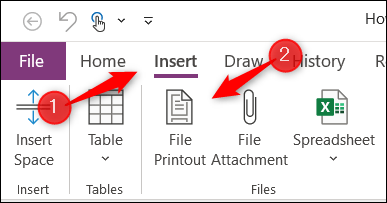
<p style="text-align: justify;">Ví dụ, trong tab “Insert”, bạn nhấn vào “File Printout”.</p>

<p style="text-align: justify;"><img alt="Nhấn vào “File Printout”" data-i="1" data-src="https://st.quantrimang.com/photos/image/2021/06/12/chen-tai-lieu-word-vao-ghi-chu-onenote2.png" data-was-processed="true" height="203" src="https://st.quantrimang.com/photos/image/2021/06/12/chen-tai-lieu-word-vao-ghi-chu-onenote2.png" width="387" /></p>

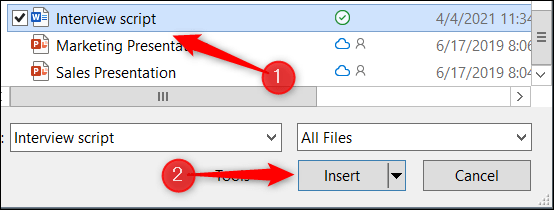
<p style="text-align: justify;">Hộp thoại chọn tệp sẽ xuất hiện. Điều hướng đến vị trí của tệp tài liệu Word mà bạn muốn chèn và chọn nó, sau đó nhấp vào “Insert”.</p>

<p style="text-align: justify;"><img alt="Chọn tệp" data-i="2" data-src="https://st.quantrimang.com/photos/image/2021/06/12/chen-tai-lieu-word-vao-ghi-chu-onenote3.png" data-was-processed="true" height="210" src="https://st.quantrimang.com/photos/image/2021/06/12/chen-tai-lieu-word-vao-ghi-chu-onenote3.png" width="554" /></p>

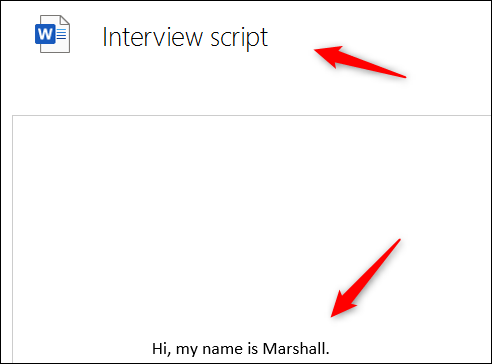
<p style="text-align: justify;">Một liên kết đến tệp gốc và “bản in” tương ứng sẽ lập tức xuất hiện trong Notebook của bạn.</p>

<p style="text-align: justify;"><img alt="“Bản in” tài liệu được chèn trong ghi chú" data-i="3" data-src="https://st.quantrimang.com/photos/image/2021/06/12/chen-tai-lieu-word-vao-ghi-chu-onenote4.png" data-was-processed="true" height="364" src="https://st.quantrimang.com/photos/image/2021/06/12/chen-tai-lieu-word-vao-ghi-chu-onenote4.png" width="492" /></p>

<div style="text-align: justify;">&nbsp;</div>

<p style="text-align: justify;">Lưu ý rằng bạn không thể trực tiếp chỉnh sửa nội dung của bản in này trong chính OneNote. Thay vào đó, bạn sẽ cần cập nhật mọi thứ trực tiếp trong tệp nguồn.</p>

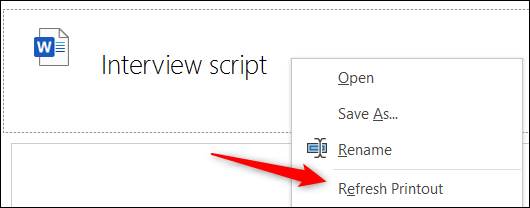
<p style="text-align: justify;">Sau khi cập nhật tệp nguồn, bạn có thể cập nhật bản in trong Notebook của mình để phản ánh các thay đổi đã được thực hiện bằng cách nhấp chuột phải vào liên kết tài liệu và chọn “Refresh Printout”.</p>

<p style="text-align: justify;"><img alt="“Refresh Printout”" data-i="4" data-src="https://st.quantrimang.com/photos/image/2021/06/12/chen-tai-lieu-word-vao-ghi-chu-onenote5.png" data-was-processed="true" height="208" src="https://st.quantrimang.com/photos/image/2021/06/12/chen-tai-lieu-word-vao-ghi-chu-onenote5.png" width="530" /></p>

<p style="text-align: justify;">Nội dung trong bản in sẽ làm mới và phản ánh nội dung hiện tại của tệp gốc.</p>
		</div>
				<div id="author">
						<p>
				<strong>Nguồn tin:</strong>
				Quantrimang.com
			</p>
		</div>
	</div>
	<div id="footer" class="clearfix">
		<div id="url">
			<strong>URL của bản tin này: </strong><a href="https://www.nguoicodonvn2008.info/vi/news/savefile/kien-thuc-may-tinh/cach-chen-tai-lieu-word-vao-ghi-chu-onenote-4283.html" title="Cách chèn tài liệu Word vào ghi chú OneNote">https://www.nguoicodonvn2008.info/vi/news/savefile/kien-thuc-may-tinh/cach-chen-tai-lieu-word-vao-ghi-chu-onenote-4283.html</a>

		</div>
		<div class="clear"></div>
		<div class="copyright">
			&copy; .&#x3A; Nguoicodonvn2008.info - Cõi lòng người cô đơn &#x3A;.
		</div>
		<div id="contact">
			<a href="mailto:admin@nguoicodonvn2008.info">admin@nguoicodonvn2008.info</a>
		</div>
	</div>
</div>
        <div id="timeoutsess" class="chromeframe">
            Bạn đã không sử dụng Site, <a onclick="timeoutsesscancel();" href="https://nguoicodonvn2008.info/#">Bấm vào đây để duy trì trạng thái đăng nhập</a>. Thời gian chờ: <span id="secField"> 60 </span> giây
        </div>
        <div id="openidResult" class="nv-alert" style="display:none"></div>
        <div id="openidBt" data-result="" data-redirect=""></div>
		</script>
		<div class="car-top">
  <span><img src="https://nguoicodonvn2008.info/themes/default/images/car.png" alt=""></span>
</div>
<script src="https://nguoicodonvn2008.info/assets/js/jquery/jquery.min.js"></script>
<script>var nv_base_siteurl="/",nv_lang_data="vi",nv_lang_interface="vi",nv_name_variable="nv",nv_fc_variable="op",nv_lang_variable="language",nv_module_name="news",nv_func_name="savefile",nv_is_user=0, nv_my_ofs=-4,nv_my_abbr="EDT",nv_cookie_prefix="nv4c_e856T",nv_check_pass_mstime=1738000,nv_area_admin=0,nv_safemode=0,theme_responsive=0,nv_recaptcha_ver=2,nv_recaptcha_sitekey="",nv_recaptcha_type="image",XSSsanitize=1;</script>
<script src="https://nguoicodonvn2008.info/assets/js/language/vi.js"></script>
<script src="https://nguoicodonvn2008.info/assets/js/DOMPurify/purify3.js"></script>
<script src="https://nguoicodonvn2008.info/assets/js/global.js"></script>
<script src="https://nguoicodonvn2008.info/assets/js/site.js"></script>
<script src="https://nguoicodonvn2008.info/themes/default/js/news.js"></script>
<script src="https://nguoicodonvn2008.info/themes/default/js/main.js"></script>
<script src="https://nguoicodonvn2008.info/themes/default/js/custom.js"></script>
<script type="application/ld+json">
        {
            "@context": "https://schema.org",
            "@type": "Organization",
            "url": "https://nguoicodonvn2008.info",
            "logo": "https://nguoicodonvn2008.info/uploads/angel.gif"
        }
        </script>
<script src="https://nguoicodonvn2008.info/themes/default/js/bootstrap.min.js"></script>
<script type="text/javascript">
var $scrolltop = $('.car-top');
$scrolltop.on('click', function () {
    $('html,body').animate({
        scrollTop: 0
    }, 800);
    $(this).addClass("car-run");
    setTimeout(function(){ $scrolltop.removeClass('car-run');}, 1000);
    return false;
});
$(window).on('scroll', function ()
{ 
    if($(window).scrollTop() >= 200)
    {
        $scrolltop.addClass("show");
        $scrolltop.addClass("car-down");
    }
    else
    {
       $scrolltop.removeClass("show");
       setTimeout(function(){ $scrolltop.removeClass('car-down');}, 300);
    }
});
</script>
</body>
</html>