<!DOCTYPE html>
    <html lang="vi" xmlns="http://www.w3.org/1999/xhtml" prefix="og: http://ogp.me/ns#">
    <head>
<title>Cách chặn Windows Defender xóa tệp</title>
<meta name="description" content="Cách chặn Windows Defender xóa tệp - Savefile - Tin Tức -...">
<meta name="author" content=".: Nguoicodonvn2008.info - Cõi lòng người cô đơn :.">
<meta name="copyright" content=".: Nguoicodonvn2008.info - Cõi lòng người cô đơn :. [admin@nguoicodonvn2008.info]">
<meta name="robots" content="index, archive, follow, noodp">
<meta name="googlebot" content="index,archive,follow,noodp">
<meta name="msnbot" content="all,index,follow">
<meta name="generator" content="NukeViet v4.5">
<meta http-equiv="Content-Type" content="text/html; charset=utf-8">
<meta property="og:title" content="Cách chặn Windows Defender xóa tệp">
<meta property="og:type" content="website">
<meta property="og:description" content="Savefile - Tin Tức - https&#x3A;&#x002F;&#x002F;www.nguoicodonvn2008.info&#x002F;vi&#x002F;news&#x002F;savefile&#x002F;kien-thuc-may-tinh&#x002F;cach-chan-windows-defender-xoa-tep-11193.html">
<meta property="og:site_name" content=".&#x3A; Nguoicodonvn2008.info - Cõi lòng người cô đơn &#x3A;.">
<meta property="og:url" content="https://www.nguoicodonvn2008.info/vi/news/savefile/kien-thuc-may-tinh/cach-chan-windows-defender-xoa-tep-11193.html">
<link rel="shortcut icon" href="https://nguoicodonvn2008.info/favicon.ico">
<link rel="canonical" href="https://www.nguoicodonvn2008.info/vi/news/savefile/kien-thuc-may-tinh/cach-chan-windows-defender-xoa-tep-11193.html">
<link rel="alternate" href="https://nguoicodonvn2008.info/vi/news/rss/" title="Tin Tức" type="application/rss+xml">
<link rel="alternate" href="https://nguoicodonvn2008.info/vi/news/rss/karaoke-dual/" title="Tin Tức - Karaoke Dual" type="application/rss+xml">
<link rel="alternate" href="https://nguoicodonvn2008.info/vi/news/rss/nhac-tre/" title="Tin Tức - Nhạc trẻ" type="application/rss+xml">
<link rel="alternate" href="https://nguoicodonvn2008.info/vi/news/rss/tru-tinh/" title="Tin Tức - Trữ tình" type="application/rss+xml">
<link rel="alternate" href="https://nguoicodonvn2008.info/vi/news/rss/nuoc-ngoai/" title="Tin Tức - Nước ngoài" type="application/rss+xml">
<link rel="alternate" href="https://nguoicodonvn2008.info/vi/news/rss/remix/" title="Tin Tức - Remix" type="application/rss+xml">
<link rel="alternate" href="https://nguoicodonvn2008.info/vi/news/rss/tam-su-tinh-yeu/" title="Tin Tức - Tâm sự tình yêu" type="application/rss+xml">
<link rel="alternate" href="https://nguoicodonvn2008.info/vi/news/rss/tho-suu-tam/" title="Tin Tức - Thơ sưu tầm" type="application/rss+xml">
<link rel="alternate" href="https://nguoicodonvn2008.info/vi/news/rss/cuoc-song/" title="Tin Tức - Cuộc sống" type="application/rss+xml">
<link rel="alternate" href="https://nguoicodonvn2008.info/vi/news/rss/phan-mem/" title="Tin Tức - Phần mềm" type="application/rss+xml">
<link rel="alternate" href="https://nguoicodonvn2008.info/vi/news/rss/kien-thuc-may-tinh/" title="Tin Tức - Kiến thức máy tính" type="application/rss+xml">
<link rel="alternate" href="https://nguoicodonvn2008.info/vi/news/rss/hoc-tap/" title="Tin Tức - Học tập" type="application/rss+xml">
<link rel="alternate" href="https://nguoicodonvn2008.info/vi/news/rss/tai-lieu/" title="Tin Tức - Tài liệu" type="application/rss+xml">
<link rel="alternate" href="https://nguoicodonvn2008.info/vi/news/rss/de-thi/" title="Tin Tức - Đề thi" type="application/rss+xml">
<link rel="preload" as="style" href="https://nguoicodonvn2008.info/assets/css/font-awesome.min.css" type="text/css">
<link rel="preload" as="style" href="https://nguoicodonvn2008.info/themes/default/css/bootstrap.non-responsive.css" type="text/css">
<link rel="preload" as="style" href="https://nguoicodonvn2008.info/themes/default/css/style.css" type="text/css">
<link rel="preload" as="style" href="https://nguoicodonvn2008.info/themes/default/css/style.non-responsive.css" type="text/css">
<link rel="preload" as="style" href="https://nguoicodonvn2008.info/themes/default/css/news.css" type="text/css">
<link rel="preload" as="style" href="https://nguoicodonvn2008.info/themes/default/css/custom.css" type="text/css">
<link rel="preload" as="script" href="https://nguoicodonvn2008.info/assets/js/jquery/jquery.min.js" type="text/javascript">
<link rel="preload" as="script" href="https://nguoicodonvn2008.info/assets/js/language/vi.js" type="text/javascript">
<link rel="preload" as="script" href="https://nguoicodonvn2008.info/assets/js/DOMPurify/purify3.js" type="text/javascript">
<link rel="preload" as="script" href="https://nguoicodonvn2008.info/assets/js/global.js" type="text/javascript">
<link rel="preload" as="script" href="https://nguoicodonvn2008.info/assets/js/site.js" type="text/javascript">
<link rel="preload" as="script" href="https://nguoicodonvn2008.info/themes/default/js/news.js" type="text/javascript">
<link rel="preload" as="script" href="https://nguoicodonvn2008.info/themes/default/js/main.js" type="text/javascript">
<link rel="preload" as="script" href="https://nguoicodonvn2008.info/themes/default/js/custom.js" type="text/javascript">
<link rel="preload" as="script" href="https://nguoicodonvn2008.info/themes/default/js/bootstrap.min.js" type="text/javascript">
<link rel="stylesheet" href="https://nguoicodonvn2008.info/assets/css/font-awesome.min.css">
<link rel="stylesheet" href="https://nguoicodonvn2008.info/themes/default/css/bootstrap.non-responsive.css">
<link rel="stylesheet" href="https://nguoicodonvn2008.info/themes/default/css/style.css">
<link rel="stylesheet" href="https://nguoicodonvn2008.info/themes/default/css/style.non-responsive.css">
<link rel="StyleSheet" href="https://nguoicodonvn2008.info/themes/default/css/news.css">
<link rel="stylesheet" href="https://nguoicodonvn2008.info/themes/default/css/custom.css">
<style type="text/css">
	body{background: #fff;}
</style>
    </head>
    <body>
<div id="print">
	<div id="hd_print">
		<h2 class="pull-left">.&#x3A; Nguoicodonvn2008.info - Cõi lòng người cô đơn &#x3A;.</h2>
		<p class="pull-right"><a title=".&#x3A; Nguoicodonvn2008.info - Cõi lòng người cô đơn &#x3A;." href="https://nguoicodonvn2008.info/">https://nguoicodonvn2008.info</a></p>
	</div>
	<div class="clear"></div>
	<hr />
	<div id="content">
		<h1>Cách chặn Windows Defender xóa tệp</h1>
		<ul class="list-inline">
			<li>Thứ sáu - 19/09/2025 23:10</li>
			<li class="hidden-print txtrequired"><em class="fa fa-print">&nbsp;</em><a title="In ra" href="javascript:;" onclick="window.print()">In ra</a></li>
			<li class="hidden-print txtrequired"><em class="fa fa-power-off">&nbsp;</em><a title="Đóng cửa sổ này" href="javascript:;" onclick="window.close()">Đóng cửa sổ này</a></li>
		</ul>
		<div class="clear"></div>
		<div id="hometext">
		</div>
				<div class="imghome">
			<img alt="Cách chặn Windows Defender xóa tệp" src="https://st.quantrimang.com/photos/image/2025/09/18/chan-Windows-Defender-xoa-tep-1.jpg" width="460" class="img-thumbnail" />
		</div>
		<div class="clear"></div>
		<div id="bodytext" class="clearfix">
			<p style="text-align: justify;">Windows Defender là giải pháp tích hợp của Microsoft giúp bảo vệ&nbsp;&nbsp;máy tính&nbsp;khỏi virus và phần mềm độc hại. Tuy nhiên, đôi khi công cụ này lại tự động xóa các tệp mà bạn biết là an toàn nhưng vẫn bị gắn cờ. Điều này có thể gây khó chịu vô cùng. Dưới đây là hướng dẫn chặn Windows Defender xóa tệp.</p>

<div style="text-align: justify;">&nbsp;</div>

<h2 style="text-align: justify;">Thêm ngoại lệ trong Windows Security</h2>

<p style="text-align: justify;">Phương pháp đơn giản nhất để ngăn chặn việc xóa tệp là truy cập trực tiếp vào nguồn thông qua Windows Security. Nếu bạn tin tưởng tệp hoặc thư mục mà Windows Defender liên tục xóa, bạn có thể thêm tệp hoặc thư mục đó vào danh sách loại trừ.</p>

<p style="text-align: justify;"><strong>Bước 1:</strong></p>

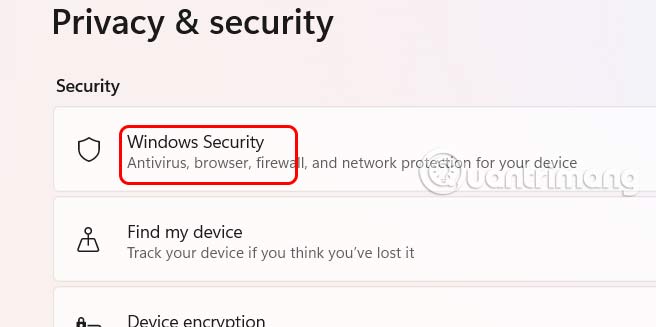
<p style="text-align: justify;">Mở cài đặt trên&nbsp;&nbsp;máy tính&nbsp;sau đó&nbsp;<strong>nhấn vào mục Privacy &amp; security</strong>&nbsp;rồi nhìn sang bên cạnh, chọn Windows Security.</p>

<p style="text-align: justify;"><img alt="Privacy &amp; security" data-i="0" data-src="https://st.quantrimang.com/photos/image/2025/09/18/chan-Windows-Defender-xoa-tep-1.jpg" data-was-processed="true" height="299" src="https://st.quantrimang.com/photos/image/2025/09/18/chan-Windows-Defender-xoa-tep-1.jpg" width="600" /></p>

<p style="text-align: justify;"><strong>Bước 2:</strong></p>

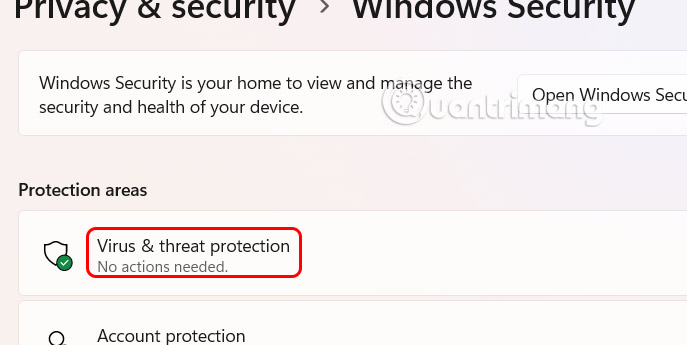
<p style="text-align: justify;">Ở giao diện tiếp theo bạn<strong>&nbsp;nhấn chọn Virus &amp; threat protection</strong>&nbsp;để điều chỉnh.</p>

<p style="text-align: justify;"><img alt="Virus &amp; threat protection" data-adbro-processed="true" data-i="1" data-src="https://st.quantrimang.com/photos/image/2025/09/18/chan-Windows-Defender-xoa-tep-2.jpg" data-was-processed="true" height="301" src="https://st.quantrimang.com/photos/image/2025/09/18/chan-Windows-Defender-xoa-tep-2.jpg" width="600" /></p>

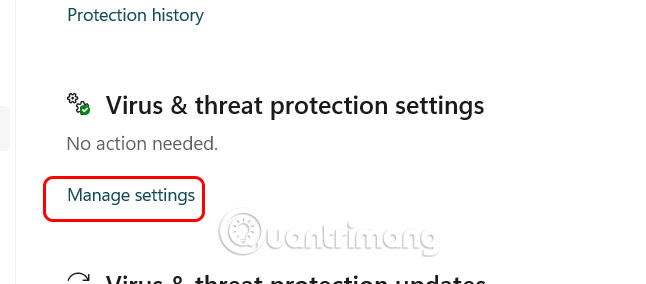
<p style="text-align: justify;">Hiển thị giao diện mới, bạn kéo xuống<strong>&nbsp;mục Virus &amp; threat protection settings</strong>&nbsp;rồi nhấn vào&nbsp;<strong>Manage settings</strong>.</p>

<p style="text-align: justify;"><img alt="Virus &amp; threat protection settings" data-i="2" data-src="https://st.quantrimang.com/photos/image/2025/09/18/chan-Windows-Defender-xoa-tep-3.jpg" data-was-processed="true" height="264" src="https://st.quantrimang.com/photos/image/2025/09/18/chan-Windows-Defender-xoa-tep-3.jpg" width="600" /></p>

<p style="text-align: justify;"><strong>Bước 3:</strong></p>

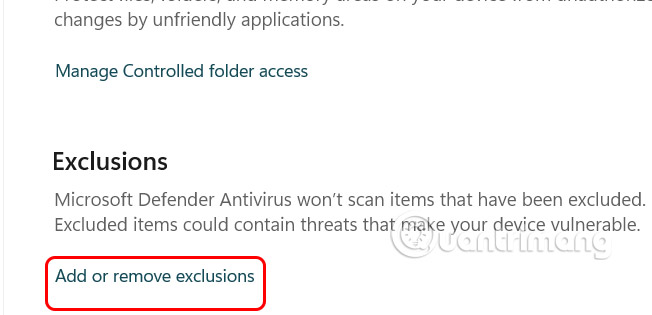
<p style="text-align: justify;">Trong&nbsp;<strong>phần Exclusions</strong>&nbsp;người dùng nhấn chọn<strong>&nbsp;mục Add or remove exclusions&nbsp;</strong>để thêm thành phần loại trừ.</p>

<p style="text-align: justify;"><img alt="Add or remove exclusions" data-i="3" data-src="https://st.quantrimang.com/photos/image/2025/09/18/chan-Windows-Defender-xoa-tep-4.jpg" data-was-processed="true" height="290" src="https://st.quantrimang.com/photos/image/2025/09/18/chan-Windows-Defender-xoa-tep-4.jpg" width="600" /></p>

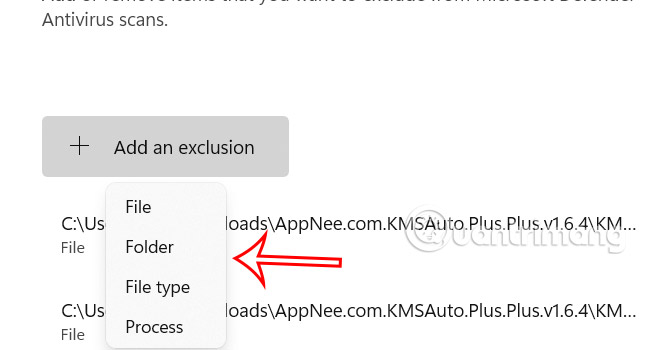
<p style="text-align: justify;">Tại đây người dùng&nbsp;<strong>nhấn vào Add an exclusion</strong>&nbsp;rồi<strong>&nbsp;lựa chọn loại nội dung bạn muốn làm thành phần ngoại trừ&nbsp;</strong>để Windows Defender không xóa.</p>

<p style="text-align: justify;"><img alt="Thêm thành phần ngoại trừ" data-i="4" data-src="https://st.quantrimang.com/photos/image/2025/09/18/chan-Windows-Defender-xoa-tep-5.jpg" data-was-processed="true" height="313" src="https://st.quantrimang.com/photos/image/2025/09/18/chan-Windows-Defender-xoa-tep-5.jpg" width="600" /></p>

<h2 style="text-align: justify;">Lấy lại các tập tin và thư mục đã xóa</h2>

<p style="text-align: justify;">Windows Defender không xóa các tệp mà cách ly chúng để hạn chế tác động tới những tập tin khác trong máy tính. Bạn có thể khôi phục các tệp và thư mục này nếu chắc chắn an toàn.</p>

<p style="text-align: justify;"><strong>Bước 1:</strong></p>

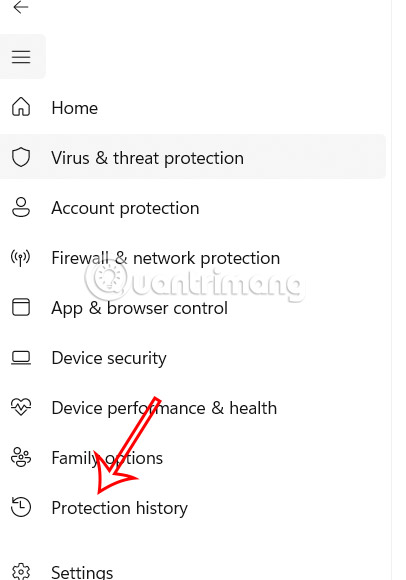
<p style="text-align: justify;">Chúng ta cũng truy cập giao diện Virus &amp; threat protection trong Settings, sau đó nhấn chọn&nbsp;<strong>Protection History</strong>.</p>

<p style="text-align: justify;"><img alt="Protection History" data-i="5" data-src="https://st.quantrimang.com/photos/image/2025/09/18/chan-Windows-Defender-xoa-tep-6.jpg" data-was-processed="true" height="571" src="https://st.quantrimang.com/photos/image/2025/09/18/chan-Windows-Defender-xoa-tep-6.jpg" width="400" /></p>

<p style="text-align: justify;"><strong>Bước 2:</strong></p>

<p style="text-align: justify;">Những tập tin bị xóa sẽ hiển thị trong giao diện này và bạn có thể lấy lại.&nbsp;<strong>Nhấn vào tập tin</strong>&nbsp;rồi&nbsp;<strong>chọn Actions sau đó nhấn Allow</strong>&nbsp;để lấy lại tập tin đã xóa.</p>

<h2 style="text-align: justify;">Vô hiệu hóa Storage Sense</h2>

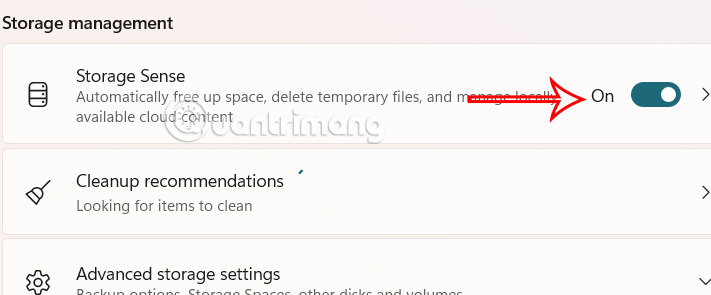
<p style="text-align: justify;">Mặc dù không phải là Windows Defender, Storage Sense là một tính năng sẽ xóa các tệp và thư mục để giải phóng dung lượng lưu trữ. Tính năng này chỉ giới hạn trong Thùng rác và sẽ tự động xóa sau 30 ngày. Nếu cần khôi phục lại dữ liệu thì có thể tắt Storage Sense.</p>

<p style="text-align: justify;"><img alt="Vô hiệu hóa Storage Sense" data-i="6" data-src="https://st.quantrimang.com/photos/image/2025/09/18/chan-Windows-Defender-xoa-tep-7.jpg" data-was-processed="true" height="266" src="https://st.quantrimang.com/photos/image/2025/09/18/chan-Windows-Defender-xoa-tep-7.jpg" width="640" /></p>

<div style="text-align: justify;">&nbsp;</div>
		</div>
				<div id="author">
						<p>
				<strong>Nguồn tin:</strong>
				Quantrimang.com:
			</p>
		</div>
	</div>
	<div id="footer" class="clearfix">
		<div id="url">
			<strong>URL của bản tin này: </strong><a href="https://www.nguoicodonvn2008.info/vi/news/savefile/kien-thuc-may-tinh/cach-chan-windows-defender-xoa-tep-11193.html" title="Cách chặn Windows Defender xóa tệp">https://www.nguoicodonvn2008.info/vi/news/savefile/kien-thuc-may-tinh/cach-chan-windows-defender-xoa-tep-11193.html</a>

		</div>
		<div class="clear"></div>
		<div class="copyright">
			&copy; .&#x3A; Nguoicodonvn2008.info - Cõi lòng người cô đơn &#x3A;.
		</div>
		<div id="contact">
			<a href="mailto:admin@nguoicodonvn2008.info">admin@nguoicodonvn2008.info</a>
		</div>
	</div>
</div>
        <div id="timeoutsess" class="chromeframe">
            Bạn đã không sử dụng Site, <a onclick="timeoutsesscancel();" href="https://nguoicodonvn2008.info/#">Bấm vào đây để duy trì trạng thái đăng nhập</a>. Thời gian chờ: <span id="secField"> 60 </span> giây
        </div>
        <div id="openidResult" class="nv-alert" style="display:none"></div>
        <div id="openidBt" data-result="" data-redirect=""></div>
		</script>
		<div class="car-top">
  <span><img src="https://nguoicodonvn2008.info/themes/default/images/car.png" alt=""></span>
</div>
<script src="https://nguoicodonvn2008.info/assets/js/jquery/jquery.min.js"></script>
<script>var nv_base_siteurl="/",nv_lang_data="vi",nv_lang_interface="vi",nv_name_variable="nv",nv_fc_variable="op",nv_lang_variable="language",nv_module_name="news",nv_func_name="savefile",nv_is_user=0, nv_my_ofs=-4,nv_my_abbr="EDT",nv_cookie_prefix="nv4c_e856T",nv_check_pass_mstime=1738000,nv_area_admin=0,nv_safemode=0,theme_responsive=0,nv_recaptcha_ver=2,nv_recaptcha_sitekey="",nv_recaptcha_type="image",XSSsanitize=1;</script>
<script src="https://nguoicodonvn2008.info/assets/js/language/vi.js"></script>
<script src="https://nguoicodonvn2008.info/assets/js/DOMPurify/purify3.js"></script>
<script src="https://nguoicodonvn2008.info/assets/js/global.js"></script>
<script src="https://nguoicodonvn2008.info/assets/js/site.js"></script>
<script src="https://nguoicodonvn2008.info/themes/default/js/news.js"></script>
<script src="https://nguoicodonvn2008.info/themes/default/js/main.js"></script>
<script src="https://nguoicodonvn2008.info/themes/default/js/custom.js"></script>
<script type="application/ld+json">
        {
            "@context": "https://schema.org",
            "@type": "Organization",
            "url": "https://nguoicodonvn2008.info",
            "logo": "https://nguoicodonvn2008.info/uploads/angel.gif"
        }
        </script>
<script src="https://nguoicodonvn2008.info/themes/default/js/bootstrap.min.js"></script>
<script type="text/javascript">
var $scrolltop = $('.car-top');
$scrolltop.on('click', function () {
    $('html,body').animate({
        scrollTop: 0
    }, 800);
    $(this).addClass("car-run");
    setTimeout(function(){ $scrolltop.removeClass('car-run');}, 1000);
    return false;
});
$(window).on('scroll', function ()
{ 
    if($(window).scrollTop() >= 200)
    {
        $scrolltop.addClass("show");
        $scrolltop.addClass("car-down");
    }
    else
    {
       $scrolltop.removeClass("show");
       setTimeout(function(){ $scrolltop.removeClass('car-down');}, 300);
    }
});
</script>
</body>
</html>