<!DOCTYPE html>
    <html lang="vi" xmlns="http://www.w3.org/1999/xhtml" prefix="og: http://ogp.me/ns#">
    <head>
<title>Cách chặn tải file, video trên Google Drive</title>
<meta name="description" content="Cách chặn tải file, video trên Google Drive - Savefile - Tin Tức -...">
<meta name="author" content=".: Nguoicodonvn2008.info - Cõi lòng người cô đơn :.">
<meta name="copyright" content=".: Nguoicodonvn2008.info - Cõi lòng người cô đơn :. [admin@nguoicodonvn2008.info]">
<meta name="robots" content="index, archive, follow, noodp">
<meta name="googlebot" content="index,archive,follow,noodp">
<meta name="msnbot" content="all,index,follow">
<meta name="generator" content="NukeViet v4.5">
<meta http-equiv="Content-Type" content="text/html; charset=utf-8">
<meta property="og:title" content="Cách chặn tải file, video trên Google Drive">
<meta property="og:type" content="website">
<meta property="og:description" content="Savefile - Tin Tức - https&#x3A;&#x002F;&#x002F;www.nguoicodonvn2008.info&#x002F;vi&#x002F;news&#x002F;savefile&#x002F;kien-thuc-may-tinh&#x002F;cach-chan-tai-file-video-tren-google-drive-11519.html">
<meta property="og:site_name" content=".&#x3A; Nguoicodonvn2008.info - Cõi lòng người cô đơn &#x3A;.">
<meta property="og:url" content="https://www.nguoicodonvn2008.info/vi/news/savefile/kien-thuc-may-tinh/cach-chan-tai-file-video-tren-google-drive-11519.html">
<link rel="shortcut icon" href="https://nguoicodonvn2008.info/favicon.ico">
<link rel="canonical" href="https://www.nguoicodonvn2008.info/vi/news/savefile/kien-thuc-may-tinh/cach-chan-tai-file-video-tren-google-drive-11519.html">
<link rel="alternate" href="https://nguoicodonvn2008.info/vi/news/rss/" title="Tin Tức" type="application/rss+xml">
<link rel="alternate" href="https://nguoicodonvn2008.info/vi/news/rss/karaoke-dual/" title="Tin Tức - Karaoke Dual" type="application/rss+xml">
<link rel="alternate" href="https://nguoicodonvn2008.info/vi/news/rss/nhac-tre/" title="Tin Tức - Nhạc trẻ" type="application/rss+xml">
<link rel="alternate" href="https://nguoicodonvn2008.info/vi/news/rss/tru-tinh/" title="Tin Tức - Trữ tình" type="application/rss+xml">
<link rel="alternate" href="https://nguoicodonvn2008.info/vi/news/rss/nuoc-ngoai/" title="Tin Tức - Nước ngoài" type="application/rss+xml">
<link rel="alternate" href="https://nguoicodonvn2008.info/vi/news/rss/remix/" title="Tin Tức - Remix" type="application/rss+xml">
<link rel="alternate" href="https://nguoicodonvn2008.info/vi/news/rss/tam-su-tinh-yeu/" title="Tin Tức - Tâm sự tình yêu" type="application/rss+xml">
<link rel="alternate" href="https://nguoicodonvn2008.info/vi/news/rss/tho-suu-tam/" title="Tin Tức - Thơ sưu tầm" type="application/rss+xml">
<link rel="alternate" href="https://nguoicodonvn2008.info/vi/news/rss/cuoc-song/" title="Tin Tức - Cuộc sống" type="application/rss+xml">
<link rel="alternate" href="https://nguoicodonvn2008.info/vi/news/rss/phan-mem/" title="Tin Tức - Phần mềm" type="application/rss+xml">
<link rel="alternate" href="https://nguoicodonvn2008.info/vi/news/rss/kien-thuc-may-tinh/" title="Tin Tức - Kiến thức máy tính" type="application/rss+xml">
<link rel="alternate" href="https://nguoicodonvn2008.info/vi/news/rss/hoc-tap/" title="Tin Tức - Học tập" type="application/rss+xml">
<link rel="alternate" href="https://nguoicodonvn2008.info/vi/news/rss/tai-lieu/" title="Tin Tức - Tài liệu" type="application/rss+xml">
<link rel="alternate" href="https://nguoicodonvn2008.info/vi/news/rss/de-thi/" title="Tin Tức - Đề thi" type="application/rss+xml">
<link rel="preload" as="style" href="https://nguoicodonvn2008.info/assets/css/font-awesome.min.css" type="text/css">
<link rel="preload" as="style" href="https://nguoicodonvn2008.info/themes/default/css/bootstrap.non-responsive.css" type="text/css">
<link rel="preload" as="style" href="https://nguoicodonvn2008.info/themes/default/css/style.css" type="text/css">
<link rel="preload" as="style" href="https://nguoicodonvn2008.info/themes/default/css/style.non-responsive.css" type="text/css">
<link rel="preload" as="style" href="https://nguoicodonvn2008.info/themes/default/css/news.css" type="text/css">
<link rel="preload" as="style" href="https://nguoicodonvn2008.info/themes/default/css/custom.css" type="text/css">
<link rel="preload" as="script" href="https://nguoicodonvn2008.info/assets/js/jquery/jquery.min.js" type="text/javascript">
<link rel="preload" as="script" href="https://nguoicodonvn2008.info/assets/js/language/vi.js" type="text/javascript">
<link rel="preload" as="script" href="https://nguoicodonvn2008.info/assets/js/DOMPurify/purify3.js" type="text/javascript">
<link rel="preload" as="script" href="https://nguoicodonvn2008.info/assets/js/global.js" type="text/javascript">
<link rel="preload" as="script" href="https://nguoicodonvn2008.info/assets/js/site.js" type="text/javascript">
<link rel="preload" as="script" href="https://nguoicodonvn2008.info/themes/default/js/news.js" type="text/javascript">
<link rel="preload" as="script" href="https://nguoicodonvn2008.info/themes/default/js/main.js" type="text/javascript">
<link rel="preload" as="script" href="https://nguoicodonvn2008.info/themes/default/js/custom.js" type="text/javascript">
<link rel="preload" as="script" href="https://nguoicodonvn2008.info/themes/default/js/bootstrap.min.js" type="text/javascript">
<link rel="stylesheet" href="https://nguoicodonvn2008.info/assets/css/font-awesome.min.css">
<link rel="stylesheet" href="https://nguoicodonvn2008.info/themes/default/css/bootstrap.non-responsive.css">
<link rel="stylesheet" href="https://nguoicodonvn2008.info/themes/default/css/style.css">
<link rel="stylesheet" href="https://nguoicodonvn2008.info/themes/default/css/style.non-responsive.css">
<link rel="StyleSheet" href="https://nguoicodonvn2008.info/themes/default/css/news.css">
<link rel="stylesheet" href="https://nguoicodonvn2008.info/themes/default/css/custom.css">
<style type="text/css">
	body{background: #fff;}
</style>
    </head>
    <body>
<div id="print">
	<div id="hd_print">
		<h2 class="pull-left">.&#x3A; Nguoicodonvn2008.info - Cõi lòng người cô đơn &#x3A;.</h2>
		<p class="pull-right"><a title=".&#x3A; Nguoicodonvn2008.info - Cõi lòng người cô đơn &#x3A;." href="https://nguoicodonvn2008.info/">https://nguoicodonvn2008.info</a></p>
	</div>
	<div class="clear"></div>
	<hr />
	<div id="content">
		<h1>Cách chặn tải file, video trên Google Drive</h1>
		<ul class="list-inline">
			<li>Thứ hai - 03/11/2025 22:53</li>
			<li class="hidden-print txtrequired"><em class="fa fa-print">&nbsp;</em><a title="In ra" href="javascript:;" onclick="window.print()">In ra</a></li>
			<li class="hidden-print txtrequired"><em class="fa fa-power-off">&nbsp;</em><a title="Đóng cửa sổ này" href="javascript:;" onclick="window.close()">Đóng cửa sổ này</a></li>
		</ul>
		<div class="clear"></div>
		<div id="hometext">
		</div>
				<div class="imghome">
			<img alt="Cách chặn tải file, video trên Google Drive" src="https://st.quantrimang.com/photos/image/2018/10/27/Google-Drive-chan-tai-file-4.jpg" width="460" class="img-thumbnail" />
		</div>
		<div class="clear"></div>
		<div id="bodytext" class="clearfix">
			<p style="text-align: justify;">Chia sẻ file qua Google Drive hay những&nbsp;dịch vụ lưu trữ đám mây&nbsp;khác không còn mới với người dùng, khi hình thức chia sẻ dữ liệu này đơn giản hơn, nhanh chóng hơn rất nhiều thông qua link file. Tuy nhiên khi bạn đăng file lưu trữ theo mặc định đã có sẵn nút&nbsp;download file Google Drive&nbsp;để người khác có thể tải xuống.</p>

<div style="text-align: justify;">&nbsp;</div>

<p style="text-align: justify;">Trong trường hợp chúng ta chỉ muốn người khác xem nội dung, nhưng không muốn tải file xuống thì có thể tùy chỉnh lại chế độ chia sẻ ngay trên Google Drive. Bài viết dưới đây sẽ hướng dẫn bạn ngăn người khác tải file trên Google Drive.</p>

<div style="text-align: justify;">&nbsp;</div>

<h2 style="text-align: justify;">Hướng dẫn chặn tải file trên Google Drive</h2>

<p style="text-align: justify;"><strong>Bước 1:</strong></p>

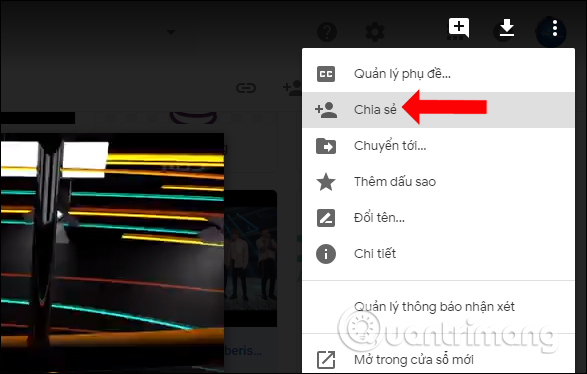
<p style="text-align: justify;">Khi nhấn vào file bất kỳ lưu trữ trên Google Drive, theo mặc định luôn có biểu tượng download như hình. Để chặn tải trước hết bạn nhấn vào&nbsp;<strong>biểu tượng 3 chấm</strong>&nbsp;chọn&nbsp;<strong>Chia sẻ</strong>.</p>

<p style="text-align: justify;"><img alt="Chia sẻ file" data-adbro-processed="true" data-i="0" data-src="https://st.quantrimang.com/photos/image/2018/10/27/Google-Drive-chan-tai-file-1.jpg" data-was-processed="true" height="374" src="https://st.quantrimang.com/photos/image/2018/10/27/Google-Drive-chan-tai-file-1.jpg" width="587" /></p>

<p style="text-align: justify;"><strong>Bước 2:</strong></p>

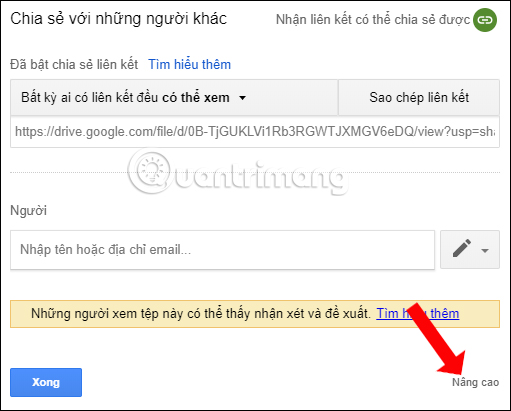
<p style="text-align: justify;">Hiển thị giao diện hộp thoại Chia sẻ với những người khác. Tại đây sẽ có link chia sẻ file với chế độ ai có liên kết đều có thể xem nội dung. Nhấn vào&nbsp;<strong>nút Nâng cao</strong>&nbsp;ở bên dưới giao diện.</p>

<p style="text-align: justify;"><img alt="Tùy chỉnh nâng cao" data-i="1" data-src="https://st.quantrimang.com/photos/image/2018/10/27/Google-Drive-chan-tai-file-2.jpg" data-was-processed="true" height="411" src="https://st.quantrimang.com/photos/image/2018/10/27/Google-Drive-chan-tai-file-2.jpg" width="511" /></p>

<p style="text-align: justify;"><strong>Bước 3:</strong></p>

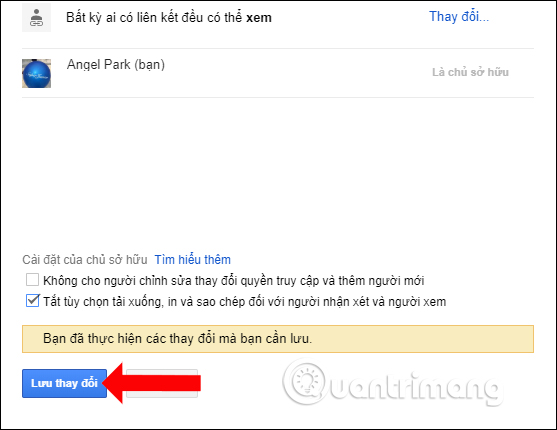
<p style="text-align: justify;">Trong giao diện hiển thị thêm bên dưới sẽ có tùy chọn&nbsp;<strong>Cài đặt của chủ sở hữu</strong>. Tại đây người dùng sẽ có 2 tùy chọn với file Google Drive.</p>

<p style="text-align: justify;">Để chặn tải file nhấn vào&nbsp;<strong>nút Tắt tùy chọn tải xuống, in và sao chép đối với người nhận xét và người xem</strong>. Với những ai nhận được link file Google Drive vẫn có thể xem nội dung nhưng không download file xuống được. Cuối cùng&nbsp;<strong>nhấn Lưu thay đổi</strong>&nbsp;để lưu lại.</p>

<p style="text-align: justify;"><img alt="Chặn tải file" data-i="2" data-src="https://st.quantrimang.com/photos/image/2018/10/27/Google-Drive-chan-tai-file-3.jpg" data-was-processed="true" height="430" src="https://st.quantrimang.com/photos/image/2018/10/27/Google-Drive-chan-tai-file-3.jpg" width="557" /></p>

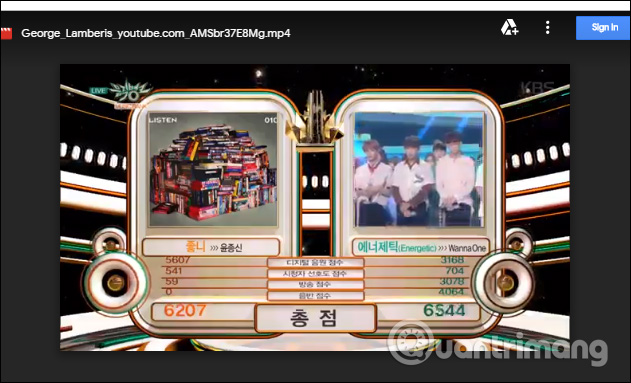
<p style="text-align: justify;">Bây giờ bạn thử chia sẻ link file đã được vô hiệu hóa tải xuống và sẽ thấy không hiện nút tải file như trước.</p>

<p style="text-align: justify;"><img alt="Nút download bị vô hiệu hóa" data-i="3" data-src="https://st.quantrimang.com/photos/image/2018/10/27/Google-Drive-chan-tai-file-4.jpg" data-was-processed="true" height="383" src="https://st.quantrimang.com/photos/image/2018/10/27/Google-Drive-chan-tai-file-4.jpg" width="631" /></p>

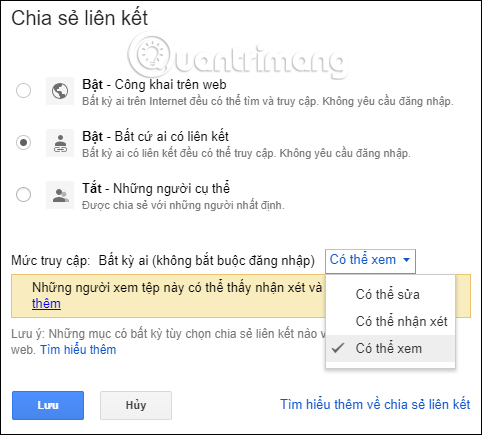
<p style="text-align: justify;">Ngoài ra chúng ta cũng có thể thay đổi người có quyền truy cập vào file, gồm ai cũng có thể truy cập không cần đăng ký, chỉ những ai có liên kết mới xem được nội dung và không cần đăng nhập hay chia sẻ link Google Drive với những người cụ thể</p>

<p style="text-align: justify;"><img alt="Tùy chỉnh nhận link file" data-i="4" data-src="https://st.quantrimang.com/photos/image/2018/10/27/Google-Drive-chan-tai-file-5.jpg" data-was-processed="true" height="435" src="https://st.quantrimang.com/photos/image/2018/10/27/Google-Drive-chan-tai-file-5.jpg" width="482" /></p>

<p style="text-align: justify;">Như vậy chỉ với thay đổi nhỏ ngay trên Google Drive, người khác không thể tải dữ liệu của bạn xuống máy tính nhưng họ vẫn có thể xem nội dung file. Bạn sẽ không lo việc tài liệu hay video bị tải và sử dụng khi chưa có sự đồng ý.</p>

<h2 style="text-align: justify;">Hướng dẫn chặn tải file, video Google Drive</h2>

<p style="text-align: justify;"><iframe allow="autoplay" allowfullscreen="" data-src="https://nguoicodonvn2008.info//xem.video/embed/21222" data-was-processed="true" frameborder="0" height="360" sandbox="allow-scripts allow-same-origin allow-forms allow-presentation allow-popups" width="640"></iframe></p>

<div style="text-align: justify;">&nbsp;</div>
		</div>
				<div id="author">
						<p>
				<strong>Nguồn tin:</strong>
				Quantrimang.com:
			</p>
		</div>
	</div>
	<div id="footer" class="clearfix">
		<div id="url">
			<strong>URL của bản tin này: </strong><a href="https://www.nguoicodonvn2008.info/vi/news/savefile/kien-thuc-may-tinh/cach-chan-tai-file-video-tren-google-drive-11519.html" title="Cách chặn tải file, video trên Google Drive">https://www.nguoicodonvn2008.info/vi/news/savefile/kien-thuc-may-tinh/cach-chan-tai-file-video-tren-google-drive-11519.html</a>

		</div>
		<div class="clear"></div>
		<div class="copyright">
			&copy; .&#x3A; Nguoicodonvn2008.info - Cõi lòng người cô đơn &#x3A;.
		</div>
		<div id="contact">
			<a href="mailto:admin@nguoicodonvn2008.info">admin@nguoicodonvn2008.info</a>
		</div>
	</div>
</div>
        <div id="timeoutsess" class="chromeframe">
            Bạn đã không sử dụng Site, <a onclick="timeoutsesscancel();" href="https://nguoicodonvn2008.info/#">Bấm vào đây để duy trì trạng thái đăng nhập</a>. Thời gian chờ: <span id="secField"> 60 </span> giây
        </div>
        <div id="openidResult" class="nv-alert" style="display:none"></div>
        <div id="openidBt" data-result="" data-redirect=""></div>
		</script>
		<div class="car-top">
  <span><img src="https://nguoicodonvn2008.info/themes/default/images/car.png" alt=""></span>
</div>
<script src="https://nguoicodonvn2008.info/assets/js/jquery/jquery.min.js"></script>
<script>var nv_base_siteurl="/",nv_lang_data="vi",nv_lang_interface="vi",nv_name_variable="nv",nv_fc_variable="op",nv_lang_variable="language",nv_module_name="news",nv_func_name="savefile",nv_is_user=0, nv_my_ofs=-4,nv_my_abbr="EDT",nv_cookie_prefix="nv4c_e856T",nv_check_pass_mstime=1738000,nv_area_admin=0,nv_safemode=0,theme_responsive=0,nv_recaptcha_ver=2,nv_recaptcha_sitekey="",nv_recaptcha_type="image",XSSsanitize=1;</script>
<script src="https://nguoicodonvn2008.info/assets/js/language/vi.js"></script>
<script src="https://nguoicodonvn2008.info/assets/js/DOMPurify/purify3.js"></script>
<script src="https://nguoicodonvn2008.info/assets/js/global.js"></script>
<script src="https://nguoicodonvn2008.info/assets/js/site.js"></script>
<script src="https://nguoicodonvn2008.info/themes/default/js/news.js"></script>
<script src="https://nguoicodonvn2008.info/themes/default/js/main.js"></script>
<script src="https://nguoicodonvn2008.info/themes/default/js/custom.js"></script>
<script type="application/ld+json">
        {
            "@context": "https://schema.org",
            "@type": "Organization",
            "url": "https://nguoicodonvn2008.info",
            "logo": "https://nguoicodonvn2008.info/uploads/angel.gif"
        }
        </script>
<script src="https://nguoicodonvn2008.info/themes/default/js/bootstrap.min.js"></script>
<script type="text/javascript">
var $scrolltop = $('.car-top');
$scrolltop.on('click', function () {
    $('html,body').animate({
        scrollTop: 0
    }, 800);
    $(this).addClass("car-run");
    setTimeout(function(){ $scrolltop.removeClass('car-run');}, 1000);
    return false;
});
$(window).on('scroll', function ()
{ 
    if($(window).scrollTop() >= 200)
    {
        $scrolltop.addClass("show");
        $scrolltop.addClass("car-down");
    }
    else
    {
       $scrolltop.removeClass("show");
       setTimeout(function(){ $scrolltop.removeClass('car-down');}, 300);
    }
});
</script>
</body>
</html>