<!DOCTYPE html>
    <html lang="vi" xmlns="http://www.w3.org/1999/xhtml" prefix="og: http://ogp.me/ns#">
    <head>
<title>Cách cấu hình lại hệ thống để sử dụng Smart Response</title>
<meta name="description" content="Cách cấu hình lại hệ thống để sử dụng Smart Response - Savefile - Tin Tức -...">
<meta name="author" content=".: Nguoicodonvn2008.info - Cõi lòng người cô đơn :.">
<meta name="copyright" content=".: Nguoicodonvn2008.info - Cõi lòng người cô đơn :. [admin@nguoicodonvn2008.info]">
<meta name="robots" content="index, archive, follow, noodp">
<meta name="googlebot" content="index,archive,follow,noodp">
<meta name="msnbot" content="all,index,follow">
<meta name="generator" content="NukeViet v4.5">
<meta http-equiv="Content-Type" content="text/html; charset=utf-8">
<meta property="og:title" content="Cách cấu hình lại hệ thống để sử dụng Smart Response">
<meta property="og:type" content="website">
<meta property="og:description" content="Savefile - Tin Tức - https&#x3A;&#x002F;&#x002F;www.nguoicodonvn2008.info&#x002F;vi&#x002F;news&#x002F;savefile&#x002F;kien-thuc-may-tinh&#x002F;cach-cau-hinh-lai-he-thong-de-su-dung-smart-response-320.html">
<meta property="og:site_name" content=".&#x3A; Nguoicodonvn2008.info - Cõi lòng người cô đơn &#x3A;.">
<meta property="og:url" content="https://www.nguoicodonvn2008.info/vi/news/savefile/kien-thuc-may-tinh/cach-cau-hinh-lai-he-thong-de-su-dung-smart-response-320.html">
<link rel="shortcut icon" href="https://nguoicodonvn2008.info/favicon.ico">
<link rel="canonical" href="https://www.nguoicodonvn2008.info/vi/news/savefile/kien-thuc-may-tinh/cach-cau-hinh-lai-he-thong-de-su-dung-smart-response-320.html">
<link rel="alternate" href="https://nguoicodonvn2008.info/vi/news/rss/" title="Tin Tức" type="application/rss+xml">
<link rel="alternate" href="https://nguoicodonvn2008.info/vi/news/rss/karaoke-dual/" title="Tin Tức - Karaoke Dual" type="application/rss+xml">
<link rel="alternate" href="https://nguoicodonvn2008.info/vi/news/rss/nhac-tre/" title="Tin Tức - Nhạc trẻ" type="application/rss+xml">
<link rel="alternate" href="https://nguoicodonvn2008.info/vi/news/rss/tru-tinh/" title="Tin Tức - Trữ tình" type="application/rss+xml">
<link rel="alternate" href="https://nguoicodonvn2008.info/vi/news/rss/nuoc-ngoai/" title="Tin Tức - Nước ngoài" type="application/rss+xml">
<link rel="alternate" href="https://nguoicodonvn2008.info/vi/news/rss/remix/" title="Tin Tức - Remix" type="application/rss+xml">
<link rel="alternate" href="https://nguoicodonvn2008.info/vi/news/rss/tam-su-tinh-yeu/" title="Tin Tức - Tâm sự tình yêu" type="application/rss+xml">
<link rel="alternate" href="https://nguoicodonvn2008.info/vi/news/rss/tho-suu-tam/" title="Tin Tức - Thơ sưu tầm" type="application/rss+xml">
<link rel="alternate" href="https://nguoicodonvn2008.info/vi/news/rss/cuoc-song/" title="Tin Tức - Cuộc sống" type="application/rss+xml">
<link rel="alternate" href="https://nguoicodonvn2008.info/vi/news/rss/phan-mem/" title="Tin Tức - Phần mềm" type="application/rss+xml">
<link rel="alternate" href="https://nguoicodonvn2008.info/vi/news/rss/kien-thuc-may-tinh/" title="Tin Tức - Kiến thức máy tính" type="application/rss+xml">
<link rel="alternate" href="https://nguoicodonvn2008.info/vi/news/rss/hoc-tap/" title="Tin Tức - Học tập" type="application/rss+xml">
<link rel="alternate" href="https://nguoicodonvn2008.info/vi/news/rss/tai-lieu/" title="Tin Tức - Tài liệu" type="application/rss+xml">
<link rel="alternate" href="https://nguoicodonvn2008.info/vi/news/rss/de-thi/" title="Tin Tức - Đề thi" type="application/rss+xml">
<link rel="preload" as="style" href="https://nguoicodonvn2008.info/assets/css/font-awesome.min.css" type="text/css">
<link rel="preload" as="style" href="https://nguoicodonvn2008.info/themes/default/css/bootstrap.non-responsive.css" type="text/css">
<link rel="preload" as="style" href="https://nguoicodonvn2008.info/themes/default/css/style.css" type="text/css">
<link rel="preload" as="style" href="https://nguoicodonvn2008.info/themes/default/css/style.non-responsive.css" type="text/css">
<link rel="preload" as="style" href="https://nguoicodonvn2008.info/themes/default/css/news.css" type="text/css">
<link rel="preload" as="style" href="https://nguoicodonvn2008.info/themes/default/css/custom.css" type="text/css">
<link rel="preload" as="script" href="https://nguoicodonvn2008.info/assets/js/jquery/jquery.min.js" type="text/javascript">
<link rel="preload" as="script" href="https://nguoicodonvn2008.info/assets/js/language/vi.js" type="text/javascript">
<link rel="preload" as="script" href="https://nguoicodonvn2008.info/assets/js/DOMPurify/purify3.js" type="text/javascript">
<link rel="preload" as="script" href="https://nguoicodonvn2008.info/assets/js/global.js" type="text/javascript">
<link rel="preload" as="script" href="https://nguoicodonvn2008.info/assets/js/site.js" type="text/javascript">
<link rel="preload" as="script" href="https://nguoicodonvn2008.info/themes/default/js/news.js" type="text/javascript">
<link rel="preload" as="script" href="https://nguoicodonvn2008.info/themes/default/js/main.js" type="text/javascript">
<link rel="preload" as="script" href="https://nguoicodonvn2008.info/themes/default/js/custom.js" type="text/javascript">
<link rel="preload" as="script" href="https://nguoicodonvn2008.info/themes/default/js/bootstrap.min.js" type="text/javascript">
<link rel="stylesheet" href="https://nguoicodonvn2008.info/assets/css/font-awesome.min.css">
<link rel="stylesheet" href="https://nguoicodonvn2008.info/themes/default/css/bootstrap.non-responsive.css">
<link rel="stylesheet" href="https://nguoicodonvn2008.info/themes/default/css/style.css">
<link rel="stylesheet" href="https://nguoicodonvn2008.info/themes/default/css/style.non-responsive.css">
<link rel="StyleSheet" href="https://nguoicodonvn2008.info/themes/default/css/news.css">
<link rel="stylesheet" href="https://nguoicodonvn2008.info/themes/default/css/custom.css">
<style type="text/css">
	body{background: #fff;}
</style>
    </head>
    <body>
<div id="print">
	<div id="hd_print">
		<h2 class="pull-left">.&#x3A; Nguoicodonvn2008.info - Cõi lòng người cô đơn &#x3A;.</h2>
		<p class="pull-right"><a title=".&#x3A; Nguoicodonvn2008.info - Cõi lòng người cô đơn &#x3A;." href="https://nguoicodonvn2008.info/">https://nguoicodonvn2008.info</a></p>
	</div>
	<div class="clear"></div>
	<hr />
	<div id="content">
		<h1>Cách cấu hình lại hệ thống để sử dụng Smart Response</h1>
		<ul class="list-inline">
			<li>Thứ hai - 01/07/2019 01:16</li>
			<li class="hidden-print txtrequired"><em class="fa fa-print">&nbsp;</em><a title="In ra" href="javascript:;" onclick="window.print()">In ra</a></li>
			<li class="hidden-print txtrequired"><em class="fa fa-power-off">&nbsp;</em><a title="Đóng cửa sổ này" href="javascript:;" onclick="window.close()">Đóng cửa sổ này</a></li>
		</ul>
		<div class="clear"></div>
		<div id="hometext">
		</div>
				<div class="imghome">
			<img alt="Cách cấu hình lại hệ thống để sử dụng Smart Response" src="https://st.quantrimang.com/photos/image/2019/06/20/cau-hinh-he-thong-de-dung-smart-response-5.jpg" width="460" class="img-thumbnail" />
		</div>
		<div class="clear"></div>
		<div id="bodytext" class="clearfix">
			<p>Bài viết này cung cấp thông tin về cách thiết lập hoặc cấu hình lại hệ thống để sử dụng Smart Response.</p>

<p>Xin lưu ý rằng bài viết này chỉ dành cho các hệ thống hỗ trợ công nghệ Smart Response của Intel. Vui lòng tham khảo hướng dẫn sử dụng sản phẩm để kiểm tra xem hệ thống của bạn có hỗ trợ công nghệ Smart Response của Intel hay không trước khi làm theo hướng dẫn bên dưới.</p>

<h2 id="mcetoc_1ddq03if10">Ghi chú trước khi cài đặt</h2>

<p>1. Nếu hệ thống ở chế độ&nbsp;<strong>AHCI</strong>&nbsp;hoặc&nbsp;<strong>ATA,</strong>&nbsp;Smart Response không thể được cấu hình.</p>

<p>2. Gói ứng dụng và driver&nbsp;<strong>Intel Rapid Storage Technology</strong>&nbsp;được yêu cầu cho các hệ thống hỗ trợ Smart Response. Nếu hệ thống hỗ trợ, driver và ứng dụng tự giải nén file thực thi sẽ có sẵn để tải xuống từ Trang web hỗ trợ của Dell. (Link tham khảo: https://www.dell.com/support/home/vn/en/vndhs1/).</p>

<p>3.&nbsp;<strong>Smart Response</strong>&nbsp;và<strong>&nbsp;Rapid Start</strong>&nbsp;có thể cùng tồn tại trên một thiết bị SSD. Cấu hình Rapid Start phải được thực hiện sau cấu hình Smart Response. Cấu hình Smart Response có thể xóa thiết bị SSD, bao gồm thông tin phân vùng Rapid Start.</p>

<h2 id="mcetoc_1ddq03if11">Cài đặt</h2>

<p>1.&nbsp;<strong>BIOS:</strong>&nbsp;Khởi động lại hệ thống và nhấn phím&nbsp;<code>F2</code>&nbsp;khi màn hình khởi động Dell xuất hiện để&nbsp;<a href="https://quantrimang.com/huong-dan-vao-bios-tren-cac-dong-may-tinh-khac-nhau-117127" title="Hướng dẫn vào BIOS trên các dòng máy tính khác nhau">vào menu cài đặt BIOS</a>.</p>

<ul>
	<li>Điều hướng đến menu&nbsp;<strong>SATA Operation mode</strong>, thường được tìm thấy trong&nbsp;<strong>System Configuration</strong>hoặc&nbsp;<strong>Advanced Settings.</strong></li>
	<li>Xác nhận rằng BIOS hệ thống được đặt thành RAID (trong một số menu BIOS hệ thống, chế độ này có thể được gọi là Smart Response hoặc Rapid Start).</li>
</ul>

<p><strong>Lưu ý</strong>: Nếu hệ thống ở chế độ AHCI hoặc ATA, Smart Response không thể được cấu hình cho đến khi chế độ được thay đổi.</p>

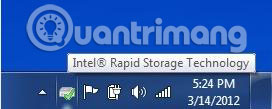
<p>2. Khởi chạy ứng dụng&nbsp;<strong>Intel Rapid Storage Manager</strong>&nbsp;(từ&nbsp;<strong>Start &gt; All programs &gt; Intel &gt; Rapid Storage Manager</strong>&nbsp;hoặc bằng cách bấm đúp vào biểu tượng trông giống như sau:</p>

<p><img alt="Khởi chạy ứng dụng Intel Rapid Storage Manager" data-i="0" data-src="https://st.quantrimang.com/photos/image/2019/06/20/cau-hinh-he-thong-de-dung-smart-response-1.jpg" data-was-processed="true" height="109" src="https://st.quantrimang.com/photos/image/2019/06/20/cau-hinh-he-thong-de-dung-smart-response-1.jpg" width="272" /></p>

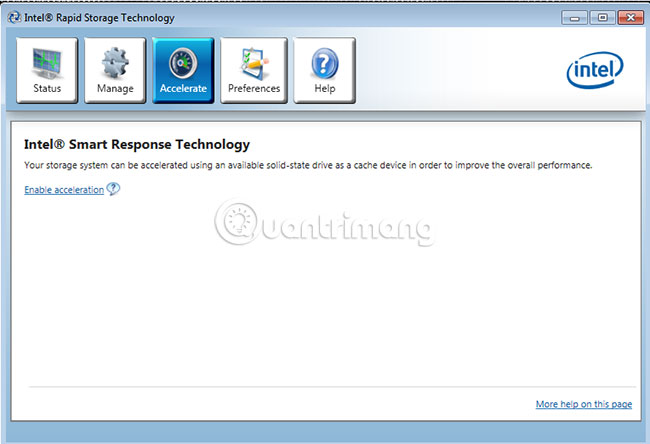
<p>3. Nút&nbsp;<strong>Accelerate</strong>&nbsp;sẽ hiển thị gần đầu cửa sổ ứng dụng&nbsp;<strong>Rapid Storage Technology Manager</strong>. Nhấp vào nút&nbsp;<strong>Accelerate</strong>&nbsp;và một trang có tiêu đề&nbsp;<strong>Intel® Smart Response Technology</strong>&nbsp;sẽ xuất hiện, tương tự như hình dưới đây:</p>

<p><img alt="Trang có tiêu đề Intel® Smart Response Technology sẽ xuất hiện" data-i="1" data-src="https://st.quantrimang.com/photos/image/2019/06/20/cau-hinh-he-thong-de-dung-smart-response-2.jpg" data-was-processed="true" height="376" src="https://st.quantrimang.com/photos/image/2019/06/20/cau-hinh-he-thong-de-dung-smart-response-2.jpg" width="550" /></p>

<p>4. Nhấp vào liên kết&nbsp;<strong>Enable Acceleration</strong>&nbsp;ở giữa cửa sổ Smart Response.</p>

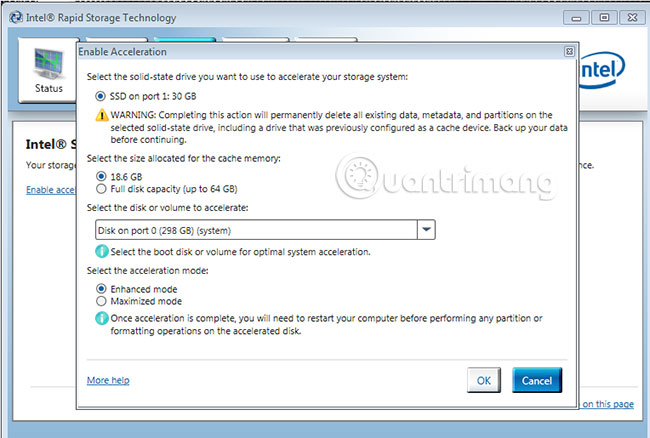
<p>5. Một cửa sổ có tiêu đề&nbsp;<strong>Enable Acceleration</strong>&nbsp;để cấu hình Smart Response sẽ xuất hiện. Một ví dụ về những điều bao gồm trong cửa sổ này trông giống như hình bên dưới:</p>

<p><img alt="Một cửa sổ có tiêu đề Enable Acceleration để cấu hình Smart Response sẽ xuất hiện" data-i="2" data-src="https://st.quantrimang.com/photos/image/2019/06/20/cau-hinh-he-thong-de-dung-smart-response-3.jpg" data-was-processed="true" height="371" src="https://st.quantrimang.com/photos/image/2019/06/20/cau-hinh-he-thong-de-dung-smart-response-3.jpg" width="550" /></p>

<p>6. Làm theo các hướng dẫn trong cửa sổ&nbsp;<strong>Enable Acceleration</strong>&nbsp;để hoàn tất cấu hình Smart Response.</p>

<ul>
	<li><a href="https://quantrimang.com/nen-chon-o-ssd-sata-hay-pcle-159664" title="Nên chọn ổ SSD SATA hay PCIe?">Chọn ổ SSD</a>&nbsp;được sử dụng làm thiết bị cache.</li>
	<li>Chọn kích thước từ SSD sẽ được cấp phát cho bộ nhớ cache. Mọi không gian còn lại trên SSD có thể được sử dụng để lưu trữ dữ liệu. Một ổ đĩa dữ liệu đơn giản có nhãn&nbsp;<strong>Volume_0000</strong>&nbsp;sẽ được tạo tự động.</li>
</ul>

<p><strong>Lưu ý</strong>: Nếu Rapid Start được kích hoạt sau khi bật Smart Response, đừng chọn&nbsp;<strong>Full disk capacity</strong>&nbsp;tại lời nhắc&nbsp;<strong>Select the size allocated for the cache memory</strong>. Thay vào đó, chọn tùy chọn&nbsp;<strong>18.6GB,</strong>&nbsp;sẽ tạo ra một volume&nbsp;<strong>RAID</strong>&nbsp;<strong>0</strong>&nbsp;một ổ đĩa, được gắn nhãn&nbsp;<strong>Volume_0000</strong>&nbsp;từ phần dung lượng còn lại để tạo phân vùng Rapid Start sau này.</p>

<ul>
	<li>Chọn ổ đĩa (hoặc volume RAID) sẽ được tăng tốc. Rất khuyến khích tăng tốc volume hệ thống hoặc ổ đĩa hệ thống để có hiệu suất tối đa.</li>
	<li>Chọn chế độ tăng tốc. Theo mặc định, chế độ&nbsp;<strong>Enhanced</strong>&nbsp;được chọn. Xem phần cách sử dụng Smart Response bên dưới để biết thêm chi tiết về các chế độ&nbsp;<strong>Enhanced</strong>&nbsp;và&nbsp;<strong>Maximized.</strong></li>
</ul>
&nbsp;

<h2 id="mcetoc_1ddq03if12">Cách sử dụng Smart Response</h2>

<p>Khi hệ thống được cấu hình cho Smart Response, nó sẽ tự động bắt đầu sử dụng cache để tăng cường hiệu năng hệ thống, bằng cách lưu trữ dữ liệu được sử dụng thường xuyên trên thiết bị cache, để có thể truy xuất nhanh hơn dữ liệu được lưu trữ trên ổ cứng.</p>

<h3 id="mcetoc_1ddq03if13">Cài đặt ứng dụng Intel Rapid Storage Manager</h3>

<p><strong>Chế độ Enhanced</strong></p>

<p>Việc tăng tốc được tối ưu hóa để bảo vệ dữ liệu. Dữ liệu được ghi vào cache sẽ đồng thời được ghi vào ổ cứng để đảm bảo tính toàn vẹn dữ liệu trong cả cache và ổ cứng, nhưng các hoạt động đọc sẽ được tăng tốc bởi cache.</p>

<p><strong>Chế độ Maximized</strong></p>

<p>Việc tăng tốc được tối ưu hóa cho hiệu suất đầu vào/đầu ra. Dữ liệu được ghi vào cache không phải lúc nào cũng được ghi đồng thời vào ổ cứng. Điều này cải thiện hiệu suất ghi, nhưng cũng có thể xảy ra khả năng dữ liệu trên cache không đồng bộ với ổ cứng nếu xảy ra sự cố tắt máy bất ngờ (chẳng hạn như khi mất điện).</p>

<h3 id="mcetoc_1ddq03if14">Vô hiệu hóa</h3>

<p>Cảnh báo về việc xóa phân vùng Smart Response hoặc xóa thiết bị cache Smart Response SSD:</p>

<p>Việc xóa phân vùng Smart Response không được khuyến khích. Tùy thuộc vào trạng thái của hệ thống và những file nào đã được lưu vào ổ SSD trong quá trình sử dụng, việc xóa phân vùng Smart Response có thể dẫn đến mất dữ liệu vĩnh viễn. Nếu cần phải vô hiệu hóa Smart Response, cách an toàn nhất là thực hiện từ trong ứng dụng Rapid Storage Manager.</p>

<p><strong>Vô hiệu hóa Smart Response trong ứng dụng Rapid Storage</strong></p>

<p>Đây là phương pháp ưa thích để vô hiệu hóa Smart Response.</p>

<p><strong>Xóa mSATA/SSD hoặc HDD</strong></p>

<p>Trước khi xóa HDD hoặc cache khỏi hệ thống, nên tắt tính năng Smart Response trong ứng dụng Rapid Storage Manager, bằng cách nhấp vào liên kết&nbsp;<strong>Disable Acceleration</strong>&nbsp;trên trang trạng thái chính hoặc trong menu&nbsp;<strong>Acceleration.</strong></p>

<p><strong>Sửa chữa cache không thể truy cập</strong></p>

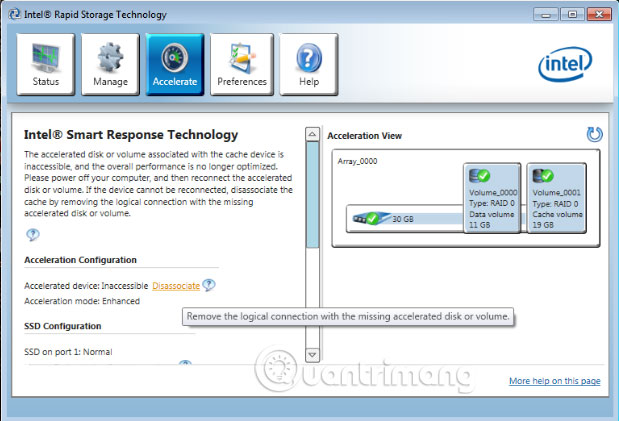
<p>Nếu thiết bị cache mSATA/SSD hoặc HDD được thay thế khi chưa tắt Smart Response (do quá trình sửa chữa ổ cứng hoặc nâng cấp), trạng thái của cache có thể xuất hiện dưới dạng&nbsp;<strong>Inaccessible</strong>&nbsp;(Không thể truy cập):</p>

<p><img alt="Trạng thái của cache có thể là Inaccessible" data-i="3" data-src="https://st.quantrimang.com/photos/image/2019/06/20/cau-hinh-he-thong-de-dung-smart-response-4.jpg" data-was-processed="true" height="285" src="https://st.quantrimang.com/photos/image/2019/06/20/cau-hinh-he-thong-de-dung-smart-response-4.jpg" width="419" /></p>

<p>Trong trường hợp này, trạng thái có thể được khôi phục bằng cách nhấp vào liên kết&nbsp;<strong>Disassociate.</strong></p>

<p><strong>Lưu ý</strong>: Trước khi tách ổ đĩa khỏi cache, hãy đảm bảo dữ liệu người dùng đã được sao lưu.</p>

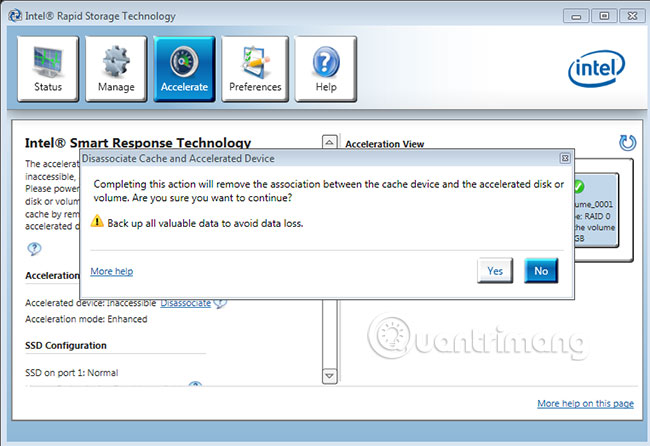
<p>Một thông báo sẽ xuất hiện, nhằm giải thích về rủi ro khi xóa thiết bị cache.</p>

<p><img alt="Thông báo xuất hiện giải thích rủi ro khi xóa cache" data-i="4" data-src="https://st.quantrimang.com/photos/image/2019/06/20/cau-hinh-he-thong-de-dung-smart-response-5.jpg" data-was-processed="true" height="377" src="https://st.quantrimang.com/photos/image/2019/06/20/cau-hinh-he-thong-de-dung-smart-response-5.jpg" width="550" /></p>

<p>Nhấp vào&nbsp;<strong>Yes</strong>&nbsp;sẽ đưa thiết bị cache mSATA hoặc SSD về trạng thái chưa tăng tốc. Tại thời điểm đó, bạn có thể cấu hình lại nó bằng cách làm theo các bước được mô tả trong phần trên.</p>

<p>Chúc bạn thực hiện thành công!</p>
		</div>
				<div id="author">
						<p>
				<strong>Nguồn tin:</strong>
				Quantrimang.com
			</p>
		</div>
	</div>
	<div id="footer" class="clearfix">
		<div id="url">
			<strong>URL của bản tin này: </strong><a href="https://www.nguoicodonvn2008.info/vi/news/savefile/kien-thuc-may-tinh/cach-cau-hinh-lai-he-thong-de-su-dung-smart-response-320.html" title="Cách cấu hình lại hệ thống để sử dụng Smart Response">https://www.nguoicodonvn2008.info/vi/news/savefile/kien-thuc-may-tinh/cach-cau-hinh-lai-he-thong-de-su-dung-smart-response-320.html</a>

		</div>
		<div class="clear"></div>
		<div class="copyright">
			&copy; .&#x3A; Nguoicodonvn2008.info - Cõi lòng người cô đơn &#x3A;.
		</div>
		<div id="contact">
			<a href="mailto:admin@nguoicodonvn2008.info">admin@nguoicodonvn2008.info</a>
		</div>
	</div>
</div>
        <div id="timeoutsess" class="chromeframe">
            Bạn đã không sử dụng Site, <a onclick="timeoutsesscancel();" href="https://nguoicodonvn2008.info/#">Bấm vào đây để duy trì trạng thái đăng nhập</a>. Thời gian chờ: <span id="secField"> 60 </span> giây
        </div>
        <div id="openidResult" class="nv-alert" style="display:none"></div>
        <div id="openidBt" data-result="" data-redirect=""></div>
		</script>
		<div class="car-top">
  <span><img src="https://nguoicodonvn2008.info/themes/default/images/car.png" alt=""></span>
</div>
<script src="https://nguoicodonvn2008.info/assets/js/jquery/jquery.min.js"></script>
<script>var nv_base_siteurl="/",nv_lang_data="vi",nv_lang_interface="vi",nv_name_variable="nv",nv_fc_variable="op",nv_lang_variable="language",nv_module_name="news",nv_func_name="savefile",nv_is_user=0, nv_my_ofs=-4,nv_my_abbr="EDT",nv_cookie_prefix="nv4c_e856T",nv_check_pass_mstime=1738000,nv_area_admin=0,nv_safemode=0,theme_responsive=0,nv_recaptcha_ver=2,nv_recaptcha_sitekey="",nv_recaptcha_type="image",XSSsanitize=1;</script>
<script src="https://nguoicodonvn2008.info/assets/js/language/vi.js"></script>
<script src="https://nguoicodonvn2008.info/assets/js/DOMPurify/purify3.js"></script>
<script src="https://nguoicodonvn2008.info/assets/js/global.js"></script>
<script src="https://nguoicodonvn2008.info/assets/js/site.js"></script>
<script src="https://nguoicodonvn2008.info/themes/default/js/news.js"></script>
<script src="https://nguoicodonvn2008.info/themes/default/js/main.js"></script>
<script src="https://nguoicodonvn2008.info/themes/default/js/custom.js"></script>
<script type="application/ld+json">
        {
            "@context": "https://schema.org",
            "@type": "Organization",
            "url": "https://nguoicodonvn2008.info",
            "logo": "https://nguoicodonvn2008.info/uploads/angel.gif"
        }
        </script>
<script src="https://nguoicodonvn2008.info/themes/default/js/bootstrap.min.js"></script>
<script type="text/javascript">
var $scrolltop = $('.car-top');
$scrolltop.on('click', function () {
    $('html,body').animate({
        scrollTop: 0
    }, 800);
    $(this).addClass("car-run");
    setTimeout(function(){ $scrolltop.removeClass('car-run');}, 1000);
    return false;
});
$(window).on('scroll', function ()
{ 
    if($(window).scrollTop() >= 200)
    {
        $scrolltop.addClass("show");
        $scrolltop.addClass("car-down");
    }
    else
    {
       $scrolltop.removeClass("show");
       setTimeout(function(){ $scrolltop.removeClass('car-down');}, 300);
    }
});
</script>
</body>
</html>