<!DOCTYPE html>
    <html lang="vi" xmlns="http://www.w3.org/1999/xhtml" prefix="og: http://ogp.me/ns#">
    <head>
<title>Cách cài theme Doctor Strange siêu đỉnh trên Windows 10&#x002F;11</title>
<meta name="description" content="Cách cài theme Doctor Strange siêu đỉnh trên Windows 10&#x002F;11 - Savefile - Tin Tức -...">
<meta name="author" content=".: Nguoicodonvn2008.info - Cõi lòng người cô đơn :.">
<meta name="copyright" content=".: Nguoicodonvn2008.info - Cõi lòng người cô đơn :. [admin@nguoicodonvn2008.info]">
<meta name="robots" content="index, archive, follow, noodp">
<meta name="googlebot" content="index,archive,follow,noodp">
<meta name="msnbot" content="all,index,follow">
<meta name="generator" content="NukeViet v4.5">
<meta http-equiv="Content-Type" content="text/html; charset=utf-8">
<meta property="og:title" content="Cách cài theme Doctor Strange siêu đỉnh trên Windows 10&#x002F;11">
<meta property="og:type" content="website">
<meta property="og:description" content="Savefile - Tin Tức - https&#x3A;&#x002F;&#x002F;www.nguoicodonvn2008.info&#x002F;vi&#x002F;news&#x002F;savefile&#x002F;kien-thuc-may-tinh&#x002F;cach-cai-theme-doctor-strange-sieu-dinh-tren-windows-10-11-5607.html">
<meta property="og:site_name" content=".&#x3A; Nguoicodonvn2008.info - Cõi lòng người cô đơn &#x3A;.">
<meta property="og:url" content="https://www.nguoicodonvn2008.info/vi/news/savefile/kien-thuc-may-tinh/cach-cai-theme-doctor-strange-sieu-dinh-tren-windows-10-11-5607.html">
<link rel="shortcut icon" href="https://nguoicodonvn2008.info/favicon.ico">
<link rel="canonical" href="https://www.nguoicodonvn2008.info/vi/news/savefile/kien-thuc-may-tinh/cach-cai-theme-doctor-strange-sieu-dinh-tren-windows-10-11-5607.html">
<link rel="alternate" href="https://nguoicodonvn2008.info/vi/news/rss/" title="Tin Tức" type="application/rss+xml">
<link rel="alternate" href="https://nguoicodonvn2008.info/vi/news/rss/karaoke-dual/" title="Tin Tức - Karaoke Dual" type="application/rss+xml">
<link rel="alternate" href="https://nguoicodonvn2008.info/vi/news/rss/nhac-tre/" title="Tin Tức - Nhạc trẻ" type="application/rss+xml">
<link rel="alternate" href="https://nguoicodonvn2008.info/vi/news/rss/tru-tinh/" title="Tin Tức - Trữ tình" type="application/rss+xml">
<link rel="alternate" href="https://nguoicodonvn2008.info/vi/news/rss/nuoc-ngoai/" title="Tin Tức - Nước ngoài" type="application/rss+xml">
<link rel="alternate" href="https://nguoicodonvn2008.info/vi/news/rss/remix/" title="Tin Tức - Remix" type="application/rss+xml">
<link rel="alternate" href="https://nguoicodonvn2008.info/vi/news/rss/tam-su-tinh-yeu/" title="Tin Tức - Tâm sự tình yêu" type="application/rss+xml">
<link rel="alternate" href="https://nguoicodonvn2008.info/vi/news/rss/tho-suu-tam/" title="Tin Tức - Thơ sưu tầm" type="application/rss+xml">
<link rel="alternate" href="https://nguoicodonvn2008.info/vi/news/rss/cuoc-song/" title="Tin Tức - Cuộc sống" type="application/rss+xml">
<link rel="alternate" href="https://nguoicodonvn2008.info/vi/news/rss/phan-mem/" title="Tin Tức - Phần mềm" type="application/rss+xml">
<link rel="alternate" href="https://nguoicodonvn2008.info/vi/news/rss/kien-thuc-may-tinh/" title="Tin Tức - Kiến thức máy tính" type="application/rss+xml">
<link rel="alternate" href="https://nguoicodonvn2008.info/vi/news/rss/hoc-tap/" title="Tin Tức - Học tập" type="application/rss+xml">
<link rel="alternate" href="https://nguoicodonvn2008.info/vi/news/rss/tai-lieu/" title="Tin Tức - Tài liệu" type="application/rss+xml">
<link rel="alternate" href="https://nguoicodonvn2008.info/vi/news/rss/de-thi/" title="Tin Tức - Đề thi" type="application/rss+xml">
<link rel="preload" as="style" href="https://nguoicodonvn2008.info/assets/css/font-awesome.min.css" type="text/css">
<link rel="preload" as="style" href="https://nguoicodonvn2008.info/themes/default/css/bootstrap.non-responsive.css" type="text/css">
<link rel="preload" as="style" href="https://nguoicodonvn2008.info/themes/default/css/style.css" type="text/css">
<link rel="preload" as="style" href="https://nguoicodonvn2008.info/themes/default/css/style.non-responsive.css" type="text/css">
<link rel="preload" as="style" href="https://nguoicodonvn2008.info/themes/default/css/news.css" type="text/css">
<link rel="preload" as="style" href="https://nguoicodonvn2008.info/themes/default/css/custom.css" type="text/css">
<link rel="preload" as="script" href="https://nguoicodonvn2008.info/assets/js/jquery/jquery.min.js" type="text/javascript">
<link rel="preload" as="script" href="https://nguoicodonvn2008.info/assets/js/language/vi.js" type="text/javascript">
<link rel="preload" as="script" href="https://nguoicodonvn2008.info/assets/js/DOMPurify/purify3.js" type="text/javascript">
<link rel="preload" as="script" href="https://nguoicodonvn2008.info/assets/js/global.js" type="text/javascript">
<link rel="preload" as="script" href="https://nguoicodonvn2008.info/assets/js/site.js" type="text/javascript">
<link rel="preload" as="script" href="https://nguoicodonvn2008.info/themes/default/js/news.js" type="text/javascript">
<link rel="preload" as="script" href="https://nguoicodonvn2008.info/themes/default/js/main.js" type="text/javascript">
<link rel="preload" as="script" href="https://nguoicodonvn2008.info/themes/default/js/custom.js" type="text/javascript">
<link rel="preload" as="script" href="https://nguoicodonvn2008.info/themes/default/js/bootstrap.min.js" type="text/javascript">
<link rel="stylesheet" href="https://nguoicodonvn2008.info/assets/css/font-awesome.min.css">
<link rel="stylesheet" href="https://nguoicodonvn2008.info/themes/default/css/bootstrap.non-responsive.css">
<link rel="stylesheet" href="https://nguoicodonvn2008.info/themes/default/css/style.css">
<link rel="stylesheet" href="https://nguoicodonvn2008.info/themes/default/css/style.non-responsive.css">
<link rel="StyleSheet" href="https://nguoicodonvn2008.info/themes/default/css/news.css">
<link rel="stylesheet" href="https://nguoicodonvn2008.info/themes/default/css/custom.css">
<style type="text/css">
	body{background: #fff;}
</style>
    </head>
    <body>
<div id="print">
	<div id="hd_print">
		<h2 class="pull-left">.&#x3A; Nguoicodonvn2008.info - Cõi lòng người cô đơn &#x3A;.</h2>
		<p class="pull-right"><a title=".&#x3A; Nguoicodonvn2008.info - Cõi lòng người cô đơn &#x3A;." href="https://nguoicodonvn2008.info/">https://nguoicodonvn2008.info</a></p>
	</div>
	<div class="clear"></div>
	<hr />
	<div id="content">
		<h1>Cách cài theme Doctor Strange siêu đỉnh trên Windows 10&#x002F;11</h1>
		<ul class="list-inline">
			<li>Thứ sáu - 13/05/2022 23:24</li>
			<li class="hidden-print txtrequired"><em class="fa fa-print">&nbsp;</em><a title="In ra" href="javascript:;" onclick="window.print()">In ra</a></li>
			<li class="hidden-print txtrequired"><em class="fa fa-power-off">&nbsp;</em><a title="Đóng cửa sổ này" href="javascript:;" onclick="window.close()">Đóng cửa sổ này</a></li>
		</ul>
		<div class="clear"></div>
		<div id="hometext">
		</div>
				<div class="imghome">
			<img alt="Cách cài theme Doctor Strange siêu đỉnh trên Windows 10&#x002F;11" src="https://st.quantrimang.com/photos/image/2022/05/13/cach-cai-theme-doctor-stranger.jpg" width="460" class="img-thumbnail" />
		</div>
		<div class="clear"></div>
		<div id="bodytext" class="clearfix">
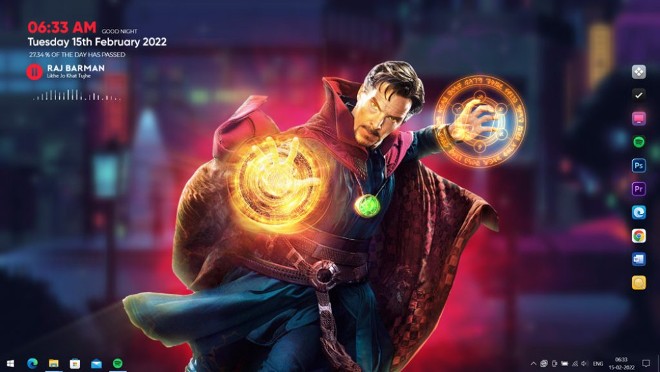
			<p style="text-align: justify;">Chẳng phải nói thì chắc anh em cũng biết bom tấn Doctor Strange 2 đang làm mưa làm gió tại các rạp chiếu phim trên toàn cầu. Mình chưa có thời gian để đi xem mặc dù khá là mê anh phù thủy tối thượng của Marvel. Trong lúc lên lịch hẹn thì mời anh em cùng Quản Trị Mạng cài đặt theme theme Doctor Strange lên máy Windows 10/11 để có động lực thúc đẩy bản thân ra rạp nhé.</p>

<p style="text-align: justify;">Dưới đây là thành quả mà anh em sẽ đạt được sau khi cài xong:</p>

<p style="text-align: justify;"><img alt="Cách cài theme Doctor Stranger trên Windows 10/11" data-i="0" data-src="https://st.quantrimang.com/photos/image/2022/05/13/cach-cai-theme-doctor-stranger.jpg" data-was-processed="true" height="372" src="https://st.quantrimang.com/photos/image/2022/05/13/cach-cai-theme-doctor-stranger.jpg" width="660" /></p>

<h2 style="text-align: justify;">Một số lưu ý trước khi bắt đầu</h2>

<p style="text-align: justify;">Trước khi bắt đầu cài đặt, anh em cần lưu ý mấy vấn đề sau:</p>

<ul>
	<li style="text-align: justify;">Như thường lệ, anh em máy khỏe một chút hãy nghĩ tới việc cài theme. Máy anh em mà dưới hoặc bằng 4GB RAM cài theme vào nó lag không làm gì được.</li>
	<li style="text-align: justify;">Anh em chú ý sao lưu hệ thống trước khi cài đặt theme để có thể dễ dàng khôi phục nếu xảy ra sự cố hoặc nhanh chóng quay trở lại trạng thái trước khi cài đặt. Tham khảo&nbsp;cách sao lưu Windows&nbsp;để biết thêm chi tiết.</li>
	<li style="text-align: justify;">Theme này có thể cài đặt được trên cả Windows 10 và Windows 11.</li>
	<li style="text-align: justify;">Quản Trị Mạng không chịu trách nhiệm nếu máy tính của ạnh em gặp vấn đề gì trong khi cài đặt.</li>
</ul>

<h2 style="text-align: justify;">Các phần mềm và file cần tải về</h2>

<p style="text-align: justify;">Để cài đặt theme, anh em cần tải về một số phần mềm và file theme tùy chỉnh dưới đây:</p>

<ul>
	<li style="text-align: justify;">Lively Wallpaper:&nbsp;<span style="color:rgb(192, 57, 43);"><strong>https://www.microsoft.com/en-us/p/lively-wallpaper/9ntm2qc6qws7</strong></span></li>
	<li style="text-align: justify;">File Theme Doctor Stranger (Tech Rifle):<strong><span style="color:rgb(192, 57, 43);">&nbsp;quantrimang.com/photos/file/2022/05/13/Doctor-Strange-Wallpaper-Theme.zip</span></strong></li>
	<li style="text-align: justify;">Winstep Nexus Dock:&nbsp;<span style="color:rgb(192, 57, 43);"><strong>https://www.winstep.net/nexus.asp</strong></span></li>
	<li style="text-align: justify;">Rainmeter:&nbsp;<span style="color:rgb(192, 57, 43);"><strong>https://www.rainmeter.net/</strong></span></li>
</ul>

<h2 style="text-align: justify;">Cách cài theme Doctor Strange trên Windows 10/11</h2>

<p style="text-align: justify;">Sau khi tải về các phần mềm và file cần thiết, anh em làm theo hướng dẫn trong video dưới đây để cài đặt theme:</p>

<div style="text-align: justify;"><iframe allowfullscreen="" data-src="https://www.youtube.com/embed/-oqXgdlhG_0" data-was-processed="true" frameborder="0" height="360" scrolling="no" src="https://www.youtube.com/embed/-oqXgdlhG_0" width="480"></iframe></div>

<p style="text-align: justify;">Nếu thấy hay, hữu ích, anh em nhớ like, chia sẻ video và sub cho kênh của Quản Trị Mạng nhé!</p>

<p style="text-align: justify;">Chúc anh em cài đặt thành công!</p>
		</div>
				<div id="author">
						<p>
				<strong>Nguồn tin:</strong>
				Quantrimang.com
			</p>
		</div>
	</div>
	<div id="footer" class="clearfix">
		<div id="url">
			<strong>URL của bản tin này: </strong><a href="https://www.nguoicodonvn2008.info/vi/news/savefile/kien-thuc-may-tinh/cach-cai-theme-doctor-strange-sieu-dinh-tren-windows-10-11-5607.html" title="Cách cài theme Doctor Strange siêu đỉnh trên Windows 10&#x002F;11">https://www.nguoicodonvn2008.info/vi/news/savefile/kien-thuc-may-tinh/cach-cai-theme-doctor-strange-sieu-dinh-tren-windows-10-11-5607.html</a>

		</div>
		<div class="clear"></div>
		<div class="copyright">
			&copy; .&#x3A; Nguoicodonvn2008.info - Cõi lòng người cô đơn &#x3A;.
		</div>
		<div id="contact">
			<a href="mailto:admin@nguoicodonvn2008.info">admin@nguoicodonvn2008.info</a>
		</div>
	</div>
</div>
        <div id="timeoutsess" class="chromeframe">
            Bạn đã không sử dụng Site, <a onclick="timeoutsesscancel();" href="https://nguoicodonvn2008.info/#">Bấm vào đây để duy trì trạng thái đăng nhập</a>. Thời gian chờ: <span id="secField"> 60 </span> giây
        </div>
        <div id="openidResult" class="nv-alert" style="display:none"></div>
        <div id="openidBt" data-result="" data-redirect=""></div>
		</script>
		<div class="car-top">
  <span><img src="https://nguoicodonvn2008.info/themes/default/images/car.png" alt=""></span>
</div>
<script src="https://nguoicodonvn2008.info/assets/js/jquery/jquery.min.js"></script>
<script>var nv_base_siteurl="/",nv_lang_data="vi",nv_lang_interface="vi",nv_name_variable="nv",nv_fc_variable="op",nv_lang_variable="language",nv_module_name="news",nv_func_name="savefile",nv_is_user=0, nv_my_ofs=-4,nv_my_abbr="EDT",nv_cookie_prefix="nv4c_e856T",nv_check_pass_mstime=1738000,nv_area_admin=0,nv_safemode=0,theme_responsive=0,nv_recaptcha_ver=2,nv_recaptcha_sitekey="",nv_recaptcha_type="image",XSSsanitize=1;</script>
<script src="https://nguoicodonvn2008.info/assets/js/language/vi.js"></script>
<script src="https://nguoicodonvn2008.info/assets/js/DOMPurify/purify3.js"></script>
<script src="https://nguoicodonvn2008.info/assets/js/global.js"></script>
<script src="https://nguoicodonvn2008.info/assets/js/site.js"></script>
<script src="https://nguoicodonvn2008.info/themes/default/js/news.js"></script>
<script src="https://nguoicodonvn2008.info/themes/default/js/main.js"></script>
<script src="https://nguoicodonvn2008.info/themes/default/js/custom.js"></script>
<script type="application/ld+json">
        {
            "@context": "https://schema.org",
            "@type": "Organization",
            "url": "https://nguoicodonvn2008.info",
            "logo": "https://nguoicodonvn2008.info/uploads/angel.gif"
        }
        </script>
<script src="https://nguoicodonvn2008.info/themes/default/js/bootstrap.min.js"></script>
<script type="text/javascript">
var $scrolltop = $('.car-top');
$scrolltop.on('click', function () {
    $('html,body').animate({
        scrollTop: 0
    }, 800);
    $(this).addClass("car-run");
    setTimeout(function(){ $scrolltop.removeClass('car-run');}, 1000);
    return false;
});
$(window).on('scroll', function ()
{ 
    if($(window).scrollTop() >= 200)
    {
        $scrolltop.addClass("show");
        $scrolltop.addClass("car-down");
    }
    else
    {
       $scrolltop.removeClass("show");
       setTimeout(function(){ $scrolltop.removeClass('car-down');}, 300);
    }
});
</script>
</body>
</html>