<!DOCTYPE html>
    <html lang="vi" xmlns="http://www.w3.org/1999/xhtml" prefix="og: http://ogp.me/ns#">
    <head>
<title>Cách cài Rescue Cut trên máy tính</title>
<meta name="description" content="Cách cài Rescue Cut trên máy tính - Savefile - Tin Tức - https&#x3A;&#x002F;&#x002F;www.nguoicodonvn2008.info&#x002F;vi&#x002F;news&#x002F;savefile&#x002F;kien-thuc-may-tinh&#x002F;cach-cai-rescue-cut-tren-may-tinh-1667.html">
<meta name="author" content=".: Nguoicodonvn2008.info - Cõi lòng người cô đơn :.">
<meta name="copyright" content=".: Nguoicodonvn2008.info - Cõi lòng người cô đơn :. [admin@nguoicodonvn2008.info]">
<meta name="robots" content="index, archive, follow, noodp">
<meta name="googlebot" content="index,archive,follow,noodp">
<meta name="msnbot" content="all,index,follow">
<meta name="generator" content="NukeViet v4.5">
<meta http-equiv="Content-Type" content="text/html; charset=utf-8">
<meta property="og:title" content="Cách cài Rescue Cut trên máy tính">
<meta property="og:type" content="website">
<meta property="og:description" content="Savefile - Tin Tức - https&#x3A;&#x002F;&#x002F;www.nguoicodonvn2008.info&#x002F;vi&#x002F;news&#x002F;savefile&#x002F;kien-thuc-may-tinh&#x002F;cach-cai-rescue-cut-tren-may-tinh-1667.html">
<meta property="og:site_name" content=".&#x3A; Nguoicodonvn2008.info - Cõi lòng người cô đơn &#x3A;.">
<meta property="og:url" content="https://www.nguoicodonvn2008.info/vi/news/savefile/kien-thuc-may-tinh/cach-cai-rescue-cut-tren-may-tinh-1667.html">
<link rel="shortcut icon" href="https://nguoicodonvn2008.info/favicon.ico">
<link rel="canonical" href="https://www.nguoicodonvn2008.info/vi/news/savefile/kien-thuc-may-tinh/cach-cai-rescue-cut-tren-may-tinh-1667.html">
<link rel="alternate" href="https://nguoicodonvn2008.info/vi/news/rss/" title="Tin Tức" type="application/rss+xml">
<link rel="alternate" href="https://nguoicodonvn2008.info/vi/news/rss/karaoke-dual/" title="Tin Tức - Karaoke Dual" type="application/rss+xml">
<link rel="alternate" href="https://nguoicodonvn2008.info/vi/news/rss/nhac-tre/" title="Tin Tức - Nhạc trẻ" type="application/rss+xml">
<link rel="alternate" href="https://nguoicodonvn2008.info/vi/news/rss/tru-tinh/" title="Tin Tức - Trữ tình" type="application/rss+xml">
<link rel="alternate" href="https://nguoicodonvn2008.info/vi/news/rss/nuoc-ngoai/" title="Tin Tức - Nước ngoài" type="application/rss+xml">
<link rel="alternate" href="https://nguoicodonvn2008.info/vi/news/rss/remix/" title="Tin Tức - Remix" type="application/rss+xml">
<link rel="alternate" href="https://nguoicodonvn2008.info/vi/news/rss/tam-su-tinh-yeu/" title="Tin Tức - Tâm sự tình yêu" type="application/rss+xml">
<link rel="alternate" href="https://nguoicodonvn2008.info/vi/news/rss/tho-suu-tam/" title="Tin Tức - Thơ sưu tầm" type="application/rss+xml">
<link rel="alternate" href="https://nguoicodonvn2008.info/vi/news/rss/cuoc-song/" title="Tin Tức - Cuộc sống" type="application/rss+xml">
<link rel="alternate" href="https://nguoicodonvn2008.info/vi/news/rss/phan-mem/" title="Tin Tức - Phần mềm" type="application/rss+xml">
<link rel="alternate" href="https://nguoicodonvn2008.info/vi/news/rss/kien-thuc-may-tinh/" title="Tin Tức - Kiến thức máy tính" type="application/rss+xml">
<link rel="alternate" href="https://nguoicodonvn2008.info/vi/news/rss/hoc-tap/" title="Tin Tức - Học tập" type="application/rss+xml">
<link rel="alternate" href="https://nguoicodonvn2008.info/vi/news/rss/tai-lieu/" title="Tin Tức - Tài liệu" type="application/rss+xml">
<link rel="alternate" href="https://nguoicodonvn2008.info/vi/news/rss/de-thi/" title="Tin Tức - Đề thi" type="application/rss+xml">
<link rel="preload" as="style" href="https://nguoicodonvn2008.info/assets/css/font-awesome.min.css" type="text/css">
<link rel="preload" as="style" href="https://nguoicodonvn2008.info/themes/default/css/bootstrap.non-responsive.css" type="text/css">
<link rel="preload" as="style" href="https://nguoicodonvn2008.info/themes/default/css/style.css" type="text/css">
<link rel="preload" as="style" href="https://nguoicodonvn2008.info/themes/default/css/style.non-responsive.css" type="text/css">
<link rel="preload" as="style" href="https://nguoicodonvn2008.info/themes/default/css/news.css" type="text/css">
<link rel="preload" as="style" href="https://nguoicodonvn2008.info/themes/default/css/custom.css" type="text/css">
<link rel="preload" as="script" href="https://nguoicodonvn2008.info/assets/js/jquery/jquery.min.js" type="text/javascript">
<link rel="preload" as="script" href="https://nguoicodonvn2008.info/assets/js/language/vi.js" type="text/javascript">
<link rel="preload" as="script" href="https://nguoicodonvn2008.info/assets/js/DOMPurify/purify3.js" type="text/javascript">
<link rel="preload" as="script" href="https://nguoicodonvn2008.info/assets/js/global.js" type="text/javascript">
<link rel="preload" as="script" href="https://nguoicodonvn2008.info/assets/js/site.js" type="text/javascript">
<link rel="preload" as="script" href="https://nguoicodonvn2008.info/themes/default/js/news.js" type="text/javascript">
<link rel="preload" as="script" href="https://nguoicodonvn2008.info/themes/default/js/main.js" type="text/javascript">
<link rel="preload" as="script" href="https://nguoicodonvn2008.info/themes/default/js/custom.js" type="text/javascript">
<link rel="preload" as="script" href="https://nguoicodonvn2008.info/themes/default/js/bootstrap.min.js" type="text/javascript">
<link rel="stylesheet" href="https://nguoicodonvn2008.info/assets/css/font-awesome.min.css">
<link rel="stylesheet" href="https://nguoicodonvn2008.info/themes/default/css/bootstrap.non-responsive.css">
<link rel="stylesheet" href="https://nguoicodonvn2008.info/themes/default/css/style.css">
<link rel="stylesheet" href="https://nguoicodonvn2008.info/themes/default/css/style.non-responsive.css">
<link rel="StyleSheet" href="https://nguoicodonvn2008.info/themes/default/css/news.css">
<link rel="stylesheet" href="https://nguoicodonvn2008.info/themes/default/css/custom.css">
<style type="text/css">
	body{background: #fff;}
</style>
    </head>
    <body>
<div id="print">
	<div id="hd_print">
		<h2 class="pull-left">.&#x3A; Nguoicodonvn2008.info - Cõi lòng người cô đơn &#x3A;.</h2>
		<p class="pull-right"><a title=".&#x3A; Nguoicodonvn2008.info - Cõi lòng người cô đơn &#x3A;." href="https://nguoicodonvn2008.info/">https://nguoicodonvn2008.info</a></p>
	</div>
	<div class="clear"></div>
	<hr />
	<div id="content">
		<h1>Cách cài Rescue Cut trên máy tính</h1>
		<ul class="list-inline">
			<li>Thứ năm - 13/02/2020 23:53</li>
			<li class="hidden-print txtrequired"><em class="fa fa-print">&nbsp;</em><a title="In ra" href="javascript:;" onclick="window.print()">In ra</a></li>
			<li class="hidden-print txtrequired"><em class="fa fa-power-off">&nbsp;</em><a title="Đóng cửa sổ này" href="javascript:;" onclick="window.close()">Đóng cửa sổ này</a></li>
		</ul>
		<div class="clear"></div>
		<div id="hometext">
		</div>
				<div class="imghome">
			<img alt="Cách cài Rescue Cut trên máy tính" src="https://st.quantrimang.com/photos/image/2020/02/14/Rescue-Cut-PC-7.jpg" width="460" class="img-thumbnail" />
		</div>
		<div class="clear"></div>
		<div id="bodytext" class="clearfix">
			<p style="text-align: justify;">Rescue Cut&nbsp;có khá nhiều màn chơi mà bạn cần phải vượt qua, và không phải màn chơi nào bạn cũng vượt qua một cách nhanh chóng. Cho nên bạn cần có nhiều thời gian để có thể vượt qua các màn chơi của Rescue Cut.</p>

<p style="text-align: justify;">Mà pin điện thoại của bạn lại không quá khỏe để có thể giúp bạn ngồi chơi suốt buổi với một game &quot;cuốn&quot; như vậy được. Cho nên lúc này bạn sẽ cần một phiên bản Rescue Cut PC.</p>

<p style="text-align: justify;">Cách đơn giản nhất là bạn dùng PC hoặc Laptop của bạn và cài vào đó một trình&nbsp;giả lập Android. Sau đó cài Rescue Cut trên giả lập Android đó mà thôi, nếu chưa sử dụng giả lập android để cài Rescue Cut trên máy tính bạn hãy làm theo các bước hướng dẫn ở đây nhé.</p>

<h2 style="text-align: justify;">Hướng dẫn tải Rescue Cut trên máy tính</h2>

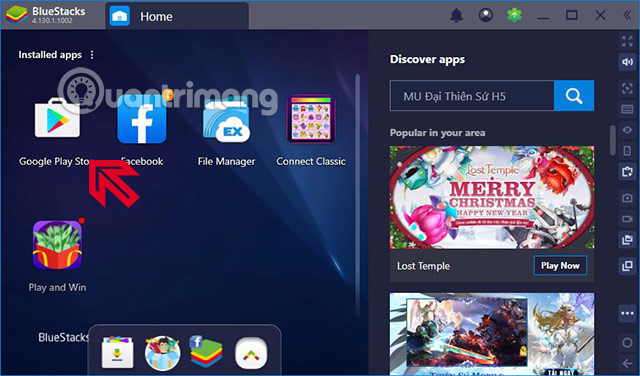
<p style="text-align: justify;"><strong>Bước 1:</strong>&nbsp;Đầu tiên bạn có thể sử dụng bất kỳ phần mềm giả lập Android phổ biến nào như BlueStack, MEmu, NoxPlayer... Miễn là máy bạn phải hỗ trợ&nbsp;ảo hóa VT. Khởi động giả lập lên và chọn&nbsp;Google Play Store.</p>

<p style="text-align: justify;"><img alt="rescue cut pc" data-i="0" data-src="https://st.quantrimang.com/photos/image/2020/02/14/Rescue-Cut-PC-1.jpg" data-was-processed="true" height="376" src="https://st.quantrimang.com/photos/image/2020/02/14/Rescue-Cut-PC-1.jpg" width="640" /></p>

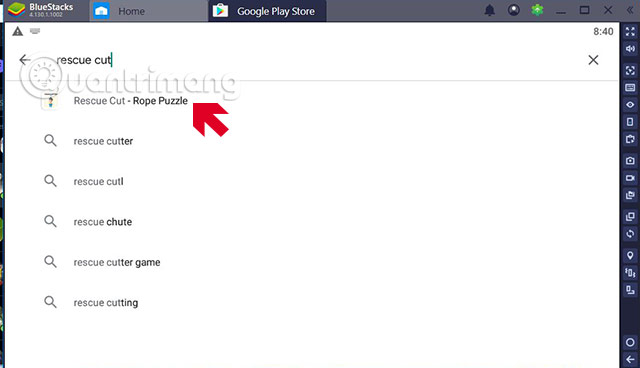
<p style="text-align: justify;"><strong>Bước 2:</strong>&nbsp;Trong giao diện chính bạn hãy bấm vào thanh tìm kiếm ứng dụng và gõ vào đó từ khóa Rescue Cut. Rồi bấm vào kết quả tìm kiếm như ở dưới hình.</p>

<p style="text-align: justify;">&nbsp;</p>

<p style="text-align: justify;">&nbsp;</p>

<p style="text-align: justify;"><img alt="tải rescue cut máy tính" data-i="1" data-src="https://st.quantrimang.com/photos/image/2020/02/14/Rescue-Cut-PC-3.jpg" data-was-processed="true" height="368" src="https://st.quantrimang.com/photos/image/2020/02/14/Rescue-Cut-PC-3.jpg" width="640" /></p>

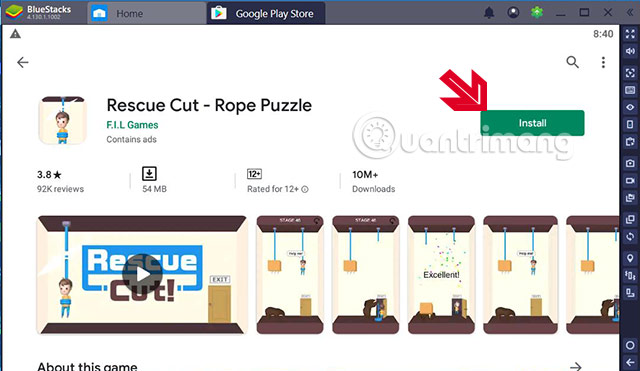
<p style="text-align: justify;">Nếu đúng là app Rescue Cut - Rope Puzzle như ở dưới hãy bấm&nbsp;<strong>Install</strong>.</p>

<p style="text-align: justify;"><img alt="tai rescue cut may tinh" data-i="2" data-src="https://st.quantrimang.com/photos/image/2020/02/14/Rescue-Cut-PC-4.jpg" data-was-processed="true" height="371" src="https://st.quantrimang.com/photos/image/2020/02/14/Rescue-Cut-PC-4.jpg" width="640" /></p>

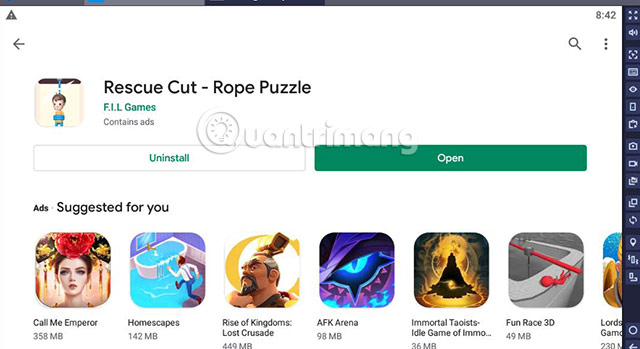
<p style="text-align: justify;">Đợi một lúc để game tải về và cài đặt, sau đó bấm&nbsp;<strong>Open</strong>.</p>

<p style="text-align: justify;"><img alt="rescue cut rope puzzle pc" data-i="3" data-src="https://st.quantrimang.com/photos/image/2020/02/14/Rescue-Cut-PC-5.jpg" data-was-processed="true" height="349" src="https://st.quantrimang.com/photos/image/2020/02/14/Rescue-Cut-PC-5.jpg" width="640" /></p>

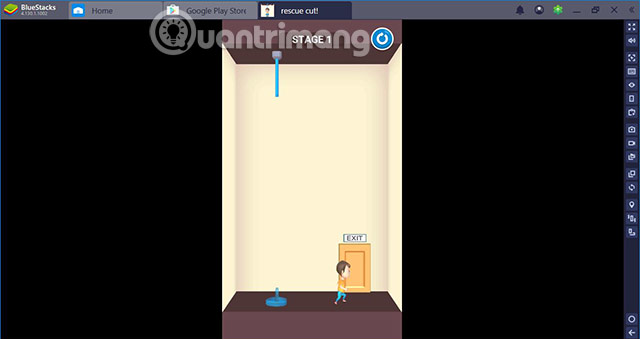
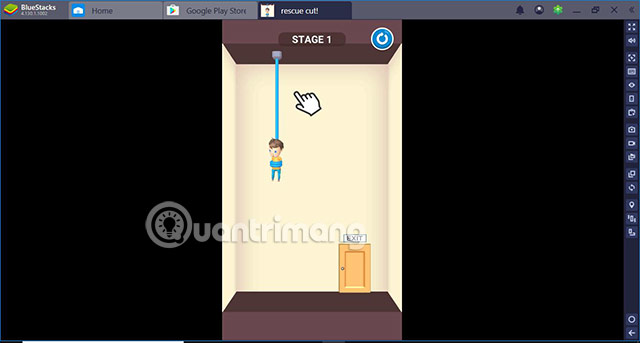
<p style="text-align: justify;">Ở phiên bản Rescue Cut trên giả lập Android này, bạn cần sử dụng chuột để cắt dây cứu nhân vật của chúng ta.</p>

<p style="text-align: justify;"><img alt="rescue cut rope puzzle cho máy tính" data-i="4" data-src="https://st.quantrimang.com/photos/image/2020/02/14/Rescue-Cut-PC-6.jpg" data-was-processed="true" height="343" src="https://st.quantrimang.com/photos/image/2020/02/14/Rescue-Cut-PC-6.jpg" width="640" /></p>

<p style="text-align: justify;">So với phiên bản trên di động thì Rescue Cut PC sẽ không mượt bằng dù game rất nhẹ. Cho nên nếu mở nhiều phần mềm cùng lúc khi chơi Rescue Cut thì game sẽ hơi giật.</p>

<p style="text-align: justify;"><img alt="rescue cut rope puzzle cho PC" data-i="5" data-src="https://st.quantrimang.com/photos/image/2020/02/14/Rescue-Cut-PC-7.jpg" data-was-processed="true" height="339" src="https://st.quantrimang.com/photos/image/2020/02/14/Rescue-Cut-PC-7.jpg" width="640" /></p>

<p style="text-align: justify;">Với phiên bản Rescue Cut trên máy tính thì bạn sẽ có nhiều thời gian hơn so với trên mobile. Bạn sẽ không bị gián đoạn bởi thời lượng pin, và cũng đừng vừa sạc vừa chơi nhé.</p>
		</div>
				<div id="author">
						<p>
				<strong>Nguồn tin:</strong>
				Quantrimang.com
			</p>
		</div>
	</div>
	<div id="footer" class="clearfix">
		<div id="url">
			<strong>URL của bản tin này: </strong><a href="https://www.nguoicodonvn2008.info/vi/news/savefile/kien-thuc-may-tinh/cach-cai-rescue-cut-tren-may-tinh-1667.html" title="Cách cài Rescue Cut trên máy tính">https://www.nguoicodonvn2008.info/vi/news/savefile/kien-thuc-may-tinh/cach-cai-rescue-cut-tren-may-tinh-1667.html</a>

		</div>
		<div class="clear"></div>
		<div class="copyright">
			&copy; .&#x3A; Nguoicodonvn2008.info - Cõi lòng người cô đơn &#x3A;.
		</div>
		<div id="contact">
			<a href="mailto:admin@nguoicodonvn2008.info">admin@nguoicodonvn2008.info</a>
		</div>
	</div>
</div>
        <div id="timeoutsess" class="chromeframe">
            Bạn đã không sử dụng Site, <a onclick="timeoutsesscancel();" href="https://nguoicodonvn2008.info/#">Bấm vào đây để duy trì trạng thái đăng nhập</a>. Thời gian chờ: <span id="secField"> 60 </span> giây
        </div>
        <div id="openidResult" class="nv-alert" style="display:none"></div>
        <div id="openidBt" data-result="" data-redirect=""></div>
		</script>
		<div class="car-top">
  <span><img src="https://nguoicodonvn2008.info/themes/default/images/car.png" alt=""></span>
</div>
<script src="https://nguoicodonvn2008.info/assets/js/jquery/jquery.min.js"></script>
<script>var nv_base_siteurl="/",nv_lang_data="vi",nv_lang_interface="vi",nv_name_variable="nv",nv_fc_variable="op",nv_lang_variable="language",nv_module_name="news",nv_func_name="savefile",nv_is_user=0, nv_my_ofs=-4,nv_my_abbr="EDT",nv_cookie_prefix="nv4c_e856T",nv_check_pass_mstime=1738000,nv_area_admin=0,nv_safemode=0,theme_responsive=0,nv_recaptcha_ver=2,nv_recaptcha_sitekey="",nv_recaptcha_type="image",XSSsanitize=1;</script>
<script src="https://nguoicodonvn2008.info/assets/js/language/vi.js"></script>
<script src="https://nguoicodonvn2008.info/assets/js/DOMPurify/purify3.js"></script>
<script src="https://nguoicodonvn2008.info/assets/js/global.js"></script>
<script src="https://nguoicodonvn2008.info/assets/js/site.js"></script>
<script src="https://nguoicodonvn2008.info/themes/default/js/news.js"></script>
<script src="https://nguoicodonvn2008.info/themes/default/js/main.js"></script>
<script src="https://nguoicodonvn2008.info/themes/default/js/custom.js"></script>
<script type="application/ld+json">
        {
            "@context": "https://schema.org",
            "@type": "Organization",
            "url": "https://nguoicodonvn2008.info",
            "logo": "https://nguoicodonvn2008.info/uploads/angel.gif"
        }
        </script>
<script src="https://nguoicodonvn2008.info/themes/default/js/bootstrap.min.js"></script>
<script type="text/javascript">
var $scrolltop = $('.car-top');
$scrolltop.on('click', function () {
    $('html,body').animate({
        scrollTop: 0
    }, 800);
    $(this).addClass("car-run");
    setTimeout(function(){ $scrolltop.removeClass('car-run');}, 1000);
    return false;
});
$(window).on('scroll', function ()
{ 
    if($(window).scrollTop() >= 200)
    {
        $scrolltop.addClass("show");
        $scrolltop.addClass("car-down");
    }
    else
    {
       $scrolltop.removeClass("show");
       setTimeout(function(){ $scrolltop.removeClass('car-down');}, 300);
    }
});
</script>
</body>
</html>