<!DOCTYPE html>
    <html lang="vi" xmlns="http://www.w3.org/1999/xhtml" prefix="og: http://ogp.me/ns#">
    <head>
<title>Cách cài Edge trên Windows 7, duyệt web nhanh, nhẹ, đẹp mắt</title>
<meta name="description" content="Cách cài Edge trên Windows 7, duyệt web nhanh, nhẹ, đẹp mắt - Savefile - Tin Tức -...">
<meta name="author" content=".: Nguoicodonvn2008.info - Cõi lòng người cô đơn :.">
<meta name="copyright" content=".: Nguoicodonvn2008.info - Cõi lòng người cô đơn :. [admin@nguoicodonvn2008.info]">
<meta name="robots" content="index, archive, follow, noodp">
<meta name="googlebot" content="index,archive,follow,noodp">
<meta name="msnbot" content="all,index,follow">
<meta name="generator" content="NukeViet v4.5">
<meta http-equiv="Content-Type" content="text/html; charset=utf-8">
<meta property="og:title" content="Cách cài Edge trên Windows 7, duyệt web nhanh, nhẹ, đẹp mắt">
<meta property="og:type" content="website">
<meta property="og:description" content="Savefile - Tin Tức - https&#x3A;&#x002F;&#x002F;www.nguoicodonvn2008.info&#x002F;vi&#x002F;news&#x002F;savefile&#x002F;kien-thuc-may-tinh&#x002F;cach-cai-edge-tren-windows-7-duyet-web-nhanh-nhe-dep-mat-3900.html">
<meta property="og:site_name" content=".&#x3A; Nguoicodonvn2008.info - Cõi lòng người cô đơn &#x3A;.">
<meta property="og:url" content="https://www.nguoicodonvn2008.info/vi/news/savefile/kien-thuc-may-tinh/cach-cai-edge-tren-windows-7-duyet-web-nhanh-nhe-dep-mat-3900.html">
<link rel="shortcut icon" href="https://nguoicodonvn2008.info/favicon.ico">
<link rel="canonical" href="https://www.nguoicodonvn2008.info/vi/news/savefile/kien-thuc-may-tinh/cach-cai-edge-tren-windows-7-duyet-web-nhanh-nhe-dep-mat-3900.html">
<link rel="alternate" href="https://nguoicodonvn2008.info/vi/news/rss/" title="Tin Tức" type="application/rss+xml">
<link rel="alternate" href="https://nguoicodonvn2008.info/vi/news/rss/karaoke-dual/" title="Tin Tức - Karaoke Dual" type="application/rss+xml">
<link rel="alternate" href="https://nguoicodonvn2008.info/vi/news/rss/nhac-tre/" title="Tin Tức - Nhạc trẻ" type="application/rss+xml">
<link rel="alternate" href="https://nguoicodonvn2008.info/vi/news/rss/tru-tinh/" title="Tin Tức - Trữ tình" type="application/rss+xml">
<link rel="alternate" href="https://nguoicodonvn2008.info/vi/news/rss/nuoc-ngoai/" title="Tin Tức - Nước ngoài" type="application/rss+xml">
<link rel="alternate" href="https://nguoicodonvn2008.info/vi/news/rss/remix/" title="Tin Tức - Remix" type="application/rss+xml">
<link rel="alternate" href="https://nguoicodonvn2008.info/vi/news/rss/tam-su-tinh-yeu/" title="Tin Tức - Tâm sự tình yêu" type="application/rss+xml">
<link rel="alternate" href="https://nguoicodonvn2008.info/vi/news/rss/tho-suu-tam/" title="Tin Tức - Thơ sưu tầm" type="application/rss+xml">
<link rel="alternate" href="https://nguoicodonvn2008.info/vi/news/rss/cuoc-song/" title="Tin Tức - Cuộc sống" type="application/rss+xml">
<link rel="alternate" href="https://nguoicodonvn2008.info/vi/news/rss/phan-mem/" title="Tin Tức - Phần mềm" type="application/rss+xml">
<link rel="alternate" href="https://nguoicodonvn2008.info/vi/news/rss/kien-thuc-may-tinh/" title="Tin Tức - Kiến thức máy tính" type="application/rss+xml">
<link rel="alternate" href="https://nguoicodonvn2008.info/vi/news/rss/hoc-tap/" title="Tin Tức - Học tập" type="application/rss+xml">
<link rel="alternate" href="https://nguoicodonvn2008.info/vi/news/rss/tai-lieu/" title="Tin Tức - Tài liệu" type="application/rss+xml">
<link rel="alternate" href="https://nguoicodonvn2008.info/vi/news/rss/de-thi/" title="Tin Tức - Đề thi" type="application/rss+xml">
<link rel="preload" as="style" href="https://nguoicodonvn2008.info/assets/css/font-awesome.min.css" type="text/css">
<link rel="preload" as="style" href="https://nguoicodonvn2008.info/themes/default/css/bootstrap.non-responsive.css" type="text/css">
<link rel="preload" as="style" href="https://nguoicodonvn2008.info/themes/default/css/style.css" type="text/css">
<link rel="preload" as="style" href="https://nguoicodonvn2008.info/themes/default/css/style.non-responsive.css" type="text/css">
<link rel="preload" as="style" href="https://nguoicodonvn2008.info/themes/default/css/news.css" type="text/css">
<link rel="preload" as="style" href="https://nguoicodonvn2008.info/themes/default/css/custom.css" type="text/css">
<link rel="preload" as="script" href="https://nguoicodonvn2008.info/assets/js/jquery/jquery.min.js" type="text/javascript">
<link rel="preload" as="script" href="https://nguoicodonvn2008.info/assets/js/language/vi.js" type="text/javascript">
<link rel="preload" as="script" href="https://nguoicodonvn2008.info/assets/js/DOMPurify/purify3.js" type="text/javascript">
<link rel="preload" as="script" href="https://nguoicodonvn2008.info/assets/js/global.js" type="text/javascript">
<link rel="preload" as="script" href="https://nguoicodonvn2008.info/assets/js/site.js" type="text/javascript">
<link rel="preload" as="script" href="https://nguoicodonvn2008.info/themes/default/js/news.js" type="text/javascript">
<link rel="preload" as="script" href="https://nguoicodonvn2008.info/themes/default/js/main.js" type="text/javascript">
<link rel="preload" as="script" href="https://nguoicodonvn2008.info/themes/default/js/custom.js" type="text/javascript">
<link rel="preload" as="script" href="https://nguoicodonvn2008.info/themes/default/js/bootstrap.min.js" type="text/javascript">
<link rel="stylesheet" href="https://nguoicodonvn2008.info/assets/css/font-awesome.min.css">
<link rel="stylesheet" href="https://nguoicodonvn2008.info/themes/default/css/bootstrap.non-responsive.css">
<link rel="stylesheet" href="https://nguoicodonvn2008.info/themes/default/css/style.css">
<link rel="stylesheet" href="https://nguoicodonvn2008.info/themes/default/css/style.non-responsive.css">
<link rel="StyleSheet" href="https://nguoicodonvn2008.info/themes/default/css/news.css">
<link rel="stylesheet" href="https://nguoicodonvn2008.info/themes/default/css/custom.css">
<style type="text/css">
	body{background: #fff;}
</style>
    </head>
    <body>
<div id="print">
	<div id="hd_print">
		<h2 class="pull-left">.&#x3A; Nguoicodonvn2008.info - Cõi lòng người cô đơn &#x3A;.</h2>
		<p class="pull-right"><a title=".&#x3A; Nguoicodonvn2008.info - Cõi lòng người cô đơn &#x3A;." href="https://nguoicodonvn2008.info/">https://nguoicodonvn2008.info</a></p>
	</div>
	<div class="clear"></div>
	<hr />
	<div id="content">
		<h1>Cách cài Edge trên Windows 7, duyệt web nhanh, nhẹ, đẹp mắt</h1>
		<ul class="list-inline">
			<li>Thứ tư - 07/04/2021 00:54</li>
			<li class="hidden-print txtrequired"><em class="fa fa-print">&nbsp;</em><a title="In ra" href="javascript:;" onclick="window.print()">In ra</a></li>
			<li class="hidden-print txtrequired"><em class="fa fa-power-off">&nbsp;</em><a title="Đóng cửa sổ này" href="javascript:;" onclick="window.close()">Đóng cửa sổ này</a></li>
		</ul>
		<div class="clear"></div>
		<div id="hometext">
		</div>
				<div class="imghome">
			<img alt="Cách cài Edge trên Windows 7, duyệt web nhanh, nhẹ, đẹp mắt" src="https://st.quantrimang.com/photos/image/2021/04/02/cai-edge-tren-win-7-3.jpg" width="460" class="img-thumbnail" />
		</div>
		<div class="clear"></div>
		<div id="bodytext" class="clearfix">
			<p style="text-align: justify;">Có rất nhiều lý do để thích Microsoft Edge. Thêm vào đó,&nbsp;Google Chrome hiện đang tiêu tốn quá nhiều tài nguyên hệ thống. Vậy tại sao bạn không suy nghĩ về việc thay đổi trình duyệt mặc định của mình nhỉ? Hiện tại, bạn đã có thể tải xuống và sử dụng Microsoft Edge trên hệ thống máy tính Windows 7.</p>

<p style="text-align: justify;">Vậy còn chần chừ gì nữa, hãy bắt đầu với cách bạn có thể tải xuống và thiết lập Microsoft Edge trên máy tính Windows 7 ngay bây giờ nhé!<br />
<br />
Sử dụng Microsoft Edge trên Windows 7</p>

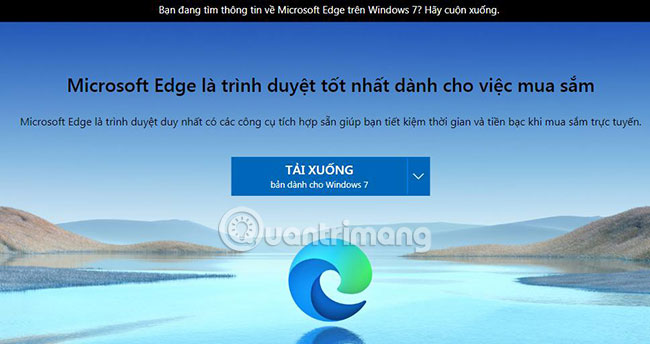
<p style="text-align: justify;"><strong>Bước 1</strong>: Trên máy tính chạy Windows 7, mở Online Explorer hoặc bất kỳ trình duyệt Internet nào khác và&nbsp;tải Microsoft Edge cho Win 7:<strong>&nbsp;<span style="color:rgb(192, 57, 43);">https://www.microsoft.com/vi-vn/edge</span></strong></p>

<figure>
<div style="text-align: justify;"><img alt="Tải Microsoft Edge cho Win 7" data-i="0" data-src="https://st.quantrimang.com/photos/image/2021/04/02/cai-edge-tren-win-7-1.jpg" data-was-processed="true" height="344" src="https://st.quantrimang.com/photos/image/2021/04/02/cai-edge-tren-win-7-1.jpg" width="650" /></div>

<figcaption>
<div style="text-align: justify;">Tải Microsoft Edge cho Win 7</div>
</figcaption>
</figure>

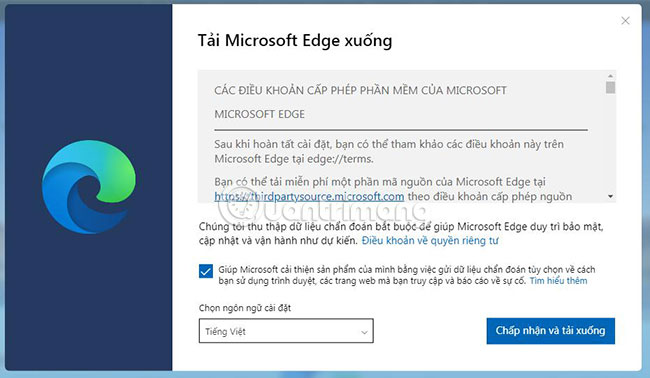
<p style="text-align: justify;"><strong>Bước 2</strong>: Bây giờ, bạn sẽ phải nhấp vào nút&nbsp;<strong>“Chấp nhận và tải xuống”</strong>&nbsp;để tiếp tục quá trình tải Microsoft Edge về máy tính.</p>

<figure>
<div style="text-align: justify;"><img alt="Nhấp vào nút “Chấp nhận và tải xuống”" data-i="1" data-src="https://st.quantrimang.com/photos/image/2021/04/02/cai-edge-tren-win-7-2.jpg" data-was-processed="true" height="378" src="https://st.quantrimang.com/photos/image/2021/04/02/cai-edge-tren-win-7-2.jpg" width="650" /></div>

<figcaption>
<div style="text-align: justify;">Nhấp vào nút “Chấp nhận và tải xuống”</div>
</figcaption>
</figure>

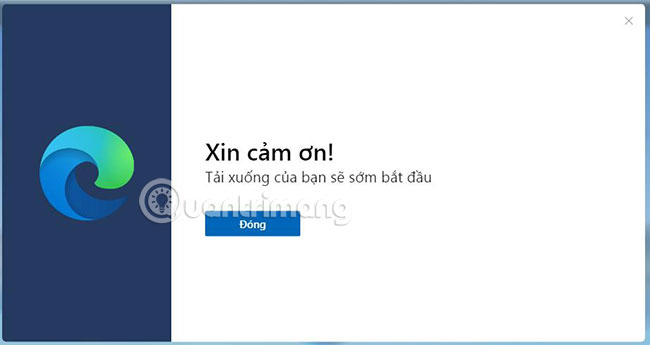
<p style="text-align: justify;"><strong>Bước 3</strong>: Bạn sẽ thấy thông báo&nbsp;<strong>“Xin cảm ơn”</strong>&nbsp;như hình bên dưới. Nhấp vào&nbsp;<strong>“Đóng”</strong>&nbsp;để bắt đầu quá trình tải xuống.</p>

<figure>
<div style="text-align: justify;"><img alt="Nhấp vào “Đóng” để bắt đầu quá trình tải xuống" data-i="2" data-src="https://st.quantrimang.com/photos/image/2021/04/02/cai-edge-tren-win-7-3.jpg" data-was-processed="true" height="345" src="https://st.quantrimang.com/photos/image/2021/04/02/cai-edge-tren-win-7-3.jpg" width="650" /></div>

<figcaption>
<div style="text-align: justify;">Nhấp vào “Đóng” để bắt đầu quá trình tải xuống</div>
</figcaption>
</figure>

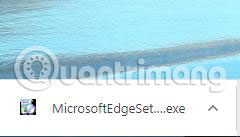
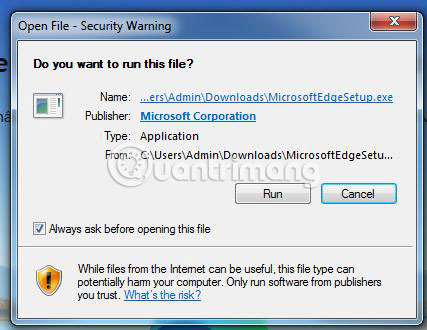
<p style="text-align: justify;"><strong>Bước 4</strong>: Mở thư mục tải xuống mặc định trên máy tính cá nhân của bạn và định vị file có tên&nbsp;<strong>“MicrosoftEdgeSetup.exe”.</strong></p>

<figure>
<div style="text-align: justify;"><img alt="Nhấp đúp vào file MicrosoftEdgeSetup.exe" data-i="3" data-src="https://st.quantrimang.com/photos/image/2021/04/02/cai-edge-tren-win-7-4.jpg" data-was-processed="true" height="137" src="https://st.quantrimang.com/photos/image/2021/04/02/cai-edge-tren-win-7-4.jpg" width="240" /></div>

<figcaption>
<div style="text-align: justify;">Nhấp đúp vào file MicrosoftEdgeSetup.exe</div>
</figcaption>
</figure>

<p style="text-align: justify;">Chỉ cần nhấp đúp vào file này như thường lệ để bắt đầu trình cài đặt.</p>

<figure>
<div style="text-align: justify;"><img alt="Cài đặt như thường lệ" data-i="4" data-src="https://st.quantrimang.com/photos/image/2021/04/02/cai-edge-tren-win-7-5.jpg" data-was-processed="true" height="330" src="https://st.quantrimang.com/photos/image/2021/04/02/cai-edge-tren-win-7-5.jpg" width="427" /></div>

<figcaption>
<div style="text-align: justify;">Cài đặt như thường lệ</div>
</figcaption>
</figure>

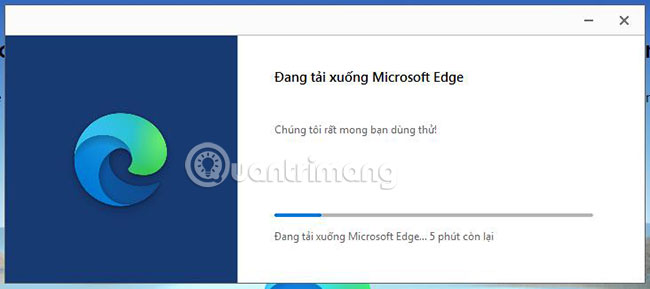
<p style="text-align: justify;"><strong>Bước 5</strong>: Quá trình tải xuống và thiết lập sẽ hiển thị thời gian chờ còn lại.</p>

<figure>
<div style="text-align: justify;"><img alt="Quá trình tải xuống đang diễn ra" data-i="5" data-src="https://st.quantrimang.com/photos/image/2021/04/02/cai-edge-tren-win-7-6.jpg" data-was-processed="true" height="289" src="https://st.quantrimang.com/photos/image/2021/04/02/cai-edge-tren-win-7-6.jpg" width="650" /></div>

<figcaption>
<div style="text-align: justify;">Quá trình tải xuống đang diễn ra</div>
</figcaption>
</figure>

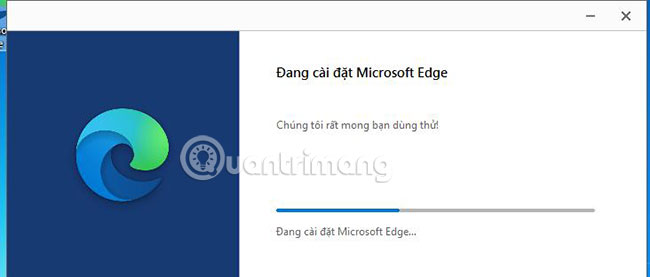
<p style="text-align: justify;">Bạn có thể theo dõi từng bước trong cửa sổ trình tải xuống.</p>

<figure>
<div style="text-align: justify;"><img alt="Quá trình cài đặt đang diễn ra" data-i="6" data-src="https://st.quantrimang.com/photos/image/2021/04/02/cai-edge-tren-win-7-7.jpg" data-was-processed="true" height="277" src="https://st.quantrimang.com/photos/image/2021/04/02/cai-edge-tren-win-7-7.jpg" width="650" /></div>

<figcaption>
<div style="text-align: justify;">Quá trình cài đặt đang diễn ra</div>
</figcaption>
</figure>

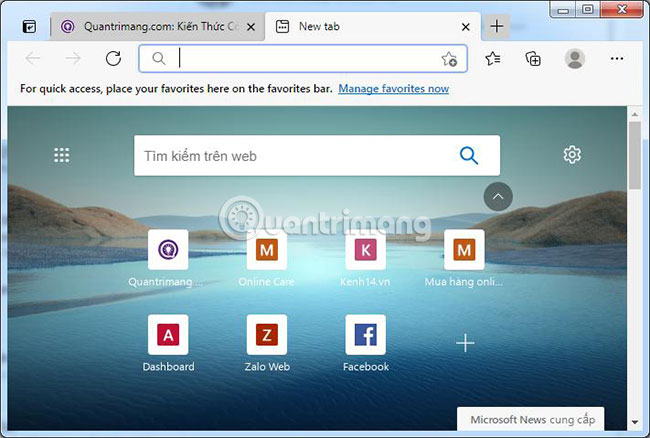
<p style="text-align: justify;"><strong>Bước 6</strong>: Ngay sau khi cài đặt xong, Microsoft Edge sẽ mở.</p>

<figure>
<div style="text-align: justify;"><img alt="Microsoft Edge sẽ mở sau khi cài đặt xong" data-i="7" data-src="https://st.quantrimang.com/photos/image/2021/04/02/cai-edge-tren-win-7-8.jpg" data-was-processed="true" height="438" src="https://st.quantrimang.com/photos/image/2021/04/02/cai-edge-tren-win-7-8.jpg" width="650" /></div>

<figcaption>
<div style="text-align: justify;">Microsoft Edge sẽ mở sau khi cài đặt xong</div>
</figcaption>
</figure>

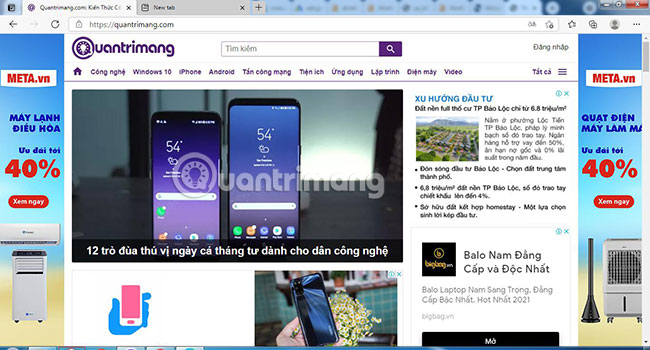
<p style="text-align: justify;"><strong>Bước 7</strong>: Bạn phải thực hiện các bước đầu tiên để thiết lập Microsoft Edge và bạn có các lựa chọn để nhập bookmark và các cài đặt khác từ trình duyệt cũ, quyết định cấu trúc tab mới và cuối cùng là đăng nhập vào tài khoản Microsoft để tất cả các cấu hình được đồng bộ và bạn có thể sử dụng liền mạch Microsoft Edge trên các máy tính cá nhân khác (điều này là tùy chọn).</p>

<p style="text-align: justify;"><strong>Bước 9</strong>: Giờ đây, bạn có thể sử dụng trình duyệt web Microsoft Edge cho tất cả các yêu cầu duyệt Internet hàng ngày của mình.</p>

<figure>
<div style="text-align: justify;"><img alt="Sử dụng trình duyệt web Microsoft Edge" data-i="8" data-src="https://st.quantrimang.com/photos/image/2021/04/02/cai-edge-tren-win-7-9.jpg" data-was-processed="true" height="350" src="https://st.quantrimang.com/photos/image/2021/04/02/cai-edge-tren-win-7-9.jpg" width="650" /></div>

<figcaption>
<div style="text-align: justify;">Sử dụng trình duyệt web Microsoft Edge</div>
</figcaption>
</figure>

<p style="text-align: justify;">Bạn có thể làm phong phú thêm các chức năng của Microsoft Edge bằng cách tải xuống các tiện ích mở rộng mới từ Microsoft Keep và cả từ Chrome Internet Keep, giống như bạn có thể làm trên Google Chrome.</p>

<p style="text-align: justify;">Đó là tất cả những gì bạn cần làm để tải xuống và thiết lập Microsoft Edge trên Windows 7!</p>

<p style="text-align: justify;">Chúc bạn thực hiện thành công!</p>
		</div>
				<div id="author">
						<p>
				<strong>Nguồn tin:</strong>
				Quantrimang.com
			</p>
		</div>
	</div>
	<div id="footer" class="clearfix">
		<div id="url">
			<strong>URL của bản tin này: </strong><a href="https://www.nguoicodonvn2008.info/vi/news/savefile/kien-thuc-may-tinh/cach-cai-edge-tren-windows-7-duyet-web-nhanh-nhe-dep-mat-3900.html" title="Cách cài Edge trên Windows 7, duyệt web nhanh, nhẹ, đẹp mắt">https://www.nguoicodonvn2008.info/vi/news/savefile/kien-thuc-may-tinh/cach-cai-edge-tren-windows-7-duyet-web-nhanh-nhe-dep-mat-3900.html</a>

		</div>
		<div class="clear"></div>
		<div class="copyright">
			&copy; .&#x3A; Nguoicodonvn2008.info - Cõi lòng người cô đơn &#x3A;.
		</div>
		<div id="contact">
			<a href="mailto:admin@nguoicodonvn2008.info">admin@nguoicodonvn2008.info</a>
		</div>
	</div>
</div>
        <div id="timeoutsess" class="chromeframe">
            Bạn đã không sử dụng Site, <a onclick="timeoutsesscancel();" href="https://nguoicodonvn2008.info/#">Bấm vào đây để duy trì trạng thái đăng nhập</a>. Thời gian chờ: <span id="secField"> 60 </span> giây
        </div>
        <div id="openidResult" class="nv-alert" style="display:none"></div>
        <div id="openidBt" data-result="" data-redirect=""></div>
		</script>
		<div class="car-top">
  <span><img src="https://nguoicodonvn2008.info/themes/default/images/car.png" alt=""></span>
</div>
<script src="https://nguoicodonvn2008.info/assets/js/jquery/jquery.min.js"></script>
<script>var nv_base_siteurl="/",nv_lang_data="vi",nv_lang_interface="vi",nv_name_variable="nv",nv_fc_variable="op",nv_lang_variable="language",nv_module_name="news",nv_func_name="savefile",nv_is_user=0, nv_my_ofs=-4,nv_my_abbr="EDT",nv_cookie_prefix="nv4c_e856T",nv_check_pass_mstime=1738000,nv_area_admin=0,nv_safemode=0,theme_responsive=0,nv_recaptcha_ver=2,nv_recaptcha_sitekey="",nv_recaptcha_type="image",XSSsanitize=1;</script>
<script src="https://nguoicodonvn2008.info/assets/js/language/vi.js"></script>
<script src="https://nguoicodonvn2008.info/assets/js/DOMPurify/purify3.js"></script>
<script src="https://nguoicodonvn2008.info/assets/js/global.js"></script>
<script src="https://nguoicodonvn2008.info/assets/js/site.js"></script>
<script src="https://nguoicodonvn2008.info/themes/default/js/news.js"></script>
<script src="https://nguoicodonvn2008.info/themes/default/js/main.js"></script>
<script src="https://nguoicodonvn2008.info/themes/default/js/custom.js"></script>
<script type="application/ld+json">
        {
            "@context": "https://schema.org",
            "@type": "Organization",
            "url": "https://nguoicodonvn2008.info",
            "logo": "https://nguoicodonvn2008.info/uploads/angel.gif"
        }
        </script>
<script src="https://nguoicodonvn2008.info/themes/default/js/bootstrap.min.js"></script>
<script type="text/javascript">
var $scrolltop = $('.car-top');
$scrolltop.on('click', function () {
    $('html,body').animate({
        scrollTop: 0
    }, 800);
    $(this).addClass("car-run");
    setTimeout(function(){ $scrolltop.removeClass('car-run');}, 1000);
    return false;
});
$(window).on('scroll', function ()
{ 
    if($(window).scrollTop() >= 200)
    {
        $scrolltop.addClass("show");
        $scrolltop.addClass("car-down");
    }
    else
    {
       $scrolltop.removeClass("show");
       setTimeout(function(){ $scrolltop.removeClass('car-down');}, 300);
    }
});
</script>
</body>
</html>