<!DOCTYPE html>
    <html lang="vi" xmlns="http://www.w3.org/1999/xhtml" prefix="og: http://ogp.me/ns#">
    <head>
<title>Cách cài đặt và chạy Arduino IDE trên Raspberry Pi</title>
<meta name="description" content="Cách cài đặt và chạy Arduino IDE trên Raspberry Pi - Savefile - Tin Tức -...">
<meta name="author" content=".: Nguoicodonvn2008.info - Cõi lòng người cô đơn :.">
<meta name="copyright" content=".: Nguoicodonvn2008.info - Cõi lòng người cô đơn :. [admin@nguoicodonvn2008.info]">
<meta name="robots" content="index, archive, follow, noodp">
<meta name="googlebot" content="index,archive,follow,noodp">
<meta name="msnbot" content="all,index,follow">
<meta name="generator" content="NukeViet v4.5">
<meta http-equiv="Content-Type" content="text/html; charset=utf-8">
<meta property="og:title" content="Cách cài đặt và chạy Arduino IDE trên Raspberry Pi">
<meta property="og:type" content="website">
<meta property="og:description" content="Savefile - Tin Tức - https&#x3A;&#x002F;&#x002F;www.nguoicodonvn2008.info&#x002F;vi&#x002F;news&#x002F;savefile&#x002F;kien-thuc-may-tinh&#x002F;cach-cai-dat-va-chay-arduino-ide-tren-raspberry-pi-7626.html">
<meta property="og:site_name" content=".&#x3A; Nguoicodonvn2008.info - Cõi lòng người cô đơn &#x3A;.">
<meta property="og:url" content="https://www.nguoicodonvn2008.info/vi/news/savefile/kien-thuc-may-tinh/cach-cai-dat-va-chay-arduino-ide-tren-raspberry-pi-7626.html">
<link rel="shortcut icon" href="https://nguoicodonvn2008.info/favicon.ico">
<link rel="canonical" href="https://www.nguoicodonvn2008.info/vi/news/savefile/kien-thuc-may-tinh/cach-cai-dat-va-chay-arduino-ide-tren-raspberry-pi-7626.html">
<link rel="alternate" href="https://nguoicodonvn2008.info/vi/news/rss/" title="Tin Tức" type="application/rss+xml">
<link rel="alternate" href="https://nguoicodonvn2008.info/vi/news/rss/karaoke-dual/" title="Tin Tức - Karaoke Dual" type="application/rss+xml">
<link rel="alternate" href="https://nguoicodonvn2008.info/vi/news/rss/nhac-tre/" title="Tin Tức - Nhạc trẻ" type="application/rss+xml">
<link rel="alternate" href="https://nguoicodonvn2008.info/vi/news/rss/tru-tinh/" title="Tin Tức - Trữ tình" type="application/rss+xml">
<link rel="alternate" href="https://nguoicodonvn2008.info/vi/news/rss/nuoc-ngoai/" title="Tin Tức - Nước ngoài" type="application/rss+xml">
<link rel="alternate" href="https://nguoicodonvn2008.info/vi/news/rss/remix/" title="Tin Tức - Remix" type="application/rss+xml">
<link rel="alternate" href="https://nguoicodonvn2008.info/vi/news/rss/tam-su-tinh-yeu/" title="Tin Tức - Tâm sự tình yêu" type="application/rss+xml">
<link rel="alternate" href="https://nguoicodonvn2008.info/vi/news/rss/tho-suu-tam/" title="Tin Tức - Thơ sưu tầm" type="application/rss+xml">
<link rel="alternate" href="https://nguoicodonvn2008.info/vi/news/rss/cuoc-song/" title="Tin Tức - Cuộc sống" type="application/rss+xml">
<link rel="alternate" href="https://nguoicodonvn2008.info/vi/news/rss/phan-mem/" title="Tin Tức - Phần mềm" type="application/rss+xml">
<link rel="alternate" href="https://nguoicodonvn2008.info/vi/news/rss/kien-thuc-may-tinh/" title="Tin Tức - Kiến thức máy tính" type="application/rss+xml">
<link rel="alternate" href="https://nguoicodonvn2008.info/vi/news/rss/hoc-tap/" title="Tin Tức - Học tập" type="application/rss+xml">
<link rel="alternate" href="https://nguoicodonvn2008.info/vi/news/rss/tai-lieu/" title="Tin Tức - Tài liệu" type="application/rss+xml">
<link rel="alternate" href="https://nguoicodonvn2008.info/vi/news/rss/de-thi/" title="Tin Tức - Đề thi" type="application/rss+xml">
<link rel="preload" as="style" href="https://nguoicodonvn2008.info/assets/css/font-awesome.min.css" type="text/css">
<link rel="preload" as="style" href="https://nguoicodonvn2008.info/themes/default/css/bootstrap.non-responsive.css" type="text/css">
<link rel="preload" as="style" href="https://nguoicodonvn2008.info/themes/default/css/style.css" type="text/css">
<link rel="preload" as="style" href="https://nguoicodonvn2008.info/themes/default/css/style.non-responsive.css" type="text/css">
<link rel="preload" as="style" href="https://nguoicodonvn2008.info/themes/default/css/news.css" type="text/css">
<link rel="preload" as="style" href="https://nguoicodonvn2008.info/themes/default/css/custom.css" type="text/css">
<link rel="preload" as="script" href="https://nguoicodonvn2008.info/assets/js/jquery/jquery.min.js" type="text/javascript">
<link rel="preload" as="script" href="https://nguoicodonvn2008.info/assets/js/language/vi.js" type="text/javascript">
<link rel="preload" as="script" href="https://nguoicodonvn2008.info/assets/js/DOMPurify/purify3.js" type="text/javascript">
<link rel="preload" as="script" href="https://nguoicodonvn2008.info/assets/js/global.js" type="text/javascript">
<link rel="preload" as="script" href="https://nguoicodonvn2008.info/assets/js/site.js" type="text/javascript">
<link rel="preload" as="script" href="https://nguoicodonvn2008.info/themes/default/js/news.js" type="text/javascript">
<link rel="preload" as="script" href="https://nguoicodonvn2008.info/themes/default/js/main.js" type="text/javascript">
<link rel="preload" as="script" href="https://nguoicodonvn2008.info/themes/default/js/custom.js" type="text/javascript">
<link rel="preload" as="script" href="https://nguoicodonvn2008.info/themes/default/js/bootstrap.min.js" type="text/javascript">
<link rel="stylesheet" href="https://nguoicodonvn2008.info/assets/css/font-awesome.min.css">
<link rel="stylesheet" href="https://nguoicodonvn2008.info/themes/default/css/bootstrap.non-responsive.css">
<link rel="stylesheet" href="https://nguoicodonvn2008.info/themes/default/css/style.css">
<link rel="stylesheet" href="https://nguoicodonvn2008.info/themes/default/css/style.non-responsive.css">
<link rel="StyleSheet" href="https://nguoicodonvn2008.info/themes/default/css/news.css">
<link rel="stylesheet" href="https://nguoicodonvn2008.info/themes/default/css/custom.css">
<style type="text/css">
	body{background: #fff;}
</style>
    </head>
    <body>
<div id="print">
	<div id="hd_print">
		<h2 class="pull-left">.&#x3A; Nguoicodonvn2008.info - Cõi lòng người cô đơn &#x3A;.</h2>
		<p class="pull-right"><a title=".&#x3A; Nguoicodonvn2008.info - Cõi lòng người cô đơn &#x3A;." href="https://nguoicodonvn2008.info/">https://nguoicodonvn2008.info</a></p>
	</div>
	<div class="clear"></div>
	<hr />
	<div id="content">
		<h1>Cách cài đặt và chạy Arduino IDE trên Raspberry Pi</h1>
		<ul class="list-inline">
			<li>Thứ ba - 10/10/2023 10:25</li>
			<li class="hidden-print txtrequired"><em class="fa fa-print">&nbsp;</em><a title="In ra" href="javascript:;" onclick="window.print()">In ra</a></li>
			<li class="hidden-print txtrequired"><em class="fa fa-power-off">&nbsp;</em><a title="Đóng cửa sổ này" href="javascript:;" onclick="window.close()">Đóng cửa sổ này</a></li>
		</ul>
		<div class="clear"></div>
		<div id="hometext">
		</div>
				<div class="imghome">
			<img alt="Cách cài đặt và chạy Arduino IDE trên Raspberry Pi" src="https://st.quantrimang.com/photos/image/2023/10/10/Arduino-IDE-7.jpg" width="460" class="img-thumbnail" />
		</div>
		<div class="clear"></div>
		<div id="bodytext" class="clearfix">
			<p style="text-align: justify;">Nếu đã quen với môi trường lập trình&nbsp;<strong>Arduino IDE</strong>, có thể bạn cũng muốn dùng nó trên Raspberry Pi. Dưới đây là&nbsp;<strong>cách cài đặt và chạy Arduino IDE trên Raspberry Pi</strong>.</p>

<p style="text-align: justify;"><img alt="Raspberry Pi" data-i="0" data-src="https://st.quantrimang.com/photos/image/2023/10/10/Arduino-IDE-7.jpg" data-was-processed="true" height="340" src="https://st.quantrimang.com/photos/image/2023/10/10/Arduino-IDE-7.jpg" width="650" /></p>

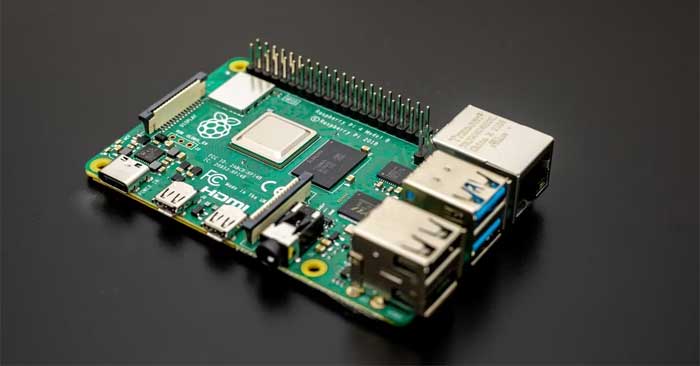
<p style="text-align: justify;">Với máy tính bo mạch đơn&nbsp;<strong>Raspberry Pi</strong>, bạn có thể chạy nhiều ứng dụng khác nhau, bao gồm cả Arduino IDE phổ biến (môi trường phát triển tích hợp). Điều này có nghĩa bạn có thể dùng nó để dễ dàng lập trình các bộ vi điều khiển với máy tính Raspberry Pi qua USB để tạo các dự án điện tử tương tác.</p>

<p style="text-align: justify;">Giờ hãy cùng nhau tìm hiểu cách cài đặt và chạy Arduino IDE trên Raspberry Pi.</p>

<h2 style="text-align: justify;">Yêu cầu:</h2>

<p style="text-align: justify;">Để chạy Arduino IDE trên Raspberry Pi, bạn cần những thành phần sau:</p>

<ul>
	<li style="text-align: justify;">Bảng mạch Raspberry Pi 3 hoặc 4 với nguồn điện phù hợp.</li>
	<li style="text-align: justify;">Màn hình HDMI hay TV.</li>
	<li style="text-align: justify;">Thẻ microSD (tối thiểu 8GB cho hệ điều hành Raspberry Pi chính thức).</li>
</ul>

<h2 style="text-align: justify;">Thiết lập Raspberry Pi</h2>

<p style="text-align: justify;"><img alt="Thiết lập Raspberry Pi" data-i="1" data-src="https://st.quantrimang.com/photos/image/2023/10/10/Raspberry-Pi.jpg" data-was-processed="true" height="325" src="https://st.quantrimang.com/photos/image/2023/10/10/Raspberry-Pi.jpg" width="650" /></p>

<p style="text-align: justify;">Raspberry Pi 4 nhờ sức mạnh xử lý nâng cao và RAM dồi dào nên được ưu tiên lựa chọn để cài đặt Arduino IDE. Tuy nhiên, Pi3 cũng có thể hoàn thành tốt nhiệm vụ này. Nếu chưa làm như vậy, hãy cài đặt hệ điều hành Raspberry Pi vào thẻ microSD bằng công cụ Raspberry Pi Imager.</p>

<p style="text-align: justify;">Sau khi hoàn tất cài đặt, chèn thẻ microSD vào Raspberry Pi và kết nối nó với màn hình. Nếu chưa có màn hình, bạn vẫn có thể truy cập Raspberry Pi từ xa trên máy tính khác qua VNC.</p>

<h2 style="text-align: justify;">Tải Arduino IDE</h2>

<p style="text-align: justify;">Arduino IDE 2.2.1 độc quyền dành cho các hệ thống x86-64, trong khi Raspberry Pi hoạt động trên kiến trúc ARM. Tuy nhiên, phiên bản IDE 1.8.19 cũ hơn có khả năng tương đương và cung cấp hỗ trợ cho kiến trúc ARM. Đầu tiên, khởi động thiết bị đầu cuối bằng cách nhấp vào biểu tượng của nó ở đầu môi trường desktop hoặc chỉ cần nhấn&nbsp;<strong>Ctrl + Alt + T</strong>. Sau đó, tiến hành tải xuống Arduino IDE bằng lệnh sau:</p>

<pre id="pre0">
<code>wget https://downloads.arduino.cc/arduino-1.8.19-linuxarm.tar.xz</code></pre>

<h2 style="text-align: justify;">Cài đặt Arduino IDE</h2>

<p style="text-align: justify;">Sau khi quá trình tải hoàn tất, hãy dùng lệnh bên dưới để truy xuất file cần thiết trong phiên terminal hiện tại:</p>

<pre id="pre1">
<code>tar -xf arduino-1.8.19-linuxarm.tar.xz</code></pre>

<p style="text-align: justify;">Sau đó, điều hướng vào thư mục&nbsp;<strong>arduino-1.8.19</strong>:</p>

<pre id="pre2">
<code>cd arduino-1.8.19</code></pre>

<p style="text-align: justify;">Để hoàn tất quá trình cài đặt, chỉ cần chạy lệnh<strong>&nbsp;install.sh</strong>:</p>

<pre id="pre3">
<code>sudo ./install.sh</code></pre>

<h2 style="text-align: justify;">Chạy IDE</h2>

<p style="text-align: justify;"><img alt="Chạy IDE" data-i="2" data-src="https://st.quantrimang.com/photos/image/2023/10/10/chay-IDE.jpg" data-was-processed="true" height="349" src="https://st.quantrimang.com/photos/image/2023/10/10/chay-IDE.jpg" width="650" /></p>

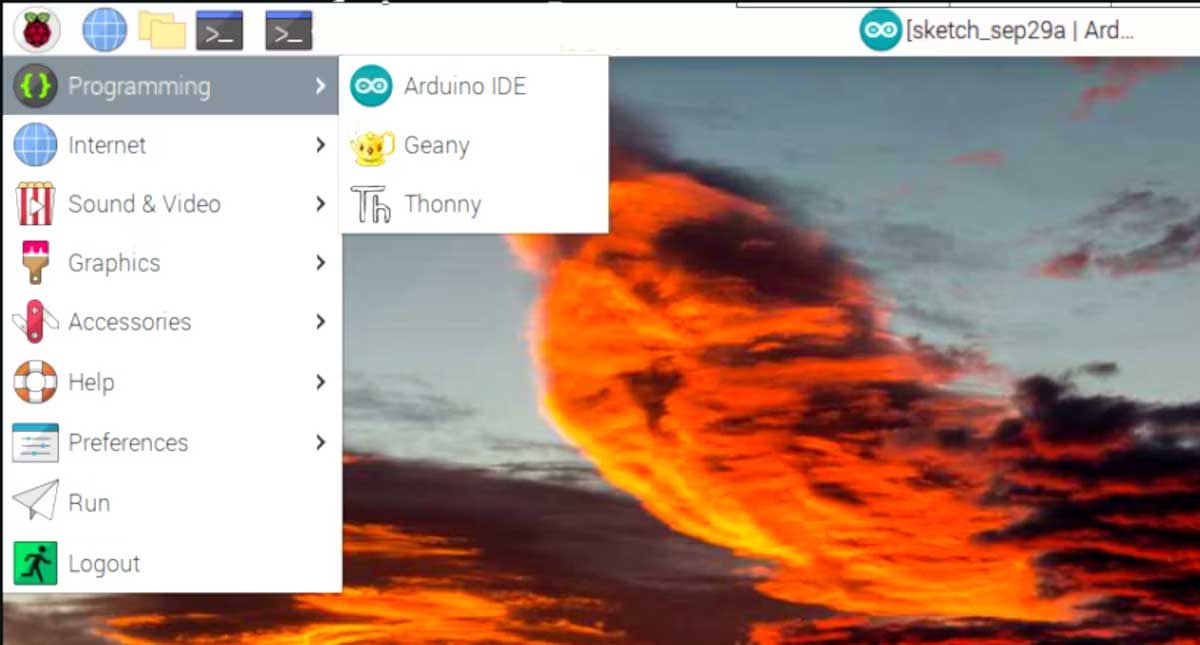
<p style="text-align: justify;">Để tìm và mở Arduino IDE, click logo Raspberry ở góc trái phía trên của desktop Raspberry Pi, sau đó chọn<strong>&nbsp;Programming &gt; Arduino IDE</strong>. Ứng dụng này sẽ mở và bạn có thể bắt đầu lập trình với nó. Như thường lệ, bạn cần kết nối bo mạch vi điều khiển qua USB để flash chương trình vào nó.</p>

<h2 style="text-align: justify;">Khám phá, thử nghiệm và cải tiến</h2>

<p style="text-align: justify;">Bạn đã thành công thiết lập Arduino IDE trên&nbsp;Raspberry Pi. Giờ bạn có thể upload các chương trình Arduino lên bộ vi điều khiển được kết nối, giống như khi bạn làm với máy tính thông thường.</p>

<p style="text-align: justify;">Trong Arduino IDE, bạn sẽ tìm thấy vô số thư viện toàn diện và một loạt công cụ phong phú. IDE đơn giản hóa quá trình lập trình bộ vi điều khiển, khiến nó trở nên thú vị và dễ tiếp cận.</p>

<div style="text-align: justify;">&nbsp;</div>
		</div>
				<div id="author">
						<p>
				<strong>Nguồn tin:</strong>
				Quantrimang.com
			</p>
		</div>
	</div>
	<div id="footer" class="clearfix">
		<div id="url">
			<strong>URL của bản tin này: </strong><a href="https://www.nguoicodonvn2008.info/vi/news/savefile/kien-thuc-may-tinh/cach-cai-dat-va-chay-arduino-ide-tren-raspberry-pi-7626.html" title="Cách cài đặt và chạy Arduino IDE trên Raspberry Pi">https://www.nguoicodonvn2008.info/vi/news/savefile/kien-thuc-may-tinh/cach-cai-dat-va-chay-arduino-ide-tren-raspberry-pi-7626.html</a>

		</div>
		<div class="clear"></div>
		<div class="copyright">
			&copy; .&#x3A; Nguoicodonvn2008.info - Cõi lòng người cô đơn &#x3A;.
		</div>
		<div id="contact">
			<a href="mailto:admin@nguoicodonvn2008.info">admin@nguoicodonvn2008.info</a>
		</div>
	</div>
</div>
        <div id="timeoutsess" class="chromeframe">
            Bạn đã không sử dụng Site, <a onclick="timeoutsesscancel();" href="https://nguoicodonvn2008.info/#">Bấm vào đây để duy trì trạng thái đăng nhập</a>. Thời gian chờ: <span id="secField"> 60 </span> giây
        </div>
        <div id="openidResult" class="nv-alert" style="display:none"></div>
        <div id="openidBt" data-result="" data-redirect=""></div>
		</script>
		<div class="car-top">
  <span><img src="https://nguoicodonvn2008.info/themes/default/images/car.png" alt=""></span>
</div>
<div id="run_cronjobs" style="visibility:hidden;display:none;"><img alt="cron" src="/index.php?second=cronjobs&amp;p=w09hbnse" width="1" height="1" /></div>
<script src="https://nguoicodonvn2008.info/assets/js/jquery/jquery.min.js"></script>
<script>var nv_base_siteurl="/",nv_lang_data="vi",nv_lang_interface="vi",nv_name_variable="nv",nv_fc_variable="op",nv_lang_variable="language",nv_module_name="news",nv_func_name="savefile",nv_is_user=0, nv_my_ofs=-4,nv_my_abbr="EDT",nv_cookie_prefix="nv4c_e856T",nv_check_pass_mstime=1738000,nv_area_admin=0,nv_safemode=0,theme_responsive=0,nv_recaptcha_ver=2,nv_recaptcha_sitekey="",nv_recaptcha_type="image",XSSsanitize=1;</script>
<script src="https://nguoicodonvn2008.info/assets/js/language/vi.js"></script>
<script src="https://nguoicodonvn2008.info/assets/js/DOMPurify/purify3.js"></script>
<script src="https://nguoicodonvn2008.info/assets/js/global.js"></script>
<script src="https://nguoicodonvn2008.info/assets/js/site.js"></script>
<script src="https://nguoicodonvn2008.info/themes/default/js/news.js"></script>
<script src="https://nguoicodonvn2008.info/themes/default/js/main.js"></script>
<script src="https://nguoicodonvn2008.info/themes/default/js/custom.js"></script>
<script type="application/ld+json">
        {
            "@context": "https://schema.org",
            "@type": "Organization",
            "url": "https://nguoicodonvn2008.info",
            "logo": "https://nguoicodonvn2008.info/uploads/angel.gif"
        }
        </script>
<script src="https://nguoicodonvn2008.info/themes/default/js/bootstrap.min.js"></script>
<script type="text/javascript">
var $scrolltop = $('.car-top');
$scrolltop.on('click', function () {
    $('html,body').animate({
        scrollTop: 0
    }, 800);
    $(this).addClass("car-run");
    setTimeout(function(){ $scrolltop.removeClass('car-run');}, 1000);
    return false;
});
$(window).on('scroll', function ()
{ 
    if($(window).scrollTop() >= 200)
    {
        $scrolltop.addClass("show");
        $scrolltop.addClass("car-down");
    }
    else
    {
       $scrolltop.removeClass("show");
       setTimeout(function(){ $scrolltop.removeClass('car-down');}, 300);
    }
});
</script>
</body>
</html>