<!DOCTYPE html>
    <html lang="vi" xmlns="http://www.w3.org/1999/xhtml" prefix="og: http://ogp.me/ns#">
    <head>
<title>Cách cài đặt µTorrent &#40;uTorrent&#41; trong Ubuntu 20.04</title>
<meta name="description" content="Cách cài đặt µTorrent &#40;uTorrent&#41; trong Ubuntu 20.04 - Savefile - Tin Tức -...">
<meta name="author" content=".: Nguoicodonvn2008.info - Cõi lòng người cô đơn :.">
<meta name="copyright" content=".: Nguoicodonvn2008.info - Cõi lòng người cô đơn :. [admin@nguoicodonvn2008.info]">
<meta name="robots" content="index, archive, follow, noodp">
<meta name="googlebot" content="index,archive,follow,noodp">
<meta name="msnbot" content="all,index,follow">
<meta name="generator" content="NukeViet v4.5">
<meta http-equiv="Content-Type" content="text/html; charset=utf-8">
<meta property="og:title" content="Cách cài đặt µTorrent &#40;uTorrent&#41; trong Ubuntu 20.04">
<meta property="og:type" content="website">
<meta property="og:description" content="Savefile - Tin Tức - https&#x3A;&#x002F;&#x002F;www.nguoicodonvn2008.info&#x002F;vi&#x002F;news&#x002F;savefile&#x002F;kien-thuc-may-tinh&#x002F;cach-cai-dat-utorrent-utorrent-trong-ubuntu-20-04-3303.html">
<meta property="og:site_name" content=".&#x3A; Nguoicodonvn2008.info - Cõi lòng người cô đơn &#x3A;.">
<meta property="og:url" content="https://www.nguoicodonvn2008.info/vi/news/savefile/kien-thuc-may-tinh/cach-cai-dat-utorrent-utorrent-trong-ubuntu-20-04-3303.html">
<link rel="shortcut icon" href="https://nguoicodonvn2008.info/favicon.ico">
<link rel="canonical" href="https://www.nguoicodonvn2008.info/vi/news/savefile/kien-thuc-may-tinh/cach-cai-dat-utorrent-utorrent-trong-ubuntu-20-04-3303.html">
<link rel="alternate" href="https://nguoicodonvn2008.info/vi/news/rss/" title="Tin Tức" type="application/rss+xml">
<link rel="alternate" href="https://nguoicodonvn2008.info/vi/news/rss/karaoke-dual/" title="Tin Tức - Karaoke Dual" type="application/rss+xml">
<link rel="alternate" href="https://nguoicodonvn2008.info/vi/news/rss/nhac-tre/" title="Tin Tức - Nhạc trẻ" type="application/rss+xml">
<link rel="alternate" href="https://nguoicodonvn2008.info/vi/news/rss/tru-tinh/" title="Tin Tức - Trữ tình" type="application/rss+xml">
<link rel="alternate" href="https://nguoicodonvn2008.info/vi/news/rss/nuoc-ngoai/" title="Tin Tức - Nước ngoài" type="application/rss+xml">
<link rel="alternate" href="https://nguoicodonvn2008.info/vi/news/rss/remix/" title="Tin Tức - Remix" type="application/rss+xml">
<link rel="alternate" href="https://nguoicodonvn2008.info/vi/news/rss/tam-su-tinh-yeu/" title="Tin Tức - Tâm sự tình yêu" type="application/rss+xml">
<link rel="alternate" href="https://nguoicodonvn2008.info/vi/news/rss/tho-suu-tam/" title="Tin Tức - Thơ sưu tầm" type="application/rss+xml">
<link rel="alternate" href="https://nguoicodonvn2008.info/vi/news/rss/cuoc-song/" title="Tin Tức - Cuộc sống" type="application/rss+xml">
<link rel="alternate" href="https://nguoicodonvn2008.info/vi/news/rss/phan-mem/" title="Tin Tức - Phần mềm" type="application/rss+xml">
<link rel="alternate" href="https://nguoicodonvn2008.info/vi/news/rss/kien-thuc-may-tinh/" title="Tin Tức - Kiến thức máy tính" type="application/rss+xml">
<link rel="alternate" href="https://nguoicodonvn2008.info/vi/news/rss/hoc-tap/" title="Tin Tức - Học tập" type="application/rss+xml">
<link rel="alternate" href="https://nguoicodonvn2008.info/vi/news/rss/tai-lieu/" title="Tin Tức - Tài liệu" type="application/rss+xml">
<link rel="alternate" href="https://nguoicodonvn2008.info/vi/news/rss/de-thi/" title="Tin Tức - Đề thi" type="application/rss+xml">
<link rel="preload" as="style" href="https://nguoicodonvn2008.info/assets/css/font-awesome.min.css" type="text/css">
<link rel="preload" as="style" href="https://nguoicodonvn2008.info/themes/default/css/bootstrap.non-responsive.css" type="text/css">
<link rel="preload" as="style" href="https://nguoicodonvn2008.info/themes/default/css/style.css" type="text/css">
<link rel="preload" as="style" href="https://nguoicodonvn2008.info/themes/default/css/style.non-responsive.css" type="text/css">
<link rel="preload" as="style" href="https://nguoicodonvn2008.info/themes/default/css/news.css" type="text/css">
<link rel="preload" as="style" href="https://nguoicodonvn2008.info/themes/default/css/custom.css" type="text/css">
<link rel="preload" as="script" href="https://nguoicodonvn2008.info/assets/js/jquery/jquery.min.js" type="text/javascript">
<link rel="preload" as="script" href="https://nguoicodonvn2008.info/assets/js/language/vi.js" type="text/javascript">
<link rel="preload" as="script" href="https://nguoicodonvn2008.info/assets/js/DOMPurify/purify3.js" type="text/javascript">
<link rel="preload" as="script" href="https://nguoicodonvn2008.info/assets/js/global.js" type="text/javascript">
<link rel="preload" as="script" href="https://nguoicodonvn2008.info/assets/js/site.js" type="text/javascript">
<link rel="preload" as="script" href="https://nguoicodonvn2008.info/themes/default/js/news.js" type="text/javascript">
<link rel="preload" as="script" href="https://nguoicodonvn2008.info/themes/default/js/main.js" type="text/javascript">
<link rel="preload" as="script" href="https://nguoicodonvn2008.info/themes/default/js/custom.js" type="text/javascript">
<link rel="preload" as="script" href="https://nguoicodonvn2008.info/themes/default/js/bootstrap.min.js" type="text/javascript">
<link rel="stylesheet" href="https://nguoicodonvn2008.info/assets/css/font-awesome.min.css">
<link rel="stylesheet" href="https://nguoicodonvn2008.info/themes/default/css/bootstrap.non-responsive.css">
<link rel="stylesheet" href="https://nguoicodonvn2008.info/themes/default/css/style.css">
<link rel="stylesheet" href="https://nguoicodonvn2008.info/themes/default/css/style.non-responsive.css">
<link rel="StyleSheet" href="https://nguoicodonvn2008.info/themes/default/css/news.css">
<link rel="stylesheet" href="https://nguoicodonvn2008.info/themes/default/css/custom.css">
<style type="text/css">
	body{background: #fff;}
</style>
    </head>
    <body>
<div id="print">
	<div id="hd_print">
		<h2 class="pull-left">.&#x3A; Nguoicodonvn2008.info - Cõi lòng người cô đơn &#x3A;.</h2>
		<p class="pull-right"><a title=".&#x3A; Nguoicodonvn2008.info - Cõi lòng người cô đơn &#x3A;." href="https://nguoicodonvn2008.info/">https://nguoicodonvn2008.info</a></p>
	</div>
	<div class="clear"></div>
	<hr />
	<div id="content">
		<h1>Cách cài đặt µTorrent &#40;uTorrent&#41; trong Ubuntu 20.04</h1>
		<ul class="list-inline">
			<li>Thứ tư - 23/12/2020 23:45</li>
			<li class="hidden-print txtrequired"><em class="fa fa-print">&nbsp;</em><a title="In ra" href="javascript:;" onclick="window.print()">In ra</a></li>
			<li class="hidden-print txtrequired"><em class="fa fa-power-off">&nbsp;</em><a title="Đóng cửa sổ này" href="javascript:;" onclick="window.close()">Đóng cửa sổ này</a></li>
		</ul>
		<div class="clear"></div>
		<div id="hometext">
		</div>
				<div class="imghome">
			<img alt="Cách cài đặt µTorrent &#40;uTorrent&#41; trong Ubuntu 20.04" src="https://st.quantrimang.com/photos/image/2020/12/23/cai-utorrent-trong-ubuntu-2.png" width="460" class="img-thumbnail" />
		</div>
		<div class="clear"></div>
		<div id="bodytext" class="clearfix">
			<p style="text-align: justify;">Hướng dẫn nhanh này cho thấy cách cài đặt và thiết lập µTorrent torrent client trong Ubuntu 20.04 LTS.</p>

<p style="text-align: justify;">µTorrent cung cấp các ứng dụng khách cho Windows và macOS X, tuy nhiên nó được cài đặt làm máy chủ trong&nbsp;Ubuntu&nbsp;Linux và cung cấp giao diện người dùng web để quản lý các bản tải xuống.</p>

<h2 style="text-align: justify;">1. Cài đặt các thư viện dependency</h2>

<p style="text-align: justify;">Mở Terminal&nbsp;từ menu ứng dụng hệ thống hoặc bằng cách nhấn&nbsp;<strong>Ctrl + Alt + T</strong>&nbsp;trên bàn phím. Khi nó mở ra, hãy chạy lệnh để cài đặt&nbsp;<strong>libssl-dev</strong>:</p>

<pre id="pre0">
<code>sudo apt install libssl-dev</code></pre>

<p style="text-align: justify;">Gói libssl1.0.0 cũng được yêu cầu. Nó đã bị xóa khỏi kho lưu trữ universe kể từ Ubuntu 19.10. Để giải quyết vấn đề, hãy tải xuống từ kho lưu trữ Ubuntu 18.04:</p>

<ul>
	<li style="text-align: justify;">Tải Libssl1.0.0 (64-bit):<strong><span style="color:rgb(192, 57, 43);">&nbsp;https://launchpad.net/ubuntu/+archive/primary/+files/libssl1.0.0_1.0.2n-1ubuntu5.3_amd64.deb</span></strong></li>
</ul>

<p style="text-align: justify;">Sau đó nhấp vào cài đặt gói thông qua tùy chọn menu ngữ cảnh&nbsp;<strong>“Open with Software Install”</strong>.</p>

<div style="text-align: justify;">&nbsp;</div>

<h2 style="text-align: justify;">2. Tải xuống và cài đặt uTorrent</h2>

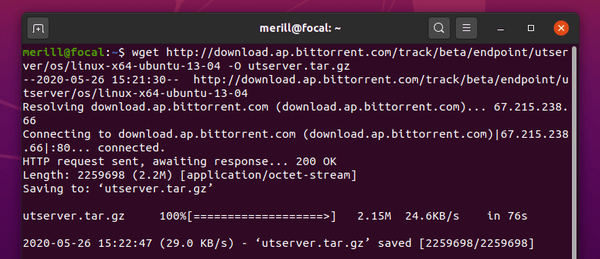
<p style="text-align: justify;"><strong>B1:</strong>&nbsp;Bạn cần&nbsp;tải xuống µTorrent Server cho Ubuntu 13.04 64-bit thông qua trang liên kết:&nbsp;<span style="color:rgb(192, 57, 43);"><strong>https://www.utorrent.com/downloads/linux</strong></span>&nbsp;hoặc bằng cách chạy lệnh trong Terminal:</p>

<pre id="pre1">
<code>wget http://download.ap.bittorrent.com/track/beta/endpoint/utserver/os/linux-x64-ubuntu-13-04 -O utserver.tar.gz</code></pre>

<figure>
<div style="text-align: justify;"><img alt="Tải xuống µTorrent Server" data-i="0" data-src="https://st.quantrimang.com/photos/image/2020/12/23/cai-utorrent-trong-ubuntu-1.png" data-was-processed="true" height="259" src="https://st.quantrimang.com/photos/image/2020/12/23/cai-utorrent-trong-ubuntu-1.png" width="600" /></div>

<figcaption>
<div style="text-align: justify;">Tải xuống µTorrent Server</div>
</figcaption>
</figure>

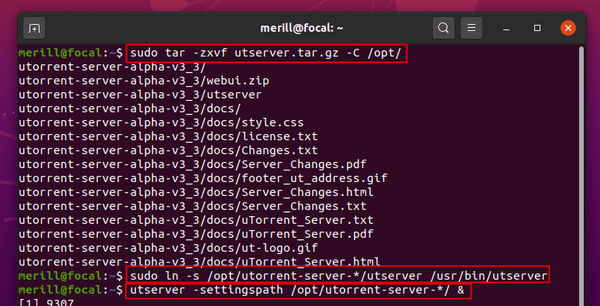
<p style="text-align: justify;"><strong>B2:</strong>&nbsp;Sau đó giải nén vào thư mục&nbsp;<strong>/opt/</strong>&nbsp;để sử dụng chung:</p>

<pre id="pre2">
<code>sudo tar -zxvf utserver.tar.gz -C /opt/</code></pre>

<p style="text-align: justify;">Nếu bạn đã tải xuống gói thông qua trang web của trình duyệt, bạn có thể chạy:</p>

<pre id="pre3">
<code>sudo tar -zxvf ~/Downloads/utserver.tar.gz -C /opt/</code></pre>

<p style="text-align: justify;"><strong>B3:</strong>&nbsp;Tạo một liên kết đến file thực thi:</p>

<pre id="pre4">
<code>sudo ln -s /opt/utorrent-server-*/utserver /usr/bin/utserver</code></pre>

<p style="text-align: justify;"><strong>B4:</strong>&nbsp;Cuối cùng, khởi động máy chủ µTorrent bằng cách chạy lệnh:</p>

<pre id="pre5">
<code>utserver -settingspath /opt/utorrent-server-*/ &amp;</code></pre>

<figure>
<div style="text-align: justify;"><img alt="Khởi động máy chủ µTorrent" data-i="1" data-src="https://st.quantrimang.com/photos/image/2020/12/23/cai-utorrent-trong-ubuntu-2.png" data-was-processed="true" height="306" src="https://st.quantrimang.com/photos/image/2020/12/23/cai-utorrent-trong-ubuntu-2.png" width="600" /></div>

<figcaption>
<div style="text-align: justify;">Khởi động máy chủ µTorrent</div>
</figcaption>
</figure>

<h2 style="text-align: justify;">3. Khởi động µTorrent web client</h2>

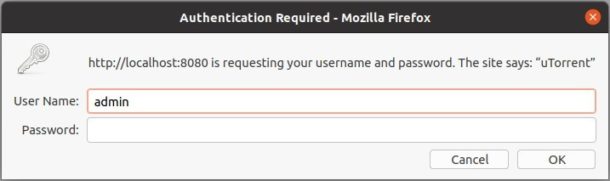
<p style="text-align: justify;">Khi máy chủ khởi động thành công, bạn có thể truy cập giao diện người dùng web bằng cách đi tới:</p>

<pre id="pre6">
<code>http://localhost:8080/gui</code></pre>

<p style="text-align: justify;">Hoặc&nbsp;<strong>http://server_ip:8080.gui</strong>&nbsp;từ bất kỳ thiết bị nào trong cùng một mạng cục bộ. Và đăng nhập bằng:</p>

<ul>
	<li style="text-align: justify;">User name:&nbsp;<strong>admin</strong></li>
	<li style="text-align: justify;">Password: Để trống</li>
</ul>

<figure>
<div style="text-align: justify;"><img alt="Truy cập giao diện µTorrent" data-i="2" data-src="https://st.quantrimang.com/photos/image/2020/12/23/cai-utorrent-trong-ubuntu-3.jpg" data-was-processed="true" height="181" src="https://st.quantrimang.com/photos/image/2020/12/23/cai-utorrent-trong-ubuntu-3.jpg" width="610" /></div>

<figcaption>
<div style="text-align: justify;">Truy cập giao diện µTorrent</div>
</figcaption>
</figure>
		</div>
				<div id="author">
						<p>
				<strong>Nguồn tin:</strong>
				Quantrimang.com
			</p>
		</div>
	</div>
	<div id="footer" class="clearfix">
		<div id="url">
			<strong>URL của bản tin này: </strong><a href="https://www.nguoicodonvn2008.info/vi/news/savefile/kien-thuc-may-tinh/cach-cai-dat-utorrent-utorrent-trong-ubuntu-20-04-3303.html" title="Cách cài đặt µTorrent &#40;uTorrent&#41; trong Ubuntu 20.04">https://www.nguoicodonvn2008.info/vi/news/savefile/kien-thuc-may-tinh/cach-cai-dat-utorrent-utorrent-trong-ubuntu-20-04-3303.html</a>

		</div>
		<div class="clear"></div>
		<div class="copyright">
			&copy; .&#x3A; Nguoicodonvn2008.info - Cõi lòng người cô đơn &#x3A;.
		</div>
		<div id="contact">
			<a href="mailto:admin@nguoicodonvn2008.info">admin@nguoicodonvn2008.info</a>
		</div>
	</div>
</div>
        <div id="timeoutsess" class="chromeframe">
            Bạn đã không sử dụng Site, <a onclick="timeoutsesscancel();" href="https://nguoicodonvn2008.info/#">Bấm vào đây để duy trì trạng thái đăng nhập</a>. Thời gian chờ: <span id="secField"> 60 </span> giây
        </div>
        <div id="openidResult" class="nv-alert" style="display:none"></div>
        <div id="openidBt" data-result="" data-redirect=""></div>
		</script>
		<div class="car-top">
  <span><img src="https://nguoicodonvn2008.info/themes/default/images/car.png" alt=""></span>
</div>
<script src="https://nguoicodonvn2008.info/assets/js/jquery/jquery.min.js"></script>
<script>var nv_base_siteurl="/",nv_lang_data="vi",nv_lang_interface="vi",nv_name_variable="nv",nv_fc_variable="op",nv_lang_variable="language",nv_module_name="news",nv_func_name="savefile",nv_is_user=0, nv_my_ofs=-4,nv_my_abbr="EDT",nv_cookie_prefix="nv4c_e856T",nv_check_pass_mstime=1738000,nv_area_admin=0,nv_safemode=0,theme_responsive=0,nv_recaptcha_ver=2,nv_recaptcha_sitekey="",nv_recaptcha_type="image",XSSsanitize=1;</script>
<script src="https://nguoicodonvn2008.info/assets/js/language/vi.js"></script>
<script src="https://nguoicodonvn2008.info/assets/js/DOMPurify/purify3.js"></script>
<script src="https://nguoicodonvn2008.info/assets/js/global.js"></script>
<script src="https://nguoicodonvn2008.info/assets/js/site.js"></script>
<script src="https://nguoicodonvn2008.info/themes/default/js/news.js"></script>
<script src="https://nguoicodonvn2008.info/themes/default/js/main.js"></script>
<script src="https://nguoicodonvn2008.info/themes/default/js/custom.js"></script>
<script type="application/ld+json">
        {
            "@context": "https://schema.org",
            "@type": "Organization",
            "url": "https://nguoicodonvn2008.info",
            "logo": "https://nguoicodonvn2008.info/uploads/angel.gif"
        }
        </script>
<script src="https://nguoicodonvn2008.info/themes/default/js/bootstrap.min.js"></script>
<script type="text/javascript">
var $scrolltop = $('.car-top');
$scrolltop.on('click', function () {
    $('html,body').animate({
        scrollTop: 0
    }, 800);
    $(this).addClass("car-run");
    setTimeout(function(){ $scrolltop.removeClass('car-run');}, 1000);
    return false;
});
$(window).on('scroll', function ()
{ 
    if($(window).scrollTop() >= 200)
    {
        $scrolltop.addClass("show");
        $scrolltop.addClass("car-down");
    }
    else
    {
       $scrolltop.removeClass("show");
       setTimeout(function(){ $scrolltop.removeClass('car-down');}, 300);
    }
});
</script>
</body>
</html>