<!DOCTYPE html>
    <html lang="vi" xmlns="http://www.w3.org/1999/xhtml" prefix="og: http://ogp.me/ns#">
    <head>
<title>Cách cài đặt Tor Browser trên Linux</title>
<meta name="description" content="Cách cài đặt Tor Browser trên Linux - Savefile - Tin Tức -...">
<meta name="author" content=".: Nguoicodonvn2008.info - Cõi lòng người cô đơn :.">
<meta name="copyright" content=".: Nguoicodonvn2008.info - Cõi lòng người cô đơn :. [admin@nguoicodonvn2008.info]">
<meta name="robots" content="index, archive, follow, noodp">
<meta name="googlebot" content="index,archive,follow,noodp">
<meta name="msnbot" content="all,index,follow">
<meta name="generator" content="NukeViet v4.5">
<meta http-equiv="Content-Type" content="text/html; charset=utf-8">
<meta property="og:title" content="Cách cài đặt Tor Browser trên Linux">
<meta property="og:type" content="website">
<meta property="og:description" content="Savefile - Tin Tức - https&#x3A;&#x002F;&#x002F;www.nguoicodonvn2008.info&#x002F;vi&#x002F;news&#x002F;savefile&#x002F;kien-thuc-may-tinh&#x002F;cach-cai-dat-tor-browser-tren-linux-4916.html">
<meta property="og:site_name" content=".&#x3A; Nguoicodonvn2008.info - Cõi lòng người cô đơn &#x3A;.">
<meta property="og:url" content="https://www.nguoicodonvn2008.info/vi/news/savefile/kien-thuc-may-tinh/cach-cai-dat-tor-browser-tren-linux-4916.html">
<link rel="shortcut icon" href="https://nguoicodonvn2008.info/favicon.ico">
<link rel="canonical" href="https://www.nguoicodonvn2008.info/vi/news/savefile/kien-thuc-may-tinh/cach-cai-dat-tor-browser-tren-linux-4916.html">
<link rel="alternate" href="https://nguoicodonvn2008.info/vi/news/rss/" title="Tin Tức" type="application/rss+xml">
<link rel="alternate" href="https://nguoicodonvn2008.info/vi/news/rss/karaoke-dual/" title="Tin Tức - Karaoke Dual" type="application/rss+xml">
<link rel="alternate" href="https://nguoicodonvn2008.info/vi/news/rss/nhac-tre/" title="Tin Tức - Nhạc trẻ" type="application/rss+xml">
<link rel="alternate" href="https://nguoicodonvn2008.info/vi/news/rss/tru-tinh/" title="Tin Tức - Trữ tình" type="application/rss+xml">
<link rel="alternate" href="https://nguoicodonvn2008.info/vi/news/rss/nuoc-ngoai/" title="Tin Tức - Nước ngoài" type="application/rss+xml">
<link rel="alternate" href="https://nguoicodonvn2008.info/vi/news/rss/remix/" title="Tin Tức - Remix" type="application/rss+xml">
<link rel="alternate" href="https://nguoicodonvn2008.info/vi/news/rss/tam-su-tinh-yeu/" title="Tin Tức - Tâm sự tình yêu" type="application/rss+xml">
<link rel="alternate" href="https://nguoicodonvn2008.info/vi/news/rss/tho-suu-tam/" title="Tin Tức - Thơ sưu tầm" type="application/rss+xml">
<link rel="alternate" href="https://nguoicodonvn2008.info/vi/news/rss/cuoc-song/" title="Tin Tức - Cuộc sống" type="application/rss+xml">
<link rel="alternate" href="https://nguoicodonvn2008.info/vi/news/rss/phan-mem/" title="Tin Tức - Phần mềm" type="application/rss+xml">
<link rel="alternate" href="https://nguoicodonvn2008.info/vi/news/rss/kien-thuc-may-tinh/" title="Tin Tức - Kiến thức máy tính" type="application/rss+xml">
<link rel="alternate" href="https://nguoicodonvn2008.info/vi/news/rss/hoc-tap/" title="Tin Tức - Học tập" type="application/rss+xml">
<link rel="alternate" href="https://nguoicodonvn2008.info/vi/news/rss/tai-lieu/" title="Tin Tức - Tài liệu" type="application/rss+xml">
<link rel="alternate" href="https://nguoicodonvn2008.info/vi/news/rss/de-thi/" title="Tin Tức - Đề thi" type="application/rss+xml">
<link rel="preload" as="style" href="https://nguoicodonvn2008.info/assets/css/font-awesome.min.css" type="text/css">
<link rel="preload" as="style" href="https://nguoicodonvn2008.info/themes/default/css/bootstrap.non-responsive.css" type="text/css">
<link rel="preload" as="style" href="https://nguoicodonvn2008.info/themes/default/css/style.css" type="text/css">
<link rel="preload" as="style" href="https://nguoicodonvn2008.info/themes/default/css/style.non-responsive.css" type="text/css">
<link rel="preload" as="style" href="https://nguoicodonvn2008.info/themes/default/css/news.css" type="text/css">
<link rel="preload" as="style" href="https://nguoicodonvn2008.info/themes/default/css/custom.css" type="text/css">
<link rel="preload" as="script" href="https://nguoicodonvn2008.info/assets/js/jquery/jquery.min.js" type="text/javascript">
<link rel="preload" as="script" href="https://nguoicodonvn2008.info/assets/js/language/vi.js" type="text/javascript">
<link rel="preload" as="script" href="https://nguoicodonvn2008.info/assets/js/DOMPurify/purify3.js" type="text/javascript">
<link rel="preload" as="script" href="https://nguoicodonvn2008.info/assets/js/global.js" type="text/javascript">
<link rel="preload" as="script" href="https://nguoicodonvn2008.info/assets/js/site.js" type="text/javascript">
<link rel="preload" as="script" href="https://nguoicodonvn2008.info/themes/default/js/news.js" type="text/javascript">
<link rel="preload" as="script" href="https://nguoicodonvn2008.info/themes/default/js/main.js" type="text/javascript">
<link rel="preload" as="script" href="https://nguoicodonvn2008.info/themes/default/js/custom.js" type="text/javascript">
<link rel="preload" as="script" href="https://nguoicodonvn2008.info/themes/default/js/bootstrap.min.js" type="text/javascript">
<link rel="stylesheet" href="https://nguoicodonvn2008.info/assets/css/font-awesome.min.css">
<link rel="stylesheet" href="https://nguoicodonvn2008.info/themes/default/css/bootstrap.non-responsive.css">
<link rel="stylesheet" href="https://nguoicodonvn2008.info/themes/default/css/style.css">
<link rel="stylesheet" href="https://nguoicodonvn2008.info/themes/default/css/style.non-responsive.css">
<link rel="StyleSheet" href="https://nguoicodonvn2008.info/themes/default/css/news.css">
<link rel="stylesheet" href="https://nguoicodonvn2008.info/themes/default/css/custom.css">
<style type="text/css">
	body{background: #fff;}
</style>
    </head>
    <body>
<div id="print">
	<div id="hd_print">
		<h2 class="pull-left">.&#x3A; Nguoicodonvn2008.info - Cõi lòng người cô đơn &#x3A;.</h2>
		<p class="pull-right"><a title=".&#x3A; Nguoicodonvn2008.info - Cõi lòng người cô đơn &#x3A;." href="https://nguoicodonvn2008.info/">https://nguoicodonvn2008.info</a></p>
	</div>
	<div class="clear"></div>
	<hr />
	<div id="content">
		<h1>Cách cài đặt Tor Browser trên Linux</h1>
		<ul class="list-inline">
			<li>Thứ ba - 21/12/2021 23:26</li>
			<li class="hidden-print txtrequired"><em class="fa fa-print">&nbsp;</em><a title="In ra" href="javascript:;" onclick="window.print()">In ra</a></li>
			<li class="hidden-print txtrequired"><em class="fa fa-power-off">&nbsp;</em><a title="Đóng cửa sổ này" href="javascript:;" onclick="window.close()">Đóng cửa sổ này</a></li>
		</ul>
		<div class="clear"></div>
		<div id="hometext">
		</div>
				<div class="imghome">
			<img alt="Cách cài đặt Tor Browser trên Linux" src="https://fs.quantrimang.com/photos/image/2021/12/17/cai-tor-browser-tren-linux-3.jpg" width="460" class="img-thumbnail" />
		</div>
		<div class="clear"></div>
		<div id="bodytext" class="clearfix">
			<p style="text-align: justify;">Sự riêng tư và ẩn danh khó có trên&nbsp;Internet. May mắn thay, có một số bước bạn có thể thực hiện để bảo vệ dữ liệu cá nhân của mình khỏi con mắt tò mò của các thuật toán thu thập dữ liệu, nhà tiếp thị và nhà quảng cáo.</p>

<p style="text-align: justify;">Hướng dẫn này sẽ chỉ cho bạn cách cài đặt Tor Browser trên Linux. Tor Browser là một trình duyệt web mã nguồn mở, đa nền tảng và hiện đại, chú trọng đến quyền riêng tư. Mục đích chính của trình duyệt là cung cấp cho bạn quyền cơ bản về quyền riêng tư trên Internet.</p>

<h2 style="text-align: justify;">Bước 1: Tải xuống gói Tor Browser</h2>

<figure>
<div style="text-align: justify;"><img alt="Tải xuống gói Tor Browser" data-i="0" data-src="https://fs.quantrimang.com/photos/image/2021/12/17/cai-tor-browser-tren-linux-1.jpg" data-was-processed="true" height="289" src="https://fs.quantrimang.com/photos/image/2021/12/17/cai-tor-browser-tren-linux-1.jpg" width="650" /></div>

<figcaption>
<div style="text-align: justify;">Tải xuống gói Tor Browser</div>
</figcaption>
</figure>

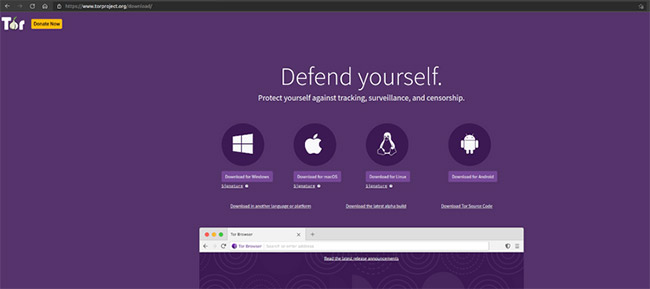
<p style="text-align: justify;">Bạn có thể cài đặt Tor Browser trên hệ thống của mình bằng 3 bước đơn giản. Đầu tiên, tải xuống các file cài đặt Tor Browser từ trang web chính thức hoặc&nbsp;<a href="https://quantrimang.com/tor-browser-178607" title="Tải Tor Browser">tại đây</a>.</p>

<p style="text-align: justify;">Nhấp vào nút&nbsp;<strong>Download for Linux&nbsp;</strong>và trình duyệt sẽ bắt đầu tải gói xuống vị trí download mặc định, chẳng hạn thư mục&nbsp;<strong>Downloads.</strong></p>

<p style="text-align: justify;">Ngoài ra, bạn có thể tải xuống các file trình duyệt từ dòng lệnh, sử dụng một công cụ như&nbsp;<strong>wget</strong>&nbsp;hoặc&nbsp;<strong>cURL.</strong>&nbsp;Để làm điều đó, hãy nhấp chuột phải vào nút&nbsp;<strong>Downloads for Linux</strong>&nbsp;và sau đó chọn tùy chọn&nbsp;<strong>Copy Link</strong>&nbsp;từ menu ngữ cảnh.</p>

<p style="text-align: justify;">Tiếp theo, chuyển đến thư mục&nbsp;<strong>Downloads</strong>&nbsp;bằng lệnh&nbsp;<strong>cd</strong>.</p>

<pre id="pre0">
<code>cd ~/Downloads</code></pre>

<p style="text-align: justify;">Sau đó, chạy&nbsp;<strong>wget</strong>&nbsp;theo liên kết bạn vừa sao chép.</p>

<pre id="pre1">
<code>wget https://www.torproject.org/dist/torbrowser/11.0.2/tor-browser-linux64-11.0.2_en-US.tar.xz</code></pre>

<p style="text-align: justify;">Lưu ý rằng phương pháp nói trên sẽ hoạt động trên bất kỳ bản phân phối Linux nào, bao gồm cả&nbsp;Ubuntu&nbsp;và&nbsp;Kali Linux.</p>

<h2 style="text-align: justify;">Bước 2: Giải nén các file cài đặt</h2>

<p style="text-align: justify;">Các file cài đặt Tor Browser được nén và bạn cần giải nén chúng trước khi có thể tiếp tục.</p>

<p style="text-align: justify;">Để làm điều đó, hãy điều hướng đến thư mục&nbsp;<strong>Downloads</strong>&nbsp;hoặc vị trí bạn đã tải xuống file.</p>

<pre id="pre2">
<code>cd ~/Downloads</code></pre>

<p style="text-align: justify;">Chạy lệnh tar để giải nén kho lưu trữ TAR.</p>

<pre id="pre3">
<code>tar -xvf tor-browser-linux64-11.0.2_en-US.tar.xz</code></pre>

<p style="text-align: justify;">Rõ ràng, bạn phải thay thế tên file bằng tên tệp đã tải xuống.</p>

<h2 style="text-align: justify;">Bước 3: Đăng ký trình duyệt dưới dạng ứng dụng</h2>

<p style="text-align: justify;">Di chuyển các file cài đặt đã giải nén vào thư mục&nbsp;<strong>/opt.</strong>&nbsp;Trên các hệ thống dựa trên UNIX, thư mục opt được dành riêng cho các gói phần mềm tùy chọn hoặc bổ sung không phải là một phần của hệ thống Linux lõi.</p>

<p style="text-align: justify;">Ngoài ra, bạn sẽ cần các đặc quyền quản trị để sao chép file vào thư mục đó.</p>

<pre id="pre4">
<code>sudo mv tor-browser_en-US /opt</code></pre>

<p style="text-align: justify;">Bây giờ, hãy vào thư mục file cài đặt Tor Browser mà bạn vừa sao chép.</p>

<pre id="pre5">
<code>cd /opt/tor-browser_en-US</code></pre>

<p style="text-align: justify;">Nếu liệt kê nội dung của thư mục này, bạn sẽ nhận thấy rằng bạn có file thực thi&nbsp;<strong>start-tor-browser.desktop.</strong>&nbsp;File này chịu trách nhiệm khởi động ứng dụng.</p>

<pre id="pre6">
<code>list -ls</code></pre>

<figure>
<div style="text-align: justify;"><img alt="File thực thi start-tor-browser.desktop chịu trách nhiệm khởi động ứng dụng" data-i="1" data-src="https://fs.quantrimang.com/photos/image/2021/12/17/cai-tor-browser-tren-linux-2.jpg" data-was-processed="true" height="85" src="https://fs.quantrimang.com/photos/image/2021/12/17/cai-tor-browser-tren-linux-2.jpg" width="650" /></div>

<figcaption>
<div style="text-align: justify;">File thực thi start-tor-browser.desktop chịu trách nhiệm khởi động ứng dụng</div>
</figcaption>
</figure>

<p style="text-align: justify;">Để đăng ký trình duyệt dưới dạng ứng dụng Linux, hãy chạy lệnh sau:</p>

<pre id="pre7">
<code>./start-tor-browser.desktop --register-app</code></pre>

<h2 style="text-align: justify;">Sử dụng Tor Browser trên Linux</h2>

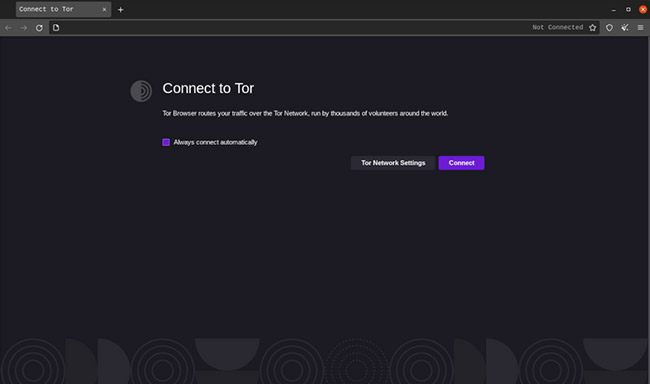
<p style="text-align: justify;">Bây giờ, Tor Browser đã được cài đặt thành công, hãy tìm kiếm tor trong menu&nbsp;<strong>Applications</strong>&nbsp;và khởi chạy nó để bắt đầu sử dụng trình duyệt.</p>

<figure>
<div style="text-align: justify;"><img alt="Tor Browser trên Linux" data-i="2" data-src="https://fs.quantrimang.com/photos/image/2021/12/17/cai-tor-browser-tren-linux-3.jpg" data-was-processed="true" height="384" src="https://fs.quantrimang.com/photos/image/2021/12/17/cai-tor-browser-tren-linux-3.jpg" width="650" /></div>

<figcaption>
<div style="text-align: justify;">Tor Browser trên Linux</div>
</figcaption>
</figure>

<p style="text-align: justify;">Bạn có thể nhấp vào nút&nbsp;<strong>Connect</strong>&nbsp;để sử dụng các kết nối được mã hóa và bắt đầu các phiên duyệt web của mình. Bạn cũng có thể cấu hình các tùy chọn duyệt web và quyền riêng tư khác bằng cách nhấp vào nút&nbsp;<strong>Tor Network Settings</strong>.</p>

<p style="text-align: justify;">Hướng dẫn này đã xem xét cách bạn có thể bảo vệ dữ liệu cá nhân và profile của mình khi duyệt web bằng cách cài đặt và sử dụng Tor Browser. Để tận dụng tối đa trải nghiệm duyệt web của bạn trên Tor Browser, bạn nên hiểu sâu về&nbsp;cách thức hoạt động của nó.</p>
		</div>
				<div id="author">
						<p>
				<strong>Nguồn tin:</strong>
				Quantrimang.com
			</p>
		</div>
	</div>
	<div id="footer" class="clearfix">
		<div id="url">
			<strong>URL của bản tin này: </strong><a href="https://www.nguoicodonvn2008.info/vi/news/savefile/kien-thuc-may-tinh/cach-cai-dat-tor-browser-tren-linux-4916.html" title="Cách cài đặt Tor Browser trên Linux">https://www.nguoicodonvn2008.info/vi/news/savefile/kien-thuc-may-tinh/cach-cai-dat-tor-browser-tren-linux-4916.html</a>

		</div>
		<div class="clear"></div>
		<div class="copyright">
			&copy; .&#x3A; Nguoicodonvn2008.info - Cõi lòng người cô đơn &#x3A;.
		</div>
		<div id="contact">
			<a href="mailto:admin@nguoicodonvn2008.info">admin@nguoicodonvn2008.info</a>
		</div>
	</div>
</div>
        <div id="timeoutsess" class="chromeframe">
            Bạn đã không sử dụng Site, <a onclick="timeoutsesscancel();" href="https://nguoicodonvn2008.info/#">Bấm vào đây để duy trì trạng thái đăng nhập</a>. Thời gian chờ: <span id="secField"> 60 </span> giây
        </div>
        <div id="openidResult" class="nv-alert" style="display:none"></div>
        <div id="openidBt" data-result="" data-redirect=""></div>
		</script>
		<div class="car-top">
  <span><img src="https://nguoicodonvn2008.info/themes/default/images/car.png" alt=""></span>
</div>
<script src="https://nguoicodonvn2008.info/assets/js/jquery/jquery.min.js"></script>
<script>var nv_base_siteurl="/",nv_lang_data="vi",nv_lang_interface="vi",nv_name_variable="nv",nv_fc_variable="op",nv_lang_variable="language",nv_module_name="news",nv_func_name="savefile",nv_is_user=0, nv_my_ofs=-4,nv_my_abbr="EDT",nv_cookie_prefix="nv4c_e856T",nv_check_pass_mstime=1738000,nv_area_admin=0,nv_safemode=0,theme_responsive=0,nv_recaptcha_ver=2,nv_recaptcha_sitekey="",nv_recaptcha_type="image",XSSsanitize=1;</script>
<script src="https://nguoicodonvn2008.info/assets/js/language/vi.js"></script>
<script src="https://nguoicodonvn2008.info/assets/js/DOMPurify/purify3.js"></script>
<script src="https://nguoicodonvn2008.info/assets/js/global.js"></script>
<script src="https://nguoicodonvn2008.info/assets/js/site.js"></script>
<script src="https://nguoicodonvn2008.info/themes/default/js/news.js"></script>
<script src="https://nguoicodonvn2008.info/themes/default/js/main.js"></script>
<script src="https://nguoicodonvn2008.info/themes/default/js/custom.js"></script>
<script type="application/ld+json">
        {
            "@context": "https://schema.org",
            "@type": "Organization",
            "url": "https://nguoicodonvn2008.info",
            "logo": "https://nguoicodonvn2008.info/uploads/angel.gif"
        }
        </script>
<script src="https://nguoicodonvn2008.info/themes/default/js/bootstrap.min.js"></script>
<script type="text/javascript">
var $scrolltop = $('.car-top');
$scrolltop.on('click', function () {
    $('html,body').animate({
        scrollTop: 0
    }, 800);
    $(this).addClass("car-run");
    setTimeout(function(){ $scrolltop.removeClass('car-run');}, 1000);
    return false;
});
$(window).on('scroll', function ()
{ 
    if($(window).scrollTop() >= 200)
    {
        $scrolltop.addClass("show");
        $scrolltop.addClass("car-down");
    }
    else
    {
       $scrolltop.removeClass("show");
       setTimeout(function(){ $scrolltop.removeClass('car-down');}, 300);
    }
});
</script>
</body>
</html>